
%201.svg)


HIPAA Compliance Checklist for 2025

Notion pricing decisions are no longer just about selecting a productivity plan. As teams adopt it across workflows, it becomes a central layer for knowledge, collaboration, and internal documentation.
What makes this more complex is how access and usage scale with adoption. Shared workspaces, embedded data, and AI-powered features expand quickly, often without clear visibility or control.
That’s why Notion pricing plans now matters beyond procurement. CIOs and CISOs need to understand how licensing impacts access to internal knowledge, sensitive information, and overall SaaS governance.
This Notion pricing guide breaks down plans and features, and explains how Notion ai pricing decisions influence usage, control, and long-term optimization.
TL;DR
- Notion offers four pricing tiers: Free, Plus ($10/month/seat), Business ($20/month/seat), and Enterprise (custom pricing). Notion's free plan is great for individuals, but teams benefit more from paid plans.
- Key advantages of Notion Pricing Guide paid plans include unlimited blocks for teams, advanced page permissions, larger file uploads, better database collaboration, and priority support.
- Individuals and freelancers can use the Free Plan, while growing businesses may require Business or Enterprise for security and granular admin roles.
- As Notion adoption grows, Notion enterprise pricing decisions also define who can access internal knowledge, documents, and shared workspaces. This makes visibility and control critical for CIOs and CISOs.
- Without governance, workspace sprawl, broad permissions, and AI usage can lead to data exposure, unused licenses, and limited audit visibility.

1. What is Notion?
Notion is your ultimate productivity hub, giving you a flexible space to take notes, manage projects, track tasks, and collaborate with your team.
Whether you're organizing personal to-dos or building a company-wide knowledge base, you can customize Notion software pricing plans to fit your workflow. Here are some key features of Notion Pricing Guide:
- Take Notes & Write Documents: Create and organize notes with rich formatting, images, and embeds.
- Manage Tasks & Projects: Use to-do lists, kanban boards, and calendars to track your work.
- Build Databases: Store and filter information with powerful database features.
- Collaborate with Others: Share pages, leave comments, and work with your team in real-time.
- Customize Your Workflow: Design dashboards, templates, and processes that fit your needs.
You can access Notion on the web, desktop (Mac & Windows), and mobile (iOS & Android). It offers both free and paid plans, making it a great option for personal use, team collaboration, and business management.
2. Is Notion Paid Version Worth It?
While Notion comes with a free version, it won’t prove beneficial for your company’s complex needs. You need to make sure you’re upgrading to a paid plan to leverage the best benefits of Notion. Here are a couple of reasons why upgrading to paid Notion pricing plans is worth the investment:
- Unlimited Blocks for Teams: With the free plan, you're limited to 1,000 blocks in team spaces. A paid plan removes this cap, so you can create as much as you need.
- Advanced Page Permissions: Control who can view, edit, or comment on specific pages, making it easier to manage team access.
- Larger File Uploads: The free plan limits file uploads to 5MB, but paid plans let you upload large images, videos, and documents without restrictions.
- More Powerful Databases: Paid plans like Notion Business pricing offers better collaboration features for databases, allowing you to build more complex workflows. Teams using Notion for content creation often pair it with writing tools. See our Grammarly pricing guide to compare AI writing costs alongside your Notion investment.
- Faster Customer Support: Get priority support, so you don’t have to wait if you run into issues.
3. Notion Free vs Paid: Key Differences
The core difference between Notion's free and paid plans boils down to collaboration, scale, and administrative control. While the Free plan is generous for individual use, it imposes critical limitations on team-based work, file sizes, and historical data access.
Paid plans systematically remove these barriers, unlocking Notion Pricing Guide features essential for growing teams and businesses that require greater security and workflow management.
Ultimately, the Free plan is ideal for individuals, students, and freelancers managing personal projects.
Teams that need to collaborate without restriction, manage user access granularly, or require robust security features like SAML SSO will find the investment in a paid Notion plan necessary for scaling their operations effectively.
SaaS and AI Spend Calculator
CloudEagle.ai customers typically recover 10–30% of annual SaaS and AI spend. Answer 12 questions to benchmark your maturity, see your recoverable spend estimate, and get a personalized 3-page savings report.
No signup required to start · Instant results
Enter your work email to reveal your personalized estimate, maturity scores, and a downloadable 3-page report.
—
Based on your responses, you are likely overspending approximately $XXXX. There may be unused licenses, overlapping tools, or suboptimal pricing across your SaaS and AI ecosystem.
Download your report for the specific gaps, the consequences if left unaddressed, and the first action to recover spend on each one.

The areas below scored 1 or 2 in your assessment. Each represents a specific gap where spend is leaking or optimization is being left on the table, with a clear first action to address it.
CloudEagle.ai is the AI-powered command center for SaaS, AI, and identity governance. Trusted by RingCentral, Automation Anywhere, Shiji, and Rec Room, the platform has processed $20B+ in spend and delivered $2B+ in savings — typically 10–30% of annual SaaS and AI spend. The gaps surfaced in this report are exactly what CloudEagle was built to close.
Most organizations are governing a fraction of their actual SaaS and AI footprint. CloudEagle.ai builds a real-time inventory through 500+ direct integrations across SSO, finance, HRIS, browser, firewall, and contract data — surfacing every sanctioned tool, every shadow purchase, and every AI tool employees adopted without IT approval. Onboarding takes 30 minutes, with usable visibility from day one.
Unused licenses, duplicate tools, and over-tiered subscriptions accumulate silently between renewal cycles. CloudEagle.ai runs continuous license harvesting, flags overlapping tools across departments, and arms renewals with peer pricing benchmarks and usage data — turning insights into action through no-code Slack-enabled workflows. Customers typically recover 10–30% of annual SaaS spend within the first 90 days.
AI tool costs are usage-based, token-driven, and largely invisible until invoices arrive. CloudEagle.ai tracks AI tool adoption across the organization, monitors usage against budget thresholds, enforces approval workflows for new AI tools, and detects sensitive content shared with public AI services — giving finance, IT, and security a shared real-time view before overruns hit the P&L.
In a focused session with a CloudEagle.ai specialist, we map your specific spend profile against our optimization framework and show you exactly where your savings are — across unused licenses, duplicate tools, renewal negotiation leverage, and AI spend governance.
4. Is Notion Free?
Yes, Notion Pricing Guide offers a robust free plan that is highly functional, especially for individual use. The free version provides unlimited pages and blocks, allowing you to build extensive personal wikis, manage tasks, and organize notes without hitting a content ceiling.
You can access your workspace across all your devices, ensuring your information is always synchronized. This makes the Notion free plan an excellent starting point for students, freelancers, or anyone looking to organize their personal life and solo projects.
The limitations of the free plan become apparent when you begin collaborating with a team. While individuals enjoy unlimited content, shared teamspaces are subject to a 1,000-block trial, which can be used up quickly.
Key constraints of the free offering include a 5MB per-file upload limit, a 7-day page history for restoring previous versions, and a maximum of 10 guests. When your team's needs for storage, version history, or advanced permissions grow beyond these limits, it signals the time to explore Notion's paid tiers for unrestricted collaboration.
Also Read: Canva Pricing Guide: Comprehensive Guide to Costs, Features, and Governance
5. Notion Free Plan: What’s Included
The Notion free plan is surprisingly robust, making it a powerful productivity tool for individual users. It provides the core building blocks of the Notion experience, allowing you to organize personal projects, take detailed notes, and manage tasks without any cost.
For your personal workspace, you get unlimited pages and blocks, meaning you can create as much content as you need, accessible across all your devices.
- Core Functionality: Full access to notes, documents, basic databases (tables, boards, lists), and templates.
- Collaboration: You can invite up to 10 guests to view, comment on, or edit specific pages.
- Version History & Uploads: Page history is limited to 7 days for restoring previous versions, and individual file uploads are capped at 5MB.
These features make the plan ideal for students managing coursework, freelancers tracking projects, or anyone building a personal knowledge base or wiki. However, teams requiring unlimited collaborators, larger file storage, or extended version history will need to consider upgrading to a paid plan.
6. Features Not Available With the Free Plan
While Notion's free plan is excellent for individual use, teams and businesses will quickly find critical gaps in functionality. The key differences in the Notion free vs paid comparison revolve around collaboration scalability, administrative control, and security.
The free tier of Notion Pricing Guide lacks the robust features needed to manage a growing workspace, restricting everything from content volume and user access to data recovery and support.
- Unlimited Team Content: Paid plans remove the 1,000-block limit for teams and increase the file upload size from 5MB to unlimited, enabling unrestricted collaboration.
- Advanced Permissions & Security: Control exactly who can view, comment on, or edit pages. Higher tiers add essential enterprise features like SAML SSO, user provisioning (SCIM), and audit logs for enhanced security.
- Expanded Page History: Recovering past work is easier with a 30-day (Plus) or 90-day (Business) page history, a significant upgrade from the free plan's 7-day limit.
- Priority Support & Analytics: Get faster assistance from Notion's support team and access advanced analytics to understand workspace usage and improve team efficiency.
Most Notion waste starts with inactive users and unmanaged workspace access. Read more →
7. Notion Pricing Plans and Governance: What Each Plan Means for Access, Data Exposure, and Control
Notion offers multiple pricing plans, each designed for different needs. Whether you’re an individual, a small team, or a large enterprise, there’s a plan that fits your workflow.
As adoption grows, these Notion Pricing Guide plans don’t just define features, they shape how teams create, store, and interact with knowledge. With AI features becoming part of everyday workflows, access to content and automation expands faster than most organizations expect.
This makes Notion Pricing Guide decisions more than a functional choice. They directly influence visibility, control, and how securely information flows across teams.
A. Free
- Cost: $0
- Best For: Personal use and light collaboration
- Features: Invite up to 10 guests for sharing and collaboration, workspace analytics, limited file uploads
- Drawbacks: Limited team collaboration (1,000-block limit in team spaces)
Enterprise Risk Breakdown:
- Adopted without IT visibility, leading to shadow workspaces across teams
- Limited control over shared documents and guest access
- Difficult to track ownership and usage of internal knowledge
B. Plus
- Cost: $10/month/seat (billed annually) or $12/month/seat (billed monthly)
- Best For: Small teams and power users who need more collaboration tools
- Features: Unlimited blocks for teams, unlimited file uploads, 100 guest collaborators
- Drawbacks: No advanced security features like Slack, no unlimited guests
Enterprise Risk Breakdown:
- Guest access can expand without structured permission controls
- No centralized visibility into shared content and collaboration patterns
- Increased risk of data exposure across external collaborators
C. Business:
- Cost: $20/month/seat (billed annually) or $24/month/seat (billed monthly)
- Best For: Growing teams that need better permissions and team management should choose Notion business plan
- Features: Advanced page permissions, bulk export options, unlimited page history history (90 days), audit logs
- Drawbacks: Higher cost compared to the Plus Plan
Enterprise Risk Breakdown:
- Permissions can become complex and misaligned across teams
- Audit logs exist but require active monitoring to be effective
- Over-provisioned access can lead to unnecessary license costs
D. Enterprise:
- Cost: Custom Notion pricing (contact sales)
- Best For: Notion enterprise plan is best for large enterprises that need full security, admin controls, and support, advanced page analytics
- Features: Advanced security and compliance tools, SCIM & SAML single sign-on, dedicated account manager
- Drawbacks: Not suitable for all companies
Enterprise Risk Breakdown:
- Advanced controls depend on correct configuration and governance processes
- Large-scale access increases complexity in managing sensitive knowledge
- Lack of continuous oversight can reduce effectiveness of security features
8. The Real Cost of Notion for CIOs and CISOs: More Than Pricing
Apart from subscription pricing, the real cost of Notion Pricing Guide comes from how knowledge, access, and AI usage scale across teams. What starts as a workspace tool can quickly become a central system for storing internal information.
- Decentralized workspace creation: Teams often create separate workspaces without IT awareness, leading to fragmented visibility and control.
- Broad access to internal knowledge: Documents, wikis, and databases may be shared widely without clear permission structures.
- AI features interacting with sensitive data: Notion AI can process internal content, even when usage policies are not clearly enforced.
- Guest access and external sharing risks: External collaborators may retain access to critical documents without regular reviews.
- Unused or overlapping licenses: Multiple teams may purchase seats independently, increasing spend without clear ownership.
- No real-time policy enforcement: Governance policies often exist, but are not enforced at the point of access or usage.
- Limited audit visibility across workspaces: Tracking who accessed, edited, or shared content can be inconsistent across teams.
For CIOs and CISOs, the challenge is not just selecting the right Notion Pricing Guide plan. It is ensuring knowledge access, AI usage, and collaboration remain visible, controlled, and aligned with security and compliance expectations.
Related Blog: Google Gemini Pricing Guide: Managing Pricing, Access, and Usage
9. Notion Pricing Guide: How CloudEagle.ai Can Help You Control AI Usage, Access, and Spend
As Notion adoption grows, pricing decisions alone don’t ensure control. What matters is how knowledge access, AI usage, and collaboration are governed across teams.
Organizations often complement these efforts with AI development services to build customized workflows, automate knowledge management, and align AI capabilities with internal governance policies.
A. Gain Visibility Into Notion Workspaces and AI Usage
Without centralized visibility, teams often create workspaces and use AI features independently. This creates blind spots in both data access and spend tracking.
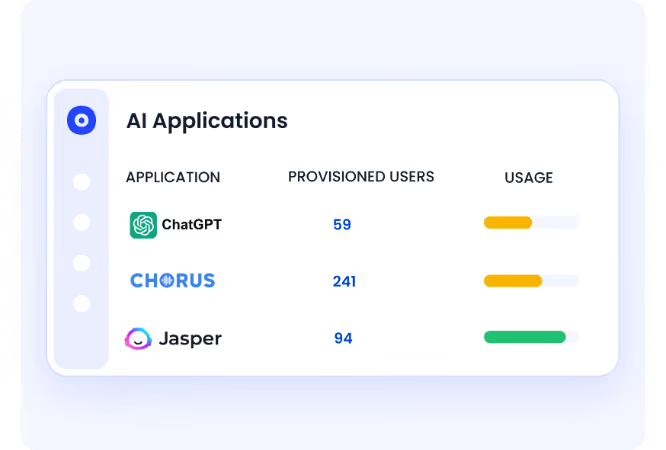
CloudEagle.ai continuously discovers all SaaS and AI tools in use, giving you a unified view of Notion adoption across the organization.
- Thanks to SaaS discovery, you will know about every Notion workspace in use, including unapproved or duplicate environments
- Map access across users, teams, and guest collaborators
- Identify where AI features interact with internal knowledge and documents
Instead of reacting to scattered usage, teams operate with a clear, centralized understanding of what exists.
B. Enforce Access and AI Usage Policies in Real Time
Policies are only effective when enforced at the point of usage. Notion usage often expands faster than governance controls.
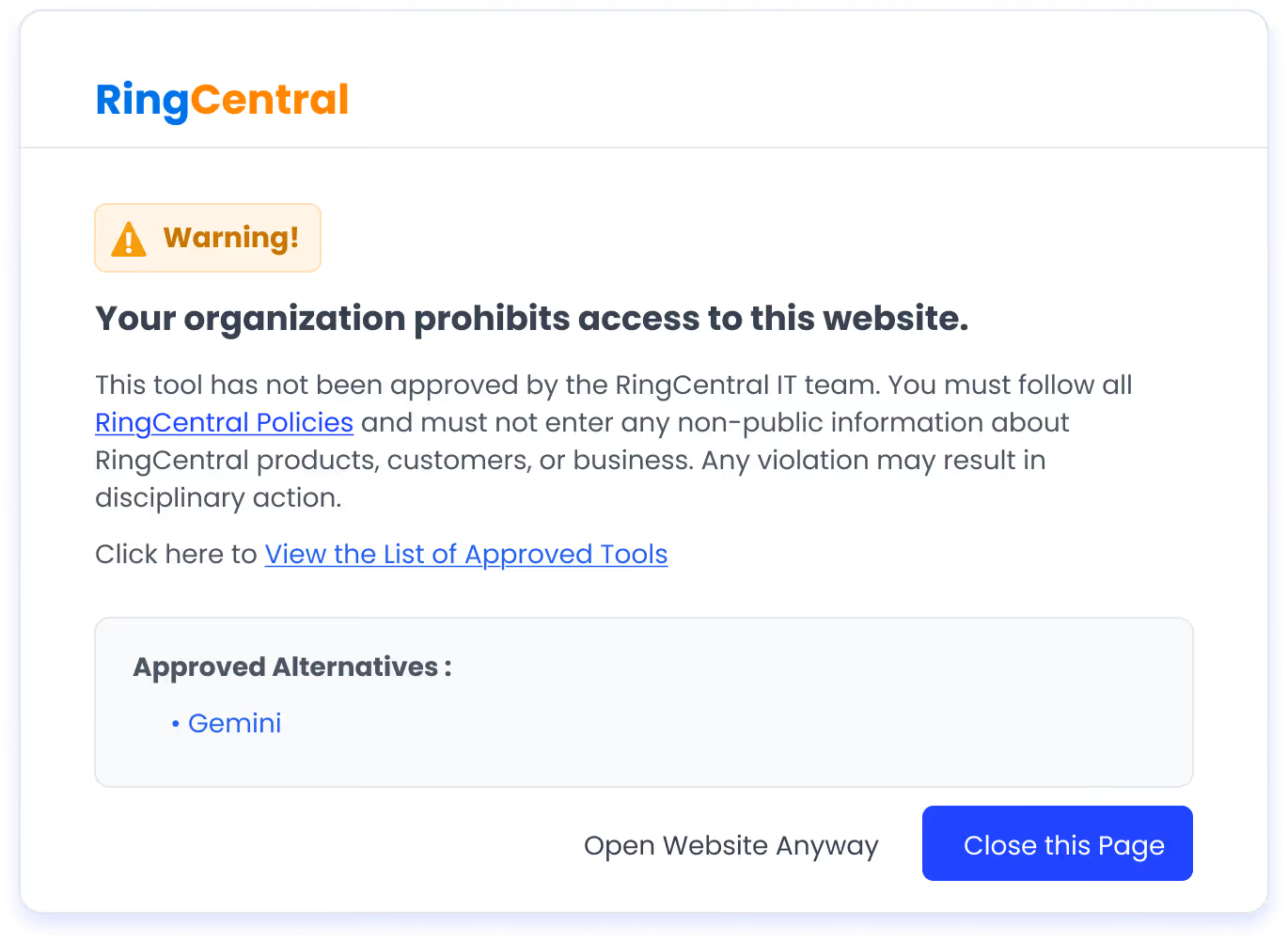
CloudEagle.ai is one of the best AI governance platforms that enforces AI usage control and SaaS usage policies in real time, ensuring employees stay within approved tools and access boundaries.
- Maintain a centralized list of approved tools and workspaces
- Enforce access policies for internal users and external collaborators
- Guide users toward approved tools and workflows when deviations occur
Governance shifts from periodic reviews to continuous, in-the-moment control.
C. Reduce Risk Across Knowledge Sharing and AI Workflows
Notion acts as a central knowledge hub, making it critical to monitor how information is accessed and shared.
CloudEagle.ai surfaces AI and SaaS-related risks with contextual insights, helping teams understand exposure before it escalates.
- Track how documents, databases, and pages are accessed across teams
- Identify sensitive content exposure risks across shared workspaces
- Align AI usage with internal policies and external compliance requirements
Risk becomes something you can quantify and address early, not after an incident.
D. Negotiate Strategically With Governance and Usage Data
Once visibility and control are in place, Notion negotiations become more effective and predictable. Decisions are based on actual usage, not assumptions.
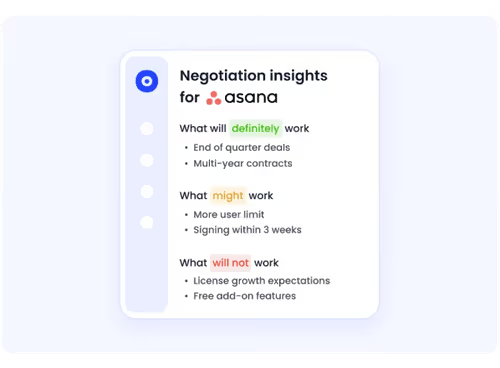
CloudEagle.ai benchmarks Notion pricing across billions in SaaS transactions, helping you validate whether your pricing is competitive or inflated.
- Focus on value, not just price: Align plans with real usage across teams
- Request flexibility: Ask for seat adjustments, trial extensions, or phased rollouts
- Align with growth: Structure contracts based on hiring and adoption plans
- Use renewal timing: Optimize seat counts and eliminate unused licenses before renewal
Without this layer of insight, even well-negotiated contracts can exceed expectations as usage scales.
E. Price Benchmarking Data
CloudEagle.ai connects you with a vast network of seasoned SaaS buyers, providing real-time benchmarking data from over a billion transactions. Its Notion benchmarking insights help you see how your costs compare to what other businesses pay for different Notion plans.
Also Read: Service Level Agreement: What Every SaaS Buyer Needs to Know
F. Expert Notion Negotiation Strategies to Secure the Best Deal
While negotiating Notion, you need to be more open-minded to focus not only only discounts but the bigger picture. Getting discounts isn’t always the most feasible option. You can also negotiate other things to get the best Notion deal and value out of investment.
- Don’t Overlook Key Clauses in the SLA: The Service Level Agreement (SLA) defines uptime guarantees, support response times, and penalties for service failures. Ensure Notion’s SLA meets your company requirements, especially if you’re on the Premium or Enterprise plan.
- Leverage Price Benchmarking: Compare what other businesses are paying for Notion using price benchmarking tools. Platforms like CloudEagle.ai provide insights into industry pricing trends, helping you determine if you’re getting a competitive rate. Use this data to push for better Notion pricing or additional features at no extra cost.
- Do Not Accept the First Offer from the Vendor: Notion’s sales team may present an initial price, but there’s often room for negotiation. Ask for discounts based on team size, long-term commitments, or bundled Atlassian products. Procurement teams exploring additional cost-reduction levers should also read our guide on software reseller programs.
- Keep BATNA Ready: BATNA (Best Alternative to a Negotiated Agreement) is your backup plan if negotiations don’t go your way. Research alternatives like Asana, ClickUp, or Airtable and highlight their competitive pricing when negotiating. Showing you have other options gives you leverage to negotiate better terms.

G. Breaking Down the Data
Curious about what other companies pay for different Notion pricing plans? Download our Notion buying guide for exclusive insights.
Right now, only the benchmark for 1-100 license counts is available here. For full benchmarking data, grab our complete Notion pricing guide.
H. Why the Notion Buying Guide is Valuable
Using Notion benchmarking data can give you a significant edge in cost management and negotiations. Here’s how:
- Real-World Pricing Insights: Get access to actual pricing data on what companies pay for Notion. Unlike standard public pricing, CloudEagle.ai’s benchmarks provide a deeper understanding of costs and usage trends.
- Stronger Negotiation Leverage: Knowing different pricing structures empowers you to negotiate better deals and avoid overpaying.
- More Accurate Budget Planning: Reliable Notion pricing estimates help procurement and IT teams plan SaaS expenses with confidence.
With CloudEagle.ai’s unbiased benchmarks and expert negotiation strategies, you can ensure fair pricing for both new purchases and renewals.
I. Expert Negotiation Insights
Why settle for standard rates when CloudEagle.ai gives you the tools to negotiate like a pro? With the right data, you can cut unnecessary costs, unlock exclusive perks, and get the most out of your Notion investment.
Don't overpay! Download our Notion buying guide today and discover proven negotiation strategies that have saved businesses thousands.
Get Visibility Into Notion Usage, Access, and AI Spend


10. Notion Pricing Models: Which Plans Are Suitable for Which Companies?
Choosing the right Notion Pricing Guide plandepends on your company’s size, collaboration needs, and budget. Here’s a breakdown of which Notion pricing plans work best for different types of businesses.
- Free Plan: If you’re a solo entrepreneur, freelancer, or running a small startup, the Free Plan gives you everything you need to stay organized. You can create unlimited pages, take notes, manage tasks, and collaborate with up to 10 guests.
- Plus Plan: The Plus Plan is great for small teams that need more collaboration without breaking the budget. With unlimited blocks for teams, unlimited file uploads, and 100 guest collaborators, it’s a good middle ground. Small teams managing creative assets should also review Canva pricing guide to understand how design tool costs stack up when combined with a Notion subscription.
- Business Plan: For companies with multiple departments and growing teams, the Business Plan provides private team spaces, advanced permissions, and bulk export options. If your company needs structured workflows and wants to keep different teams organized, this plan offers the right balance of features.
- Enterprise Plan: If your company handles sensitive data, requires compliance measures, or needs advanced admin controls, the Enterprise Plan is the best choice. It includes features like SCIM, SAML SSO, and dedicated account managers to ensure security and efficiency at scale.
11. Notion Paid Plans: When to Upgrade
The Notion Free plan is generous for individuals, but clear triggers signal it's time for an upgrade. The most common pain point is hitting the 1,000-block limit when collaborating with a team. If your workflow involves sharing large assets, the 5MB file upload cap quickly becomes a bottleneck.
Furthermore, if you need to recover older versions of a page, the 7-day page history is often insufficient for business continuity. Upgrading to the Plus plan resolves these core issues, making it the logical next step for small teams who need unlimited blocks, larger file uploads, and a longer page history.
As your organization scales, the need for control and security dictates the move to a higher-tier Notion pricing plan. You should upgrade to the Business plan when you require advanced page permissions to control who can edit, comment on, or share sensitive information.
For larger organizations, the Enterprise plan becomes essential for compliance and administration. Key triggers include the need for SAML Single Sign-On (SSO) for secure access, a full audit log to track workspace activity, and dedicated user provisioning (SCIM) to manage team members at scale. These plans are built for mature teams that prioritize security, governance, and administrative oversight.
12. Best Notion Alternatives
If Notion isn’t the right fit for you, several Notion Pricing Guide alternatives offer similar features with different strengths. Here are five great options:
Evernote
Evernote is a powerful note-taking app with strong search capabilities, tagging, and document scanning. It’s ideal for organizing research, personal notes, and professional documents but lacks Notion’s advanced workspace and synced database features.
ClickUp
ClickUp focuses on task and project management, offering kanban boards, Gantt charts, automation, and goal tracking. It’s great for teams that need structured workflows but can feel overwhelming for new users.
OneNote
OneNote integrates seamlessly with Microsoft 365, providing a freeform, notebook-style approach to note-taking. It supports handwritten notes and sketches but lacks Notion’s teamspace security controls and project management tools.
Coda
Coda blends documents, databases, and automation, making it a powerful tool for teams that need interactive workflows. It’s more dynamic than Notion for business use cases but has a steeper learning curve.
Design and product teams looking for a visual collaboration complement to Notion should also explore our Figma pricing guide to understand how design tool costs fit into the broader SaaS stack.
Trello
Trello is a simple, visual project management tool that uses Kanban boards for organizing tasks. It’s easy to use for team collaboration but lacks Notion’s rich note-taking and database capabilities.
13. Conclusion
Selecting the right Notion plan is no longer just about improving productivity or managing costs. As Notion becomes a central hub for knowledge and AI-assisted workflows, pricing decisions directly impact how information is accessed, shared, and governed across teams.
For startups, growing companies, and enterprises, understanding plan differences is only one part of the equation. Ensuring visibility into workspace usage, controlling access to sensitive knowledge, and governing AI interactions are equally critical for long-term efficiency and compliance.
CloudEagle.ai equips you with real-world Notion pricing insights, expert negotiation tactics, and governance controls to help you manage access, reduce risk, and optimize spend with confidence.
Make the smartest Notion decision today. Download our Notion pricing guide to access proven strategies that have helped businesses save thousands while staying in control.
14. Frequently Asked Questions
1. Can CloudEagle.ai detect Notion workspaces created without IT approval?
Yes. CloudEagle.ai integrates with SSO and finance systems to surface all Notion workspaces across your organization, including those created independently by teamsm, giving IT a complete view of workspace sprawl before it becomes a governance problem.
2. How does CloudEagle.ai help manage Notion guest access at scale?
CloudEagle.ai maps all external collaborators across Notion workspaces, flags guests who no longer need access, and supports automated access review workflows, reducing the risk of sensitive knowledge being accessible to the wrong people.
3. Can CloudEagle.ai identify which Notion plan tier each team is using?Y
es. CloudEagle.ai's license management surfaces plan-level details across your Notion deployment, showing which teams are on Plus vs. Business vs. Enterprise so IT and finance can right-size spend and prevent overprovisioning across departments.
4. Does CloudEagle.ai support Notion license reclamation when employees leave?
Yes. CloudEagle.ai automates offboarding workflows that include Notion seat deprovisioning, ensuring licenses are reclaimed promptly and that former employees no longer have access to internal knowledge bases or shared workspaces.
5. Can CloudEagle.ai benchmark what we should be paying for Notion Enterprise?
Yes. CloudEagle.ai's benchmarking engine uses data from $20B+ in processed SaaS transactions to show how your Notion contract rate compares to similar companies by size and industry, giving your procurement team hard data to negotiate confidently at renewal.


.avif)


.avif)
.avif)









.avif)
.avif)
.avif)


