Miro Pricing: How to Stop Paying for Idle Seats and Surprise Guests

Share via:
blog-cms-banner-bg
Little-Known Negotiation Hacks to Get the Best Deal on Slack
cta-bg-blogDownload Your Copy

HIPAA Compliance Checklist for 2025

Download PDF

TL;DR

  • Miro pricing is easy to read on the page. Your actual Miro bill is set by two things it does not show: how many paid seats sit idle, and how many people became paid seats just by opening a shared board.
  • Miro bills per member. Starter is $8 and Business is $20 per member per month on annual billing. Every person with edit access is a seat.
  • The trap is the guest model. Invite someone to collaborate and, depending on your plan, they can convert to a full paid seat at the Business rate with no confirmation.
  • Third-party analysis puts unused Miro licenses around 60%, so most companies pay for a large block of seats nobody opens.
  • CloudEagle.ai finds every Miro seat you pay for, shows which are actually used, flags the guest conversions, and turns that into a smaller renewal.

Miro publishes four tiers, and you can read them in a minute. Free, Starter at $8, Business at $20, and a custom Enterprise plan. 

What the pricing page cannot tell you is how many of your paid seats are idle, or how many people became paid seats simply by clicking into a board someone shared with them. Those two numbers are your real Miro cost, and neither one appears on the page you were reading to work it out.

1. Why Miro pricing gets harder to control at scale

Miro pricing plans and what they list for

Here is what each Miro plan costs and where it caps out.

Plan Billed annually Billed monthly AI credits Notable limits
Free $0 $0 10 per team 3 editable boards, no guest role
Starter $8 per member per month $10 per member per month 25 per member No SSO, single workspace
Business $20 per member per month $25 per member per month 50 per member SSO, unlimited guest editing, advanced shapes
Enterprise Custom Custom 100 per member 30-member minimum, SCIM, data residency

Rates from Miro's pricing page, July 2026. Miro changes its packaging often, so confirm the live figures before you sign.

Two things stand out. Annual billing saves 20% on both paid tiers. And the jump from Starter to Business is 2.5x per seat, usually triggered by one requirement: SSO, which does not appear until Business.

The meter that sets your bill: paid members

The figure that decides your Miro pricing is the member count. Miro bills per member, where a member is anyone with a full seat who can create and edit boards.

Here's how different user types are treated:

  • Members: Full paid seats that can create and edit boards.
  • Visitors: Free users who interact with public boards through a link.
  • Guests: Free to view and comment, though guest editing is a Business-tier feature.

A few billing rules matter just as much as the seat price:

  • Seats added partway through a billing cycle are prorated, so growth is relatively inexpensive to start.
  • Removing a member usually takes effect only at renewal, not immediately.

That asymmetry is the reason a Miro seat audit is worth far more before a renewal than after one, and it is the reason so many companies carry seats they stopped needing months ago.

The guest trap that converts viewers into billed seats

This is the part of Miro pricing that catches people, and the old version of this guide never mentioned it.

Here's how it works:

  • On the Free plan: There is no guest role, so anyone you invite to collaborate becomes a full paid member of your team.
  • On Enterprise (Flexible Licensing Program): A user holding a free license can be silently upgraded to a paid one the moment they edit a board, with no confirmation step.
  • Real-world reports: Independent user reports describe exactly this, sharing a board with someone who only needed to look at it, only to find them billed at the full Business rate.

The mechanism is not hidden, but it is not obvious either, and it runs in the expensive direction by default.

If your Miro bill grew faster than your headcount, this is usually why.

It is worth getting the billing behavior for guests and shared boards confirmed in writing before you sign, which is a point we come back to in the best-practices section.

2. How CloudEagle.ai gets Miro spend and access under control

CloudEagle.ai works the problem in the order it actually happens. It discovers every place Miro is being paid for, shows which seats are genuinely used, then governs who holds access and brings the spend down. 

Each lever below works on its own, and they compound when run together, because the same usage data that cuts your seat count is what you carry into the renewal.

Right-size Miro seats against real usage

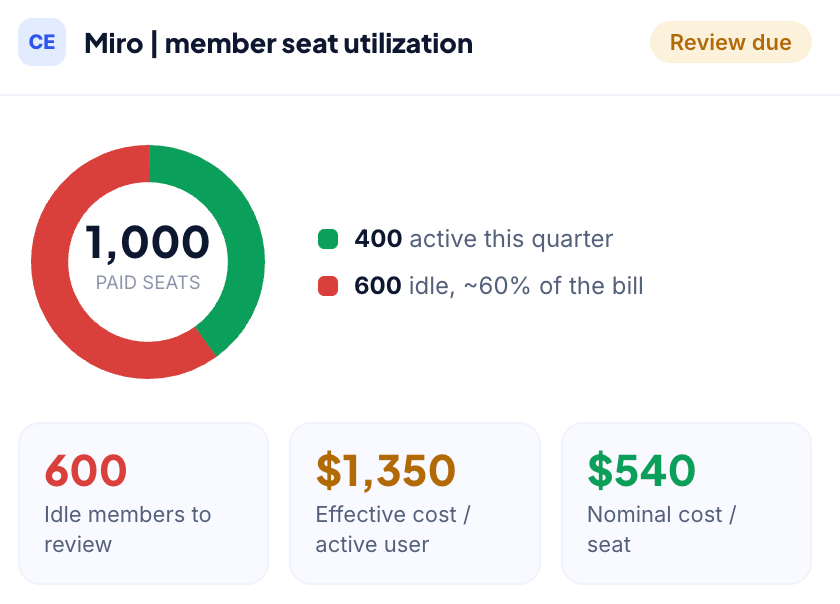
With unused Miro licenses estimated at around 60% by third-party studies, the first question is simple: which paid members actually use the platform?

CloudEagle.ai identifies active and inactive members, then reclaims idle seats through approval workflows and user nudges, so nobody loses access unexpectedly. For Miro, optimization isn't just about removing users. Infrequent members can often be downgraded to lower-cost roles, keeping them on the platform without paying for a full seat they barely use.

This is the same license optimization approach that has helped customers like RingCentral reduce unnecessary SaaS spend across their application portfolio.

How it helps

  • Identifies active, inactive, and underutilized Miro members
  • Automates license reclamation through approval workflows
  • Recommends lower-cost roles for infrequent users
  • Reduces paid seat counts without disrupting collaboration
Catch the guest and licensing conversions before they bill

The guest licensing trap only becomes expensive when it goes unnoticed. Shared board invitations can gradually convert free users into paid members without anyone realizing it.

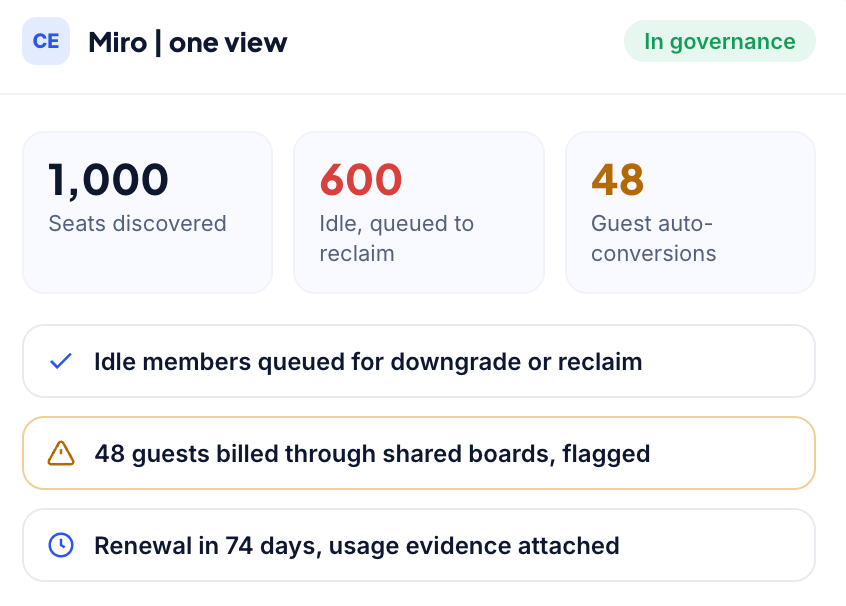
CloudEagle.ai surfaces guest-to-member conversions, identifies users occupying paid seats through shared boards, and helps teams decide which memberships are justified before the next invoice arrives.

The same visibility that shows whether a seat is idle also reveals whether it was ever an intentional purchase in the first place.

How it helps

  • Identifies guest-to-member license conversions
  • Flags paid memberships created through shared boards
  • Highlights unnecessary member upgrades
  • Prevents avoidable licensing costs before renewal

Match board access to role with access reviews

A Miro member doesn't just consume a license, they gain access to product roadmaps, design files, workshop boards, and other business-critical content. Those permissions should be reviewed regularly, especially for external collaborators.

CloudEagle.ai puts current members and guests in front of the managers who know whether they still need edit access. The result is fewer paid seats and fewer users retaining unnecessary access after changing roles or leaving projects.

How it helps

  • Reviews member and guest access across shared boards
  • Identifies users who no longer need edit permissions
  • Removes unnecessary access while preserving collaboration
  • Strengthens governance through recurring access reviews

If you want to learn more about the process, read our guide to User Access Reviews, which explains how to run recurring access certifications instead of treating them as a last-minute audit exercise.

Walk into the renewal with usage data

Most Miro renewals are based on last year's seat count plus whatever has grown since then. Without usage data, procurement teams have little evidence to challenge those numbers.

CloudEagle.ai tracks renewals in a centralized renewal calendar and pairs each renewal with member usage data. The conversation shifts from what was provisioned months ago to what employees actually use today.

For Business plans, the biggest savings lever is optimizing seat counts. For Enterprise plans, where pricing is custom, usage evidence gives procurement teams stronger negotiating leverage.

How it helps

  • Tracks renewals in a centralized renewal calendar
  • Combines renewal timelines with member usage data
  • Optimizes seat counts before contracts renew
  • Strengthens Enterprise renewal negotiations with utilization insights

This version keeps the important differentiators (the 60% unused license stat, the RingCentral proof point, the explanation about downgrading vs. removing users, and the Business vs. Enterprise renewal nuance) while making every paragraph easier to scan. It also matches the style you've been using across your other pricing guides.

3. What companies actually pay for Miro

This is where list price and real spend part ways. CloudEagle.ai benchmark data, drawn from actual deal outcomes and last refreshed on 27 July 2026, puts typical Miro pricing here:

Plan Seat band Benchmark per user per year
Starter 100 to 500 $210 to $246
Starter 500 to 1,000 $186 to $225
Starter 1,000+ $162 to $180
Business 100 to 500 $630 to $738
Business 500 to 1,000 $558 to $675
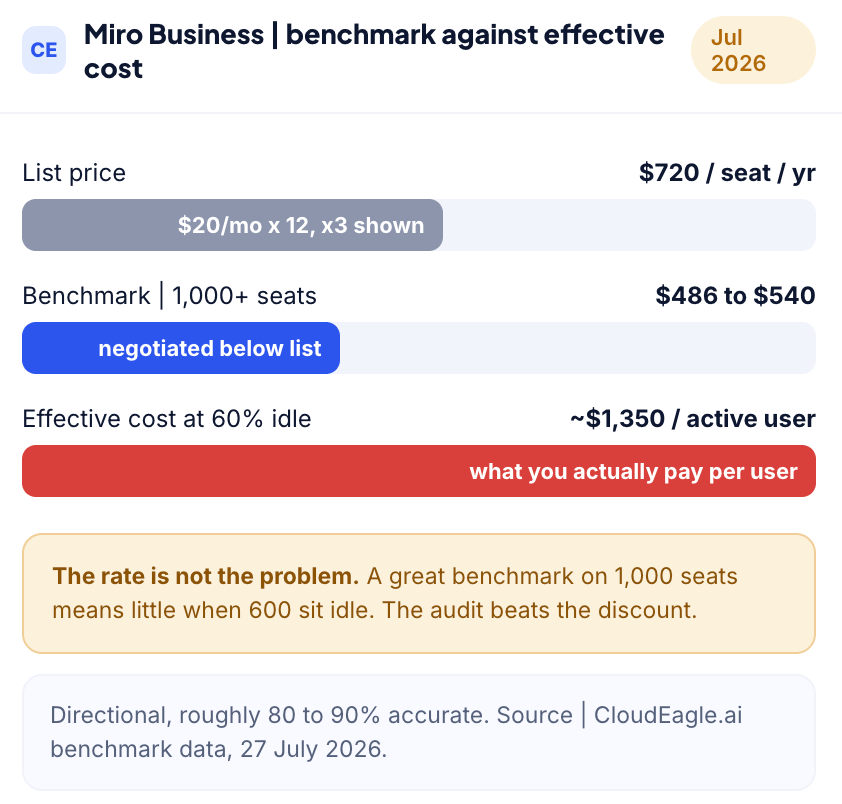
Business 1,000+ $486 to $540
Enterprise 100 to 500 $2,520 to $2,952
Enterprise 500 to 1,000 $2,232 to $2,700
Enterprise 1,000+ $1,944 to $2,160

CloudEagle.ai benchmark data, last refreshed 27 July 2026. Directional, roughly 80% to 90% accurate.

Two things are worth reading from that table. 

Discounts deepen with volume, as expected, with the largest bands landing meaningfully below list. But the more important number isn't in the table at all: if roughly 60% of your licenses go unused, the effective cost per active user is more than double your negotiated seat price. 

A Business deal at $540 per seat for 1,000 seats, with 600 sitting idle, effectively costs around $1,350 per active user. The benchmark tells you what a good rate looks like. Utilization tells you whether that rate even matters.

That's why a seat audit delivers more value than price negotiation. Negotiating a 10% discount helps, but eliminating 60% idle seats can save several times more, and it's entirely within your control.

Benchmark note: These ranges are directional, roughly 80% to 90% accurate. Real quotes move on contract length, payment terms, competitive pressure, and where you land in Miro's quarter. Validate against current list pricing before you anchor a negotiation. Source: CloudEagle.ai price benchmarking and buying guides, 29 July 2026.
4. Best practices for reducing Miro costs

None of these require a negotiation. They are all things you can do before you next talk to Miro.

  • Get the guest billing rules in writing at signing. Ask explicitly how shared-board and guest access is billed, and whether view-only access can trigger a paid seat. Have the answer written into the contract, not left to a verbal assurance.
  • Use visitors for public collaboration. People who only need to view or interact with a shared board do not need a paid seat. Route them through the visitor model rather than adding them as members.
  • Audit idle members before renewal, not after. Removals usually take effect at renewal, so the timing is most of the value. A seat you cut the day after renewal costs you for the whole next term.
  • Move to annual billing if your usage is stable. It is a 20% reduction on both paid tiers, and it is the one discount available without a sales conversation.
  • Cap the annual uplift in writing. Negotiate a fixed rate that cannot rise mid-term because of a feature-tier change or automatic seat additions.
  • Check startup and nonprofit eligibility. Miro offers steep startup discounts through accelerator partnerships and a nonprofit discount that stacks with annual billing. Both are worth a support conversation if you qualify.
  • Do not over-buy Business for freeform whiteboarding. Miro's move to an AI-heavy "Intelligent Canvas" means you may be paying for a broad platform to do basic sticky-note work. Match the tier to what your team actually does.

5. What is actually inside a Miro board

The cost argument is only half the reason to know where your Miro accounts are. The other half is what the boards hold.

A typical Miro board contains:

  • Product roadmaps
  • Org charts
  • Unreleased designs
  • Retrospective notes naming individuals
  • Customer and prospect data from workshop boards

Access is often granted through a shared link for one session and then never reviewed. As a result, boards created years ago may still be accessible to former employees.

That is why board access deserves the same treatment as any system holding sensitive data.

  • A guest invited to one board or a shared link that never expired is a governance gap.
  • Employee offboarding must remove access from every board a user held.
  • Shadow IT discovery surfaces Miro workspaces created outside IT, so they can be governed alongside the rest of your SaaS stack.

6. When consolidation beats another Miro tier

Before you upgrade a tier or switch tools, check whether the real problem is the plan or tool duplication.

If multiple teams use overlapping whiteboard tools, the fix is usually not a bigger Miro plan. Application rationalization identifies duplicate tools, often delivering greater savings than a tier upgrade because collaboration apps spread easily and duplicate quietly.

Common alternatives include:

  • FigJam: Best for teams already using Figma, with a lower per-seat cost.
  • Mural: Better suited for facilitator-led workshops with advanced voting and timing features.
  • Lucidspark: Ideal for teams that combine brainstorming with structured diagrams, especially alongside Lucidchart.
  • Excalidraw: A free, open-source option for quick sketching without accounts or integrations.

One caution: migration costs, moving boards, retraining users, and rebuilding integration, rarely appear in comparison tables. If Miro already meets your needs, reducing unused seats is usually more cost-effective than switching tools.

7. Get your Miro seat count under control

Miro pricing is not really a pricing problem. The tiers are published, and on the rate itself there is only so much room to move. What varies between companies is how many seats sit idle, how many people got auto-converted to a paid seat through a shared board, and whether anyone checks before the renewal processes.

CloudEagle.ai gives you that answer in one view: every Miro seat you pay for, who is actually using it, and which ones were never a deliberate purchase.

Book a demo and see your own numbers.
Frequently asked questions

  1. Who counts as a billed seat in Miro? 

Any member with a full seat who can create and edit boards. Visitors interacting with public boards through a link are free, and guests can view and comment for free, though guest editing is a Business-tier feature. This is why two companies with the same headcount can pay very different amounts for Miro.

  1. Do Miro guests cost money? 

It depends on the plan and the role. Viewing and commenting guests are free on paid plans. But on the Free plan there is no guest role, so anyone you invite becomes a full paid member, and under Enterprise Flexible Licensing a free user can be auto-upgraded to a paid seat the moment they edit. That is the source of most surprise Miro charges.

  1. What triggers a surprise Miro charge? 

Usually a shared board. Inviting someone to collaborate, or having a free-licensed user edit a board under Flexible Licensing, can convert them to a paid seat at the Business rate without an explicit confirmation. Getting the guest billing rules written into your contract is the way to prevent it.

  1. If I remove a member mid-cycle, do I get a refund? 

Generally no. Seats added mid-cycle are prorated, but removals typically take effect at the next renewal rather than immediately. Treat seat removals as savings on the next term, and run your audit before you renew.

  1. Is Miro pricing negotiable? 

On Starter, rarely, since it is close to self-serve. On Business and Enterprise, yes, particularly at volume and on multi-year terms, where buyers commonly land below list. The bigger lever for most companies is not the rate but the seat count, because cutting idle seats saves more than a rate discount does.

Advertisement for a SaaS Subscription Tracking Template with a call-to-action button to download and a partial graphic of a tablet showing charts.Banner promoting a SaaS Agreement Checklist to streamline SaaS management and avoid budget waste with a call-to-action button labeled Download checklist.Blue banner with text 'The Ultimate Employee Offboarding Checklist!' and a black button labeled 'Download checklist' alongside partial views of checklist documents from cloudeagle.ai.Digital ad for download checklist titled 'The Ultimate Checklist for IT Leaders to Optimize SaaS Operations' by cloudeagle.ai, showing checklist pages.Slack Buyer's Guide offer with text 'Unlock insider insights to get the best deal on Slack!' and a button labeled 'Get Your Copy', accompanied by a preview of the guide featuring Slack's logo.Monday Pricing Guide by cloudeagle.ai offering exclusive pricing secrets to maximize investment with a call-to-action button labeled Get Your Copy and an image of the guide's cover.Blue banner for Canva Pricing Guide by cloudeagle.ai offering a guide to Canva costs, features, and alternatives with a call-to-action button saying Get Your Copy.Blue banner with white text reading 'Little-Known Negotiation Hacks to Get the Best Deal on Slack' and a white button labeled 'Get Your Copy'.Blue banner with text 'Little-Known Negotiation Hacks to Get the Best Deal on Monday.com' and a white button labeled 'Get Your Copy'.Blue banner with text 'Little-Known Negotiation Hacks to Get the Best Deal on Canva' and a white button labeled 'Get Your Copy'.Banner with text 'Slack Buyer's Guide' and a 'Download Now' button next to images of a guide titled 'Slack Buyer’s Guide: Features, Pricing & Best Practices'.Digital cover of Monday Pricing Guide with a button labeled Get Your Copy on a blue background.Canva Pricing Guide cover with a button labeled Get Your Copy on a blue gradient background.
What to consider when buying Miro
Based on the latest community trends and observations
Admin
Admins can convert users to full licenses, guests, or remove them.
Billing
Miro‘s Flexible Licensing Program enables customers to easily add or remove licenses without upfront costs, retroactive billing, or contract changes. During an agreed-upon true-up period, customers and Miro review new users who joined the Miro instance, and customers can choose to convert them to a full license or remove them as needed.
Free Credits / Months
Customers have shared being offered 1 free month for signature by end of the month.
Free Product / Trials Considerations
Miro provides a free plan suitable for individuals or small teams with minimal requirements.
Plans
There is a 20 user minimum threshold to purchase the Enterprise Plan.
Sales
Miro sales reps are typically commissioned only on deals that include the Enterprise SKU.
Upgrades / Downgrades
Customers can upgrade their plan type at anytime.
Usage / Overages
If not on the Flexible Licensing Program and a customer runs out of licenses, new users join with a free restricted license. To convert to a full license, the customer must purchase more licenses.
Product
Miro commits to a 99.5% Service Availability Percentage. If below 99.5%, customers may be eligible for a service credit which is outlined in Miro's Service Level Agreement.

Enter your email to
unlock the report

Oops! Something went wrong while submitting the form.
License Count
Benchmark
Per User/Per Year

Enter your email to
unlock the report

Oops! Something went wrong while submitting the form.
License Count
Benchmark
Per User/Per Year

Enter your email to
unlock the report

Oops! Something went wrong while submitting the form.
Notion Plus
License Count
Benchmark
Per User/Per Year
100-500
$67.20 - $78.72
500-1000
$59.52 - $72.00
1000+
$51.84 - $57.60
Canva Pro
License Count
Benchmark
Per User/Per Year
100-500
$74.33-$88.71
500-1000
$64.74-$80.32
1000+
$55.14-$62.34

Enter your email to
unlock the report

Oops! Something went wrong while submitting the form.

Enter your email to
unlock the report

Oops! Something went wrong while submitting the form.
Zoom Business
License Count
Benchmark
Per User/Per Year
100-500
$216.00 - $264.00
500-1000
$180.00 - $216.00
1000+
$156.00 - $180.00

Enter your email to
unlock the report

Oops! Something went wrong while submitting the form.

Get the Right Security Platform To Secure Your Cloud Infrastructure

Please enter a business email
Thank you!
The 2023 SaaS report has been sent to your email. Check your promotional or spam folder.
Oops! Something went wrong while submitting the form.

Access full report

Please enter a business email
Thank you!
The 2023 SaaS report has been sent to your email. Check your promotional or spam folder.
Oops! Something went wrong while submitting the form.

TL;DR

  • Miro pricing is easy to read on the page. Your actual Miro bill is set by two things it does not show: how many paid seats sit idle, and how many people became paid seats just by opening a shared board.
  • Miro bills per member. Starter is $8 and Business is $20 per member per month on annual billing. Every person with edit access is a seat.
  • The trap is the guest model. Invite someone to collaborate and, depending on your plan, they can convert to a full paid seat at the Business rate with no confirmation.
  • Third-party analysis puts unused Miro licenses around 60%, so most companies pay for a large block of seats nobody opens.
  • CloudEagle.ai finds every Miro seat you pay for, shows which are actually used, flags the guest conversions, and turns that into a smaller renewal.

Miro publishes four tiers, and you can read them in a minute. Free, Starter at $8, Business at $20, and a custom Enterprise plan. 

What the pricing page cannot tell you is how many of your paid seats are idle, or how many people became paid seats simply by clicking into a board someone shared with them. Those two numbers are your real Miro cost, and neither one appears on the page you were reading to work it out.

1. Why Miro pricing gets harder to control at scale

Miro pricing plans and what they list for

Here is what each Miro plan costs and where it caps out.

Plan Billed annually Billed monthly AI credits Notable limits
Free $0 $0 10 per team 3 editable boards, no guest role
Starter $8 per member per month $10 per member per month 25 per member No SSO, single workspace
Business $20 per member per month $25 per member per month 50 per member SSO, unlimited guest editing, advanced shapes
Enterprise Custom Custom 100 per member 30-member minimum, SCIM, data residency

Rates from Miro's pricing page, July 2026. Miro changes its packaging often, so confirm the live figures before you sign.

Two things stand out. Annual billing saves 20% on both paid tiers. And the jump from Starter to Business is 2.5x per seat, usually triggered by one requirement: SSO, which does not appear until Business.

The meter that sets your bill: paid members

The figure that decides your Miro pricing is the member count. Miro bills per member, where a member is anyone with a full seat who can create and edit boards.

Here's how different user types are treated:

  • Members: Full paid seats that can create and edit boards.
  • Visitors: Free users who interact with public boards through a link.
  • Guests: Free to view and comment, though guest editing is a Business-tier feature.

A few billing rules matter just as much as the seat price:

  • Seats added partway through a billing cycle are prorated, so growth is relatively inexpensive to start.
  • Removing a member usually takes effect only at renewal, not immediately.

That asymmetry is the reason a Miro seat audit is worth far more before a renewal than after one, and it is the reason so many companies carry seats they stopped needing months ago.

The guest trap that converts viewers into billed seats

This is the part of Miro pricing that catches people, and the old version of this guide never mentioned it.

Here's how it works:

  • On the Free plan: There is no guest role, so anyone you invite to collaborate becomes a full paid member of your team.
  • On Enterprise (Flexible Licensing Program): A user holding a free license can be silently upgraded to a paid one the moment they edit a board, with no confirmation step.
  • Real-world reports: Independent user reports describe exactly this, sharing a board with someone who only needed to look at it, only to find them billed at the full Business rate.

The mechanism is not hidden, but it is not obvious either, and it runs in the expensive direction by default.

If your Miro bill grew faster than your headcount, this is usually why.

It is worth getting the billing behavior for guests and shared boards confirmed in writing before you sign, which is a point we come back to in the best-practices section.

2. How CloudEagle.ai gets Miro spend and access under control

CloudEagle.ai works the problem in the order it actually happens. It discovers every place Miro is being paid for, shows which seats are genuinely used, then governs who holds access and brings the spend down. 

Each lever below works on its own, and they compound when run together, because the same usage data that cuts your seat count is what you carry into the renewal.

Right-size Miro seats against real usage

With unused Miro licenses estimated at around 60% by third-party studies, the first question is simple: which paid members actually use the platform?

CloudEagle.ai identifies active and inactive members, then reclaims idle seats through approval workflows and user nudges, so nobody loses access unexpectedly. For Miro, optimization isn't just about removing users. Infrequent members can often be downgraded to lower-cost roles, keeping them on the platform without paying for a full seat they barely use.

This is the same license optimization approach that has helped customers like RingCentral reduce unnecessary SaaS spend across their application portfolio.

How it helps

  • Identifies active, inactive, and underutilized Miro members
  • Automates license reclamation through approval workflows
  • Recommends lower-cost roles for infrequent users
  • Reduces paid seat counts without disrupting collaboration

Catch the guest and licensing conversions before they bill

The guest licensing trap only becomes expensive when it goes unnoticed. Shared board invitations can gradually convert free users into paid members without anyone realizing it.

CloudEagle.ai surfaces guest-to-member conversions, identifies users occupying paid seats through shared boards, and helps teams decide which memberships are justified before the next invoice arrives.

The same visibility that shows whether a seat is idle also reveals whether it was ever an intentional purchase in the first place.

How it helps

  • Identifies guest-to-member license conversions
  • Flags paid memberships created through shared boards
  • Highlights unnecessary member upgrades
  • Prevents avoidable licensing costs before renewal

Match board access to role with access reviews

A Miro member doesn't just consume a license, they gain access to product roadmaps, design files, workshop boards, and other business-critical content. Those permissions should be reviewed regularly, especially for external collaborators.

CloudEagle.ai puts current members and guests in front of the managers who know whether they still need edit access. The result is fewer paid seats and fewer users retaining unnecessary access after changing roles or leaving projects.

How it helps

  • Reviews member and guest access across shared boards
  • Identifies users who no longer need edit permissions
  • Removes unnecessary access while preserving collaboration
  • Strengthens governance through recurring access reviews

If you want to learn more about the process, read our guide to User Access Reviews, which explains how to run recurring access certifications instead of treating them as a last-minute audit exercise.

Walk into the renewal with usage data

Most Miro renewals are based on last year's seat count plus whatever has grown since then. Without usage data, procurement teams have little evidence to challenge those numbers.

CloudEagle.ai tracks renewals in a centralized renewal calendar and pairs each renewal with member usage data. The conversation shifts from what was provisioned months ago to what employees actually use today.

For Business plans, the biggest savings lever is optimizing seat counts. For Enterprise plans, where pricing is custom, usage evidence gives procurement teams stronger negotiating leverage.

How it helps

  • Tracks renewals in a centralized renewal calendar
  • Combines renewal timelines with member usage data
  • Optimizes seat counts before contracts renew
  • Strengthens Enterprise renewal negotiations with utilization insights

This version keeps the important differentiators (the 60% unused license stat, the RingCentral proof point, the explanation about downgrading vs. removing users, and the Business vs. Enterprise renewal nuance) while making every paragraph easier to scan. It also matches the style you've been using across your other pricing guides.

3. What companies actually pay for Miro

This is where list price and real spend part ways. CloudEagle.ai benchmark data, drawn from actual deal outcomes and last refreshed on 27 July 2026, puts typical Miro pricing here:

Plan Seat band Benchmark per user per year
Starter 100 to 500 $210 to $246
Starter 500 to 1,000 $186 to $225
Starter 1,000+ $162 to $180
Business 100 to 500 $630 to $738
Business 500 to 1,000 $558 to $675
Business 1,000+ $486 to $540
Enterprise 100 to 500 $2,520 to $2,952
Enterprise 500 to 1,000 $2,232 to $2,700
Enterprise 1,000+ $1,944 to $2,160

CloudEagle.ai benchmark data, last refreshed 27 July 2026. Directional, roughly 80% to 90% accurate.

Two things are worth reading from that table. 

Discounts deepen with volume, as expected, with the largest bands landing meaningfully below list. But the more important number isn't in the table at all: if roughly 60% of your licenses go unused, the effective cost per active user is more than double your negotiated seat price. 

A Business deal at $540 per seat for 1,000 seats, with 600 sitting idle, effectively costs around $1,350 per active user. The benchmark tells you what a good rate looks like. Utilization tells you whether that rate even matters.

That's why a seat audit delivers more value than price negotiation. Negotiating a 10% discount helps, but eliminating 60% idle seats can save several times more, and it's entirely within your control.

Benchmark note: These ranges are directional, roughly 80% to 90% accurate. Real quotes move on contract length, payment terms, competitive pressure, and where you land in Miro's quarter. Validate against current list pricing before you anchor a negotiation. Source: CloudEagle.ai price benchmarking and buying guides, 29 July 2026.

4. Best practices for reducing Miro costs

None of these require a negotiation. They are all things you can do before you next talk to Miro.

  • Get the guest billing rules in writing at signing. Ask explicitly how shared-board and guest access is billed, and whether view-only access can trigger a paid seat. Have the answer written into the contract, not left to a verbal assurance.
  • Use visitors for public collaboration. People who only need to view or interact with a shared board do not need a paid seat. Route them through the visitor model rather than adding them as members.
  • Audit idle members before renewal, not after. Removals usually take effect at renewal, so the timing is most of the value. A seat you cut the day after renewal costs you for the whole next term.
  • Move to annual billing if your usage is stable. It is a 20% reduction on both paid tiers, and it is the one discount available without a sales conversation.
  • Cap the annual uplift in writing. Negotiate a fixed rate that cannot rise mid-term because of a feature-tier change or automatic seat additions.
  • Check startup and nonprofit eligibility. Miro offers steep startup discounts through accelerator partnerships and a nonprofit discount that stacks with annual billing. Both are worth a support conversation if you qualify.
  • Do not over-buy Business for freeform whiteboarding. Miro's move to an AI-heavy "Intelligent Canvas" means you may be paying for a broad platform to do basic sticky-note work. Match the tier to what your team actually does.

5. What is actually inside a Miro board

The cost argument is only half the reason to know where your Miro accounts are. The other half is what the boards hold.

A typical Miro board contains:

  • Product roadmaps
  • Org charts
  • Unreleased designs
  • Retrospective notes naming individuals
  • Customer and prospect data from workshop boards

Access is often granted through a shared link for one session and then never reviewed. As a result, boards created years ago may still be accessible to former employees.

That is why board access deserves the same treatment as any system holding sensitive data.

  • A guest invited to one board or a shared link that never expired is a governance gap.
  • Employee offboarding must remove access from every board a user held.
  • Shadow IT discovery surfaces Miro workspaces created outside IT, so they can be governed alongside the rest of your SaaS stack.

6. When consolidation beats another Miro tier

Before you upgrade a tier or switch tools, check whether the real problem is the plan or tool duplication.

If multiple teams use overlapping whiteboard tools, the fix is usually not a bigger Miro plan. Application rationalization identifies duplicate tools, often delivering greater savings than a tier upgrade because collaboration apps spread easily and duplicate quietly.

Common alternatives include:

  • FigJam: Best for teams already using Figma, with a lower per-seat cost.
  • Mural: Better suited for facilitator-led workshops with advanced voting and timing features.
  • Lucidspark: Ideal for teams that combine brainstorming with structured diagrams, especially alongside Lucidchart.
  • Excalidraw: A free, open-source option for quick sketching without accounts or integrations.

One caution: migration costs, moving boards, retraining users, and rebuilding integration, rarely appear in comparison tables. If Miro already meets your needs, reducing unused seats is usually more cost-effective than switching tools.

7. Get your Miro seat count under control

Miro pricing is not really a pricing problem. The tiers are published, and on the rate itself there is only so much room to move. What varies between companies is how many seats sit idle, how many people got auto-converted to a paid seat through a shared board, and whether anyone checks before the renewal processes.

CloudEagle.ai gives you that answer in one view: every Miro seat you pay for, who is actually using it, and which ones were never a deliberate purchase.

Book a demo and see your own numbers.

Frequently asked questions

  1. Who counts as a billed seat in Miro? 

Any member with a full seat who can create and edit boards. Visitors interacting with public boards through a link are free, and guests can view and comment for free, though guest editing is a Business-tier feature. This is why two companies with the same headcount can pay very different amounts for Miro.

  1. Do Miro guests cost money? 

It depends on the plan and the role. Viewing and commenting guests are free on paid plans. But on the Free plan there is no guest role, so anyone you invite becomes a full paid member, and under Enterprise Flexible Licensing a free user can be auto-upgraded to a paid seat the moment they edit. That is the source of most surprise Miro charges.

  1. What triggers a surprise Miro charge? 

Usually a shared board. Inviting someone to collaborate, or having a free-licensed user edit a board under Flexible Licensing, can convert them to a paid seat at the Business rate without an explicit confirmation. Getting the guest billing rules written into your contract is the way to prevent it.

  1. If I remove a member mid-cycle, do I get a refund? 

Generally no. Seats added mid-cycle are prorated, but removals typically take effect at the next renewal rather than immediately. Treat seat removals as savings on the next term, and run your audit before you renew.

  1. Is Miro pricing negotiable? 

On Starter, rarely, since it is close to self-serve. On Business and Enterprise, yes, particularly at volume and on multi-year terms, where buyers commonly land below list. The bigger lever for most companies is not the rate but the seat count, because cutting idle seats saves more than a rate discount does.

CloudEagle.ai recognized in the 2025 Gartner® Magic Quadrant™ for SaaS Management Platforms
Download now
gartner chart
5x
Faster employee
onboarding
80%
Reduction in time for
user access reviews
30k
Workflows
automated
$15Bn
Analyzed in
contract spend
$2Bn
Saved in
SaaS spend

Streamline SaaS governance and save 10-30%

Book a Demo with Expert
CTA image