
%201.svg)


HIPAA Compliance Checklist for 2025

Canva is one of the most widely used platforms for creating visual content across teams. When used well, it helps design presentations, marketing assets, and internal materials at scale.
Canva offers a free plan with limited features, but most teams move to paid tiers as usage grows. Its pricing structure can feel simple at first, yet expands quickly with users, teams, and feature access.
Choosing the right plan is not just about cost savings or design needs anymore. As adoption spreads, Canva becomes part of your SaaS stack, quietly adding users, permissions, and usage patterns.
That’s where governance starts to matter alongside pricing decisions. What looks like a design tool can scale into a system that impacts access control, spend visibility, and team-level accountability.
This Canva pricing guide breaks down plans and features, and shows why pricing choices also shape control, usage, and optimization.
TL;DR
- Canva is an easy-to-use online graphic design platform that helps individuals and businesses create social media graphics, presentations, posters, and more.
- Canva offers multiple pricing plans: Free ($0), Pro ($120/year per user), Teams ($100/year per user, min. 3 users), Enterprise (custom pricing), and education-focused plans for teachers, schools, and campuses.
- Upgrading to Canva Pro or Teams provides access to premium design elements, brand management tools, and advanced export options.
- As Canva adoption grows, pricing decisions also affect how users access templates, brand assets, and shared content. This makes visibility and control important for CIOs and CISOs managing SaaS usage.
- CloudEagle.ai provides benchmarking data and expert negotiation strategies to help businesses secure the best Canva pricing. By leveraging pricing insights, negotiating for extra benefits, and considering competitor offers, you can optimize your SaaS investment.

1. What is Canva?
Canva is an online graphic design platform that helps you create various visual materials. You can create everything from social media posts and presentations to posters, documents, videos, and interactive flipbook content.
With its simple drag-and-drop interface, you can easily customize thousands of templates. You can also use stock images, fonts, and design types without having any advanced design skills.
Whether you're a business owner, marketer, educator, or just someone who wants to create eye-catching visuals, the right Canva pricing plan makes the process quick and effortless. Teams using Canva Pricing Guide alongside knowledge management tools should also check our Notion pricing guide.
2. Is It Worth Paying for Canva?
Yes, purchasing Canva Premium is undoubtedly a great investment for your company. The paid plans of Canva team pricing offer advanced features designed to enhance your magic design approval and streamline your workflow. Here are some key benefits of Canva Pricing Guide to consider:
- Access to Premium Content: You will get more than 100 million stock photos, videos, audio, and graphics. The premium templates and design elements will help you create unique graphics.
- Advanced Design Tools: Canva can help you remove backgrounds from images. The designs can also adapt to different formats with one click.
- Brand Management Features: You can store logos, colors, and fonts for consistent branding. You can quickly create reusable designs aligned with your brand.
Export Options: You can export in SVG, CMYK PDFs, and more formats. No need to worry about conversion.
The biggest Canva savings opportunities usually come from license cleanup. Read more →
3. Canva Free vs Paid: Head-to-Head Comparison
Here’s how Canva Pricing Guide features and pricing stack up in 2025. Canva Free is $0, suited to basic design. Canva Pro costs about $120/year per user (canva pro pricing), while Teams is around $100/year per user (min. 3). These canva pricing plans unlock Canva premium pricing assets, brand control, advanced export, and collaboration.
Best for: Free—personal use and trials (canva pricing free plan). Pro—creators needing premium assets and brand control. Teams—SMBs needing permissions and shared brand kits. Quick decision: choose Free if outputs are web-only and solo; Pro if you need SVG/CMYK and AI; Teams if collaboration and governance drive ROI in canva pricing.
SaaS and AI Spend Calculator
CloudEagle.ai customers typically recover 10–30% of annual SaaS and AI spend. Answer 12 questions to benchmark your maturity, see your recoverable spend estimate, and get a personalized 3-page savings report.
No signup required to start · Instant results
Enter your work email to reveal your personalized estimate, maturity scores, and a downloadable 3-page report.
—
Based on your responses, you are likely overspending approximately $XXXX. There may be unused licenses, overlapping tools, or suboptimal pricing across your SaaS and AI ecosystem.
Download your report for the specific gaps, the consequences if left unaddressed, and the first action to recover spend on each one.

The areas below scored 1 or 2 in your assessment. Each represents a specific gap where spend is leaking or optimization is being left on the table, with a clear first action to address it.
CloudEagle.ai is the AI-powered command center for SaaS, AI, and identity governance. Trusted by RingCentral, Automation Anywhere, Shiji, and Rec Room, the platform has processed $20B+ in spend and delivered $2B+ in savings — typically 10–30% of annual SaaS and AI spend. The gaps surfaced in this report are exactly what CloudEagle was built to close.
Most organizations are governing a fraction of their actual SaaS and AI footprint. CloudEagle.ai builds a real-time inventory through 500+ direct integrations across SSO, finance, HRIS, browser, firewall, and contract data — surfacing every sanctioned tool, every shadow purchase, and every AI tool employees adopted without IT approval. Onboarding takes 30 minutes, with usable visibility from day one.
Unused licenses, duplicate tools, and over-tiered subscriptions accumulate silently between renewal cycles. CloudEagle.ai runs continuous license harvesting, flags overlapping tools across departments, and arms renewals with peer pricing benchmarks and usage data — turning insights into action through no-code Slack-enabled workflows. Customers typically recover 10–30% of annual SaaS spend within the first 90 days.
AI tool costs are usage-based, token-driven, and largely invisible until invoices arrive. CloudEagle.ai tracks AI tool adoption across the organization, monitors usage against budget thresholds, enforces approval workflows for new AI tools, and detects sensitive content shared with public AI services — giving finance, IT, and security a shared real-time view before overruns hit the P&L.
In a focused session with a CloudEagle.ai specialist, we map your specific spend profile against our optimization framework and show you exactly where your savings are — across unused licenses, duplicate tools, renewal negotiation leverage, and AI spend governance.
4. Canva Pricing: Features Explained and How They Built It?
Canva Pricing Guide comes with different pricing plans for different users. Depending on your unique needs, you need to choose the most suitable one like Canva Pro plans. Here’s a detailed breakdown of Canva pricing plans.
A. Canva Free
- Cost: Free Forever ($0)
- Best For: Beginners, casual users, and those who need basic design tools
- Features: Access to over 250,000 free templates, 5GB of cloud storage, basic design tools
- Drawbacks: Limited stock images, no advanced design tools
Enterprise Risk Breakdown:
- Adopted without IT visibility, leading to shadow usage across teams
- No centralized control over where designs and data are stored
- Difficult to track usage, ownership, and access across users
B. Canva Pro
- Cost: $120/year/user (billed annually) or $15/month/user (billed monthly)
- Best For: Individuals and freelancers who need high-quality assets and advanced tools should choose Canva Pro plan
- Features: 100+ million premium stock photos, 610,000+ premium and free templates, 1TB of cloud storage
- Drawbacks: Single-user license, no advanced collaboration tools
Enterprise Risk Breakdown:
- Individual subscriptions create fragmented usage across departments
- No centralized visibility into users, assets, or activity
- Increased risk of duplicate licenses and unmanaged spend
C. Canva Teams
- Cost: Minimum 3 people - $100/year/user (billed annually) or $10/month/user (billed monthly)
- Best For: Small to medium sized businesses that need collaborative design tools
- Features: Collaboration tools for teams, brand kits management features, shared team folders
- Drawbacks: Pricing increases as more users join, lacks enterprise-level security
Enterprise Risk Breakdown:
- Access expands quickly without structured role-based controls
- Over-provisioned users lead to unnecessary license costs
- Inconsistent brand and asset governance across teams
D. Canva Enterprise
- Cost: Contact sales to know Canva enterprise pricing plan
- Best For: Enterprises needing high-level security, automation, and brand control
- Features: Advanced security and compliance tools, SSO integration, 24/7 enterprise-level support
- Drawbacks: Higher cost, not suitable for individuals
Enterprise Risk Breakdown:
- Advanced features require proper setup to deliver full control
- Lack of continuous monitoring reduces governance effectiveness
- Misconfigured access can still expose sensitive design assets
E. Canva Teachers
- Cost: Free for verified K-12 educators, librarians, and students
- Best For: Teachers, students, and schools looking for an easy-to-use design tool
- Features: Education-specific templates and resources, Classroom collaboration tools, LMS integration
- Drawbacks: Only available for K-12 educators
Enterprise Risk Breakdown:
- Limited visibility into how content is shared across classrooms
- Overlap with institutional systems complicates access control
- Difficult to enforce consistent usage policies across users
F. Canva Schools and Districts
- Cost: Free for eligible K-12 schools and districts
- Best For: This Canva pricing plan is perfect for school districts that need a unified design solution for multiple schools
- Features: IT and admin controls, district-wide collaboration capabilities, Priority support
- Drawbacks: Requires verification and approval from Canva
Enterprise Risk Breakdown:
- Complex access management across schools increases oversight challenges
- Inconsistent policy enforcement creates governance gaps
- Limited visibility into usage across departments and institutions
G. Canva for Campus
- Cost: Custom Canva website pricing
- Best For: Universities and colleges that want AI-powered design tools
- Features: Campus-wide access, educational and marketing tools, integration with existing campus systems
- Drawbacks: Requires approval and verification
Enterprise Risk Breakdown:
- AI feature usage is difficult to monitor across departments
- Shared assets increase risk of uncontrolled data exposure
- Lack of centralized oversight impacts compliance and accountability
5. The Real Cost of Canva for CIOs and CISOs: Where Pricing Meets Risk
Besides the Canva Pricing Guide subscription costs, the true cost of Canva enterprise pricing often comes from how access, assets, and usage scale across teams.
- Decentralized adoption without visibility: Employees often start using Canva independently, creating workspaces without IT awareness or approval.
- AI features enabled without oversight: Canva AI capabilities can activate across teams, even when usage policies are not clearly enforced.
- Unused or duplicated licenses: Teams may purchase Canva Pricing Guide seats separately, leading to overlap, underutilization, and rising SaaS spend.
- Uncontrolled access to brand assets: Shared templates, designs, and brand kits may be accessed or modified without clear permission structures.
- Sensitive content inside designs: Presentations and creatives may include internal data, with limited visibility into who can access or share them.
- No real-time policy enforcement: AI and design usage policies often exist, but are not enforced at the point of access or usage.
- Lack of audit-ready visibility: Organizations struggle to track who used Canva, what was accessed, and whether usage followed policy.
For CIOs and CISOs, the challenge is not just selecting the right Canva plan. It is ensuring Canva usage, especially AI-powered features, stays visible, controlled, and aligned with security and compliance expectations.
Related Blog: Google Gemini Pricing Guide: Managing Pricing, Access, and Usage
6. Canva Pricing Guide: How CIOs and CISOs Can Control Access, Spend, and AI Usage with CloudEagle.ai?
As Canva Pricing Guide adoption grows, pricing decisions alone don’t ensure control. What matters is how usage is tracked, governed, and aligned with security and financial policies.
Here’s how leading CIOs and CISOs take care of Canva premium pricing strategically.
A. Gain Visibility Into Canva and Shadow AI
Without centralized visibility, teams often adopt Canva and its AI features independently. This creates blind spots in both spend tracking and policy enforcement.
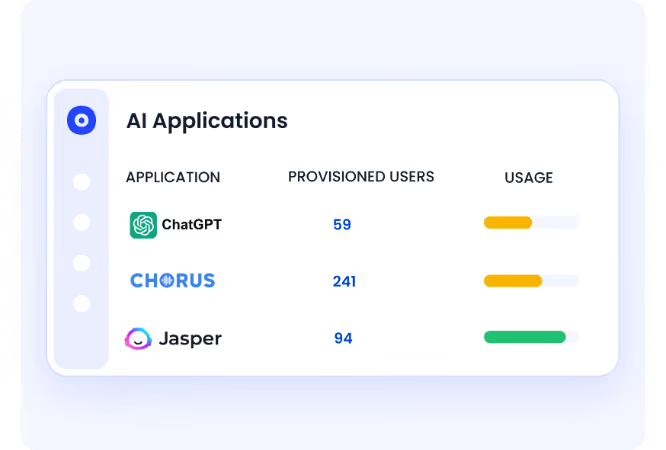
With CloudEagle.ai, CISOs and CIOs can:
- Discover every Canva workspace and AI-enabled tool in use across teams, including unapproved adoption
- Map usage across departments, users, and roles instead of relying on fragmented data
- Identify which tools are sanctioned, unreviewed, or require immediate governance action
This level of visibility helps IT and security teams move from reactive discovery to proactive control.
B. Enforce API Usage Policies in Real Time
Policies often exist, but enforcement usually happens too late. Governance needs to happen at the point where usage decisions are made.
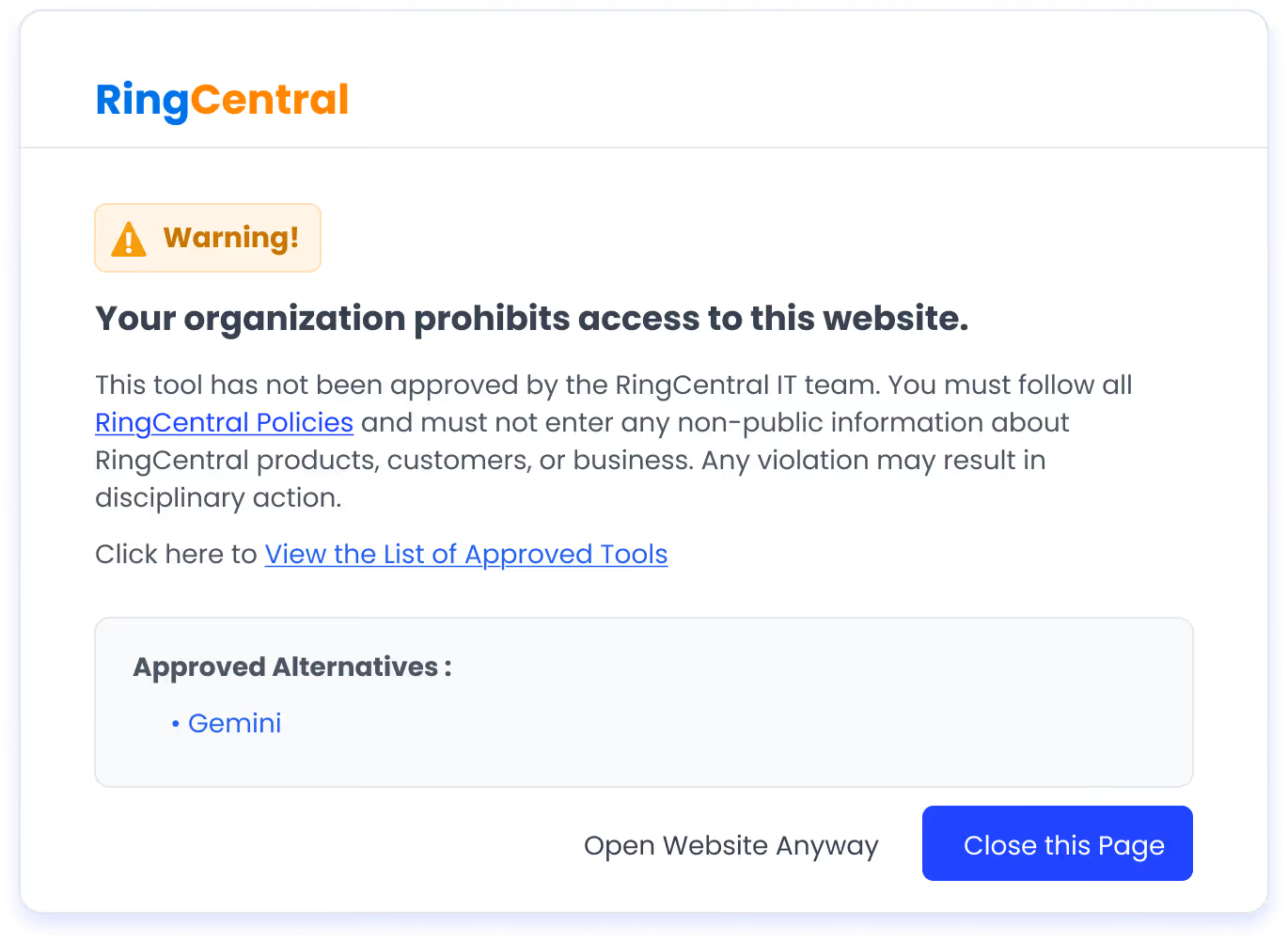
Here's how CloudEagle.ai can help:
- Redirect users from unapproved tools to sanctioned alternatives in real time
- Maintain a centralized list of approved design and AI tools aligned with company policies
- Ensure usage follows defined guardrails without blocking productivity
This approach ensures teams can continue working while staying within approved boundaries.
C. Reduce Risk Across Canva Usage and AI Features
As teams create and share designs, sensitive data can flow through templates and assets. Without oversight, these risks grow silently.
- Monitor how AI features and design assets are being used across the organization
- Assess risk levels based on tool usage, access patterns, and integrations
- Align usage with internal policies and external compliance requirements like GDPR or CCPA
D. Negotiate Strategically With Governance and Usage Data
Once visibility and control are in place, Canva negotiations become more effective and predictable. Decisions are no longer based on assumptions, but on actual usage and access patterns.
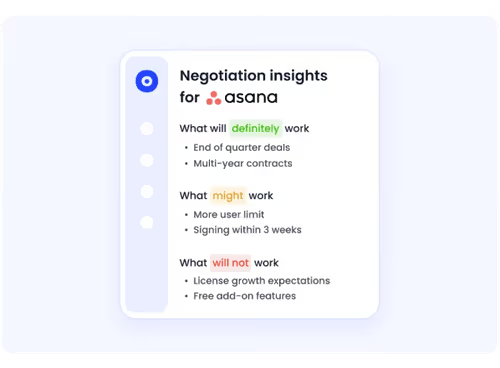
- Benchmark Canva pricing against similar organizations to identify inefficiencies
- Detect unused or duplicated licenses and optimize allocation
- Use renewal cycles as checkpoints to reassess usage, access, and overall value
CloudEagle.ai benchmarks Canva pricing across billions in SaaS transactions, helping you validate whether your pricing is competitive or inflated. Without this layer of insight, even well-negotiated contracts can quietly exceed expectations as usage scales.
E. Price Benchmarking Data
CloudEagle.ai connects you with a vast network of seasoned SaaS buyers, providing the latest benchmarking data from over a billion transactions. With its Canva benchmarking insights, you can see how much other businesses are paying for different Canva plans.
F. Expert Strategies: Negotiation Tips to Secure the Best Canva Deal
Here are some key negotiation strategies to help you secure the best possible Canva plans and pricing deal:
- Focus on Value, Not Just Price: Negotiation is about more than just lowering the price. Aim to secure the best overall value for your team. Consider the features, flexibility, and services included in the plan, ensuring it aligns with your long-term business needs.
- Ask for Extra Benefits: Rather than pushing for a lower price, ask for additional perks. This could include extended trial periods, better payment terms, or complimentary services that can enhance the value of your contract.
- Make Thoughtful Requests: Frame your negotiation in a way that shows how a better deal benefits both you and the vendor. Consider how the partnership will support growth and demonstrate your potential for a long-term commitment.
- Use Leverage Wisely: Strengthen your position by mentioning competitors’ offers, consolidating multiple licenses, or timing negotiations around renewal periods. Exploring software reseller programs is another lever that can unlock better Canva pricing outside the direct sales process.
In the next section, we’ll cover proven negotiation tactics, factors that influence pricing, and how to position your needs effectively to get the best deal.

G. Breaking Down the Data
Are you curious about how much other businesses are paying for different Canva plans? Download our Canva buying guide to get valuable insights.
H. Benefits of Canva Benchmarking Data
Here are a couple of benefits of benchmarking data from the Canva buying guide:
- Real-World Pricing Insights: Get access to actual pricing data on what businesses pay for Canva. Unlike Canva’s public pricing, CloudEagle.ai’s benchmarking data offers a deeper look into costs and usage trends.
- Stronger Negotiation Power: Understanding different pricing models allows you to negotiate with confidence and avoid overpaying.
- More Accurate Budgeting: Reliable pricing estimates help your procurement and IT teams plan SaaS expenses more efficiently.
With CloudEagle.ai’s unbiased price benchmarks and expert negotiation insights, you’ll secure fair pricing for procurement and renewals. Hence, you will get the best value from your Canva investment.
I. Premium Negotiation Insights
No need to pay standard rates when you can use CloudEagle.ai to negotiate like a pro. With the right data, you can cut unnecessary costs, unlock exclusive perks, and get the most out of your Canva investment.
Don’t miss out on potential savings! Download our Canva pricing guide today to discover proven negotiation strategies that have helped businesses save thousands.
Bring Canva Licenses, Access, and Spend Under Control


7. Canva’s Usage-Based Elements: Credits, Premium Assets, Prints
Beyond base Canva Pricing Guide, several usage-based charges can apply. Free users often pay per premium asset (images, videos, audio) via one-time licenses; most are included for Pro/Teams, but specialty media or third‑party content may still be pay-per-asset.
Brand features can have allowances (e.g., brand templates, approvals, storage); exceeding limits can trigger upgrades or add-ons. Factor these into canva features and pricing when modeling total Canva software price.
To avoid surprises, align canva pro pricing with actual usage: map who needs premium media versus standard assets, estimate print volumes, and forecast AI workloads. For the canva pricing free plan, compare occasional pay-per-asset Canva app pricing against upgrading if monthly spend of Canva Pricing Guide nears subscription price.
8. Canva Pricing Models: Which Companies Should Use Which Plans?
Canva Pricing Guide provides a range of pricing plans designed to meet different needs. The best option for your business depends on factors such as company size, meeting frequency, and real-time collaboration features.
- Freelancers and Bloggers: Freelancers and bloggers should opt for Canva Pro as it offers an extensive library of over 100 million premium stock photos, videos, and templates that will help elevate the visual quality of their content. If you're a blogger and managing written and visual content together should also review our Grammarly pricing guide.
- Small Businesses and Startups: Small businesses and startups will benefit most from Canva Pro as it provides premium tools that help create high-quality marketing materials.
- Medium-Sized Companies: Medium-sized companies will benefit from Canva for Teams, as it provides all the essential collaboration tools needed to work efficiently with multiple team members.
- Large Corporations & Enterprises: Large corporations and enterprises should opt for Canva Enterprise pricing, which is built to meet the complex needs of large teams. Nonprofits can also get Canva’s premium tools for free . Here’s how Canva for nonprofits can elevate your marketing on a budget.
9. Canva Nonprofit Pricing: Premium Access, Zero Cost
Canva for Nonprofits grants eligible charities full Canva Pro at no cost, turning Pro into a true canva pricing free plan for mission-driven work. Eligibility of this Canva Pricing Guide typically includes registered 501(c)(3) equivalents (or local NGO status) verified via TechSoup or regional partners; governments, political groups, hospitals/health insurers, and schools are generally excluded.
10. Is There a Better Alternative to Canva?
While Canva is a popular design tool, it does have some drawbacks. First, its design customization options are somewhat limited compared to professional software like Adobe Illustrator or Photoshop.
Second, the free version of Canva Pricing Guide structure has significant limitations, such as fewer templates, restricted access to premium elements, and limited storage. So, if you are looking for Canva alternatives, here are some options:
Adobe Express
A simplified version of Adobe’s powerful design tools, Adobe Express offers templates, branding options, and easy-to-use features, making it a strong alternative for both beginners and professionals.
Visme
Visme is ideal for creating presentations, infographics, and social media graphics, Visme provides advanced design tools, animations, and interactivity features that go beyond Canva’s capabilities.
Crello (VistaCreate)
Similar to Canva, Crello offers a wide range of templates and design assets, with an emphasis on motion graphics and animation, making it a great choice for dynamic content creation.
Figma
Figma is best suited for collaborative design work, Figma allows real-time editing, advanced prototyping, and seamless team collaboration, making it a great option for UI/UX designers and marketing teams. See our Figma pricing guide to compare plans and costs before switching.
Piktochart
If your primary focus is on infographics, reports, and data visualizations, Piktochart provides a more data-driven approach to design, allowing users to create visually appealing presentations with ease.
11. Conclusion
Canva is an incredibly versatile design tool that can serve businesses, educators, and nonprofits of all sizes. However, with multiple pricing plans available, it can be tricky to decide which one best suits your specific needs.
To ensure you select the right plan and make the most of your Canva Pricing Guide investment, take a moment to evaluate your team size, collaboration needs, and design requirements.
CloudEagle’s Canva pricing benchmarks and negotiation strategies can help you make the most of your SaaS investment. You'll enhance the value of your Canva subscription and simplify the procurement process.
Join CloudEagle today to access expert negotiation insights and take full control of your SaaS purchasing decisions!
12. Frequently Asked Questions
1. Can CloudEagle.ai give department managers visibility into their team's Canva spend?
CloudEagle.ai provides department-level spend dashboards, so marketing, design, or content team leads can see exactly what their team is spending on Canva, without IT having to manually pull reports for every request.
2. Can CloudEagle.ai alert finance or IT when Canva spend crosses a set threshold?
CloudEagle.ai lets you set budget caps and spend anomaly alerts per department or tool. When Canva spend spikes unexpectedly, the right stakeholders get notified in real time before it compounds.
3. Does CloudEagle.ai detect Canva usage that isn't connected to SSO?
CloudEagle.ai's browser plugin captures Canva usage even when employees access it outside SSO, personal accounts, direct logins, or unapproved workspaces, giving IT visibility that identity integrations alone can't provide.
4. Can CloudEagle.ai automate Canva license assignment based on employee role at onboarding?
CloudEagle.ai supports role-based provisioning rules. For example, automatically assigning Canva Teams to designers and Canva Pro to marketers at onboarding, so the right plan goes to the right person without manual IT intervention.
5. Does CloudEagle.ai assign a risk score to Canva's AI features?
CloudEagle.ai generates AI risk scores for every tool in your stack, including Canva, based on factors like data access scope, compliance certifications, and usage patterns. This helps security teams prioritize governance action rather than treating all AI tools equally.


.avif)


.avif)
.avif)




.png)






.avif)
.avif)
.avif)


