HIPAA Compliance Checklist for 2025

You already know which SaaS tasks should run on their own. Offboarding, renewals, license cleanup, and access requests all follow the same steps every time.
The question holding the decision back is simpler: who builds all of this, and who keeps it running? That fear is earned. In an InformationWeek survey, 45% of IT teams said they spend more than five hours a week writing scripts for workflow and automation.
This guide walks through how SaaS workflow automation works inside CloudEagle.ai, module by module, and how much of it your IT team actually has to touch.
"Who's Going to Build This?" Why SaaS Workflow Automation Stalls Before It Starts
It stalls because most teams have only seen IT workflow automation that someone has to build from scratch and then babysit. Three patterns created that belief:
- Generic SaaS workflow automation tools hand you a blank canvas: Every connector, condition, and error path is yours to design. In the same InformationWeek study, 28% of organizations carried an automation backlog longer than six months.
- IdP workflows stop at the login: Provisioning through SSO covers apps behind your identity provider, while licenses and renewal dates sit in other systems.
- Home-grown scripts break quietly: When the person who wrote them leaves, nobody knows what they did or whether they still run.
Meanwhile, the manual work keeps piling up. Only 1 in 4 IT teams automate offboarding, according to BetterCloud's 2026 State of SaaS data.

7 Best Workflows in CloudEagle.ai, Module by Module
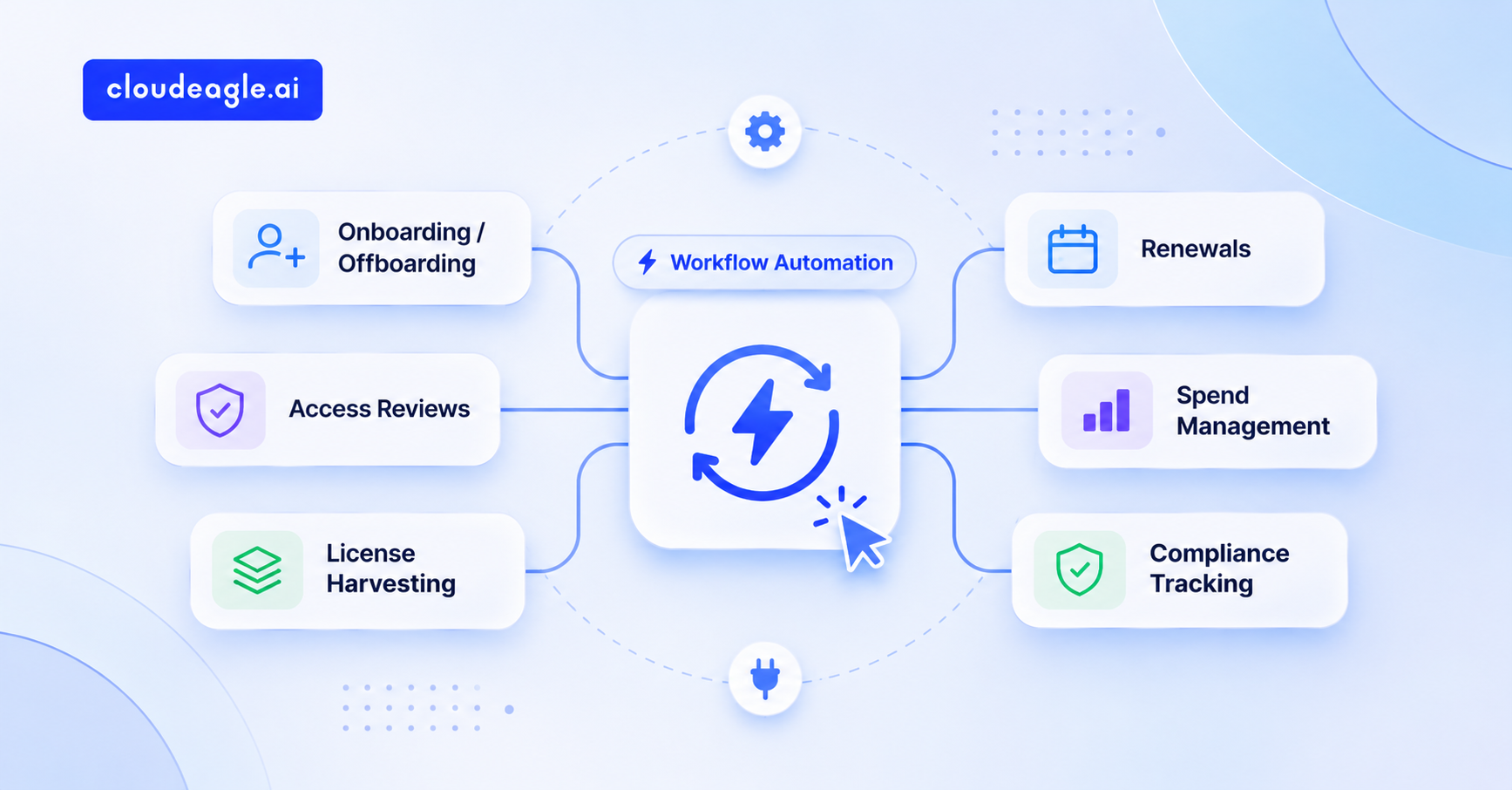
CloudEagle.ai ships SaaS management workflows for seven modules, and each one starts from a pre-built template with its own trigger. Here is what each module does and what your team no longer has to build.
1. License harvesting: unused seats come back before renewal
Inactive seats renew at full price, and Zylo's 2026 index puts the average organization's waste on unused licenses at $19.8M a year. Reclaiming them by hand means exporting usage and chasing users.
How CloudEagle.ai solves it:
- Rules flag users with no activity over a chosen window, such as 30 or 90 days, using in-app activity like tasks updated in Asana as well as logins.
- Users get an email asking whether they still need the license, with a response deadline.
- The rule then sends users for review, removes them, moves them out of an Okta or Azure AD group, or opens a Jira ticket.
- A safety limit pauses the rule if it matches more than 400 users, and admins can exempt specific people.
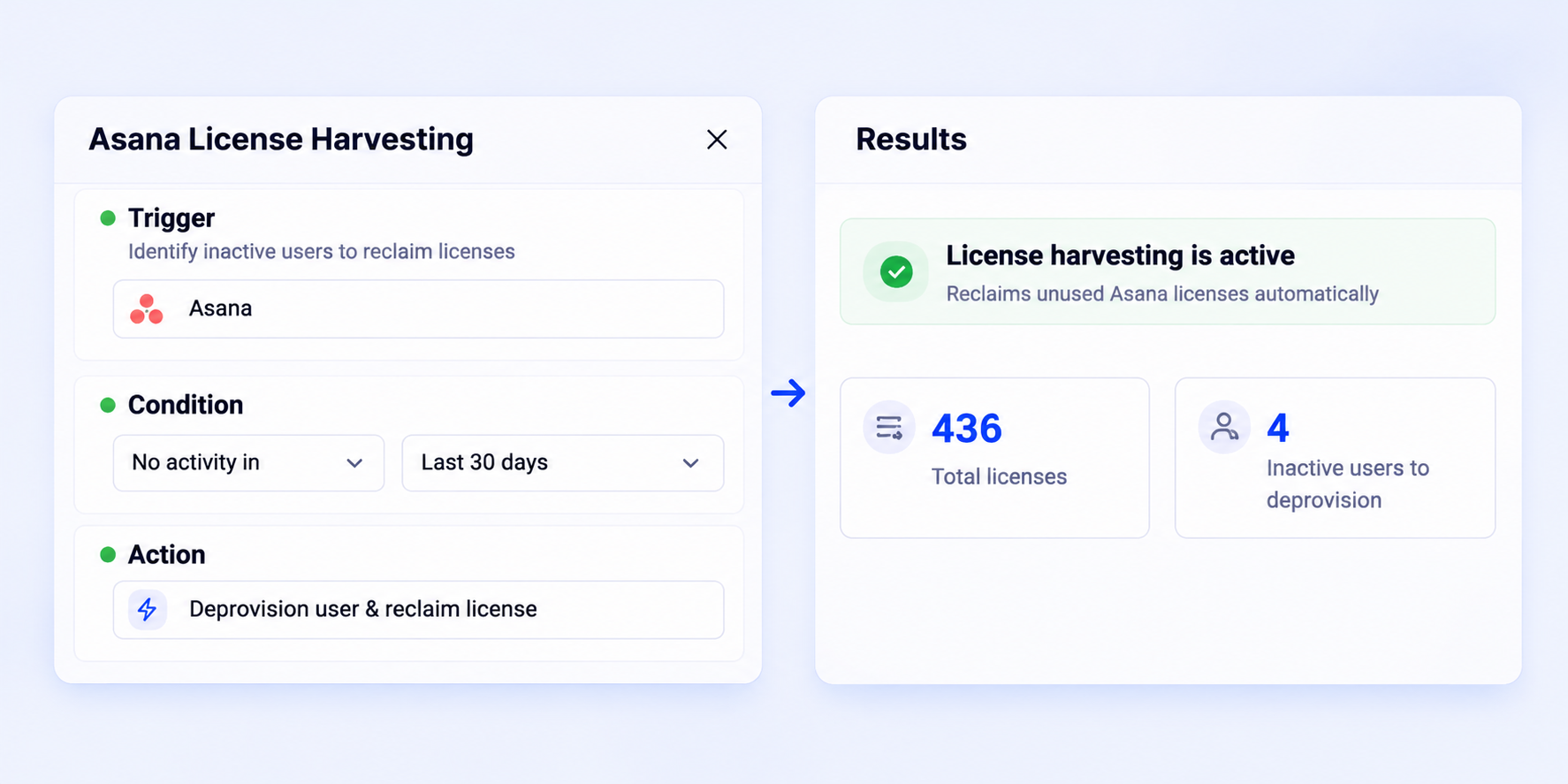
With SaaS workflow automation, license reclamation becomes a standing process, and users get a say before they lose access.
Domo kept buying new Salesforce seats because nobody could see who used the old ones. A 60-day inactivity rule found 38% of licenses unused and reclaimed 760 of them, saving $1.5M a year.
2. Procurement intake: every request reaches the right reviewer
Software requests arrive through Slack DMs and email threads, and procurement sorts them by hand. A $250K tool that stores customer data waits in the same pile as a $20 browser extension.
How CloudEagle.ai solves it:
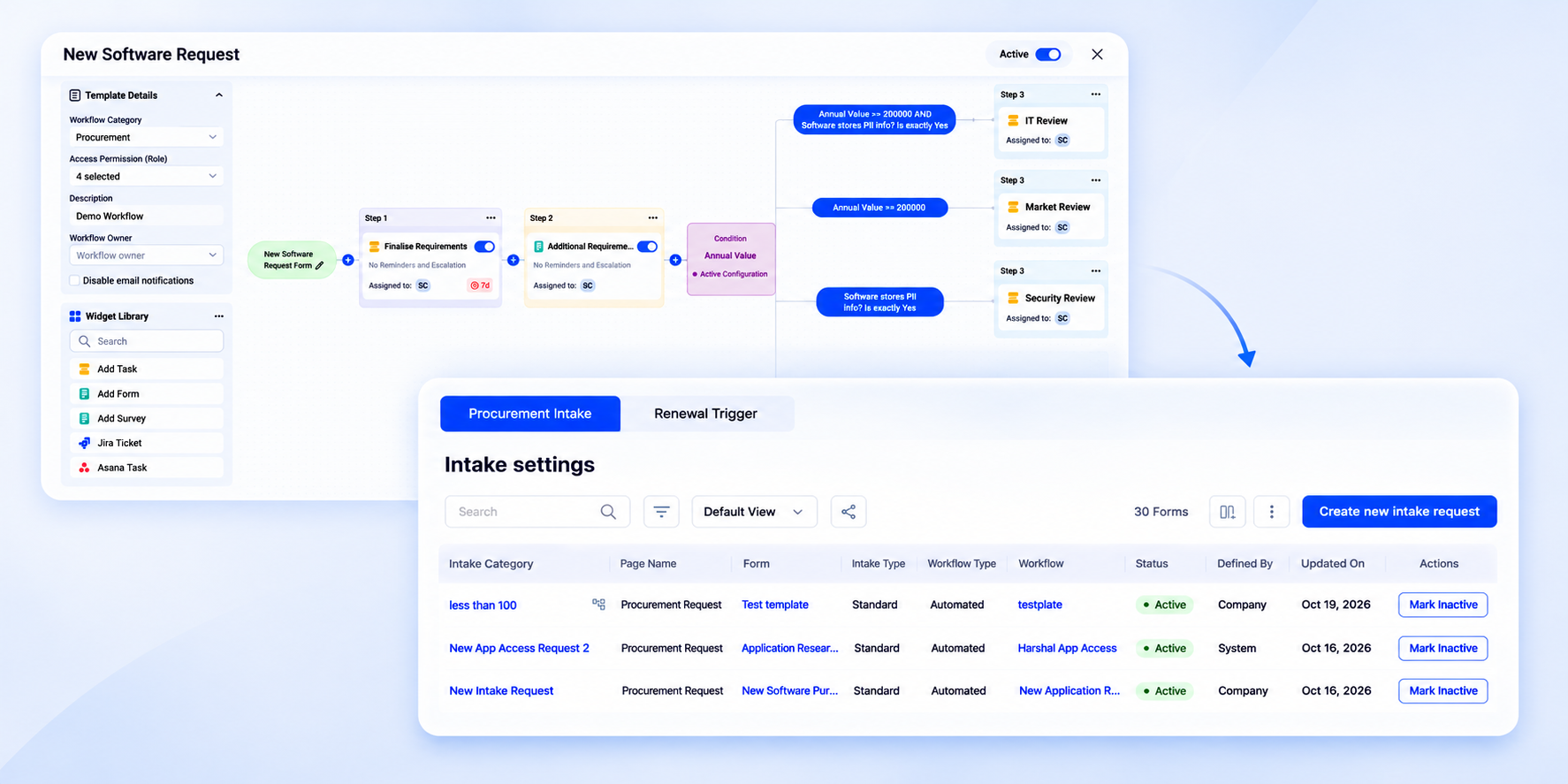
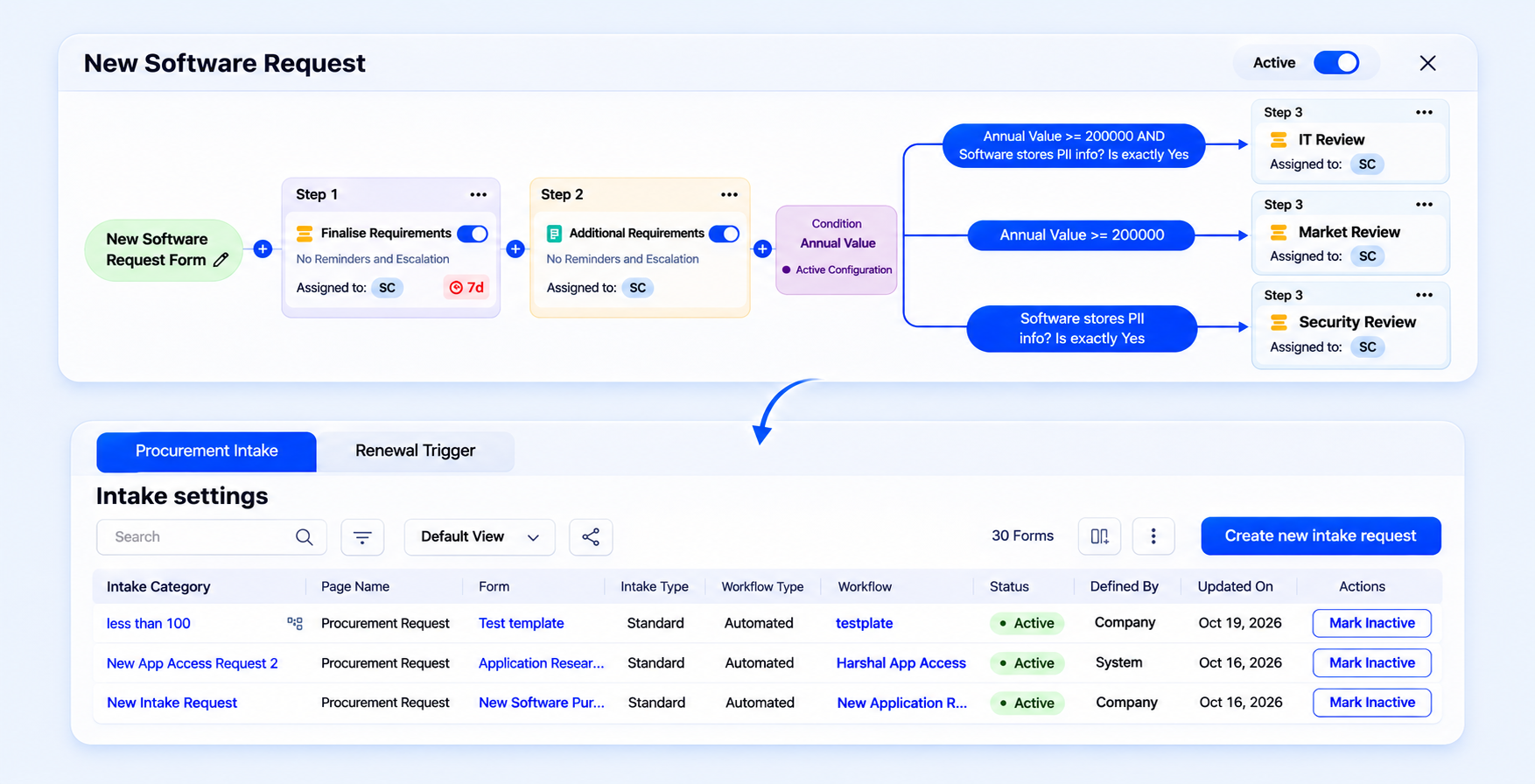
- Each request type gets its own intake form and workflow.
- A condition step reads the answers and branches. High-value requests go to market research and apps storing PII go to security review, while the rest move to negotiation.
- Tasks close on their own once every assignee completes the form.
Every request lands with the right reviewer, and risky purchases can't skip security review.
3. Contract renewals: every renewal starts before the notice window closes
Most renewals surface when the invoice does. By then, the notice period has passed, and the contract rolls over at the same price or higher.
How CloudEagle.ai solves it:
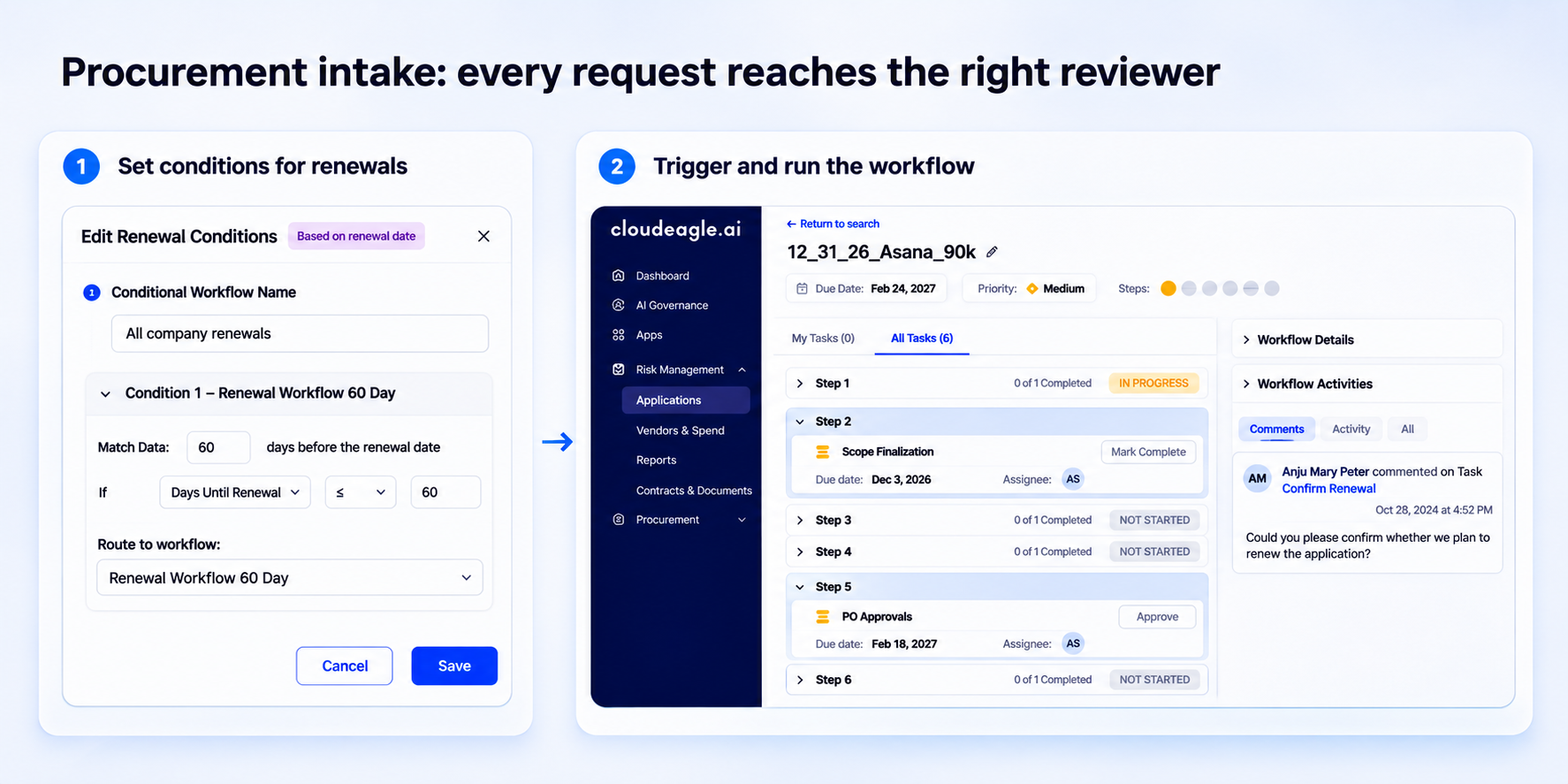
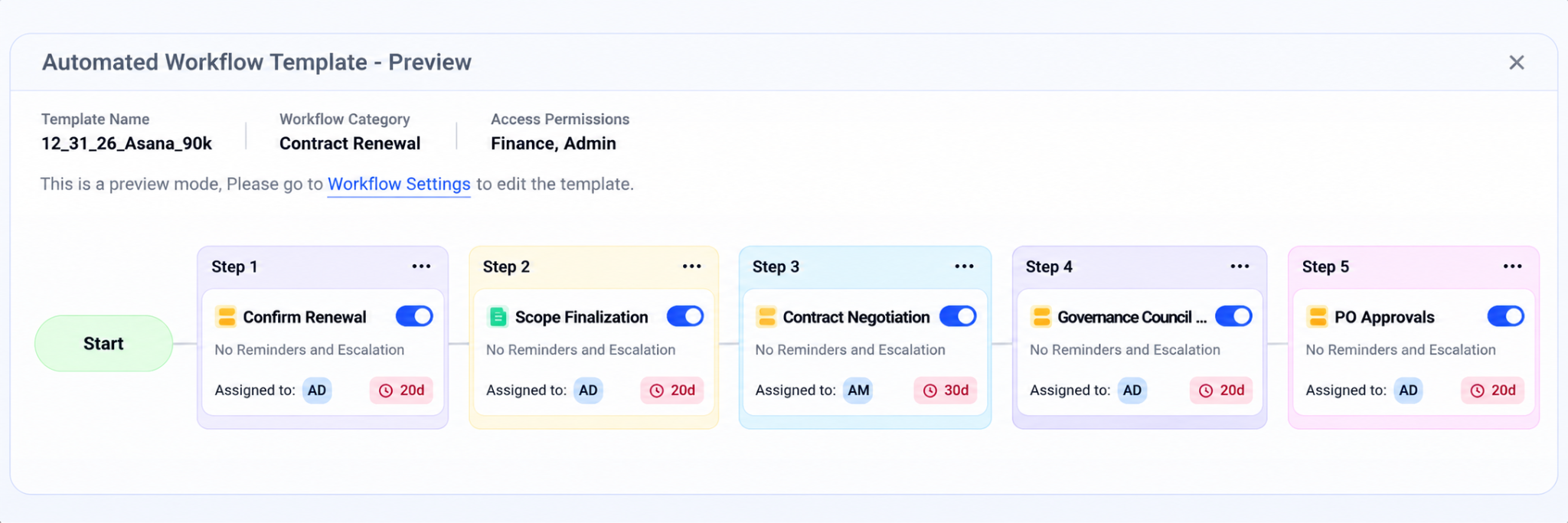
- Renewal workflows start a set number of days before each renewal date, such as 60 or 90, or when an external system sends a webhook.
- Conditions route each renewal to the right template, so a large contract gets the full review and a small one gets a quick confirmation.
- Every step has an owner, due date, and escalation, and each renewal can open its own Slack channel.
Renewals start on schedule even for vendors nobody is watching, leaving time to check usage and negotiate.
Sapphire Ventures tracked contracts in spreadsheets, and missed notice periods kept locking it into unwanted renewals. With renewal workflows starting 90 days out, Sapphire cut auto-renewals to zero and saves $1.3M a year.
4. App access requests: employees get access without a ticket
Every access request lands in IT's queue. IT chases the manager for approval while the employee waits days, and nobody records whether the access should expire.
How CloudEagle.ai solves it:
- Employees request new or changed access from a self-service app catalog, as permanent or temporary access.
- Approval policies set who signs off for each app, across one or more steps with due dates, reminders, and escalation.
- Once approved, CloudEagle.ai provisions the app or assigns the task to the app admin.
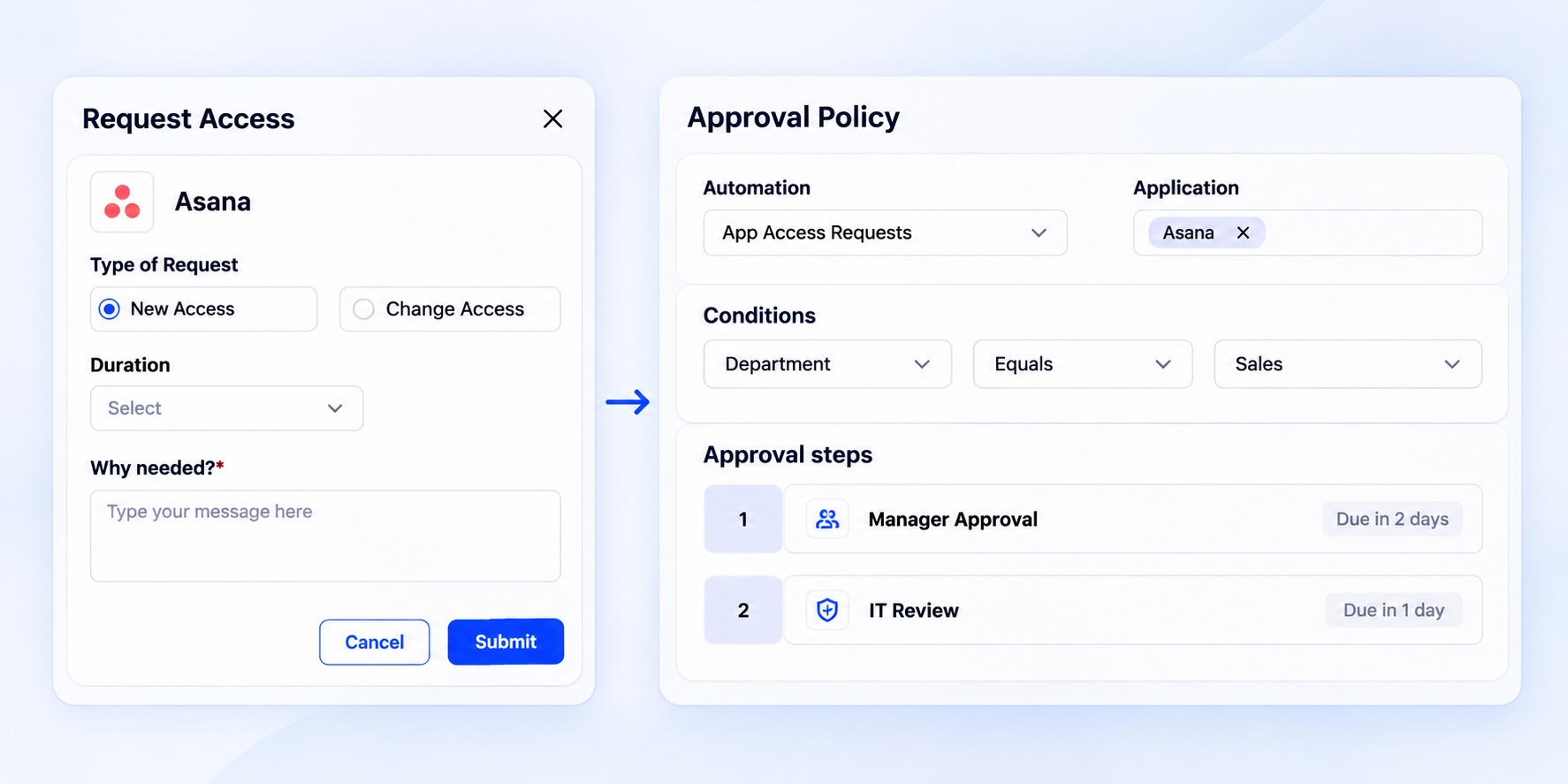
IT stops acting as the messenger, and every grant has an approver and a reason.
At Benchling, routine requests were helpdesk tickets, and employees waited about three days for tools. With a self-service catalog and Slack approvals, Benchling cut access-related IT tickets by 95%.
5. Birthright onboarding: new hires get the right apps on day one
IT creates each new hire's accounts one by one, often after the start date, and two people in the same role end up with different access.
How CloudEagle.ai solves it:
- Birthright rules match new hires by department and job title, and can narrow further by location.
- Each rule assigns a set of apps, so a sales hire in India and an engineer in Austin get different bundles automatically.
- Auto provisioning applies these rules as new hires arrive from your identity provider.
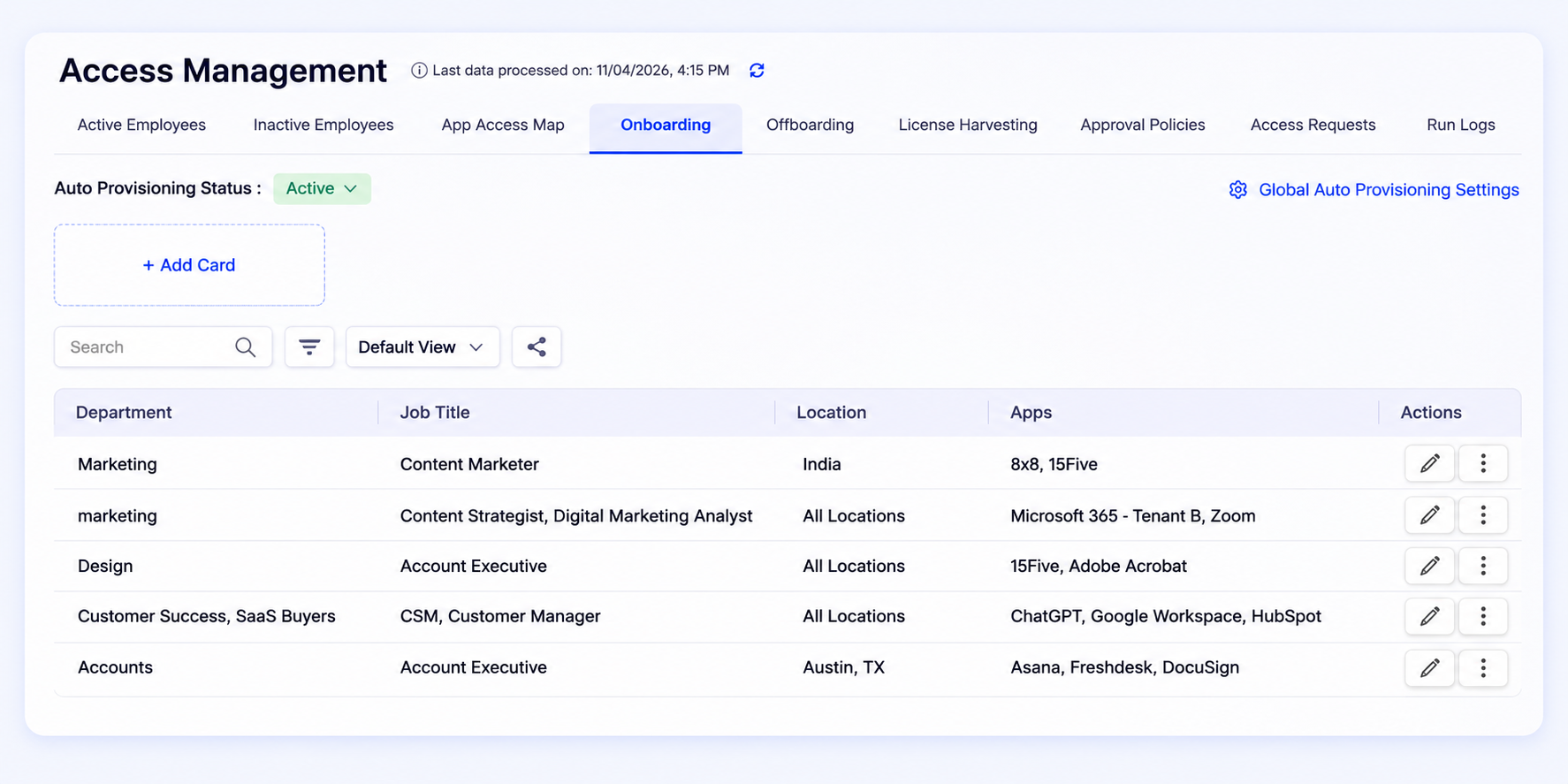
New hires start with working access on day one, and IT edits one rule when a role changes. Bloom & Wild used these workflows to cut onboarding time to minutes.
For the full joiner flow, see how CloudEagle.ai automates the joiner process.
6. Offboarding: access ends on schedule when someone leaves
Offboarding depends on someone remembering every app a person used. Apps outside SSO keep the account alive, files stay locked in the departed user's account, and the paid seat renews.
How CloudEagle.ai solves it:
- Offboarding starts when a user is suspended in your SSO, on a schedule you set, such as one day later at 5 PM.
- Each app gets its own sequence: enforce an approval policy, transfer data such as Zoom meetings to another user, then remove the user.
- Where CloudEagle.ai has no write access to an app, removal goes to that app's admin as a tracked task.
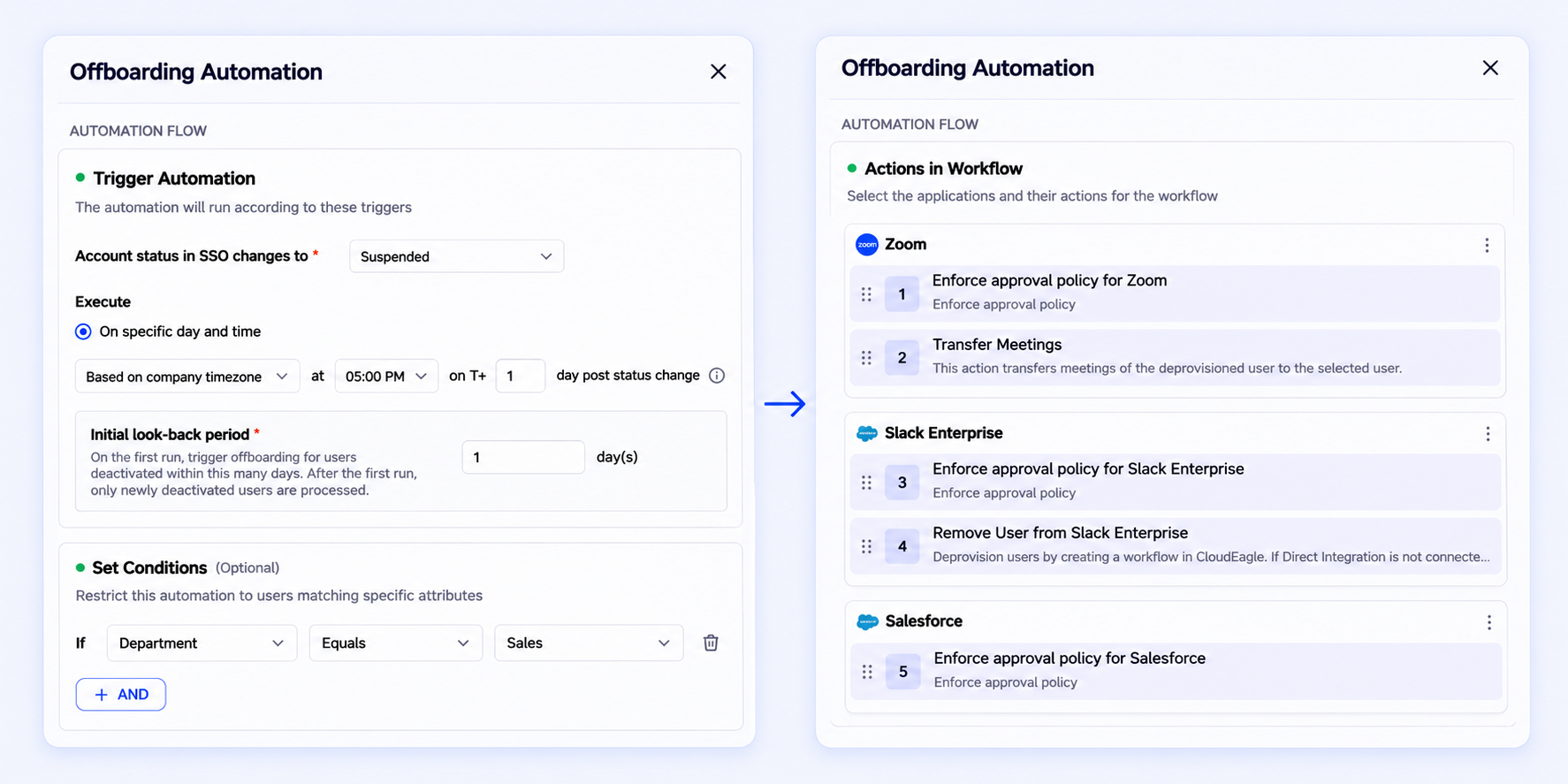
Access and licenses end on schedule, and data stays with the team. Every step lands in one audit trail.
Treasure Data's IT manager used to start work early to remove access for leavers in other time zones, because only half its apps sat behind Okta. With location-based offboarding, the team saved 1,354 hours a year.
7. Shadow app review: every unapproved app gets an owner and a decision
New apps show up in SSO logs and expense data, and nobody owns the follow-up. IT sees the list, but chasing users and vendors app by app never happens.
How CloudEagle.ai solves it:
- Shadow IT policies define what counts as shadow, such as unconfirmed AI apps or apps found in the browser but missing from Okta.
- Each policy can start a workflow automatically when an app matches, such as a Slack alert, a user survey, and then a decision to block or approve.
- For any single app, IT can block it through the browser plugin, survey its users, send the vendor a questionnaire, or start a procurement request.
- An Action Tracker shows every email, survey, and workflow in one place, including what's overdue.
Shadow apps get reviewed as they appear, and with SaaS workflow automation handling the follow-ups, IT stops chasing people by hand.
The seven workflows at a glance
This table shows where SaaS workflow automation removes the most IT effort:
See All Seven Workflows Running Live


What Setup Actually Looks Like
Setup for SaaS workflow automation in CloudEagle.ai is configuration work: you connect apps, switch on templates, and map roles to people. A typical rollout looks like this
- Day 1, connect your apps: CloudEagle.ai has 500+ direct integrations, and Rec Room was onboarded in 30 minutes.
- Week 1, switch on templates: Start with the system renewal and offboarding templates, then adjust steps and due dates to match your policy.
- Week 2, map roles once: Assign the people behind roles like business owner and legal, and every template route to them automatically.
- Week 3 onward, add rules: Layer in birthright and harvesting rules department by department, using no-code workflow automation instead of scripts.
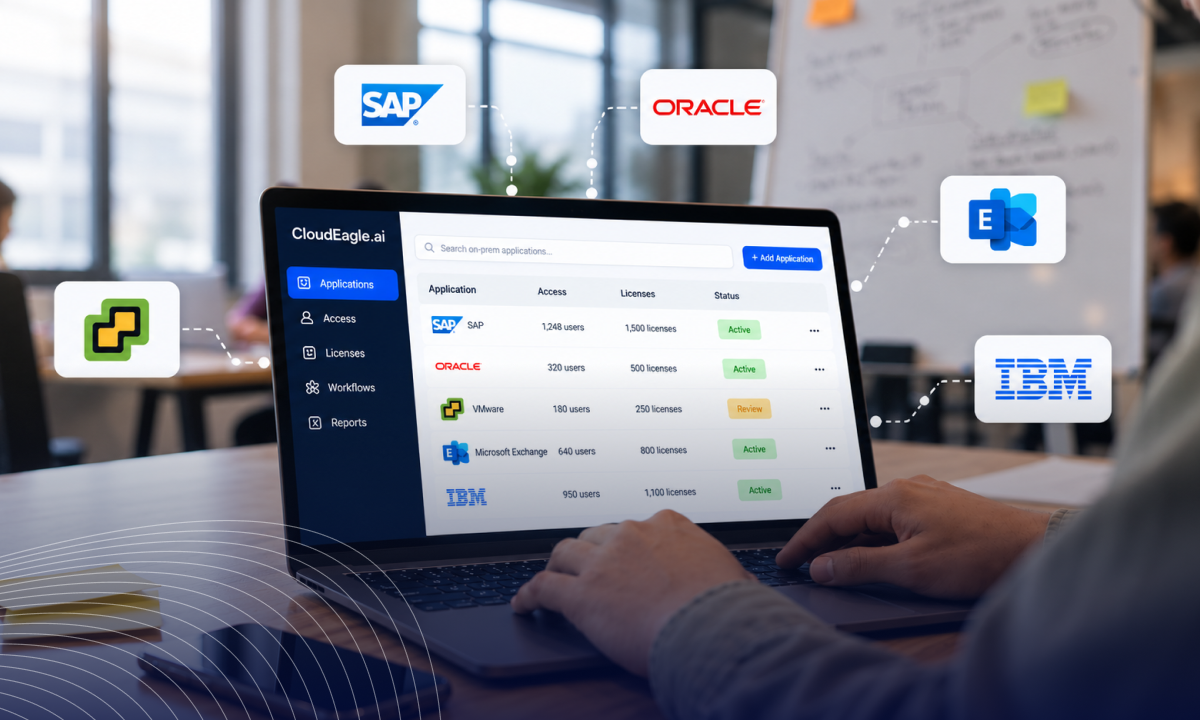
The same workflows also extend beyond the cloud. If part of your stack still runs on-prem, see how CloudEagle.ai extends access and license workflows to on-prem apps.
CloudEagle.ai vs. Generic SaaS Workflow Automation Tools
The real difference when comparing SaaS workflow automation options is who carries the build and how much context the workflow has.
Generic tools still make sense for one-off data syncs between two apps. For IT workflow automation that has to know who uses an app, what it costs, and when it renews, purpose-built SaaS management workflows save the build entirely.
For a vendor-level breakdown, see how CloudEagle.ai compares with BetterCloud.
FAQs
1. Is SaaS growing or dying?
Growing. Gartner forecasts $299.1B in SaaS spending for 2025, up 19.2%. More apps mean more renewals and access requests, which makes SaaS workflow automation harder to skip.
2. What are examples of workflow automation?
Common SaaS examples include onboarding new hires, offboarding leavers, reclaiming inactive licenses, routing purchase requests, and starting renewal reviews before contracts auto-renew.
3. Is ChatGPT a SaaS?
Yes. ChatGPT is delivered as a cloud subscription, and its business plans are sold per seat, so access, onboarding, and license harvesting workflows apply to ChatGPT too.
4. What are the top 5 SaaS companies?
Microsoft, Salesforce, SAP, Oracle, and Adobe usually rank as the largest vendors. Their apps are often the biggest renewals a SaaS workflow automation program governs.
5. Do I need coding skills to build workflows in CloudEagle.ai?
No. CloudEagle.ai uses no-code workflow automation built on templates, and approvals run in Slack and email, so business owners can act on requests without waiting on IT.
6. How long does SaaS workflow automation take to set up?
Connecting apps can take minutes, and Rec Room was onboarded in 30 minutes. Most teams switch on templates first, then add birthright and harvesting rules over a few weeks.
Ready to see which workflows you could switch on this week? Book a CloudEagle.ai demo and bring your SaaS workflow automation list.
Pick Your First Workflow This Week