SaaS Management

CloudEagle.ai Extends Access and License Workflows to On-Prem Apps

Share via:
Written by:
CloudEagle.ai Team
Reviewed by
Nidhi Jain
Last Updated:
October 13, 2026
blog-cms-banner-bg
Little-Known Negotiation Hacks to Get the Best Deal on Slack
cta-bg-blogDownload Your Copy

HIPAA Compliance Checklist for 2025

Download PDF

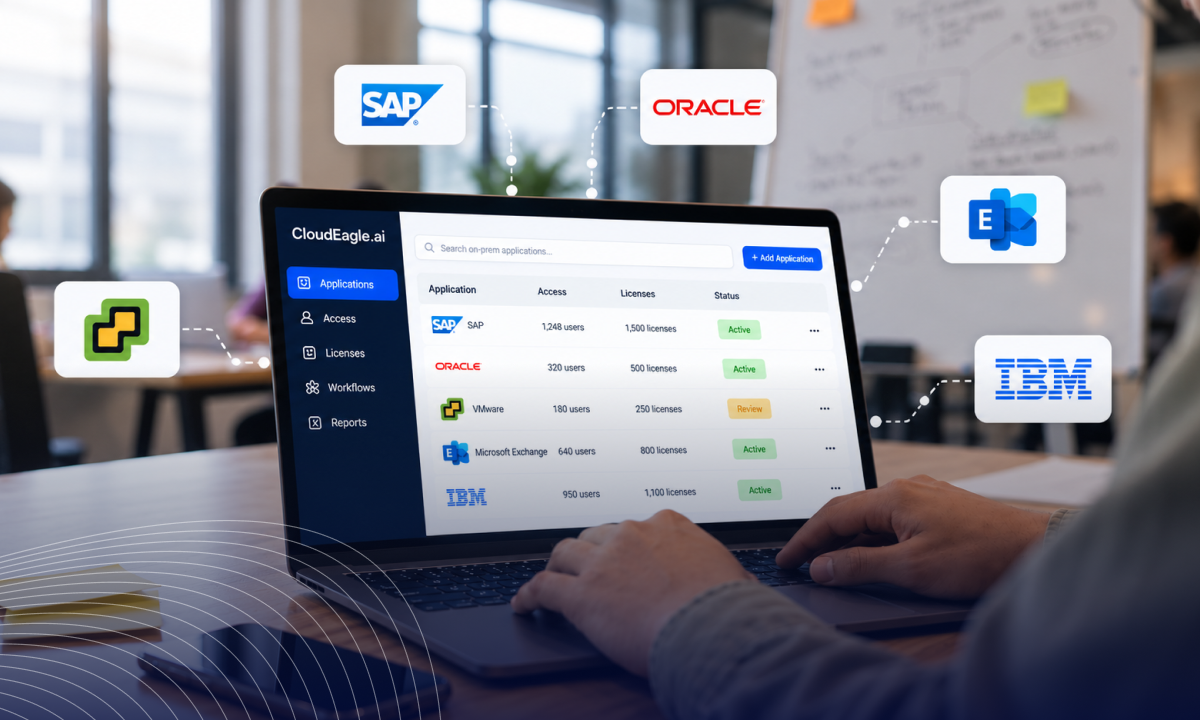
CloudEagle.ai helps enterprises govern access and licenses across their SaaS and AI applications, bringing visibility and automation to application access, employee lifecycle management, and license optimization.

Now, CloudEagle.ai is extending these capabilities to on-prem applications, bringing them into the same governance framework as SaaS and AI.

This expansion helps enterprises address the gaps that often arise when different parts of their application ecosystem are managed through separate processes and tools.

With SaaS, AI, and on-prem applications under one platform, IT teams can take a more consistent approach to managing access and licenses across the enterprise.

Here's how CloudEagle.ai extends its existing workflows to on-prem environments.

‍

How CloudEagle.ai Governs On-Prem Applications

It extends to on-prem applications through three mechanisms: an Active Directory agent that connects over LDAP, Entra ID groups, and usage data that you upload.
This allows IT teams to manage user access, automate employee lifecycle changes, and reclaim unused licenses without replacing their existing infrastructure.

‍

How Does CloudEagle.ai Connect to On-Prem Apps?

We work with on-prem apps three ways, matched to how each app handles access and where its usage data lives. 

An agent changes access in Active Directory over LDAP, Entra ID groups cover apps whose access syncs to Entra ID, and uploaded usage data shows who is using what.

1. The Active Directory Agent

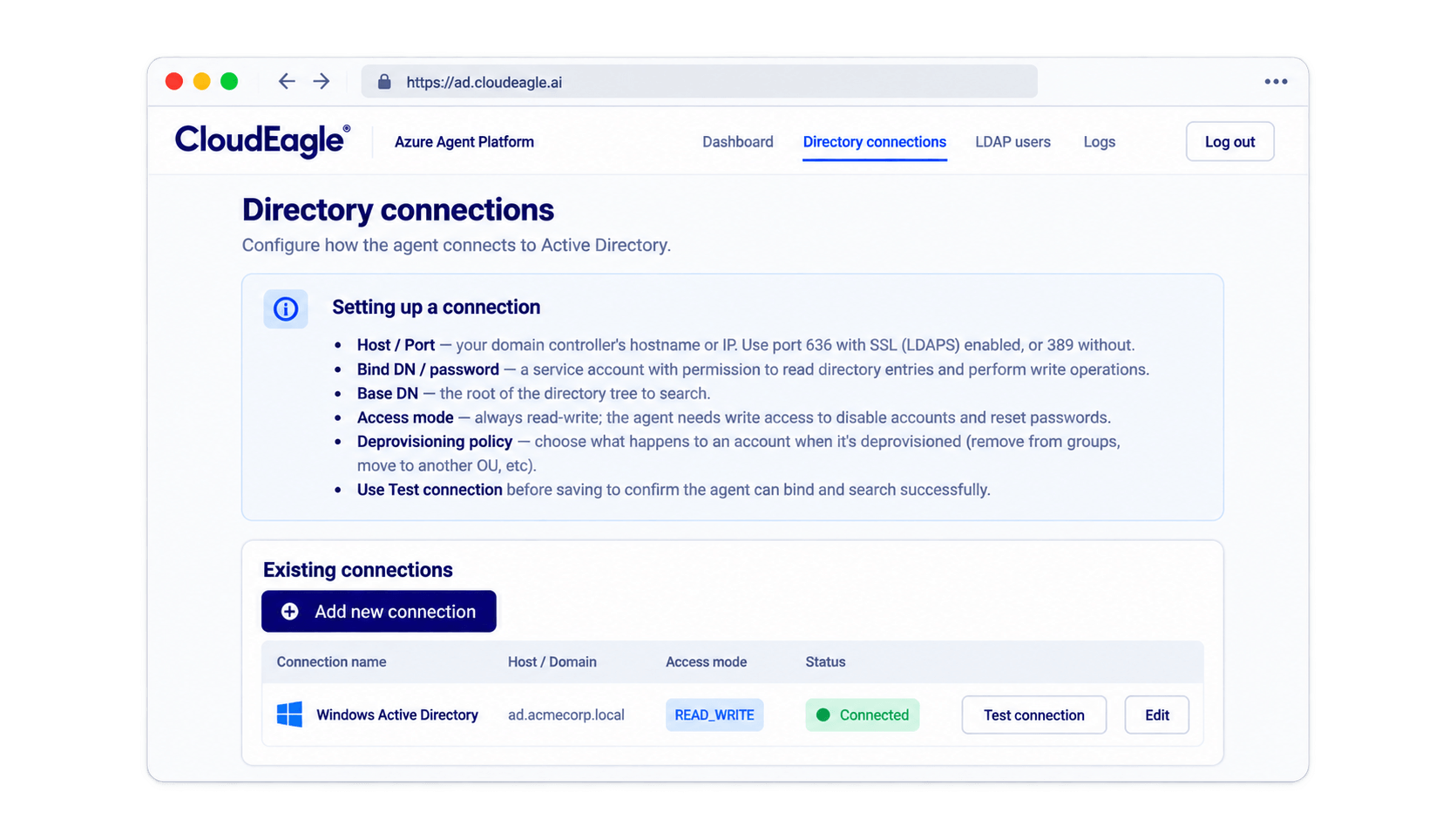
We deploy an agent inside your network that connects to your Active Directory over LDAP, the standard way directories answer requests. 

You register it with CloudEagle.ai, point it at your domain and organizational unit, and give it a dedicated account that limits what it can touch.
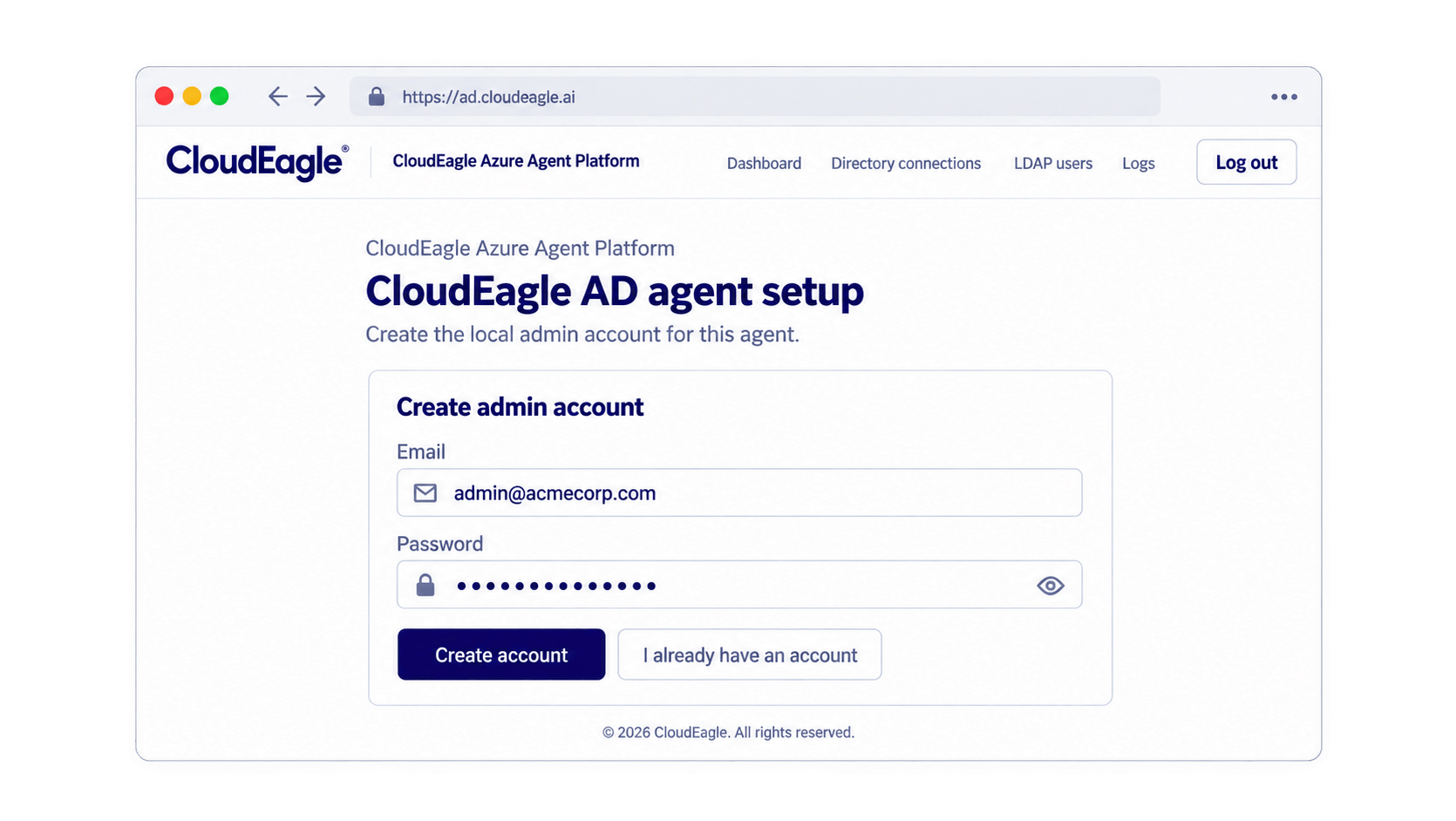
You choose read-only or read/write access. Test the connection, save it, and the agent starts working with your directory. In read/write mode, it adds and removes specific groups for a user.
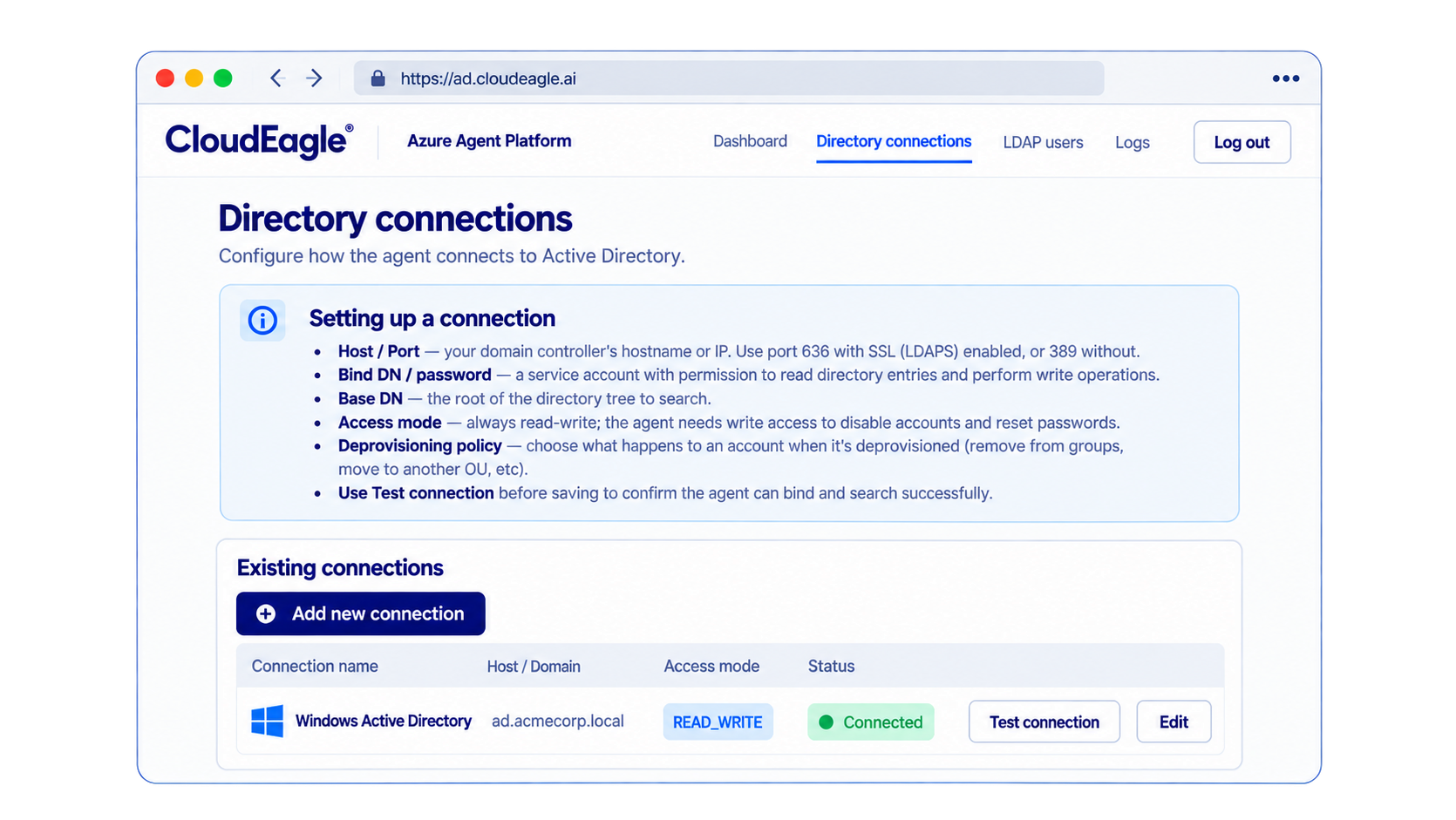
For leavers, you choose what happens:

  • Disable the account
  • Remove all group memberships
  • Move the user to another organizational unit

You can check our work. Every request is logged from queued to completed, and the change shows up in Active Directory itself.

2. Entra ID Sync

If your on-prem apps are connected and synced to Entra ID, we deprovision users through their Azure groups.

Apps that aren't synced fall outside this route. We act on access here. We don't track on-prem usage ourselves.

3. S3 Ingestion and Custom Connectors

We have no desktop agent, so for on-prem apps the usage data comes from you. You upload it through S3 ingestion: CloudEagle.ai picks the file up, and you map its columns once from a ten-row sample.

Metering tools such as SCCM can produce that data, but we don't read them directly today. You export the report and upload it. For endpoint-level usage, we also work with partner tools that run an agent on devices.
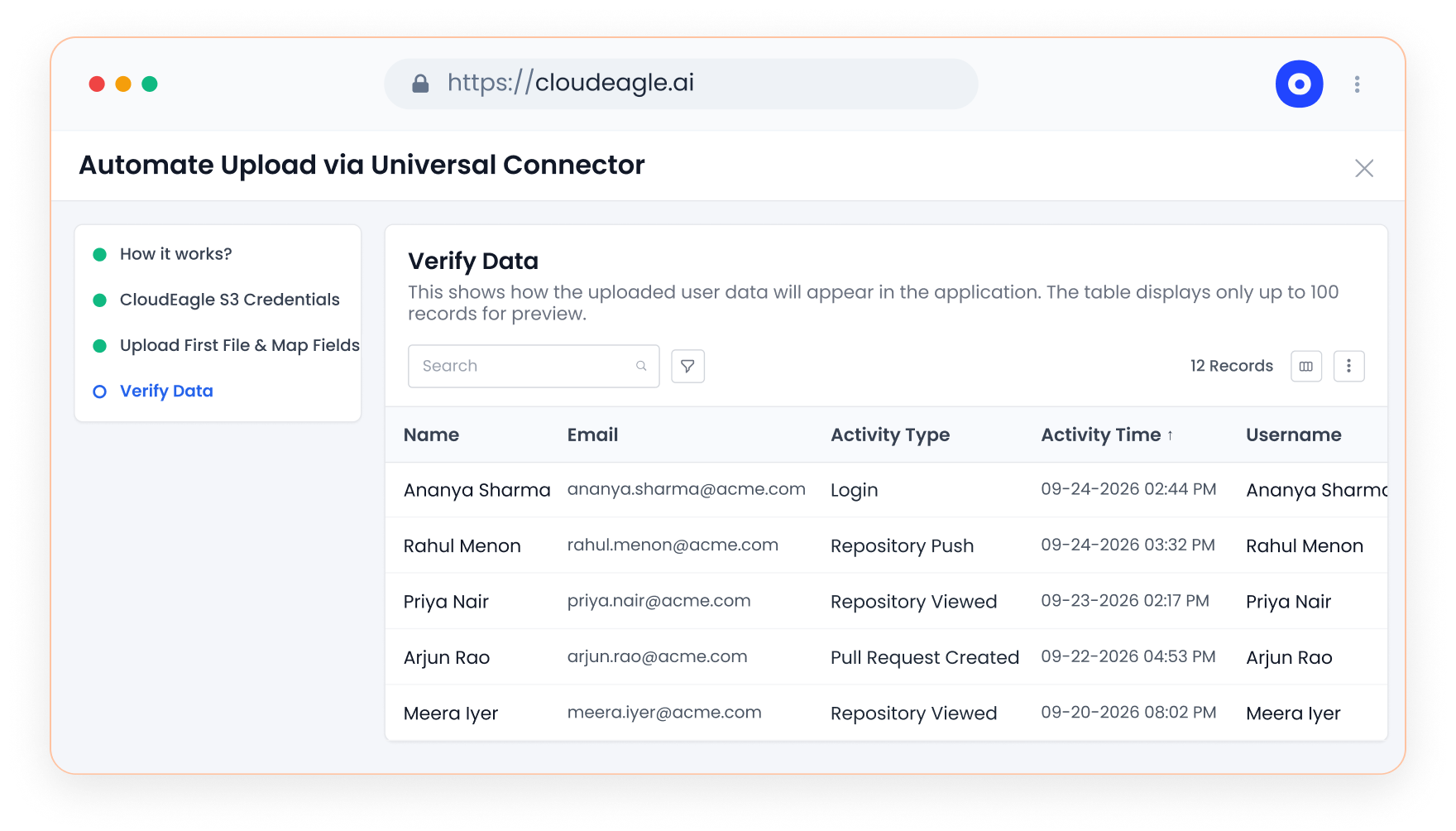
If an app has the APIs we need, a custom connector is the other option. We confirm feasibility first, then estimate three to six weeks.

‍

Where Should You Start With Hybrid Identity Governance?

Start hybrid identity governance with the on-prem apps that cost the most or carry the most access risk, and where access runs through Active Directory groups. 

Connect those, prove the workflow, then add the rest in phases.

  1. List your on-prem apps and note which ones grant access through Active Directory groups.
  2. Find where each app's usage data lives.
  3. Pick the five with the highest cost or risk.
  4. Run offboarding and license harvesting on those first.

‍

Why Do On-Prem Apps Fall Outside Most Governance Programs?

They fall outside because governance tools were built around apps with modern APIs, and on-prem apps rarely have them. 

Changes run through tickets and admin consoles, so lifecycle, reviews, and license cleanup depend on people remembering to do them.

A rule nobody can enforce is a suggestion. The gap shows up in three places:

  • Offboarding reaches the connected apps and stops there.
  • Licenses stay assigned long after projects end, so you pay for them until the annual renewal.
  • Audit evidence comes from tickets and email threads.

The fix is to connect these apps to the same workflows as everything else, not to migrate them. That's what hybrid identity governance means in practice: one set of rules for every app, wherever it runs.

‍

Wrapping up

On-prem apps don’t need their own governance program. They need a way to be acted on, and that’s what we add.

Through an Active Directory agent, Entra ID groups, and usage data you upload, on-prem apps run through the same onboarding, offboarding, and license harvesting workflows as the rest of your estate. 

You get one set of rules, one audit trail, and one place to see who has access and who holds a license.

Start with the five on-prem apps that cost the most or carry the most access risk. Connect them, prove the workflow, and add the rest in phases. 

To see it on your own apps, book a demo with us.

‍

‍

Frequently Asked Questions

1. Is CloudEagle.ai only for SaaS apps?

No. We govern SaaS and AI apps, and we act on on-prem apps through the Active Directory agent and Entra ID groups, with usage data that you upload.

2. How does CloudEagle.ai connect to Active Directory?

Through an agent that runs inside your network and talks to Active Directory over LDAP. It uses a dedicated account scoped to your domain and organizational unit, and you choose read-only or read/write access.

3. Do you need software on employee devices?

No. The agent sits in your network, not on laptops. CloudEagle.ai has no desktop agent.

4. What if an on-prem app has no API?

You can still manage access through Active Directory groups and upload usage data through S3 ingestion. A custom connector needs the app to have an API.

5. Can you downgrade a license instead of removing it?

Yes. If each license tier maps to an Active Directory group, we remove the advanced group and add the basic one in one run.

6. How long does it take to connect an on-prem app?

Custom connectors take an estimated three to six weeks. Timelines for the Active Directory agent and S3 ingestion depend on your environment, and we scope them with you in a demo.

‍

Advertisement for a SaaS Subscription Tracking Template with a call-to-action button to download and a partial graphic of a tablet showing charts.Banner promoting a SaaS Agreement Checklist to streamline SaaS management and avoid budget waste with a call-to-action button labeled Download checklist.Blue banner with text 'The Ultimate Employee Offboarding Checklist!' and a black button labeled 'Download checklist' alongside partial views of checklist documents from cloudeagle.ai.Digital ad for download checklist titled 'The Ultimate Checklist for IT Leaders to Optimize SaaS Operations' by cloudeagle.ai, showing checklist pages.Slack Buyer's Guide offer with text 'Unlock insider insights to get the best deal on Slack!' and a button labeled 'Get Your Copy', accompanied by a preview of the guide featuring Slack's logo.Monday Pricing Guide by cloudeagle.ai offering exclusive pricing secrets to maximize investment with a call-to-action button labeled Get Your Copy and an image of the guide's cover.Blue banner for Canva Pricing Guide by cloudeagle.ai offering a guide to Canva costs, features, and alternatives with a call-to-action button saying Get Your Copy.Blue banner with white text reading 'Little-Known Negotiation Hacks to Get the Best Deal on Slack' and a white button labeled 'Get Your Copy'.Blue banner with text 'Little-Known Negotiation Hacks to Get the Best Deal on Monday.com' and a white button labeled 'Get Your Copy'.Blue banner with text 'Little-Known Negotiation Hacks to Get the Best Deal on Canva' and a white button labeled 'Get Your Copy'.Banner with text 'Slack Buyer's Guide' and a 'Download Now' button next to images of a guide titled 'Slack Buyer’s Guide: Features, Pricing & Best Practices'.Digital cover of Monday Pricing Guide with a button labeled Get Your Copy on a blue background.Canva Pricing Guide cover with a button labeled Get Your Copy on a blue gradient background.

Enter your email to
unlock the report

Oops! Something went wrong while submitting the form.
License Count
Benchmark
Per User/Per Year

Enter your email to
unlock the report

Oops! Something went wrong while submitting the form.
License Count
Benchmark
Per User/Per Year

Enter your email to
unlock the report

Oops! Something went wrong while submitting the form.
Notion Plus
License Count
Benchmark
Per User/Per Year
100-500
$67.20 - $78.72
500-1000
$59.52 - $72.00
1000+
$51.84 - $57.60
Canva Pro
License Count
Benchmark
Per User/Per Year
100-500
$74.33-$88.71
500-1000
$64.74-$80.32
1000+
$55.14-$62.34

Enter your email to
unlock the report

Oops! Something went wrong while submitting the form.

Enter your email to
unlock the report

Oops! Something went wrong while submitting the form.
Zoom Business
License Count
Benchmark
Per User/Per Year
100-500
$216.00 - $264.00
500-1000
$180.00 - $216.00
1000+
$156.00 - $180.00

Enter your email to
unlock the report

Oops! Something went wrong while submitting the form.

Get the Right Security Platform To Secure Your Cloud Infrastructure

Please enter a business email
Thank you!
The 2023 SaaS report has been sent to your email. Check your promotional or spam folder.
Oops! Something went wrong while submitting the form.

Access full report

Please enter a business email
Thank you!
The 2023 SaaS report has been sent to your email. Check your promotional or spam folder.
Oops! Something went wrong while submitting the form.

TL;DR

  • On-prem application governance is the easier half of the problem. These apps are known, finite, and expensive. What's missing is the ability to act on them.
  • We act on on-prem apps through an agent that connects to Active Directory over LDAP and through Entra ID groups, and we take in usage data that you upload.
  • Once connected, on-prem apps run through the same onboarding, offboarding, and license harvesting workflows as your SaaS apps.
  • We govern access and licenses. We don't scan your network for apps or replace device management.
  • CloudEagle.ai gives you one place to run access and licenses across SaaS, AI, and on-prem.

‍

CloudEagle.ai helps enterprises govern access and licenses across their SaaS and AI applications, bringing visibility and automation to application access, employee lifecycle management, and license optimization.

Now, CloudEagle.ai is extending these capabilities to on-prem applications, bringing them into the same governance framework as SaaS and AI.

This expansion helps enterprises address the gaps that often arise when different parts of their application ecosystem are managed through separate processes and tools.

With SaaS, AI, and on-prem applications under one platform, IT teams can take a more consistent approach to managing access and licenses across the enterprise.

Here's how CloudEagle.ai extends its existing workflows to on-prem environments.

‍

How CloudEagle.ai Governs On-Prem Applications

It extends to on-prem applications through three mechanisms: an Active Directory agent that connects over LDAP, Entra ID groups, and usage data that you upload.

This allows IT teams to manage user access, automate employee lifecycle changes, and reclaim unused licenses without replacing their existing infrastructure.

‍

How Does CloudEagle.ai Connect to On-Prem Apps?

We work with on-prem apps three ways, matched to how each app handles access and where its usage data lives. 

An agent changes access in Active Directory over LDAP, Entra ID groups cover apps whose access syncs to Entra ID, and uploaded usage data shows who is using what.

1. The Active Directory Agent

We deploy an agent inside your network that connects to your Active Directory over LDAP, the standard way directories answer requests. 

You register it with CloudEagle.ai, point it at your domain and organizational unit, and give it a dedicated account that limits what it can touch.

You choose read-only or read/write access. Test the connection, save it, and the agent starts working with your directory. In read/write mode, it adds and removes specific groups for a user.

For leavers, you choose what happens:

  • Disable the account
  • Remove all group memberships
  • Move the user to another organizational unit

You can check our work. Every request is logged from queued to completed, and the change shows up in Active Directory itself.

2. Entra ID Sync

If your on-prem apps are connected and synced to Entra ID, we deprovision users through their Azure groups.

Apps that aren't synced fall outside this route. We act on access here. We don't track on-prem usage ourselves.

3. S3 Ingestion and Custom Connectors

We have no desktop agent, so for on-prem apps the usage data comes from you. You upload it through S3 ingestion: CloudEagle.ai picks the file up, and you map its columns once from a ten-row sample.

Metering tools such as SCCM can produce that data, but we don't read them directly today. You export the report and upload it. For endpoint-level usage, we also work with partner tools that run an agent on devices.

If an app has the APIs we need, a custom connector is the other option. We confirm feasibility first, then estimate three to six weeks.

‍

Where Should You Start With Hybrid Identity Governance?

Start hybrid identity governance with the on-prem apps that cost the most or carry the most access risk, and where access runs through Active Directory groups. 

Connect those, prove the workflow, then add the rest in phases.

  1. List your on-prem apps and note which ones grant access through Active Directory groups.
  2. Find where each app's usage data lives.
  3. Pick the five with the highest cost or risk.
  4. Run offboarding and license harvesting on those first.

‍

Why Do On-Prem Apps Fall Outside Most Governance Programs?

They fall outside because governance tools were built around apps with modern APIs, and on-prem apps rarely have them. 

Changes run through tickets and admin consoles, so lifecycle, reviews, and license cleanup depend on people remembering to do them.

A rule nobody can enforce is a suggestion. The gap shows up in three places:

  • Offboarding reaches the connected apps and stops there.
  • Licenses stay assigned long after projects end, so you pay for them until the annual renewal.
  • Audit evidence comes from tickets and email threads.

The fix is to connect these apps to the same workflows as everything else, not to migrate them. That's what hybrid identity governance means in practice: one set of rules for every app, wherever it runs.

‍

Wrapping up

On-prem apps don’t need their own governance program. They need a way to be acted on, and that’s what we add.

Through an Active Directory agent, Entra ID groups, and usage data you upload, on-prem apps run through the same onboarding, offboarding, and license harvesting workflows as the rest of your estate. 

You get one set of rules, one audit trail, and one place to see who has access and who holds a license.

Start with the five on-prem apps that cost the most or carry the most access risk. Connect them, prove the workflow, and add the rest in phases. 

To see it on your own apps, book a demo with us.

‍

‍

Frequently Asked Questions

1. Is CloudEagle.ai only for SaaS apps?

No. We govern SaaS and AI apps, and we act on on-prem apps through the Active Directory agent and Entra ID groups, with usage data that you upload.

2. How does CloudEagle.ai connect to Active Directory?

Through an agent that runs inside your network and talks to Active Directory over LDAP. It uses a dedicated account scoped to your domain and organizational unit, and you choose read-only or read/write access.

3. Do you need software on employee devices?

No. The agent sits in your network, not on laptops. CloudEagle.ai has no desktop agent.

4. What if an on-prem app has no API?

You can still manage access through Active Directory groups and upload usage data through S3 ingestion. A custom connector needs the app to have an API.

5. Can you downgrade a license instead of removing it?

Yes. If each license tier maps to an Active Directory group, we remove the advanced group and add the basic one in one run.

6. How long does it take to connect an on-prem app?

Custom connectors take an estimated three to six weeks. Timelines for the Active Directory agent and S3 ingestion depend on your environment, and we scope them with you in a demo.

‍

CloudEagle.ai recognized in the 2025 Gartner® Magic Quadrant™ for SaaS Management Platforms
Download now
gartner chart
5x
Faster employee
onboarding
80%
Reduction in time for
user access reviews
30k
Workflows
automated
$15Bn
Analyzed in
contract spend
$2Bn
Saved in
SaaS spend

Streamline SaaS governance and save 10-30%

Book a Demo with Expert
CTA image