You need to enable JavaScript in order to use the AI chatbot tool powered by ChatBot

5 Ways to Prioritize and Mitigate SAM Risks Effectively

Share via:
blog-cms-banner-bg
Little-Known Negotiation Hacks to Get the Best Deal on Slack
cta-bg-blogDownload Your Copy

HIPAA Compliance Checklist for 2025

Download PDF

Stop Threat Actors Before They Compromise Your Saas Stack

This IT-trusted security checklist helps you audit user access, verify permissions, and prevent data leaks 2X faster!

Get Free SaaS Security Checklist
CTA Thumbnail

Are your unmanaged software assets putting your enterprise at security risk?

In modern enterprises, hundreds of SaaS apps are in use, and unmanaged licenses, untracked software, or non-compliant usage can quickly create financial, operational, and security risks. 

Effective Software Asset Management (SAM) ensures every application is properly licensed, monitored, and optimized, helping organizations reduce costs and maintain compliance.

Proactively managing SAM risks allows IT, finance, and security teams to optimize SaaS usage, prevent overspending, and safeguard against audits and security issues. Prioritizing these risks ensures applications are used efficiently, aligned with corporate policies, and fully compliant.

Let’s explore the most effective ways to mitigate SAM risks.

TL;DR

  • Unmanaged licenses, redundant tools, and untracked apps create financial waste, audit exposure, and security vulnerabilities.
  • Without automation, tracking software usage, enforcing compliance, and auditing licenses is time-consuming and error-prone.
  • Identify and classify software by compliance, security, and operational criticality to focus mitigation efforts where they matter most.
  • Use asset management software to automate license tracking, monitor usage continuously, and align IT, finance, and security teams.
  • Solutions like CloudEagle.ai centralize software data, provide actionable insights, prevent Shadow IT, and ensure proactive SAM governance.

What are SAM Risks?

Software Asset Management (SAM) risks encompass the challenges and exposures enterprises face when managing software assets inefficiently. These risks can significantly impact compliance, security, and costs across the organization. 

Research indicates that up to 44% of SaaS licenses are wasted or underutilized, leading to substantial financial losses.

Common SAM Risks and Their Impact

You're wasting 25% of your SaaS budget on unused licenses.

IT teams are using this guide to identify, reclaim, and prevent license waste across entire stack.

Download Free eBook
CTA Thumbnail

Why Enterprises Need to Address Software Asset Management Risks?

Unmanaged software assets can inflate costs, create security risks, and lead to compliance penalties. Effective SAM helps enterprises cut expenses, stay compliant, and maintain IT control.

1. Rampant Shadow IT & Untracked Saas Usage

When employees use unauthorized apps without IT supervision (known as shadow IT), it creates hidden security and compliance gaps. Uncontrolled SaaS use can expose sensitive data and increase the risk of breaches and regulatory violations. Enterprises must manage this to protect assets and maintain compliance.

Explore this inspiring story of how Rec Room gets complete visibility on free apps used by its teams.

2. Heavy Fines for License Non-compliance

Ignoring SaaS licensing rules can cost companies millions in fines. Using more SaaS licenses than purchased may trigger audits, legal issues, and strained vendor relationships. Proper license management keeps companies compliant and avoids these costly problems.

For example, Adobe conducted audits and found companies using more licenses than purchased, resulting in penalties exceeding $500,000 in some cases. 

3. Wasted Spend On Redundant Or Unused Licenses

Many companies buy more software licenses than they actually use, wasting large sums on unused or duplicate licenses. Without clear visibility and application rationalization, these wasted costs accumulate quickly, reducing the return on technology investments. Tracking and reclaiming unused licenses maximizes software spending efficiency.
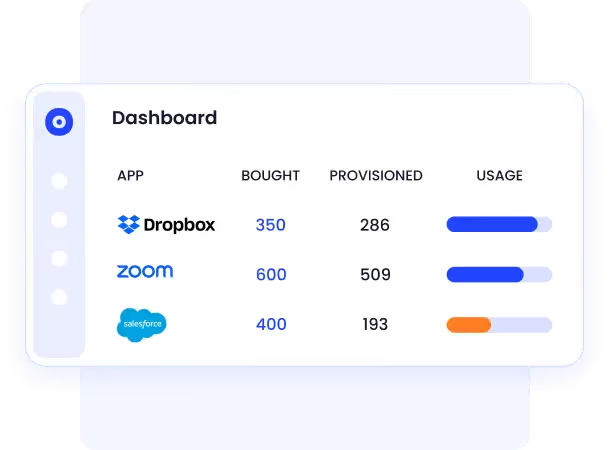
Unused Licenses

4. Increased Security Risks From Unauthorized Software

Unauthorized or outdated software creates vulnerabilities that hackers can exploit to damage data and systems. When software use is not monitored, IT teams cannot enforce security policies or remove risky applications. Proper SAM programs identify and eliminate unauthorized software to minimize cybersecurity threats.

5. Poor Vendor And Renewal Management Hurting Budgets

Without organized contract tracking and renewal management, companies miss key deadlines and lose bargaining power with vendors. This leads to paying inflated fees and missing out on discounts. Automating renewal tracking and vendor management ensures companies renegotiate on time and save money.

6. Inaccurate Or Outdated Software Asset Records

Using spreadsheets or disconnected systems to track software assets results in errors, missed updates, and incomplete data. This hinders proper license management, compliance reporting, and budgeting. Collecting and maintaining accurate asset records in a centralized system is crucial for effective SAM.

7. Manual Processes Causing Inefficiency And Audit Delays

Manually tracking licenses and preparing for audits takes up valuable IT time and often results in errors. These slow processes delay compliance and increase the risk of penalties. Automating asset management workflows improves accuracy, speeds audits, and frees up IT staff to focus on more strategic priorities.

How to Address SAM Risks Effectively?

Effectively managing software asset management (SAM) risks isn’t just about staying compliant; it’s about building long-term IT resilience. When enterprises take a proactive, data-driven approach to SAM, they reduce compliance issues, optimize software spend, and strengthen overall IT governance.

Here are five proven strategies to address SAM risks effectively and make your software environment more secure, cost-efficient, and audit-ready:

1. Identify and Classify Software Risks Early

The first step in mitigating SAM risks is gaining complete visibility into your software ecosystem. Many enterprises underestimate how much software is in use, especially with the rise of shadow IT, free trials, and decentralized purchasing.

Start by conducting a comprehensive software inventory using automated discovery tools. Catalog every application, licensed, unlicensed, or SaaS-based, and classify them based on their risk profile:

  • Compliance Risk: Apps with expired or misused licenses that could trigger vendor audits or legal penalties.
  • Security Risk: Software with weak controls, unpatched vulnerabilities, or unmanaged access.
  • Operational Risk: Critical apps with no redundancy plan or insufficient oversight.

By classifying software this way, IT and procurement teams can prioritize high-risk applications for immediate review and mitigation, turning visibility into actionable control.

2. Strengthen Compliance and License Governance

Poor license governance is one of the biggest causes of financial waste and audit exposure. Many enterprises pay for unused software, exceed license limits, or lose track of renewals.

To address this:

  • Centralize license tracking in one repository that covers all vendors and contracts.
  • Automate renewal alerts and assign ownership for each license to prevent lapses.
  • Establish clear policies for software procurement, renewal approvals, and usage audits.
  • Regularly reconcile purchase records with deployment data to ensure you’re paying only for what’s being used.

A disciplined approach to license governance minimizes audit risk and maximizes value from every software investment.

3. Automate Software Tracking and Usage Monitoring

Manual tracking through spreadsheets can’t keep pace with modern SaaS environments. It’s error-prone, reactive, and lacks real-time accuracy.

Automation transforms this process by continuously tracking:

  • Software usage: who’s using what, how often, and on which devices.
  • License consumption: to detect underutilized or over-allocated licenses.
  • Unauthorized installations: identifying and flagging shadow IT instantly.

Automated software asset management systems generate accurate, real-time reports that highlight usage trends, compliance gaps, and optimization opportunities. This allows IT leaders to make faster, data-backed decisions while eliminating guesswork.

Automation doesn’t just save time; it builds predictability and confidence into your SAM program.

4. Implement Strong Vendor and Contract Management Practices

Vendors are at the core of SAM success or failure. Without structured vendor oversight, organizations risk renewal penalties, contract violations, and unbudgeted cost overruns.

To minimize vendor-related SAM risks:

  • Maintain a centralized contract repository with all vendor agreements, renewal dates, and licensing terms.
  • Review vendor compliance clauses regularly, ensuring that usage stays within limits.
  • Evaluate vendors based on security, support quality, and flexibility of licensing models.
  • Use consumption data to negotiate renewals and eliminate shelfware, licenses that are paid for but never used.

Strong vendor governance ensures that your organization remains compliant while optimizing costs and building more transparent, accountable partnerships.

5. Integrate SAM Across IT, Finance, and Security Teams

One of the biggest SAM challenges is treating it as an IT-only function. True SAM maturity comes from cross-functional collaboration between IT, finance, procurement, and security.

  • IT Teams provide deployment data, system integrations, and technical control.
  • Finance Teams ensure budget visibility, identify cost inefficiencies, and measure ROI.
  • Security Teams assess software risks, vulnerabilities, and access permissions.

When these functions operate in sync, SAM shifts from a compliance exercise to a strategic enabler.

This integration helps enterprises:

  • Link financial and operational data for smarter spending.
  • Detect non-compliant software faster and fix it before audits.
  • Align software access policies with identity and access governance frameworks.

Collaboration ensures every department understands the why behind SAM, and contributes to the how of continuous improvement.

1 in 3 apps in your environment may be Shadow IT. Identify them Today!

This guide helps you surface hidden apps, rationalize them and save on spend.

  • Reveal and control unauthorized apps
  • Reduce security risks from unknown tools
  • Cut unnecessary SaaS spending
  • Simplify SaaS management and compliance
Download the eBook
CTA Thumbnail

How CloudEagle.ai Addresses SAM Risks?

CloudEagle.ai helps enterprises turn Software Asset Management (SAM) from a reactive chore into a proactive risk control strategy. Instead of simply tracking licenses, it helps IT, finance, and security teams detect hidden risks, maintain compliance, reduce waste, and prevent security exposure; all from one intelligent platform.

Here’s how CloudEagle.ai tackles the biggest SAM risks enterprises face:

1. Tackling Shadow IT and Hidden Software Risks

Risk: Unapproved or hidden SaaS apps create compliance blind spots and expose sensitive data.

Detects Shadow IT and Untracked Applications

How CloudEagle.ai mitigates it:

  • Continuously scans your ecosystem to detect untracked or unauthorized SaaS applications.
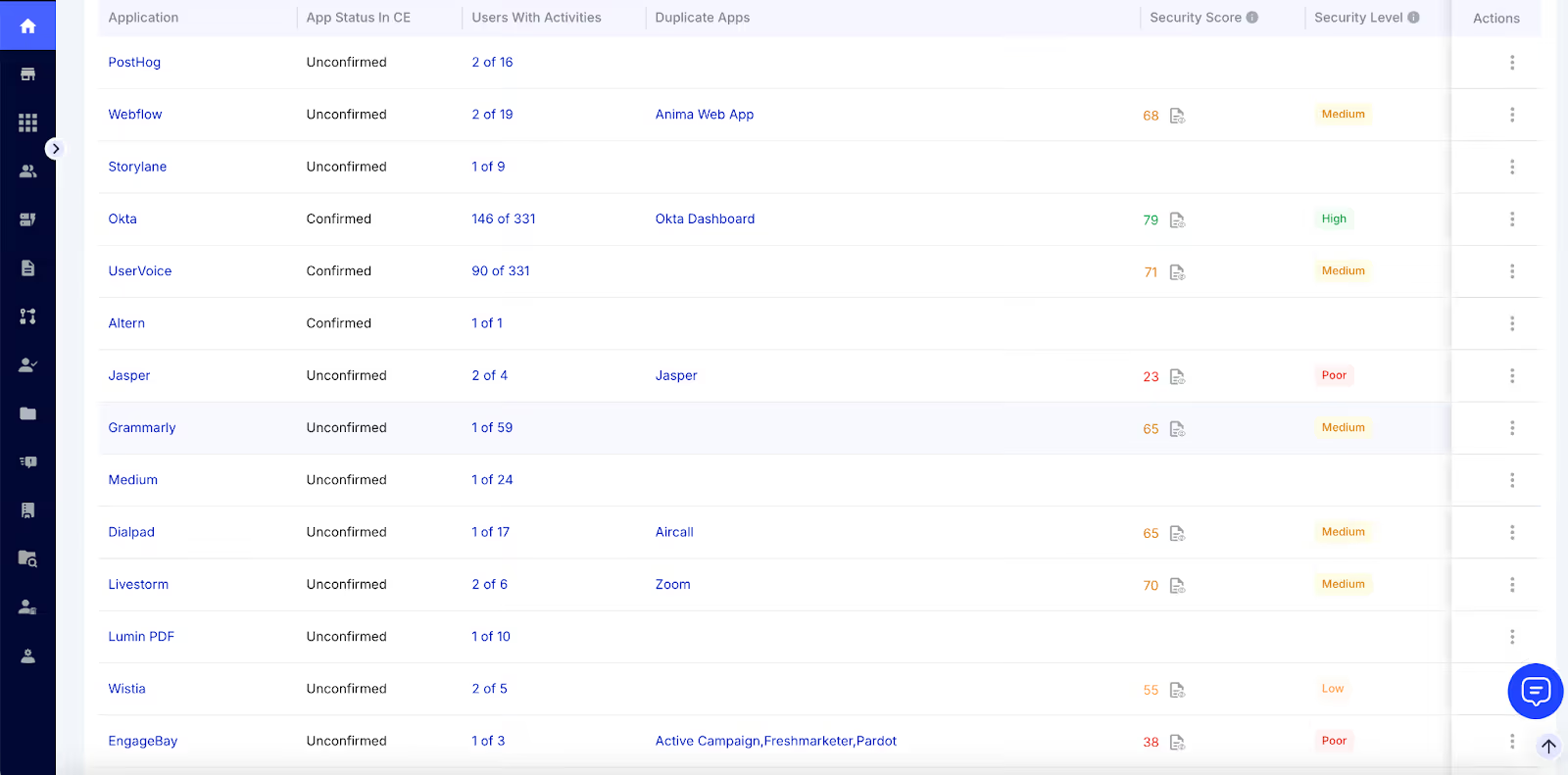
CloudEagle.ai Dashboard

  • Flag risky, duplicate, or non-compliant apps instantly.
  • Centralizes all shadow IT data on a single dashboard, allowing IT to approve, restrict, or remove access quickly.

This eliminates visibility gaps, enforces policy control, and ensures every app meets governance and compliance standards, reducing data breach and audit risks.

Discover how CloudEagle.ai saves RingCentral $250K by consolidating duplicate apps.

Quote

2. Preventing License Waste and Overspending

Risk: Idle or duplicate licenses inflate costs and create inaccurate financial reporting.

How CloudEagle.ai mitigates it:

  • Tracks real-time SaaS usage to identify unused or underutilized licenses.
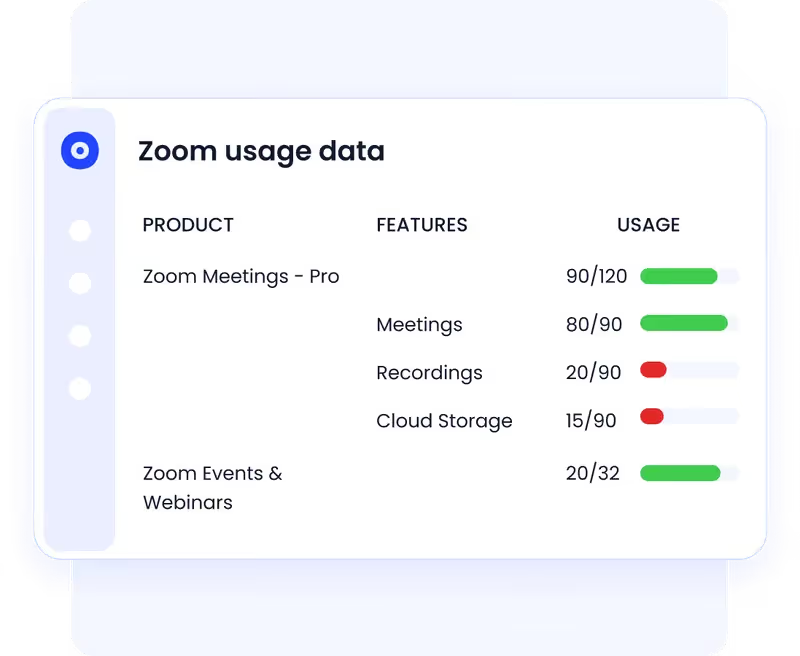
License Usage

  • Automates license harvesting and reallocation workflows.
  • Provides cost optimization insights based on usage trends and contract terms.

By reclaiming unused licenses with license harvesting workflows and consolidating duplicates, CloudEagle.ai helps teams cut SaaS spend by up to 30% and redirect that budget toward innovation.

Know how CloudEagle.ai saves RingCentral time and costs in license harvesting.

3. Ensuring License Compliance and Audit Readiness

Risk: Poor license tracking leads to non-compliance penalties and audit failures.

How CloudEagle.ai mitigates it:

  • Maintains real-time license tracking and usage logs for all software.
  • Sends proactive alerts for expiring or overused licenses.
  • Generates audit-ready compliance reports that document due diligence.

With CloudEagle.ai, enterprises can demonstrate continuous compliance, avoid legal penalties, and stay fully prepared for vendor audits without last-minute panic.

4. Reducing Security Vulnerabilities from Unmanaged Software

Risk: Unpatched, outdated, or unauthorized apps increase cyber risk and insider threats.

How CloudEagle.ai mitigates it:

  • Flag high-risk, outdated, or non-compliant apps across your environment.
  • Enforces least-privilege access policies and monitors privileged accounts.
  • Automatically aligns software access controls with corporate security standards.

This proactive oversight prevents unauthorized access, strengthens SaaS security, and helps prevent data leaks or ransomware risks tied to shadow or unmanaged tools.

5. Avoiding Renewal Gaps and Contract Mismanagement

Risk: Missed renewals or mismanaged vendor contracts lead to service interruptions, overspending, or compliance lapses.
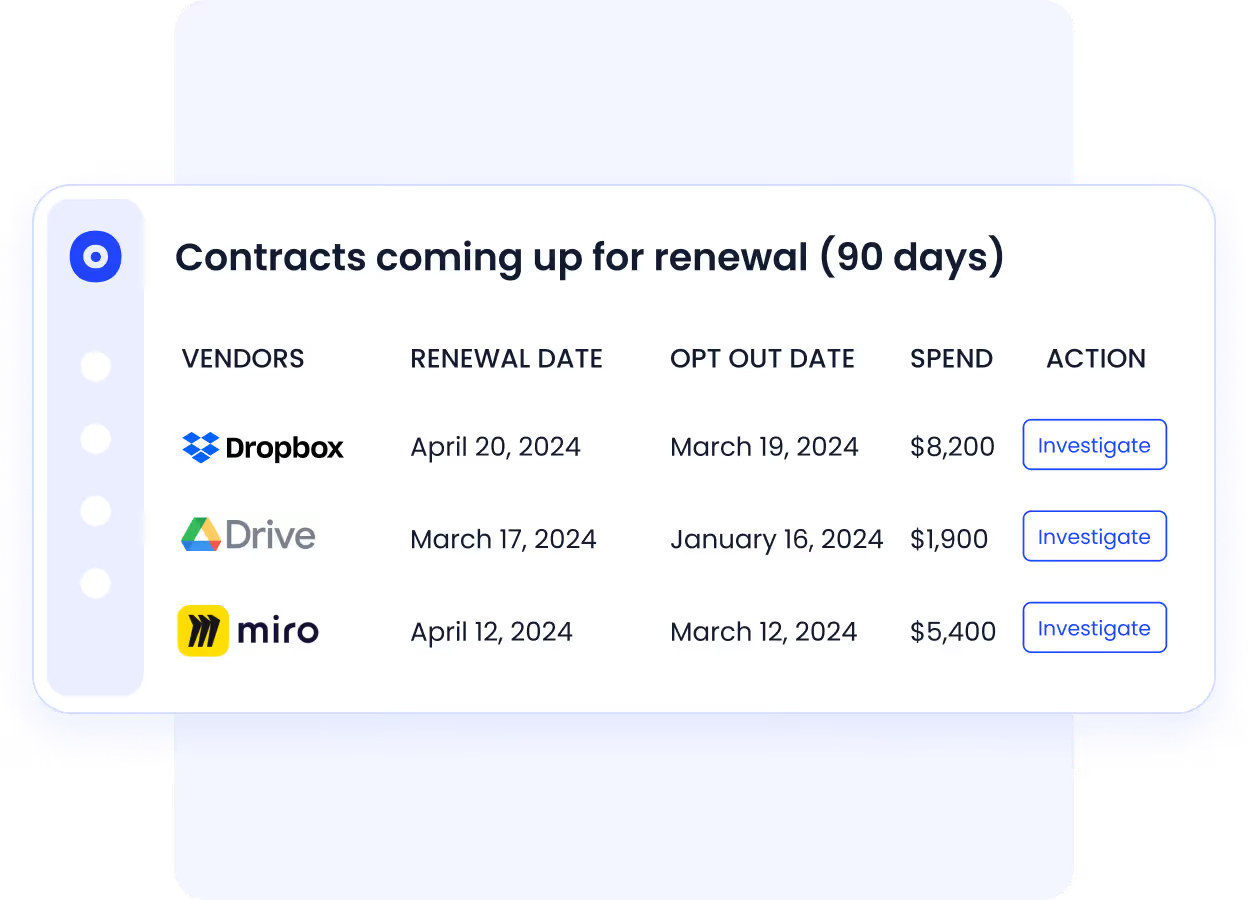
SaaS Renewal Calendar

How CloudEagle.ai mitigates it:

  • Centralizes all vendor contracts, renewals, and license data.
  • Sends smart alerts for upcoming renewals and audit checkpoints.
  • Provides analytics for negotiation readiness and spend forecasting.

This ensures no missed renewals, no duplicate contracts, and no untracked vendor obligations, keeping the organization compliant and financially optimized.

6. Eliminating Data Silos and Inconsistent Records

Risk: Fragmented software data across spreadsheets, IT systems, and departments leads to compliance errors and poor decisions.

How CloudEagle.ai mitigates it:

  • Consolidates all license, contract, and usage data into one centralized source of truth.
  • Uses AI metadata extraction to auto-capture key terms, renewal dates, and license limits.

Centralized Contract Records

  • Gives IT, finance, and security teams shared visibility for better alignment and accountability.

With accurate, real-time data, organizations gain control over software spend, governance, and compliance from a single dashboard.

7. Overcoming Manual Inefficiency and Resource Drain

Risk: Manual SAM workflows waste time and increase human error.

How CloudEagle.ai mitigates it:

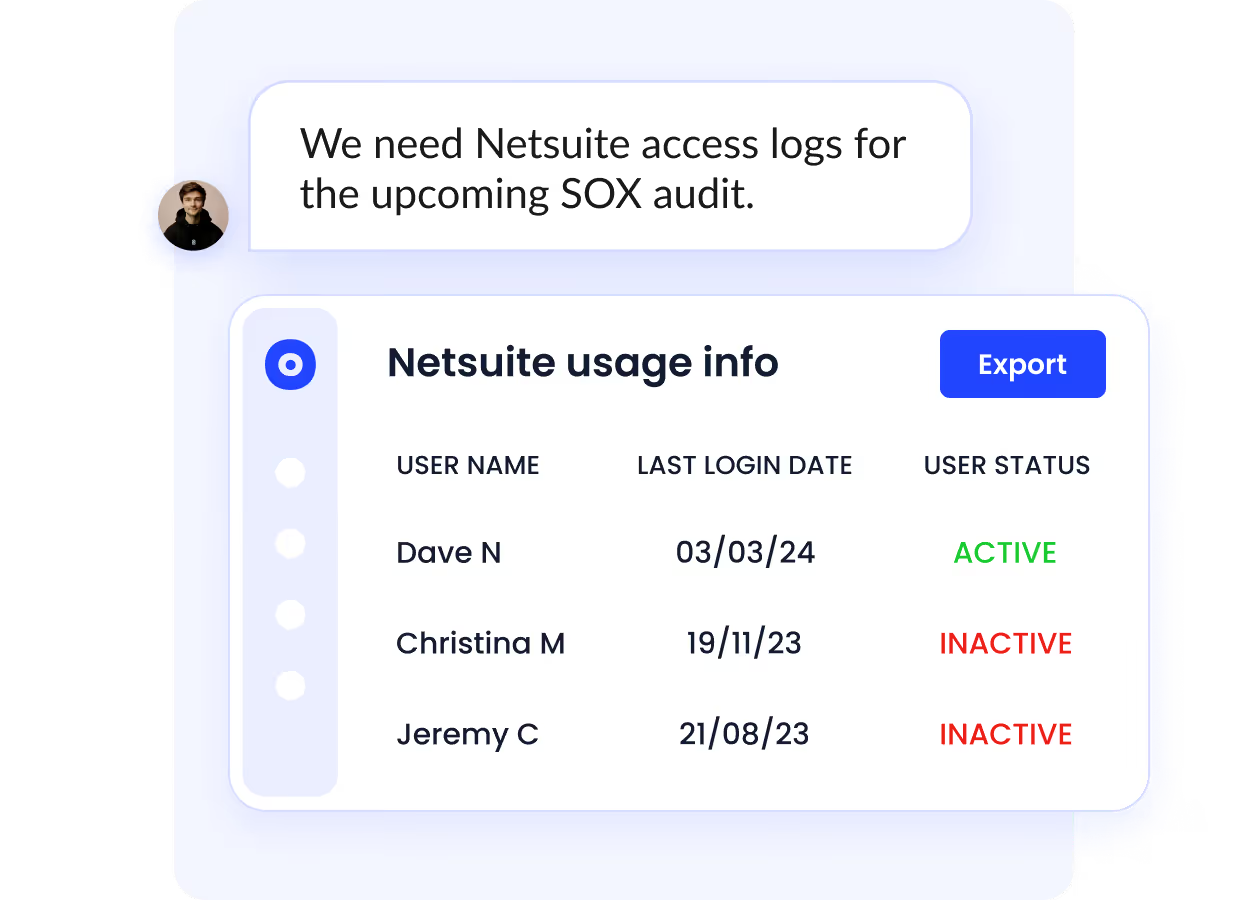
  • Automates tedious SAM tasks like app access reviews, usage reporting, and license validation.
App Access Reviews

  • Streamlines approvals, renewals, and audits with built-in workflows.
  • Generates instant compliance and financial reports.

This automation reduces human dependency, speeds up audits, and frees IT resources for strategic work instead of admin-heavy processes.

Check out this testimonial where Iffi Wallah, Co-founder and CEO of Edge, discusses how Edge gains complete visibility using CloudEagle in a comprehensive video.

Conclusion

Managing software assets without proper supervision exposes enterprises to financial, operational, and security risks. SAM risks, from redundant licenses to unauthorized software usage, can quickly escalate if not proactively addressed.

CloudEagle.ai transforms software asset management by centralizing visibility, automating license tracking, and providing AI-driven insights. IT, finance, and security teams can collaborate seamlessly, detect risks early, enforce compliance, and optimize software spend, all from a single platform.

By adopting CloudEagle.ai, enterprises move from reactive, manual SAM processes to proactive, automated governance. This ensures reduced compliance gaps, better cost control, and strengthened operational efficiency.

Ready to streamline your enterprise SaaS management and protect against SAM risks?

Schedule a demo with CloudEagle.ai to simplify your software asset management.

IT teams spend 100+ hours/month manually tracking SaaS tools.

Automate optimization with this proven SaaS management framework.

Grab the Free eBook
CTA Thumbnail

FAQs

1. What do you mean by software asset management (SAM)?

Software Asset Management (SAM) is the process of tracking, managing, and optimizing an organization’s software assets. It ensures compliance, reduces costs, and minimizes security risks across all applications and licenses.

2. What are the 5 stages of asset management?

The five stages are:

  • Planning: Define software needs and policies.
  • Acquisition: Purchase or subscribe to software according to business requirements.
  • Deployment: Install and configure software while assigning proper licenses.
  • Management & Maintenance: Monitor usage, update licenses, and track compliance.
  • Retirement/Decommissioning: Remove unused software and reclaim licenses.

3. What is the importance of SAM?

SAM helps enterprises avoid overspending, ensures compliance with licensing agreements, reduces security vulnerabilities, and improves operational efficiency. It also provides visibility into software usage and supports strategic IT decisions.

4. What is the lifecycle of software asset management?

The SAM lifecycle includes planning, acquisition, deployment, management, and retirement of software. It ensures continuous compliance, optimized spending, and risk mitigation throughout the software’s lifecycle.

5. What is a SAM audit?

A SAM audit is a review of an organization’s software usage and licenses to ensure compliance with vendor agreements. It identifies unlicensed software, redundant licenses, and underutilized applications, helping reduce costs and avoid legal or financial penalties.

Advertisement for a SaaS Subscription Tracking Template with a call-to-action button to download and a partial graphic of a tablet showing charts.Banner promoting a SaaS Agreement Checklist to streamline SaaS management and avoid budget waste with a call-to-action button labeled Download checklist.Blue banner with text 'The Ultimate Employee Offboarding Checklist!' and a black button labeled 'Download checklist' alongside partial views of checklist documents from cloudeagle.ai.Digital ad for download checklist titled 'The Ultimate Checklist for IT Leaders to Optimize SaaS Operations' by cloudeagle.ai, showing checklist pages.Slack Buyer's Guide offer with text 'Unlock insider insights to get the best deal on Slack!' and a button labeled 'Get Your Copy', accompanied by a preview of the guide featuring Slack's logo.Monday Pricing Guide by cloudeagle.ai offering exclusive pricing secrets to maximize investment with a call-to-action button labeled Get Your Copy and an image of the guide's cover.Blue banner for Canva Pricing Guide by cloudeagle.ai offering a guide to Canva costs, features, and alternatives with a call-to-action button saying Get Your Copy.Blue banner with white text reading 'Little-Known Negotiation Hacks to Get the Best Deal on Slack' and a white button labeled 'Get Your Copy'.Blue banner with text 'Little-Known Negotiation Hacks to Get the Best Deal on Monday.com' and a white button labeled 'Get Your Copy'.Blue banner with text 'Little-Known Negotiation Hacks to Get the Best Deal on Canva' and a white button labeled 'Get Your Copy'.Banner with text 'Slack Buyer's Guide' and a 'Download Now' button next to images of a guide titled 'Slack Buyer’s Guide: Features, Pricing & Best Practices'.Digital cover of Monday Pricing Guide with a button labeled Get Your Copy on a blue background.Canva Pricing Guide cover with a button labeled Get Your Copy on a blue gradient background.

Enter your email to
unlock the report

Oops! Something went wrong while submitting the form.
License Count
Benchmark
Per User/Per Year

Enter your email to
unlock the report

Oops! Something went wrong while submitting the form.
License Count
Benchmark
Per User/Per Year

Enter your email to
unlock the report

Oops! Something went wrong while submitting the form.
Notion Plus
License Count
Benchmark
Per User/Per Year
100-500
$67.20 - $78.72
500-1000
$59.52 - $72.00
1000+
$51.84 - $57.60
Canva Pro
License Count
Benchmark
Per User/Per Year
100-500
$74.33-$88.71
500-1000
$64.74-$80.32
1000+
$55.14-$62.34

Enter your email to
unlock the report

Oops! Something went wrong while submitting the form.

Enter your email to
unlock the report

Oops! Something went wrong while submitting the form.
Zoom Business
License Count
Benchmark
Per User/Per Year
100-500
$216.00 - $264.00
500-1000
$180.00 - $216.00
1000+
$156.00 - $180.00

Enter your email to
unlock the report

Oops! Something went wrong while submitting the form.

Get the Right Security Platform To Secure Your Cloud Infrastructure

Please enter a business email
Thank you!
The 2023 SaaS report has been sent to your email. Check your promotional or spam folder.
Oops! Something went wrong while submitting the form.

Access full report

Please enter a business email
Thank you!
The 2023 SaaS report has been sent to your email. Check your promotional or spam folder.
Oops! Something went wrong while submitting the form.

Stop Threat Actors Before They Compromise Your Saas Stack

This IT-trusted security checklist helps you audit user access, verify permissions, and prevent data leaks 2X faster!

Get Free SaaS Security Checklist
CTA Thumbnail

Are your unmanaged software assets putting your enterprise at security risk?

In modern enterprises, hundreds of SaaS apps are in use, and unmanaged licenses, untracked software, or non-compliant usage can quickly create financial, operational, and security risks. 

Effective Software Asset Management (SAM) ensures every application is properly licensed, monitored, and optimized, helping organizations reduce costs and maintain compliance.

Proactively managing SAM risks allows IT, finance, and security teams to optimize SaaS usage, prevent overspending, and safeguard against audits and security issues. Prioritizing these risks ensures applications are used efficiently, aligned with corporate policies, and fully compliant.

Let’s explore the most effective ways to mitigate SAM risks.

TL;DR

  • Unmanaged licenses, redundant tools, and untracked apps create financial waste, audit exposure, and security vulnerabilities.
  • Without automation, tracking software usage, enforcing compliance, and auditing licenses is time-consuming and error-prone.
  • Identify and classify software by compliance, security, and operational criticality to focus mitigation efforts where they matter most.
  • Use asset management software to automate license tracking, monitor usage continuously, and align IT, finance, and security teams.
  • Solutions like CloudEagle.ai centralize software data, provide actionable insights, prevent Shadow IT, and ensure proactive SAM governance.

What are SAM Risks?

Software Asset Management (SAM) risks encompass the challenges and exposures enterprises face when managing software assets inefficiently. These risks can significantly impact compliance, security, and costs across the organization. 

Research indicates that up to 44% of SaaS licenses are wasted or underutilized, leading to substantial financial losses.

Common SAM Risks and Their Impact

You're wasting 25% of your SaaS budget on unused licenses.

IT teams are using this guide to identify, reclaim, and prevent license waste across entire stack.

Download Free eBook
CTA Thumbnail

Why Enterprises Need to Address Software Asset Management Risks?

Unmanaged software assets can inflate costs, create security risks, and lead to compliance penalties. Effective SAM helps enterprises cut expenses, stay compliant, and maintain IT control.

1. Rampant Shadow IT & Untracked Saas Usage

When employees use unauthorized apps without IT supervision (known as shadow IT), it creates hidden security and compliance gaps. Uncontrolled SaaS use can expose sensitive data and increase the risk of breaches and regulatory violations. Enterprises must manage this to protect assets and maintain compliance.

Explore this inspiring story of how Rec Room gets complete visibility on free apps used by its teams.

2. Heavy Fines for License Non-compliance

Ignoring SaaS licensing rules can cost companies millions in fines. Using more SaaS licenses than purchased may trigger audits, legal issues, and strained vendor relationships. Proper license management keeps companies compliant and avoids these costly problems.

For example, Adobe conducted audits and found companies using more licenses than purchased, resulting in penalties exceeding $500,000 in some cases. 

3. Wasted Spend On Redundant Or Unused Licenses

Many companies buy more software licenses than they actually use, wasting large sums on unused or duplicate licenses. Without clear visibility and application rationalization, these wasted costs accumulate quickly, reducing the return on technology investments. Tracking and reclaiming unused licenses maximizes software spending efficiency.

Unused Licenses

4. Increased Security Risks From Unauthorized Software

Unauthorized or outdated software creates vulnerabilities that hackers can exploit to damage data and systems. When software use is not monitored, IT teams cannot enforce security policies or remove risky applications. Proper SAM programs identify and eliminate unauthorized software to minimize cybersecurity threats.

5. Poor Vendor And Renewal Management Hurting Budgets

Without organized contract tracking and renewal management, companies miss key deadlines and lose bargaining power with vendors. This leads to paying inflated fees and missing out on discounts. Automating renewal tracking and vendor management ensures companies renegotiate on time and save money.

6. Inaccurate Or Outdated Software Asset Records

Using spreadsheets or disconnected systems to track software assets results in errors, missed updates, and incomplete data. This hinders proper license management, compliance reporting, and budgeting. Collecting and maintaining accurate asset records in a centralized system is crucial for effective SAM.

7. Manual Processes Causing Inefficiency And Audit Delays

Manually tracking licenses and preparing for audits takes up valuable IT time and often results in errors. These slow processes delay compliance and increase the risk of penalties. Automating asset management workflows improves accuracy, speeds audits, and frees up IT staff to focus on more strategic priorities.

How to Address SAM Risks Effectively?

Effectively managing software asset management (SAM) risks isn’t just about staying compliant; it’s about building long-term IT resilience. When enterprises take a proactive, data-driven approach to SAM, they reduce compliance issues, optimize software spend, and strengthen overall IT governance.

Here are five proven strategies to address SAM risks effectively and make your software environment more secure, cost-efficient, and audit-ready:

1. Identify and Classify Software Risks Early

The first step in mitigating SAM risks is gaining complete visibility into your software ecosystem. Many enterprises underestimate how much software is in use, especially with the rise of shadow IT, free trials, and decentralized purchasing.

Start by conducting a comprehensive software inventory using automated discovery tools. Catalog every application, licensed, unlicensed, or SaaS-based, and classify them based on their risk profile:

  • Compliance Risk: Apps with expired or misused licenses that could trigger vendor audits or legal penalties.
  • Security Risk: Software with weak controls, unpatched vulnerabilities, or unmanaged access.
  • Operational Risk: Critical apps with no redundancy plan or insufficient oversight.

By classifying software this way, IT and procurement teams can prioritize high-risk applications for immediate review and mitigation, turning visibility into actionable control.

2. Strengthen Compliance and License Governance

Poor license governance is one of the biggest causes of financial waste and audit exposure. Many enterprises pay for unused software, exceed license limits, or lose track of renewals.

To address this:

  • Centralize license tracking in one repository that covers all vendors and contracts.
  • Automate renewal alerts and assign ownership for each license to prevent lapses.
  • Establish clear policies for software procurement, renewal approvals, and usage audits.
  • Regularly reconcile purchase records with deployment data to ensure you’re paying only for what’s being used.

A disciplined approach to license governance minimizes audit risk and maximizes value from every software investment.

3. Automate Software Tracking and Usage Monitoring

Manual tracking through spreadsheets can’t keep pace with modern SaaS environments. It’s error-prone, reactive, and lacks real-time accuracy.

Automation transforms this process by continuously tracking:

  • Software usage: who’s using what, how often, and on which devices.
  • License consumption: to detect underutilized or over-allocated licenses.
  • Unauthorized installations: identifying and flagging shadow IT instantly.

Automated software asset management systems generate accurate, real-time reports that highlight usage trends, compliance gaps, and optimization opportunities. This allows IT leaders to make faster, data-backed decisions while eliminating guesswork.

Automation doesn’t just save time; it builds predictability and confidence into your SAM program.

4. Implement Strong Vendor and Contract Management Practices

Vendors are at the core of SAM success or failure. Without structured vendor oversight, organizations risk renewal penalties, contract violations, and unbudgeted cost overruns.

To minimize vendor-related SAM risks:

  • Maintain a centralized contract repository with all vendor agreements, renewal dates, and licensing terms.
  • Review vendor compliance clauses regularly, ensuring that usage stays within limits.
  • Evaluate vendors based on security, support quality, and flexibility of licensing models.
  • Use consumption data to negotiate renewals and eliminate shelfware, licenses that are paid for but never used.

Strong vendor governance ensures that your organization remains compliant while optimizing costs and building more transparent, accountable partnerships.

5. Integrate SAM Across IT, Finance, and Security Teams

One of the biggest SAM challenges is treating it as an IT-only function. True SAM maturity comes from cross-functional collaboration between IT, finance, procurement, and security.

  • IT Teams provide deployment data, system integrations, and technical control.
  • Finance Teams ensure budget visibility, identify cost inefficiencies, and measure ROI.
  • Security Teams assess software risks, vulnerabilities, and access permissions.

When these functions operate in sync, SAM shifts from a compliance exercise to a strategic enabler.

This integration helps enterprises:

  • Link financial and operational data for smarter spending.
  • Detect non-compliant software faster and fix it before audits.
  • Align software access policies with identity and access governance frameworks.

Collaboration ensures every department understands the why behind SAM, and contributes to the how of continuous improvement.

1 in 3 apps in your environment may be Shadow IT. Identify them Today!

This guide helps you surface hidden apps, rationalize them and save on spend.

  • Reveal and control unauthorized apps
  • Reduce security risks from unknown tools
  • Cut unnecessary SaaS spending
  • Simplify SaaS management and compliance
Download the eBook
CTA Thumbnail

How CloudEagle.ai Addresses SAM Risks?

CloudEagle.ai helps enterprises turn Software Asset Management (SAM) from a reactive chore into a proactive risk control strategy. Instead of simply tracking licenses, it helps IT, finance, and security teams detect hidden risks, maintain compliance, reduce waste, and prevent security exposure; all from one intelligent platform.

Here’s how CloudEagle.ai tackles the biggest SAM risks enterprises face:

1. Tackling Shadow IT and Hidden Software Risks

Risk: Unapproved or hidden SaaS apps create compliance blind spots and expose sensitive data.

Detects Shadow IT and Untracked Applications

How CloudEagle.ai mitigates it:

  • Continuously scans your ecosystem to detect untracked or unauthorized SaaS applications.

CloudEagle.ai Dashboard

  • Flag risky, duplicate, or non-compliant apps instantly.
  • Centralizes all shadow IT data on a single dashboard, allowing IT to approve, restrict, or remove access quickly.

This eliminates visibility gaps, enforces policy control, and ensures every app meets governance and compliance standards, reducing data breach and audit risks.

Discover how CloudEagle.ai saves RingCentral $250K by consolidating duplicate apps.

Quote

2. Preventing License Waste and Overspending

Risk: Idle or duplicate licenses inflate costs and create inaccurate financial reporting.

How CloudEagle.ai mitigates it:

  • Tracks real-time SaaS usage to identify unused or underutilized licenses.

License Usage

  • Automates license harvesting and reallocation workflows.
  • Provides cost optimization insights based on usage trends and contract terms.

By reclaiming unused licenses with license harvesting workflows and consolidating duplicates, CloudEagle.ai helps teams cut SaaS spend by up to 30% and redirect that budget toward innovation.

Know how CloudEagle.ai saves RingCentral time and costs in license harvesting.

3. Ensuring License Compliance and Audit Readiness

Risk: Poor license tracking leads to non-compliance penalties and audit failures.

How CloudEagle.ai mitigates it:

  • Maintains real-time license tracking and usage logs for all software.
  • Sends proactive alerts for expiring or overused licenses.
  • Generates audit-ready compliance reports that document due diligence.

With CloudEagle.ai, enterprises can demonstrate continuous compliance, avoid legal penalties, and stay fully prepared for vendor audits without last-minute panic.

4. Reducing Security Vulnerabilities from Unmanaged Software

Risk: Unpatched, outdated, or unauthorized apps increase cyber risk and insider threats.

How CloudEagle.ai mitigates it:

  • Flag high-risk, outdated, or non-compliant apps across your environment.
  • Enforces least-privilege access policies and monitors privileged accounts.
  • Automatically aligns software access controls with corporate security standards.

This proactive oversight prevents unauthorized access, strengthens SaaS security, and helps prevent data leaks or ransomware risks tied to shadow or unmanaged tools.

5. Avoiding Renewal Gaps and Contract Mismanagement

Risk: Missed renewals or mismanaged vendor contracts lead to service interruptions, overspending, or compliance lapses.

SaaS Renewal Calendar

How CloudEagle.ai mitigates it:

  • Centralizes all vendor contracts, renewals, and license data.
  • Sends smart alerts for upcoming renewals and audit checkpoints.
  • Provides analytics for negotiation readiness and spend forecasting.

This ensures no missed renewals, no duplicate contracts, and no untracked vendor obligations, keeping the organization compliant and financially optimized.

6. Eliminating Data Silos and Inconsistent Records

Risk: Fragmented software data across spreadsheets, IT systems, and departments leads to compliance errors and poor decisions.

How CloudEagle.ai mitigates it:

  • Consolidates all license, contract, and usage data into one centralized source of truth.
  • Uses AI metadata extraction to auto-capture key terms, renewal dates, and license limits.

Centralized Contract Records

  • Gives IT, finance, and security teams shared visibility for better alignment and accountability.

With accurate, real-time data, organizations gain control over software spend, governance, and compliance from a single dashboard.

7. Overcoming Manual Inefficiency and Resource Drain

Risk: Manual SAM workflows waste time and increase human error.

How CloudEagle.ai mitigates it:

  • Automates tedious SAM tasks like app access reviews, usage reporting, and license validation.

App Access Reviews

  • Streamlines approvals, renewals, and audits with built-in workflows.
  • Generates instant compliance and financial reports.

This automation reduces human dependency, speeds up audits, and frees IT resources for strategic work instead of admin-heavy processes.

Check out this testimonial where Iffi Wallah, Co-founder and CEO of Edge, discusses how Edge gains complete visibility using CloudEagle in a comprehensive video.

Conclusion

Managing software assets without proper supervision exposes enterprises to financial, operational, and security risks. SAM risks, from redundant licenses to unauthorized software usage, can quickly escalate if not proactively addressed.

CloudEagle.ai transforms software asset management by centralizing visibility, automating license tracking, and providing AI-driven insights. IT, finance, and security teams can collaborate seamlessly, detect risks early, enforce compliance, and optimize software spend, all from a single platform.

By adopting CloudEagle.ai, enterprises move from reactive, manual SAM processes to proactive, automated governance. This ensures reduced compliance gaps, better cost control, and strengthened operational efficiency.

Ready to streamline your enterprise SaaS management and protect against SAM risks?

Schedule a demo with CloudEagle.ai to simplify your software asset management.

IT teams spend 100+ hours/month manually tracking SaaS tools.

Automate optimization with this proven SaaS management framework.

Grab the Free eBook
CTA Thumbnail

FAQs

1. What do you mean by software asset management (SAM)?

Software Asset Management (SAM) is the process of tracking, managing, and optimizing an organization’s software assets. It ensures compliance, reduces costs, and minimizes security risks across all applications and licenses.

2. What are the 5 stages of asset management?

The five stages are:

  • Planning: Define software needs and policies.
  • Acquisition: Purchase or subscribe to software according to business requirements.
  • Deployment: Install and configure software while assigning proper licenses.
  • Management & Maintenance: Monitor usage, update licenses, and track compliance.
  • Retirement/Decommissioning: Remove unused software and reclaim licenses.

3. What is the importance of SAM?

SAM helps enterprises avoid overspending, ensures compliance with licensing agreements, reduces security vulnerabilities, and improves operational efficiency. It also provides visibility into software usage and supports strategic IT decisions.

4. What is the lifecycle of software asset management?

The SAM lifecycle includes planning, acquisition, deployment, management, and retirement of software. It ensures continuous compliance, optimized spending, and risk mitigation throughout the software’s lifecycle.

5. What is a SAM audit?

A SAM audit is a review of an organization’s software usage and licenses to ensure compliance with vendor agreements. It identifies unlicensed software, redundant licenses, and underutilized applications, helping reduce costs and avoid legal or financial penalties.

CloudEagle.ai recognized in the 2025 Gartner® Magic Quadrant™ for SaaS Management Platforms
Download now
gartner chart
5x
Faster employee
onboarding
80%
Reduction in time for
user access reviews
30k
Workflows
automated
$15Bn
Analyzed in
contract spend
$2Bn
Saved in
SaaS spend

Recognized as an Industry leader for our AI

CloudEagle.ai is Recognized in the 2024 Gartner® Magic Quadrant™ for SaaS Management Platforms

Recognition highlights CloudEagle’s innovation and leadership in the rapidly evolving SaaS management and procurement space.
Read More
Gartner Magic Quadrant for SaaS Management Platforms showing a chart divided into Challengers and Leaders quadrants with various companies plotted as dots.

CloudEagle.ai Recognized in the GigaOm Radar for SaaS Management Platforms

CloudEagle named a Leader and Outperformer in GigaOm Radar Report, validating its impact in the SaaS management platform landscape.
Read More
gigaom

Everest Group Positions CloudEagle.ai as a Trailblazer in SaaS Management Platforms

CloudEagle recognized as a Trailblazer by Everest Group, showcasing its rapid growth and innovation in SaaS spend and operations management.
Read More
qks

CloudEagle.ai is Recognized in the 2024 Gartner® Magic Quadrant™ for SaaS Management Platforms

Recognition highlights CloudEagle’s innovation and leadership in the rapidly evolving SaaS management and procurement space.
Read More
gartner

Streamline SaaS governance and save 10-30%

Book a Demo with Expert
CTA image
One platform to Manage
all SaaS Products
Learn More