SaaS Security

How SSPM Closes the Gaps Your IdP and CASB Leave Open

Share via:
Written by:
CloudEagle.ai Team
Review by:
Nidhi Jain
Last Updated:
August 24, 2026
blog-cms-banner-bg
Little-Known Negotiation Hacks to Get the Best Deal on Slack
cta-bg-blogDownload Your Copy

HIPAA Compliance Checklist for 2025

Download PDF

Most security teams already run an identity provider and a CASB, so the real question in any SSPM vs CASB conversation is not which tool wins. It is what each one cannot see.

Your IdP governs the login and your CASB watches the traffic, but neither looks inside the app itself, at how it is configured and which identities have standing access. That blind spot is widening fastest around AI, since AI tools and the connections they open are the newest apps neither tool was built to see. 

Covering it, across your AI and SaaS apps alike, is where SaaS security posture management earns its place.
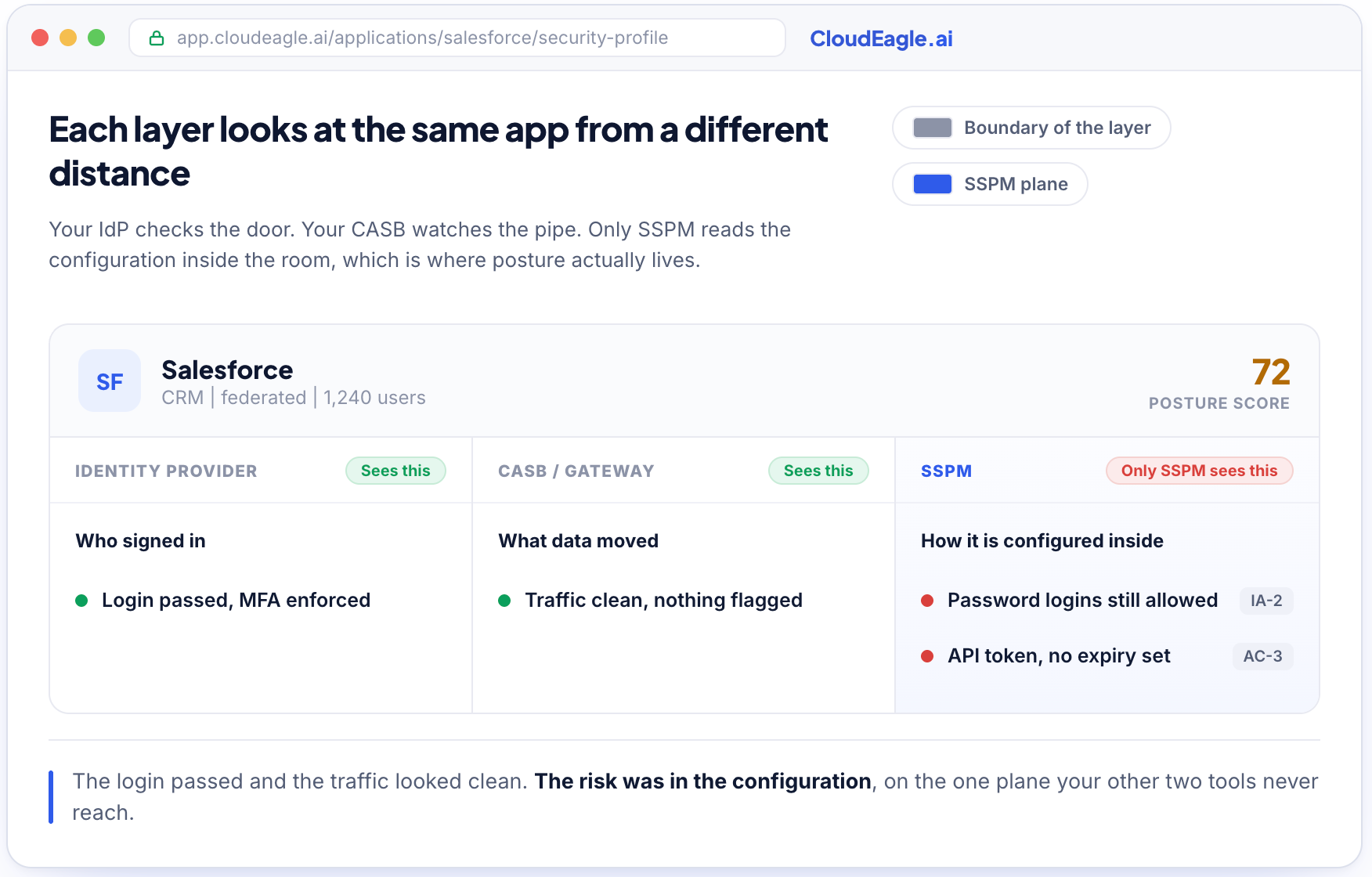
An IdP, a CASB, and SSPM each view the same SaaS app from a different layer, with only SSPM reading the configuration inside.

What is SSPM and Why it Doesn't Replace your IdP or CASB

SSPM covers a layer your IdP and CASB do not reach, across both your AI and SaaS apps, so it adds to that stack rather than replacing any of it.

What Is SaaS Security Posture Management (SSPM)?

SaaS security posture management is a security practice that connects directly to a SaaS or AI application through its API and reads the app's own configuration continuously. 

It watches how the app is set up, not the network traffic around it. G2 now lists SSPM as its own software category for that reason.

It reads the settings your other tools never look at:

  • Whether multi-factor authentication (MFA) is enforced, for all users or only some.
  • Whether single sign-on (SSO) is required, or whether local password logins still work alongside it.
  • How many admin accounts exist, whether that number is defensible, and whether outside partners hold admin access.
  • What data is shared publicly, and how each app maps to a framework like System and Organization Controls (SOC 2) or the National Institute of Standards and Technology (NIST) 800 series.

That focus on configuration is what keeps it from overlapping with the two tools you already run. For the fuller definition, here is what SSPM checks.

Understanding SSPM vs CASB vs IdP

Each tool owns a different layer. Your IdP owns identity at login, your CASB owns traffic in the data path, and SSPM owns configuration inside the app. 

The table shows where each one covers a risk, where it covers only part of it, and where it hands the work to another layer.

What to check IdP (Okta, Entra) CASB (proxy layer) SSPM
Where it operates Identity and login Network traffic path Inside the app, via its API
The question it answers Should this identity be allowed in? Is this traffic and data movement safe? Is the app configured safely, and who has access inside it?
How it connects Identity federation and SSO Endpoint agent and forward proxy, inline Agentless, direct API to each app
App coverage Only apps federated to it Web traffic it can route; native and desktop apps often fall outside its path Apps connected by API; discovery breadth varies by tool
In-app misconfiguration and drift (MFA actually enforced, sharing, admin sprawl) No, sees the login only No, sees the traffic only Yes, reads the app's own settings
OAuth grants and SaaS-to-SaaS connections Partial, only grants it brokered Limited, cloud-to-cloud API calls are off its path Yes, inventories and scores every grant
Service accounts, API keys, AI agents Partial, some workload identities No Yes, in one registry with an owner
Shadow AI and shadow SaaS discovery Only what is federated Only what its traffic path sees Connected apps; correlation depth varies by tool
Compliance posture vs NIST 800, SOC 2 No Partial, data-movement policies Yes, continuous per-app status
Enforcement style Allow or deny at login Inline hard block and data loss prevention (DLP) in the data path Flag, fix config, revoke access or keys, soft policy
Biggest blind spot Apps it never federated Native apps and in-app configuration Inline data-path controls like DLP and hard block

As you read down the SSPM column and the pattern is clear. The gaps your other two tools leave open all live in the same place, inside the app.

How SSPM Reads Your IdP Settings and CASB Logs

SSPM is a reader, not a replacement. It uses what your IdP and CASB already know and adds the view they cannot produce on their own.

In practice it:

  • Pulls federation settings from your IdP to confirm MFA and SSO are enforced per app.
  • Ingests your CASB logs to map network activity back to specific apps and users.
  • Hands your proxy a current list of sanctioned apps so its block decisions get sharper.

There is a line SSPM does not cross, and being precise about it matters. 

It does not sit in the data path, inspect file contents inline, or hard-block traffic at the network layer. That work stays with your CASB, which is built for it.

What SSPM adds is the link a proxy has never had. A proxy can block a category, but it does not know that finance approved one AI tool last week and rejected two others. 

Give it that list and its decisions get sharper, which is the difference between seeing SaaS and governing it.

Four Things Your IdP and CASB Miss Inside Each App

Four risks live inside the application where neither an IdP nor a CASB can reach. 

These include settings that were never hardened or have quietly drifted, app-to-app connections nobody approved, identities that are not people, and apps your IdP never knew existed. 

Each one is a documented root cause of SaaS breaches.

Misconfigured Apps and Configuration That Quietly Drifts

An IdP enforces MFA at its own login screen, but it cannot force a SaaS app to require MFA for local accounts, admin backdoors, or API logins that bypass SSO.

  • The gap: Many apps ship with these settings off by default. Worse, the apps you did approve keep changing. Vendors add features, change defaults, and update terms without asking, so an approval from eighteen months ago says nothing about today's configuration.
  • Why it hides: You bought the IdP to enforce strong authentication, so you assume it is enforced everywhere, and a review you ran once is treated as a review that still holds.
  • What the data shows: In Verizon's 2025 Data Breach Investigations Report, credential abuse was the leading initial access vector, behind 22% of breaches. An app with MFA off is a door onto that path.
  • How SSPM closes it: It reads the app's own configuration continuously and flags every app where a control has lapsed, so the setting matches the policy you believed was in place, not the one from last year.

OAuth Grants That Connect One App to Another Without Review

When an employee clicks "connect" to link one SaaS app to another, they create an OAuth grant that can read or write data on their behalf, often with broad scopes and no expiry.

  • The gap: Your IdP did not broker the grant, and your CASB does not see the API traffic between the two clouds.
  • Why it matters: These SaaS-to-SaaS connections are how a breach in one vendor becomes a breach in yours, and the token keeps working long after the person who approved it has forgotten it exists.
  • What the data shows: Verizon found third-party involvement in breaches doubled in a single year, to 30 percent, in its 2025 DBIR. A forgotten OAuth token inside a trusted vendor is exactly that path.
  • How SSPM closes it: It inventories every OAuth grant and third-party connection per app, scores the risky ones by scope and usage, and gives you one place to revoke what should never have been approved.

Service Accounts, API Keys, and AI Agents Nobody Owns

Most of the identities in your stack are not people anymore. Service accounts, API keys, tokens, and AI agents hold standing access, rarely rotate, and usually have no clear owner.

Apps Your IdP Never Federated, Including Shadow AI

Your IdP only sees the apps configured behind it. Everything bought on a card, signed up for with a personal email, or accessed on a free tier stays invisible.

  • The gap: An app nobody federated is an app nobody is reviewing, and AI tools are widening it by the day.
  • What the data shows: In Microsoft and LinkedIn's 2024 Work Trend Index, 78% of people who use AI at work bring their own tools, most outside any IT process. Our own research puts roughly 60 percent of AI and SaaS apps outside IT's line of sight.
  • The order that matters: You cannot check the posture of an app you do not know exists. Discovery has to come first, and it has to reach past the IdP.
  • How SSPM closes it: It correlates signals your IdP alone cannot to surface shadow AI and shadow IT and route each one for review. If the mechanics are what you are weighing, start with shadow IT discovery.

You Can't Secure the Apps You Never Found

A practical guide to surfacing the shadow AI and SaaS that sit outside your IdP and CASB, before you try to score their posture.
Get the Guide

How Does CloudEagle.ai Close the Gaps Between These Layers?

We run discovery first, track posture on everything discovery finds, then govern access across people and machines in the same place. Your IdP and CASB stay exactly where they are.

How We Discover Apps Your IdP and CASB Never See

Apps enter through paths your IdP does not watch, and each path needs a different signal to catch it. We correlate all of them rather than relying on any one.
How the app got in Signal that catches it
Federated through SSO IdP data from Okta or Entra
Bought on a card, never routed to IT Finance system and card transaction data
Signed up for on a free tier with a work email Browser plugin and social-login capture
Accessed through a native client, integrated development environment (IDE) plugin, or extension Browser plugin and endpoint signal
Reached over the corporate network Firewall logs from Netskope, Zscaler, or Defender

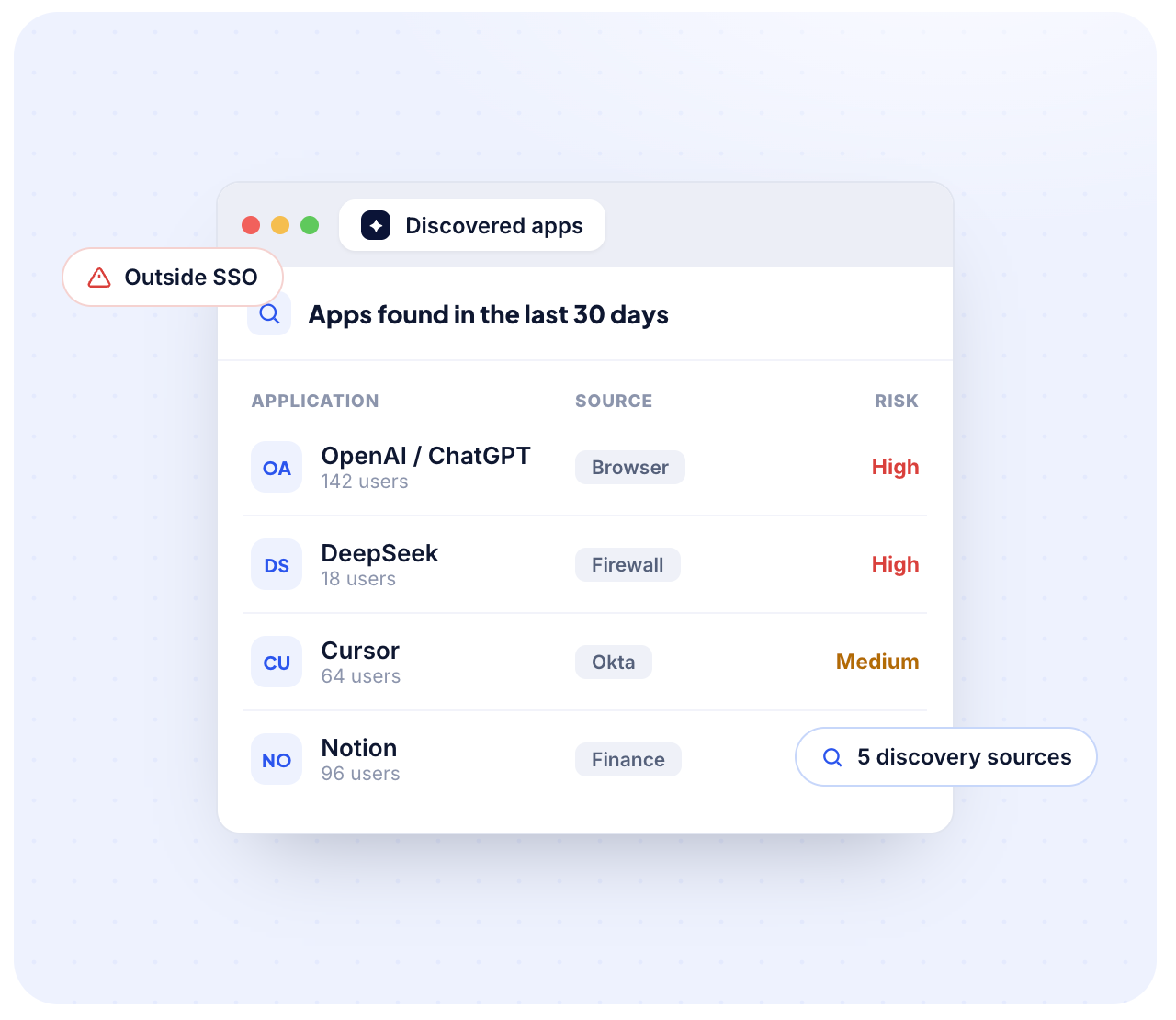
CloudEagle.ai discovered-apps view surfacing shadow AI and SaaS apps outside SSO from browser, firewall, Okta, and finance signals.

Our browser plugin is what reaches the native and personal-account usage a web proxy alone misses, down to whether someone is signed into a personal tenant instead of the company one.

That covers the tools most likely to touch sensitive data on an engineer's machine:

  • Local IDE plugins and coding assistants
  • AI clients installed as apps rather than used in a browser tab
  • Desktop collaboration suites that never show up in proxy logs

Everything we find is classified against a repository of roughly 150,000 known applications, so the inventory is a list of apps with real usage rather than raw log volume you still have to sort. AI tools come into the same inventory through our AI governance module.

One Live View of Posture, Risk, and Compliance Status

For every app we find, we track roughly 12 to 15 parameters against the NIST 800 reference and roll them into a pass or fail view per app.

AI tools sit on the same scale as SaaS apps, including whether the vendor trains on your data and whether you can switch that off.

Where each signal comes from is worth being specific about, because a pass is only as good as its source.

Posture signal Source How it's collected
MFA and SSO enforcement Okta or Entra Automated
App compliance attributes Vendor API, where the vendor exposes one Automated, coverage varies by vendor
Risk score, data classification, DLP status Netskope Cloud Confidence Index Automated, and no Netskope subscription needed
App owner and internal approval status Your team Manual entry, tracked in the same view

That last row is not a gap we gloss over. No vendor pulls every field automatically for every app, and being straight about which signals are automated and which are entered by hand is the point.
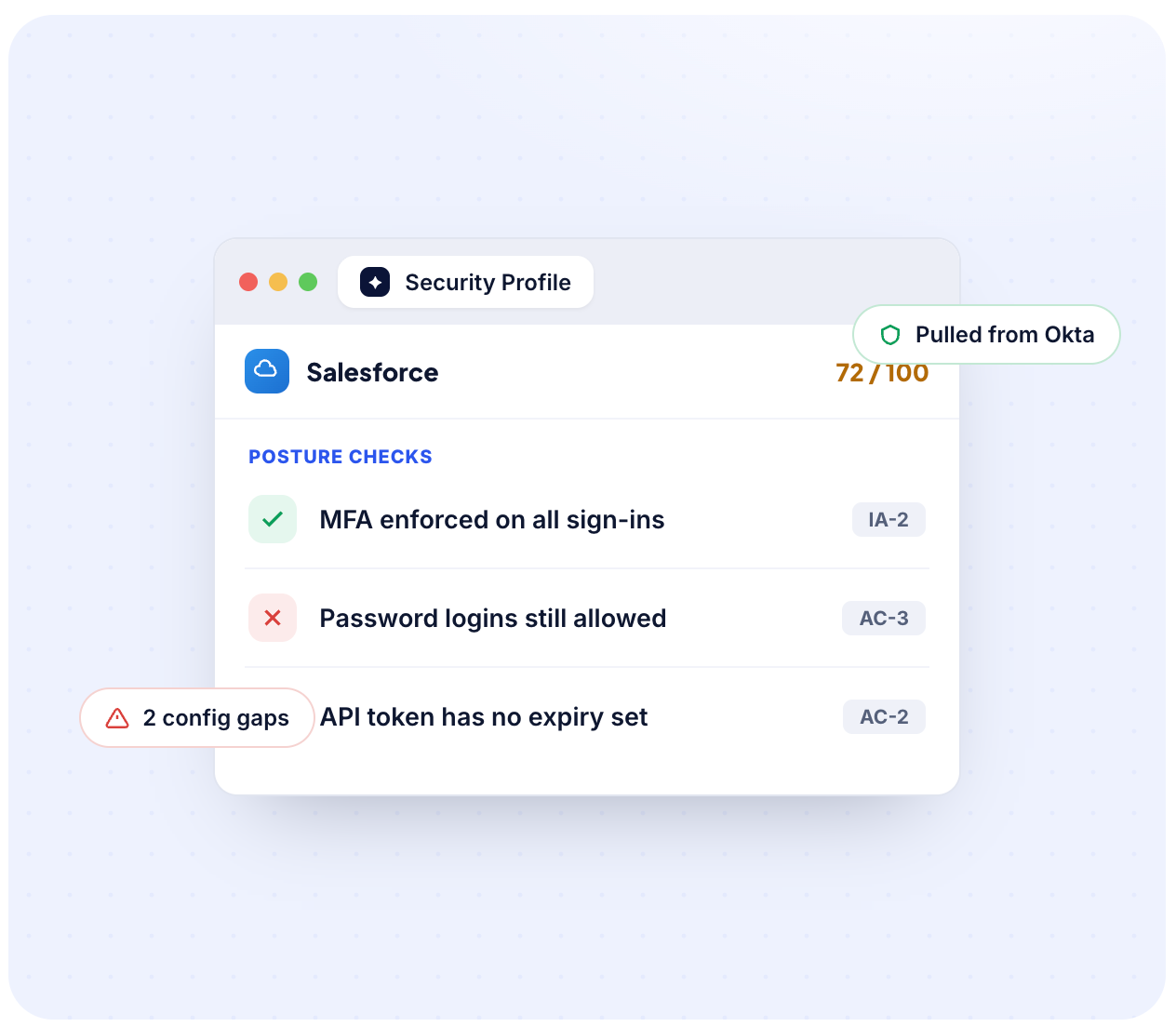
CloudEagle.ai security posture profile for Salesforce showing a 72 out of 100 score with NIST control checks pulled from Okta.

The view updates as configuration changes, so it stays current instead of going stale the day after you build a spreadsheet. That is continuous posture management rather than a point-in-time audit, and it sits inside our SaaS security and compliance module.

Two things that changes in practice:

  • Audit prep stops being a scramble: Lapzo went from two weeks of manual evidence gathering to SOC 2-ready logs in a day, cleared 220+ excessive admin privileges, and closed the next audit with zero access-related findings.
  • It is a proven operating model, not a theory: Federal agencies already run posture this way. The Centers for Medicare and Medicaid Services (CMS) operates an agency-wide SSPM program so unaccredited SaaS cannot create blind spots.

Every Finding Tied to the Identity Behind It, Including Non-Human Identities

A misconfiguration matters more when you know who it exposes. We connect every posture and access finding to the identity behind it, human or not, so a risky setting is not just a flag. 

It reads as this over-permissioned admin, on this app, who has not logged in for months.

  • Continuous user access reviews, with reviewer routing pulled from human resources information system (HRIS) data rather than spreadsheets
  • Ex-employees and over-privileged accounts flagged automatically, with evidence attached as the review runs
  • Service accounts, API tokens, and AI agents brought into the same review scope, not a separate program

That is how least privilege stops being a quarterly exercise and starts behaving like the access governance framework you already wrote down. ICEYE cut manual access review work by 90 percent and saved over 1,500 hours a year after moving to automated access reviews with us, with certifications audit-ready by default.

How Do You Layer IdP, CASB, and SSPM Without Overlap?

Run the three as a sequence, not a stack of overlapping tools. Discover first so you know what exists, check posture next so you know what is exposed, then enforce at the layer built for it.

The Order to Turn On Discovery, Posture, and Enforcement

Each step feeds the next, and each tool does the job it is best at.

Step Layer that owns it What happens
1. Discover SSPM Find every app, including the ones past your IdP
2. Assess SSPM Read each app's configuration, access, and risk
3. Enforce SSPM and CASB Fix config and revoke access in SSPM; keep hard block and inline DLP in your CASB

The seams between these steps are where risk hides, so the point of layering is to close them, not to run three tools that each do a third of the same job.

Discovery is the precondition, not a bonus feature. Point a posture tool at your 180 federated apps and it grades 180 apps, while the 300 you do not know about stay invisible.

A posture score across a partial inventory reads as reassurance and works as a blind spot. The sanctioned-app list you build in step one also flows back to your proxy, so discovery makes your existing CASB sharper too.
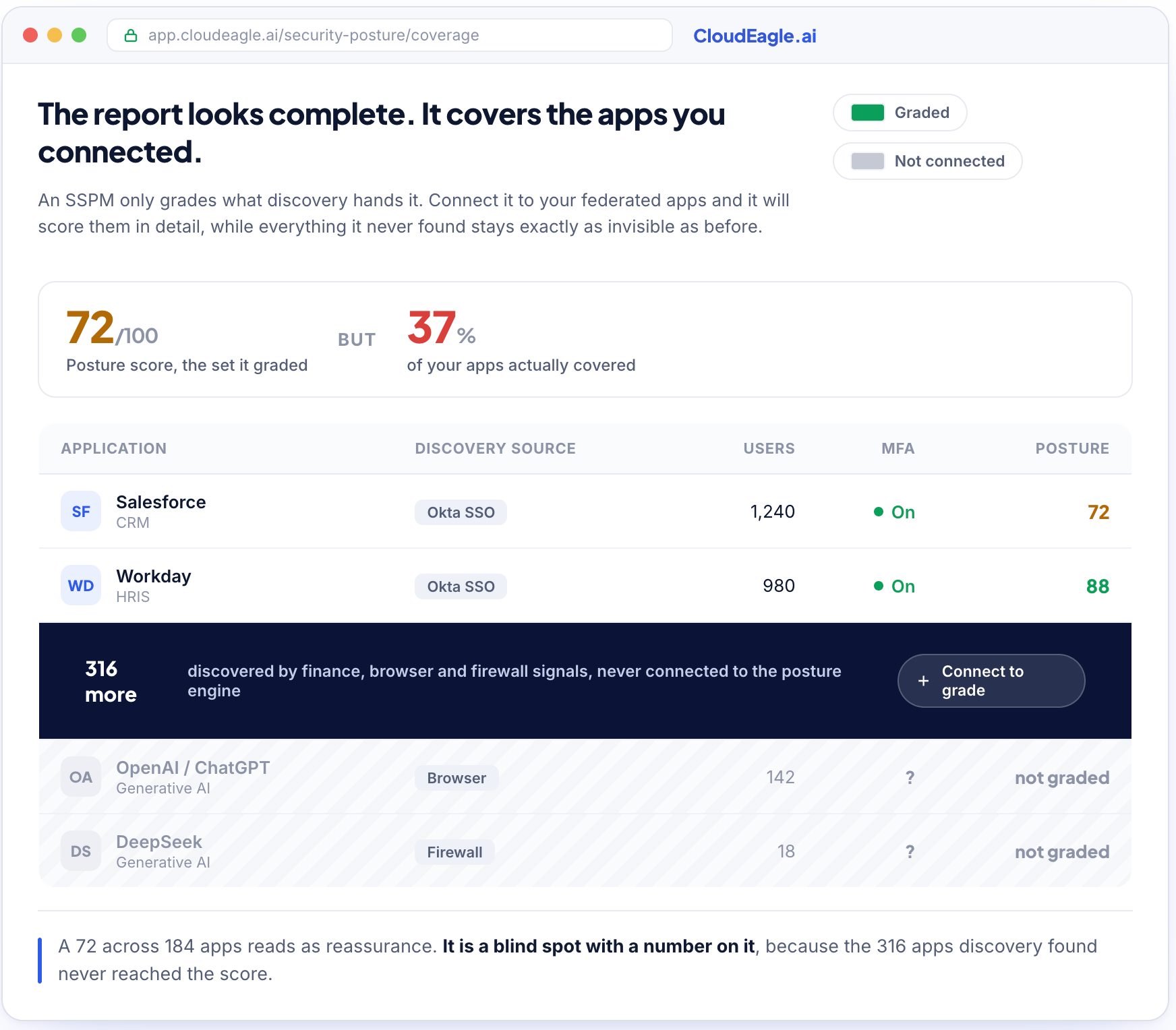
An SSPM posture score of 72 covering only 37 percent of apps, with 316 discovered apps not yet connected to the posture engine.

What a Posture Layer Lets You Retire

A proxy and a posture layer cover more ground together than either alone, so the useful question is not whether SSPM replaces your CASB. It is what adding one lets you consolidate.

  • Ask whether it removes a separate discovery tool, a separate access-review tool, and a separate AI inventory, because that is where duplicate spend sits.
  • If you already run a CASB, feed its logs into the posture layer. If you do not, browser and endpoint signals cover more of that gap than most teams expect.

How to Evaluate an SSPM: Ask Where Each Signal Comes From

Evaluate on coverage and provenance, not on the feature matrix. Two products can both claim continuous NIST tracking and return very different answers depending on how many of your apps they see and where their signals originate.

Ask the vendor What a real answer sounds like
Where does each control's pass or fail come from? A named source per control, not "the platform determines it"
What share of my specific apps support automated collection? A number run against your app list, not a total integration count
What happens to apps you cannot reach by API? A manual tracking path that still lands in the same dashboard
How do you find apps I have not told you about? Several discovery sources, not IdP logs with a new label

Any vendor claiming full automated coverage across every app in your stack is describing something that does not exist yet. 

The honest answer is that coverage depends on what each vendor exposes and what you have connected, and a tool that says so is the one worth trusting.

Frequently Asked Questions

Do I need a CASB in place before an SSPM is worth buying?

No. An SSPM works without a CASB, but the CASB changes how much of your stack it sees. Firewall and proxy logs are one discovery source among several, so without one you lean harder on identity provider data, finance records, and browser signals. Coverage stays workable. Ask any vendor which specific controls they can still verify automatically in your setup before you sign.

Where does an SSPM get the data behind a pass or fail on a control?

From three places, and the mix varies app by app. Federation signals such as MFA and SSO enforcement come from your identity provider. Compliance attributes come from the application's own API where the vendor exposes one. Anything neither source covers, such as app ownership, is entered and tracked manually. Any control marked as passed should trace back to a named source, so ask which one.

Can an SSPM tell me which apps handle regulated data like protected health information (PHI) or cardholder data?

Partly, and it depends on the source behind each app profile. We surface data classification and DLP details through our Netskope Cloud Confidence Index partnership, which covers a large share of known applications but not every one. For apps outside that coverage, classification is something your team records against the app. Treat it as a strong starting inventory rather than a complete regulatory map.

Does SSPM cover shadow AI tools, or only the SaaS apps you already sanctioned?

That depends on the discovery layer underneath it, not on the SSPM itself. A posture tool connected only to your identity provider will grade sanctioned apps and miss everything else. Ours discovers AI tools through browser, finance, and firewall signals first, so shadow AI lands in the same posture and risk-scoring view as approved SaaS. Plex found 73 shadow AI tools this way against 30 they believed they had.

How long does it take to build an inventory complete enough for posture tracking to be useful?

Days rather than months for the first meaningful picture. Connecting your identity provider and finance systems produces a baseline quickly, and browser and firewall signals fill in what those two miss over the following weeks. The inventory never fully stops moving, since employees adopt new tools constantly, which is the argument for continuous discovery instead of a one-time audit.

Advertisement for a SaaS Subscription Tracking Template with a call-to-action button to download and a partial graphic of a tablet showing charts.Banner promoting a SaaS Agreement Checklist to streamline SaaS management and avoid budget waste with a call-to-action button labeled Download checklist.Blue banner with text 'The Ultimate Employee Offboarding Checklist!' and a black button labeled 'Download checklist' alongside partial views of checklist documents from cloudeagle.ai.Digital ad for download checklist titled 'The Ultimate Checklist for IT Leaders to Optimize SaaS Operations' by cloudeagle.ai, showing checklist pages.Slack Buyer's Guide offer with text 'Unlock insider insights to get the best deal on Slack!' and a button labeled 'Get Your Copy', accompanied by a preview of the guide featuring Slack's logo.Monday Pricing Guide by cloudeagle.ai offering exclusive pricing secrets to maximize investment with a call-to-action button labeled Get Your Copy and an image of the guide's cover.Blue banner for Canva Pricing Guide by cloudeagle.ai offering a guide to Canva costs, features, and alternatives with a call-to-action button saying Get Your Copy.Blue banner with white text reading 'Little-Known Negotiation Hacks to Get the Best Deal on Slack' and a white button labeled 'Get Your Copy'.Blue banner with text 'Little-Known Negotiation Hacks to Get the Best Deal on Monday.com' and a white button labeled 'Get Your Copy'.Blue banner with text 'Little-Known Negotiation Hacks to Get the Best Deal on Canva' and a white button labeled 'Get Your Copy'.Banner with text 'Slack Buyer's Guide' and a 'Download Now' button next to images of a guide titled 'Slack Buyer’s Guide: Features, Pricing & Best Practices'.Digital cover of Monday Pricing Guide with a button labeled Get Your Copy on a blue background.Canva Pricing Guide cover with a button labeled Get Your Copy on a blue gradient background.

Enter your email to
unlock the report

Oops! Something went wrong while submitting the form.
License Count
Benchmark
Per User/Per Year

Enter your email to
unlock the report

Oops! Something went wrong while submitting the form.
License Count
Benchmark
Per User/Per Year

Enter your email to
unlock the report

Oops! Something went wrong while submitting the form.
Notion Plus
License Count
Benchmark
Per User/Per Year
100-500
$67.20 - $78.72
500-1000
$59.52 - $72.00
1000+
$51.84 - $57.60
Canva Pro
License Count
Benchmark
Per User/Per Year
100-500
$74.33-$88.71
500-1000
$64.74-$80.32
1000+
$55.14-$62.34

Enter your email to
unlock the report

Oops! Something went wrong while submitting the form.

Enter your email to
unlock the report

Oops! Something went wrong while submitting the form.
Zoom Business
License Count
Benchmark
Per User/Per Year
100-500
$216.00 - $264.00
500-1000
$180.00 - $216.00
1000+
$156.00 - $180.00

Enter your email to
unlock the report

Oops! Something went wrong while submitting the form.

Get the Right Security Platform To Secure Your Cloud Infrastructure

Please enter a business email
Thank you!
The 2023 SaaS report has been sent to your email. Check your promotional or spam folder.
Oops! Something went wrong while submitting the form.

Access full report

Please enter a business email
Thank you!
The 2023 SaaS report has been sent to your email. Check your promotional or spam folder.
Oops! Something went wrong while submitting the form.

TL;DR

  • Your identity provider (IdP) secures who logs in and your cloud access security broker (CASB) watches the traffic, but neither one looks inside the AI and SaaS apps your teams use, at how each is configured or who is connected to it.
  • That blind spot is where most incidents now start: misconfigured settings, configuration drift, unreviewed OAuth grants, and the service accounts and AI agents nobody owns.
  • Shadow AI widened it fast, since AI tools and the connections they open are the apps least likely to be federated and most likely to touch sensitive data.
  • SaaS security posture management (SSPM) connects to each app through its own API and reads that posture continuously, so drift shows up in hours instead of at the next audit.
  • SSPM does not replace your IdP or CASB. It reads your IdP's settings, ingests your CASB's logs, and hands your proxy a sanctioned-app list so its blocks get smarter.
  • CloudEagle.ai discovers every app your IdP and CASB miss, AI and SaaS alike, tracks posture and risk in one live view, and ties each finding to the identity behind it, human or not.

Most security teams already run an identity provider and a CASB, so the real question in any SSPM vs CASB conversation is not which tool wins. It is what each one cannot see.

Your IdP governs the login and your CASB watches the traffic, but neither looks inside the app itself, at how it is configured and which identities have standing access. That blind spot is widening fastest around AI, since AI tools and the connections they open are the newest apps neither tool was built to see. 

Covering it, across your AI and SaaS apps alike, is where SaaS security posture management earns its place.

An IdP, a CASB, and SSPM each view the same SaaS app from a different layer, with only SSPM reading the configuration inside.

What is SSPM and Why it Doesn't Replace your IdP or CASB

SSPM covers a layer your IdP and CASB do not reach, across both your AI and SaaS apps, so it adds to that stack rather than replacing any of it.

What Is SaaS Security Posture Management (SSPM)?

SaaS security posture management is a security practice that connects directly to a SaaS or AI application through its API and reads the app's own configuration continuously. 

It watches how the app is set up, not the network traffic around it. G2 now lists SSPM as its own software category for that reason.

It reads the settings your other tools never look at:

  • Whether multi-factor authentication (MFA) is enforced, for all users or only some.
  • Whether single sign-on (SSO) is required, or whether local password logins still work alongside it.
  • How many admin accounts exist, whether that number is defensible, and whether outside partners hold admin access.
  • What data is shared publicly, and how each app maps to a framework like System and Organization Controls (SOC 2) or the National Institute of Standards and Technology (NIST) 800 series.

That focus on configuration is what keeps it from overlapping with the two tools you already run. For the fuller definition, here is what SSPM checks.

Understanding SSPM vs CASB vs IdP

Each tool owns a different layer. Your IdP owns identity at login, your CASB owns traffic in the data path, and SSPM owns configuration inside the app. 

The table shows where each one covers a risk, where it covers only part of it, and where it hands the work to another layer.

What to check IdP (Okta, Entra) CASB (proxy layer) SSPM
Where it operates Identity and login Network traffic path Inside the app, via its API
The question it answers Should this identity be allowed in? Is this traffic and data movement safe? Is the app configured safely, and who has access inside it?
How it connects Identity federation and SSO Endpoint agent and forward proxy, inline Agentless, direct API to each app
App coverage Only apps federated to it Web traffic it can route; native and desktop apps often fall outside its path Apps connected by API; discovery breadth varies by tool
In-app misconfiguration and drift (MFA actually enforced, sharing, admin sprawl) No, sees the login only No, sees the traffic only Yes, reads the app's own settings
OAuth grants and SaaS-to-SaaS connections Partial, only grants it brokered Limited, cloud-to-cloud API calls are off its path Yes, inventories and scores every grant
Service accounts, API keys, AI agents Partial, some workload identities No Yes, in one registry with an owner
Shadow AI and shadow SaaS discovery Only what is federated Only what its traffic path sees Connected apps; correlation depth varies by tool
Compliance posture vs NIST 800, SOC 2 No Partial, data-movement policies Yes, continuous per-app status
Enforcement style Allow or deny at login Inline hard block and data loss prevention (DLP) in the data path Flag, fix config, revoke access or keys, soft policy
Biggest blind spot Apps it never federated Native apps and in-app configuration Inline data-path controls like DLP and hard block

As you read down the SSPM column and the pattern is clear. The gaps your other two tools leave open all live in the same place, inside the app.

How SSPM Reads Your IdP Settings and CASB Logs

SSPM is a reader, not a replacement. It uses what your IdP and CASB already know and adds the view they cannot produce on their own.

In practice it:

  • Pulls federation settings from your IdP to confirm MFA and SSO are enforced per app.
  • Ingests your CASB logs to map network activity back to specific apps and users.
  • Hands your proxy a current list of sanctioned apps so its block decisions get sharper.

There is a line SSPM does not cross, and being precise about it matters. 

It does not sit in the data path, inspect file contents inline, or hard-block traffic at the network layer. That work stays with your CASB, which is built for it.

What SSPM adds is the link a proxy has never had. A proxy can block a category, but it does not know that finance approved one AI tool last week and rejected two others. 

Give it that list and its decisions get sharper, which is the difference between seeing SaaS and governing it.

Four Things Your IdP and CASB Miss Inside Each App

Four risks live inside the application where neither an IdP nor a CASB can reach. 

These include settings that were never hardened or have quietly drifted, app-to-app connections nobody approved, identities that are not people, and apps your IdP never knew existed. 

Each one is a documented root cause of SaaS breaches.

Misconfigured Apps and Configuration That Quietly Drifts

An IdP enforces MFA at its own login screen, but it cannot force a SaaS app to require MFA for local accounts, admin backdoors, or API logins that bypass SSO.

  • The gap: Many apps ship with these settings off by default. Worse, the apps you did approve keep changing. Vendors add features, change defaults, and update terms without asking, so an approval from eighteen months ago says nothing about today's configuration.
  • Why it hides: You bought the IdP to enforce strong authentication, so you assume it is enforced everywhere, and a review you ran once is treated as a review that still holds.
  • What the data shows: In Verizon's 2025 Data Breach Investigations Report, credential abuse was the leading initial access vector, behind 22% of breaches. An app with MFA off is a door onto that path.
  • How SSPM closes it: It reads the app's own configuration continuously and flags every app where a control has lapsed, so the setting matches the policy you believed was in place, not the one from last year.

OAuth Grants That Connect One App to Another Without Review

When an employee clicks "connect" to link one SaaS app to another, they create an OAuth grant that can read or write data on their behalf, often with broad scopes and no expiry.

  • The gap: Your IdP did not broker the grant, and your CASB does not see the API traffic between the two clouds.
  • Why it matters: These SaaS-to-SaaS connections are how a breach in one vendor becomes a breach in yours, and the token keeps working long after the person who approved it has forgotten it exists.
  • What the data shows: Verizon found third-party involvement in breaches doubled in a single year, to 30 percent, in its 2025 DBIR. A forgotten OAuth token inside a trusted vendor is exactly that path.
  • How SSPM closes it: It inventories every OAuth grant and third-party connection per app, scores the risky ones by scope and usage, and gives you one place to revoke what should never have been approved.

Service Accounts, API Keys, and AI Agents Nobody Owns

Most of the identities in your stack are not people anymore. Service accounts, API keys, tokens, and AI agents hold standing access, rarely rotate, and usually have no clear owner.

Apps Your IdP Never Federated, Including Shadow AI

Your IdP only sees the apps configured behind it. Everything bought on a card, signed up for with a personal email, or accessed on a free tier stays invisible.

  • The gap: An app nobody federated is an app nobody is reviewing, and AI tools are widening it by the day.
  • What the data shows: In Microsoft and LinkedIn's 2024 Work Trend Index, 78% of people who use AI at work bring their own tools, most outside any IT process. Our own research puts roughly 60 percent of AI and SaaS apps outside IT's line of sight.
  • The order that matters: You cannot check the posture of an app you do not know exists. Discovery has to come first, and it has to reach past the IdP.
  • How SSPM closes it: It correlates signals your IdP alone cannot to surface shadow AI and shadow IT and route each one for review. If the mechanics are what you are weighing, start with shadow IT discovery.

You Can't Secure the Apps You Never Found

A practical guide to surfacing the shadow AI and SaaS that sit outside your IdP and CASB, before you try to score their posture.
Get the Guide

How Does CloudEagle.ai Close the Gaps Between These Layers?

We run discovery first, track posture on everything discovery finds, then govern access across people and machines in the same place. Your IdP and CASB stay exactly where they are.

How We Discover Apps Your IdP and CASB Never See

Apps enter through paths your IdP does not watch, and each path needs a different signal to catch it. We correlate all of them rather than relying on any one.

How the app got in Signal that catches it
Federated through SSO IdP data from Okta or Entra
Bought on a card, never routed to IT Finance system and card transaction data
Signed up for on a free tier with a work email Browser plugin and social-login capture
Accessed through a native client, integrated development environment (IDE) plugin, or extension Browser plugin and endpoint signal
Reached over the corporate network Firewall logs from Netskope, Zscaler, or Defender

CloudEagle.ai discovered-apps view surfacing shadow AI and SaaS apps outside SSO from browser, firewall, Okta, and finance signals.

Our browser plugin is what reaches the native and personal-account usage a web proxy alone misses, down to whether someone is signed into a personal tenant instead of the company one.

That covers the tools most likely to touch sensitive data on an engineer's machine:

  • Local IDE plugins and coding assistants
  • AI clients installed as apps rather than used in a browser tab
  • Desktop collaboration suites that never show up in proxy logs

Everything we find is classified against a repository of roughly 150,000 known applications, so the inventory is a list of apps with real usage rather than raw log volume you still have to sort. AI tools come into the same inventory through our AI governance module.

One Live View of Posture, Risk, and Compliance Status

For every app we find, we track roughly 12 to 15 parameters against the NIST 800 reference and roll them into a pass or fail view per app.

AI tools sit on the same scale as SaaS apps, including whether the vendor trains on your data and whether you can switch that off.

Where each signal comes from is worth being specific about, because a pass is only as good as its source.

Posture signal Source How it's collected
MFA and SSO enforcement Okta or Entra Automated
App compliance attributes Vendor API, where the vendor exposes one Automated, coverage varies by vendor
Risk score, data classification, DLP status Netskope Cloud Confidence Index Automated, and no Netskope subscription needed
App owner and internal approval status Your team Manual entry, tracked in the same view

That last row is not a gap we gloss over. No vendor pulls every field automatically for every app, and being straight about which signals are automated and which are entered by hand is the point.

CloudEagle.ai security posture profile for Salesforce showing a 72 out of 100 score with NIST control checks pulled from Okta.

The view updates as configuration changes, so it stays current instead of going stale the day after you build a spreadsheet. That is continuous posture management rather than a point-in-time audit, and it sits inside our SaaS security and compliance module.

Two things that changes in practice:

  • Audit prep stops being a scramble: Lapzo went from two weeks of manual evidence gathering to SOC 2-ready logs in a day, cleared 220+ excessive admin privileges, and closed the next audit with zero access-related findings.
  • It is a proven operating model, not a theory: Federal agencies already run posture this way. The Centers for Medicare and Medicaid Services (CMS) operates an agency-wide SSPM program so unaccredited SaaS cannot create blind spots.

Every Finding Tied to the Identity Behind It, Including Non-Human Identities

A misconfiguration matters more when you know who it exposes. We connect every posture and access finding to the identity behind it, human or not, so a risky setting is not just a flag. 

It reads as this over-permissioned admin, on this app, who has not logged in for months.

  • Continuous user access reviews, with reviewer routing pulled from human resources information system (HRIS) data rather than spreadsheets
  • Ex-employees and over-privileged accounts flagged automatically, with evidence attached as the review runs
  • Service accounts, API tokens, and AI agents brought into the same review scope, not a separate program

That is how least privilege stops being a quarterly exercise and starts behaving like the access governance framework you already wrote down. ICEYE cut manual access review work by 90 percent and saved over 1,500 hours a year after moving to automated access reviews with us, with certifications audit-ready by default.

How Do You Layer IdP, CASB, and SSPM Without Overlap?

Run the three as a sequence, not a stack of overlapping tools. Discover first so you know what exists, check posture next so you know what is exposed, then enforce at the layer built for it.

The Order to Turn On Discovery, Posture, and Enforcement

Each step feeds the next, and each tool does the job it is best at.

Step Layer that owns it What happens
1. Discover SSPM Find every app, including the ones past your IdP
2. Assess SSPM Read each app's configuration, access, and risk
3. Enforce SSPM and CASB Fix config and revoke access in SSPM; keep hard block and inline DLP in your CASB

The seams between these steps are where risk hides, so the point of layering is to close them, not to run three tools that each do a third of the same job.

Discovery is the precondition, not a bonus feature. Point a posture tool at your 180 federated apps and it grades 180 apps, while the 300 you do not know about stay invisible.

A posture score across a partial inventory reads as reassurance and works as a blind spot. The sanctioned-app list you build in step one also flows back to your proxy, so discovery makes your existing CASB sharper too.

An SSPM posture score of 72 covering only 37 percent of apps, with 316 discovered apps not yet connected to the posture engine.

What a Posture Layer Lets You Retire

A proxy and a posture layer cover more ground together than either alone, so the useful question is not whether SSPM replaces your CASB. It is what adding one lets you consolidate.

  • Ask whether it removes a separate discovery tool, a separate access-review tool, and a separate AI inventory, because that is where duplicate spend sits.
  • If you already run a CASB, feed its logs into the posture layer. If you do not, browser and endpoint signals cover more of that gap than most teams expect.

How to Evaluate an SSPM: Ask Where Each Signal Comes From

Evaluate on coverage and provenance, not on the feature matrix. Two products can both claim continuous NIST tracking and return very different answers depending on how many of your apps they see and where their signals originate.

Ask the vendor What a real answer sounds like
Where does each control's pass or fail come from? A named source per control, not "the platform determines it"
What share of my specific apps support automated collection? A number run against your app list, not a total integration count
What happens to apps you cannot reach by API? A manual tracking path that still lands in the same dashboard
How do you find apps I have not told you about? Several discovery sources, not IdP logs with a new label

Any vendor claiming full automated coverage across every app in your stack is describing something that does not exist yet. 

The honest answer is that coverage depends on what each vendor exposes and what you have connected, and a tool that says so is the one worth trusting.

Frequently Asked Questions

Do I need a CASB in place before an SSPM is worth buying?

No. An SSPM works without a CASB, but the CASB changes how much of your stack it sees. Firewall and proxy logs are one discovery source among several, so without one you lean harder on identity provider data, finance records, and browser signals. Coverage stays workable. Ask any vendor which specific controls they can still verify automatically in your setup before you sign.

Where does an SSPM get the data behind a pass or fail on a control?

From three places, and the mix varies app by app. Federation signals such as MFA and SSO enforcement come from your identity provider. Compliance attributes come from the application's own API where the vendor exposes one. Anything neither source covers, such as app ownership, is entered and tracked manually. Any control marked as passed should trace back to a named source, so ask which one.

Can an SSPM tell me which apps handle regulated data like protected health information (PHI) or cardholder data?

Partly, and it depends on the source behind each app profile. We surface data classification and DLP details through our Netskope Cloud Confidence Index partnership, which covers a large share of known applications but not every one. For apps outside that coverage, classification is something your team records against the app. Treat it as a strong starting inventory rather than a complete regulatory map.

Does SSPM cover shadow AI tools, or only the SaaS apps you already sanctioned?

That depends on the discovery layer underneath it, not on the SSPM itself. A posture tool connected only to your identity provider will grade sanctioned apps and miss everything else. Ours discovers AI tools through browser, finance, and firewall signals first, so shadow AI lands in the same posture and risk-scoring view as approved SaaS. Plex found 73 shadow AI tools this way against 30 they believed they had.

How long does it take to build an inventory complete enough for posture tracking to be useful?

Days rather than months for the first meaningful picture. Connecting your identity provider and finance systems produces a baseline quickly, and browser and firewall signals fill in what those two miss over the following weeks. The inventory never fully stops moving, since employees adopt new tools constantly, which is the argument for continuous discovery instead of a one-time audit.

CloudEagle.ai recognized in the 2025 Gartner® Magic Quadrant™ for SaaS Management Platforms
Download now
gartner chart
5x
Faster employee
onboarding
80%
Reduction in time for
user access reviews
30k
Workflows
automated
$15Bn
Analyzed in
contract spend
$2Bn
Saved in
SaaS spend

Streamline SaaS governance and save 10-30%

Book a Demo with Expert
CTA image