
%201.svg)


HIPAA Compliance Checklist for 2025

TL;DR
- An MCP server is a standing access grant. It hands an AI assistant a live key into a real internal system.
- Most MCP server security advice is about hardening the server. Governing the access it opens is the part nobody owns yet.
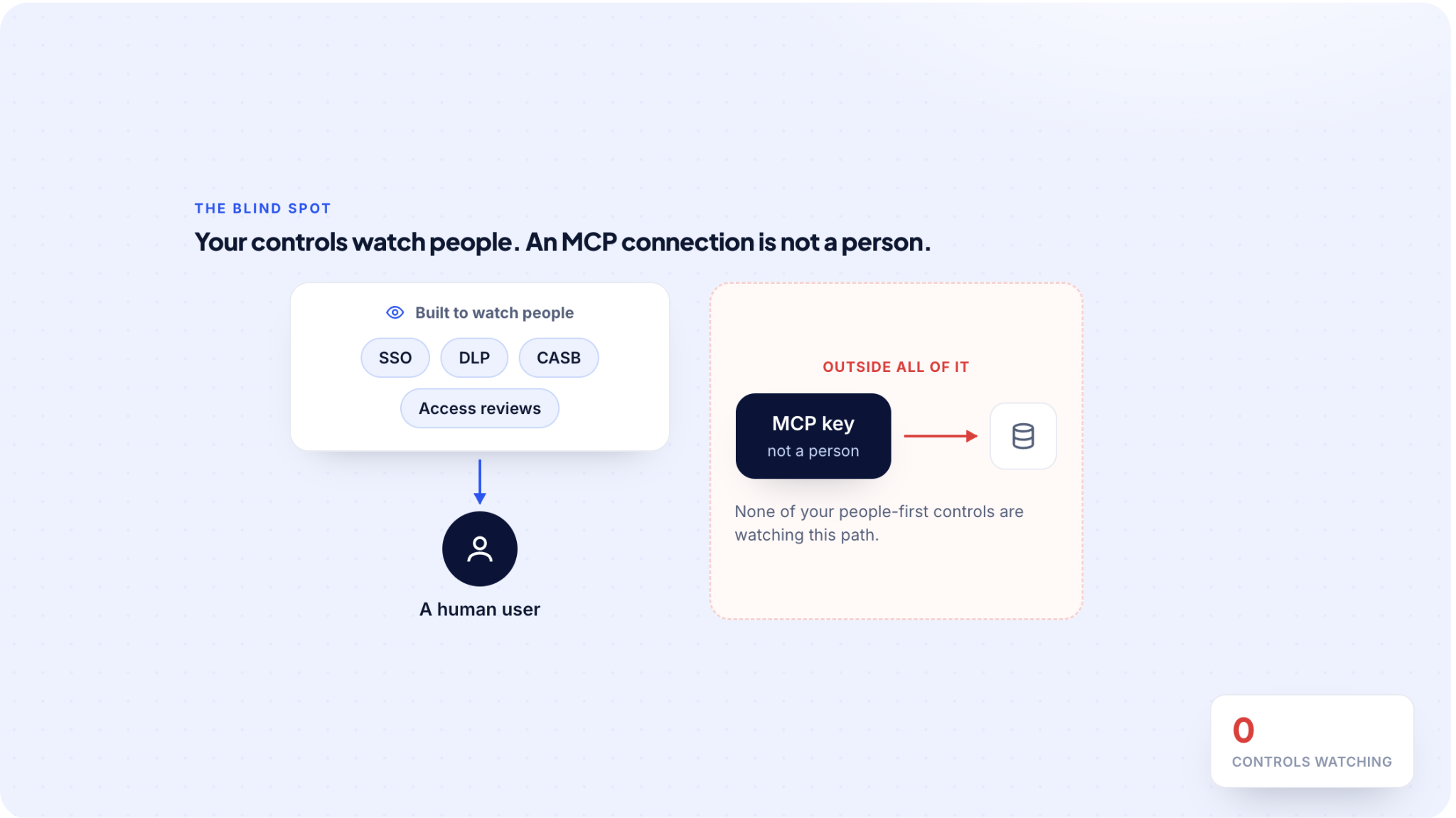
- Your controls miss it. SSO, DLP, CASB, and access reviews were all built to watch people, not machine credentials.
- Left ungoverned, you get standing access nobody reviewed, on keys that outlive their projects and often outrank the person using them.
- You will never see every server, but you can govern the access, because the key it runs on lives in a system you control.
- CloudEagle.ai brings that access into view, so IT and Security see what SSO-only tools miss.
MCP servers are quietly becoming one of the least governed ways into your systems. Each one connects an AI assistant to a real internal system through a credential of its own, and that credential rarely lands on any access list you own.
So far, the MCP server security conversation has centered on hardening the server against attacks. The harder problem for IT and Security teams is governing the standing access every connection creates, because that access sits outside the controls built to watch people.

What Does an MCP Server Actually Give an AI Assistant Access To?
An MCP server gives an AI assistant a direct, standing connection to a real internal system, whether that is a production database, a Git repository, or a cloud console.
It does this with a credential of its own, not a login you provisioned for a person, but a key or service account that acts on the assistant's behalf.
Someone can set one up in minutes, which is why these spread faster than anyone tracks them.
The API Keys and Service Accounts an MCP Server Runs On
Every MCP connection runs on a credential, and it is almost never a human login. It is an API key or service account created so the assistant can reach the system.
These are the logins that aren't people, and they slip through the checks a human account never would:
- No manager to answer for it
- No offboarding date to retire it
- No line in your access review to catch it
So it stays live long after the person who created it has moved on.

Why Don't SSO, DLP, and CASB Catch MCP Connections?
Each of those tools was built to watch people or known traffic, and an MCP connection is neither.
It slips past the stack the same way unsanctioned AI tools bypass your security controls, except here it is a standing connection, not a browser tab.
Most MCP server security guidance right now is about locking down the server with auth, sandboxing, and supply-chain checks. That work is necessary, and it still does not tell you who or what holds standing access.
Here is where each control goes quiet:
- SSO logs a person logging in. It has no record of an assistant holding an API key, because no person logged in.
- DLP and CASB inspect known traffic and sanctioned app usage. A local MCP connection an engineer set up matches neither.
- Access reviews certify users. An MCP server is not a user, so it never enters the review at all.
The one process built to catch standing access is the one most likely to miss this, because this access does not look like a person.
What Happens When MCP Servers Go Ungoverned?
You accumulate standing access nobody remembers granting. Keys outlive their projects, assistants still reach production months later, and an auditor asking who or what can touch the data gets no clean answer.
MCP Keys That Never Get Reviewed
An assistant keeps live access to an internal system on a key created for a project that wrapped up two quarters ago. Nobody rotated it, and nobody reviewed it.
At one Fortune 500 financial services firm, offboarding was never built for AI, so departed staff kept active accounts and API tokens, and finance saw the AI spend only once the invoices arrived. The tokens outlived the people, and nobody caught it until the cost did.
MCP Access That Outranks the Person Using It
An MCP server usually runs with its own broad permissions, not the permissions of the person prompting the assistant. So the assistant can reach data the user was never cleared for, often with nobody approving it in the moment.
It is the same over-privileged access problem teams already fight with human accounts, except the account here is not a person. The credential, not the human, sets the ceiling.

MCP Approvals Expire the Moment the Server Changes
Some MCP servers run locally, on hardware you control. Others are third-party servers you connect to and do not run, which means trusting code someone else can change after you approve it.
That is the problem with a one-time approval. The review you did in March does not cover what the server does in September, so access to a moving target has to be rechecked on a schedule or the approval quietly stops meaning anything.
Why Security Teams Are Already Locking MCP Servers Down
This is not a future problem. Gartner expects roughly a quarter of enterprise breaches to trace back to AI agent abuse by 2028.
Talk to security leads right now and you hear the same thing. They are mid-way through locking down MCP servers across their workforce, starting with the engineers most likely to have connected one.
The teams doing this are ahead of the exposure. Everyone else has it too and just cannot see it yet.
How Do You Find MCP Connections You Can't See?
There is no single scan that finds every MCP server. You find them by correlating signals you already have, and by watching the systems they connect to instead of hunting the servers themselves.
Start at the Systems an MCP Server Connects To
The clearest trail is on the other end of the connection. Every MCP server has to authenticate into the system it reaches, so its key or service account shows up in that system's own access logs, in your cloud IAM, and in your secrets manager.
Start there and you can account for the access even when the server itself is invisible to you. The systems that matter most are the ones whose logs you already keep.
Watch the Browser and Endpoint Signals
Most AI assistants, and the tools that wire them into your systems, arrive through browsers, IDE plugins, and direct URLs. That is the one layer your identity provider never sees, and it is where a lot of MCP activity first shows up.
If SSO is the only place you are looking, you are looking in the one place this does not appear. The browser and endpoint signals you already collect are what catch it.
Where the Key Lives When the Server Doesn't
A local MCP server on an engineer's laptop is the hard case. It spins up and down on a machine you do not control, so keeping an inventory of the servers themselves is a losing game.
But the server still has to authenticate, and that key or service account lives in a system you do control. The durable, governable thing was never the server. It is the access, and that is where you point your governance.
How Do You Bring MCP Access Under Governance?
Once you can see them, treat every MCP connection like an app you have to account for. Give each key an owner and an expiry, review it like any other identity, and pull the whole set into the reviews you already run.
Give Every MCP Server an Owner
Part of why this stays ungoverned is that nobody clearly owns it. Engineers create the connections, security owns the risk, and IT owns access, so it lives in the gap between them.
Gartner's own MCP guidance lands in the same place: put clear owners on MCP servers and have them set the guardrails before agents get access. Name an owner before you build a process, because access with no owner is access no one will review.
How to Bring MCP Connections Into Your Reviews
- List every MCP connection you have surfaced. You cannot govern what you have not written down.
- Review each key the same way you review a user's access.
- Give every connection an owner, a reason to exist, and an expiry date.
- Fold it into the same access-review cadence that already covers your people.
- Recheck third-party servers on a schedule, since a past approval does not cover a changed server.

How CloudEagle.ai Surfaces Your MCP Access
Our AI governance tool surfaces active MCP servers, their owners, permissions, and connected workflows, so the servers running against your systems stop being a blind spot.
From there, we:
- Surface AI and AI-connected tools across your SaaS, browser, and IDE layers, including the shadow AI SSO-only tools never see.
- Bring the API keys and service accounts that aren't people into the same view as your human users.
- Put the credentials behind your AI assistants inside the same review scope as everyone else.

You see the access first. That is the part every other control leaves out.
Every MCP Connection Runs On A Key You Can Govern


An MCP Server Security Checklist to Run Before You Connect One
MCP server security starts before the connection goes live. So, before you approve one, answer four questions:
- What system does it reach, and how much can it read or write?
- What credential does it use, and who created it?
- Who owns it, and who gets asked when it needs to change?
- How do you revoke it, and how fast?
If you cannot answer all four, the connection is not ready to go live.
AI Agent Security Risks That Go Beyond MCP
MCP is one doorway, but it is not the only one. AI assistants also reach your systems through:
- OAuth-connected apps
- Browser extensions
- IDE plugins
Each holds a token you probably have not reviewed. These AI agent security risks follow the same pattern every time: an assistant gets standing access on a credential that is not a person, and your people-first controls do not see it.
The fix is the same one this piece argues for. Find the access, give the credential behind it an owner, and put it in the same review as everyone else, rather than treating it as a background integration you set once and forget.
Get Ahead of It
Most teams are already working on hardening the MCP server. Far fewer are governing the access it opens, and that is where the real exposure sits.
Here is the whole argument in one line. You will never see every MCP server, especially the one on someone's laptop, but every one of them runs on a credential that lives in a system you control.
So govern the access, not the server. Find it, give it an owner, and put it in the reviews you already run.
Do that, and an MCP server stops being a blind spot and becomes one more account you can account for.
Govern The Access, Not The Server
Also worth a watch: our on-demand webinar on shadow AI and over-privileged access, where IT and security teams walk through governing SaaS and AI access at scale.
Frequently Asked Questions
Are MCP servers a security risk?
Yes. An MCP server gives an AI assistant a standing connection into a real internal system, using an API key or service account of its own. That credential usually sits outside your access reviews and identity controls, so the access is real but ungoverned. The server itself may be hardened, yet the standing access it opens is what most teams never see or review.
Why don't SSO, DLP, and CASB catch MCP connections?
Because those tools were built to watch people and known traffic, and an MCP connection is neither. SSO logs a human signing in, not an assistant holding an API key. DLP and CASB inspect known traffic, not a local MCP connection an engineer set up. And an access review certifies users, so a machine credential never enters it. The access does not look like a person, so people-first controls miss it.
How do you find MCP servers running in your environment?
There is no single scan that finds every MCP server, so you correlate the signals you already have. The clearest trail is the credential. An MCP server has to authenticate, so its key or service account shows up in the target system's access logs, your cloud IAM, and your secrets manager. Browser and endpoint signals catch the tools that arrive outside SSO. You watch the systems the server connects to, not the server itself.
What is the difference between securing an MCP server and governing the access it opens?
Securing the server means hardening it against attacks, with authentication, sandboxing, and supply-chain checks. Governing the access means knowing who or what holds the standing credential it runs on, who owns it, and when it expires. The first protects the server. The second controls what the connection can actually reach across your systems. Most guidance covers the first and skips the second, which is where the ungoverned exposure sits.
How does CloudEagle.ai help govern MCP server access?
CloudEagle.ai surfaces active MCP servers along with their owners, permissions, and connected workflows, so the connections running against your systems stop being a blind spot. It also brings the API keys and service accounts that aren't people into the same review scope as your human users, across the SaaS, browser, and IDE layers that SSO-only tools miss. That visibility is the part most other controls leave out.


.avif)


.avif)
.avif)




.png)






.png)
.avif)
.avif)
.avif)


