You need to enable JavaScript in order to use the AI chatbot tool powered by ChatBot

How to Enforce an AI Acceptable Use Policy (Before Someone Pastes Your Customer Data into ChatGPT)

Share via:
blog-cms-banner-bg
Little-Known Negotiation Hacks to Get the Best Deal on Slack
cta-bg-blogDownload Your Copy

HIPAA Compliance Checklist for 2025

Download PDF

Most organizations have an AI acceptable use policy. Almost none of them can enforce it.

Because the enforcement gap is in the three places employees actually access AI: the browser, signing up with a personal email, the API key a developer spun up outside the approved gateway, and the Copilot session inside Microsoft 365 that your policy predates.

None of those sessions generates an SSO event or triggers a CASB alert. The session opens, data goes in, the tab closes, and your security stack never saw it.

That is the problem this post addresses.

TL;DR

  • Most AI acceptable use policies fail because they assume employees access AI through IT-sanctioned channels
  • The three real enforcement blind spots are browser-based signups, direct API access, and bundled AI inside sanctioned SaaS tools
  • Enforcing an AI acceptable use policy requires three technical controls: browser-level detection, flash-page redirection, and prompt-level content monitoring
  • CloudEagle.ai enforces your AI acceptable use policy at the point of use, detecting ungoverned AI tools, blocking sensitive data submission, redirecting users to approved alternatives, and logging every intervention
  • Each major policy clause maps directly to a CloudEagle.ai technical control, producing audit-ready evidence

1. Your AI Acceptable Use Policy Has a Blind Spot (And It's Where Employees Actually Use AI)

Most AI acceptable use policies are written for a world that doesn't exist: one where employees request AI tools through IT, wait for procurement review, and access everything through the corporate identity provider.

The reality looks different:

None of that generates an SSO event, a CASB alert, or a DLP flag. The session opens, the data goes in, the tab closes, and your security stack never saw any of it.

One enterprise IT leader described exactly this state: 

"Most of these are just general service provider logins. They're going to a site and logging in with their unique service provider credentials that they created for whatever that service is." 

His organization hadn't even defined what sanctioned and unsanctioned AI tools meant yet, because without a visibility layer, the definition has no enforcement surface.

A policy that says "don't use unsanctioned AI tools" has no mechanism to detect when someone does. You can't enforce what you can't see.

71% of Employees Use Unapproved AI Every Week.

Find every tool your policy can't see right now.
Download Checklist

2. The Three Entry Points Your AI Policy Can't See (But Employees Use Every Day)

Traditional IT security tooling misses three specific entry points. That is where most AI policy violations happen.

a) Browser-Based Signups

An employee navigates to ChatGPT, Perplexity, or Gemini with a personal email address. The session is invisible to every tool monitoring the corporate identity layer.

One CIO at a global enterprise software company ran a firewall log analysis and discovered 92 AI engines being actively used across the organization, none of which appeared in the IT-managed application inventory. Without active discovery at the browser layer, those tools are completely invisible to policy enforcement.

b) Direct API Access

A developer hits the OpenAI API directly with a personal or team API key, bypassing the approved LLM gateway entirely. 

Token consumption accumulates with no user attribution and no usage context. The session does not appear in your AI acceptable use policy reporting because no system knows it happened.

c) Bundled AI Features Inside Sanctioned Tools

Your organization approved Microsoft 365. Copilot is enabled. Copilot sits behind SSO, but your AI acceptable use policy may have been written before Copilot existed, which means the governance language doesn't address:

  • What data can employees feed it
  • Which Copilot features are approved for which teams
  • How usage is monitored or flagged

The same applies to Gemini inside Google Workspace. Embedded AI assistants are technically sanctioned. They are practically ungoverned.

CloudEagle's SaaSMap maintains a proprietary AI application inventory that flags bundled AI features inside sanctioned tools as a separate governance category precisely because the standard approved/unapproved list misses them entirely.

If you want to understand the ownership problem underneath these gaps, The Shadow AI Governance Gap covers why 63% of enterprises still have no shadow AI policy.

3. What "Enforcing" an AI Acceptable Use Policy Actually Requires

Three technical controls make an AI acceptable use policy actually function. Here is what each one does:

Control What it does Why it matters
Browser-layer detection MDM-deployed plugin catches every AI tool accessed, including browser signups and personal credentials The only mechanism that sees AI activity outside SSO, CASB, and DLP coverage
Flash page redirection Intercepts the session before it opens and routes the employee to an approved alternative Keeps employees productive without letting policy violations through
Prompt-level content monitoring Detects PII, IP, and confidential data before it reaches the AI vendor Turns "no customer data in AI tools" from a policy clause into a technical control

These three controls are not interchangeable. 

Detection without intervention means you know about violations but cannot prevent them. Intervention without monitoring means you can redirect browser sessions, but you cannot catch sensitive data submitted through approved tools. 

All three, running together, give your AI acceptable use policy actual teeth.

4. How CloudEagle.ai Enforces Your AI Acceptable Use Policy at the Point of Use

CloudEagle.ai is a SaaS management and AI governance platform that enforces policy at the browser level where AI tool access actually happens. 

Here is what each capability does and what it produces:

a) Unsanctioned AI Tool Detection

Employees access AI outside SSO through browser signups, personal credentials, and free tiers. None of it generates an IT event or appears in your approved tool list.

What CloudEagle.ai does:

  • Browser plugin deployed via MDM detects every AI tool an employee accesses
  • Cross-references against SaaSMap's proprietary AI application inventory in real time
  • Surfaces tools accessed through personal credentials, free tiers, and direct browser visits

What you get: A complete AI footprint across your organization. Not just what IT sanctioned, but what employees are actually using.

One technology company running Claude, Cursor, and Microsoft Copilot had no connected security enforcement despite active spend across all three. Token consumption was accumulating with no attribution and no security team visibility. CloudEagle closes that gap at first access.

b) Flash Page Interception

An employee tries to open an unsanctioned AI tool. Without intervention, the session opens, data gets entered, and your policy is violated before any alert fires.

What CloudEagle.ai does:

  • Detects the attempt before the session opens
  • Displays a flash page redirecting the employee to the approved alternative; your AI acceptable use policy already designates
  • Logs the attempt with user, tool, and timestamp

What you get: Policy enforcement at the point of access without blocking productivity.

A Fortune 500 financial services firm deployed flash page interception through CloudEagle and blocked 100% of PII exposure incidents while maintaining day-to-day AI productivity across teams. Read the full case study →
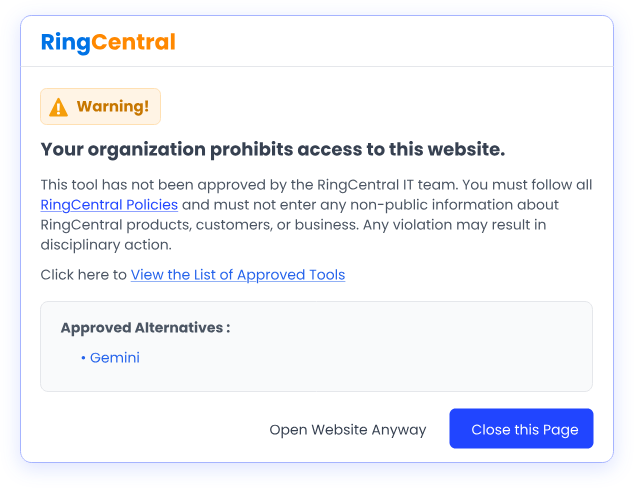
Enterprise browser warning screen notifying users that access to an unapproved website is restricted, displaying compliance requirements, approved alternatives, and governance controls for AI tool usage.

c) Sensitive Data Blocking

The policy says "no customer data in AI tools." There is no technical control that enforces it. An employee pastes a client list into ChatGPT. Nothing fires.

What CloudEagle.ai does:

  • Monitors what employees submit to AI tools at the prompt level
  • Detects PII, credentials, IP, and confidential data before it reaches the vendor
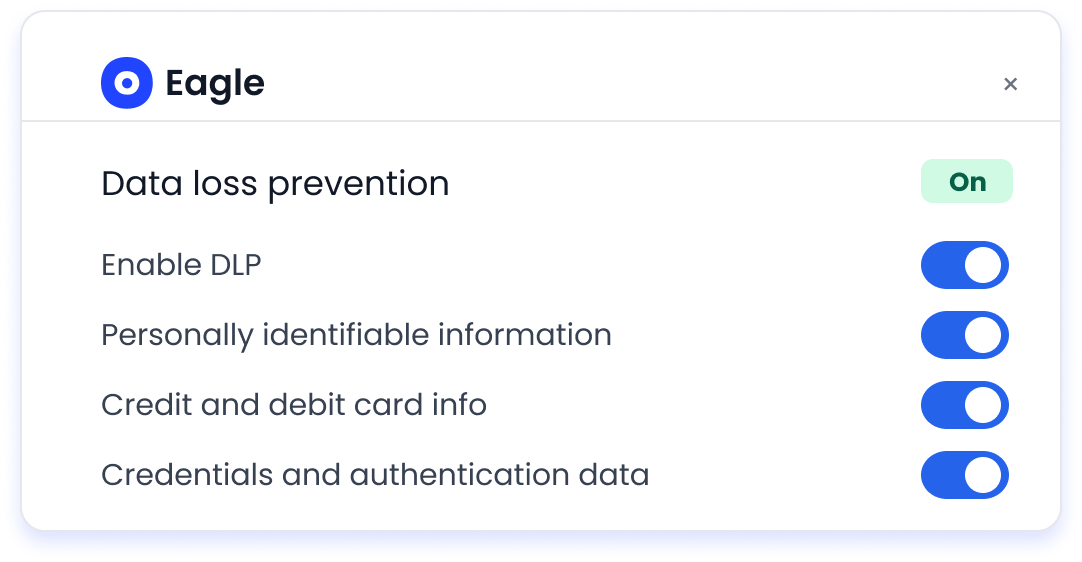
Data loss prevention settings panel enabling organizations to monitor and protect sensitive information, including personal data, payment card details, and authentication credentials shared with AI applications.

  • Blocks or flags the submission depending on your policy configuration

What gets logged for every flagged submission:

  • User and team
  • AI tool the data was submitted to
  • Content type flagged (PII, IP, confidential)
  • Intervention status and outcome

The policy rule "no customer data in AI tools" becomes a technical control.

d) Offboarding Enforcement Extended to AI Tools

Standard offboarding kills IDP access. It does not touch AI tools accessed through browser signups, personal API keys, or free-tier accounts. Former employees keep active accounts. API tokens keep running.

What CloudEagle.ai does:

  • JML automation extends offboarding to every AI tool CloudEagle has discovered
  • Closes orphaned accounts and active API tokens on departure
  • Produces offboarding confirmation records per departing user

What you get: Complete offboarding coverage for AI tools, with audit-ready evidence that access was terminated.

User offboarding automation workflow showing revoked access across business applications after an employee departure, ensuring licenses are reclaimed and permissions are removed automatically.

5. Four Policy Clauses, Four Technical Controls: Making Your AI Acceptable Use Policy Auditor-Ready

The CISO presenting an AI acceptable use policy to an auditor is not presenting the document. They are presenting evidence that controls were in place and functioning. Those are different deliverables.

Here is how the four most common AI acceptable use policy clauses map to CloudEagle's technical controls:

Policy Clause Technical Control Evidence Output
"Employees must only use approved AI tools" Browser detection + SaaSMap cross-reference catches every unapproved tool at first access Access log: tool name, user, timestamp, approval status
"Sensitive data must not be shared with external AI models" Prompt-level content monitoring detects and blocks PII, IP, and confidential data before submission Intervention record: user, data type flagged, tool, outcome
"All AI tool usage must be logged and auditable" Complete access log: who accessed what tool, when, whether it was intercepted, what data was flagged Exportable audit trail per tool, user, and team
"Offboarded employees must lose AI tool access immediately" JML automation extends offboarding to every discovered AI tool, not just apps behind the IDP Offboarding confirmation record per departing user

One security team discovered this gap during a compliance review: domain-level AI tracking existed inside their SOX function, but operated as a separate audit trail disconnected from the AI acceptable use policy enforcement layer and unable to produce integrated evidence across access, data, and offboarding. CloudEagle.ai closes that gap by producing all four evidence outputs from a single governance layer.

With these controls in place, the conversation with an auditor shifts from "here is our policy" to "here is our policy, here is the control, and here is the log proving the control worked."

Policy Clauses Without Evidence Won't Survive an Audit.

Get the practices that make every compliance control provable.
Download Checklist

6. FAQs

1. What is an AI acceptable use policy? 

An AI acceptable use policy is a formal document that defines which AI tools employees can use, what data can be entered into them, and the consequences for violations. It governs both approved tools and prohibited behaviors.

2. How do you enforce an AI acceptable use policy? 

Enforcement requires three technical controls: browser-layer detection of unsanctioned AI tool access, flash-page redirection to approved alternatives, and prompt-level content monitoring to block sensitive data before submission.

3. What is shadow AI, and why is it an enforcement problem? 

Shadow AI is the use of AI tools without IT or security approval, typically through browser signups, personal credentials, or free tiers that never appear in SSO or CASB logs. It is the primary reason AI acceptable use policies fail to prevent data exposure.

4. What should an AI acceptable use policy include? 

A complete AI acceptable use policy covers approved and prohibited tools, data classification rules, prompt and output guidelines, offboarding procedures for AI tool access, and the technical controls that enforce each clause. 

For a policy-building starting point, see CloudEagle's AI Governance Policies and Controls guide.

5. How does browser-level enforcement differ from CASB? 

CASB tools monitor traffic at the network layer and catch apps that route through the corporate network. Browser-level enforcement operates at the point of access, catching tools accessed through personal credentials, direct browser signups, and sessions that never touch the corporate network at all. For ungoverned AI access, browser-level detection is the only control that sees it.

An AI acceptable use policy is only as strong as the enforcement layer underneath it. CloudEagle.ai is that layer.

See CloudEagle's AI Governance in Action → Book a Demo

Advertisement for a SaaS Subscription Tracking Template with a call-to-action button to download and a partial graphic of a tablet showing charts.Banner promoting a SaaS Agreement Checklist to streamline SaaS management and avoid budget waste with a call-to-action button labeled Download checklist.Blue banner with text 'The Ultimate Employee Offboarding Checklist!' and a black button labeled 'Download checklist' alongside partial views of checklist documents from cloudeagle.ai.Digital ad for download checklist titled 'The Ultimate Checklist for IT Leaders to Optimize SaaS Operations' by cloudeagle.ai, showing checklist pages.Slack Buyer's Guide offer with text 'Unlock insider insights to get the best deal on Slack!' and a button labeled 'Get Your Copy', accompanied by a preview of the guide featuring Slack's logo.Monday Pricing Guide by cloudeagle.ai offering exclusive pricing secrets to maximize investment with a call-to-action button labeled Get Your Copy and an image of the guide's cover.Blue banner for Canva Pricing Guide by cloudeagle.ai offering a guide to Canva costs, features, and alternatives with a call-to-action button saying Get Your Copy.Blue banner with white text reading 'Little-Known Negotiation Hacks to Get the Best Deal on Slack' and a white button labeled 'Get Your Copy'.Blue banner with text 'Little-Known Negotiation Hacks to Get the Best Deal on Monday.com' and a white button labeled 'Get Your Copy'.Blue banner with text 'Little-Known Negotiation Hacks to Get the Best Deal on Canva' and a white button labeled 'Get Your Copy'.Banner with text 'Slack Buyer's Guide' and a 'Download Now' button next to images of a guide titled 'Slack Buyer’s Guide: Features, Pricing & Best Practices'.Digital cover of Monday Pricing Guide with a button labeled Get Your Copy on a blue background.Canva Pricing Guide cover with a button labeled Get Your Copy on a blue gradient background.

Enter your email to
unlock the report

Oops! Something went wrong while submitting the form.
License Count
Benchmark
Per User/Per Year

Enter your email to
unlock the report

Oops! Something went wrong while submitting the form.
License Count
Benchmark
Per User/Per Year

Enter your email to
unlock the report

Oops! Something went wrong while submitting the form.
Notion Plus
License Count
Benchmark
Per User/Per Year
100-500
$67.20 - $78.72
500-1000
$59.52 - $72.00
1000+
$51.84 - $57.60
Canva Pro
License Count
Benchmark
Per User/Per Year
100-500
$74.33-$88.71
500-1000
$64.74-$80.32
1000+
$55.14-$62.34

Enter your email to
unlock the report

Oops! Something went wrong while submitting the form.

Enter your email to
unlock the report

Oops! Something went wrong while submitting the form.
Zoom Business
License Count
Benchmark
Per User/Per Year
100-500
$216.00 - $264.00
500-1000
$180.00 - $216.00
1000+
$156.00 - $180.00

Enter your email to
unlock the report

Oops! Something went wrong while submitting the form.

Get the Right Security Platform To Secure Your Cloud Infrastructure

Please enter a business email
Thank you!
The 2023 SaaS report has been sent to your email. Check your promotional or spam folder.
Oops! Something went wrong while submitting the form.

Access full report

Please enter a business email
Thank you!
The 2023 SaaS report has been sent to your email. Check your promotional or spam folder.
Oops! Something went wrong while submitting the form.

Most organizations have an AI acceptable use policy. Almost none of them can enforce it.

Because the enforcement gap is in the three places employees actually access AI: the browser, signing up with a personal email, the API key a developer spun up outside the approved gateway, and the Copilot session inside Microsoft 365 that your policy predates.

None of those sessions generates an SSO event or triggers a CASB alert. The session opens, data goes in, the tab closes, and your security stack never saw it.

That is the problem this post addresses.

TL;DR

  • Most AI acceptable use policies fail because they assume employees access AI through IT-sanctioned channels
  • The three real enforcement blind spots are browser-based signups, direct API access, and bundled AI inside sanctioned SaaS tools
  • Enforcing an AI acceptable use policy requires three technical controls: browser-level detection, flash-page redirection, and prompt-level content monitoring
  • CloudEagle.ai enforces your AI acceptable use policy at the point of use, detecting ungoverned AI tools, blocking sensitive data submission, redirecting users to approved alternatives, and logging every intervention
  • Each major policy clause maps directly to a CloudEagle.ai technical control, producing audit-ready evidence

1. Your AI Acceptable Use Policy Has a Blind Spot (And It's Where Employees Actually Use AI)

Most AI acceptable use policies are written for a world that doesn't exist: one where employees request AI tools through IT, wait for procurement review, and access everything through the corporate identity provider.

The reality looks different:

None of that generates an SSO event, a CASB alert, or a DLP flag. The session opens, the data goes in, the tab closes, and your security stack never saw any of it.

One enterprise IT leader described exactly this state: 

"Most of these are just general service provider logins. They're going to a site and logging in with their unique service provider credentials that they created for whatever that service is." 

His organization hadn't even defined what sanctioned and unsanctioned AI tools meant yet, because without a visibility layer, the definition has no enforcement surface.

A policy that says "don't use unsanctioned AI tools" has no mechanism to detect when someone does. You can't enforce what you can't see.

71% of Employees Use Unapproved AI Every Week.

Find every tool your policy can't see right now.
Download Checklist

2. The Three Entry Points Your AI Policy Can't See (But Employees Use Every Day)

Traditional IT security tooling misses three specific entry points. That is where most AI policy violations happen.

a) Browser-Based Signups

An employee navigates to ChatGPT, Perplexity, or Gemini with a personal email address. The session is invisible to every tool monitoring the corporate identity layer.

One CIO at a global enterprise software company ran a firewall log analysis and discovered 92 AI engines being actively used across the organization, none of which appeared in the IT-managed application inventory. Without active discovery at the browser layer, those tools are completely invisible to policy enforcement.

b) Direct API Access

A developer hits the OpenAI API directly with a personal or team API key, bypassing the approved LLM gateway entirely. 

Token consumption accumulates with no user attribution and no usage context. The session does not appear in your AI acceptable use policy reporting because no system knows it happened.

c) Bundled AI Features Inside Sanctioned Tools

Your organization approved Microsoft 365. Copilot is enabled. Copilot sits behind SSO, but your AI acceptable use policy may have been written before Copilot existed, which means the governance language doesn't address:

  • What data can employees feed it
  • Which Copilot features are approved for which teams
  • How usage is monitored or flagged

The same applies to Gemini inside Google Workspace. Embedded AI assistants are technically sanctioned. They are practically ungoverned.

CloudEagle's SaaSMap maintains a proprietary AI application inventory that flags bundled AI features inside sanctioned tools as a separate governance category precisely because the standard approved/unapproved list misses them entirely.

If you want to understand the ownership problem underneath these gaps, The Shadow AI Governance Gap covers why 63% of enterprises still have no shadow AI policy.

3. What "Enforcing" an AI Acceptable Use Policy Actually Requires

Three technical controls make an AI acceptable use policy actually function. Here is what each one does:

Control What it does Why it matters
Browser-layer detection MDM-deployed plugin catches every AI tool accessed, including browser signups and personal credentials The only mechanism that sees AI activity outside SSO, CASB, and DLP coverage
Flash page redirection Intercepts the session before it opens and routes the employee to an approved alternative Keeps employees productive without letting policy violations through
Prompt-level content monitoring Detects PII, IP, and confidential data before it reaches the AI vendor Turns "no customer data in AI tools" from a policy clause into a technical control

These three controls are not interchangeable. 

Detection without intervention means you know about violations but cannot prevent them. Intervention without monitoring means you can redirect browser sessions, but you cannot catch sensitive data submitted through approved tools. 

All three, running together, give your AI acceptable use policy actual teeth.

4. How CloudEagle.ai Enforces Your AI Acceptable Use Policy at the Point of Use

CloudEagle.ai is a SaaS management and AI governance platform that enforces policy at the browser level where AI tool access actually happens. 

Here is what each capability does and what it produces:

a) Unsanctioned AI Tool Detection

Employees access AI outside SSO through browser signups, personal credentials, and free tiers. None of it generates an IT event or appears in your approved tool list.

What CloudEagle.ai does:

  • Browser plugin deployed via MDM detects every AI tool an employee accesses
  • Cross-references against SaaSMap's proprietary AI application inventory in real time
  • Surfaces tools accessed through personal credentials, free tiers, and direct browser visits

What you get: A complete AI footprint across your organization. Not just what IT sanctioned, but what employees are actually using.

One technology company running Claude, Cursor, and Microsoft Copilot had no connected security enforcement despite active spend across all three. Token consumption was accumulating with no attribution and no security team visibility. CloudEagle closes that gap at first access.

b) Flash Page Interception

An employee tries to open an unsanctioned AI tool. Without intervention, the session opens, data gets entered, and your policy is violated before any alert fires.

What CloudEagle.ai does:

  • Detects the attempt before the session opens
  • Displays a flash page redirecting the employee to the approved alternative; your AI acceptable use policy already designates
  • Logs the attempt with user, tool, and timestamp

What you get: Policy enforcement at the point of access without blocking productivity.

A Fortune 500 financial services firm deployed flash page interception through CloudEagle and blocked 100% of PII exposure incidents while maintaining day-to-day AI productivity across teams. Read the full case study →

Enterprise browser warning screen notifying users that access to an unapproved website is restricted, displaying compliance requirements, approved alternatives, and governance controls for AI tool usage.

c) Sensitive Data Blocking

The policy says "no customer data in AI tools." There is no technical control that enforces it. An employee pastes a client list into ChatGPT. Nothing fires.

What CloudEagle.ai does:

  • Monitors what employees submit to AI tools at the prompt level
  • Detects PII, credentials, IP, and confidential data before it reaches the vendor

Data loss prevention settings panel enabling organizations to monitor and protect sensitive information, including personal data, payment card details, and authentication credentials shared with AI applications.

  • Blocks or flags the submission depending on your policy configuration

What gets logged for every flagged submission:

  • User and team
  • AI tool the data was submitted to
  • Content type flagged (PII, IP, confidential)
  • Intervention status and outcome

The policy rule "no customer data in AI tools" becomes a technical control.

d) Offboarding Enforcement Extended to AI Tools

Standard offboarding kills IDP access. It does not touch AI tools accessed through browser signups, personal API keys, or free-tier accounts. Former employees keep active accounts. API tokens keep running.

What CloudEagle.ai does:

  • JML automation extends offboarding to every AI tool CloudEagle has discovered
  • Closes orphaned accounts and active API tokens on departure
  • Produces offboarding confirmation records per departing user

What you get: Complete offboarding coverage for AI tools, with audit-ready evidence that access was terminated.

User offboarding automation workflow showing revoked access across business applications after an employee departure, ensuring licenses are reclaimed and permissions are removed automatically.

5. Four Policy Clauses, Four Technical Controls: Making Your AI Acceptable Use Policy Auditor-Ready

The CISO presenting an AI acceptable use policy to an auditor is not presenting the document. They are presenting evidence that controls were in place and functioning. Those are different deliverables.

Here is how the four most common AI acceptable use policy clauses map to CloudEagle's technical controls:

Policy Clause Technical Control Evidence Output
"Employees must only use approved AI tools" Browser detection + SaaSMap cross-reference catches every unapproved tool at first access Access log: tool name, user, timestamp, approval status
"Sensitive data must not be shared with external AI models" Prompt-level content monitoring detects and blocks PII, IP, and confidential data before submission Intervention record: user, data type flagged, tool, outcome
"All AI tool usage must be logged and auditable" Complete access log: who accessed what tool, when, whether it was intercepted, what data was flagged Exportable audit trail per tool, user, and team
"Offboarded employees must lose AI tool access immediately" JML automation extends offboarding to every discovered AI tool, not just apps behind the IDP Offboarding confirmation record per departing user

One security team discovered this gap during a compliance review: domain-level AI tracking existed inside their SOX function, but operated as a separate audit trail disconnected from the AI acceptable use policy enforcement layer and unable to produce integrated evidence across access, data, and offboarding. CloudEagle.ai closes that gap by producing all four evidence outputs from a single governance layer.

With these controls in place, the conversation with an auditor shifts from "here is our policy" to "here is our policy, here is the control, and here is the log proving the control worked."

Policy Clauses Without Evidence Won't Survive an Audit.

Get the practices that make every compliance control provable.
Download Checklist

6. FAQs

1. What is an AI acceptable use policy? 

An AI acceptable use policy is a formal document that defines which AI tools employees can use, what data can be entered into them, and the consequences for violations. It governs both approved tools and prohibited behaviors.

2. How do you enforce an AI acceptable use policy? 

Enforcement requires three technical controls: browser-layer detection of unsanctioned AI tool access, flash-page redirection to approved alternatives, and prompt-level content monitoring to block sensitive data before submission.

3. What is shadow AI, and why is it an enforcement problem? 

Shadow AI is the use of AI tools without IT or security approval, typically through browser signups, personal credentials, or free tiers that never appear in SSO or CASB logs. It is the primary reason AI acceptable use policies fail to prevent data exposure.

4. What should an AI acceptable use policy include? 

A complete AI acceptable use policy covers approved and prohibited tools, data classification rules, prompt and output guidelines, offboarding procedures for AI tool access, and the technical controls that enforce each clause. 

For a policy-building starting point, see CloudEagle's AI Governance Policies and Controls guide.

5. How does browser-level enforcement differ from CASB? 

CASB tools monitor traffic at the network layer and catch apps that route through the corporate network. Browser-level enforcement operates at the point of access, catching tools accessed through personal credentials, direct browser signups, and sessions that never touch the corporate network at all. For ungoverned AI access, browser-level detection is the only control that sees it.

An AI acceptable use policy is only as strong as the enforcement layer underneath it. CloudEagle.ai is that layer.

See CloudEagle's AI Governance in Action → Book a Demo

CloudEagle.ai recognized in the 2025 Gartner® Magic Quadrant™ for SaaS Management Platforms
Download now
gartner chart
5x
Faster employee
onboarding
80%
Reduction in time for
user access reviews
30k
Workflows
automated
$15Bn
Analyzed in
contract spend
$2Bn
Saved in
SaaS spend

Streamline SaaS governance and save 10-30%

Book a Demo with Expert
CTA image