AI Governance

Blocking ChatGPT Didn't Work. Here's What Actually Reduces the Risk

Share via:
Written by:
CloudEagle.ai Team
Reviewed by
Nidhi Jain
Last Updated:
October 9, 2026
blog-cms-banner-bg
Little-Known Negotiation Hacks to Get the Best Deal on Slack
cta-bg-blogDownload Your Copy

HIPAA Compliance Checklist for 2025

Download PDF

‍

In May 2023, Samsung banned ChatGPT and other generative AI tools on company devices after engineers pasted internal source code into the chatbot. Three years later, it approved ChatGPT, Gemini and Claude across the group, after a pilot and mandatory AI training.

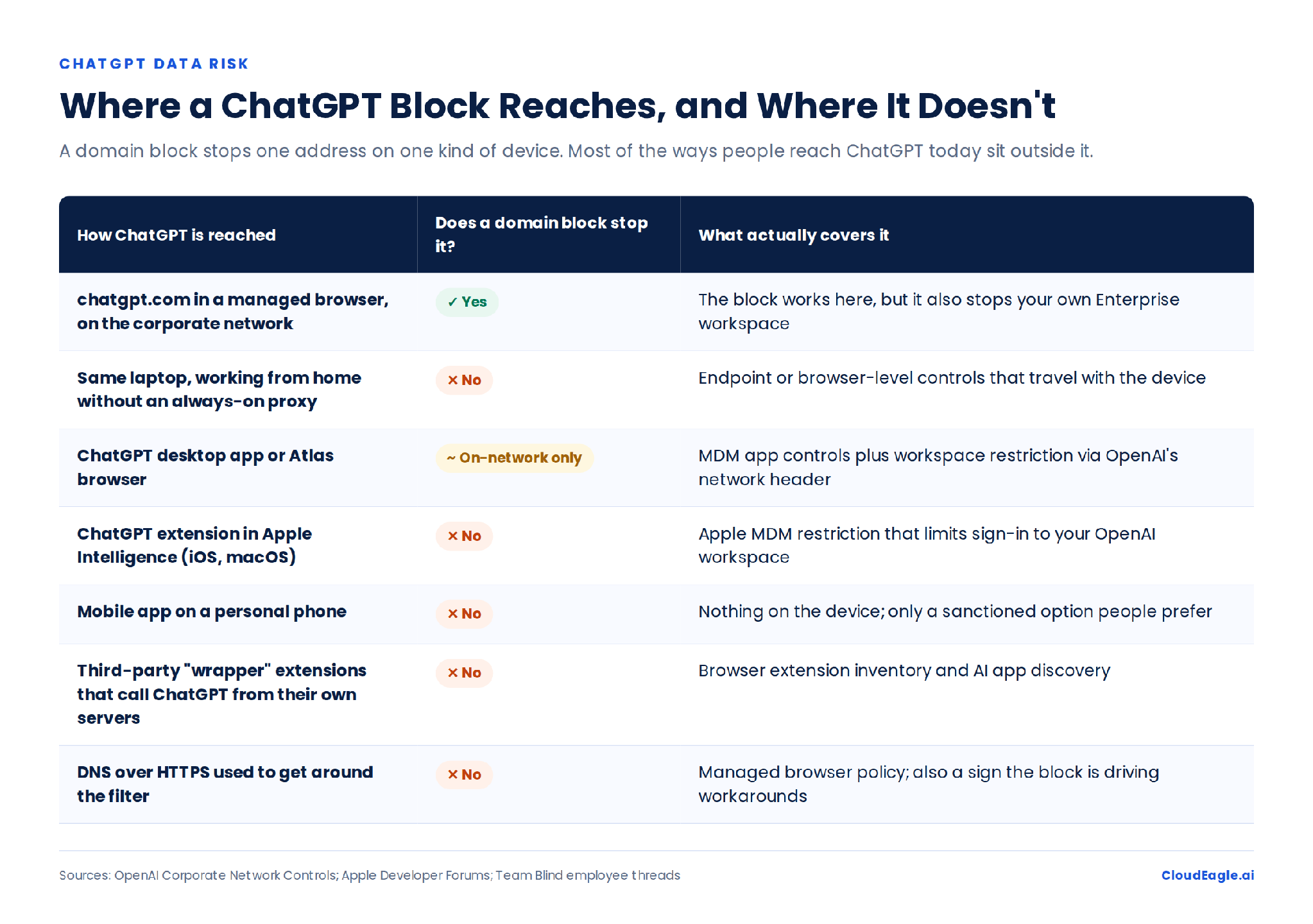
The company that made the ChatGPT ban famous now governs the tools instead. That shift is the lesson: blocking ChatGPT was never the same as controlling ChatGPT risk. A domain block stops employees opening chatgpt.com on the corporate network; it doesn't stop a phone, a personal account or a third-party wrapper.

The controls that work sit on the account, the data and the access path. Here are seven of them.

‍

Why Doesn't Blocking ChatGPT Reduce the Risk?

A ChatGPT block is a network control. The risk it targets is a data governance problem, and three gaps follow from that.

  • The block targets a URL; the risk lives in the account. The same website serves a free personal account, an employee-paid Plus subscription and an Enterprise workspace, each with a different security posture. The real question is which ChatGPT account receives the company's data, and a domain block can't tell.
  • Workarounds move usage out of sight. In Blind threads about corporate blocks, employees suggest switching to a phone, using an extension that reaches ChatGPT through another backend, or turning on DNS over HTTPS. Each route sits outside the proxy, DLP or endpoint controls the block relied on.
  • ChatGPT no longer lives at one URL. Employees reach it through desktop and mobile apps, browser extensions, connectors and Apple Intelligence on iOS and macOS. The ways in grow faster than a blocklist can follow.

‍

CloudEagle.ai dashboard showing 152 AI agents, their Azure AD environment, service ID types, and an active agent registry with identity names, last activity dates, status, owners, and edit actions.

The Block Doesn’t See the Personal Account

Find every ChatGPT account, extension, and API key in your environment.
Download Checklist

‍

Where Does ChatGPT Data Exposure Actually Come From?

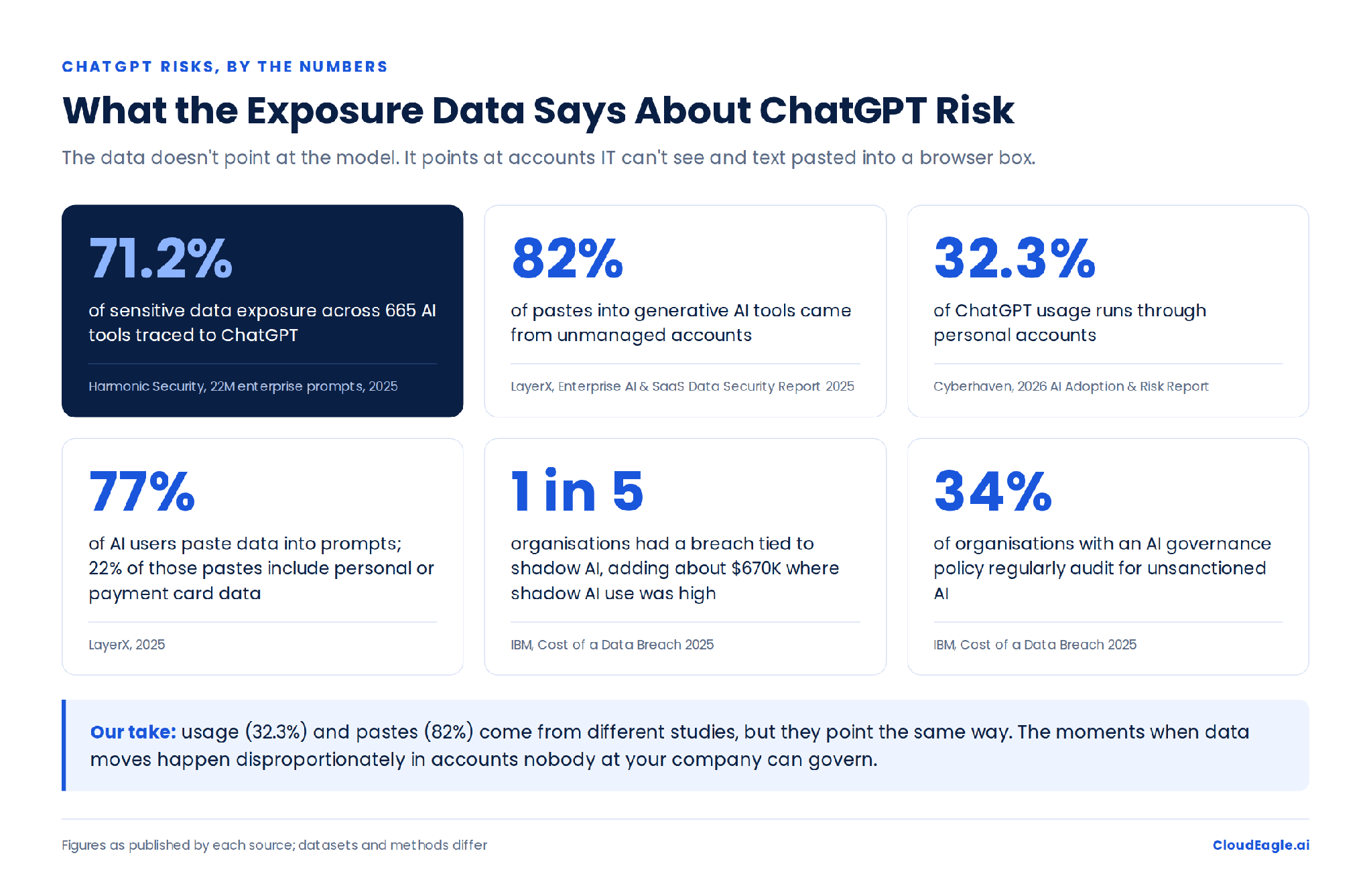
AI risk lists bundle hallucinations, prompt injection, training and leakage together; our breakdown of ChatGPT enterprise security covers the full register. The urgent problem is narrower: sensitive data entering accounts the organisation can't govern. Harmonic Security's analysis of 22 million enterprise AI prompts found ChatGPT accounted for 71.2% of sensitive data exposure across 665 AI tools.

Four patterns drive most of it:

  • Personal accounts. Cyberhaven's 2026 AI Adoption & Risk Report found 32.3% of ChatGPT usage ran through personal accounts, often because they let employees bypass token limits on company plans.
  • Copy-paste. LayerX found 77% of AI users paste data into prompts, and 22% of those pastes contain personal or payment card data. File-based DLP rarely sees a browser text box.
  • New features. OpenAI removed a sharing option in August 2025 after shared conversations appeared in Google results. Memory, connectors and custom GPTs can open new data paths without any deployment on your side.
  • Stolen credentials. Group-IB found more than 225,000 infostealer logs containing ChatGPT credentials. For a personal account, the company controls neither the password nor the history.
‍

CloudEagle.ai Secure Browsing Settings dashboard showing data loss prevention controls for personal identification information, financial data, credentials and authentication, and personal health information, with toggles to enable protection.

Our take: the biggest ChatGPT problem is whether you can govern the account, data and access path your data enters, not what the model does with it.

‍

7 Best Practices to Reduce ChatGPT Risk Without a Ban

The alternative to a blanket block isn't "let everyone use ChatGPT." It's putting controls closer to the account, data and action that create the risk.

1. Find Every ChatGPT Account

Build the inventory before enforcing anything. Look for:

  • Enterprise seats and Business subscriptions
  • Plus subscriptions paid with company cards
  • personal accounts used on managed devices
  • browser extensions, connectors and API keys

SSO shows sanctioned users only. Finance, browser, endpoint and network signals fill in the rest.

2. Make the Approved Workspace Worth Using

MIT's State of AI in Business 2025 research found only 40% of companies had bought an official LLM subscription, while workers at more than 90% used personal AI tools. If the approved workspace lacks a model or feature people need, a policy won't remove the demand; the shadow AI economy is a signal of what the sanctioned stack is missing.

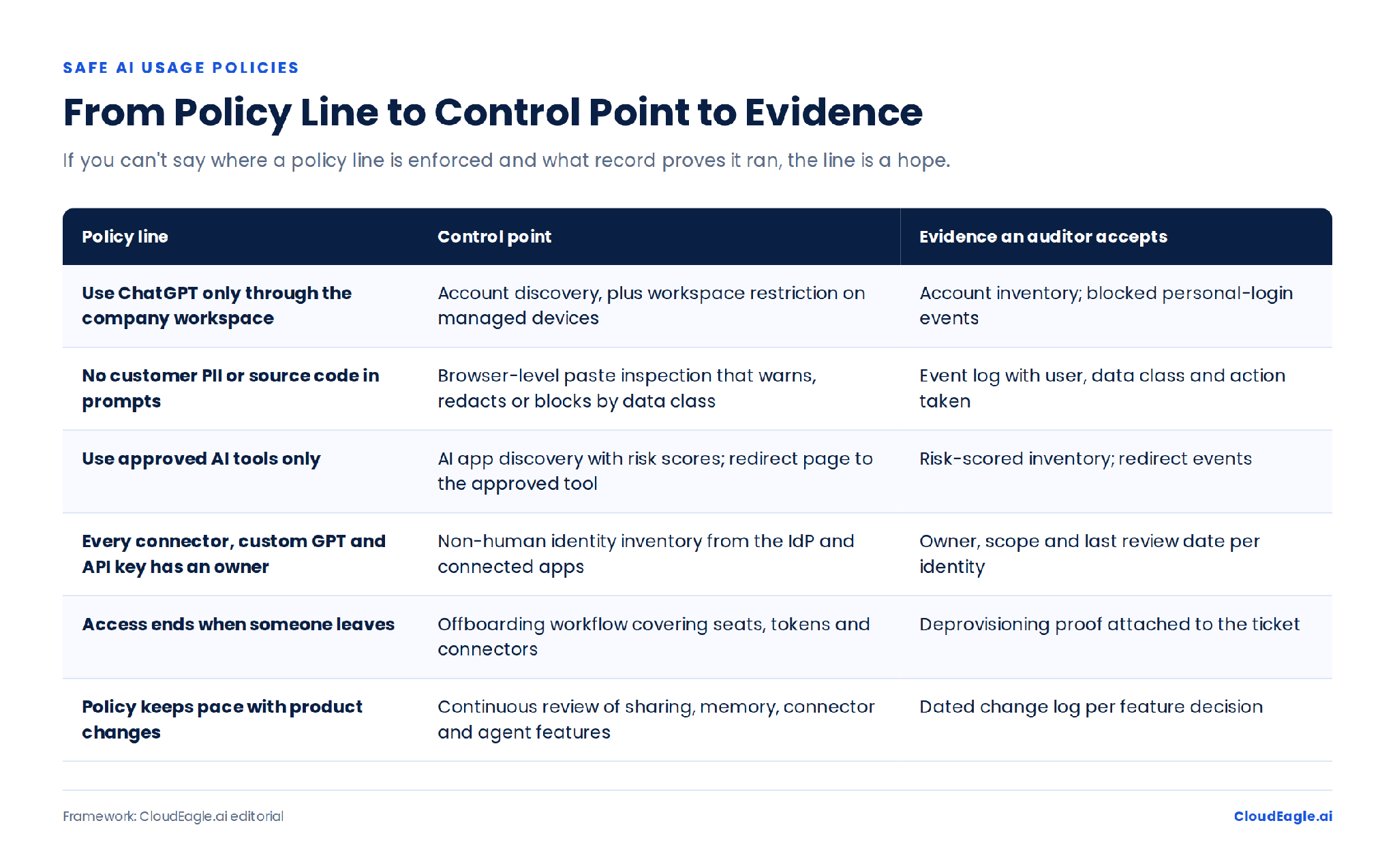
3. Write a Policy That Answers Three Questions

  • Which accounts are allowed: company workspaces, personal accounts, logged-out sessions, unmanaged devices?
  • Which data classes are allowed, allowed with a warning, redacted or blocked?
  • Which features are approved: connectors, custom GPTs, actions, API keys and agents, each with an owner and a revocation process?

Every line should map to a control and an evidence trail. If you can't say where a rule is enforced, it's still a document.

New to this? Start with what AI policy enforcement is.
‍

CloudEagle.ai NHI Risk dashboard showing identity permissions for two Okta OAuth service apps, including their active and inactive statuses, admin-granted permissions, and options to revoke access.

4. Restrict Personal Accounts on Managed Devices

OpenAI's Corporate Network Controls let Enterprise customers restrict access to their own workspace IDs, and Apple MDM can limit the built-in ChatGPT extension to your workspace. That allows the approved workspace instead of allowing or blocking ChatGPT outright. It only covers managed devices, which is why the next control sits on the data.

5. Inspect the Prompt When the Paste Happens

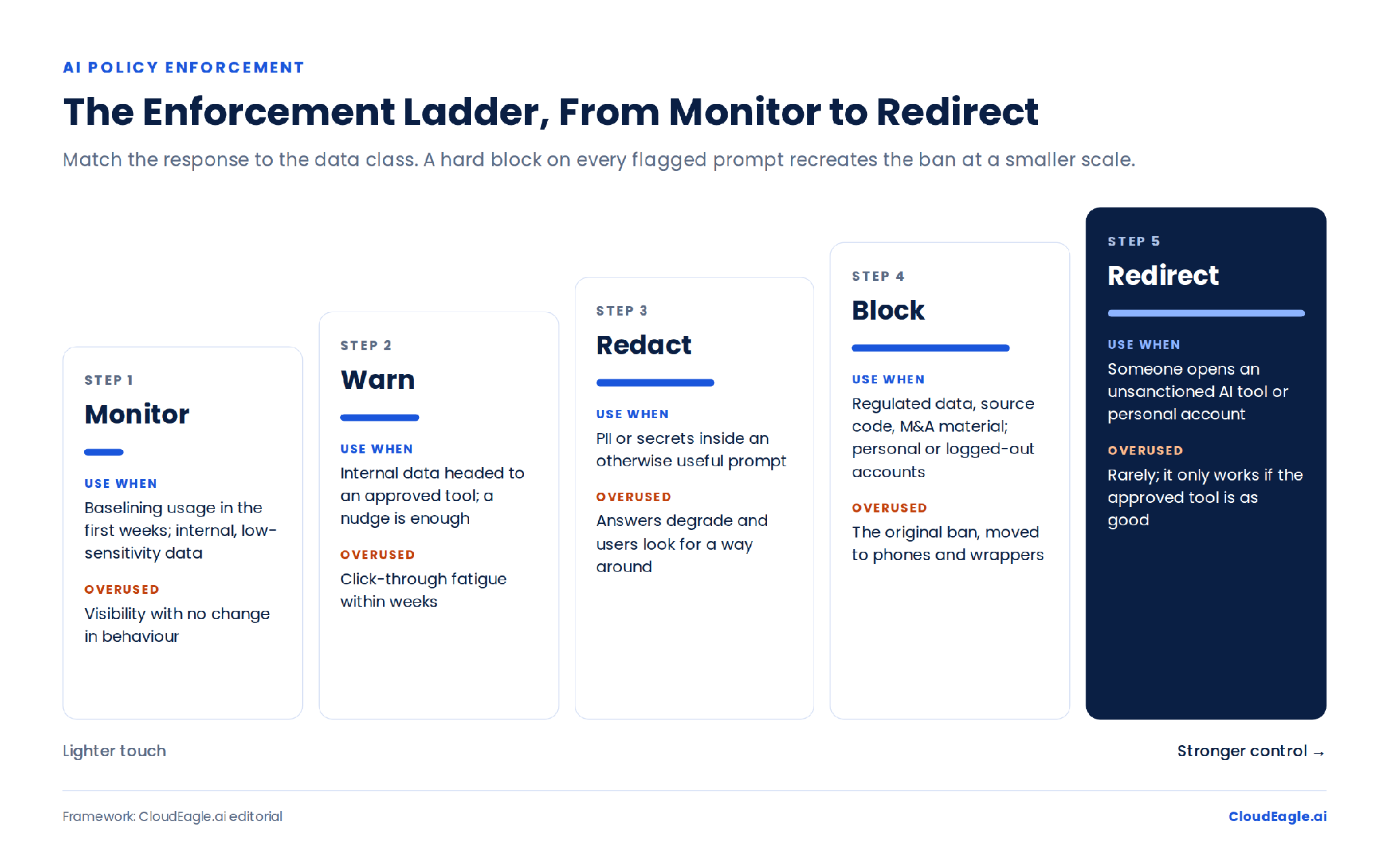
Browser-level controls can check a prompt before it reaches an AI service. Match the response to the risk: warn on lower-risk data, redact the sensitive field to keep the workflow moving, and block only restricted information. Graduated responses are harder to route around than a flat no.
‍

Usage report for Cursor showing a 30-day usage chart broken down by eight users, with color-coded activity trends across dates from November 1 to November 14 and options to view usage by user, API key, or project.

6. Treat Connectors, GPTs and API Keys as Identities

A ChatGPT connector to Google Drive is an access path into company data, and so is a custom GPT with an action or an API key in a script. Give each an owner, a defined scope, monitoring and a revocation step in the same offboarding workflow used for employees.

7. Test the Control, Not Just the Policy

IBM's 2025 Cost of a Data Breach report found one in five organisations had a breach tied to shadow AI, adding about $670,000 to costs where shadow AI use was high. Only 34% of organisations with an AI governance policy audited regularly for unsanctioned AI.

The test is simple. Paste a synthetic customer record into a personal ChatGPT account from a managed laptop. If nothing detects it, the policy isn't working yet.

A Policy Without a Control Is Just a Document

Turn your AI governance rules into enforcement that actually holds.
Download Checklist

‍

When Is Blocking ChatGPT Still Useful?

Narrow blocks still work when you know exactly what you're protecting:

  1. personal ChatGPT workspaces or logged-out use on managed devices
  2. specific sensitive data classes, such as code, legal documents, financials and M&A material
  3. unmanaged devices reaching regulated systems
  4. unapproved AI apps with no legitimate business use

Block the risky path, not the whole category of AI use.

‍

How Does CloudEagle.ai Enforce ChatGPT Policies Across Accounts?

ChatGPT's admin controls govern your own workspace. They don't show the Plus subscription an employee pays for, the personal account on a contractor's laptop, or an API key still active after someone leaves. CloudEagle.ai closes that gap in four ways.

  • Discovery: CloudEagle.ai correlates SSO, finance and card spend, firewall and endpoint logs, and its browser plugin with EagleIQ, its AI application inventory, so sanctioned seats appear next to personal and expensed accounts.
  • Enforcement at the paste: AI policy enforcement monitors or blocks sensitive content and detects PII sent to AI vendors. Unsanctioned tools redirect users to the approved one, so the work still gets done.
  • AI identities: non-human identity management tracks service accounts, API keys and AI agents across Okta, Entra and connected apps, with owners, permissions and revocation for orphaned credentials.
  • Offboarding: zero-touch offboarding removes ChatGPT seats with evidence for the audit trail, and usage data flags inactive seats to reclaim.
In 2023 the question was how to stop employees using ChatGPT. In 2026 it's how to govern the ChatGPT use you can't eliminate.

Book a demo to see every ChatGPT account in your environment in 30 minutes.

‍

Frequently Asked Questions About ChatGPT Risks

Should Companies Ban ChatGPT?

A blanket ban misses personal devices, personal accounts and third-party apps. A targeted model allows approved use while controlling accounts, sensitive data, connectors and other access paths.

Does ChatGPT Train on Company Data?

Not by default on Business, Enterprise or Edu workspaces. Consumer accounts can use conversations to improve models unless the user turns that setting off.

Can Companies Block Personal ChatGPT Accounts but Allow ChatGPT Enterprise?

Yes, on managed devices. Corporate Network Controls restrict access to your workspace IDs, and Apple MDM can restrict the ChatGPT extension. Unmanaged devices need data-level controls.

How Can Companies Monitor ChatGPT Usage?

Don't rely on SSO alone. Combine identity, finance, browser, endpoint and network data with an AI application inventory, then use prompt-level controls to stop sensitive data reaching unsanctioned tools.

‍

Advertisement for a SaaS Subscription Tracking Template with a call-to-action button to download and a partial graphic of a tablet showing charts.Banner promoting a SaaS Agreement Checklist to streamline SaaS management and avoid budget waste with a call-to-action button labeled Download checklist.Blue banner with text 'The Ultimate Employee Offboarding Checklist!' and a black button labeled 'Download checklist' alongside partial views of checklist documents from cloudeagle.ai.Digital ad for download checklist titled 'The Ultimate Checklist for IT Leaders to Optimize SaaS Operations' by cloudeagle.ai, showing checklist pages.Slack Buyer's Guide offer with text 'Unlock insider insights to get the best deal on Slack!' and a button labeled 'Get Your Copy', accompanied by a preview of the guide featuring Slack's logo.Monday Pricing Guide by cloudeagle.ai offering exclusive pricing secrets to maximize investment with a call-to-action button labeled Get Your Copy and an image of the guide's cover.Blue banner for Canva Pricing Guide by cloudeagle.ai offering a guide to Canva costs, features, and alternatives with a call-to-action button saying Get Your Copy.Blue banner with white text reading 'Little-Known Negotiation Hacks to Get the Best Deal on Slack' and a white button labeled 'Get Your Copy'.Blue banner with text 'Little-Known Negotiation Hacks to Get the Best Deal on Monday.com' and a white button labeled 'Get Your Copy'.Blue banner with text 'Little-Known Negotiation Hacks to Get the Best Deal on Canva' and a white button labeled 'Get Your Copy'.Banner with text 'Slack Buyer's Guide' and a 'Download Now' button next to images of a guide titled 'Slack Buyer’s Guide: Features, Pricing & Best Practices'.Digital cover of Monday Pricing Guide with a button labeled Get Your Copy on a blue background.Canva Pricing Guide cover with a button labeled Get Your Copy on a blue gradient background.

Enter your email to
unlock the report

Oops! Something went wrong while submitting the form.
License Count
Benchmark
Per User/Per Year

Enter your email to
unlock the report

Oops! Something went wrong while submitting the form.
License Count
Benchmark
Per User/Per Year

Enter your email to
unlock the report

Oops! Something went wrong while submitting the form.
Notion Plus
License Count
Benchmark
Per User/Per Year
100-500
$67.20 - $78.72
500-1000
$59.52 - $72.00
1000+
$51.84 - $57.60
Canva Pro
License Count
Benchmark
Per User/Per Year
100-500
$74.33-$88.71
500-1000
$64.74-$80.32
1000+
$55.14-$62.34

Enter your email to
unlock the report

Oops! Something went wrong while submitting the form.

Enter your email to
unlock the report

Oops! Something went wrong while submitting the form.
Zoom Business
License Count
Benchmark
Per User/Per Year
100-500
$216.00 - $264.00
500-1000
$180.00 - $216.00
1000+
$156.00 - $180.00

Enter your email to
unlock the report

Oops! Something went wrong while submitting the form.

Get the Right Security Platform To Secure Your Cloud Infrastructure

Please enter a business email
Thank you!
The 2023 SaaS report has been sent to your email. Check your promotional or spam folder.
Oops! Something went wrong while submitting the form.

Access full report

Please enter a business email
Thank you!
The 2023 SaaS report has been sent to your email. Check your promotional or spam folder.
Oops! Something went wrong while submitting the form.

‍

In May 2023, Samsung banned ChatGPT and other generative AI tools on company devices after engineers pasted internal source code into the chatbot. Three years later, it approved ChatGPT, Gemini and Claude across the group, after a pilot and mandatory AI training.

The company that made the ChatGPT ban famous now governs the tools instead. That shift is the lesson: blocking ChatGPT was never the same as controlling ChatGPT risk. A domain block stops employees opening chatgpt.com on the corporate network; it doesn't stop a phone, a personal account or a third-party wrapper.

The controls that work sit on the account, the data and the access path. Here are seven of them.

‍

Why Doesn't Blocking ChatGPT Reduce the Risk?

A ChatGPT block is a network control. The risk it targets is a data governance problem, and three gaps follow from that.

  • The block targets a URL; the risk lives in the account. The same website serves a free personal account, an employee-paid Plus subscription and an Enterprise workspace, each with a different security posture. The real question is which ChatGPT account receives the company's data, and a domain block can't tell.
  • Workarounds move usage out of sight. In Blind threads about corporate blocks, employees suggest switching to a phone, using an extension that reaches ChatGPT through another backend, or turning on DNS over HTTPS. Each route sits outside the proxy, DLP or endpoint controls the block relied on.
  • ChatGPT no longer lives at one URL. Employees reach it through desktop and mobile apps, browser extensions, connectors and Apple Intelligence on iOS and macOS. The ways in grow faster than a blocklist can follow.

‍

CloudEagle.ai dashboard showing 152 AI agents, their Azure AD environment, service ID types, and an active agent registry with identity names, last activity dates, status, owners, and edit actions.

The Block Doesn’t See the Personal Account

Find every ChatGPT account, extension, and API key in your environment.
Download Checklist

‍

Where Does ChatGPT Data Exposure Actually Come From?

AI risk lists bundle hallucinations, prompt injection, training and leakage together; our breakdown of ChatGPT enterprise security covers the full register. The urgent problem is narrower: sensitive data entering accounts the organisation can't govern. Harmonic Security's analysis of 22 million enterprise AI prompts found ChatGPT accounted for 71.2% of sensitive data exposure across 665 AI tools.

Four patterns drive most of it:

  • Personal accounts. Cyberhaven's 2026 AI Adoption & Risk Report found 32.3% of ChatGPT usage ran through personal accounts, often because they let employees bypass token limits on company plans.
  • Copy-paste. LayerX found 77% of AI users paste data into prompts, and 22% of those pastes contain personal or payment card data. File-based DLP rarely sees a browser text box.
  • New features. OpenAI removed a sharing option in August 2025 after shared conversations appeared in Google results. Memory, connectors and custom GPTs can open new data paths without any deployment on your side.
  • Stolen credentials. Group-IB found more than 225,000 infostealer logs containing ChatGPT credentials. For a personal account, the company controls neither the password nor the history.

‍

CloudEagle.ai Secure Browsing Settings dashboard showing data loss prevention controls for personal identification information, financial data, credentials and authentication, and personal health information, with toggles to enable protection.

Our take: the biggest ChatGPT problem is whether you can govern the account, data and access path your data enters, not what the model does with it.

‍

7 Best Practices to Reduce ChatGPT Risk Without a Ban

The alternative to a blanket block isn't "let everyone use ChatGPT." It's putting controls closer to the account, data and action that create the risk.

1. Find Every ChatGPT Account

Build the inventory before enforcing anything. Look for:

  • Enterprise seats and Business subscriptions
  • Plus subscriptions paid with company cards
  • personal accounts used on managed devices
  • browser extensions, connectors and API keys

SSO shows sanctioned users only. Finance, browser, endpoint and network signals fill in the rest.

2. Make the Approved Workspace Worth Using

MIT's State of AI in Business 2025 research found only 40% of companies had bought an official LLM subscription, while workers at more than 90% used personal AI tools. If the approved workspace lacks a model or feature people need, a policy won't remove the demand; the shadow AI economy is a signal of what the sanctioned stack is missing.

3. Write a Policy That Answers Three Questions

  • Which accounts are allowed: company workspaces, personal accounts, logged-out sessions, unmanaged devices?
  • Which data classes are allowed, allowed with a warning, redacted or blocked?
  • Which features are approved: connectors, custom GPTs, actions, API keys and agents, each with an owner and a revocation process?

Every line should map to a control and an evidence trail. If you can't say where a rule is enforced, it's still a document.

New to this? Start with what AI policy enforcement is.

‍

CloudEagle.ai NHI Risk dashboard showing identity permissions for two Okta OAuth service apps, including their active and inactive statuses, admin-granted permissions, and options to revoke access.

4. Restrict Personal Accounts on Managed Devices

OpenAI's Corporate Network Controls let Enterprise customers restrict access to their own workspace IDs, and Apple MDM can limit the built-in ChatGPT extension to your workspace. That allows the approved workspace instead of allowing or blocking ChatGPT outright. It only covers managed devices, which is why the next control sits on the data.

5. Inspect the Prompt When the Paste Happens

Browser-level controls can check a prompt before it reaches an AI service. Match the response to the risk: warn on lower-risk data, redact the sensitive field to keep the workflow moving, and block only restricted information. Graduated responses are harder to route around than a flat no.

‍

Usage report for Cursor showing a 30-day usage chart broken down by eight users, with color-coded activity trends across dates from November 1 to November 14 and options to view usage by user, API key, or project.

6. Treat Connectors, GPTs and API Keys as Identities

A ChatGPT connector to Google Drive is an access path into company data, and so is a custom GPT with an action or an API key in a script. Give each an owner, a defined scope, monitoring and a revocation step in the same offboarding workflow used for employees.

7. Test the Control, Not Just the Policy

IBM's 2025 Cost of a Data Breach report found one in five organisations had a breach tied to shadow AI, adding about $670,000 to costs where shadow AI use was high. Only 34% of organisations with an AI governance policy audited regularly for unsanctioned AI.

The test is simple. Paste a synthetic customer record into a personal ChatGPT account from a managed laptop. If nothing detects it, the policy isn't working yet.

A Policy Without a Control Is Just a Document

Turn your AI governance rules into enforcement that actually holds.
Download Checklist

‍

When Is Blocking ChatGPT Still Useful?

Narrow blocks still work when you know exactly what you're protecting:

  1. personal ChatGPT workspaces or logged-out use on managed devices
  2. specific sensitive data classes, such as code, legal documents, financials and M&A material
  3. unmanaged devices reaching regulated systems
  4. unapproved AI apps with no legitimate business use

Block the risky path, not the whole category of AI use.

‍

How Does CloudEagle.ai Enforce ChatGPT Policies Across Accounts?

ChatGPT's admin controls govern your own workspace. They don't show the Plus subscription an employee pays for, the personal account on a contractor's laptop, or an API key still active after someone leaves. CloudEagle.ai closes that gap in four ways.

  • Discovery: CloudEagle.ai correlates SSO, finance and card spend, firewall and endpoint logs, and its browser plugin with EagleIQ, its AI application inventory, so sanctioned seats appear next to personal and expensed accounts.
  • Enforcement at the paste: AI policy enforcement monitors or blocks sensitive content and detects PII sent to AI vendors. Unsanctioned tools redirect users to the approved one, so the work still gets done.
  • AI identities: non-human identity management tracks service accounts, API keys and AI agents across Okta, Entra and connected apps, with owners, permissions and revocation for orphaned credentials.
  • Offboarding: zero-touch offboarding removes ChatGPT seats with evidence for the audit trail, and usage data flags inactive seats to reclaim.
In 2023 the question was how to stop employees using ChatGPT. In 2026 it's how to govern the ChatGPT use you can't eliminate.

Book a demo to see every ChatGPT account in your environment in 30 minutes.

‍

Frequently Asked Questions About ChatGPT Risks

Should Companies Ban ChatGPT?

A blanket ban misses personal devices, personal accounts and third-party apps. A targeted model allows approved use while controlling accounts, sensitive data, connectors and other access paths.

Does ChatGPT Train on Company Data?

Not by default on Business, Enterprise or Edu workspaces. Consumer accounts can use conversations to improve models unless the user turns that setting off.

Can Companies Block Personal ChatGPT Accounts but Allow ChatGPT Enterprise?

Yes, on managed devices. Corporate Network Controls restrict access to your workspace IDs, and Apple MDM can restrict the ChatGPT extension. Unmanaged devices need data-level controls.

How Can Companies Monitor ChatGPT Usage?

Don't rely on SSO alone. Combine identity, finance, browser, endpoint and network data with an AI application inventory, then use prompt-level controls to stop sensitive data reaching unsanctioned tools.

‍

CloudEagle.ai recognized in the 2025 Gartner® Magic Quadrant™ for SaaS Management Platforms
Download now
gartner chart
5x
Faster employee
onboarding
80%
Reduction in time for
user access reviews
30k
Workflows
automated
$15Bn
Analyzed in
contract spend
$2Bn
Saved in
SaaS spend

Streamline SaaS governance and save 10-30%

Book a Demo with Expert
CTA image