%201.svg)


HIPAA Compliance Checklist for 2025

Yes, through four routes, and the AI vendor controls fewer of them than most security reviews assume.
ChatGPT and Claude see what employees paste into them, what their connectors can retrieve, what the vendor keeps afterwards, and what admins or vendor staff can later read. Each route has a different owner. Training, the question most reviews start with, is settled by one setting on one plan.
Three details from the vendors' own documentation show why the question deserves a closer look. Claude Enterprise keeps chats indefinitely unless an admin sets a retention period. ChatGPT Business turns third-party apps on by default. And an employee's personal ChatGPT history never moves into the company workspace, even after IT claims the domain.
This guide maps each route for both tools, shows where personal accounts slip past your controls, and turns a safe AI usage policy into controls you can prove.
What Does "Access" Actually Mean for ChatGPT and Claude?
Security questionnaires usually ask one question: does the vendor train on our data? It is the easiest question to answer and the least complete.
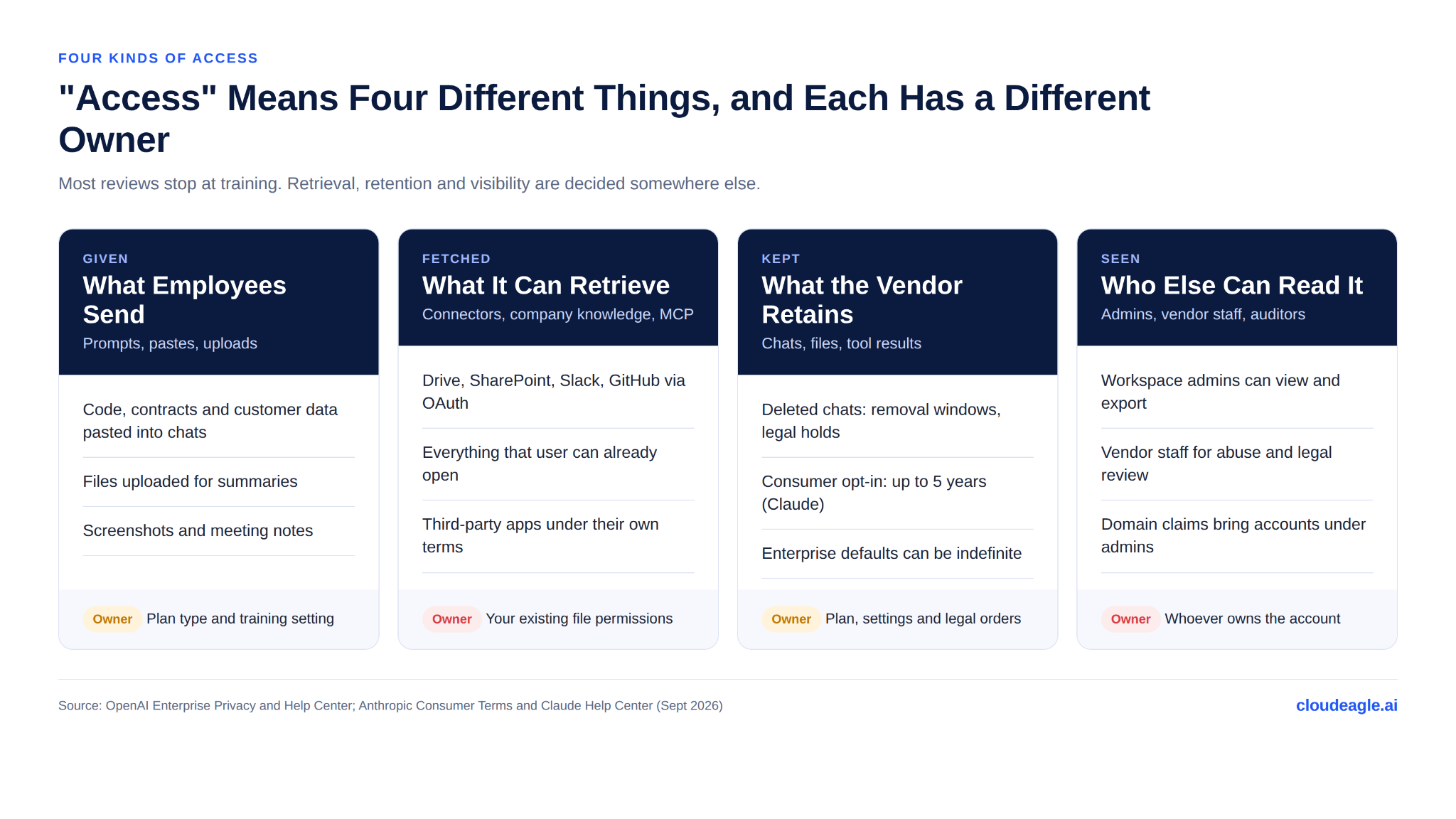
The first route, what employees send, is decided by the plan they are signed into. The second, what connectors can retrieve, is decided by your own file permissions in Google Drive, SharePoint or Slack. The third, what the vendor keeps, is decided by retention settings and, occasionally, by courts. The fourth, who can read it later, is decided by whoever owns the account.
Only the first is fully in the vendor's hands. The rest of this guide takes each route in turn.
Do ChatGPT and Claude Train on Company Data?
Not on business plans. OpenAI's enterprise privacy page states that it does not train on data from ChatGPT Business, Enterprise, Edu or the API by default. Anthropic's consumer terms update excludes Claude for Work, Claude for Government, Claude for Education and API use, including through Amazon Bedrock and Google Cloud's Vertex AI.
Consumer plans work differently. ChatGPT Free and Plus use conversations to improve OpenAI's models unless the user turns that setting off. Since Anthropic's August 2025 terms update, Claude Free, Pro and Max users choose for themselves; if they opt in, new chats are retained for up to five years instead of 30 days.
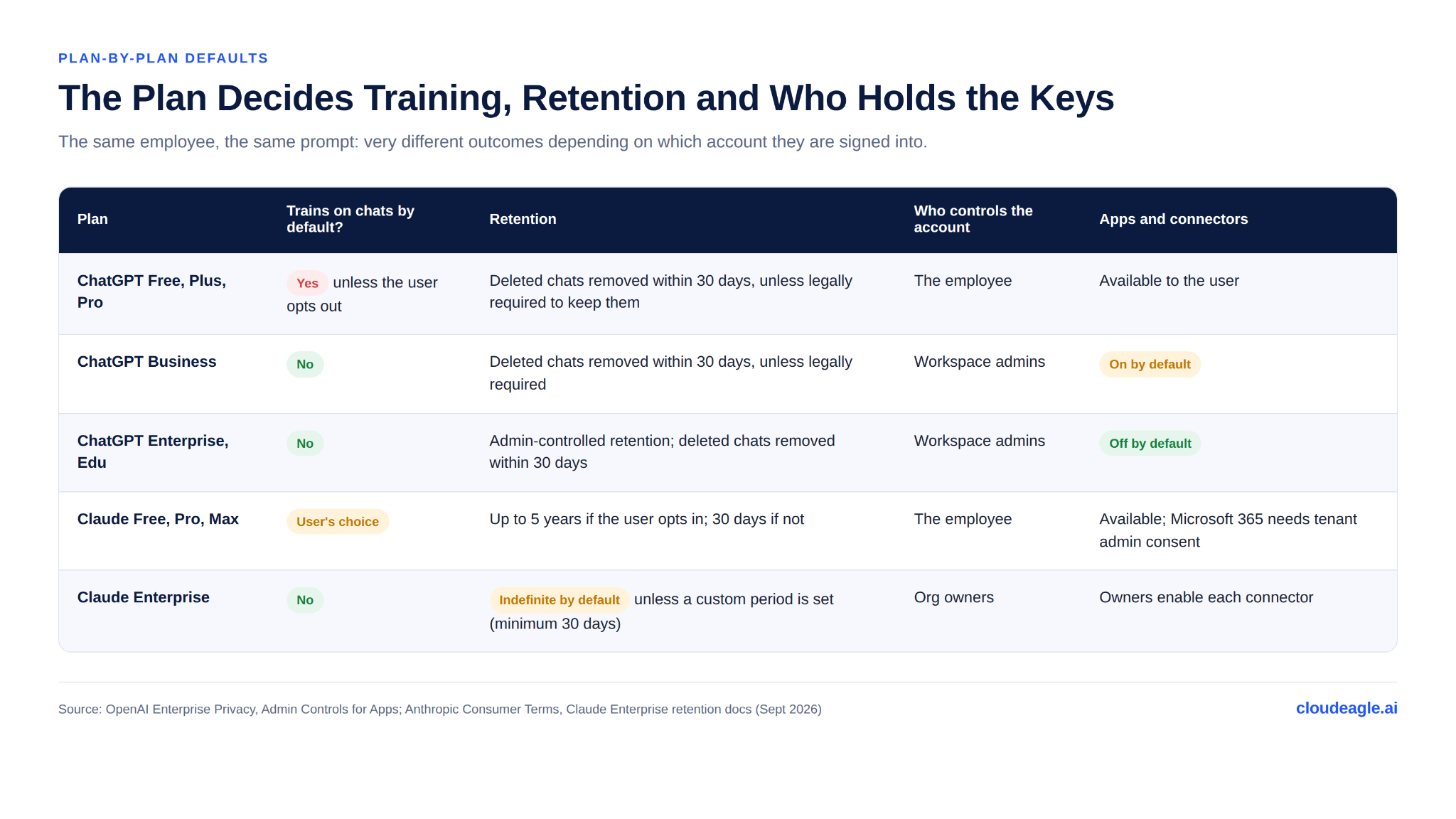
So "does it train on our data?" is really a question about which account the employee was signed into. At most companies, the honest answer is "several."
Deleted Does Not Always Mean Gone
OpenAI removes deleted business conversations within 30 days "unless we are legally required to retain them." That clause has been used. A court order in the New York Times copyright case required OpenAI to preserve ChatGPT conversations, including deleted ones, until the obligation ended on September 26, 2025. Logs already preserved, and data tied to accounts the Times flagged, are still held.
Claude Enterprise has the opposite default. Per Anthropic's retention documentation, Enterprise data is "retained indefinitely unless a custom retention period is set," with a 30-day minimum. Chats inside projects follow the project's retention, which is also indefinite by default, and content flagged by trust and safety systems is kept under a separate policy.
The lesson for both tools is the same: retention is a setting you choose, and the default rarely matches your records policy.
What Can ChatGPT and Claude See Through Connectors?
Connectors are where access stops meaning only what employees type. ChatGPT's company knowledge and Claude's connectors search Google Drive, SharePoint, Slack, GitHub and other systems on the user's behalf.
Both vendors describe the same permission model. OpenAI says company knowledge "respects permissions in the connected source," and Anthropic says Claude "inherits each person's permissions from the connected service" (Claude connectors).
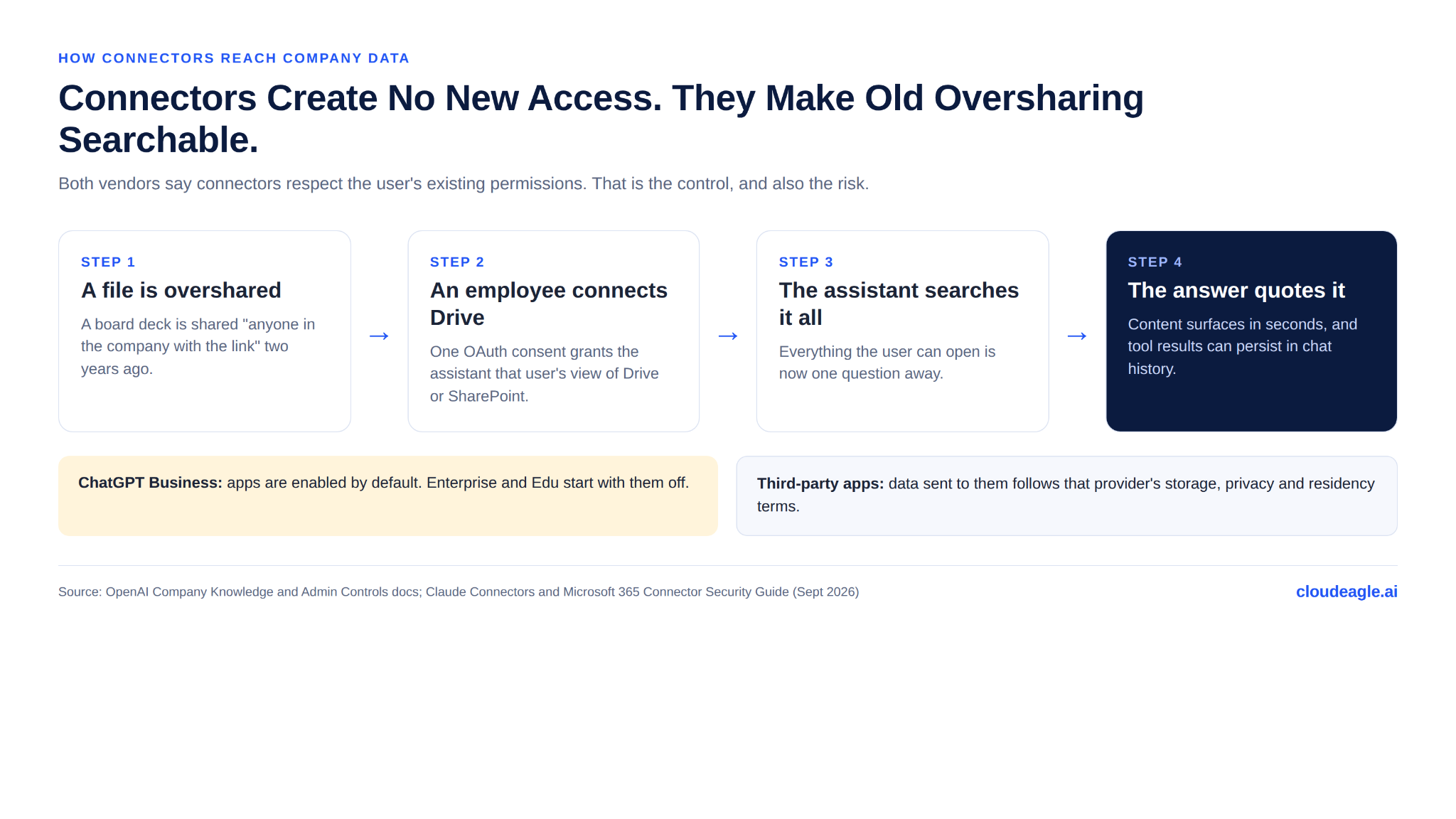
That is the right design, and it is also the core risk. The assistant creates no new access. It turns every overshared folder into something one question can find. A permissions model that relied on nobody looking now has a search engine pointed at it, which is why Metomic argues the real exposure starts upstream, in SaaS sharing settings.
Three Defaults Worth Checking
- ChatGPT Business enables apps by default, while Enterprise and Edu start with them disabled, according to OpenAI's admin controls documentation.
- Data sent to third-party apps is "subject to that provider's storage, processing, privacy, and data-residency terms." Claude's documentation says the same of connected services.
- Audit coverage varies. OpenAI says Compliance API and app-log availability "depend on the specific app," and asks customers to confirm coverage before relying on it.
One more detail matters for retention. Claude's Microsoft 365 connector fetches documents only during active queries, but tool-call results that become part of a stored chat are retained with it. A quoted board deck lives on in the conversation.

Who Else Can Read Your Team's AI Conversations?
On a business plan, your own admins can. OpenAI's enterprise privacy page says workspace admins can view, access, export and delete conversations. Its help article on managed accounts adds that an administrator "may be able to access, export, audit, retain, delete" data tied to the account, and that claiming or verifying a domain can bring accounts on that domain under those controls.
The vendor can too, within limits. OpenAI says authorized employees may access data for engineering support, abuse investigation and legal compliance, alongside contractors reviewing for misuse under confidentiality obligations. Anthropic keeps inputs and outputs flagged by its trust and safety systems under a separate retention policy.
For employees, the practical point is that a company AI workspace is not private from the company. For security leaders, that visibility is exactly what makes the workspace governable, and exactly what personal accounts lack.
What Happens When Employees Use Personal ChatGPT or Claude Accounts?
Every protection above applies to the account, not the person. The moment an employee signs into a personal account, the rulebook changes.
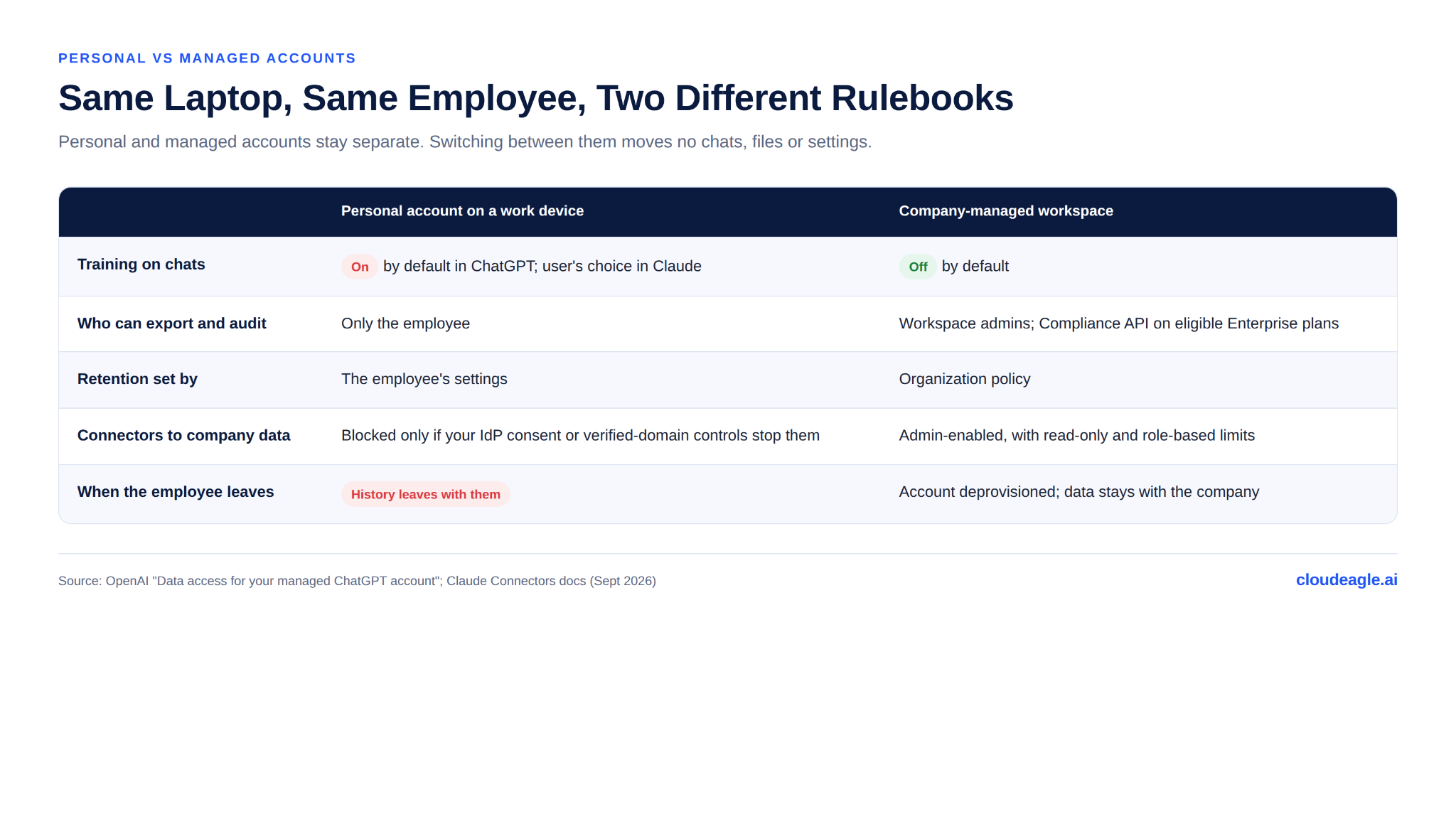
OpenAI states that personal and managed accounts "remain separate" and that switching between them "does not move chats, files, or settings." A year of work done in a personal account never becomes visible to admins, never falls under company retention, and leaves with the employee.
The gap is visible from the outside, but not fixable from it. In one Glassdoor thread, an engineer using personal ChatGPT Plus on a work laptop said his employer produced "a whole list" of what he had entered after a data incident. Device monitoring showed what went in. Nothing let the company retrieve or delete it.
Where Personal Accounts Can Actually Be Stopped
Pasting is hard to stop. Connecting personal accounts to company systems is not, because every connector needs an OAuth grant your identity provider can refuse.
- Claude's Microsoft 365 connector requires a Microsoft Entra Global Administrator to grant consent for the whole organization, even on Free and Pro plans.
- Claude Enterprise can prevent services on its verified domains from being connected to Claude accounts outside the organization.
- Google Workspace admins can restrict which third-party apps can access Workspace data, which covers personal AI accounts requesting Drive or Gmail scopes.
These controls don't stop an employee from pasting a contract into a personal chat. They do stop a personal account from searching your entire Drive. For why employees reach for personal accounts in the first place, see the shadow AI economy.
How Do You Build Safe AI Usage Policies That Actually Hold?
Most companies already have a safe AI usage policy for ChatGPT and Claude. Fewer can point to where each line is enforced, or show an auditor the evidence. Work through the four routes in order.
1. Put Every Work Account on a Business Plan
Consolidate on ChatGPT Business or Enterprise and Claude Team or Enterprise, with SSO, SCIM and domain verification. That settles training and brings conversations under admin retention and export.
2. Close the Personal-Account Door at the Identity Layer
Require admin consent for third-party AI apps in Google Workspace and Microsoft Entra, and turn on Claude's verified-domain protection where you run Claude Enterprise. Personal accounts can still exist; they just can't reach company systems.
3. Clean Permissions Before You Turn On Connectors
Connectors inherit whatever sharing mistakes already exist. Review "anyone with the link" and company-wide shares in the sources you plan to connect, enable apps one at a time, and start with read-only actions and role-based access.
4. Set Retention on Purpose
Set a custom retention period in Claude Enterprise and a workspace retention policy in ChatGPT that match your records schedule. Remember that projects and flagged content can follow different rules.
5. Keep Sensitive Data Out of Prompts
Plan type decides training, not whether a customer list should be pasted at all. Use browser-level controls to warn on or block sensitive content headed to AI tools, and route users to the approved workspace.
6. Make Offboarding Revoke AI Access
Deprovision ChatGPT and Claude seats through SCIM, and revoke the OAuth tokens, API keys and connector grants tied to the departing user. Those grants outlive the seat if nobody removes them.
How Does CloudEagle.ai Enforce AI Policies Across ChatGPT and Claude?
OpenAI's and Anthropic's admin consoles govern their own workspaces. Neither can see the personal Plus subscription on a corporate card, the Claude Pro account an engineer signed up for last quarter, or the API key a departed contractor still holds. CloudEagle.ai works across those seams.
Find Every ChatGPT and Claude Account
CloudEagle.ai correlates SSO logins, finance and card spend, firewall logs and its browser plugin against EagleIQ, its inventory of AI applications. Personal and unsanctioned accounts show up next to sanctioned workspaces, each with a risk score, so security knows which to bring under governance first.
Enforce the Policy in the Browser
ChatGPT and Claude are used mostly through the browser, which is where CloudEagle.ai's AI policy enforcement applies. It can monitor or block sensitive data shared with AI tools, and it shows a page that redirects users from an unsanctioned tool to the approved workspace.
Govern the Keys and Tokens Around Them
CloudEagle.ai tracks non-human identities such as API keys, service accounts and AI agents, with an owner, status and permissions for each, and flags orphaned credentials for revocation. Token usage tracking by user and team shows who is actually using which model, and at what cost.
Close Access When People Leave
Zero-touch offboarding removes ChatGPT and Claude seats along with the rest of a departing employee's app access, and attaches proof of deprovisioning for the audit trail.
The question was never only whether ChatGPT or Claude can see your data; it is which accounts, connectors and keys give them that access. CloudEagle.ai gives IT and security one view of all of them, with the controls to act.
Book a demo to see your AI footprint in 30 minutes.
Frequently Asked Questions About ChatGPT and Claude Data Access
Does ChatGPT Enterprise Train on Company Data?
No. OpenAI does not train on ChatGPT Business, Enterprise, Edu or API data by default. Free and Plus accounts are different: conversations can be used for training unless the user opts out.
Does Claude Keep My Conversations?
It depends on the plan. On Free, Pro and Max, chats are kept for up to five years if the user opts into training, and 30 days if not. On Claude Enterprise, chats are kept indefinitely unless an admin sets a custom retention period.
Can ChatGPT or Claude Read My Google Drive?
Only if someone connects it, and only what that person can already open. Both vendors' connectors inherit the user's existing permissions, so any overshared file becomes searchable.
Can My Employer See My ChatGPT Conversations?
In a company-managed workspace, yes: admins can view and export conversations. In a personal account, the employer can't read the chats themselves, but device monitoring can still show what was entered.
Is It Safe to Use a Personal ChatGPT or Claude Account for Work?
Not for company data. Personal accounts fall outside business training terms, company retention and admin export, and their history leaves with the employee.
The Risk Isn’t the Model. It’s the Account.




.avif)


.avif)
.avif)




.png)






.avif)
.avif)
.avif)


