AI Governance

Third-Party Risk Management (TPRM): A Complete Guide

Share via:
Written by:
CloudEagle.ai Team
Reviewed by
Nidhi Jain
Last Updated:
September 4, 2026
blog-cms-banner-bg
Little-Known Negotiation Hacks to Get the Best Deal on Slack
cta-bg-blogDownload Your Copy

HIPAA Compliance Checklist for 2025

Download PDF

Third-party risk is not just about whether a vendor has good security controls. A SaaS provider, cloud service, or technology partner may also have access to sensitive data, business systems, and employee accounts. Verizon’s 2026 Data Breach Investigations Report found third-party involvement in 48% of breaches, up from 30% the previous year.

That makes third-party risk management (TPRM) more than an annual questionnaire. Teams need to know not just which vendors they use, but what those vendors can reach inside the environment and how that exposure changes over time.

In this guide, you’ll learn how TPRM works, what risks to assess, how to manage vendors across their lifecycle, and how to connect vendor risk with SaaS security, identity, access, usage, contracts, and procurement

What Is Third-Party Risk Management (TPRM)?

Third-Party Risk Management (TPRM) is the systematic process of identifying, assessing, monitoring, and mitigating the legal, operational, and cybersecurity risks introduced by external vendors, suppliers, partners, SaaS applications, and AI applications throughout the third-party lifecycle. 

A useful TPRM program should answer:

  • Who are our third parties?
  • What exposure do they create?
  • What should we do when that exposure changes? 

The important distinction is between a third-party risk assessment and TPRM. An assessment gives you a point-in-time view of a vendor. TPRM manages the relationship before onboarding, during active use, at renewal, and when the relationship ends.

What Types of Third-Party Risk Should You Assess?

Not every vendor deserves the same level of scrutiny. A company handling payroll data is not the same risk as a tool used for internal surveys. The review should reflect what the vendor can access, how important the service is, and what happens if that relationship goes wrong. 

1. Cybersecurity and Data Risk

s Assess both the vendor and the application because they create different points of exposure. The vendor may own the underlying service and security controls, while the application is where users actually access systems or share data. 

For example, Anthropic is the vendor and Claude is the application. If employees upload sensitive information to Claude, the data risk sits at the application level while still forming part of the wider vendor relationship. A strong TPRM review should therefore consider the vendor's security practices, the application's controls, and the data and systems connected to it. 

2. Identity and Access Risk

Vendor access often spreads quietly inside an organization. Employees change roles, admins get added, and integrations create service accounts or API keys. Over time, the original access decision may no longer make sense. 

Review who can access the vendor, what they can do, and whether that access is still necessary. This is where third-party risk management overlaps with identity governance and least-privilege controls.

3. Operational and Business Risk

The biggest risk may have nothing to do with a breach. If a vendor runs a critical business process, an outage can quickly become an operational problem. Look at how dependent the business is on the service, whether there is a realistic fallback, and how long it would take to recover or switch providers.

4. Compliance and Contract Risk

A vendor can create compliance trouble through weak contract terms even when its security program looks solid. Check who owns the data, what the vendor must report, whether you have audit rights, and what happens when the relationship ends. Contract terms around breach notification, data processing, subcontractors, deletion, and data return should match the level of risk.

5. Financial and Commercial Risk

Risk also shows up in the economics of the relationship. A vendor may become harder to justify when usage drops, prices rise, or the business becomes too dependent on one provider. Look at actual usage, spend, renewal terms, pricing changes, and switching costs before deciding what to do next.

A good third-party risk management program should help answer more than “Is this vendor risky?” It should help you decide whether to keep the relationship, reduce exposure, renegotiate, replace the vendor, or exit.

Your Vendors Have More Access

See where vendor access, data, and integrations create exposure.
Download Checklist

What Is the Third-Party Risk Management Lifecycle?

A vendor assessment should not end when the contract is signed. The vendor may gain access to new systems, handle more data, or become more important to the business. That can change the risk without anyone changing the vendor itself.

A practical TPRM lifecycle looks like:

Identify → Classify → Assess → Approve → Onboard → Monitor → Remediate → Renew or Exit
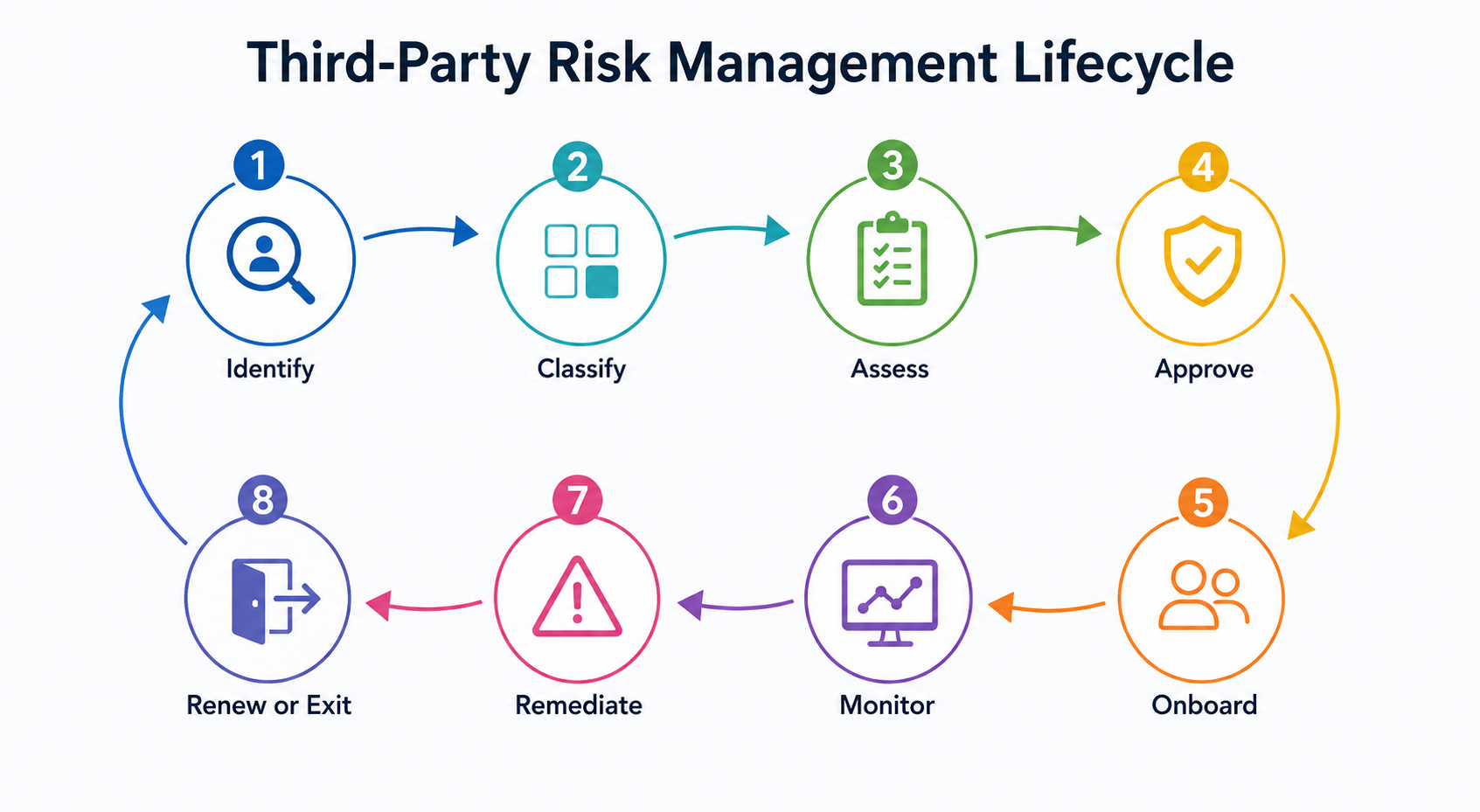
Flowchart illustrating the third-party risk management lifecycle with eight connected stages: Identify, Classify, Assess, Approve, Onboard, Monitor, Remediate, and Renew or Exit, shown as a continuous risk management process.

1. Identify and Inventory Third Parties

First, find the vendors the company actually uses. Procurement records alone may miss SaaS tools bought by teams, vendors paid through finance, or services connected through SSO.

Keep track of:

  • Vendor and application
  • Business owner
  • Users and access
  • Connected systems
  • Spend and contract
  • Business purpose

Without this information, it is hard to judge the vendor's real exposure.

2. Classify Third-Party Risk

Not every vendor deserves the same review. A provider handling customer information or connecting to production systems needs more scrutiny than a low-impact tool.

Look at:

  • Data sensitivity
  • Business importance
  • Privileged access
  • System integrations
  • Regulatory exposure
  • Dependence on the vendor

The risk tier should determine how much evidence you need and how often the vendor should be reviewed.

3. Assess the Vendor and Your Exposure

Security questionnaires and certifications are useful, but they only tell you what the vendor reports about itself. You also need to look at how your company is using the service.

Check:

  • What data the vendor receives
  • Who has access
  • Whether admin access exists
  • Which systems or APIs are connected
  • How heavily the service is used

That gives third-party risk management a clearer picture of the vendor and your actual exposure.

4. Approve and Onboard With Controls

Before the vendor gets access, set the rules. Decide what data it can handle, who can use the service, what security requirements apply, and who owns the relationship.

Signing the contract should not automatically mean giving the vendor broad, permanent access.

5. Monitor Third-Party Risk

Risk can change after onboarding. A breach, new integration, change in ownership, or wider use of the service may increase your exposure.

Keep an eye on:

  • Security posture
  • User and privileged access
  • New integrations
  • Usage changes
  • Incidents
  • Business dependency

When something important changes, it should trigger a review rather than wait for the next annual assessment.

6. Remediate or Accept the Risk

A finding should lead to a decision.

Depending on the issue, the next step may be: Fix → Restrict → Add controls → Accept → Escalate → Replace

Record who made the decision, why the risk was accepted or reduced, and when it should be reviewed again.

7. Renew, Replace, or Exit the Vendor

Before renewal, look at the relationship as it exists today, not when the contract was signed.

Review:

  • Current risk
  • Actual usage
  • Access and privileges
  • Spend
  • Contract terms
  • Business criticality

When a vendor is no longer needed, the process should go beyond cancelling the contract. Revoke access, disable integrations, remove credentials, reclaim licenses, and confirm data-handling obligations are complete.

A good TPRM lifecycle keeps coming back to three questions: What changed? What does that change mean for our exposure? And what should we do next?

Why Is Annual Vendor Risk Assessment Not Enough?

An annual vendor review only tells you what was true when the assessment happened. The situation can change soon after. A vendor may get access to another system, handle more sensitive data, or become part of a critical workflow.

Your own exposure can change too, even if the vendor does nothing differently.

Watch for changes such as:

  • New access: Added systems, users, or privileged accounts
  • New data: More sensitive or regulated information
  • New integrations: APIs, connectors, or subprocessors
  • Security events: Breaches, vulnerabilities, or control changes
  • Business changes: Higher dependency or an upcoming renewal

The goal of third-party risk management is not to reassess every vendor constantly. It is to catch meaningful changes, understand how they affect your exposure, and act before the next annual review.

Also read: 7-Step Vendor Risk Assessment Checklist for Secure Third-Party Partnerships.

“The challenge is making sure you’re not just ticking boxes for compliance, but building a process that’s resilient, scalable, and delivers real value for both your business and your vendors and partners.”
— Joey Gyengo, US Third-Party Risk Management Leader, KPMG LLP, 2026 

Annual Reviews Miss New Risk

Catch changes in vendor access, data, integrations, and security posture.
Download Checklist

How Does TPRM Connect With SaaS Security and Identity Governance?

A vendor review gives you one side of the picture. The other side is what that vendor actually creates inside your environment. That can include an application, user accounts, admin access, API connections, and machine identities.

  • Look beyond the vendor: Review the SaaS or AI application, its security setup, integrations, data access, and usage.
  • Check user access: Know who can access the application, what permissions they have, and whether those permissions are still needed.
  • Track non-human identities: Service accounts, API keys, tokens, and bots can quietly keep access long after an integration is set up. Know who owns them and what they can reach.
  • Bring usage and spend into the picture: Heavy usage, high spend, or deep business dependency can change how you view the vendor relationship.
  • Tie risk to a decision: A vendor security issue may call for tighter access, additional controls, renegotiation, replacement, or exit. CloudEagle connects these areas across SaaS, identity, security, usage, and procurement.
Real-world example: Armorcode used CloudEagle to improve visibility into its non-human identities across its SaaS and cloud environment. CloudEagle increased NHI visibility from 40% to 95%, helped remediate 480 unmanaged identities, and optimized 220+ over-privileged identities.

The takeaway is simple: third-party risk does not stop with the vendor. You also need to govern the applications, identities, and access that come with the relationship.


What Are the Common TPRM Challenges and How Can You Address Them?

TPRM gets messy when vendor information sits in different places and nobody has the full picture. Security may own the assessment, procurement owns the contract, and IT sees the access. That can leave important gaps between them.

1. Incomplete Vendor Visibility

A vendor may have a contract with procurement but still be missing from the team's wider technology inventory. Business teams can also adopt SaaS tools without going through the usual process.

How to address it: Use multiple sources across finance, identity, SaaS usage, and security to build one current view.

CloudEagle.ai combines signals from SSO/IdPs, finance and credit-card data, browser activity, firewall logs, and other connected sources to build a broader inventory of the applications actually being used. It can then link those applications to users, ownership, usage, spend, and connected systems, helping teams see which third parties are active and what sits around them. 

2. Stale Risk Assessments

A vendor's risk can change after the initial review. New integrations, broader access, a security incident, or a change in how the service is used can make the original assessment outdated.

How to address it: Set clear triggers for reassessment and use current access, usage, and security data alongside vendor-provided evidence.

CloudEagle.ai brings security posture, access, usage, and identity signals into the same view, so teams can spot changes instead of relying only on the vendor's last questionnaire. 

3. Poor Risk Prioritization

Teams cannot give every vendor the same level of attention. Spending hours reviewing a low-impact tool can take resources away from vendors that handle sensitive data or support critical operations.

How to address it: Prioritize vendors using data sensitivity, access, business criticality, integrations, and regulatory exposure. This helps teams focus their time where the potential impact is highest. 

4. Unmanaged Vendor Access

The vendor may be approved, but access inside your environment can still get out of hand. Employees change roles, admin accounts remain active, and integrations create service accounts or API keys that are easy to overlook.

How to address it: Connect TPRM with access reviews and least-privilege controls.

CloudEagle.ai can help teams bring human and non-human identities into the same governance view. 

5. Risk Disconnected From Renewal Decisions

Security teams may flag vendor issues while procurement works on the renewal separately. By the time both sides compare notes, there may be little room to change the deal.

How to address it: Bring risk, access, usage, spend, and contract data into the renewal process early.

CloudEagle.ai connects these areas so teams have more context when deciding whether to renew, renegotiate, restrict, replace, or exit a vendor. 

How Do You Measure TPRM Performance?

A good TPRM program should show whether vendor risk is being managed, not just how many assessments were completed.

1. Measure Risk Coverage

Track whether your most important vendors have current risk reviews and ongoing monitoring. Look at critical-vendor coverage, assessment freshness, and monitoring coverage to see where visibility is missing.

2. Measure Risk Response

A finding matters only when someone acts on it. Measure how long material issues stay open, how quickly risky access is removed, and how long exceptions remain unresolved.

3. Measure Actual Exposure

Go beyond vendor scores. Track excessive vendor access, orphaned accounts, unmanaged service accounts or API keys, and overdue access reviews. These metrics show the risk the vendor creates inside your environment.

4. Measure Renewal and Exit Decisions

Your third-party risk management program should influence what happens next. Track how many renewals were reviewed using current risk and usage data, and how often vendors were remediated, restricted, replaced, or exited because of the findings.

Quick Read: Vendor Risk Assessment Process: Step-by-Step Guide 

How Does CloudEagle Support Third-Party Risk Management?

CloudEagle helps organizations manage the risk, access, security posture, usage, and business impact of third-party applications and vendors from one place. Rather than treating TPRM as a standalone assessment, it connects vendor information with what is happening across SaaS, AI, identities, security, contracts, and procurement.

With CloudEagle, teams can:

  • Discover the full third-party footprint: Identify SaaS, AI applications, shadow tools, integrations, and non-human identities across sources such as SSO, finance, browsers, and security systems.
  • Understand actual exposure: See users, roles, entitlements, privileged access, service accounts, API keys, and connected systems tied to third-party applications.
  • Continuously assess security posture: Track application security posture, MFA/SSO, compliance signals, risk scores, usage, and access changes instead of relying only on periodic reviews.
  • Govern and remediate access: Run access reviews, enforce least privilege, remove unnecessary access, and automate onboarding, offboarding, and other risk-based workflows.
  • Connect risk with business decisions: Bring usage, spend, contract terms, benchmarking, and renewal data into vendor decisions, so teams can decide whether to remediate, restrict, renegotiate, renew, replace, or exit.
  • Work with the existing stack: CloudEagle integrates with identity, ITSM, security, finance, and procurement management systems rather than requiring a rip-and-replace approach.

The bigger value is the connection between these signals. Third-party risk management becomes more actionable when security findings can be tied to the people, machine identities, applications, usage, spend, and contracts involved in the relationship. CloudEagle brings those pieces together so teams can move from visibility to decision to action.

Conclusion

Third-party risks do not disappear once a vendor passes the test. Access, utilization, security posture, and dependency can shift at any point in time.

A good third-party risk management program makes sure these shifts are always in sight and linked to action. The objective is straightforward: know which vendors bring risks to the table, know how exposed you are, and take action before risks become problems for your business.

FAQs

1. What is third-party risk management (TPRM)?

A. Third-Party Risk Management refers to an organizational process for managing, mitigating, and monitoring third-party risks that can occur due to use of vendors, suppliers, partners, or any other service provider. This includes reviewing, onboarding, monitoring, renewing, and off-boarding of third parties. 

2. What are the main types of third-party risk?

A. Some of the major categories include cybersecurity risks, data/privacy risks, operational risks, compliance risks, financial risks, and reputational risks. It all depends upon the accessibility of vendors within the business and its importance in the company.

3. What is the difference between TPRM and a third-party risk assessment?

A. A. The third-party risk assessment typically is an assessment of vendor risk at a particular point in time. TPRM refers to the overall process for managing that risk through due diligence, contract, access, monitoring, remediation, renewal, and offboarding. 

4. How often should third-party risks be assessed?

A. There is no universal schedule that fits every vendor. The frequency of reviews depends on the level of vendor risk and business importance, in addition to any new events such as changes to data access, integration with the organization's systems, security incidents, or changes to the relationship.

5. Why is continuous monitoring important in TPRM?

A. The vendor's risk level may vary between assessments of the vendor. Continuous monitoring enables the team to identify changes in security posture, security incidents, access levels, ownership, and other risks. The key to continuous monitoring is not just capturing additional alerts but acting on them.

Advertisement for a SaaS Subscription Tracking Template with a call-to-action button to download and a partial graphic of a tablet showing charts.Banner promoting a SaaS Agreement Checklist to streamline SaaS management and avoid budget waste with a call-to-action button labeled Download checklist.Blue banner with text 'The Ultimate Employee Offboarding Checklist!' and a black button labeled 'Download checklist' alongside partial views of checklist documents from cloudeagle.ai.Digital ad for download checklist titled 'The Ultimate Checklist for IT Leaders to Optimize SaaS Operations' by cloudeagle.ai, showing checklist pages.Slack Buyer's Guide offer with text 'Unlock insider insights to get the best deal on Slack!' and a button labeled 'Get Your Copy', accompanied by a preview of the guide featuring Slack's logo.Monday Pricing Guide by cloudeagle.ai offering exclusive pricing secrets to maximize investment with a call-to-action button labeled Get Your Copy and an image of the guide's cover.Blue banner for Canva Pricing Guide by cloudeagle.ai offering a guide to Canva costs, features, and alternatives with a call-to-action button saying Get Your Copy.Blue banner with white text reading 'Little-Known Negotiation Hacks to Get the Best Deal on Slack' and a white button labeled 'Get Your Copy'.Blue banner with text 'Little-Known Negotiation Hacks to Get the Best Deal on Monday.com' and a white button labeled 'Get Your Copy'.Blue banner with text 'Little-Known Negotiation Hacks to Get the Best Deal on Canva' and a white button labeled 'Get Your Copy'.Banner with text 'Slack Buyer's Guide' and a 'Download Now' button next to images of a guide titled 'Slack Buyer’s Guide: Features, Pricing & Best Practices'.Digital cover of Monday Pricing Guide with a button labeled Get Your Copy on a blue background.Canva Pricing Guide cover with a button labeled Get Your Copy on a blue gradient background.

Enter your email to
unlock the report

Oops! Something went wrong while submitting the form.
License Count
Benchmark
Per User/Per Year

Enter your email to
unlock the report

Oops! Something went wrong while submitting the form.
License Count
Benchmark
Per User/Per Year

Enter your email to
unlock the report

Oops! Something went wrong while submitting the form.
Notion Plus
License Count
Benchmark
Per User/Per Year
100-500
$67.20 - $78.72
500-1000
$59.52 - $72.00
1000+
$51.84 - $57.60
Canva Pro
License Count
Benchmark
Per User/Per Year
100-500
$74.33-$88.71
500-1000
$64.74-$80.32
1000+
$55.14-$62.34

Enter your email to
unlock the report

Oops! Something went wrong while submitting the form.

Enter your email to
unlock the report

Oops! Something went wrong while submitting the form.
Zoom Business
License Count
Benchmark
Per User/Per Year
100-500
$216.00 - $264.00
500-1000
$180.00 - $216.00
1000+
$156.00 - $180.00

Enter your email to
unlock the report

Oops! Something went wrong while submitting the form.

Get the Right Security Platform To Secure Your Cloud Infrastructure

Please enter a business email
Thank you!
The 2023 SaaS report has been sent to your email. Check your promotional or spam folder.
Oops! Something went wrong while submitting the form.

Access full report

Please enter a business email
Thank you!
The 2023 SaaS report has been sent to your email. Check your promotional or spam folder.
Oops! Something went wrong while submitting the form.

TL;DR 

  • TPRM goes beyond vendor assessments. It covers the full relationship, from identifying and assessing third parties to monitoring, remediation, renewal, and exit.
  • Risk depends on actual exposure. Look at the applications, data, users, privileged access, integrations, and non-human identities connected to a third party.
  • Annual reviews are not enough. Changes in access, data, integrations, security posture, or business dependency should trigger a fresh review.
  • Better TPRM connects risk to action. Bringing security, identity, usage, spend, contracts, and renewal data together helps teams decide when to remediate, restrict, renegotiate, replace, or exit a vendor.

Third-party risk is not just about whether a vendor has good security controls. A SaaS provider, cloud service, or technology partner may also have access to sensitive data, business systems, and employee accounts. Verizon’s 2026 Data Breach Investigations Report found third-party involvement in 48% of breaches, up from 30% the previous year.

That makes third-party risk management (TPRM) more than an annual questionnaire. Teams need to know not just which vendors they use, but what those vendors can reach inside the environment and how that exposure changes over time.

In this guide, you’ll learn how TPRM works, what risks to assess, how to manage vendors across their lifecycle, and how to connect vendor risk with SaaS security, identity, access, usage, contracts, and procurement

What Is Third-Party Risk Management (TPRM)?

Third-Party Risk Management (TPRM) is the systematic process of identifying, assessing, monitoring, and mitigating the legal, operational, and cybersecurity risks introduced by external vendors, suppliers, partners, SaaS applications, and AI applications throughout the third-party lifecycle. 

A useful TPRM program should answer:

  • Who are our third parties?
  • What exposure do they create?
  • What should we do when that exposure changes? 

The important distinction is between a third-party risk assessment and TPRM. An assessment gives you a point-in-time view of a vendor. TPRM manages the relationship before onboarding, during active use, at renewal, and when the relationship ends.

What Types of Third-Party Risk Should You Assess?

Not every vendor deserves the same level of scrutiny. A company handling payroll data is not the same risk as a tool used for internal surveys. The review should reflect what the vendor can access, how important the service is, and what happens if that relationship goes wrong. 

1. Cybersecurity and Data Risk

s Assess both the vendor and the application because they create different points of exposure. The vendor may own the underlying service and security controls, while the application is where users actually access systems or share data. 

For example, Anthropic is the vendor and Claude is the application. If employees upload sensitive information to Claude, the data risk sits at the application level while still forming part of the wider vendor relationship. A strong TPRM review should therefore consider the vendor's security practices, the application's controls, and the data and systems connected to it. 

2. Identity and Access Risk

Vendor access often spreads quietly inside an organization. Employees change roles, admins get added, and integrations create service accounts or API keys. Over time, the original access decision may no longer make sense. 

Review who can access the vendor, what they can do, and whether that access is still necessary. This is where third-party risk management overlaps with identity governance and least-privilege controls.

3. Operational and Business Risk

The biggest risk may have nothing to do with a breach. If a vendor runs a critical business process, an outage can quickly become an operational problem. Look at how dependent the business is on the service, whether there is a realistic fallback, and how long it would take to recover or switch providers.

4. Compliance and Contract Risk

A vendor can create compliance trouble through weak contract terms even when its security program looks solid. Check who owns the data, what the vendor must report, whether you have audit rights, and what happens when the relationship ends. Contract terms around breach notification, data processing, subcontractors, deletion, and data return should match the level of risk.

5. Financial and Commercial Risk

Risk also shows up in the economics of the relationship. A vendor may become harder to justify when usage drops, prices rise, or the business becomes too dependent on one provider. Look at actual usage, spend, renewal terms, pricing changes, and switching costs before deciding what to do next.

A good third-party risk management program should help answer more than “Is this vendor risky?” It should help you decide whether to keep the relationship, reduce exposure, renegotiate, replace the vendor, or exit.

Your Vendors Have More Access

See where vendor access, data, and integrations create exposure.
Download Checklist

What Is the Third-Party Risk Management Lifecycle?

A vendor assessment should not end when the contract is signed. The vendor may gain access to new systems, handle more data, or become more important to the business. That can change the risk without anyone changing the vendor itself.

A practical TPRM lifecycle looks like:

Identify → Classify → Assess → Approve → Onboard → Monitor → Remediate → Renew or Exit

Flowchart illustrating the third-party risk management lifecycle with eight connected stages: Identify, Classify, Assess, Approve, Onboard, Monitor, Remediate, and Renew or Exit, shown as a continuous risk management process.

1. Identify and Inventory Third Parties

First, find the vendors the company actually uses. Procurement records alone may miss SaaS tools bought by teams, vendors paid through finance, or services connected through SSO.

Keep track of:

  • Vendor and application
  • Business owner
  • Users and access
  • Connected systems
  • Spend and contract
  • Business purpose

Without this information, it is hard to judge the vendor's real exposure.

2. Classify Third-Party Risk

Not every vendor deserves the same review. A provider handling customer information or connecting to production systems needs more scrutiny than a low-impact tool.

Look at:

  • Data sensitivity
  • Business importance
  • Privileged access
  • System integrations
  • Regulatory exposure
  • Dependence on the vendor

The risk tier should determine how much evidence you need and how often the vendor should be reviewed.

3. Assess the Vendor and Your Exposure

Security questionnaires and certifications are useful, but they only tell you what the vendor reports about itself. You also need to look at how your company is using the service.

Check:

  • What data the vendor receives
  • Who has access
  • Whether admin access exists
  • Which systems or APIs are connected
  • How heavily the service is used

That gives third-party risk management a clearer picture of the vendor and your actual exposure.

4. Approve and Onboard With Controls

Before the vendor gets access, set the rules. Decide what data it can handle, who can use the service, what security requirements apply, and who owns the relationship.

Signing the contract should not automatically mean giving the vendor broad, permanent access.

5. Monitor Third-Party Risk

Risk can change after onboarding. A breach, new integration, change in ownership, or wider use of the service may increase your exposure.

Keep an eye on:

  • Security posture
  • User and privileged access
  • New integrations
  • Usage changes
  • Incidents
  • Business dependency

When something important changes, it should trigger a review rather than wait for the next annual assessment.

6. Remediate or Accept the Risk

A finding should lead to a decision.

Depending on the issue, the next step may be: Fix → Restrict → Add controls → Accept → Escalate → Replace

Record who made the decision, why the risk was accepted or reduced, and when it should be reviewed again.

7. Renew, Replace, or Exit the Vendor

Before renewal, look at the relationship as it exists today, not when the contract was signed.

Review:

  • Current risk
  • Actual usage
  • Access and privileges
  • Spend
  • Contract terms
  • Business criticality

When a vendor is no longer needed, the process should go beyond cancelling the contract. Revoke access, disable integrations, remove credentials, reclaim licenses, and confirm data-handling obligations are complete.

A good TPRM lifecycle keeps coming back to three questions: What changed? What does that change mean for our exposure? And what should we do next?

Why Is Annual Vendor Risk Assessment Not Enough?

An annual vendor review only tells you what was true when the assessment happened. The situation can change soon after. A vendor may get access to another system, handle more sensitive data, or become part of a critical workflow.

Your own exposure can change too, even if the vendor does nothing differently.

Watch for changes such as:

  • New access: Added systems, users, or privileged accounts
  • New data: More sensitive or regulated information
  • New integrations: APIs, connectors, or subprocessors
  • Security events: Breaches, vulnerabilities, or control changes
  • Business changes: Higher dependency or an upcoming renewal

The goal of third-party risk management is not to reassess every vendor constantly. It is to catch meaningful changes, understand how they affect your exposure, and act before the next annual review.

Also read: 7-Step Vendor Risk Assessment Checklist for Secure Third-Party Partnerships.

“The challenge is making sure you’re not just ticking boxes for compliance, but building a process that’s resilient, scalable, and delivers real value for both your business and your vendors and partners.”
— Joey Gyengo, US Third-Party Risk Management Leader, KPMG LLP, 2026 

Annual Reviews Miss New Risk

Catch changes in vendor access, data, integrations, and security posture.
Download Checklist

How Does TPRM Connect With SaaS Security and Identity Governance?

A vendor review gives you one side of the picture. The other side is what that vendor actually creates inside your environment. That can include an application, user accounts, admin access, API connections, and machine identities.

  • Look beyond the vendor: Review the SaaS or AI application, its security setup, integrations, data access, and usage.
  • Check user access: Know who can access the application, what permissions they have, and whether those permissions are still needed.
  • Track non-human identities: Service accounts, API keys, tokens, and bots can quietly keep access long after an integration is set up. Know who owns them and what they can reach.
  • Bring usage and spend into the picture: Heavy usage, high spend, or deep business dependency can change how you view the vendor relationship.
  • Tie risk to a decision: A vendor security issue may call for tighter access, additional controls, renegotiation, replacement, or exit. CloudEagle connects these areas across SaaS, identity, security, usage, and procurement.
Real-world example: Armorcode used CloudEagle to improve visibility into its non-human identities across its SaaS and cloud environment. CloudEagle increased NHI visibility from 40% to 95%, helped remediate 480 unmanaged identities, and optimized 220+ over-privileged identities.

The takeaway is simple: third-party risk does not stop with the vendor. You also need to govern the applications, identities, and access that come with the relationship.


What Are the Common TPRM Challenges and How Can You Address Them?

TPRM gets messy when vendor information sits in different places and nobody has the full picture. Security may own the assessment, procurement owns the contract, and IT sees the access. That can leave important gaps between them.

1. Incomplete Vendor Visibility

A vendor may have a contract with procurement but still be missing from the team's wider technology inventory. Business teams can also adopt SaaS tools without going through the usual process.

How to address it: Use multiple sources across finance, identity, SaaS usage, and security to build one current view.

CloudEagle.ai combines signals from SSO/IdPs, finance and credit-card data, browser activity, firewall logs, and other connected sources to build a broader inventory of the applications actually being used. It can then link those applications to users, ownership, usage, spend, and connected systems, helping teams see which third parties are active and what sits around them. 

2. Stale Risk Assessments

A vendor's risk can change after the initial review. New integrations, broader access, a security incident, or a change in how the service is used can make the original assessment outdated.

How to address it: Set clear triggers for reassessment and use current access, usage, and security data alongside vendor-provided evidence.

CloudEagle.ai brings security posture, access, usage, and identity signals into the same view, so teams can spot changes instead of relying only on the vendor's last questionnaire. 

3. Poor Risk Prioritization

Teams cannot give every vendor the same level of attention. Spending hours reviewing a low-impact tool can take resources away from vendors that handle sensitive data or support critical operations.

How to address it: Prioritize vendors using data sensitivity, access, business criticality, integrations, and regulatory exposure. This helps teams focus their time where the potential impact is highest. 

4. Unmanaged Vendor Access

The vendor may be approved, but access inside your environment can still get out of hand. Employees change roles, admin accounts remain active, and integrations create service accounts or API keys that are easy to overlook.

How to address it: Connect TPRM with access reviews and least-privilege controls.

CloudEagle.ai can help teams bring human and non-human identities into the same governance view. 

5. Risk Disconnected From Renewal Decisions

Security teams may flag vendor issues while procurement works on the renewal separately. By the time both sides compare notes, there may be little room to change the deal.

How to address it: Bring risk, access, usage, spend, and contract data into the renewal process early.

CloudEagle.ai connects these areas so teams have more context when deciding whether to renew, renegotiate, restrict, replace, or exit a vendor. 

How Do You Measure TPRM Performance?

A good TPRM program should show whether vendor risk is being managed, not just how many assessments were completed.

1. Measure Risk Coverage

Track whether your most important vendors have current risk reviews and ongoing monitoring. Look at critical-vendor coverage, assessment freshness, and monitoring coverage to see where visibility is missing.

2. Measure Risk Response

A finding matters only when someone acts on it. Measure how long material issues stay open, how quickly risky access is removed, and how long exceptions remain unresolved.

3. Measure Actual Exposure

Go beyond vendor scores. Track excessive vendor access, orphaned accounts, unmanaged service accounts or API keys, and overdue access reviews. These metrics show the risk the vendor creates inside your environment.

4. Measure Renewal and Exit Decisions

Your third-party risk management program should influence what happens next. Track how many renewals were reviewed using current risk and usage data, and how often vendors were remediated, restricted, replaced, or exited because of the findings.

Quick Read: Vendor Risk Assessment Process: Step-by-Step Guide 

How Does CloudEagle Support Third-Party Risk Management?

CloudEagle helps organizations manage the risk, access, security posture, usage, and business impact of third-party applications and vendors from one place. Rather than treating TPRM as a standalone assessment, it connects vendor information with what is happening across SaaS, AI, identities, security, contracts, and procurement.

With CloudEagle, teams can:

  • Discover the full third-party footprint: Identify SaaS, AI applications, shadow tools, integrations, and non-human identities across sources such as SSO, finance, browsers, and security systems.
  • Understand actual exposure: See users, roles, entitlements, privileged access, service accounts, API keys, and connected systems tied to third-party applications.
  • Continuously assess security posture: Track application security posture, MFA/SSO, compliance signals, risk scores, usage, and access changes instead of relying only on periodic reviews.
  • Govern and remediate access: Run access reviews, enforce least privilege, remove unnecessary access, and automate onboarding, offboarding, and other risk-based workflows.
  • Connect risk with business decisions: Bring usage, spend, contract terms, benchmarking, and renewal data into vendor decisions, so teams can decide whether to remediate, restrict, renegotiate, renew, replace, or exit.
  • Work with the existing stack: CloudEagle integrates with identity, ITSM, security, finance, and procurement management systems rather than requiring a rip-and-replace approach.

The bigger value is the connection between these signals. Third-party risk management becomes more actionable when security findings can be tied to the people, machine identities, applications, usage, spend, and contracts involved in the relationship. CloudEagle brings those pieces together so teams can move from visibility to decision to action.

Conclusion

Third-party risks do not disappear once a vendor passes the test. Access, utilization, security posture, and dependency can shift at any point in time.

A good third-party risk management program makes sure these shifts are always in sight and linked to action. The objective is straightforward: know which vendors bring risks to the table, know how exposed you are, and take action before risks become problems for your business.

FAQs

1. What is third-party risk management (TPRM)?

A. Third-Party Risk Management refers to an organizational process for managing, mitigating, and monitoring third-party risks that can occur due to use of vendors, suppliers, partners, or any other service provider. This includes reviewing, onboarding, monitoring, renewing, and off-boarding of third parties. 

2. What are the main types of third-party risk?

A. Some of the major categories include cybersecurity risks, data/privacy risks, operational risks, compliance risks, financial risks, and reputational risks. It all depends upon the accessibility of vendors within the business and its importance in the company.

3. What is the difference between TPRM and a third-party risk assessment?

A. A. The third-party risk assessment typically is an assessment of vendor risk at a particular point in time. TPRM refers to the overall process for managing that risk through due diligence, contract, access, monitoring, remediation, renewal, and offboarding. 

4. How often should third-party risks be assessed?

A. There is no universal schedule that fits every vendor. The frequency of reviews depends on the level of vendor risk and business importance, in addition to any new events such as changes to data access, integration with the organization's systems, security incidents, or changes to the relationship.

5. Why is continuous monitoring important in TPRM?

A. The vendor's risk level may vary between assessments of the vendor. Continuous monitoring enables the team to identify changes in security posture, security incidents, access levels, ownership, and other risks. The key to continuous monitoring is not just capturing additional alerts but acting on them.

CloudEagle.ai recognized in the 2025 Gartner® Magic Quadrant™ for SaaS Management Platforms
Download now
gartner chart
5x
Faster employee
onboarding
80%
Reduction in time for
user access reviews
30k
Workflows
automated
$15Bn
Analyzed in
contract spend
$2Bn
Saved in
SaaS spend

Streamline SaaS governance and save 10-30%

Book a Demo with Expert
CTA image




