Airtable Pricing: How to Control Editor Seats and Cut Waste

Share via:
blog-cms-banner-bg
Little-Known Negotiation Hacks to Get the Best Deal on Slack
cta-bg-blogDownload Your Copy

HIPAA Compliance Checklist for 2025

Download PDF

TL;DR

  • Airtable pricing is published and fixed, but published rates do not predict your bill. The seat count does, and almost nobody audits it.
  • Airtable charges per editor. Anyone with edit permission on a single base is a full billed seat. Viewers, commenters, and form submitters cost nothing.
  • Team workspaces are bought on a credit card, so Airtable spreads team by team and lands on expense reports instead of in procurement.
  • SAML single sign-on starts at the Business plan, which means every Free and Team workspace in your company sits outside SSO by design.
  • CloudEagle.ai finds every Airtable workspace you pay for, shows who actually holds edit access, and turns that into a smaller renewal.

Airtable publishes its prices. Team is $20 per seat per month, Business is $45, and Enterprise Scale is whatever your account team quotes. Those numbers are easy to find, and they are not the reason your Airtable bill came in higher than you planned. 

The reason is that Airtable charges for every person who can edit a base, and most companies have no idea how many of those people they have. The pricing page can tell you the rate. It cannot tell you the seat count, and the seat count is the bill.

1. Why Airtable pricing gets harder to control at scale

Airtable pricing plans and what they list for

Airtable runs four plans. Here is what each one costs and where it caps out.

Plan Billed annually Billed monthly Records per base Notable limits
Free $0 $0 1,000 Up to 5 editors, no SSO
Team $20 per seat per month $24 per seat per month 50,000 No admin panel, no SAML SSO
Business $45 per seat per month $54 per seat per month 125,000 Adds admin panel, SAML SSO, two-way sync
Enterprise Scale Custom Custom 500,000 Unlimited workspaces and org units, audit logs

Rates and plan structure from Airtable's pricing page, July 2026. Airtable revises plans regularly, so confirm the live figures before you sign.

Two things follow from that table. Annual billing saves 16.7% against monthly on both paid tiers, which is $48 per seat per year on Team and $108 on Business. And the step from Team to Business is a 125% increase per seat, the steepest jump in the lineup.

The meter that actually sets your bill

Here is the detail that decides your Airtable pricing, and it is the one most buying guides leave out. Airtable bills per editor, not per user or workspace. In Airtable's own words, you are charged for every user with edit permission for at least one base in the workspace.

What doesn't count as a paid seat:

  • Read-only collaborators
  • Form submissions
  • Share links

Now think about your own organization:

  • A contractor who updated one field last quarter is still a full seat.
  • An analyst who received edit access during a launch and never had it removed is also a full seat.

Neither appears to be a problem because Airtable has no reason to flag them, and most organizations never review edit permissions after projects end.

Seats added mid-cycle are prorated, making growth inexpensive at first. Removing a collaborator stops future charges, but Airtable's published proration policy covers additions, not refunds on removed seats. That asymmetry is why an Airtable seat audit is far more valuable before renewal than after.

SaaS and AI Spend Calculator

CloudEagle.ai customers typically recover 10–30% of annual SaaS and AI spend. Answer 12 questions to benchmark your maturity, see your recoverable spend estimate, and get a personalized 3-page savings report.

12 questions · ~4 min 10–30% typical savings $2B+ saved across customers

No signup required to start · Instant results

Select “Save as PDF” in the print dialog to download your report.
SaaS & AI Spend Optimization Report  · 
Recoverable Spend Estimate

Maturity Score Breakdown
Overall Maturity
SaaS Maturity
AI Maturity
Optimization Areas Identified

Executive Summary
cloudeagle.ai Confidential 1 / 3
Your Optimization Gaps
Identified Optimization Gaps

The areas below scored 1 or 2 in your assessment. Each represents a specific gap where spend is leaking or optimization is being left on the table, with a clear first action to address it.

cloudeagle.ai Confidential 2 / 3
How CloudEagle.ai Can Help
Closing the Gap

CloudEagle.ai is the AI-powered command center for SaaS, AI, and identity governance. Trusted by RingCentral, Automation Anywhere, Shiji, and Rec Room, the platform has processed $20B+ in spend and delivered $2B+ in savings — typically 10–30% of annual SaaS and AI spend. The gaps surfaced in this report are exactly what CloudEagle was built to close.

Discover Every Tool — Including Shadow AI

Most organizations are governing a fraction of their actual SaaS and AI footprint. CloudEagle.ai builds a real-time inventory through 500+ direct integrations across SSO, finance, HRIS, browser, firewall, and contract data — surfacing every sanctioned tool, every shadow purchase, and every AI tool employees adopted without IT approval. Onboarding takes 30 minutes, with usable visibility from day one.


Eliminate Waste with Automated Optimization

Unused licenses, duplicate tools, and over-tiered subscriptions accumulate silently between renewal cycles. CloudEagle.ai runs continuous license harvesting, flags overlapping tools across departments, and arms renewals with peer pricing benchmarks and usage data — turning insights into action through no-code Slack-enabled workflows. Customers typically recover 10–30% of annual SaaS spend within the first 90 days.


Govern AI Spend Before It Becomes Ungovernable

AI tool costs are usage-based, token-driven, and largely invisible until invoices arrive. CloudEagle.ai tracks AI tool adoption across the organization, monitors usage against budget thresholds, enforces approval workflows for new AI tools, and detects sensitive content shared with public AI services — giving finance, IT, and security a shared real-time view before overruns hit the P&L.

Book a 30-Min Optimization Review

In a focused session with a CloudEagle.ai specialist, we map your specific spend profile against our optimization framework and show you exactly where your savings are — across unused licenses, duplicate tools, renewal negotiation leverage, and AI spend governance.

cloudeagle.ai/book-a-demo
cloudeagle.ai Confidential 3 / 3

What forces the tier jump

Three separate meters can push you up a tier, and any one of them is enough.

  • Records: Caps are per base, not per workspace. A base with ten tables averaging five thousand records each hits the Team ceiling. Once you are over, Airtable keeps your data but blocks new records until you upgrade.
  • Automation runs: These reset monthly and count every script and trigger. Hit the cap and automations stop until the next cycle.
  • Single sign-on: SAML SSO and the admin panel begin at Business. When your security team asks for SSO, the answer is a 125% per-seat increase across everyone in that workspace, not a line item.

That last one is worth sitting with, because it is where Airtable pricing stops being a finance question and becomes an IT one.

2. How CloudEagle.ai gets Airtable spend under control

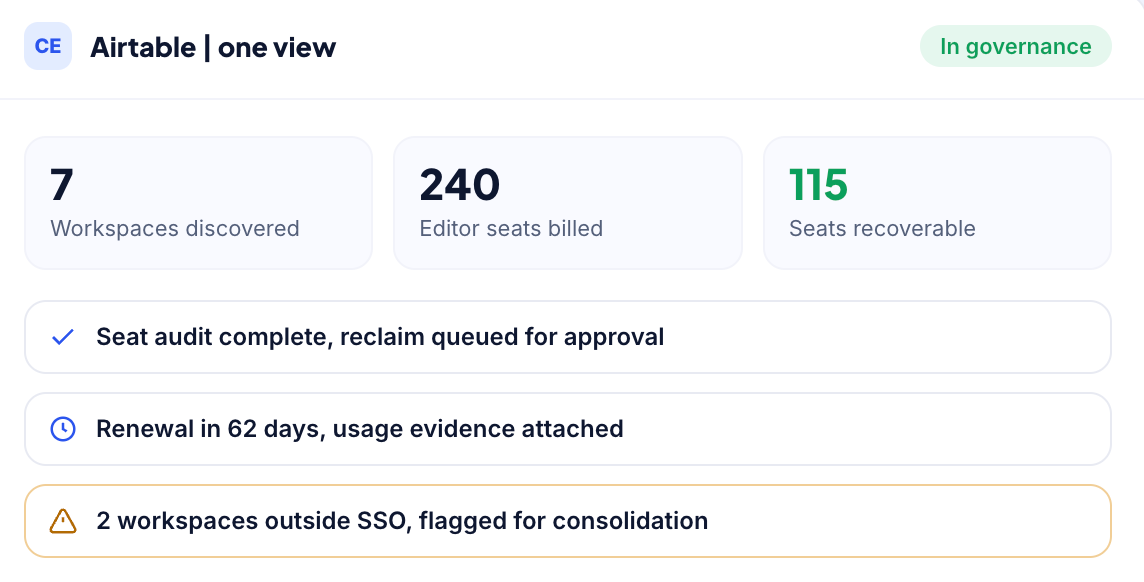
CloudEagle.ai works the problem in the order it actually occurs. It discovers every place Airtable is being paid for, shows who genuinely holds edit access, then governs that access and brings the spend down. 

Each of the four levers below is useful on its own. Run together, they compound, because the same seat data that cuts your license count is what you take into the renewal.

Find Every Airtable Workspace You're Paying For

Airtable sprawl usually starts with decentralized purchases. A team lead signs up with a corporate card, another department creates its own workspace, and IT only discovers them when finance reconciles expenses.

CloudEagle.ai combines signals from finance systems, SSO, browser activity, and SaaS discovery to surface every Airtable subscription across the organization, including workspaces purchased outside IT. Instead of chasing invoices, you get a complete inventory of every paid workspace in one place.

How it helps

  • Discovers every Airtable workspace, including those purchased outside IT
  • Correlates finance, SSO, browser, and SaaS discovery data into one inventory
  • Eliminates duplicate workspaces across departments
  • Gives IT, procurement, and finance a single view of Airtable spend

Right-Size Editor Seats Based on Actual Usage

Once every workspace is visible, the next step is understanding who truly needs a paid editor seat.

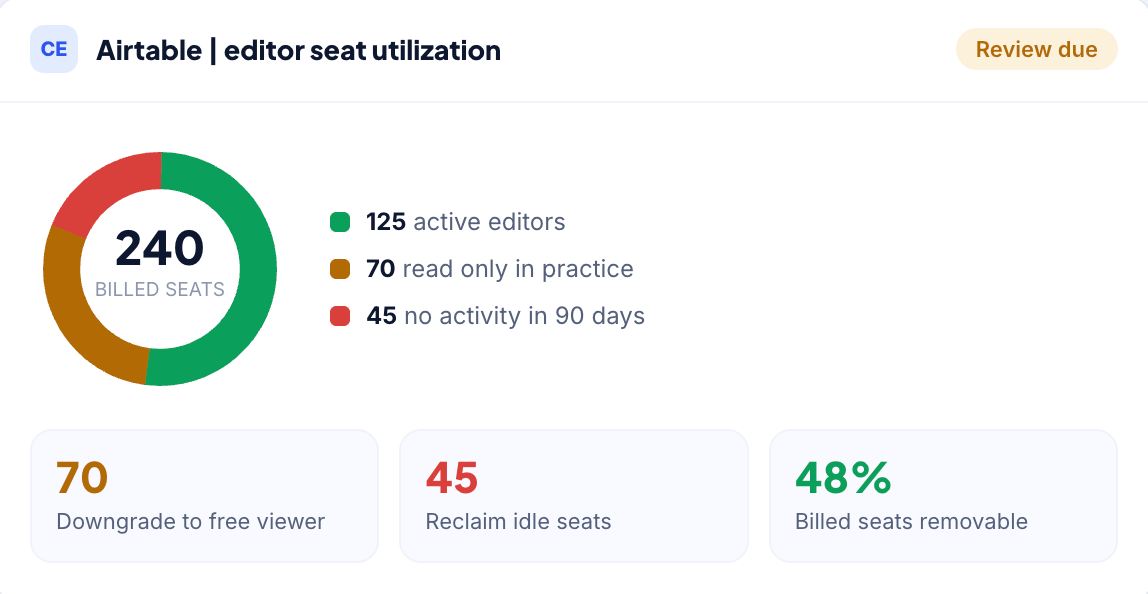
CloudEagle.ai shows which editors actively collaborate and which haven't touched a base in months. It automates license reclamation through approval workflows and user notifications, ensuring no one loses access unexpectedly.

The biggest savings often come from changing permissions rather than removing users. Someone who only views reports can be converted from a paid editor to a free read-only collaborator without disrupting their work. Repeating this across dozens or hundreds of users can significantly reduce Airtable licensing costs.

How it helps

  • Identifies active, inactive, and underutilized editor seats
  • Automates license reclamation with approval workflows and user notifications
  • Recommends converting unnecessary editors to free read-only collaborators
  • Reduces paid editor seats without disrupting business users
Match Edit Access to Business Need with Access Reviews

In Airtable, editor permissions affect both licensing costs and security. Regular access reviews ensure employees only keep the edit rights they still need.

CloudEagle.ai presents managers with a review of current editors, including external collaborators, so they can validate whether each person still requires edit access. This helps remove unnecessary permissions while keeping legitimate collaboration uninterrupted.

The result is a lower editor count, reduced license costs, and fewer users retaining unnecessary access after changing roles or leaving projects.

How it helps

  • Reviews editor access across employees and external collaborators
  • Removes unnecessary edit permissions while preserving required access
  • Reduces paid editor seats through role-based access validation
  • Strengthens governance alongside SaaS cost optimization

Walk Into Every Renewal With Usage Data

Many Airtable renewals simply roll forward last year's editor count. Without usage data, it's difficult to challenge the renewal or reduce costs.

CloudEagle.ai tracks renewal dates in a centralized renewal calendar and pairs each renewal with license utilization data. Procurement teams can enter renewal discussions with evidence of actual editor usage instead of relying on historical seat counts.

For Team and Business plans, where pricing is largely fixed per editor, reducing unnecessary editor seats is the biggest savings lever. For Enterprise Scale customers with custom pricing, historical usage data provides stronger leverage during contract negotiations.

How it helps

  • Tracks Airtable renewals in a centralized renewal calendar
  • Combines renewal timelines with editor usage and license data
  • Equips procurement with evidence for renewal negotiations
  • Helps reduce renewal costs by optimizing seat counts before contracts renew

.

3. What companies actually pay for Airtable

This is where it gets uncomfortable. CloudEagle.ai benchmark data, drawn from actual deal outcomes and last refreshed on 20 July 2026, puts typical Airtable pricing here:

Plan Seat band Benchmark per user per year
Team All $240
Business 1 to 100 $540
Enterprise Scale 1 to 100 $840
Enterprise Scale 101 to 200 $600 to $840

Now compare those to the list prices. Team lists at $240 per user/year, while Business lists at $540 per user/year. For most companies, the final price is the list price, to the dollar.

That is not because Airtable refuses to discount. It is because most buyers never ask.

  • Team is self-serve only.
  • Business purchased through the workspace settings is charged at the flat list price.
  • Buyers who engage sales and bring a documented Notion or Smartsheet evaluation to a Business renewal typically negotiate 15%–25% off. In our benchmark data, one 150-seat renewal landed 22% below list with an additional year of expanded AI credits.
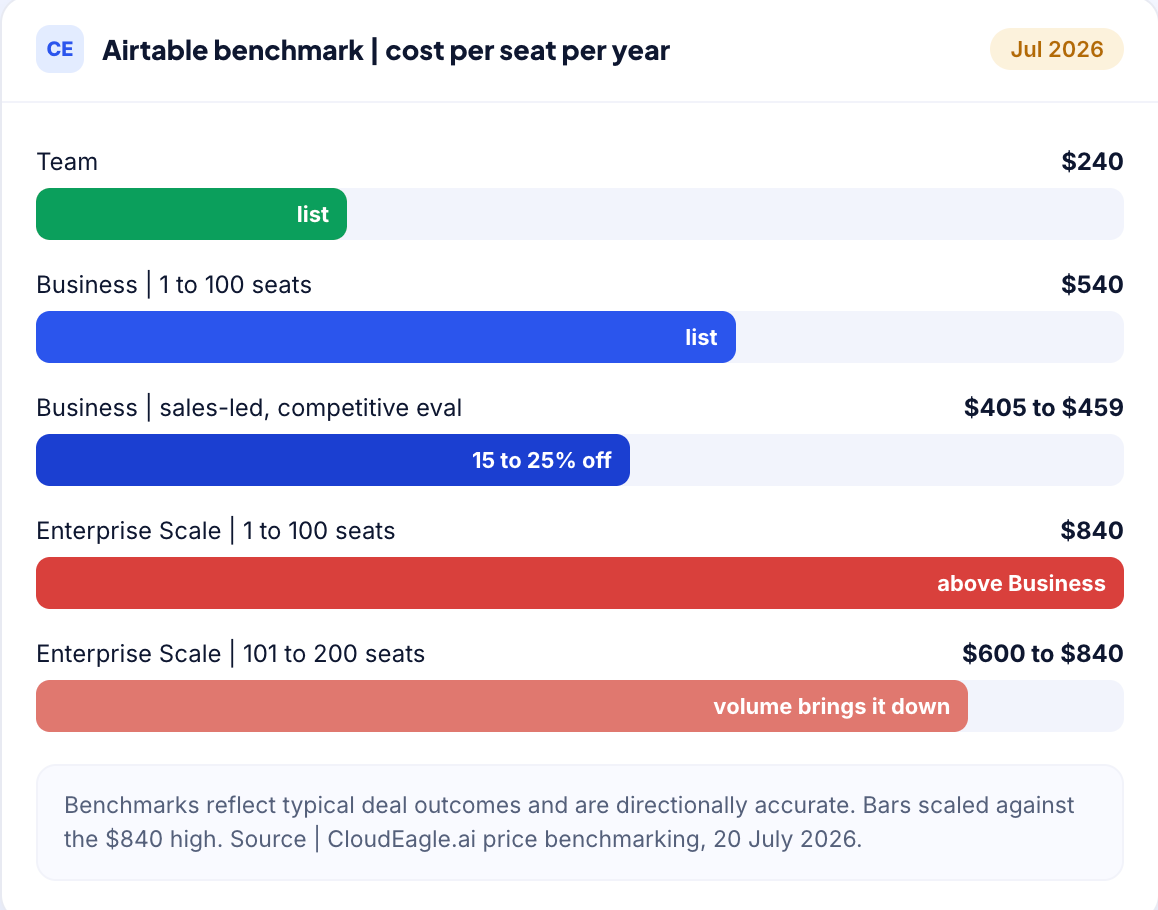
Enterprise Scale deserves a closer look because the pricing works differently. At 101–200 seats, it benchmarks at $840 per user/year, compared to $540 for Business. Volume reduces that cost, not the tier itself. If your workspace count is stable and you do not need SCIM, Business is often the more cost-effective choice.

The biggest savings, however, come from reducing unnecessary editor seats. In one 200-seat Business deployment, 60% of editor seats only used commenter-level features. Downgrading 120 users saved about $43,000 per year without changing what anyone could do.

Benchmark note: These ranges are directional, roughly 80% to 90% accurate. Real quotes move on contract length, payment terms, competitive pressure, and where you land in Airtable's quarter. Validate against current list pricing before you anchor a negotiation. Source: CloudEagle.ai benchmark data, 23 July 2026.

4. Best practices for reducing Airtable costs

None of these require a negotiation. They are all things you can do before you next talk to Airtable.

  • Audit edit permission before you budget headcount: Start from who needs to change data, not from who is on the team. The gap between those two numbers is your saving.
  • Use interfaces and forms instead of granting edit rights: People who submit or read data do not need editor seats. Airtable does not charge for form submissions or share links.
  • Move to annual billing if your usage is stable: It is a 16.7% reduction on both paid tiers, and it is the one discount available without a sales conversation.
  • Consolidate duplicate workspaces before you upgrade a tier: Three teams paying separately for overlapping bases is a more expensive problem than the record cap that triggered the upgrade conversation.
  • Run the seat audit before the renewal, not after it: Removals do not claw back what you have already committed to, so the timing is most of the value.
  • Check whether you are on a legacy plan: Airtable moves legacy Enterprise customers onto current plans at renewal, which makes that renewal a decision point rather than a formality.

5. The Airtable workspaces sitting outside SSO

SAML single sign-on begins at Business. Follow that through and the conclusion is uncomfortable: every Free and Team workspace in your company is outside single sign-on, by Airtable's own packaging. Not through anyone's mistake, and not because of a misconfiguration. That is simply how the plans are built.

An account outside SSO is an account your identity provider cannot deprovision. When someone leaves, offboarding reaches the systems IT knows about. It does not reach a workspace that marketing expensed eighteen months ago, and that workspace may hold customer records, candidate data, or contract terms.

This is the same discovery problem as the spend one, viewed through a different lens. Shadow IT discovery surfaces those workspaces so you can decide what happens to them: fold them into the governed tenant, or close them. Either answer is better than not knowing they exist.

6. When consolidation beats another Airtable tier

Before you upgrade, check whether the problem is capacity or duplication.

If three departments run overlapping bases in three separate workspaces, upgrading all three to Business costs roughly three times what consolidating into one governed workspace does. Application rationalization is the exercise of finding that overlap, and it usually pays for itself faster than a tier change.

The same question applies across tools. Plenty of companies run Airtable alongside Notion, Coda, ClickUp, or Baserow, with real overlap between them. That is worth examining honestly, though be careful about the obvious conclusion. 

Switching database tools carries migration cost, retraining, and rebuilt automations, and those rarely appear in the comparison table. If Airtable is doing the job, the cheaper answer is almost always fewer Airtable seats rather than a different vendor.

Before You Buy More, Make Sure You Need More.

Learn how leading procurement teams reduce SaaS costs before every renewal.
Get the Guide

7. Get your Airtable seat count under control

Airtable pricing is not really a pricing problem. The rates are published, the tiers are clear, and on two of the four plans there is nothing to negotiate. 

What varies between companies is how many editor seats they are carrying, how many workspaces they have lost track of, and whether anyone checks before the renewal auto-processes.

CloudEagle.ai gives you that answer in one view: every Airtable workspace you pay for, every person holding edit access, and what they have actually done with it.

Book a demo and see your own numbers.
Frequently asked questions

  1. Who counts as a billed seat in Airtable? 

Anyone with edit permission on at least one base in the workspace. Read-only collaborators, people who submit forms, and anyone viewing through a share link are free on Team and Business. This is why two companies with identical headcounts can pay very different amounts for Airtable.

  1. If I remove a user mid-cycle, do I get a refund? 

Airtable's published proration language covers users added partway through a cycle, who are charged only for the period after they were added. It does not promise a refund when you remove someone. Treat seat removals as savings on the next term, and run your audit before you renew.

  1. How many people can use Airtable for free? 

The Free plan supports up to five editors, with unlimited read-only collaborators alongside them. Each base caps at 1,000 records, which is the limit most teams hit first.

  1. What usually triggers the upgrade from Team to Business? 

One of three things: a base passing 50,000 records, automation runs hitting the monthly cap, or a security requirement for SAML SSO. The SSO trigger is the expensive one, because it raises the rate for everyone in the workspace rather than adding a feature charge.

  1. Is Airtable pricing negotiable? 

On Team and Business the published per-seat rate is what you pay, so the only lever is how many seats you buy. Enterprise Scale is custom priced through the sales team, and that is where volume, term length, and usage evidence change the number.

Advertisement for a SaaS Subscription Tracking Template with a call-to-action button to download and a partial graphic of a tablet showing charts.Banner promoting a SaaS Agreement Checklist to streamline SaaS management and avoid budget waste with a call-to-action button labeled Download checklist.Blue banner with text 'The Ultimate Employee Offboarding Checklist!' and a black button labeled 'Download checklist' alongside partial views of checklist documents from cloudeagle.ai.Digital ad for download checklist titled 'The Ultimate Checklist for IT Leaders to Optimize SaaS Operations' by cloudeagle.ai, showing checklist pages.Slack Buyer's Guide offer with text 'Unlock insider insights to get the best deal on Slack!' and a button labeled 'Get Your Copy', accompanied by a preview of the guide featuring Slack's logo.Monday Pricing Guide by cloudeagle.ai offering exclusive pricing secrets to maximize investment with a call-to-action button labeled Get Your Copy and an image of the guide's cover.Blue banner for Canva Pricing Guide by cloudeagle.ai offering a guide to Canva costs, features, and alternatives with a call-to-action button saying Get Your Copy.Blue banner with white text reading 'Little-Known Negotiation Hacks to Get the Best Deal on Slack' and a white button labeled 'Get Your Copy'.Blue banner with text 'Little-Known Negotiation Hacks to Get the Best Deal on Monday.com' and a white button labeled 'Get Your Copy'.Blue banner with text 'Little-Known Negotiation Hacks to Get the Best Deal on Canva' and a white button labeled 'Get Your Copy'.Banner with text 'Slack Buyer's Guide' and a 'Download Now' button next to images of a guide titled 'Slack Buyer’s Guide: Features, Pricing & Best Practices'.Digital cover of Monday Pricing Guide with a button labeled Get Your Copy on a blue background.Canva Pricing Guide cover with a button labeled Get Your Copy on a blue gradient background.

Enter your email to
unlock the report

Oops! Something went wrong while submitting the form.
License Count
Benchmark
Per User/Per Year

Enter your email to
unlock the report

Oops! Something went wrong while submitting the form.
License Count
Benchmark
Per User/Per Year

Enter your email to
unlock the report

Oops! Something went wrong while submitting the form.
Notion Plus
License Count
Benchmark
Per User/Per Year
100-500
$67.20 - $78.72
500-1000
$59.52 - $72.00
1000+
$51.84 - $57.60
Canva Pro
License Count
Benchmark
Per User/Per Year
100-500
$74.33-$88.71
500-1000
$64.74-$80.32
1000+
$55.14-$62.34

Enter your email to
unlock the report

Oops! Something went wrong while submitting the form.

Enter your email to
unlock the report

Oops! Something went wrong while submitting the form.
Zoom Business
License Count
Benchmark
Per User/Per Year
100-500
$216.00 - $264.00
500-1000
$180.00 - $216.00
1000+
$156.00 - $180.00

Enter your email to
unlock the report

Oops! Something went wrong while submitting the form.

Get the Right Security Platform To Secure Your Cloud Infrastructure

Please enter a business email
Thank you!
The 2023 SaaS report has been sent to your email. Check your promotional or spam folder.
Oops! Something went wrong while submitting the form.

Access full report

Please enter a business email
Thank you!
The 2023 SaaS report has been sent to your email. Check your promotional or spam folder.
Oops! Something went wrong while submitting the form.

TL;DR

  • Airtable pricing is published and fixed, but published rates do not predict your bill. The seat count does, and almost nobody audits it.
  • Airtable charges per editor. Anyone with edit permission on a single base is a full billed seat. Viewers, commenters, and form submitters cost nothing.
  • Team workspaces are bought on a credit card, so Airtable spreads team by team and lands on expense reports instead of in procurement.
  • SAML single sign-on starts at the Business plan, which means every Free and Team workspace in your company sits outside SSO by design.
  • CloudEagle.ai finds every Airtable workspace you pay for, shows who actually holds edit access, and turns that into a smaller renewal.

Airtable publishes its prices. Team is $20 per seat per month, Business is $45, and Enterprise Scale is whatever your account team quotes. Those numbers are easy to find, and they are not the reason your Airtable bill came in higher than you planned. 

The reason is that Airtable charges for every person who can edit a base, and most companies have no idea how many of those people they have. The pricing page can tell you the rate. It cannot tell you the seat count, and the seat count is the bill.

1. Why Airtable pricing gets harder to control at scale

Airtable pricing plans and what they list for

Airtable runs four plans. Here is what each one costs and where it caps out.

Plan Billed annually Billed monthly Records per base Notable limits
Free $0 $0 1,000 Up to 5 editors, no SSO
Team $20 per seat per month $24 per seat per month 50,000 No admin panel, no SAML SSO
Business $45 per seat per month $54 per seat per month 125,000 Adds admin panel, SAML SSO, two-way sync
Enterprise Scale Custom Custom 500,000 Unlimited workspaces and org units, audit logs

Rates and plan structure from Airtable's pricing page, July 2026. Airtable revises plans regularly, so confirm the live figures before you sign.

Two things follow from that table. Annual billing saves 16.7% against monthly on both paid tiers, which is $48 per seat per year on Team and $108 on Business. And the step from Team to Business is a 125% increase per seat, the steepest jump in the lineup.

The meter that actually sets your bill

Here is the detail that decides your Airtable pricing, and it is the one most buying guides leave out. Airtable bills per editor, not per user or workspace. In Airtable's own words, you are charged for every user with edit permission for at least one base in the workspace.

What doesn't count as a paid seat:

  • Read-only collaborators
  • Form submissions
  • Share links

Now think about your own organization:

  • A contractor who updated one field last quarter is still a full seat.
  • An analyst who received edit access during a launch and never had it removed is also a full seat.

Neither appears to be a problem because Airtable has no reason to flag them, and most organizations never review edit permissions after projects end.

Seats added mid-cycle are prorated, making growth inexpensive at first. Removing a collaborator stops future charges, but Airtable's published proration policy covers additions, not refunds on removed seats. That asymmetry is why an Airtable seat audit is far more valuable before renewal than after.

SaaS and AI Spend Calculator

CloudEagle.ai customers typically recover 10–30% of annual SaaS and AI spend. Answer 12 questions to benchmark your maturity, see your recoverable spend estimate, and get a personalized 3-page savings report.

12 questions · ~4 min 10–30% typical savings $2B+ saved across customers

No signup required to start · Instant results

Select “Save as PDF” in the print dialog to download your report.
SaaS & AI Spend Optimization Report  · 
Recoverable Spend Estimate

Maturity Score Breakdown
Overall Maturity
SaaS Maturity
AI Maturity
Optimization Areas Identified

Executive Summary
cloudeagle.ai Confidential 1 / 3
Your Optimization Gaps
Identified Optimization Gaps

The areas below scored 1 or 2 in your assessment. Each represents a specific gap where spend is leaking or optimization is being left on the table, with a clear first action to address it.

cloudeagle.ai Confidential 2 / 3
How CloudEagle.ai Can Help
Closing the Gap

CloudEagle.ai is the AI-powered command center for SaaS, AI, and identity governance. Trusted by RingCentral, Automation Anywhere, Shiji, and Rec Room, the platform has processed $20B+ in spend and delivered $2B+ in savings — typically 10–30% of annual SaaS and AI spend. The gaps surfaced in this report are exactly what CloudEagle was built to close.

Discover Every Tool — Including Shadow AI

Most organizations are governing a fraction of their actual SaaS and AI footprint. CloudEagle.ai builds a real-time inventory through 500+ direct integrations across SSO, finance, HRIS, browser, firewall, and contract data — surfacing every sanctioned tool, every shadow purchase, and every AI tool employees adopted without IT approval. Onboarding takes 30 minutes, with usable visibility from day one.


Eliminate Waste with Automated Optimization

Unused licenses, duplicate tools, and over-tiered subscriptions accumulate silently between renewal cycles. CloudEagle.ai runs continuous license harvesting, flags overlapping tools across departments, and arms renewals with peer pricing benchmarks and usage data — turning insights into action through no-code Slack-enabled workflows. Customers typically recover 10–30% of annual SaaS spend within the first 90 days.


Govern AI Spend Before It Becomes Ungovernable

AI tool costs are usage-based, token-driven, and largely invisible until invoices arrive. CloudEagle.ai tracks AI tool adoption across the organization, monitors usage against budget thresholds, enforces approval workflows for new AI tools, and detects sensitive content shared with public AI services — giving finance, IT, and security a shared real-time view before overruns hit the P&L.

Book a 30-Min Optimization Review

In a focused session with a CloudEagle.ai specialist, we map your specific spend profile against our optimization framework and show you exactly where your savings are — across unused licenses, duplicate tools, renewal negotiation leverage, and AI spend governance.

cloudeagle.ai/book-a-demo
cloudeagle.ai Confidential 3 / 3

What forces the tier jump

Three separate meters can push you up a tier, and any one of them is enough.

  • Records: Caps are per base, not per workspace. A base with ten tables averaging five thousand records each hits the Team ceiling. Once you are over, Airtable keeps your data but blocks new records until you upgrade.
  • Automation runs: These reset monthly and count every script and trigger. Hit the cap and automations stop until the next cycle.
  • Single sign-on: SAML SSO and the admin panel begin at Business. When your security team asks for SSO, the answer is a 125% per-seat increase across everyone in that workspace, not a line item.

That last one is worth sitting with, because it is where Airtable pricing stops being a finance question and becomes an IT one.

2. How CloudEagle.ai gets Airtable spend under control

CloudEagle.ai works the problem in the order it actually occurs. It discovers every place Airtable is being paid for, shows who genuinely holds edit access, then governs that access and brings the spend down. 

Each of the four levers below is useful on its own. Run together, they compound, because the same seat data that cuts your license count is what you take into the renewal.

Find Every Airtable Workspace You're Paying For

Airtable sprawl usually starts with decentralized purchases. A team lead signs up with a corporate card, another department creates its own workspace, and IT only discovers them when finance reconciles expenses.

CloudEagle.ai combines signals from finance systems, SSO, browser activity, and SaaS discovery to surface every Airtable subscription across the organization, including workspaces purchased outside IT. Instead of chasing invoices, you get a complete inventory of every paid workspace in one place.

How it helps

  • Discovers every Airtable workspace, including those purchased outside IT
  • Correlates finance, SSO, browser, and SaaS discovery data into one inventory
  • Eliminates duplicate workspaces across departments
  • Gives IT, procurement, and finance a single view of Airtable spend

Right-Size Editor Seats Based on Actual Usage

Once every workspace is visible, the next step is understanding who truly needs a paid editor seat.

CloudEagle.ai shows which editors actively collaborate and which haven't touched a base in months. It automates license reclamation through approval workflows and user notifications, ensuring no one loses access unexpectedly.

The biggest savings often come from changing permissions rather than removing users. Someone who only views reports can be converted from a paid editor to a free read-only collaborator without disrupting their work. Repeating this across dozens or hundreds of users can significantly reduce Airtable licensing costs.

How it helps

  • Identifies active, inactive, and underutilized editor seats
  • Automates license reclamation with approval workflows and user notifications
  • Recommends converting unnecessary editors to free read-only collaborators
  • Reduces paid editor seats without disrupting business users

Match Edit Access to Business Need with Access Reviews

In Airtable, editor permissions affect both licensing costs and security. Regular access reviews ensure employees only keep the edit rights they still need.

CloudEagle.ai presents managers with a review of current editors, including external collaborators, so they can validate whether each person still requires edit access. This helps remove unnecessary permissions while keeping legitimate collaboration uninterrupted.

The result is a lower editor count, reduced license costs, and fewer users retaining unnecessary access after changing roles or leaving projects.

How it helps

  • Reviews editor access across employees and external collaborators
  • Removes unnecessary edit permissions while preserving required access
  • Reduces paid editor seats through role-based access validation
  • Strengthens governance alongside SaaS cost optimization

Walk Into Every Renewal With Usage Data

Many Airtable renewals simply roll forward last year's editor count. Without usage data, it's difficult to challenge the renewal or reduce costs.

CloudEagle.ai tracks renewal dates in a centralized renewal calendar and pairs each renewal with license utilization data. Procurement teams can enter renewal discussions with evidence of actual editor usage instead of relying on historical seat counts.

For Team and Business plans, where pricing is largely fixed per editor, reducing unnecessary editor seats is the biggest savings lever. For Enterprise Scale customers with custom pricing, historical usage data provides stronger leverage during contract negotiations.

How it helps

  • Tracks Airtable renewals in a centralized renewal calendar
  • Combines renewal timelines with editor usage and license data
  • Equips procurement with evidence for renewal negotiations
  • Helps reduce renewal costs by optimizing seat counts before contracts renew

.

3. What companies actually pay for Airtable

This is where it gets uncomfortable. CloudEagle.ai benchmark data, drawn from actual deal outcomes and last refreshed on 20 July 2026, puts typical Airtable pricing here:

Plan Seat band Benchmark per user per year
Team All $240
Business 1 to 100 $540
Enterprise Scale 1 to 100 $840
Enterprise Scale 101 to 200 $600 to $840

Now compare those to the list prices. Team lists at $240 per user/year, while Business lists at $540 per user/year. For most companies, the final price is the list price, to the dollar.

That is not because Airtable refuses to discount. It is because most buyers never ask.

  • Team is self-serve only.
  • Business purchased through the workspace settings is charged at the flat list price.
  • Buyers who engage sales and bring a documented Notion or Smartsheet evaluation to a Business renewal typically negotiate 15%–25% off. In our benchmark data, one 150-seat renewal landed 22% below list with an additional year of expanded AI credits.

Enterprise Scale deserves a closer look because the pricing works differently. At 101–200 seats, it benchmarks at $840 per user/year, compared to $540 for Business. Volume reduces that cost, not the tier itself. If your workspace count is stable and you do not need SCIM, Business is often the more cost-effective choice.

The biggest savings, however, come from reducing unnecessary editor seats. In one 200-seat Business deployment, 60% of editor seats only used commenter-level features. Downgrading 120 users saved about $43,000 per year without changing what anyone could do.

Benchmark note: These ranges are directional, roughly 80% to 90% accurate. Real quotes move on contract length, payment terms, competitive pressure, and where you land in Airtable's quarter. Validate against current list pricing before you anchor a negotiation. Source: CloudEagle.ai benchmark data, 23 July 2026.

4. Best practices for reducing Airtable costs

None of these require a negotiation. They are all things you can do before you next talk to Airtable.

  • Audit edit permission before you budget headcount: Start from who needs to change data, not from who is on the team. The gap between those two numbers is your saving.
  • Use interfaces and forms instead of granting edit rights: People who submit or read data do not need editor seats. Airtable does not charge for form submissions or share links.
  • Move to annual billing if your usage is stable: It is a 16.7% reduction on both paid tiers, and it is the one discount available without a sales conversation.
  • Consolidate duplicate workspaces before you upgrade a tier: Three teams paying separately for overlapping bases is a more expensive problem than the record cap that triggered the upgrade conversation.
  • Run the seat audit before the renewal, not after it: Removals do not claw back what you have already committed to, so the timing is most of the value.
  • Check whether you are on a legacy plan: Airtable moves legacy Enterprise customers onto current plans at renewal, which makes that renewal a decision point rather than a formality.

5. The Airtable workspaces sitting outside SSO

SAML single sign-on begins at Business. Follow that through and the conclusion is uncomfortable: every Free and Team workspace in your company is outside single sign-on, by Airtable's own packaging. Not through anyone's mistake, and not because of a misconfiguration. That is simply how the plans are built.

An account outside SSO is an account your identity provider cannot deprovision. When someone leaves, offboarding reaches the systems IT knows about. It does not reach a workspace that marketing expensed eighteen months ago, and that workspace may hold customer records, candidate data, or contract terms.

This is the same discovery problem as the spend one, viewed through a different lens. Shadow IT discovery surfaces those workspaces so you can decide what happens to them: fold them into the governed tenant, or close them. Either answer is better than not knowing they exist.

6. When consolidation beats another Airtable tier

Before you upgrade, check whether the problem is capacity or duplication.

If three departments run overlapping bases in three separate workspaces, upgrading all three to Business costs roughly three times what consolidating into one governed workspace does. Application rationalization is the exercise of finding that overlap, and it usually pays for itself faster than a tier change.

The same question applies across tools. Plenty of companies run Airtable alongside Notion, Coda, ClickUp, or Baserow, with real overlap between them. That is worth examining honestly, though be careful about the obvious conclusion. 

Switching database tools carries migration cost, retraining, and rebuilt automations, and those rarely appear in the comparison table. If Airtable is doing the job, the cheaper answer is almost always fewer Airtable seats rather than a different vendor.

Before You Buy More, Make Sure You Need More.

Learn how leading procurement teams reduce SaaS costs before every renewal.
Get the Guide

7. Get your Airtable seat count under control

Airtable pricing is not really a pricing problem. The rates are published, the tiers are clear, and on two of the four plans there is nothing to negotiate. 

What varies between companies is how many editor seats they are carrying, how many workspaces they have lost track of, and whether anyone checks before the renewal auto-processes.

CloudEagle.ai gives you that answer in one view: every Airtable workspace you pay for, every person holding edit access, and what they have actually done with it.

Book a demo and see your own numbers.

Frequently asked questions

  1. Who counts as a billed seat in Airtable? 

Anyone with edit permission on at least one base in the workspace. Read-only collaborators, people who submit forms, and anyone viewing through a share link are free on Team and Business. This is why two companies with identical headcounts can pay very different amounts for Airtable.

  1. If I remove a user mid-cycle, do I get a refund? 

Airtable's published proration language covers users added partway through a cycle, who are charged only for the period after they were added. It does not promise a refund when you remove someone. Treat seat removals as savings on the next term, and run your audit before you renew.

  1. How many people can use Airtable for free? 

The Free plan supports up to five editors, with unlimited read-only collaborators alongside them. Each base caps at 1,000 records, which is the limit most teams hit first.

  1. What usually triggers the upgrade from Team to Business? 

One of three things: a base passing 50,000 records, automation runs hitting the monthly cap, or a security requirement for SAML SSO. The SSO trigger is the expensive one, because it raises the rate for everyone in the workspace rather than adding a feature charge.

  1. Is Airtable pricing negotiable? 

On Team and Business the published per-seat rate is what you pay, so the only lever is how many seats you buy. Enterprise Scale is custom priced through the sales team, and that is where volume, term length, and usage evidence change the number.

CloudEagle.ai recognized in the 2025 Gartner® Magic Quadrant™ for SaaS Management Platforms
Download now
gartner chart
5x
Faster employee
onboarding
80%
Reduction in time for
user access reviews
30k
Workflows
automated
$15Bn
Analyzed in
contract spend
$2Bn
Saved in
SaaS spend

Streamline SaaS governance and save 10-30%

Book a Demo with Expert
CTA image