Identity & Access Management

Non-Human Identity Security: Why Service Accounts Are Your Biggest Unmanaged Risk

Share via:
Written by:
CloudEagle.ai Team
Reviewed by
Nidhi Jain
Last Updated:
August 28, 2026
blog-cms-banner-bg
Little-Known Negotiation Hacks to Get the Best Deal on Slack
cta-bg-blogDownload Your Copy

HIPAA Compliance Checklist for 2025

Download PDF

Non-human identity security is not a discovery problem anymore. Most teams can produce a list of service accounts if they go looking. 

What they cannot do is answer the questions that actually govern a human account: who owns this, when was it last reviewed, and what breaks if we turn it off. 

That gap, not the raw count, is why service accounts are your biggest unmanaged risk. Bringing them into the same identity governance you already run for people is the whole job.
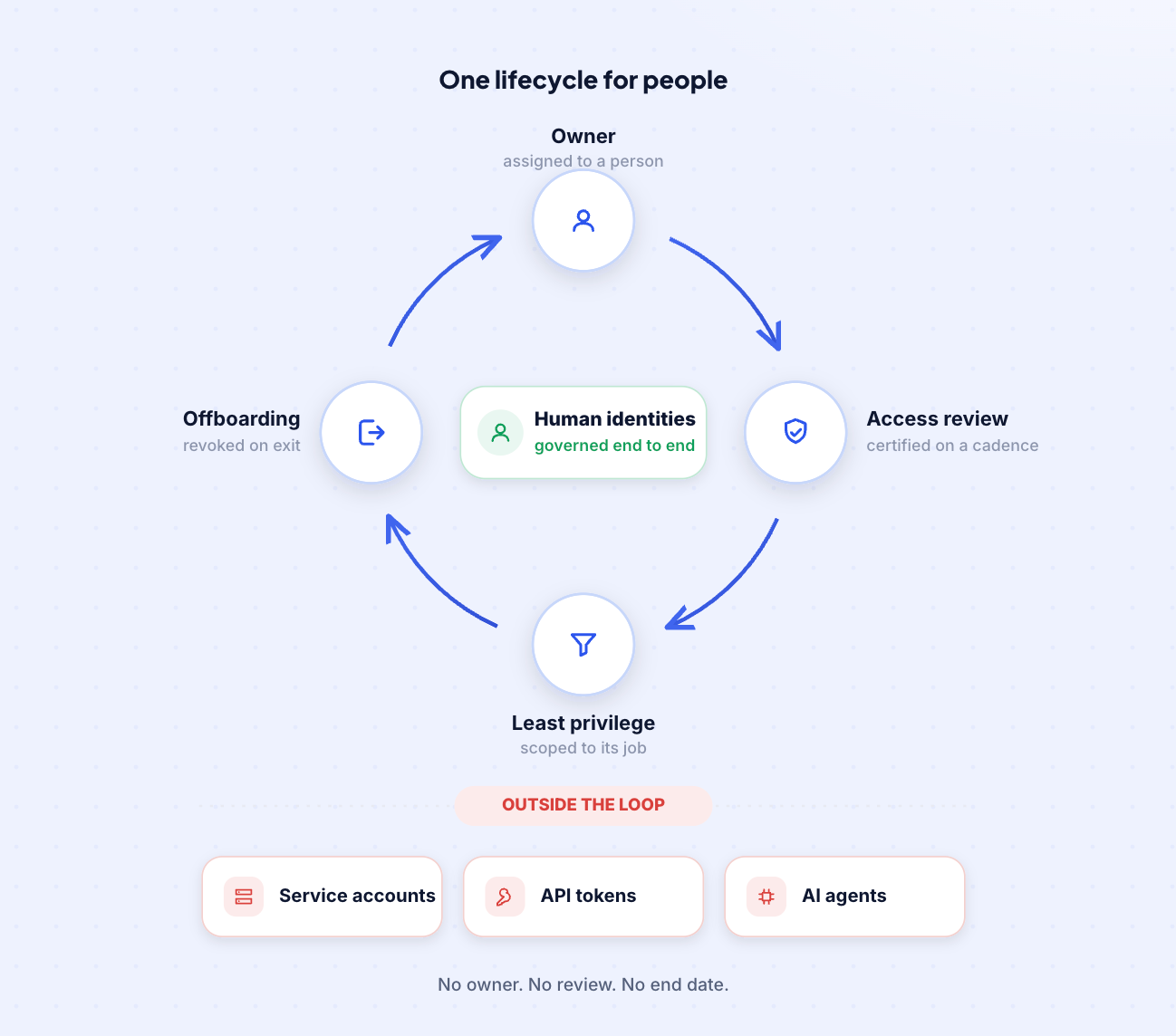
Why Are Service Accounts Your Biggest Unmanaged Risk?

Because they carry real privilege and none of the controls that keep human accounts honest. 

A person gets an owner, an access review, and a leaver date. A service account gets created for one integration and then runs untouched for years. 

Estimates of how far non-human identities outnumber people vary widely, but the number that matters is how few of them anyone actually governs.

Every control you rely on to keep employee access in check has no equivalent for a service account by default:

Control that keeps access honest Human employee Service account or token
Has a named owner Yes, by default Rarely
MFA at login Yes No
Session ends or logs out Yes No, runs continuously
Gets an access review On a cadence Almost never
Offboarded when it leaves HR-triggered No leaver event

Three failures turn that gap into your largest exposure.

Standing Privilege That No One Reviews or Revokes

Service accounts are over-privileged by default and stay that way. They get set up with broad access so the integration works on day one, and that access is almost never scoped back once the job is running.

  • Broad on setup: the account is granted wide permissions so nothing breaks in the first hour.
  • Never scoped back: "it needs admin to work" becomes permanent because no one revisits it.
  • Never challenged: a human's access gets questioned at the next review, but a service account's excessive privilege just sits there.
  • Waiting to be inherited: whoever compromises the credential inherits every one of those standing permissions.

The answer is to put that privilege on the same review clock as everyone else's.

You Can't Govern What You Can't See

Ten must-dos to keep every identity, human and machine, under control.
Learn More

The Ownership Gap That Makes Cleanup Impossible

Most risky service accounts have no clear owner, and that single gap blocks every cleanup. If nobody can say what an account does or what depends on it, nobody is willing to turn it off, so it stays. We hear the same story from security teams constantly:

  • The creator is gone: the credential was set up years ago for a developer who has since left.
  • The chain is gone too: their manager has since left, and the project moved on.
  • Something still runs on it: automation is firing somewhere behind it, but no one knows exactly what.
  • No evidence to act: the admin looking at it today has no documentation and no way to prove it is safe to remove.

So the safest-feeling choice is to leave a high-privilege account running, which is the opposite of safe. Cleanup only becomes possible once every account has a named owner and evidence behind the decision.

Dormant Credentials That Outlive the Projects That Created Them

Non-human identities get created for a specific integration or project and almost never decommissioned when it ends. There is no leaver event for a machine, so dormant credentials pile up as standing, forgotten access.

  • No leaver trigger: a person leaves and HR starts offboarding; a project ends and its service account just keeps its keys.
  • Dormant but privileged: an account with no activity in six months but full admin rights is a low-effort, high-reward target.
  • Nobody is watching: no monitoring flags an identity nobody expects to be active in the first place.

Dormancy is only a risk if it goes unseen. Surfaced and expired on a schedule, it becomes routine housekeeping.
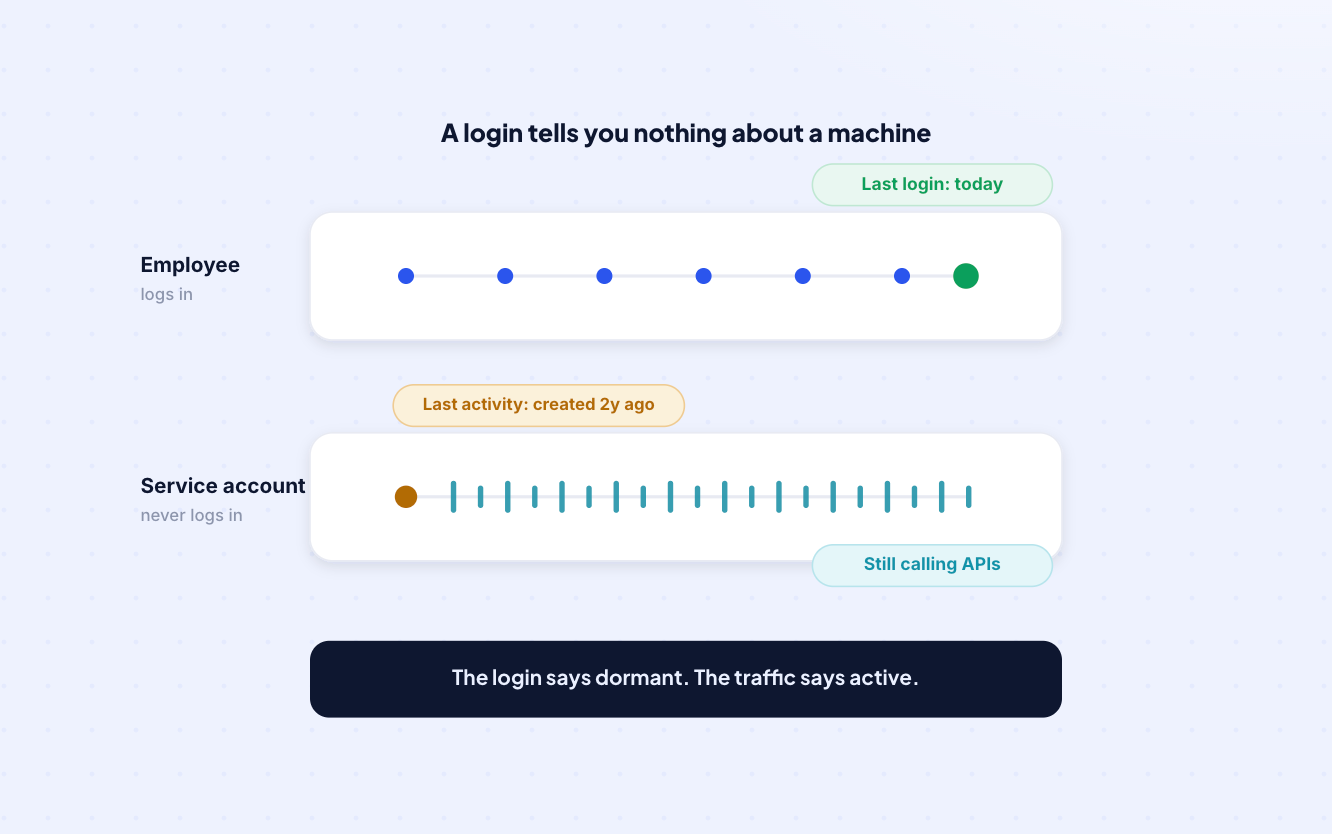
How Do You Find Service Accounts You Cannot See?

You pull every managed and service identity out of your identity providers and SaaS systems into one inventory, then judge each one by privilege, dormancy, and ownership rather than by login activity.

 Non-human identity security starts here, because machines rarely log in and leave the trail you would use for a person.

Pulling Every Service Identity Into One Inventory

The first move is a single inventory that spans where these identities actually live, with enough context on each one to make a decision instead of just a longer spreadsheet. 

We pull managed identities and service identities into one view, including the ones outside traditional SSO visibility.

  • Across every source: Azure AD, Okta, GCP, Salesforce, and the rest of your SaaS stack in one place.
  • With the credentials it holds: what the identity can authenticate to and reach.
  • With its roles and permissions: what it is actually allowed to do, not just that it exists.
  • With its creator or owner: who set it up, so the row points to a person.

Judging Usage When There Are No Login Logs

Here is the honest limit, and the principle that comes with it. A service account often has no meaningful login history, so its last activity may be nothing more than the day it was created. 

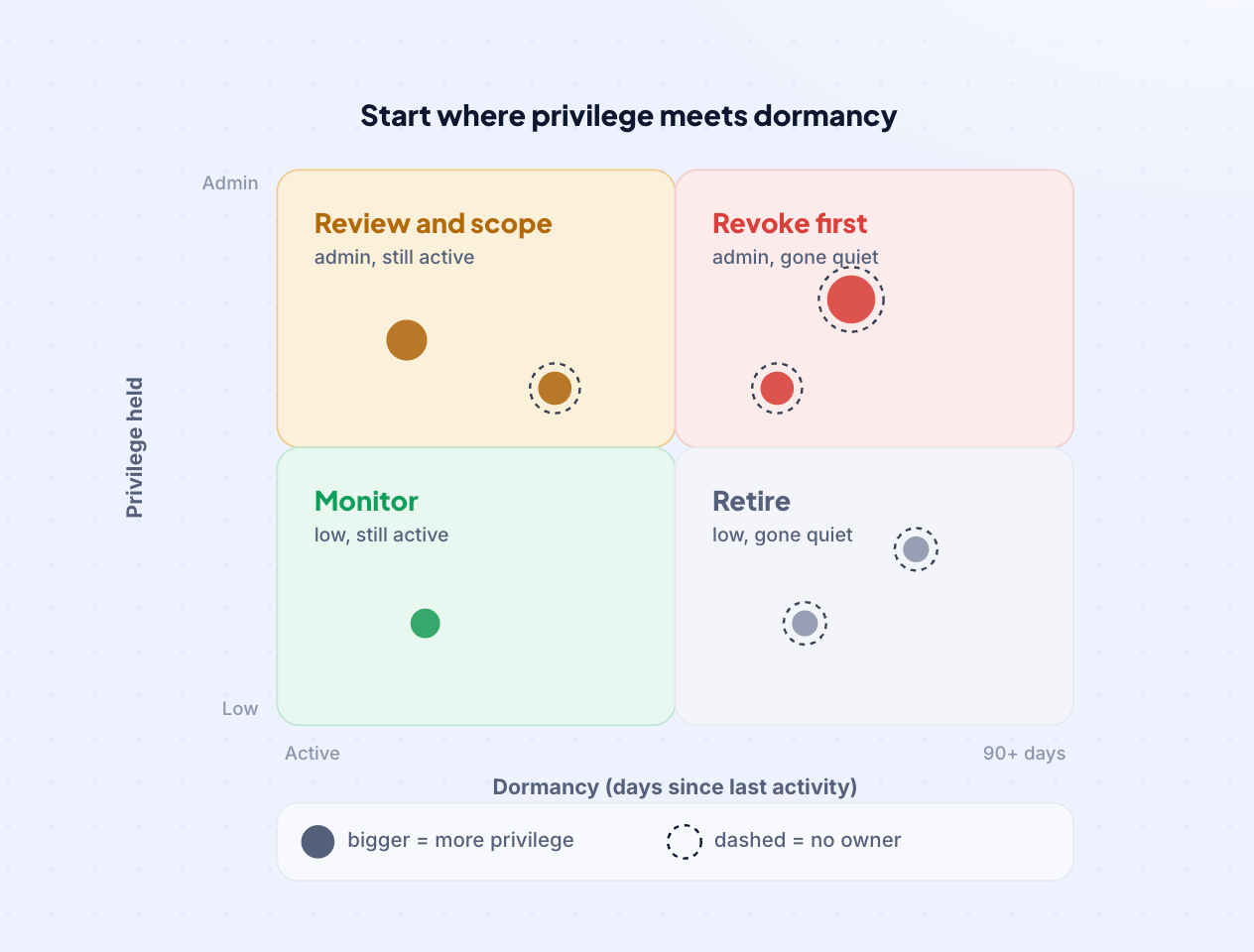
You cannot wait for a login signal that is never coming, so you rank risk on the signals you do have:

Signal What it tells you How to act
Privilege held Blast radius if the credential is compromised Scope the highest-privilege accounts first
Dormancy (90+ days) The identity is likely unused Flag it for review
Roles and permissions Whether it can do anything at all No roles and no activity means orphaned
Ownership Whether anyone is accountable for it Assign an owner or retire it

The teams that make progress here stop trying to prove a negative from login logs and start ranking risk by privilege and dormancy. That is what non-human identity security looks like once you accept the login signal is never coming, and it is the defensible call admins say they are missing.

How Do You Bring Non-Human Identities Under the Same Governance as People?

You run them through the same lifecycle your human identities already follow: discovery, ownership, access reviews, least privilege, and expiry. 

That is the core of non-human identity governance, and it is what turns an inventory into control. We apply each of those steps to service accounts, tokens, and agents.
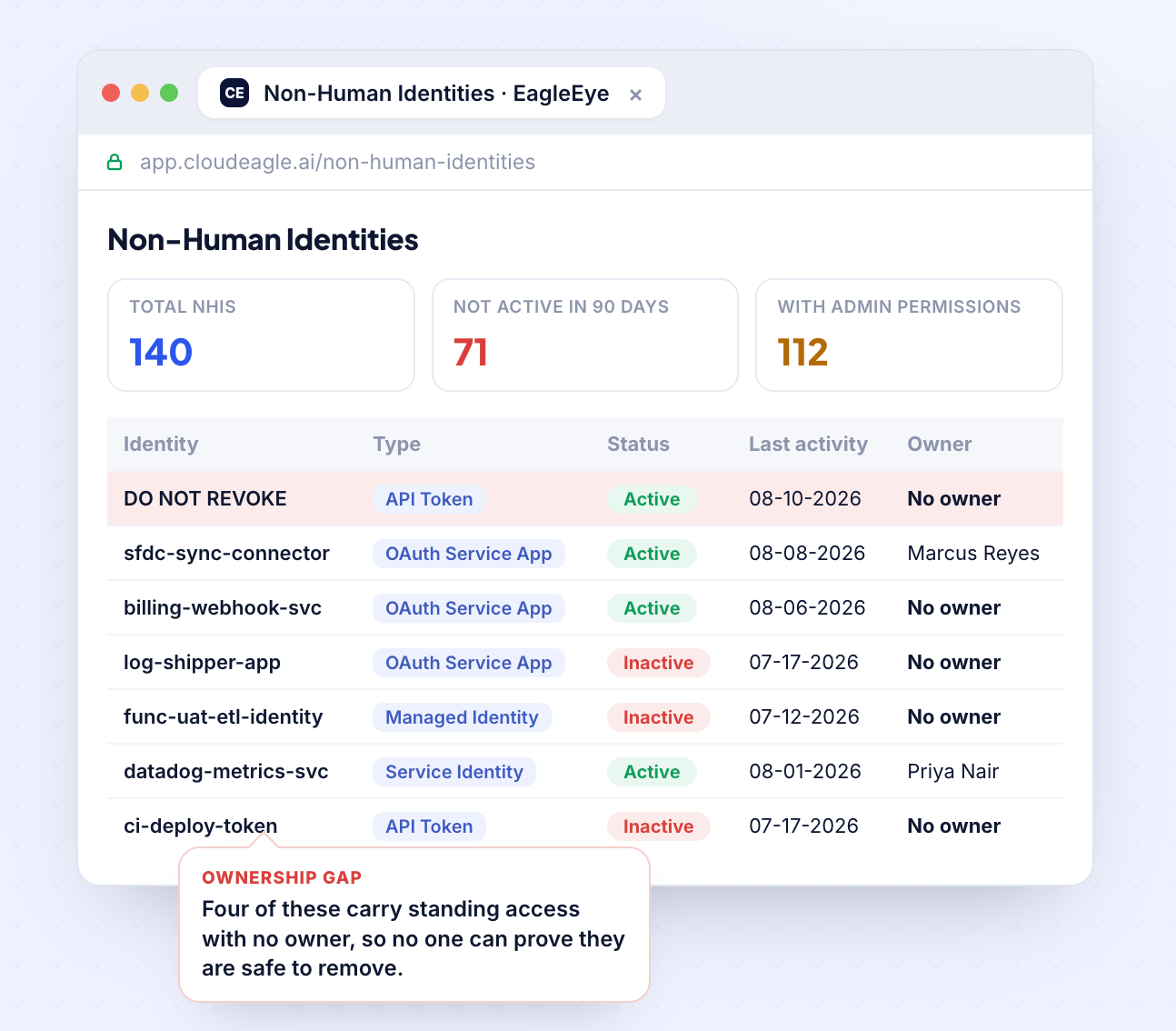
Assign an Owner to Every Service Account

An identity with no owner is a dead end the moment something goes wrong, so the first governance step is accountability. 

Where an account has no clear owner, we let you assign an active person to it and notify them, the same way access control and compliance already works for people.

  • Someone is answerable: every account maps to a named person, not a departed developer.
  • It unblocks the review: an owned account can be certified, challenged, and decided on.
  • Decisions carry a name: keep or retire is a documented call, not a guess.

Extend Access Reviews to Service Accounts and Tokens

The same review cadence you run for employees should cover service accounts and tokens. We extend user access reviews to non-human identities, so machines are certified on the same clock as people instead of living outside the process.

  • In the same cycle: non-human identities enter the review rotation, not a separate annual scramble.
  • Context in front of the reviewer: privilege and activity sit next to each identity, which cuts rubber-stamping.
  • Evidence as a byproduct: every keep, revoke, or flag is logged, so the review doubles as your audit trail.

Scope Down Privilege and Expire Credentials at Creation

Governance is not just cleanup, it is making sure the pile stops growing. 

We surface over-privileged non-human identities so you can scope them to least privilege, and we let you set expiry dates on credentials at creation so standing access does not build up again.

  • Scope to least privilege: over-privileged identities get cut down to what their function needs.
  • Expire at creation: time-based access gives a credential a defined end date, the same privileged access controls you apply to admins.
  • Arrive governed: new service accounts show up scoped and dated instead of becoming next year's cleanup project.

When Armorcode brought service accounts, API tokens, and AI agents under the same governance as their people, the results were measurable:

Outcome Result
Visibility across non-human identities 40% to 95%
Unmanaged non-human identities remediated 480
Over-privileged identities scoped down 220+

Where Should You Start a Non-Human Identity Governance Program?

Start where risk and effort trade off best: orphaned and over-privileged identities first, one review inside the first 30 days, then a standing cadence. A non-human identity governance program is a loop you run continuously, not a one-time audit.

Phase Focus What you do
First 30 days Highest-risk identities only One review: confirm, flag, or revoke
At creation Every new credential Assign an owner, scope access, set an expiry
Continuous The full population Reviews on a schedule, dormancy surfaced automatically

Start With Orphaned and Over-Privileged Identities

Orphaned accounts and over-privileged ones give you the fastest risk reduction for the least operational risk, so they are where to begin. 

An identity with no owner, no recent activity, and broad access is both the most dangerous and the least likely to break anything when you remove it.

  • Most dangerous first: no owner, no activity, broad access is the top-priority profile.
  • Work down by risk: rank the rest by privilege and dormancy.
  • Keep it simple: confirm, flag, or revoke; save the nuanced workflows for once the program has a rhythm.

Make Governance Continuous, Not a One-Time Cleanup

A cleanup you run once is out of date within a quarter, because new service accounts and tokens are created every week. 

The point of a program is the cadence: access reviews on a schedule, ownership enforced at creation, and expiry set by default.

  • First review in 30 days: high-risk identities only, then let it repeat.
  • Born governed: new credentials show up owned, scoped, and dated.
  • The backlog shrinks: the population you have to chase gets smaller instead of compounding.

The teams who get this right stop treating non-human identities as a security side quest and start governing them with the same discipline as everyone else on the payroll. 

That is what they are: access that needs an owner, a review, and an end date.
Frequently Asked Questions

What is the difference between a service account and a non-human identity?
A service account is one type of non-human identity, the umbrella term for any non-person login: API tokens, OAuth grants, service principals, and AI agent credentials. Service accounts are the most common kind, but securing them means governing the whole population the same way, with an owner, a review, and an end date.

Is a secrets manager or PAM tool enough to secure service accounts?
Not on its own. A secrets manager rotates credentials and a PAM tool controls privileged sessions, but neither answers who owns an account, whether its access is still needed, or when it should expire. Service account security means running each identity through the same governance lifecycle as people, discovery, ownership, access reviews, least privilege, and expiry, not just vaulting the password.

How do you know a service account is safe to delete if it has no login history?
Judge it by privilege, dormancy, ownership, and attached permissions rather than logins, because most service accounts never generate meaningful login activity. High privilege, no activity for 90 days or more, no attached roles, and no clear owner makes an account a strong candidate to review and retire, a decision you can defend to the business instead of a guess.

Can user access reviews include service accounts, or only employees?
They can and should include service accounts and tokens, not just employees. CloudEagle.ai extends user access reviews to non-human identities, so machines are certified on the same cadence as people, with each one's privilege and activity shown alongside it. Every keep or revoke decision is logged as audit evidence.

How often should non-human identities be reviewed?
On the same cadence as human access: typically quarterly for high-risk identities, at least annually for the rest. Start with one review of your highest-risk accounts in the first 30 days, then repeat on a schedule instead of treating it as a one-time cleanup. Give new credentials an owner, scoped permissions, and an expiry at creation, so the posture holds between reviews.

Advertisement for a SaaS Subscription Tracking Template with a call-to-action button to download and a partial graphic of a tablet showing charts.Banner promoting a SaaS Agreement Checklist to streamline SaaS management and avoid budget waste with a call-to-action button labeled Download checklist.Blue banner with text 'The Ultimate Employee Offboarding Checklist!' and a black button labeled 'Download checklist' alongside partial views of checklist documents from cloudeagle.ai.Digital ad for download checklist titled 'The Ultimate Checklist for IT Leaders to Optimize SaaS Operations' by cloudeagle.ai, showing checklist pages.Slack Buyer's Guide offer with text 'Unlock insider insights to get the best deal on Slack!' and a button labeled 'Get Your Copy', accompanied by a preview of the guide featuring Slack's logo.Monday Pricing Guide by cloudeagle.ai offering exclusive pricing secrets to maximize investment with a call-to-action button labeled Get Your Copy and an image of the guide's cover.Blue banner for Canva Pricing Guide by cloudeagle.ai offering a guide to Canva costs, features, and alternatives with a call-to-action button saying Get Your Copy.Blue banner with white text reading 'Little-Known Negotiation Hacks to Get the Best Deal on Slack' and a white button labeled 'Get Your Copy'.Blue banner with text 'Little-Known Negotiation Hacks to Get the Best Deal on Monday.com' and a white button labeled 'Get Your Copy'.Blue banner with text 'Little-Known Negotiation Hacks to Get the Best Deal on Canva' and a white button labeled 'Get Your Copy'.Banner with text 'Slack Buyer's Guide' and a 'Download Now' button next to images of a guide titled 'Slack Buyer’s Guide: Features, Pricing & Best Practices'.Digital cover of Monday Pricing Guide with a button labeled Get Your Copy on a blue background.Canva Pricing Guide cover with a button labeled Get Your Copy on a blue gradient background.

Enter your email to
unlock the report

Oops! Something went wrong while submitting the form.
License Count
Benchmark
Per User/Per Year

Enter your email to
unlock the report

Oops! Something went wrong while submitting the form.
License Count
Benchmark
Per User/Per Year

Enter your email to
unlock the report

Oops! Something went wrong while submitting the form.
Notion Plus
License Count
Benchmark
Per User/Per Year
100-500
$67.20 - $78.72
500-1000
$59.52 - $72.00
1000+
$51.84 - $57.60
Canva Pro
License Count
Benchmark
Per User/Per Year
100-500
$74.33-$88.71
500-1000
$64.74-$80.32
1000+
$55.14-$62.34

Enter your email to
unlock the report

Oops! Something went wrong while submitting the form.

Enter your email to
unlock the report

Oops! Something went wrong while submitting the form.
Zoom Business
License Count
Benchmark
Per User/Per Year
100-500
$216.00 - $264.00
500-1000
$180.00 - $216.00
1000+
$156.00 - $180.00

Enter your email to
unlock the report

Oops! Something went wrong while submitting the form.

Get the Right Security Platform To Secure Your Cloud Infrastructure

Please enter a business email
Thank you!
The 2023 SaaS report has been sent to your email. Check your promotional or spam folder.
Oops! Something went wrong while submitting the form.

Access full report

Please enter a business email
Thank you!
The 2023 SaaS report has been sent to your email. Check your promotional or spam folder.
Oops! Something went wrong while submitting the form.

TL;DR

  • The risk from service accounts was never that you have thousands of them. It is that not one of them runs through the governance loop your people already do: an owner, a review, a scoped set of permissions, and an end date.
  • Service accounts, API tokens, and AI agents are the largest and least watched population in most enterprises, and they sit outside the controls built for humans. No MFA, no logout, no leaver date.
  • Three failures make them your biggest unmanaged risk: standing privilege nobody reviews, no clear owner, and dormant credentials that outlive the projects that created them.
  • The hard part is not finding them. It is proving which ones are safe to remove, because machines rarely log in, so there are no login logs to judge them by.
  • The fix is to govern service accounts the same way you govern people: discover them, assign owners, run them through access reviews, scope down privilege, and expire credentials at creation.
  • That is what our non-human identity governance does. It is how one security team took visibility across its non-human identities from 40% to 95% and remediated 480 unmanaged ones.

Non-human identity security is not a discovery problem anymore. Most teams can produce a list of service accounts if they go looking. 

What they cannot do is answer the questions that actually govern a human account: who owns this, when was it last reviewed, and what breaks if we turn it off. 

That gap, not the raw count, is why service accounts are your biggest unmanaged risk. Bringing them into the same identity governance you already run for people is the whole job.

Why Are Service Accounts Your Biggest Unmanaged Risk?

Because they carry real privilege and none of the controls that keep human accounts honest. 

A person gets an owner, an access review, and a leaver date. A service account gets created for one integration and then runs untouched for years. 

Estimates of how far non-human identities outnumber people vary widely, but the number that matters is how few of them anyone actually governs.

Every control you rely on to keep employee access in check has no equivalent for a service account by default:

Control that keeps access honest Human employee Service account or token
Has a named owner Yes, by default Rarely
MFA at login Yes No
Session ends or logs out Yes No, runs continuously
Gets an access review On a cadence Almost never
Offboarded when it leaves HR-triggered No leaver event

Three failures turn that gap into your largest exposure.

Standing Privilege That No One Reviews or Revokes

Service accounts are over-privileged by default and stay that way. They get set up with broad access so the integration works on day one, and that access is almost never scoped back once the job is running.

  • Broad on setup: the account is granted wide permissions so nothing breaks in the first hour.
  • Never scoped back: "it needs admin to work" becomes permanent because no one revisits it.
  • Never challenged: a human's access gets questioned at the next review, but a service account's excessive privilege just sits there.
  • Waiting to be inherited: whoever compromises the credential inherits every one of those standing permissions.

The answer is to put that privilege on the same review clock as everyone else's.

You Can't Govern What You Can't See

Ten must-dos to keep every identity, human and machine, under control.
Learn More

The Ownership Gap That Makes Cleanup Impossible

Most risky service accounts have no clear owner, and that single gap blocks every cleanup. If nobody can say what an account does or what depends on it, nobody is willing to turn it off, so it stays. We hear the same story from security teams constantly:

  • The creator is gone: the credential was set up years ago for a developer who has since left.
  • The chain is gone too: their manager has since left, and the project moved on.
  • Something still runs on it: automation is firing somewhere behind it, but no one knows exactly what.
  • No evidence to act: the admin looking at it today has no documentation and no way to prove it is safe to remove.

So the safest-feeling choice is to leave a high-privilege account running, which is the opposite of safe. Cleanup only becomes possible once every account has a named owner and evidence behind the decision.

Dormant Credentials That Outlive the Projects That Created Them

Non-human identities get created for a specific integration or project and almost never decommissioned when it ends. There is no leaver event for a machine, so dormant credentials pile up as standing, forgotten access.

  • No leaver trigger: a person leaves and HR starts offboarding; a project ends and its service account just keeps its keys.
  • Dormant but privileged: an account with no activity in six months but full admin rights is a low-effort, high-reward target.
  • Nobody is watching: no monitoring flags an identity nobody expects to be active in the first place.

Dormancy is only a risk if it goes unseen. Surfaced and expired on a schedule, it becomes routine housekeeping.

How Do You Find Service Accounts You Cannot See?

You pull every managed and service identity out of your identity providers and SaaS systems into one inventory, then judge each one by privilege, dormancy, and ownership rather than by login activity.

 Non-human identity security starts here, because machines rarely log in and leave the trail you would use for a person.

Pulling Every Service Identity Into One Inventory

The first move is a single inventory that spans where these identities actually live, with enough context on each one to make a decision instead of just a longer spreadsheet. 

We pull managed identities and service identities into one view, including the ones outside traditional SSO visibility.

  • Across every source: Azure AD, Okta, GCP, Salesforce, and the rest of your SaaS stack in one place.
  • With the credentials it holds: what the identity can authenticate to and reach.
  • With its roles and permissions: what it is actually allowed to do, not just that it exists.
  • With its creator or owner: who set it up, so the row points to a person.

Judging Usage When There Are No Login Logs

Here is the honest limit, and the principle that comes with it. A service account often has no meaningful login history, so its last activity may be nothing more than the day it was created. 

You cannot wait for a login signal that is never coming, so you rank risk on the signals you do have:

Signal What it tells you How to act
Privilege held Blast radius if the credential is compromised Scope the highest-privilege accounts first
Dormancy (90+ days) The identity is likely unused Flag it for review
Roles and permissions Whether it can do anything at all No roles and no activity means orphaned
Ownership Whether anyone is accountable for it Assign an owner or retire it

The teams that make progress here stop trying to prove a negative from login logs and start ranking risk by privilege and dormancy. That is what non-human identity security looks like once you accept the login signal is never coming, and it is the defensible call admins say they are missing.

How Do You Bring Non-Human Identities Under the Same Governance as People?

You run them through the same lifecycle your human identities already follow: discovery, ownership, access reviews, least privilege, and expiry. 

That is the core of non-human identity governance, and it is what turns an inventory into control. We apply each of those steps to service accounts, tokens, and agents.

Assign an Owner to Every Service Account

An identity with no owner is a dead end the moment something goes wrong, so the first governance step is accountability. 

Where an account has no clear owner, we let you assign an active person to it and notify them, the same way access control and compliance already works for people.

  • Someone is answerable: every account maps to a named person, not a departed developer.
  • It unblocks the review: an owned account can be certified, challenged, and decided on.
  • Decisions carry a name: keep or retire is a documented call, not a guess.

Extend Access Reviews to Service Accounts and Tokens

The same review cadence you run for employees should cover service accounts and tokens. We extend user access reviews to non-human identities, so machines are certified on the same clock as people instead of living outside the process.

  • In the same cycle: non-human identities enter the review rotation, not a separate annual scramble.
  • Context in front of the reviewer: privilege and activity sit next to each identity, which cuts rubber-stamping.
  • Evidence as a byproduct: every keep, revoke, or flag is logged, so the review doubles as your audit trail.

Scope Down Privilege and Expire Credentials at Creation

Governance is not just cleanup, it is making sure the pile stops growing. 

We surface over-privileged non-human identities so you can scope them to least privilege, and we let you set expiry dates on credentials at creation so standing access does not build up again.

  • Scope to least privilege: over-privileged identities get cut down to what their function needs.
  • Expire at creation: time-based access gives a credential a defined end date, the same privileged access controls you apply to admins.
  • Arrive governed: new service accounts show up scoped and dated instead of becoming next year's cleanup project.

When Armorcode brought service accounts, API tokens, and AI agents under the same governance as their people, the results were measurable:

Outcome Result
Visibility across non-human identities 40% to 95%
Unmanaged non-human identities remediated 480
Over-privileged identities scoped down 220+

Where Should You Start a Non-Human Identity Governance Program?

Start where risk and effort trade off best: orphaned and over-privileged identities first, one review inside the first 30 days, then a standing cadence. A non-human identity governance program is a loop you run continuously, not a one-time audit.

Phase Focus What you do
First 30 days Highest-risk identities only One review: confirm, flag, or revoke
At creation Every new credential Assign an owner, scope access, set an expiry
Continuous The full population Reviews on a schedule, dormancy surfaced automatically

Start With Orphaned and Over-Privileged Identities

Orphaned accounts and over-privileged ones give you the fastest risk reduction for the least operational risk, so they are where to begin. 

An identity with no owner, no recent activity, and broad access is both the most dangerous and the least likely to break anything when you remove it.

  • Most dangerous first: no owner, no activity, broad access is the top-priority profile.
  • Work down by risk: rank the rest by privilege and dormancy.
  • Keep it simple: confirm, flag, or revoke; save the nuanced workflows for once the program has a rhythm.

Make Governance Continuous, Not a One-Time Cleanup

A cleanup you run once is out of date within a quarter, because new service accounts and tokens are created every week. 

The point of a program is the cadence: access reviews on a schedule, ownership enforced at creation, and expiry set by default.

  • First review in 30 days: high-risk identities only, then let it repeat.
  • Born governed: new credentials show up owned, scoped, and dated.
  • The backlog shrinks: the population you have to chase gets smaller instead of compounding.

The teams who get this right stop treating non-human identities as a security side quest and start governing them with the same discipline as everyone else on the payroll. 

That is what they are: access that needs an owner, a review, and an end date.

Frequently Asked Questions

What is the difference between a service account and a non-human identity?
A service account is one type of non-human identity, the umbrella term for any non-person login: API tokens, OAuth grants, service principals, and AI agent credentials. Service accounts are the most common kind, but securing them means governing the whole population the same way, with an owner, a review, and an end date.

Is a secrets manager or PAM tool enough to secure service accounts?
Not on its own. A secrets manager rotates credentials and a PAM tool controls privileged sessions, but neither answers who owns an account, whether its access is still needed, or when it should expire. Service account security means running each identity through the same governance lifecycle as people, discovery, ownership, access reviews, least privilege, and expiry, not just vaulting the password.

How do you know a service account is safe to delete if it has no login history?
Judge it by privilege, dormancy, ownership, and attached permissions rather than logins, because most service accounts never generate meaningful login activity. High privilege, no activity for 90 days or more, no attached roles, and no clear owner makes an account a strong candidate to review and retire, a decision you can defend to the business instead of a guess.

Can user access reviews include service accounts, or only employees?
They can and should include service accounts and tokens, not just employees. CloudEagle.ai extends user access reviews to non-human identities, so machines are certified on the same cadence as people, with each one's privilege and activity shown alongside it. Every keep or revoke decision is logged as audit evidence.

How often should non-human identities be reviewed?
On the same cadence as human access: typically quarterly for high-risk identities, at least annually for the rest. Start with one review of your highest-risk accounts in the first 30 days, then repeat on a schedule instead of treating it as a one-time cleanup. Give new credentials an owner, scoped permissions, and an expiry at creation, so the posture holds between reviews.

CloudEagle.ai recognized in the 2025 Gartner® Magic Quadrant™ for SaaS Management Platforms
Download now
gartner chart
5x
Faster employee
onboarding
80%
Reduction in time for
user access reviews
30k
Workflows
automated
$15Bn
Analyzed in
contract spend
$2Bn
Saved in
SaaS spend

Streamline SaaS governance and save 10-30%

Book a Demo with Expert
CTA image