You need to enable JavaScript in order to use the AI chatbot tool powered by ChatBot

How to Find Out If You Are Paying for a License Tier Your Team Has Never Actually Needed

Share via:
blog-cms-banner-bg
Little-Known Negotiation Hacks to Get the Best Deal on Slack
cta-bg-blogDownload Your Copy

HIPAA Compliance Checklist for 2025

Download PDF

Your team chose Microsoft E5 because the bundle made sense. Power BI, Teams Calling, and security add-ons in one tier. It’s cheaper than buying each separately.

Then someone looked at the usage data. A significant portion of E5 users had never opened Power BI. The bundle was valuable but not for everyone who had it. This isn't a Microsoft problem.

Every major vendor does the same thing. Salesforce bundles advanced analytics into Enterprise, Gong packages full recording into premium seats. The issue surfaces 12 months later when renewal arrives.

CloudEagle.ai pulls SKU-level visibility and feature-level usage data from a direct Microsoft integration, generates a downgrade recommendation report, and gives procurement the right-sized seat count before the EA closes.

In this guide, we’ll show you how. 

TL;DR

  • Organizations often overpay for premium SaaS license tiers because feature usage is rarely reviewed before renewals.
  • CloudEagle.ai combines SKU-level visibility with feature-level usage data to identify over-licensed users.
  • Automated downgrade recommendations and license harvesting right-size subscriptions before contracts renew.
  • Continuous monitoring and 90-day usage analysis help eliminate unnecessary premium license costs.
  • CloudEagle.ai enables data-driven renewals by combining usage insights, automation, and price benchmarking in one platform

1. Why Over-Licensed Tiers Stay Invisible Until Renewal

Most organizations don't intentionally over-license users. The problem is that the data needed to spot over-licensed tiers is scattered across multiple reports, portals, and administrative consoles.

One Head of IT at a manufacturing company managing 3,000 Microsoft licenses put it directly: "The data is somewhat available in Microsoft, but you have to run six, seven, eight different reports”.
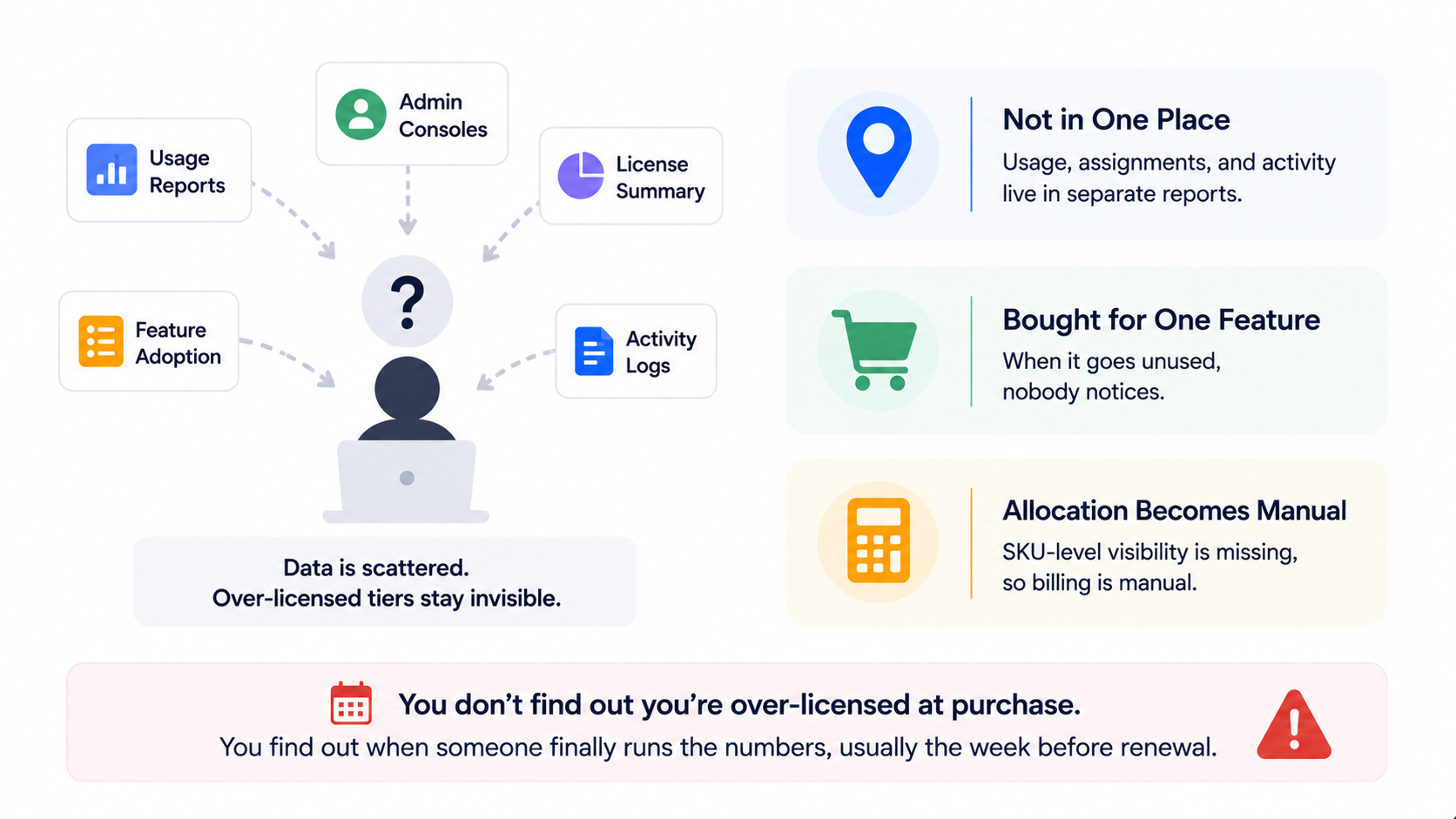
The same problem exists across every major SaaS vendor. Gong doesn't flag which full-seat holders haven't recorded a call in 90 days. Tableau doesn't tell you which Creators are doing Explorer-level work.

  • Usage Data Exists, But Not in One Place: Assignments, feature adoption, and activity metrics live in separate reports.
  • Premium Tiers Are Bought for One Feature: If that feature goes unused six months later, nobody notices because the tier already renewed,
  • Cost Allocation Becomes a Separate Problem: Without usable SKU-level visibility, department-level billing becomes a manual exercise nobody completes.

As one ITAM manager at the same organization we talked with noted:

"We have to make sure we're charging the right departments when we need to bill for some of our Microsoft usage."

You don't find out you're over-licensed at purchase. You find out when someone finally runs the numbers, usually the week before renewal.

Every License Deserves A Review

Before every renewal.
Start Here

2. How CloudEagle.ai Finds Out Unused License Tiers

CloudEagle.ai connects directly to Microsoft 365, Salesforce, Gong, Tableau, and 500+ other applications

It replaces the manual multi-report process with a single, continuously updated view of what's purchased, what's assigned, and what's actually being used across your entire stack.

A. SKU-Level Breakdown: See What You Own vs. What's Being Used

CloudEagle.ai pulls SKU-level data directly from each application integration: units purchased, units assigned, actively used, cost per unit, and potential savings visible in one view without manual exports.

Here's how SKU-level license visibility is designed in CloudEagle.ai:
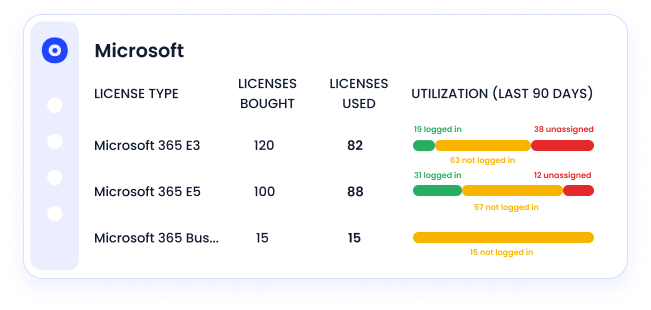
In CloudEagle.ai's SKU breakdown view, every license tier across every connected application appears with purchased count, assigned count, and actively used count side by side. 

Microsoft E5 vs E3, Salesforce Enterprise vs Professional, Tableau Creator vs Explorer, the gap between assigned and actively used is where over-licensed tiers become visible without running a single report:
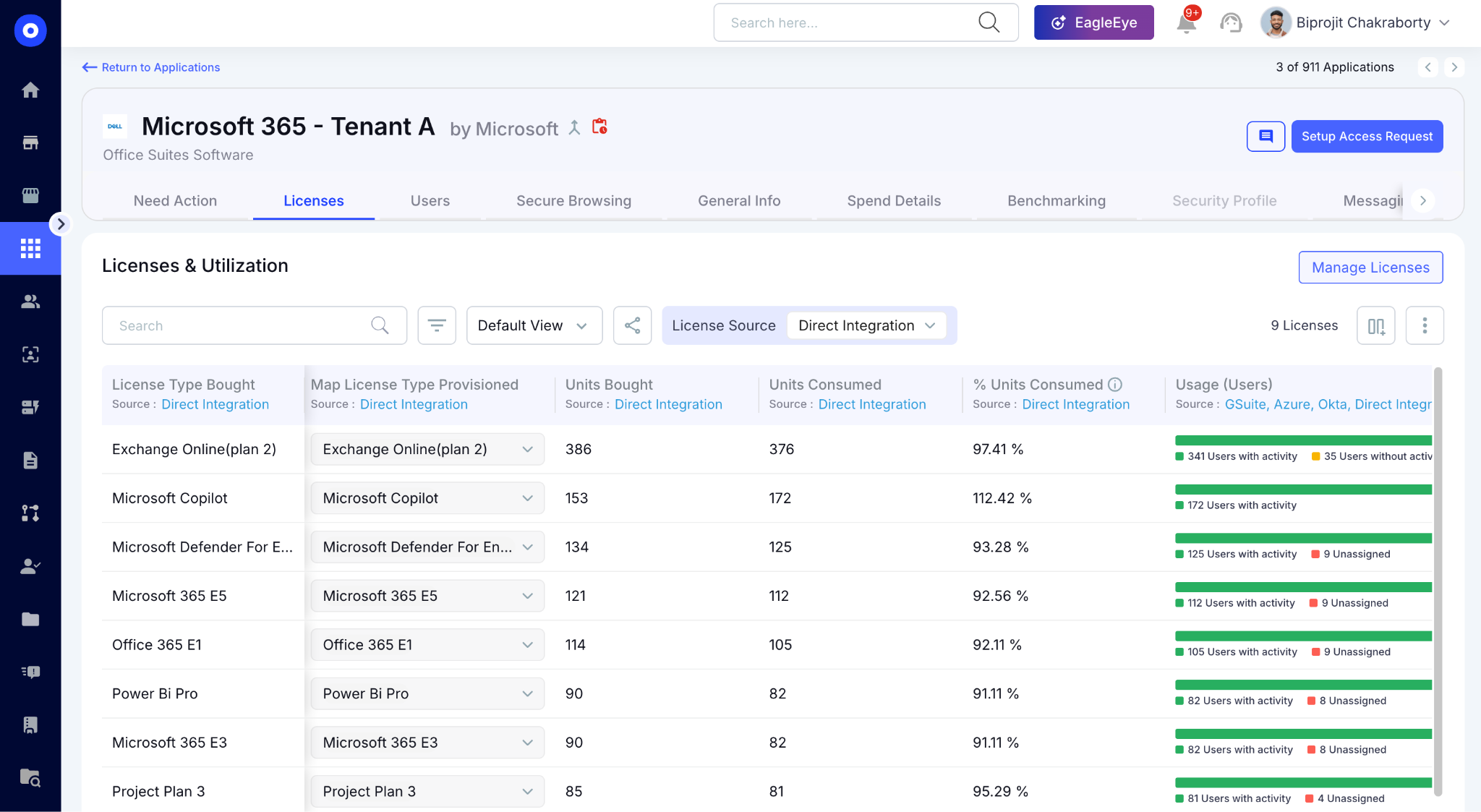
This answers the first question every IT and ITAM team asks before any major renewal: not how many licenses were purchased, but how many are actually earning their tier cost.

B. Feature-Level Activity Logs: See Which Premium Features Are Actually Used

CloudEagle.ai's Activity-Based Filtering provides granular insight into user behavior, revealing which features are most frequently used and which are underutilized licenses across every connected application.

In CloudEagle.ai's feature-level activity view, every user's engagement with premium features is visible against their current license tier across every connected application:
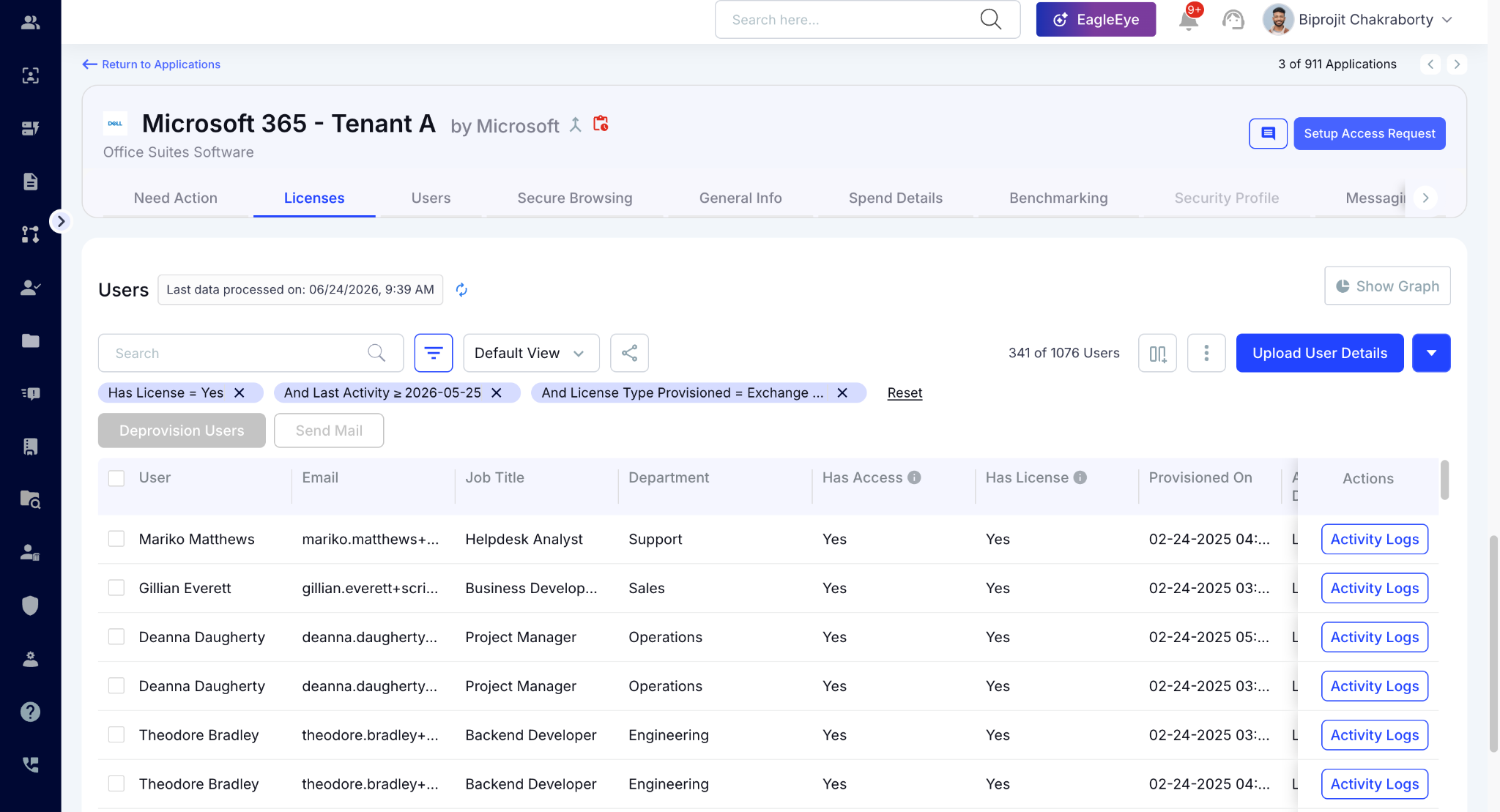
A user who hasn't touched the features justifying their premium tier in 90 days is a downgrade candidate, regardless of which vendor issued the license.

C. Downgrade Recommendation Report: The Document That Changes the Renewal Conversation

Once SKU-level and feature-level data are combined, CloudEagle.ai generates a clean downgrade recommendation report. 

CloudEagle.ai identifies which users' feature usage doesn't justify their current tier, with recommended downgrade tier and projected savings per user and in aggregate. Here's how the downgrade recommendation report is designed:
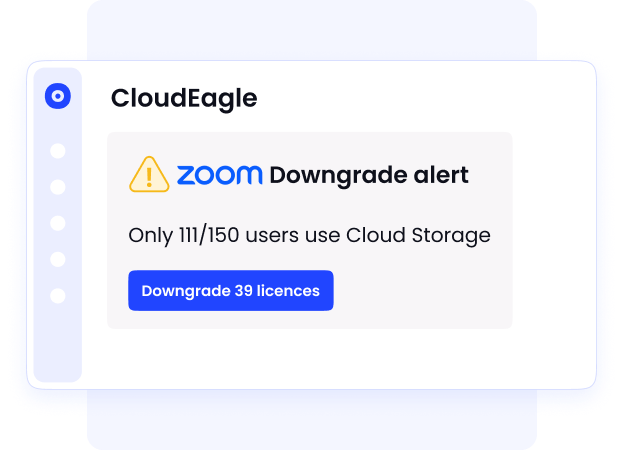
In CloudEagle.ai's downgrade report, every over-licensed user appears with their current tier, recommended tier, and the projected annual savings. 

D. License Harvesting Automation: Execute Before the Renewal Closes

The recommendation report identifies who to downgrade. License harvesting automation executes it, on a configurable schedule that fits the renewal timeline across any vendor, not just Microsoft.
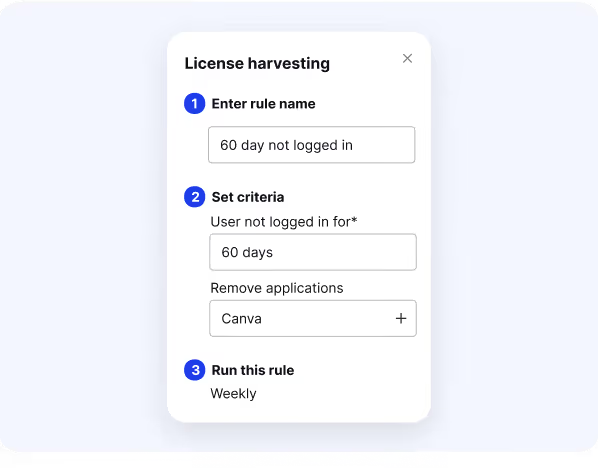
CloudEagle.ai's automation continuously monitors license usage and adjusts tiers based on user activity, flagging inactive premium-tier users, notifying them before changes are made.
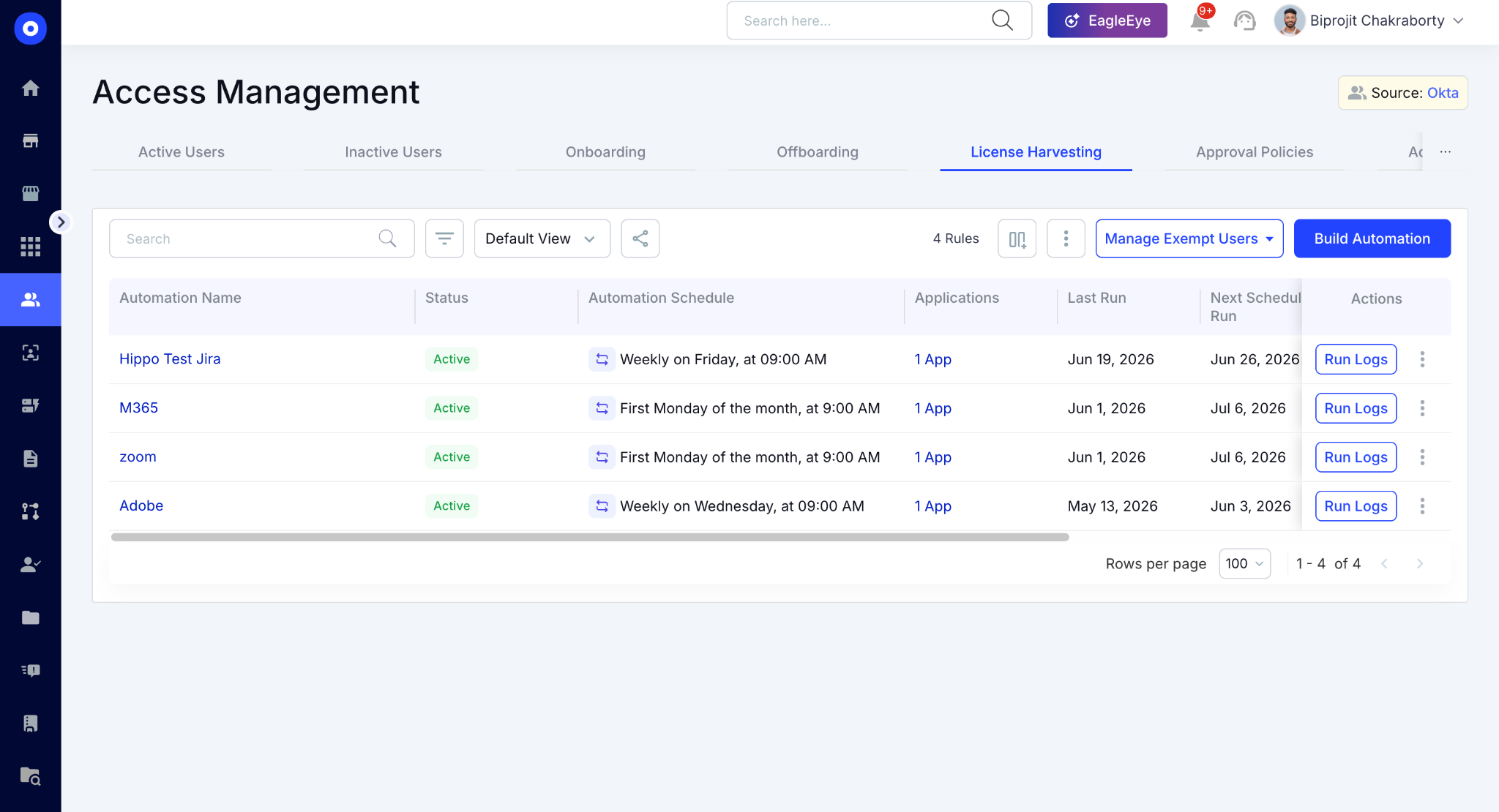
Saved views let IT filter by license type, department, or provision date across every connected application, persistent reports that refresh automatically so the seat count going into any renewal reflects actual current usage:

E. Price Benchmarking: Make Sure the Right-Sized Renewal Is Also the Right Price

Once the downgrade analysis is complete and the seat count is right-sized, one question remains: is the price per seat competitive? 
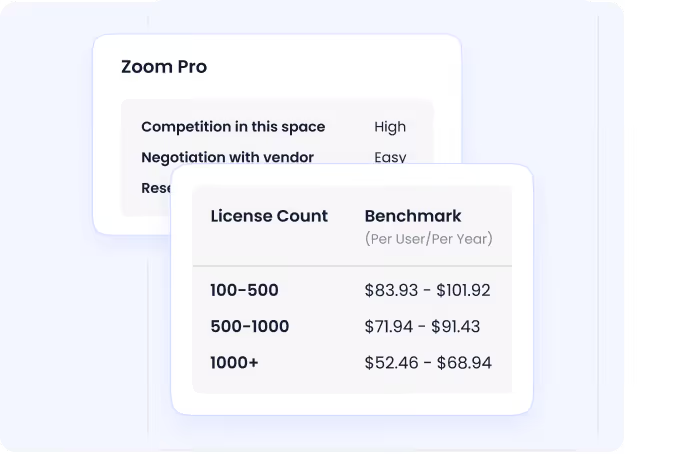
CloudEagle.ai's price benchmarking surfaces what peer organizations at the same size and tier are actually paying, for Microsoft, Salesforce, Gong, Tableau, or any other vendor in the stack. 
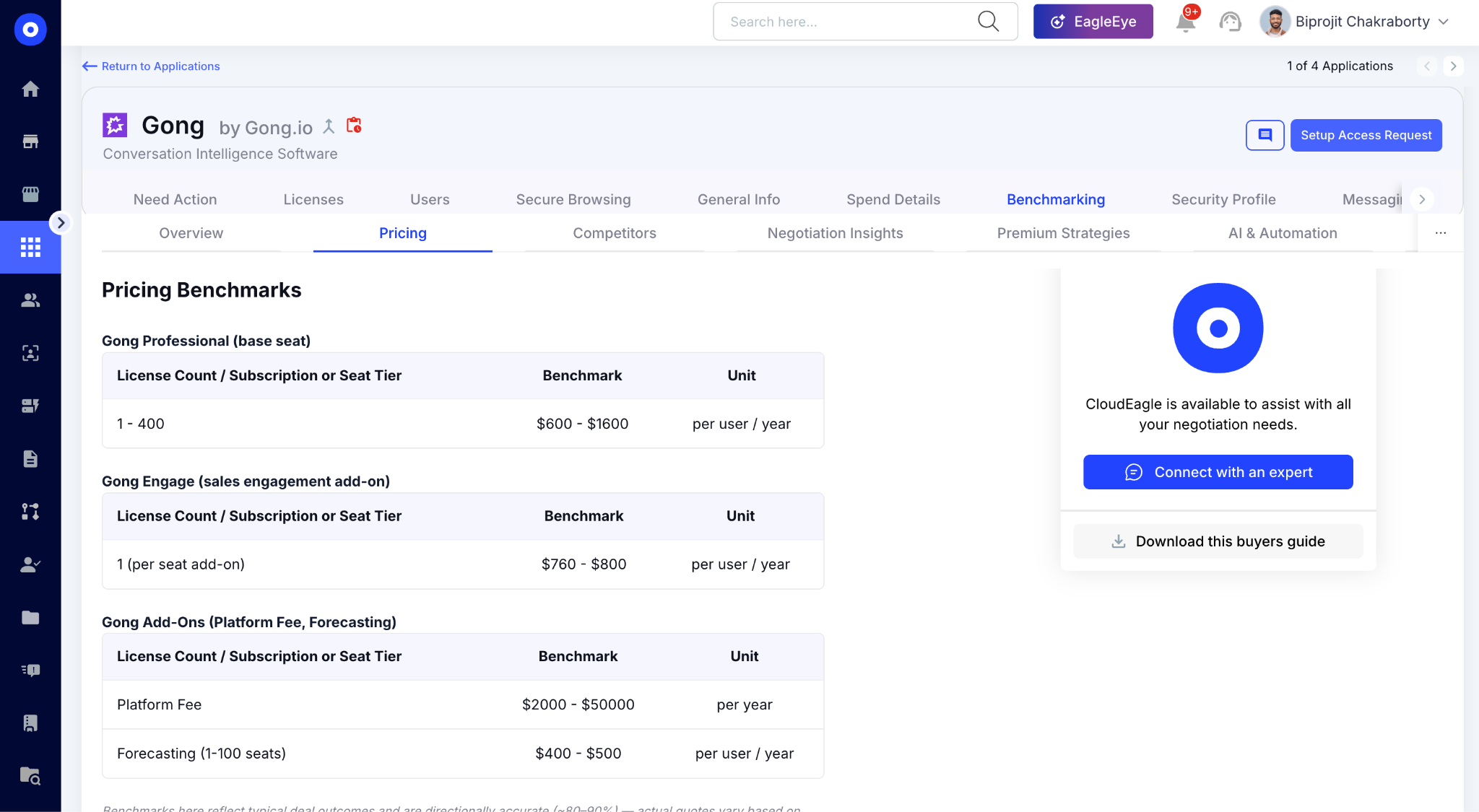
The usage data, downgrade recommendation, and peer pricing benchmark are all in the same platform when the renewal conversation begins, so every EA, ELA, or annual contract closes at the right size and the right price.

3. The Audit-to-Action Workflow Before Your Next Renewal

Finding over-licensed users is only half the job. The real value comes from turning that data into renewal decisions before contracts lock for another year.

A. Pull 90 Days of SKU-Level Data

The foundation of any tier audit is usage data pulled at the SKU level, not login data, not seat counts, but feature-level activity mapped against the license tier each user holds. 

A 90-day window filters out vacations and temporary absences without masking genuine underutilization across any vendor in the stack.

B. Run the Downgrade Analysis and Export the Recommendation Report

With SKU-level and feature-level data in hand, the downgrade analysis identifies which users' actual behavior doesn't justify their current tier:

  • Identify users who don't need their current tier: Feature usage mapped against tier cost surfaces who is genuinely over-licensed vs. who occasionally uses premium features
  • Recommend the appropriate downgrade path: E5 to E3, Salesforce Enterprise to Professional, Tableau Creator to Explorer, the right tier for each user's actual workflow
  • Calculate projected savings: Per-user and aggregate savings give procurement a concrete number to anchor the renewal negotiation

The result is a recommendation report that gives renewal discussions a clear, data-backed starting point rather than a best guess.

C. Execute Before the Renewal Closes, Not After

The most valuable savings opportunity sits in the window between identifying unused premium licenses and acting on that data before the contract renews. 

For one manufacturing company managing 3,000 Microsoft licenses, renewal decisions needed to be confirmed weeks before the EA anniversary, the audit had to happen in March for a June close, not the week before signing.

That timing applies to any major SaaS renewal. The downgrade analysis is only useful if it's complete early enough to change the seat count going into the negotiation.

Your SaaS Spend Isn't Standing Still

Neither is the waste.
Find It

4. Conclusion

Over-licensed tiers don't announce themselves. They survive renewal after renewal because the data needed to spot them exists in multiple places, and connecting it manually requires more time than most IT teams have.

The fix isn't a bigger audit. It's a repeatable process that pulls SKU-level data, maps feature usage against license tiers, and generates a downgrade recommendation before the renewal window closes.

CloudEagle.ai is an AI-powered SaaS Management, Security and Identity Governance platform that surfaces over-licensed tiers across Microsoft 365, Salesforce, Gong, Tableau, and 500+ other applications.

Procurement gets to right-sized seat count, backed by 90 days of feature-level usage data, before the contract renews.

5. FAQs

1. Can CloudEagle.ai automatically notify users before downgrading their license tier?

Scheduled workflows detect inactivity, notify users, and reclaim or downgrade licenses automatically based on real usage data. Users receive a notification before any tier change is executed, giving them a chance to confirm whether they still need the premium features, reducing false downgrades and IT escalations. 

2. Can CloudEagle.ai generate ITSM tickets for downgrade approvals instead of handling them in Slack?

IT teams can automatically email users, trigger workflows, or generate ITSM tickets to reclaim underused licenses and reduce risk exposure. Downgrade workflows route through whichever system your team already works in, whether Slack, ServiceNow, Jira, or email, without requiring a separate portal login. 

3. How does CloudEagle.ai handle licenses for users who are temporarily inactive, like those on leave?

CloudEagle.ai automatically adjusts licenses as employee roles, projects, or usage patterns shift and the 90-day inactivity threshold filters out short-term absences like leave or vacation before flagging a user for downgrade. The window is configurable per application so the threshold matches your organization's actual usage patterns. 

4. Does CloudEagle.ai connect to HRIS systems to automatically right-size licenses when someone changes roles?

CloudEagle.ai connects to HRIS platforms like Workday to match licenses with role-based needs and update access automatically when roles change. A role change triggers a review of whether the existing license tier still fits the new responsibilities, catching tier mismatches at the point of transition rather than 12 months later at renewal. 

5. Can CloudEagle.ai track add-on licenses separately from bundled tier licenses?

CloudEagle.ai tracks both bundled tiers and individual add-ons at the feature level, so a Zoom Webinar add-on that hasn't been used in 60 days appears separately from the base license in the downgrade analysis. Feature-level visibility into how employees interact with applications reveals which tools are most frequently used and which may be underutilized, including add-ons that generate charges independently of the base tier. 

Advertisement for a SaaS Subscription Tracking Template with a call-to-action button to download and a partial graphic of a tablet showing charts.Banner promoting a SaaS Agreement Checklist to streamline SaaS management and avoid budget waste with a call-to-action button labeled Download checklist.Blue banner with text 'The Ultimate Employee Offboarding Checklist!' and a black button labeled 'Download checklist' alongside partial views of checklist documents from cloudeagle.ai.Digital ad for download checklist titled 'The Ultimate Checklist for IT Leaders to Optimize SaaS Operations' by cloudeagle.ai, showing checklist pages.Slack Buyer's Guide offer with text 'Unlock insider insights to get the best deal on Slack!' and a button labeled 'Get Your Copy', accompanied by a preview of the guide featuring Slack's logo.Monday Pricing Guide by cloudeagle.ai offering exclusive pricing secrets to maximize investment with a call-to-action button labeled Get Your Copy and an image of the guide's cover.Blue banner for Canva Pricing Guide by cloudeagle.ai offering a guide to Canva costs, features, and alternatives with a call-to-action button saying Get Your Copy.Blue banner with white text reading 'Little-Known Negotiation Hacks to Get the Best Deal on Slack' and a white button labeled 'Get Your Copy'.Blue banner with text 'Little-Known Negotiation Hacks to Get the Best Deal on Monday.com' and a white button labeled 'Get Your Copy'.Blue banner with text 'Little-Known Negotiation Hacks to Get the Best Deal on Canva' and a white button labeled 'Get Your Copy'.Banner with text 'Slack Buyer's Guide' and a 'Download Now' button next to images of a guide titled 'Slack Buyer’s Guide: Features, Pricing & Best Practices'.Digital cover of Monday Pricing Guide with a button labeled Get Your Copy on a blue background.Canva Pricing Guide cover with a button labeled Get Your Copy on a blue gradient background.

Enter your email to
unlock the report

Oops! Something went wrong while submitting the form.
License Count
Benchmark
Per User/Per Year

Enter your email to
unlock the report

Oops! Something went wrong while submitting the form.
License Count
Benchmark
Per User/Per Year

Enter your email to
unlock the report

Oops! Something went wrong while submitting the form.
Notion Plus
License Count
Benchmark
Per User/Per Year
100-500
$67.20 - $78.72
500-1000
$59.52 - $72.00
1000+
$51.84 - $57.60
Canva Pro
License Count
Benchmark
Per User/Per Year
100-500
$74.33-$88.71
500-1000
$64.74-$80.32
1000+
$55.14-$62.34

Enter your email to
unlock the report

Oops! Something went wrong while submitting the form.

Enter your email to
unlock the report

Oops! Something went wrong while submitting the form.
Zoom Business
License Count
Benchmark
Per User/Per Year
100-500
$216.00 - $264.00
500-1000
$180.00 - $216.00
1000+
$156.00 - $180.00

Enter your email to
unlock the report

Oops! Something went wrong while submitting the form.

Get the Right Security Platform To Secure Your Cloud Infrastructure

Please enter a business email
Thank you!
The 2023 SaaS report has been sent to your email. Check your promotional or spam folder.
Oops! Something went wrong while submitting the form.

Access full report

Please enter a business email
Thank you!
The 2023 SaaS report has been sent to your email. Check your promotional or spam folder.
Oops! Something went wrong while submitting the form.

Your team chose Microsoft E5 because the bundle made sense. Power BI, Teams Calling, and security add-ons in one tier. It’s cheaper than buying each separately.

Then someone looked at the usage data. A significant portion of E5 users had never opened Power BI. The bundle was valuable but not for everyone who had it. This isn't a Microsoft problem.

Every major vendor does the same thing. Salesforce bundles advanced analytics into Enterprise, Gong packages full recording into premium seats. The issue surfaces 12 months later when renewal arrives.

CloudEagle.ai pulls SKU-level visibility and feature-level usage data from a direct Microsoft integration, generates a downgrade recommendation report, and gives procurement the right-sized seat count before the EA closes.

In this guide, we’ll show you how. 

TL;DR

  • Organizations often overpay for premium SaaS license tiers because feature usage is rarely reviewed before renewals.
  • CloudEagle.ai combines SKU-level visibility with feature-level usage data to identify over-licensed users.
  • Automated downgrade recommendations and license harvesting right-size subscriptions before contracts renew.
  • Continuous monitoring and 90-day usage analysis help eliminate unnecessary premium license costs.
  • CloudEagle.ai enables data-driven renewals by combining usage insights, automation, and price benchmarking in one platform

1. Why Over-Licensed Tiers Stay Invisible Until Renewal

Most organizations don't intentionally over-license users. The problem is that the data needed to spot over-licensed tiers is scattered across multiple reports, portals, and administrative consoles.

One Head of IT at a manufacturing company managing 3,000 Microsoft licenses put it directly: "The data is somewhat available in Microsoft, but you have to run six, seven, eight different reports”.

The same problem exists across every major SaaS vendor. Gong doesn't flag which full-seat holders haven't recorded a call in 90 days. Tableau doesn't tell you which Creators are doing Explorer-level work.

  • Usage Data Exists, But Not in One Place: Assignments, feature adoption, and activity metrics live in separate reports.
  • Premium Tiers Are Bought for One Feature: If that feature goes unused six months later, nobody notices because the tier already renewed,
  • Cost Allocation Becomes a Separate Problem: Without usable SKU-level visibility, department-level billing becomes a manual exercise nobody completes.

As one ITAM manager at the same organization we talked with noted:

"We have to make sure we're charging the right departments when we need to bill for some of our Microsoft usage."

You don't find out you're over-licensed at purchase. You find out when someone finally runs the numbers, usually the week before renewal.

Every License Deserves A Review

Before every renewal.
Start Here

2. How CloudEagle.ai Finds Out Unused License Tiers

CloudEagle.ai connects directly to Microsoft 365, Salesforce, Gong, Tableau, and 500+ other applications

It replaces the manual multi-report process with a single, continuously updated view of what's purchased, what's assigned, and what's actually being used across your entire stack.

A. SKU-Level Breakdown: See What You Own vs. What's Being Used

CloudEagle.ai pulls SKU-level data directly from each application integration: units purchased, units assigned, actively used, cost per unit, and potential savings visible in one view without manual exports.

Here's how SKU-level license visibility is designed in CloudEagle.ai:

In CloudEagle.ai's SKU breakdown view, every license tier across every connected application appears with purchased count, assigned count, and actively used count side by side. 

Microsoft E5 vs E3, Salesforce Enterprise vs Professional, Tableau Creator vs Explorer, the gap between assigned and actively used is where over-licensed tiers become visible without running a single report:

This answers the first question every IT and ITAM team asks before any major renewal: not how many licenses were purchased, but how many are actually earning their tier cost.

B. Feature-Level Activity Logs: See Which Premium Features Are Actually Used

CloudEagle.ai's Activity-Based Filtering provides granular insight into user behavior, revealing which features are most frequently used and which are underutilized licenses across every connected application.

In CloudEagle.ai's feature-level activity view, every user's engagement with premium features is visible against their current license tier across every connected application:

A user who hasn't touched the features justifying their premium tier in 90 days is a downgrade candidate, regardless of which vendor issued the license.

C. Downgrade Recommendation Report: The Document That Changes the Renewal Conversation

Once SKU-level and feature-level data are combined, CloudEagle.ai generates a clean downgrade recommendation report. 

CloudEagle.ai identifies which users' feature usage doesn't justify their current tier, with recommended downgrade tier and projected savings per user and in aggregate. Here's how the downgrade recommendation report is designed:

In CloudEagle.ai's downgrade report, every over-licensed user appears with their current tier, recommended tier, and the projected annual savings. 

D. License Harvesting Automation: Execute Before the Renewal Closes

The recommendation report identifies who to downgrade. License harvesting automation executes it, on a configurable schedule that fits the renewal timeline across any vendor, not just Microsoft.

CloudEagle.ai's automation continuously monitors license usage and adjusts tiers based on user activity, flagging inactive premium-tier users, notifying them before changes are made.

Saved views let IT filter by license type, department, or provision date across every connected application, persistent reports that refresh automatically so the seat count going into any renewal reflects actual current usage:

E. Price Benchmarking: Make Sure the Right-Sized Renewal Is Also the Right Price

Once the downgrade analysis is complete and the seat count is right-sized, one question remains: is the price per seat competitive? 

CloudEagle.ai's price benchmarking surfaces what peer organizations at the same size and tier are actually paying, for Microsoft, Salesforce, Gong, Tableau, or any other vendor in the stack. 

The usage data, downgrade recommendation, and peer pricing benchmark are all in the same platform when the renewal conversation begins, so every EA, ELA, or annual contract closes at the right size and the right price.

3. The Audit-to-Action Workflow Before Your Next Renewal

Finding over-licensed users is only half the job. The real value comes from turning that data into renewal decisions before contracts lock for another year.

A. Pull 90 Days of SKU-Level Data

The foundation of any tier audit is usage data pulled at the SKU level, not login data, not seat counts, but feature-level activity mapped against the license tier each user holds. 

A 90-day window filters out vacations and temporary absences without masking genuine underutilization across any vendor in the stack.

B. Run the Downgrade Analysis and Export the Recommendation Report

With SKU-level and feature-level data in hand, the downgrade analysis identifies which users' actual behavior doesn't justify their current tier:

  • Identify users who don't need their current tier: Feature usage mapped against tier cost surfaces who is genuinely over-licensed vs. who occasionally uses premium features
  • Recommend the appropriate downgrade path: E5 to E3, Salesforce Enterprise to Professional, Tableau Creator to Explorer, the right tier for each user's actual workflow
  • Calculate projected savings: Per-user and aggregate savings give procurement a concrete number to anchor the renewal negotiation

The result is a recommendation report that gives renewal discussions a clear, data-backed starting point rather than a best guess.

C. Execute Before the Renewal Closes, Not After

The most valuable savings opportunity sits in the window between identifying unused premium licenses and acting on that data before the contract renews. 

For one manufacturing company managing 3,000 Microsoft licenses, renewal decisions needed to be confirmed weeks before the EA anniversary, the audit had to happen in March for a June close, not the week before signing.

That timing applies to any major SaaS renewal. The downgrade analysis is only useful if it's complete early enough to change the seat count going into the negotiation.

Your SaaS Spend Isn't Standing Still

Neither is the waste.
Find It

4. Conclusion

Over-licensed tiers don't announce themselves. They survive renewal after renewal because the data needed to spot them exists in multiple places, and connecting it manually requires more time than most IT teams have.

The fix isn't a bigger audit. It's a repeatable process that pulls SKU-level data, maps feature usage against license tiers, and generates a downgrade recommendation before the renewal window closes.

CloudEagle.ai is an AI-powered SaaS Management, Security and Identity Governance platform that surfaces over-licensed tiers across Microsoft 365, Salesforce, Gong, Tableau, and 500+ other applications.

Procurement gets to right-sized seat count, backed by 90 days of feature-level usage data, before the contract renews.

5. FAQs

1. Can CloudEagle.ai automatically notify users before downgrading their license tier?

Scheduled workflows detect inactivity, notify users, and reclaim or downgrade licenses automatically based on real usage data. Users receive a notification before any tier change is executed, giving them a chance to confirm whether they still need the premium features, reducing false downgrades and IT escalations. 

2. Can CloudEagle.ai generate ITSM tickets for downgrade approvals instead of handling them in Slack?

IT teams can automatically email users, trigger workflows, or generate ITSM tickets to reclaim underused licenses and reduce risk exposure. Downgrade workflows route through whichever system your team already works in, whether Slack, ServiceNow, Jira, or email, without requiring a separate portal login. 

3. How does CloudEagle.ai handle licenses for users who are temporarily inactive, like those on leave?

CloudEagle.ai automatically adjusts licenses as employee roles, projects, or usage patterns shift and the 90-day inactivity threshold filters out short-term absences like leave or vacation before flagging a user for downgrade. The window is configurable per application so the threshold matches your organization's actual usage patterns. 

4. Does CloudEagle.ai connect to HRIS systems to automatically right-size licenses when someone changes roles?

CloudEagle.ai connects to HRIS platforms like Workday to match licenses with role-based needs and update access automatically when roles change. A role change triggers a review of whether the existing license tier still fits the new responsibilities, catching tier mismatches at the point of transition rather than 12 months later at renewal. 

5. Can CloudEagle.ai track add-on licenses separately from bundled tier licenses?

CloudEagle.ai tracks both bundled tiers and individual add-ons at the feature level, so a Zoom Webinar add-on that hasn't been used in 60 days appears separately from the base license in the downgrade analysis. Feature-level visibility into how employees interact with applications reveals which tools are most frequently used and which may be underutilized, including add-ons that generate charges independently of the base tier. 

CloudEagle.ai recognized in the 2025 Gartner® Magic Quadrant™ for SaaS Management Platforms
Download now
gartner chart
5x
Faster employee
onboarding
80%
Reduction in time for
user access reviews
30k
Workflows
automated
$15Bn
Analyzed in
contract spend
$2Bn
Saved in
SaaS spend

Streamline SaaS governance and save 10-30%

Book a Demo with Expert
CTA image