AI Governance

How CloudEagle.ai Goes Beyond Detection And Provides Complete Governance 

Share via:
Written by:
CloudEagle.ai Team
Reviewed by
Nidhi Jain
Last Updated:
October 19, 2026
blog-cms-banner-bg
Little-Known Negotiation Hacks to Get the Best Deal on Slack
cta-bg-blogDownload Your Copy

HIPAA Compliance Checklist for 2025

Download PDF

Most enterprises have spent years building detection: SSO logs, network monitoring, CASB, endpoint tools, spend reports. Today, most of them can tell you which apps are in use, who’s using them and what they cost.

But detection only tells you a problem exists. It doesn’t decide whether an app should stay or go. It doesn’t ask the vendor for a security review, take back a license nobody uses, or block a risky AI tool before company data ends up in it. 

In this blog, we’ll cover why detection alone isn’t enough to govern your apps, how to use the data your existing tools already collect, and what it takes to go from an alert to a decision that actually gets carried out.

‍

Why Isn’t Detection Enough to Govern Your Apps?

Detection tells you an app exists. It doesn’t tell you who owns it, whether you need it, what it costs, or whether the vendor is safe. 

Each of those questions turns into manual work. Without a centralized platform that acts on what it finds, every alert becomes a task for someone on your team, and the list grows faster than they can clear it.

‍

What Does CloudEagle.ai Connect to in Your Environment To Provide Complete Governance?

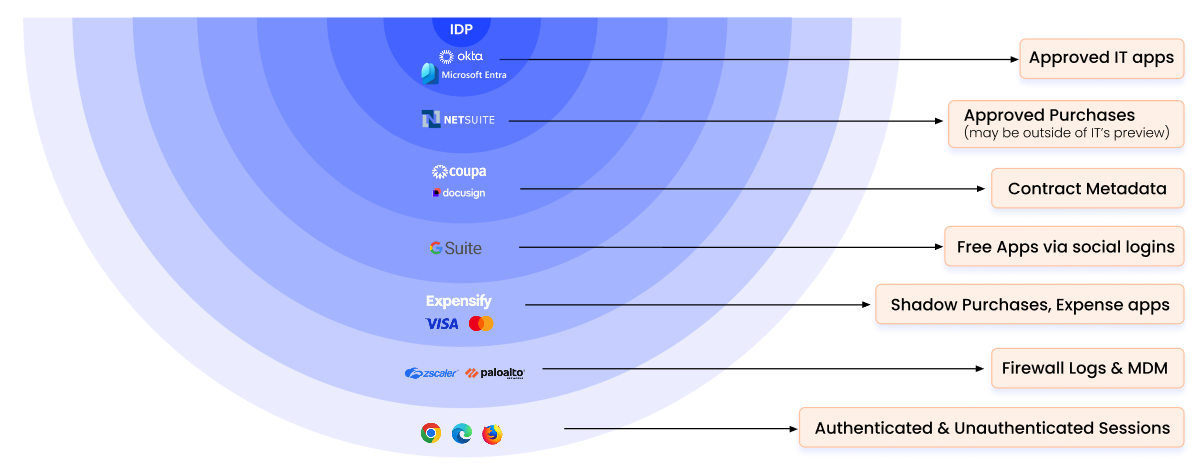
We connect to the systems you already run: your identity provider, your security and network tools, your finance records, the browser, and the apps themselves.

Each one sees part of the picture. Together, they show who uses each app, how people reach it, what it costs and how risky it is. You keep your current tools, and we bring what they know into one place.

We now support 500+ integrations, so the question isn’t whether we can connect to your stack. It’s what you want to do once everything is visible.
‍

‍

Your Identity Provider

Your identity provider is the system employees use to sign in to work apps, such as Microsoft Entra ID or Okta. Connecting it tells us which apps are linked to it, who has access, and who signs in the approved way.

It also shows the gaps: apps people sign up for with a separate password, outside the company login. As we explain in how we detect apps beyond SSO, the login system only sees what’s connected to it.

Your Security and Network Tools

Many security teams already collect records of where company devices connect online. If you have them, we take them in directly instead of asking you to install something new.

Our Netskope integration, for example, brings in the apps Netskope discovers along with their risk scores. Your security tools keep doing their job, and we use what they see to drive the next step.

Your Finance and Expense Systems

Corporate cards, expense reports and invoices show which apps the company pays for, including free trials that quietly turned into paid plans.

Security tools never see this data. Connecting it shows where money goes, which apps overlap, and which renewals are coming up.

The Browser

Our browser plugin is a small add-on that shows which AI and SaaS tools people visit, down to the specific website, and flagging sensitive data being uploaded in LLMs, in the approved browsers where it’s installed.

It also feeds the same engine as your network records. Teams that don’t collect network records use the plugin. Teams that do can send those records instead, and many use both for fuller coverage.

The Apps Themselves

We connect directly to the apps you use, such as Microsoft 365, Google Workspace, Salesforce and Slack. That shows us who has a license, who actually uses it, and who has admin rights.

This is the data that turns “we have this app” into “we’re paying for 400 seats and 120 are idle.”

‍

How Does CloudEagle.ai Turn What It Sees Into Decisions?

Once everything is connected, our SaaS security posture management (SSPM) layer takes every app through four steps: detect, classify, decide and act. 

Detect, Classify, Decide and Act in One Workflow

Each step answers one question:

  • Detect: Which apps are in use, and who is using them?
  • Classify: What does the app do, how risky is it, and does it duplicate something you already pay for?
  • Decide: Should it be approved, blocked, set up properly, or bought through procurement?
  • Act: Contact the users, question the vendor, apply the rule, open the ticket and take back unused licenses.

Most tools handle the first step. The value is in the other three. Classifying, for example, is how you spot that a new tool does the same job as one you already license, which makes cutting duplicate apps part of the same decision.

Connecting App Risk to the Security Standards You Follow

Most companies follow security standards, such as SOC 2, ISO 27001 or NIST, that set rules for how data is handled. Our SaaS security and compliance module checks your apps against the standards you follow and shows where you fall short.

So a risky finding about an app feeds straight into your compliance picture instead of sitting in a separate queue.

‍

What Does CloudEagle.ai Do Beyond Detection?

Beyond detection, we take six actions:

  1. Contact users.
  2. Question vendors.
  3. Decide each app’s status.
  4. Enforce rules in the browser.
  5. Send work to your ticketing tool.
  6. Take back unused licenses.

These apply across your whole stack, not just to apps nobody approved. Each one replaces a manual task your team would otherwise chase by email.

Reach Out to End Users

We survey or email the people using an app and ask why they need it.

For a new tool, their answers tell you whether it supports real work. For an approved app, the same message checks whether people still use their license, and if not, starts the process of taking it back.

Question the Vendor

We send vendors a security questionnaire and collect their compliance documents, such as audit reports and certifications. 

This matters for every app that handles company data, not just new ones. New rules on AI and data increasingly expect companies to show which tools touch their data and who signed off on them.

Decide Whether to Approve, Block or Buy the App

Every app gets a clear status: approved, blocked, set up for wider use, or sent to procurement for a proper purchase.

When an app earns its place, our procurement workflows take it from request to an official purchase, with an owner and a contract.

Enforce the Policy in the Browser

Rules only work if they’re applied where people use the apps. Our AI policy enforcement works in the browser and supports two kinds of blocks:

  • Soft blocks warn the user and point them to an approved tool.
  • Hard blocks users from pasting sensitive PII/PHI information in prompts

It can also stop personal information or source code from being pasted into AI tools.

Rules can be precise. You can:

  • Block one AI tool across the whole company.
  • Allow another tool for a single team.
  • Choose which AI models employees can use inside a tool.

Our guide to browser-based AI governance covers how this works in practice.

Route Into Ticketing

Decisions that need a person to follow through go straight into the tools your team already uses to track work: Jira, ServiceNow or Asana.

Nothing sits on a dashboard waiting for someone to notice it.

Harvest the Licenses

We take back seats nobody uses and remove access for people who’ve gone inactive. Users get an automatic email first. If they don’t reply, or say they don’t need it, the licenses are reclaimed and assigned to the person who needs them.

Our license management applies this to every app connected to your company login, not just one vendor’s. RingCentral used it to save time and money on taking back licenses.

‍

Why Govern Every App From One Platform?

Your tools each see one part of the picture. Security tools watch traffic, the login system tracks access, and finance tracks spend. 

Making a good decision about an app takes all three. A platform that connects them can make the decision and act on it. Separate tools can only pass alerts to each other.

Does CloudEagle.ai Replace Your Existing Tools?

No. Your security tools, login system and finance systems keep doing what they do well.

We integrate with them, take in what they see, and run the follow-up they weren’t built for. You get more out of the tools you’ve already paid for.

One View Across Every Vendor You Use

Platforms built by a single vendor usually manage that vendor’s own apps best. Your apps come from dozens of vendors.

We work across all of them, including SaaS apps, AI tools and cloud platforms, so spend, risk and compliance sit in one view no matter which tools your teams pick. 

A Record of Every Decision for Audits and AI Rules

Auditors and new AI regulations ask the same questions: which tools touch your data, who approved them, and what you did when something broke the rules.

Because every detection, decision and action is recorded as it happens, you have those answers ready without scrambling before an audit.

‍

Get More From the Stack You Already Have

You already run tools that can see your apps. What they can’t do is decide and act.

CloudEagle.ai connects to your identity, security, finance and browser data, and goes beyond detection to govern every app in your stack, from the first signal to the last license you take back.

To see how CloudEagle.ai connects to the tools you already use, Book a demo.

‍

Advertisement for a SaaS Subscription Tracking Template with a call-to-action button to download and a partial graphic of a tablet showing charts.Banner promoting a SaaS Agreement Checklist to streamline SaaS management and avoid budget waste with a call-to-action button labeled Download checklist.Blue banner with text 'The Ultimate Employee Offboarding Checklist!' and a black button labeled 'Download checklist' alongside partial views of checklist documents from cloudeagle.ai.Digital ad for download checklist titled 'The Ultimate Checklist for IT Leaders to Optimize SaaS Operations' by cloudeagle.ai, showing checklist pages.Slack Buyer's Guide offer with text 'Unlock insider insights to get the best deal on Slack!' and a button labeled 'Get Your Copy', accompanied by a preview of the guide featuring Slack's logo.Monday Pricing Guide by cloudeagle.ai offering exclusive pricing secrets to maximize investment with a call-to-action button labeled Get Your Copy and an image of the guide's cover.Blue banner for Canva Pricing Guide by cloudeagle.ai offering a guide to Canva costs, features, and alternatives with a call-to-action button saying Get Your Copy.Blue banner with white text reading 'Little-Known Negotiation Hacks to Get the Best Deal on Slack' and a white button labeled 'Get Your Copy'.Blue banner with text 'Little-Known Negotiation Hacks to Get the Best Deal on Monday.com' and a white button labeled 'Get Your Copy'.Blue banner with text 'Little-Known Negotiation Hacks to Get the Best Deal on Canva' and a white button labeled 'Get Your Copy'.Banner with text 'Slack Buyer's Guide' and a 'Download Now' button next to images of a guide titled 'Slack Buyer’s Guide: Features, Pricing & Best Practices'.Digital cover of Monday Pricing Guide with a button labeled Get Your Copy on a blue background.Canva Pricing Guide cover with a button labeled Get Your Copy on a blue gradient background.

Enter your email to
unlock the report

Oops! Something went wrong while submitting the form.
License Count
Benchmark
Per User/Per Year

Enter your email to
unlock the report

Oops! Something went wrong while submitting the form.
License Count
Benchmark
Per User/Per Year

Enter your email to
unlock the report

Oops! Something went wrong while submitting the form.
Notion Plus
License Count
Benchmark
Per User/Per Year
100-500
$67.20 - $78.72
500-1000
$59.52 - $72.00
1000+
$51.84 - $57.60
Canva Pro
License Count
Benchmark
Per User/Per Year
100-500
$74.33-$88.71
500-1000
$64.74-$80.32
1000+
$55.14-$62.34

Enter your email to
unlock the report

Oops! Something went wrong while submitting the form.

Enter your email to
unlock the report

Oops! Something went wrong while submitting the form.
Zoom Business
License Count
Benchmark
Per User/Per Year
100-500
$216.00 - $264.00
500-1000
$180.00 - $216.00
1000+
$156.00 - $180.00

Enter your email to
unlock the report

Oops! Something went wrong while submitting the form.

Get the Right Security Platform To Secure Your Cloud Infrastructure

Please enter a business email
Thank you!
The 2023 SaaS report has been sent to your email. Check your promotional or spam folder.
Oops! Something went wrong while submitting the form.

Access full report

Please enter a business email
Thank you!
The 2023 SaaS report has been sent to your email. Check your promotional or spam folder.
Oops! Something went wrong while submitting the form.

Most enterprises have spent years building detection: SSO logs, network monitoring, CASB, endpoint tools, spend reports. Today, most of them can tell you which apps are in use, who’s using them and what they cost.

But detection only tells you a problem exists. It doesn’t decide whether an app should stay or go. It doesn’t ask the vendor for a security review, take back a license nobody uses, or block a risky AI tool before company data ends up in it. 

In this blog, we’ll cover why detection alone isn’t enough to govern your apps, how to use the data your existing tools already collect, and what it takes to go from an alert to a decision that actually gets carried out.

‍

Why Isn’t Detection Enough to Govern Your Apps?

Detection tells you an app exists. It doesn’t tell you who owns it, whether you need it, what it costs, or whether the vendor is safe. 

Each of those questions turns into manual work. Without a centralized platform that acts on what it finds, every alert becomes a task for someone on your team, and the list grows faster than they can clear it.

‍

What Does CloudEagle.ai Connect to in Your Environment To Provide Complete Governance?

We connect to the systems you already run: your identity provider, your security and network tools, your finance records, the browser, and the apps themselves.

Each one sees part of the picture. Together, they show who uses each app, how people reach it, what it costs and how risky it is. You keep your current tools, and we bring what they know into one place.

We now support 500+ integrations, so the question isn’t whether we can connect to your stack. It’s what you want to do once everything is visible.

‍

‍

Your Identity Provider

Your identity provider is the system employees use to sign in to work apps, such as Microsoft Entra ID or Okta. Connecting it tells us which apps are linked to it, who has access, and who signs in the approved way.

It also shows the gaps: apps people sign up for with a separate password, outside the company login. As we explain in how we detect apps beyond SSO, the login system only sees what’s connected to it.

Your Security and Network Tools

Many security teams already collect records of where company devices connect online. If you have them, we take them in directly instead of asking you to install something new.

Our Netskope integration, for example, brings in the apps Netskope discovers along with their risk scores. Your security tools keep doing their job, and we use what they see to drive the next step.

Your Finance and Expense Systems

Corporate cards, expense reports and invoices show which apps the company pays for, including free trials that quietly turned into paid plans.

Security tools never see this data. Connecting it shows where money goes, which apps overlap, and which renewals are coming up.

The Browser

Our browser plugin is a small add-on that shows which AI and SaaS tools people visit, down to the specific website, and flagging sensitive data being uploaded in LLMs, in the approved browsers where it’s installed.

It also feeds the same engine as your network records. Teams that don’t collect network records use the plugin. Teams that do can send those records instead, and many use both for fuller coverage.

The Apps Themselves

We connect directly to the apps you use, such as Microsoft 365, Google Workspace, Salesforce and Slack. That shows us who has a license, who actually uses it, and who has admin rights.

This is the data that turns “we have this app” into “we’re paying for 400 seats and 120 are idle.”

‍

How Does CloudEagle.ai Turn What It Sees Into Decisions?

Once everything is connected, our SaaS security posture management (SSPM) layer takes every app through four steps: detect, classify, decide and act. 

Detect, Classify, Decide and Act in One Workflow

Each step answers one question:

  • Detect: Which apps are in use, and who is using them?
  • Classify: What does the app do, how risky is it, and does it duplicate something you already pay for?
  • Decide: Should it be approved, blocked, set up properly, or bought through procurement?
  • Act: Contact the users, question the vendor, apply the rule, open the ticket and take back unused licenses.

Most tools handle the first step. The value is in the other three. Classifying, for example, is how you spot that a new tool does the same job as one you already license, which makes cutting duplicate apps part of the same decision.

Connecting App Risk to the Security Standards You Follow

Most companies follow security standards, such as SOC 2, ISO 27001 or NIST, that set rules for how data is handled. Our SaaS security and compliance module checks your apps against the standards you follow and shows where you fall short.

So a risky finding about an app feeds straight into your compliance picture instead of sitting in a separate queue.

‍

What Does CloudEagle.ai Do Beyond Detection?

Beyond detection, we take six actions:

  1. Contact users.
  2. Question vendors.
  3. Decide each app’s status.
  4. Enforce rules in the browser.
  5. Send work to your ticketing tool.
  6. Take back unused licenses.

These apply across your whole stack, not just to apps nobody approved. Each one replaces a manual task your team would otherwise chase by email.

Reach Out to End Users

We survey or email the people using an app and ask why they need it.

For a new tool, their answers tell you whether it supports real work. For an approved app, the same message checks whether people still use their license, and if not, starts the process of taking it back.

Question the Vendor

We send vendors a security questionnaire and collect their compliance documents, such as audit reports and certifications. 

This matters for every app that handles company data, not just new ones. New rules on AI and data increasingly expect companies to show which tools touch their data and who signed off on them.

Decide Whether to Approve, Block or Buy the App

Every app gets a clear status: approved, blocked, set up for wider use, or sent to procurement for a proper purchase.

When an app earns its place, our procurement workflows take it from request to an official purchase, with an owner and a contract.

Enforce the Policy in the Browser

Rules only work if they’re applied where people use the apps. Our AI policy enforcement works in the browser and supports two kinds of blocks:

  • Soft blocks warn the user and point them to an approved tool.
  • Hard blocks users from pasting sensitive PII/PHI information in prompts

It can also stop personal information or source code from being pasted into AI tools.

Rules can be precise. You can:

  • Block one AI tool across the whole company.
  • Allow another tool for a single team.
  • Choose which AI models employees can use inside a tool.

Our guide to browser-based AI governance covers how this works in practice.

Route Into Ticketing

Decisions that need a person to follow through go straight into the tools your team already uses to track work: Jira, ServiceNow or Asana.

Nothing sits on a dashboard waiting for someone to notice it.

Harvest the Licenses

We take back seats nobody uses and remove access for people who’ve gone inactive. Users get an automatic email first. If they don’t reply, or say they don’t need it, the licenses are reclaimed and assigned to the person who needs them.

Our license management applies this to every app connected to your company login, not just one vendor’s. RingCentral used it to save time and money on taking back licenses.

‍

Why Govern Every App From One Platform?

Your tools each see one part of the picture. Security tools watch traffic, the login system tracks access, and finance tracks spend. 

Making a good decision about an app takes all three. A platform that connects them can make the decision and act on it. Separate tools can only pass alerts to each other.

Does CloudEagle.ai Replace Your Existing Tools?

No. Your security tools, login system and finance systems keep doing what they do well.

We integrate with them, take in what they see, and run the follow-up they weren’t built for. You get more out of the tools you’ve already paid for.

One View Across Every Vendor You Use

Platforms built by a single vendor usually manage that vendor’s own apps best. Your apps come from dozens of vendors.

We work across all of them, including SaaS apps, AI tools and cloud platforms, so spend, risk and compliance sit in one view no matter which tools your teams pick. 

A Record of Every Decision for Audits and AI Rules

Auditors and new AI regulations ask the same questions: which tools touch your data, who approved them, and what you did when something broke the rules.

Because every detection, decision and action is recorded as it happens, you have those answers ready without scrambling before an audit.

‍

Get More From the Stack You Already Have

You already run tools that can see your apps. What they can’t do is decide and act.

CloudEagle.ai connects to your identity, security, finance and browser data, and goes beyond detection to govern every app in your stack, from the first signal to the last license you take back.

To see how CloudEagle.ai connects to the tools you already use, Book a demo.

‍

CloudEagle.ai recognized in the 2025 Gartner® Magic Quadrant™ for SaaS Management Platforms
Download now
gartner chart
5x
Faster employee
onboarding
80%
Reduction in time for
user access reviews
30k
Workflows
automated
$15Bn
Analyzed in
contract spend
$2Bn
Saved in
SaaS spend

Streamline SaaS governance and save 10-30%

Book a Demo with Expert
CTA image




