AI Governance

AI Agent Lifecycle Management: A Complete Enterprise Guide

Share via:
Written by:
CloudEagle.ai Team
Reviewed by
Nidhi Jain
Last Updated:
September 4, 2026
blog-cms-banner-bg
Little-Known Negotiation Hacks to Get the Best Deal on Slack
cta-bg-blogDownload Your Copy

HIPAA Compliance Checklist for 2025

Download PDF

AI agents are moving into real business workflows, where they can access data, call APIs, and complete tasks with limited human input. That makes managing an agent more than a deployment exercise.

Okta’s 2026 Global CISO Insights report found that 21% of organizations use shared credentials or service accounts with broad permissions to manage AI access. 

An agent can change long after it goes live. Its model, tools, permissions, owner, or business purpose may change while its identity and access remain untouched.

That is why AI agent lifecycle management needs to cover the full journey, from request and approval to identity, access, monitoring, review, and retirement.

In this guide, you’ll learn how to manage AI agents through each stage, protect the AI agent identity lifecycle, and keep agentic AI access aligned with its current business purpose.

What Is AI Agent Lifecycle Management?

AI agent lifecycle management covers the full journey of an agent, from the first request and approval to deployment, ongoing reviews, and retirement. It keeps its identity, access, owner, and business purpose in check as things change.

A practical lifecycle looks like: Request → Assess → Approve → Provision → Deploy → Monitor → Review → Modify → Retire
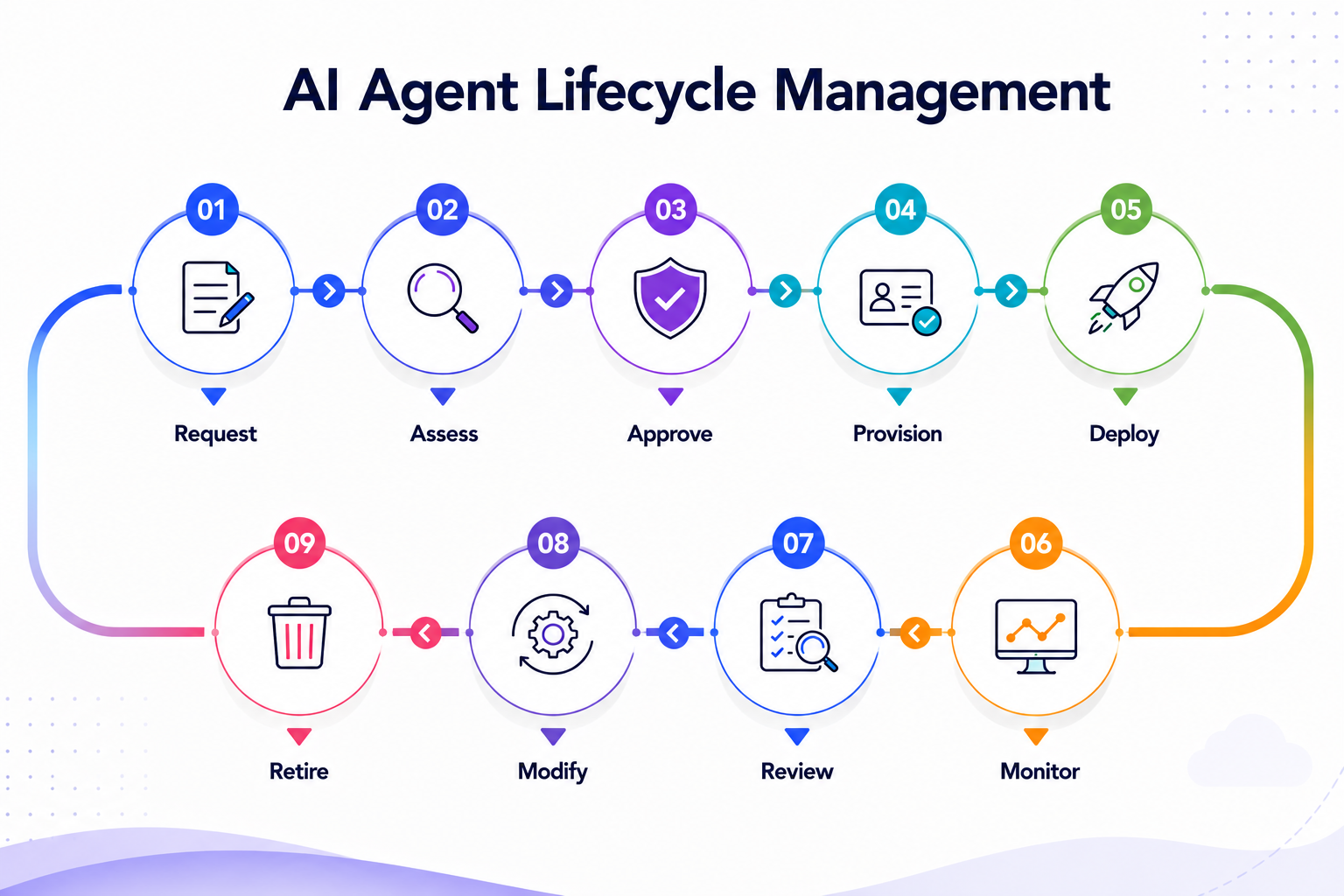
AI agent lifecycle management diagram showing nine stages: Request, Assess, Approve, Provision, Deploy, Monitor, Review, Modify, and Retire, arranged in a continuous cycle.

At each stage, teams should be able to answer:

  • Purpose: What is the agent meant to do?
  • Identity: Which AI agent identity belongs to it?
  • Access: What data, systems, and APIs can it use?
  • Owner: Who is responsible for it?
  • Changes: What has changed since the last review?
  • Retirement: When should its access be removed?

The important part is that AI agent lifecycle management goes beyond managing the model. An agent may keep the same model while its tools, permissions, data, or business role change.

Why AI Agents Need Lifecycle Management

An agent may start with a narrow task and gain access as the workflow grows. A new API, data source, model, or permission can change what it can do without anyone revisiting the original approval.

The main lifecycle risks are:

  • Access drift: Permissions grow beyond the agent's original task.
  • Ownership gaps: The person responsible for the agent changes or leaves.
  • Stale identities: Credentials remain active after the business need ends.
  • Delegation gaps: An agent passes work to another agent and the original authority becomes difficult to trace.

This is why AI agent lifecycle management needs to treat material changes as governance events, not ordinary configuration updates.

The key question is not only whether an agent is approved. It is whether its current identity, authority, and business purpose still match.

Also Read: How Agentic AI Will Transform Identity and Access Management (IAM)?

Is Your AI Agent Still Safe?

Find lifecycle gaps before outdated access becomes a security risk.
Download Checklist

7 Stages of AI Agent Lifecycle Management

An AI agent should not be considered “managed” simply because it has reached production. Its model, access, tools, and role can change over time. 

1. Request and Define the Business Purpose

Start with the task the agent is meant to perform. This gives teams a basis for deciding what access it needs and what it should never be allowed to do.

Define:

  • Business purpose and expected outcome
  • Data and systems required
  • Level of autonomy
  • Tools and APIs needed
  • Conditions for suspension or retirement

The business purpose should drive the agent's permissions, not the other way around.

2. Assess Risk and Assign Ownership

Before creating an identity, assess what could happen if the agent is misused, compromised, or simply makes the wrong decision.

Consider:

  • Data sensitivity
  • Business impact
  • System and API access
  • Level of autonomy
  • Regulatory or contractual exposure

Assign a business owner and technical owner. For higher-risk AI agents, a human sponsor should also have authority over access and lifecycle decisions.

Microsoft's current agent identity guidance separates these roles: technical owners manage configuration and operations, while sponsors are accountable for the agent's purpose, lifecycle decisions, and access reviews.

3. Create the Identity and Grant Access

Give the agent a distinct identity instead of using a person's account or a broad shared service account. This creates a clear record of which agent acted and what authority it had.

Define:

  • Agent identity and credentials
  • Applications and APIs it can access
  • Data permissions
  • Read and write rights
  • Actions requiring human approval

Keep application access and tool-level access separate. An agent may need access to a CRM without needing permission to delete records or call every available API.

This is where the AI agent identity lifecycle begins. Strong non-human identity management keeps the agent's identity, access, and authority tied to its approved task.

Your Agent Has Too Much Access

Identify excessive permissions before they become permanent.
Download Checklist

4. Deploy With Clear Boundaries

Before production, test whether the agent can complete its task without unnecessary authority. For agentic AI, this is particularly important because an agent may combine multiple tools to complete one workflow.

Set boundaries around:

  • Approved tools and APIs
  • Data sources
  • Write or destructive actions
  • Human approval points
  • Execution environment

Also test the failure path. The team should know what happens if an agent calls an unauthorized tool, exceeds its scope, or encounters an unexpected response.

5. Monitor What the Agent Actually Does

Production activity can tell you whether the original access decision still makes sense. Monitor the agent's real use of tools, data, and permissions rather than relying only on its configuration.

Watch for:

  • Unexpected API or tool calls
  • New systems or data accessed
  • Permission changes
  • Unusual activity patterns
  • Repeated blocked actions

These signals should feed back into AI agent lifecycle management. If an agent's behavior changes materially, its access or risk assessment may need to change too.

6. Review and Reassess After Material Changes

An agent's original approval should not remain valid indefinitely. A new model, tool, data source, owner, or business purpose can change its risk.

Trigger reassessment when:

  • Permissions expand
  • A new model or provider is introduced
  • New tools or APIs are connected
  • The business purpose changes
  • Ownership changes
  • The agent has been inactive for an extended period

This keeps the AI agent identities aligned with what the agents actually do today.

7. Suspend, Revoke, and Retire

Retirement is a security action, not simply a status change. An agent is not fully retired if its credentials, scheduled jobs, API access, or connected workflows can still run.

Before retirement:

  • Disable scheduled workflows
  • Revoke credentials and API access
  • Remove connected tools and permissions
  • Preserve required audit records
  • Check downstream dependencies
  • Mark the identity as retired

A mature AI agent lifecycle management process ends only when the agent's identity, access, and execution paths are no longer active.

The most critical architectural capability is integration. We don't know what's coming next, so the foundation must support constant change.”
— David Treat, CTO, Pearson, IBM Institute for Business Value, 2026. 

How to Operationalize AI Agent Lifecycle Management

Managing a few agents manually may work at first. It becomes harder when agents span SaaS, cloud platforms, internal applications, and APIs.

A practical setup should connect:

  • Identity: Agent, owner, purpose, and status
  • Access: Data, applications, APIs, and tools
  • Monitoring: Activity and permission changes
  • Lifecycle: Reviews, suspension, and retirement
  • Governance: Approvals, risk, and exceptions

When these controls work together, a change in an agent's permissions, owner, or business purpose can trigger the right review instead of going unnoticed.

The goal of AI agent lifecycle management is not simply to track agents. It is to keep their identity, access, and business purpose aligned from creation to retirement.

This also helps connect agent-level controls with broader AI governance practices across the enterprise. 

Common AI Agent Lifecycle Management Gaps and How to Address Them

Most lifecycle problems are not obvious when an agent is first deployed. They appear later, when permissions expand, ownership changes, or the agent starts using tools it was never reviewed for.

1. Shared or Generic Identities

When several agents use the same account, security teams lose a clean link between an action and the agent that performed it. That makes incident investigation and targeted access removal much harder.

How to address it:

  • Give each production agent a distinct identity
  • Link it to a business owner and approved purpose
  • Keep development, testing, and production identities separate

2. Permissions That Never Get Reviewed

An agent may begin with limited access and gradually gain permissions as new workflows, APIs, or tools are added. The original approval then no longer reflects its actual authority.

How to address it:

  • Review access after material changes
  • Track read, write, and high-impact permissions separately
  • Remove permissions that are no longer tied to the agent's task

3. Agents Without a Current Owner

An agent can remain active even after its creator changes roles, leaves the company, or stops managing the workflow. The identity still works, but nobody is clearly accountable for it.

How to address it:

  • Require a named business owner
  • Review ownership when roles or teams change
  • Suspend agents that have no valid owner

4. Model or Tool Changes Without Reassessment

Changing a model, adding an API, or connecting a new data source can materially change what an agent can do. Treating these as simple configuration updates can leave the original risk assessment outdated.

How to address it:

  • Define which changes require reassessment
  • Recheck permissions before new tools go live
  • Record what changed, who approved it, and why

5. Incomplete Retirement

Setting an agent to “inactive” does not necessarily stop it. Credentials, scheduled jobs, API permissions, and downstream workflows may still be able to trigger it.

How to address it:

  • Revoke credentials and permissions
  • Disable scheduled jobs and connected workflows
  • Remove API and tool access
  • Verify that the agent can no longer execute

These gaps show why AI agent lifecycle management cannot stop at provisioning. The agent's identity, access, ownership, and authority need to stay aligned throughout its entire working life.

How to Measure AI Agent Lifecycle Management

A lifecycle program should tell you more than how many agents are active. It should show whether each agent still has a valid purpose, the right level of access, a clear owner, and a reliable path to retirement.

1. Measure Identity and Ownership

Start with whether AI agent identities remain tied to a real business need. An agent without a current owner or purpose is a governance gap, even if it has not caused an incident.

Track:

  • Agent ownership coverage: % of production agents with a current owner and business purpose
  • Identity coverage: % using dedicated identities rather than shared accounts
  • Orphan rate: Number of agents without a valid owner
  • Dormancy: Agents inactive beyond the defined review period

2. Measure Access Drift

The access approved at launch may not be the access an agent has today. New tools, APIs, or workflows can gradually expand its authority.

Track:

  • Permissions added since initial approval
  • Unused or excessive permissions
  • % of agents reviewed on schedule
  • Time taken to remove unnecessary access

A useful metric here is permission drift rate: how often an agent's access changes without a corresponding change in its approved business purpose.

3. Measure Lifecycle Response

The real test comes when an agent changes, becomes risky, or reaches the end of its useful life. Teams should be able to act without manually tracking down every credential and integration.

Measure:

  • Time from retirement approval to credential revocation
  • % of retired agents with all access removed
  • Time to suspend a high-risk agent
  • % of material changes that trigger reassessment

These measures make AI agent lifecycle management more than a tracking exercise. They show whether the organization can keep an agent's identity, authority, and business needs aligned throughout its working life.

Conclusion

AI agents should not be treated as one-time deployments. Their identity, access, tools, and purpose can change after they go live, and those changes can create new AI security risks.

A strong AI agent lifecycle management process keeps ownership, permissions, reviews, and retirement connected. It ensures every agent has a clear purpose and only the access it needs.

The real test is simple: Can you tell what an agent can do today, why it has that access, and how quickly you can remove it when it is no longer needed?

FAQs

1. What is AI Agent Lifecycle Management?

A. AI agent lifecycle management is the process of managing an agent from creation and approval through deployment, monitoring, changes, and retirement. It keeps the agent's identity, access, owner, and business purpose aligned as its role changes.

2. What are the main stages of AI Agent Lifecycle Management?

A. A typical process is request → assess → approval → provision → deploy → monitor → review → modify → retire. The exact steps can vary, but each stage should have a clear owner, access decision, and trigger for the next review.

3. Why do AI agents need dedicated identities?

A. Dedicated AI agent identities make it easier to trace actions, control permissions, and remove access without affecting other agents or users. They also give teams a clear way to assign human ownership throughout the agent lifecycle.

4. What should trigger an AI agent lifecycle review?

A. A review should happen when an agent gets a new model, tool, API, data source, owner, permission, or business purpose. Extended inactivity or a security incident should also trigger a review because the agent's original risk may no longer reflect its current use.

5. How should enterprises retire AI agents securely?

A. Retirement should go beyond marking the agent as inactive. Teams should revoke its credentials and permissions, disable scheduled workflows, remove connected tools and APIs, preserve required records, and verify that the agent can no longer execute. This closes the AI agent identity lifecycle instead of leaving an unused identity behind.

Advertisement for a SaaS Subscription Tracking Template with a call-to-action button to download and a partial graphic of a tablet showing charts.Banner promoting a SaaS Agreement Checklist to streamline SaaS management and avoid budget waste with a call-to-action button labeled Download checklist.Blue banner with text 'The Ultimate Employee Offboarding Checklist!' and a black button labeled 'Download checklist' alongside partial views of checklist documents from cloudeagle.ai.Digital ad for download checklist titled 'The Ultimate Checklist for IT Leaders to Optimize SaaS Operations' by cloudeagle.ai, showing checklist pages.Slack Buyer's Guide offer with text 'Unlock insider insights to get the best deal on Slack!' and a button labeled 'Get Your Copy', accompanied by a preview of the guide featuring Slack's logo.Monday Pricing Guide by cloudeagle.ai offering exclusive pricing secrets to maximize investment with a call-to-action button labeled Get Your Copy and an image of the guide's cover.Blue banner for Canva Pricing Guide by cloudeagle.ai offering a guide to Canva costs, features, and alternatives with a call-to-action button saying Get Your Copy.Blue banner with white text reading 'Little-Known Negotiation Hacks to Get the Best Deal on Slack' and a white button labeled 'Get Your Copy'.Blue banner with text 'Little-Known Negotiation Hacks to Get the Best Deal on Monday.com' and a white button labeled 'Get Your Copy'.Blue banner with text 'Little-Known Negotiation Hacks to Get the Best Deal on Canva' and a white button labeled 'Get Your Copy'.Banner with text 'Slack Buyer's Guide' and a 'Download Now' button next to images of a guide titled 'Slack Buyer’s Guide: Features, Pricing & Best Practices'.Digital cover of Monday Pricing Guide with a button labeled Get Your Copy on a blue background.Canva Pricing Guide cover with a button labeled Get Your Copy on a blue gradient background.

Enter your email to
unlock the report

Oops! Something went wrong while submitting the form.
License Count
Benchmark
Per User/Per Year

Enter your email to
unlock the report

Oops! Something went wrong while submitting the form.
License Count
Benchmark
Per User/Per Year

Enter your email to
unlock the report

Oops! Something went wrong while submitting the form.
Notion Plus
License Count
Benchmark
Per User/Per Year
100-500
$67.20 - $78.72
500-1000
$59.52 - $72.00
1000+
$51.84 - $57.60
Canva Pro
License Count
Benchmark
Per User/Per Year
100-500
$74.33-$88.71
500-1000
$64.74-$80.32
1000+
$55.14-$62.34

Enter your email to
unlock the report

Oops! Something went wrong while submitting the form.

Enter your email to
unlock the report

Oops! Something went wrong while submitting the form.
Zoom Business
License Count
Benchmark
Per User/Per Year
100-500
$216.00 - $264.00
500-1000
$180.00 - $216.00
1000+
$156.00 - $180.00

Enter your email to
unlock the report

Oops! Something went wrong while submitting the form.

Get the Right Security Platform To Secure Your Cloud Infrastructure

Please enter a business email
Thank you!
The 2023 SaaS report has been sent to your email. Check your promotional or spam folder.
Oops! Something went wrong while submitting the form.

Access full report

Please enter a business email
Thank you!
The 2023 SaaS report has been sent to your email. Check your promotional or spam folder.
Oops! Something went wrong while submitting the form.

TL;DR 

  • AI agents need ongoing lifecycle management. Their identity, access, tools, and business purpose can change after deployment.
  • Every agent needs clear identity and authority. Tie each agent to an owner, defined permissions, and only the access required for its task.
  • Changes should trigger review. New models, APIs, data, permissions, owners, or capabilities can change an agent’s risk.
  • Retirement must remove access completely. Revoke credentials, disable workflows, remove connected tools, and verify the agent can no longer act.

AI agents are moving into real business workflows, where they can access data, call APIs, and complete tasks with limited human input. That makes managing an agent more than a deployment exercise.

Okta’s 2026 Global CISO Insights report found that 21% of organizations use shared credentials or service accounts with broad permissions to manage AI access. 

An agent can change long after it goes live. Its model, tools, permissions, owner, or business purpose may change while its identity and access remain untouched.

That is why AI agent lifecycle management needs to cover the full journey, from request and approval to identity, access, monitoring, review, and retirement.

In this guide, you’ll learn how to manage AI agents through each stage, protect the AI agent identity lifecycle, and keep agentic AI access aligned with its current business purpose.

What Is AI Agent Lifecycle Management?

AI agent lifecycle management covers the full journey of an agent, from the first request and approval to deployment, ongoing reviews, and retirement. It keeps its identity, access, owner, and business purpose in check as things change.

A practical lifecycle looks like: Request → Assess → Approve → Provision → Deploy → Monitor → Review → Modify → Retire

AI agent lifecycle management diagram showing nine stages: Request, Assess, Approve, Provision, Deploy, Monitor, Review, Modify, and Retire, arranged in a continuous cycle.

At each stage, teams should be able to answer:

  • Purpose: What is the agent meant to do?
  • Identity: Which AI agent identity belongs to it?
  • Access: What data, systems, and APIs can it use?
  • Owner: Who is responsible for it?
  • Changes: What has changed since the last review?
  • Retirement: When should its access be removed?

The important part is that AI agent lifecycle management goes beyond managing the model. An agent may keep the same model while its tools, permissions, data, or business role change.

Why AI Agents Need Lifecycle Management

An agent may start with a narrow task and gain access as the workflow grows. A new API, data source, model, or permission can change what it can do without anyone revisiting the original approval.

The main lifecycle risks are:

  • Access drift: Permissions grow beyond the agent's original task.
  • Ownership gaps: The person responsible for the agent changes or leaves.
  • Stale identities: Credentials remain active after the business need ends.
  • Delegation gaps: An agent passes work to another agent and the original authority becomes difficult to trace.

This is why AI agent lifecycle management needs to treat material changes as governance events, not ordinary configuration updates.

The key question is not only whether an agent is approved. It is whether its current identity, authority, and business purpose still match.

Also Read: How Agentic AI Will Transform Identity and Access Management (IAM)?

Is Your AI Agent Still Safe?

Find lifecycle gaps before outdated access becomes a security risk.
Download Checklist

7 Stages of AI Agent Lifecycle Management

An AI agent should not be considered “managed” simply because it has reached production. Its model, access, tools, and role can change over time. 

1. Request and Define the Business Purpose

Start with the task the agent is meant to perform. This gives teams a basis for deciding what access it needs and what it should never be allowed to do.

Define:

  • Business purpose and expected outcome
  • Data and systems required
  • Level of autonomy
  • Tools and APIs needed
  • Conditions for suspension or retirement

The business purpose should drive the agent's permissions, not the other way around.

2. Assess Risk and Assign Ownership

Before creating an identity, assess what could happen if the agent is misused, compromised, or simply makes the wrong decision.

Consider:

  • Data sensitivity
  • Business impact
  • System and API access
  • Level of autonomy
  • Regulatory or contractual exposure

Assign a business owner and technical owner. For higher-risk AI agents, a human sponsor should also have authority over access and lifecycle decisions.

Microsoft's current agent identity guidance separates these roles: technical owners manage configuration and operations, while sponsors are accountable for the agent's purpose, lifecycle decisions, and access reviews.

3. Create the Identity and Grant Access

Give the agent a distinct identity instead of using a person's account or a broad shared service account. This creates a clear record of which agent acted and what authority it had.

Define:

  • Agent identity and credentials
  • Applications and APIs it can access
  • Data permissions
  • Read and write rights
  • Actions requiring human approval

Keep application access and tool-level access separate. An agent may need access to a CRM without needing permission to delete records or call every available API.

This is where the AI agent identity lifecycle begins. Strong non-human identity management keeps the agent's identity, access, and authority tied to its approved task.

Your Agent Has Too Much Access

Identify excessive permissions before they become permanent.
Download Checklist

4. Deploy With Clear Boundaries

Before production, test whether the agent can complete its task without unnecessary authority. For agentic AI, this is particularly important because an agent may combine multiple tools to complete one workflow.

Set boundaries around:

  • Approved tools and APIs
  • Data sources
  • Write or destructive actions
  • Human approval points
  • Execution environment

Also test the failure path. The team should know what happens if an agent calls an unauthorized tool, exceeds its scope, or encounters an unexpected response.

5. Monitor What the Agent Actually Does

Production activity can tell you whether the original access decision still makes sense. Monitor the agent's real use of tools, data, and permissions rather than relying only on its configuration.

Watch for:

  • Unexpected API or tool calls
  • New systems or data accessed
  • Permission changes
  • Unusual activity patterns
  • Repeated blocked actions

These signals should feed back into AI agent lifecycle management. If an agent's behavior changes materially, its access or risk assessment may need to change too.

6. Review and Reassess After Material Changes

An agent's original approval should not remain valid indefinitely. A new model, tool, data source, owner, or business purpose can change its risk.

Trigger reassessment when:

  • Permissions expand
  • A new model or provider is introduced
  • New tools or APIs are connected
  • The business purpose changes
  • Ownership changes
  • The agent has been inactive for an extended period

This keeps the AI agent identities aligned with what the agents actually do today.

7. Suspend, Revoke, and Retire

Retirement is a security action, not simply a status change. An agent is not fully retired if its credentials, scheduled jobs, API access, or connected workflows can still run.

Before retirement:

  • Disable scheduled workflows
  • Revoke credentials and API access
  • Remove connected tools and permissions
  • Preserve required audit records
  • Check downstream dependencies
  • Mark the identity as retired

A mature AI agent lifecycle management process ends only when the agent's identity, access, and execution paths are no longer active.

The most critical architectural capability is integration. We don't know what's coming next, so the foundation must support constant change.”
— David Treat, CTO, Pearson, IBM Institute for Business Value, 2026. 

How to Operationalize AI Agent Lifecycle Management

Managing a few agents manually may work at first. It becomes harder when agents span SaaS, cloud platforms, internal applications, and APIs.

A practical setup should connect:

  • Identity: Agent, owner, purpose, and status
  • Access: Data, applications, APIs, and tools
  • Monitoring: Activity and permission changes
  • Lifecycle: Reviews, suspension, and retirement
  • Governance: Approvals, risk, and exceptions

When these controls work together, a change in an agent's permissions, owner, or business purpose can trigger the right review instead of going unnoticed.

The goal of AI agent lifecycle management is not simply to track agents. It is to keep their identity, access, and business purpose aligned from creation to retirement.

This also helps connect agent-level controls with broader AI governance practices across the enterprise. 

Common AI Agent Lifecycle Management Gaps and How to Address Them

Most lifecycle problems are not obvious when an agent is first deployed. They appear later, when permissions expand, ownership changes, or the agent starts using tools it was never reviewed for.

1. Shared or Generic Identities

When several agents use the same account, security teams lose a clean link between an action and the agent that performed it. That makes incident investigation and targeted access removal much harder.

How to address it:

  • Give each production agent a distinct identity
  • Link it to a business owner and approved purpose
  • Keep development, testing, and production identities separate

2. Permissions That Never Get Reviewed

An agent may begin with limited access and gradually gain permissions as new workflows, APIs, or tools are added. The original approval then no longer reflects its actual authority.

How to address it:

  • Review access after material changes
  • Track read, write, and high-impact permissions separately
  • Remove permissions that are no longer tied to the agent's task

3. Agents Without a Current Owner

An agent can remain active even after its creator changes roles, leaves the company, or stops managing the workflow. The identity still works, but nobody is clearly accountable for it.

How to address it:

  • Require a named business owner
  • Review ownership when roles or teams change
  • Suspend agents that have no valid owner

4. Model or Tool Changes Without Reassessment

Changing a model, adding an API, or connecting a new data source can materially change what an agent can do. Treating these as simple configuration updates can leave the original risk assessment outdated.

How to address it:

  • Define which changes require reassessment
  • Recheck permissions before new tools go live
  • Record what changed, who approved it, and why

5. Incomplete Retirement

Setting an agent to “inactive” does not necessarily stop it. Credentials, scheduled jobs, API permissions, and downstream workflows may still be able to trigger it.

How to address it:

  • Revoke credentials and permissions
  • Disable scheduled jobs and connected workflows
  • Remove API and tool access
  • Verify that the agent can no longer execute

These gaps show why AI agent lifecycle management cannot stop at provisioning. The agent's identity, access, ownership, and authority need to stay aligned throughout its entire working life.

How to Measure AI Agent Lifecycle Management

A lifecycle program should tell you more than how many agents are active. It should show whether each agent still has a valid purpose, the right level of access, a clear owner, and a reliable path to retirement.

1. Measure Identity and Ownership

Start with whether AI agent identities remain tied to a real business need. An agent without a current owner or purpose is a governance gap, even if it has not caused an incident.

Track:

  • Agent ownership coverage: % of production agents with a current owner and business purpose
  • Identity coverage: % using dedicated identities rather than shared accounts
  • Orphan rate: Number of agents without a valid owner
  • Dormancy: Agents inactive beyond the defined review period

2. Measure Access Drift

The access approved at launch may not be the access an agent has today. New tools, APIs, or workflows can gradually expand its authority.

Track:

  • Permissions added since initial approval
  • Unused or excessive permissions
  • % of agents reviewed on schedule
  • Time taken to remove unnecessary access

A useful metric here is permission drift rate: how often an agent's access changes without a corresponding change in its approved business purpose.

3. Measure Lifecycle Response

The real test comes when an agent changes, becomes risky, or reaches the end of its useful life. Teams should be able to act without manually tracking down every credential and integration.

Measure:

  • Time from retirement approval to credential revocation
  • % of retired agents with all access removed
  • Time to suspend a high-risk agent
  • % of material changes that trigger reassessment

These measures make AI agent lifecycle management more than a tracking exercise. They show whether the organization can keep an agent's identity, authority, and business needs aligned throughout its working life.

Conclusion

AI agents should not be treated as one-time deployments. Their identity, access, tools, and purpose can change after they go live, and those changes can create new AI security risks.

A strong AI agent lifecycle management process keeps ownership, permissions, reviews, and retirement connected. It ensures every agent has a clear purpose and only the access it needs.

The real test is simple: Can you tell what an agent can do today, why it has that access, and how quickly you can remove it when it is no longer needed?

FAQs

1. What is AI Agent Lifecycle Management?

A. AI agent lifecycle management is the process of managing an agent from creation and approval through deployment, monitoring, changes, and retirement. It keeps the agent's identity, access, owner, and business purpose aligned as its role changes.

2. What are the main stages of AI Agent Lifecycle Management?

A. A typical process is request → assess → approval → provision → deploy → monitor → review → modify → retire. The exact steps can vary, but each stage should have a clear owner, access decision, and trigger for the next review.

3. Why do AI agents need dedicated identities?

A. Dedicated AI agent identities make it easier to trace actions, control permissions, and remove access without affecting other agents or users. They also give teams a clear way to assign human ownership throughout the agent lifecycle.

4. What should trigger an AI agent lifecycle review?

A. A review should happen when an agent gets a new model, tool, API, data source, owner, permission, or business purpose. Extended inactivity or a security incident should also trigger a review because the agent's original risk may no longer reflect its current use.

5. How should enterprises retire AI agents securely?

A. Retirement should go beyond marking the agent as inactive. Teams should revoke its credentials and permissions, disable scheduled workflows, remove connected tools and APIs, preserve required records, and verify that the agent can no longer execute. This closes the AI agent identity lifecycle instead of leaving an unused identity behind.

CloudEagle.ai recognized in the 2025 Gartner® Magic Quadrant™ for SaaS Management Platforms
Download now
gartner chart
5x
Faster employee
onboarding
80%
Reduction in time for
user access reviews
30k
Workflows
automated
$15Bn
Analyzed in
contract spend
$2Bn
Saved in
SaaS spend

Streamline SaaS governance and save 10-30%

Book a Demo with Expert
CTA image




