%201.svg)


HIPAA Compliance Checklist for 2025

Gartner expects 75% of employees to acquire, modify, or create technology outside IT's visibility by 2027, up from 41% in 2022.
Almost none of that arrives as a procurement request. It arrives on a company credit card, in ninety seconds, from someone who needed a transcription tool on Tuesday and could not wait three weeks.
That is a shadow purchase: software bought on a corporate or personal card without IT, security, or procurement approval.
This guide covers what shadow purchases cost, how to find them in card data, and how the review workflow runs in CloudEagle.ai.
Why Shadow Purchases Slip Past Every Other Detection Method?
Because every other method looks
The money involved is not marginal. Gartner has long estimated that 30% to 40% of IT spending in large enterprises sits outside the IT organisation, with Everest Group putting the figure closer to half. That is the pool shadow purchases come from, and card charges are the only place most of it becomes visible.
If you want the wider picture on why identity-based discovery leaves this gap open, this is the piece that maps it: How CloudEagle.ai detects shadow IT beyond Okta and SSO.

The Manual Approach: Card Statements and a Spreadsheet
Without a dedicated tool, most teams go looking for shadow purchases in the card statement itself, because the charge is the only signal one reliably leaves. The process is usually the same everywhere.
- Finance exports card and expense data for the period, including personal cards reimbursed through claims
- Someone scans it for recurring charges in software-typical amounts
- Each vendor gets checked against the app inventory, and anything that does not appear is set aside
- The leftovers get traced back to a buyer so someone can ask what the charge was for
This surfaces real purchases. It also has three limits worth knowing before you rely on it.
Billing names rarely match product names, so a charge from a payment processor or parent company tells you nothing about which app it bought. Free tiers leave no charge at all until they convert, by which point the tool is embedded. And the review is periodic while the buying is continuous, so a monthly pass means a purchase runs for four weeks before anyone sees it.
That last one is the real problem. Reconciling spend against inventory is the right method. Doing it by hand once a month means you find shadow purchases after the window where cancelling was easy has closed.
How to Catch Shadow Purchases on Company Credit Cards in CloudEagle.ai
CloudEagle.ai runs that same reconciliation continuously. The results sit in two places, depending on whether you want the current window or the longer view.
1. From the Alerts section
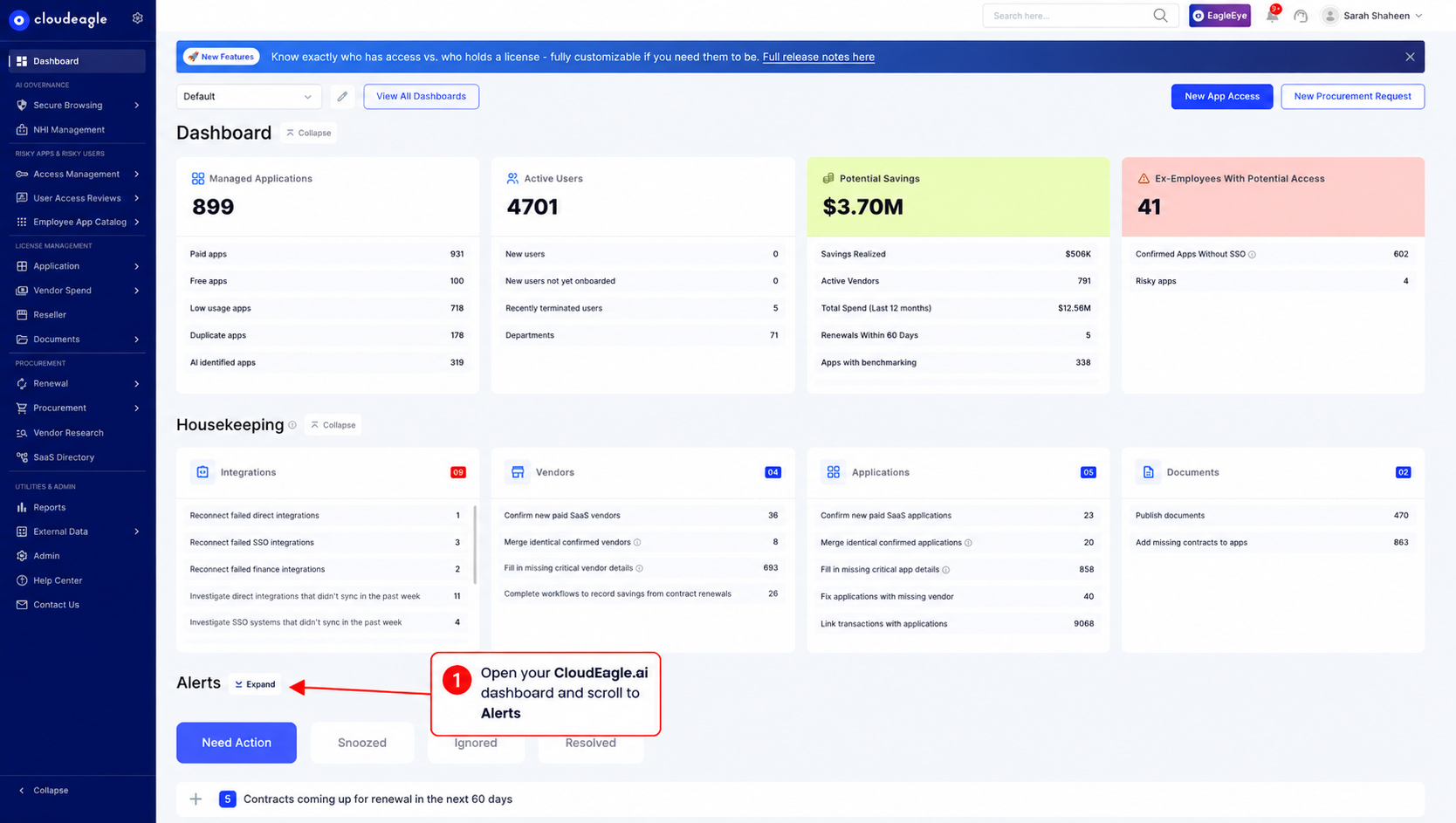
- Open your CloudEagle.ai dashboard and scroll to Alerts
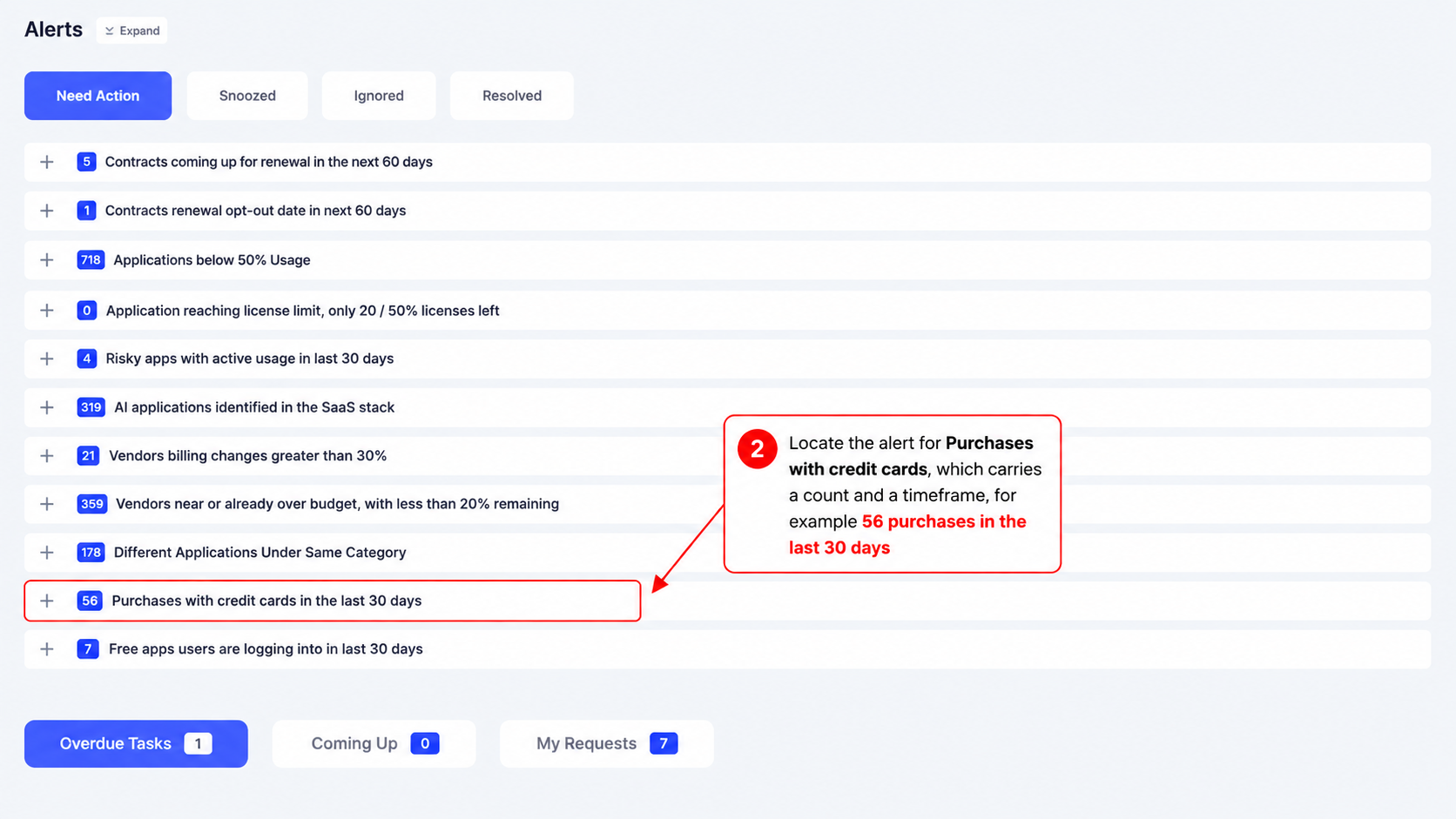
- Locate the alert for Purchases with credit cards, which carries a count and a timeframe, for example 56 purchases in the last 30 days
- Adjust the timeframe to match your review window
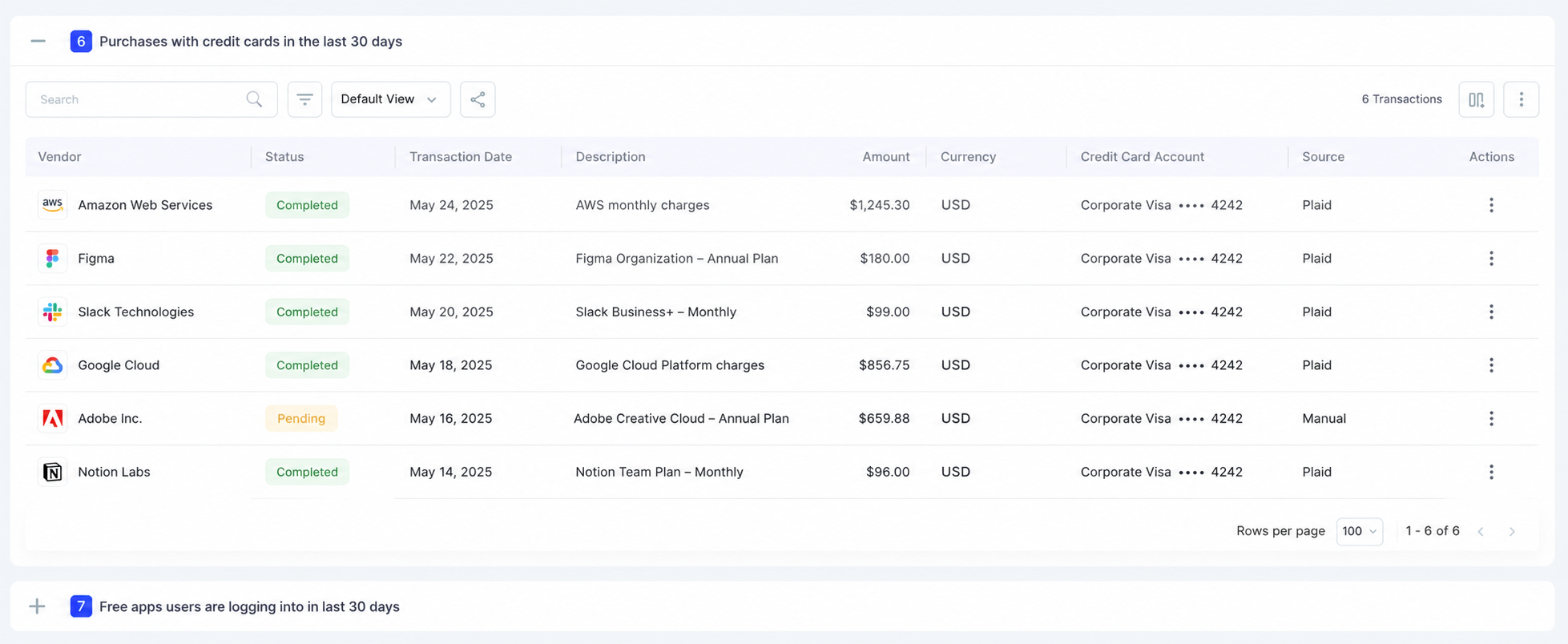
- Click the alert to open the table of all credit card transactions
The count is worth reading before you click anything. It tells you how many shadow purchases entered in that window, which is a number most teams have never had.
2. From the Reports section
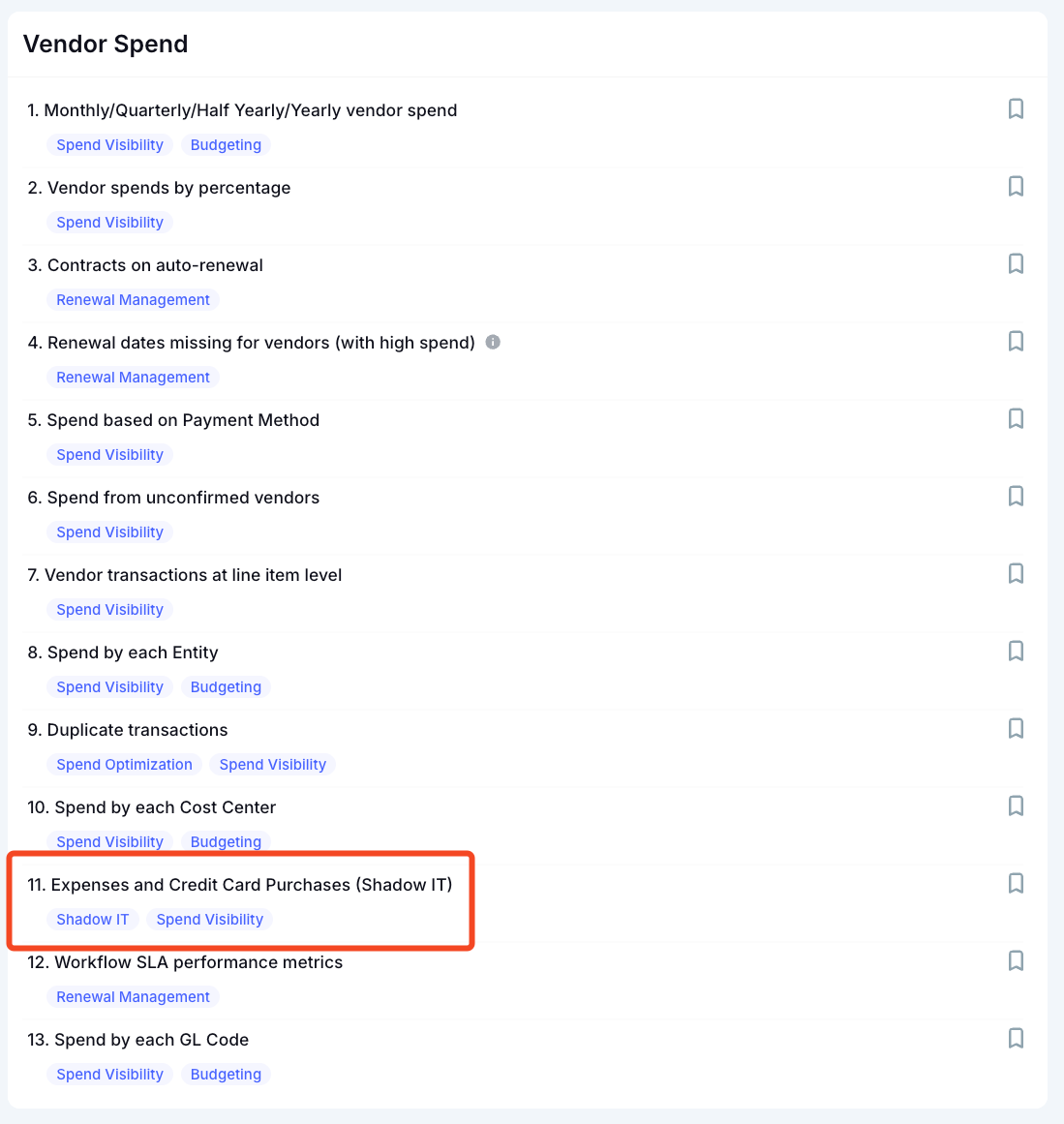
The same credit card purchase data is available under Reports, and this is where you go for history rather than the current window.
An alert answers what came in over the last 30 days. Reports lets you analyze these purchases over time and understand who is bringing unauthorized software into the organization and where it is coming from.
You can see:
- Which departments are driving the most Shadow IT purchases
- Which users are purchasing unauthorized applications
- Which apps and vendors are being purchased outside approved channels
- How Shadow IT purchases are changing month over month
- Which departments or users have recurring purchases
- How much organizations are spending on unapproved software
This gives IT, security, and procurement teams a historical view of Shadow IT activity, making it easier to identify repeat offenders, spot departments with higher levels of unauthorized software adoption, and understand how Shadow IT is entering the organization.
See Every Shadow Purchase Live


Reviewing the Transactions the Alert Surfaces
Click the alert. It opens the detailed table of every credit card transaction in that timeframe, and this is where the review actually happens.
What the transaction table shows
Two columns do most of that narrowing.
a) Status removes everything you have already handled:
Filter to unconfirmed and what remains is the set of purchases still waiting on a decision. Click any row to see the transaction detail or trace it back to the vendor, which is how you find out what an unfamiliar billing name actually bought.
b) Vendor shows you what you are paying for twice:
The same vendor appearing more than once is the fastest win in the list, because cancelling one of two overlapping tools costs you no migration and no retraining. One customer who ran this analysis across 180 applications cut software spend by 20%, worth $450,000 in five months.
How Often to Run the Check
Run it once and the list rebuilds, because employees keep buying.
- Weekly or monthly: clear the unconfirmed queue, matched to your procurement cycle
- Quarterly: review confirmed apps for duplicate vendors that entered separately
- Before renewal season: check which confirmed apps still have no proper contract
The measure of success is not zero shadow purchases. It is a shrinking gap between when one happens and when you find it.
What Shadow Purchases Actually Cost You
Four costs, and only the first one shows up in a budget.
- Duplicate spend: Two teams buy overlapping tools independently. Both charges sit in separate budget lines under names nobody cross-references, so the overlap stays invisible until someone puts the transactions side by side.
- Renewal lock-in: A card subscription auto-renews on a date IT never sees. By the time anyone reviews it, cancelling means losing data, retraining a team, or paying out the term.
- Security exposure: Unsanctioned tools sit outside your access reviews. IBM found that breaches involving shadow AI, meaning unapproved AI tools employees adopt on their own, carried an extra $670,000 in cost, and that 97% of organisations with AI-related breaches lacked proper access controls.
- Offboarding gaps: When someone leaves, you revoke access to the apps you know about. The shadow purchase they made two years ago keeps their account live.
The compounding one is offboarding. Every shadow purchase you never find becomes an account nobody deprovisions, and those accumulate silently across every departure.
FAQs
1. What is a shadow purchase?
Software bought on a corporate or personal card without IT or procurement approval. It is the most common form of shadow IT because it needs no ticket and no login.
2. Why don't card purchases appear in SSO logs?
Because the app was never connected to your identity provider. The employee signs in directly with an email and password, so single sign-on never sees the session.
3. How often should I review credit card purchases?
Match it to your procurement cycle. Weekly suits fast-moving teams, monthly works for most. Set your review window to the same period so nothing falls between cycles.
4. Can I find shadow purchases without a SaaS management tool?
Yes, by reconciling card and expense data against your app inventory by hand. It works, but monthly reviews mean you find purchases weeks after they happen.
5. How do I know who made a purchase?
In CloudEagle.ai, click the transaction row to inspect its details or trace the purchase back to the vendor.
Reconcile your card data against your app inventory, and shorten the gap between purchase and discovery. Book a demo to see the credit card purchase alert running against your own spend.
Your Card Data Has the Answers


.avif)


.avif)
.avif)




.png)





_.png)

.avif)
.avif)
.avif)


