AI Governance

Beyond Claude's Admin Dashboard: One Place to Manage Your Entire AI Stack

Share via:
Written by:
CloudEagle.ai Team
Reviewed by
Nidhi Jain
Last Updated:
November 10, 2026
blog-cms-banner-bg
Little-Known Negotiation Hacks to Get the Best Deal on Slack
cta-bg-blogDownload Your Copy

HIPAA Compliance Checklist for 2025

Download PDF

Gartner forecasts worldwide AI spending will reach $2.7 trillion in 2026, up 49.5% from 2025. Claude tells you what's happening inside Claude. CloudEagle.ai helps IT see what's happening across the entire AI stack and actually do something about it.

So when teams ask how CloudEagle.ai is different, the honest answer starts with what Claude does well.
‍

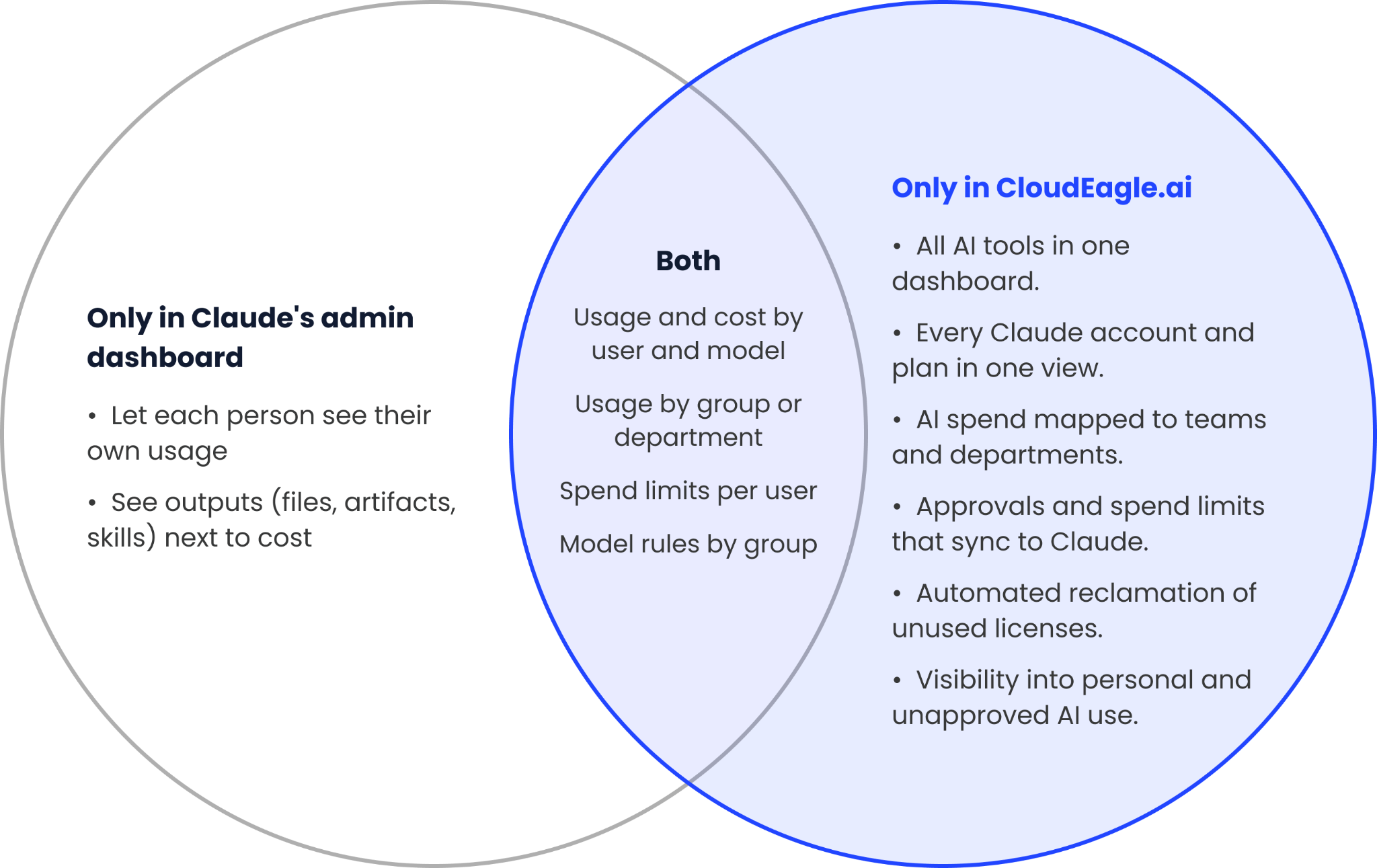
Venn diagram comparing what only Claude's admin dashboard does, what both do, and what only CloudEagle.ai does
Where Claude's admin dashboard and CloudEagle.ai each fit.

‍

What Does Claude's Admin Dashboard Already Do Well?

It gives Claude owners an accurate view of Claude usage inside their account, with the controls to act on it there.

CloudEagle.ai covers the same ground, and reads the same data through Anthropic's APIs, so the numbers match.

‍

When Is Claude's Dashboard Enough, and When Do You Need More?

Claude's dashboard may be enough if:

  • One Account: You use just one Claude Enterprise account.
  • One Tool: Claude is your only AI tool.
  • One Audience: Your Claude admins are the only people who need spend visibility.

You need CloudEagle.ai when:

  • More Tools and Accounts: You use multiple AI tools and Claude accounts.
  • One View of Spend: You need one view of AI spend across teams.
  • Automation: You want to automate approvals, license reclamation and access controls.

‍

What Changes When You Run More Than One Claude Account?

The view splits. Claude's dashboard shows one account at a time, and many companies run several: an Enterprise account, Team plans bought by different departments, Claude Code and an API account for engineering, which lives in the separate Claude Console.

Each has its own admin view, and Team plans show less: analytics go only to owners, and the API is Enterprise-only.

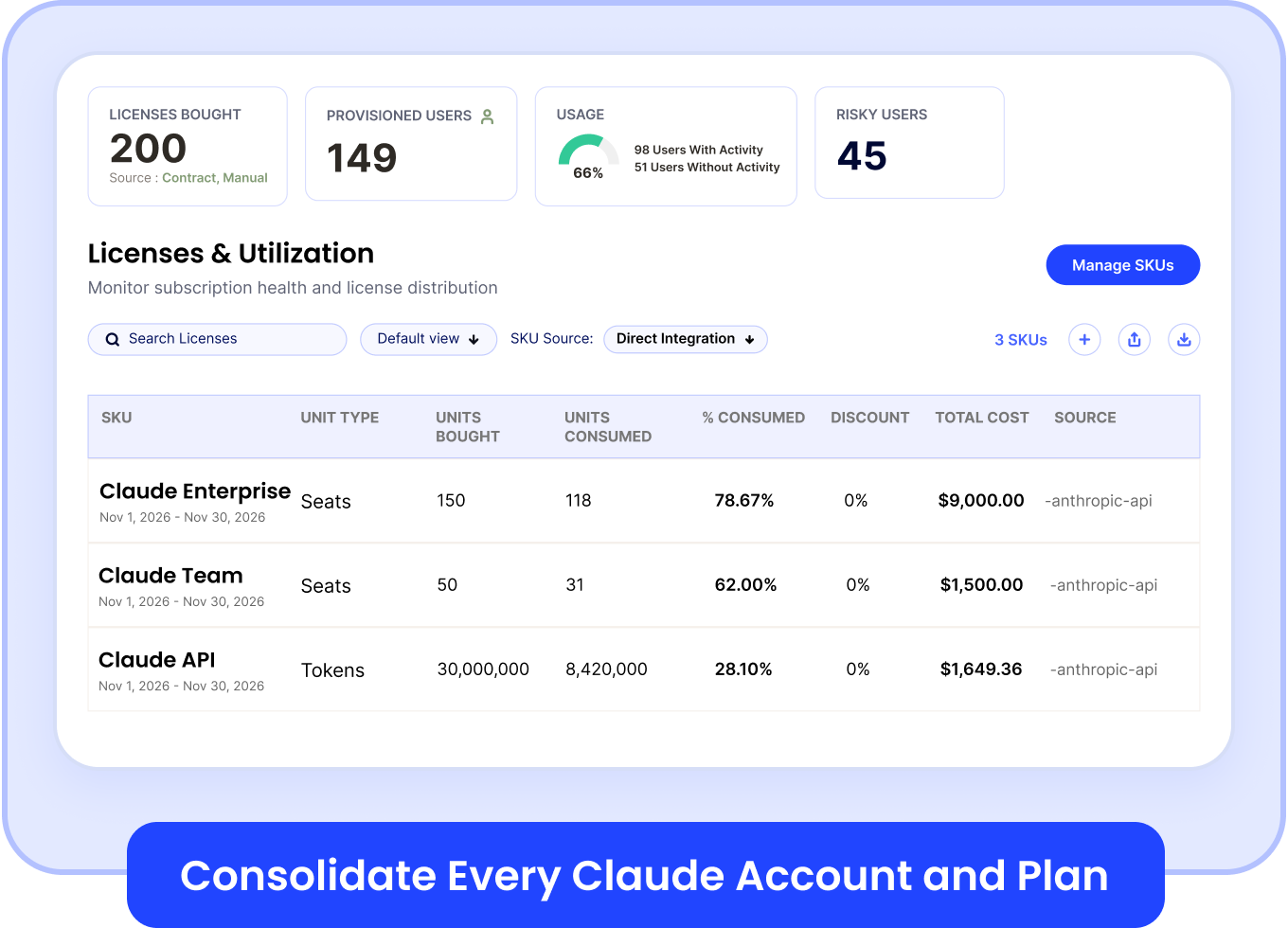
CloudEagle.ai consolidates every Claude account and plan into one dashboard, tagged by team or business unit, so "our total Claude spend" is one number instead of several exports.
‍

CloudEagle.ai licenses and utilization view listing Claude Enterprise, Claude Team and Claude API usage

‍

Why Does Claude Spend Need Context From Other Tools?

Because the questions finance and IT get asked rarely stop at Claude. What does it really cost us? Which teams drive that spend? Do the same people also pay for ChatGPT, Copilot or Cursor? Claude's dashboard can't answer those alone:

  • Partial Cost: On seat-based Enterprise plans, spend reports cover only overage, not usage inside your seat allotment. The seat fees live in your contract.
  • Groups, Not Budgets: Claude breaks usage down by SCIM groups and has spend limits, but not your department budgets or cost centers.
  • Claude Only: ChatGPT, Copilot and Cursor each report in their own dashboards and units, so no one sees total AI spend in one place.

The Analytics API exports Claude's data, but someone still has to join it with your contracts, HR records and other AI vendors, and keep that working. CloudEagle.ai does that join and keeps it running:

  • Full Claude Cost: Adds the seat fees from your contract to Claude usage and API spend, so "what does Claude cost us?" has one answer.
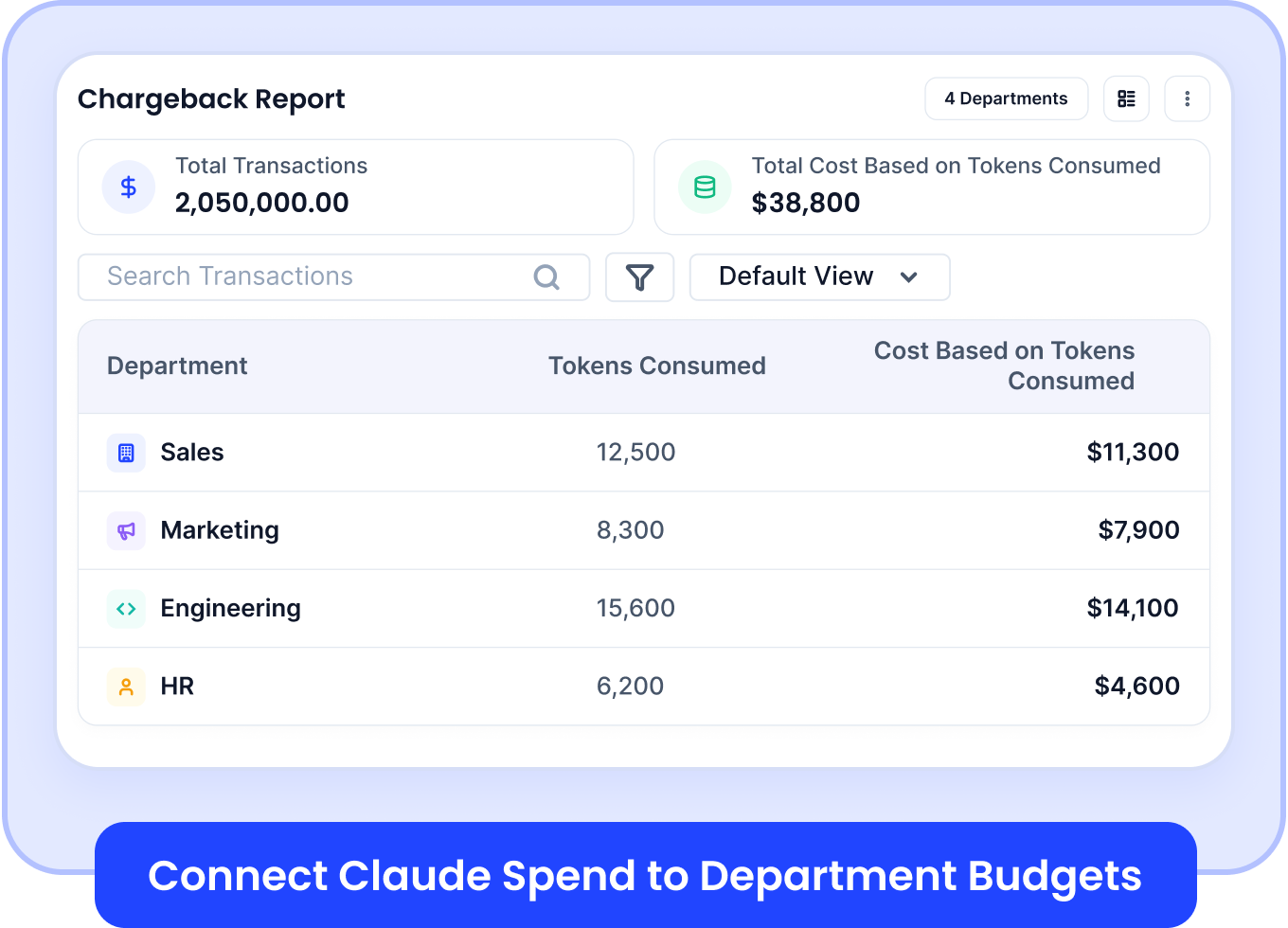
  • Spend by Department: Maps Claude spend to teams and departments using your identity and HR data, then ties it to department budgets and chargeback.
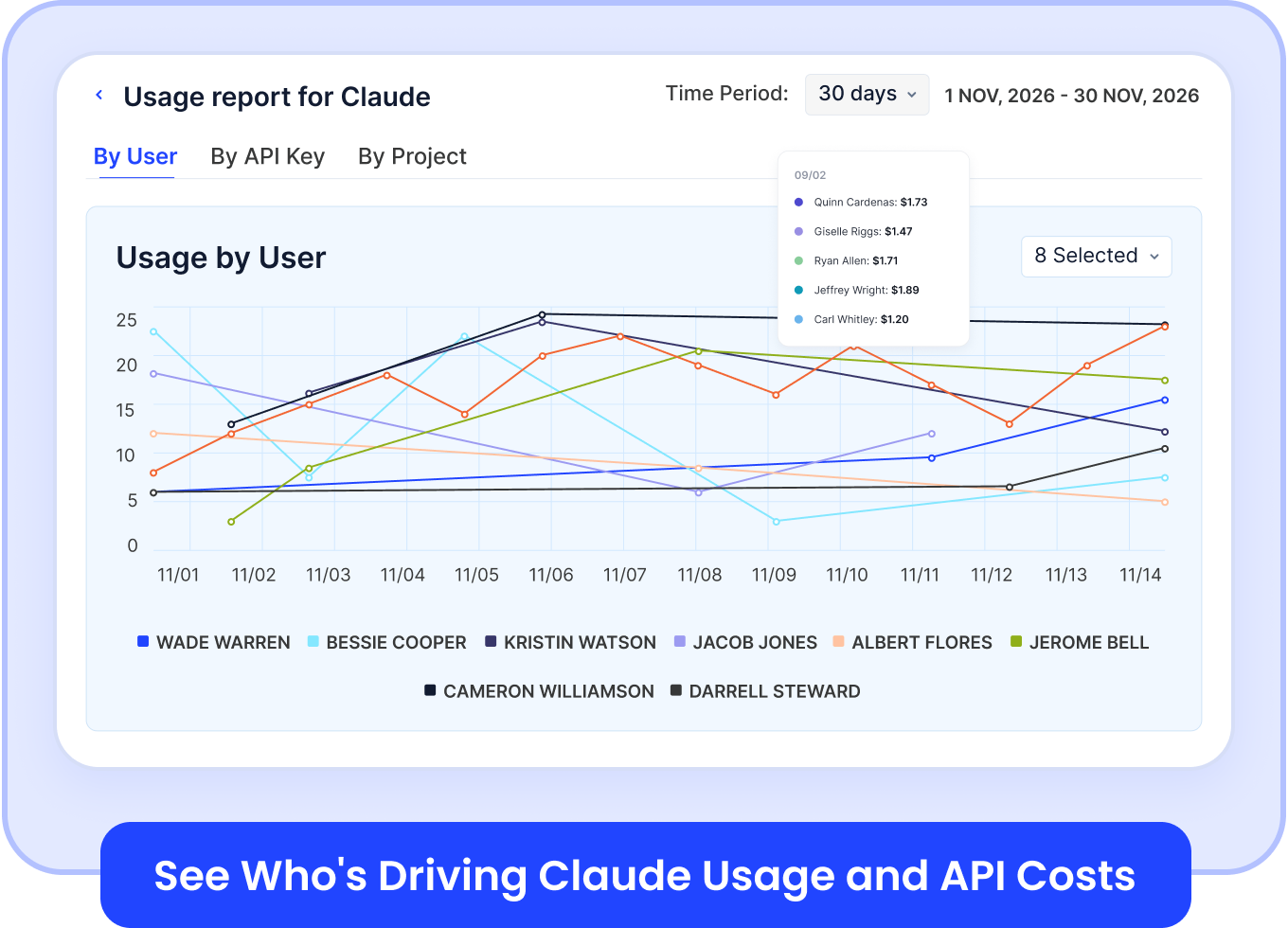
  • One View of AI: Puts Claude next to ChatGPT, Copilot, Cursor and Gemini, with who is driving each, so total AI spend lives in one place.
‍

CloudEagle.ai usage report for Claude showing usage by user over 30 days

‍

"For the first time, we could see exactly which teams were using Claude, Cursor, and had Gemini access they had never touched. That single view changed every conversation we had about our AI program, internally and with our vendors." - Daren Thayne, Chief Technology Officer, EVP of Product, Domo.
‍

CloudEagle.ai chargeback report showing Claude tokens and cost by departmen

‍

Who Approves a Higher Claude Spend Limit?

In Claude, members can request a higher limit and admins can approve it. That works when one admin decides.

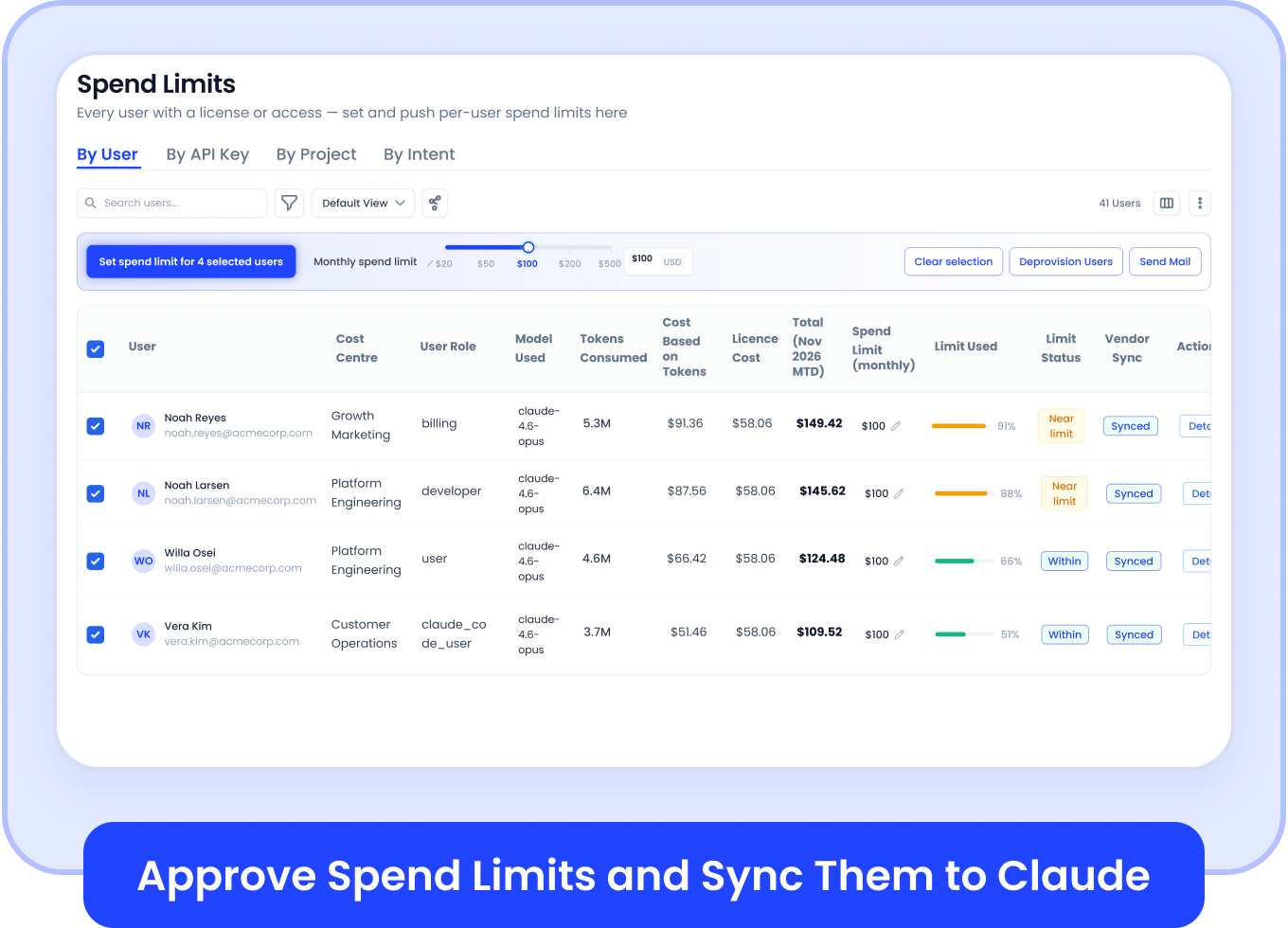
In larger companies, the decision needs a manager, a CIO or a finance owner, and requests pile up in email. CloudEagle.ai routes each request through your own approvers in Slack, Teams or email, syncs the approved limit to Claude, and keeps a record of who asked and who said yes.
‍

CloudEagle.ai spend limits table with per-user Claude limits synced to Claude

‍

How Do You Route Employees to the Right Claude Model?

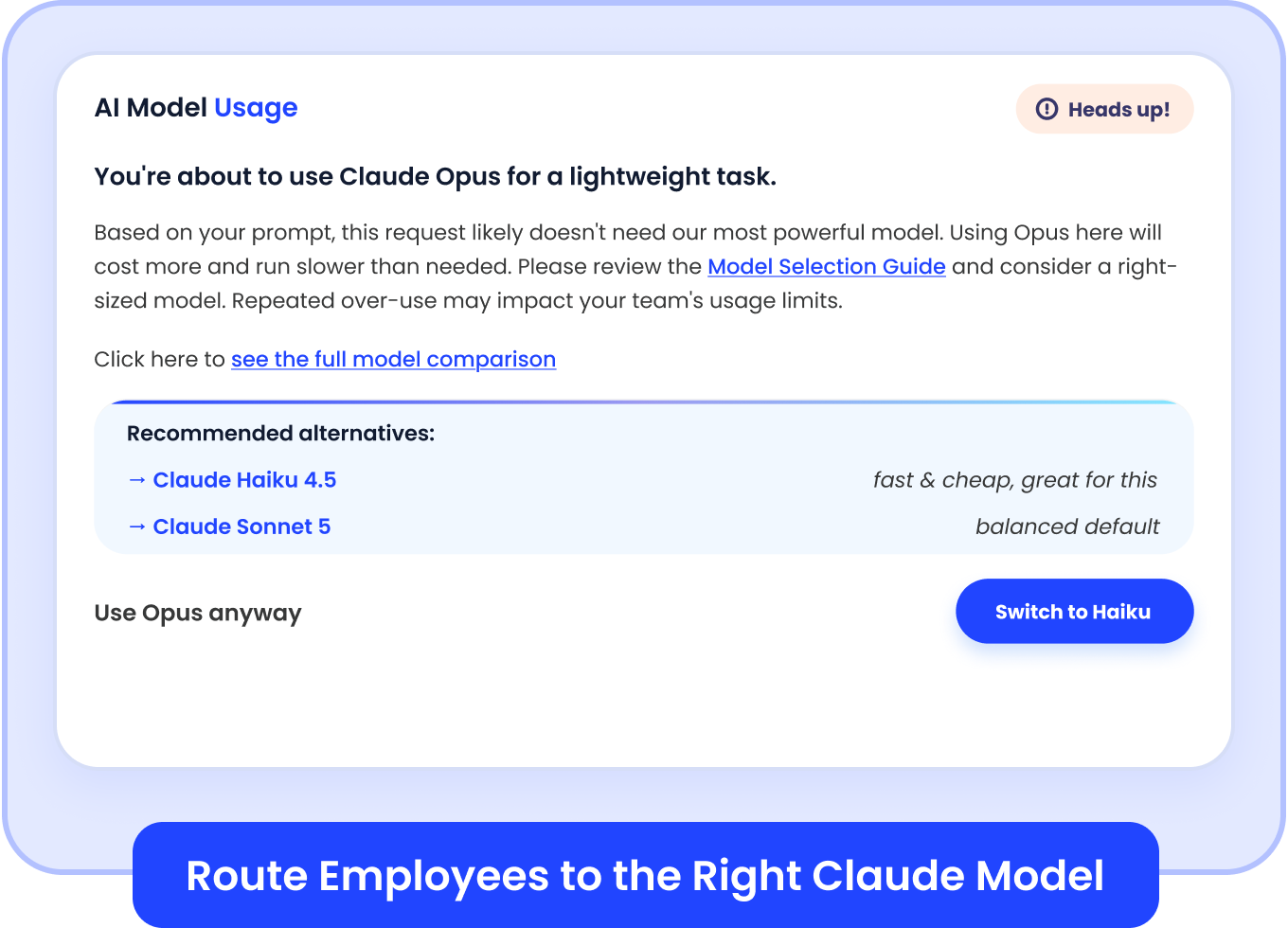
Both tools let you set model rules by role. CloudEagle.ai adds a nudge in the browser: when someone is about to use Opus for a lightweight task, it suggests a smaller model such as Haiku.
‍

CloudEagle.ai browser prompt suggesting a smaller Claude model for a lightweight task

‍

What About Idle Seats and Unapproved Claude Use?

Claude's dashboard shows who is active. Someone still has to act on who isn't. With our license harvesting, CloudEagle.ai emails people who haven't used Claude in a set period and reclaims seats they don't need. When HR shows someone has left, their access is removed.

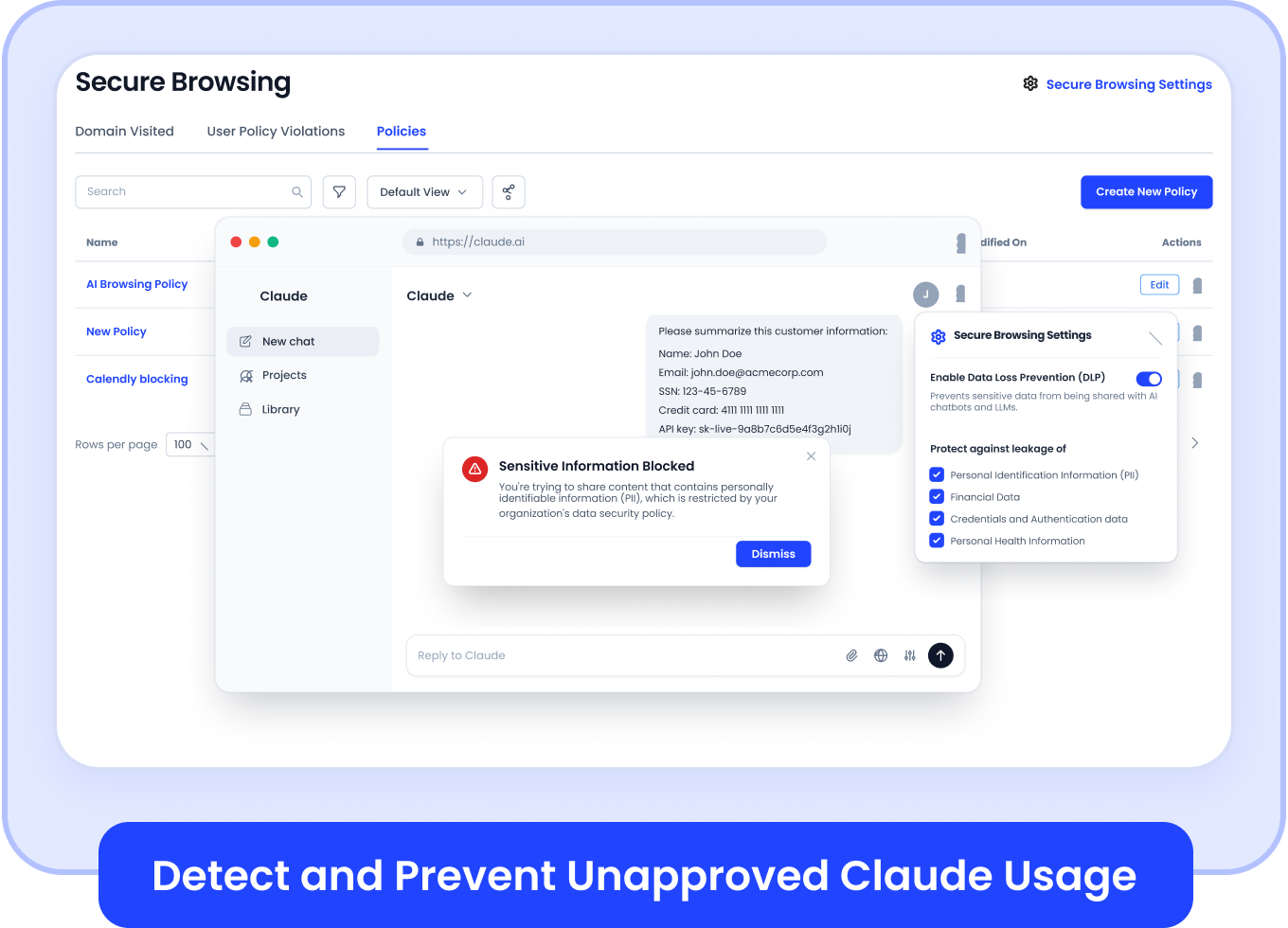
Some Claude use never reaches your company account: a personal sign-in, or a plan a team bought on a card. Our browser extension detects that use, points people to the company workspace, and flags or blocks sensitive data, like PII, before it is submitted.
‍

CloudEagle.ai secure browsing blocking sensitive data from being sent to Claude"

‍

How Do Claude and CloudEagle.ai Work Together?

Claude's dashboard is the system of record for how Claude is used in each account. CloudEagle.ai sits around it: every Claude plan in one view, Claude next to your other AI tools, approvals that sync to Claude, and cleanup tied to your HR and identity data. Start with Claude's dashboard, and add one place to manage the whole AI stack once Claude is one of several tools.

CloudEagle.ai is the command center for SaaS, AI, and identity governance, with 500+ direct integrations, $20B+ in spend managed and 10-30% savings on software spend.

‍

‍

FAQs

Is CloudEagle.ai a Replacement for Claude's Admin Dashboard?

No. Claude's dashboard remains the place to manage Claude. CloudEagle.ai reads the same data and adds cross-account, cross-tool and approval workflows.

Does CloudEagle.ai Show the Same Numbers as Claude?

Yes. We read Claude usage and cost through Anthropic's own APIs, so the figures match.

When Should I Add CloudEagle.ai?

When you use multiple AI tools and Claude accounts, or need one view of AI spend and automated approvals.

‍

Advertisement for a SaaS Subscription Tracking Template with a call-to-action button to download and a partial graphic of a tablet showing charts.Banner promoting a SaaS Agreement Checklist to streamline SaaS management and avoid budget waste with a call-to-action button labeled Download checklist.Blue banner with text 'The Ultimate Employee Offboarding Checklist!' and a black button labeled 'Download checklist' alongside partial views of checklist documents from cloudeagle.ai.Digital ad for download checklist titled 'The Ultimate Checklist for IT Leaders to Optimize SaaS Operations' by cloudeagle.ai, showing checklist pages.Slack Buyer's Guide offer with text 'Unlock insider insights to get the best deal on Slack!' and a button labeled 'Get Your Copy', accompanied by a preview of the guide featuring Slack's logo.Monday Pricing Guide by cloudeagle.ai offering exclusive pricing secrets to maximize investment with a call-to-action button labeled Get Your Copy and an image of the guide's cover.Blue banner for Canva Pricing Guide by cloudeagle.ai offering a guide to Canva costs, features, and alternatives with a call-to-action button saying Get Your Copy.Blue banner with white text reading 'Little-Known Negotiation Hacks to Get the Best Deal on Slack' and a white button labeled 'Get Your Copy'.Blue banner with text 'Little-Known Negotiation Hacks to Get the Best Deal on Monday.com' and a white button labeled 'Get Your Copy'.Blue banner with text 'Little-Known Negotiation Hacks to Get the Best Deal on Canva' and a white button labeled 'Get Your Copy'.Banner with text 'Slack Buyer's Guide' and a 'Download Now' button next to images of a guide titled 'Slack Buyer’s Guide: Features, Pricing & Best Practices'.Digital cover of Monday Pricing Guide with a button labeled Get Your Copy on a blue background.Canva Pricing Guide cover with a button labeled Get Your Copy on a blue gradient background.

Enter your email to
unlock the report

Oops! Something went wrong while submitting the form.
License Count
Benchmark
Per User/Per Year

Enter your email to
unlock the report

Oops! Something went wrong while submitting the form.
License Count
Benchmark
Per User/Per Year

Enter your email to
unlock the report

Oops! Something went wrong while submitting the form.
Notion Plus
License Count
Benchmark
Per User/Per Year
100-500
$67.20 - $78.72
500-1000
$59.52 - $72.00
1000+
$51.84 - $57.60
Canva Pro
License Count
Benchmark
Per User/Per Year
100-500
$74.33-$88.71
500-1000
$64.74-$80.32
1000+
$55.14-$62.34

Enter your email to
unlock the report

Oops! Something went wrong while submitting the form.

Enter your email to
unlock the report

Oops! Something went wrong while submitting the form.
Zoom Business
License Count
Benchmark
Per User/Per Year
100-500
$216.00 - $264.00
500-1000
$180.00 - $216.00
1000+
$156.00 - $180.00

Enter your email to
unlock the report

Oops! Something went wrong while submitting the form.

Get the Right Security Platform To Secure Your Cloud Infrastructure

Please enter a business email
Thank you!
The 2023 SaaS report has been sent to your email. Check your promotional or spam folder.
Oops! Something went wrong while submitting the form.

Access full report

Please enter a business email
Thank you!
The 2023 SaaS report has been sent to your email. Check your promotional or spam folder.
Oops! Something went wrong while submitting the form.

TL;DR

  • Claude's admin dashboard is the best place to see how Claude is used inside one Claude account.
  • It shows usage and cost by user and group, with spend limits and model rules.
  • It stops at the edge of that account, so other Claude accounts, other AI tools and your org data sit outside it.
  • CloudEagle.ai reads the same Claude data through Anthropic's APIs, then gives you one dashboard to act on it.
  • If you run one Claude Enterprise account and no other AI tools, Claude's dashboard may be all you need.

Gartner forecasts worldwide AI spending will reach $2.7 trillion in 2026, up 49.5% from 2025. Claude tells you what's happening inside Claude. CloudEagle.ai helps IT see what's happening across the entire AI stack and actually do something about it.

So when teams ask how CloudEagle.ai is different, the honest answer starts with what Claude does well.

‍

Venn diagram comparing what only Claude's admin dashboard does, what both do, and what only CloudEagle.ai does
Where Claude's admin dashboard and CloudEagle.ai each fit.

‍

What Does Claude's Admin Dashboard Already Do Well?

It gives Claude owners an accurate view of Claude usage inside their account, with the controls to act on it there.

CloudEagle.ai covers the same ground, and reads the same data through Anthropic's APIs, so the numbers match.

‍

When Is Claude's Dashboard Enough, and When Do You Need More?

Claude's dashboard may be enough if:

  • One Account: You use just one Claude Enterprise account.
  • One Tool: Claude is your only AI tool.
  • One Audience: Your Claude admins are the only people who need spend visibility.

You need CloudEagle.ai when:

  • More Tools and Accounts: You use multiple AI tools and Claude accounts.
  • One View of Spend: You need one view of AI spend across teams.
  • Automation: You want to automate approvals, license reclamation and access controls.

‍

What Changes When You Run More Than One Claude Account?

The view splits. Claude's dashboard shows one account at a time, and many companies run several: an Enterprise account, Team plans bought by different departments, Claude Code and an API account for engineering, which lives in the separate Claude Console.

Each has its own admin view, and Team plans show less: analytics go only to owners, and the API is Enterprise-only.

CloudEagle.ai consolidates every Claude account and plan into one dashboard, tagged by team or business unit, so "our total Claude spend" is one number instead of several exports.

‍

CloudEagle.ai licenses and utilization view listing Claude Enterprise, Claude Team and Claude API usage

‍

Why Does Claude Spend Need Context From Other Tools?

Because the questions finance and IT get asked rarely stop at Claude. What does it really cost us? Which teams drive that spend? Do the same people also pay for ChatGPT, Copilot or Cursor? Claude's dashboard can't answer those alone:

  • Partial Cost: On seat-based Enterprise plans, spend reports cover only overage, not usage inside your seat allotment. The seat fees live in your contract.
  • Groups, Not Budgets: Claude breaks usage down by SCIM groups and has spend limits, but not your department budgets or cost centers.
  • Claude Only: ChatGPT, Copilot and Cursor each report in their own dashboards and units, so no one sees total AI spend in one place.

The Analytics API exports Claude's data, but someone still has to join it with your contracts, HR records and other AI vendors, and keep that working. CloudEagle.ai does that join and keeps it running:

  • Full Claude Cost: Adds the seat fees from your contract to Claude usage and API spend, so "what does Claude cost us?" has one answer.
  • Spend by Department: Maps Claude spend to teams and departments using your identity and HR data, then ties it to department budgets and chargeback.
  • One View of AI: Puts Claude next to ChatGPT, Copilot, Cursor and Gemini, with who is driving each, so total AI spend lives in one place.

‍

CloudEagle.ai usage report for Claude showing usage by user over 30 days

‍

"For the first time, we could see exactly which teams were using Claude, Cursor, and had Gemini access they had never touched. That single view changed every conversation we had about our AI program, internally and with our vendors." - Daren Thayne, Chief Technology Officer, EVP of Product, Domo.

‍

CloudEagle.ai chargeback report showing Claude tokens and cost by departmen

‍

Who Approves a Higher Claude Spend Limit?

In Claude, members can request a higher limit and admins can approve it. That works when one admin decides.

In larger companies, the decision needs a manager, a CIO or a finance owner, and requests pile up in email. CloudEagle.ai routes each request through your own approvers in Slack, Teams or email, syncs the approved limit to Claude, and keeps a record of who asked and who said yes.

‍

CloudEagle.ai spend limits table with per-user Claude limits synced to Claude

‍

How Do You Route Employees to the Right Claude Model?

Both tools let you set model rules by role. CloudEagle.ai adds a nudge in the browser: when someone is about to use Opus for a lightweight task, it suggests a smaller model such as Haiku.

‍

CloudEagle.ai browser prompt suggesting a smaller Claude model for a lightweight task

‍

What About Idle Seats and Unapproved Claude Use?

Claude's dashboard shows who is active. Someone still has to act on who isn't. With our license harvesting, CloudEagle.ai emails people who haven't used Claude in a set period and reclaims seats they don't need. When HR shows someone has left, their access is removed.

Some Claude use never reaches your company account: a personal sign-in, or a plan a team bought on a card. Our browser extension detects that use, points people to the company workspace, and flags or blocks sensitive data, like PII, before it is submitted.

‍

CloudEagle.ai secure browsing blocking sensitive data from being sent to Claude"

‍

How Do Claude and CloudEagle.ai Work Together?

Claude's dashboard is the system of record for how Claude is used in each account. CloudEagle.ai sits around it: every Claude plan in one view, Claude next to your other AI tools, approvals that sync to Claude, and cleanup tied to your HR and identity data. Start with Claude's dashboard, and add one place to manage the whole AI stack once Claude is one of several tools.

CloudEagle.ai is the command center for SaaS, AI, and identity governance, with 500+ direct integrations, $20B+ in spend managed and 10-30% savings on software spend.

‍

‍

FAQs

Is CloudEagle.ai a Replacement for Claude's Admin Dashboard?

No. Claude's dashboard remains the place to manage Claude. CloudEagle.ai reads the same data and adds cross-account, cross-tool and approval workflows.

Does CloudEagle.ai Show the Same Numbers as Claude?

Yes. We read Claude usage and cost through Anthropic's own APIs, so the figures match.

When Should I Add CloudEagle.ai?

When you use multiple AI tools and Claude accounts, or need one view of AI spend and automated approvals.

‍

CloudEagle.ai recognized in the 2025 Gartner® Magic Quadrant™ for SaaS Management Platforms
Download now
gartner chart
5x
Faster employee
onboarding
80%
Reduction in time for
user access reviews
30k
Workflows
automated
$15Bn
Analyzed in
contract spend
$2Bn
Saved in
SaaS spend

Streamline SaaS governance and save 10-30%

Book a Demo with Expert
CTA image