Vendor Management

SaaS Vendor Lock-In: How to Spot It and Avoid It

Share via:
Written by:
CloudEagle.ai Team
Reviewed by
Nidhi Jain
Last Updated:
November 16, 2026
blog-cms-banner-bg
Little-Known Negotiation Hacks to Get the Best Deal on Slack
cta-bg-blogDownload Your Copy

HIPAA Compliance Checklist for 2025

Download PDF

Microsoft raised list prices on most commercial Microsoft 365 suites on July 1, 2026. Microsoft 365 E3 went from $36 to $39 per user per month, and F3 rose 25%.

Existing customers pay the new price at their next renewal. Most will pay it, because leaving costs more. That's a SaaS vendor lock-in.

This guide shows you how to spot it in your stack and how to avoid it before your next renewal.

‍

1. What Is SaaS Vendor Lock-In, and How Do You Avoid It?

SaaS vendor lock-in is when switching away from a SaaS vendor costs more than the value of switching.

The fastest way to avoid it is to negotiate exit rights before you sign, while you still have leverage.

The Definition: Switching Costs That Outweigh the Value of Switching

Every SaaS tool builds some switching cost over time. Lock-in starts when that cost is high enough that you'd renew a worse deal rather than leave.

For the general definition, see our glossary entry on vendor lock-in.

The Short Answer: Secure Your Exit Rights Before You Sign

Before you sign, get these in writing:

  • Data export: full export in a standard format, at no extra cost.
  • Renewal caps: a fixed limit on price increases at renewal.
  • Notice periods: short enough that you can actually act on them.
  • Termination terms: what you can leave, when, and at what cost.

Once the contract is signed, every one of these gets harder to win.

‍

2. What Are the Four Types of SaaS Vendor Lock-In?

The four types of SaaS vendor lock-in are data, contract, integration, and process lock-in.

Most critical vendors carry more than one, and they compound each other.

‍

Type What Traps You What It Costs to Leave
Data Proprietary formats, limited or paid exports Moving years of history
Contract Auto-renewals, uncapped uplifts, multi-year terms Penalties and lost leverage
Integration Workflows built on one vendor's API Rebuilding every connection
Process Daily habits built around one tool Retraining and lost productivity

‍

Data Lock-In: Proprietary Formats and Export Limits

Your data sits in a format only the vendor reads well. The longer you stay, the more history you'd have to move.

Watch for:

  • Exports that are partial, slow, or paid.
  • Custom fields or history that don't come out in a standard format.
  • No retrieval period after you terminate.

Contract Lock-In: Auto-Renewals, Price Uplifts, and Multi-Year Terms

The contract renews itself unless you give notice in a narrow window. Uncapped increases and multi-year commitments make leaving expensive even when you want to.

Picture this. Your security tool auto-renews for a full year unless you cancel 30 days before term end. You email the vendor on day 35. The window has closed, and you're paying for another year.

Integration Lock-In: Workflows Built Around One Vendor's API

Your other tools, scripts, and automations are wired into one vendor's API. Switching means rebuilding every connection, not just moving data.

Process Lock-In: User Habits and Retraining Costs

People build their daily work around a tool. Retraining, lost productivity, and change fatigue become real switching costs, even when a better option exists.

‍

Worth A Read: A Smarter SaaS Renewal Checklist for Finance, IT, and Procurement

‍

3. How Do You Spot SaaS Vendor Lock-In Before It Hardens?

You spot SaaS vendor lock-in by checking for warning signs at three points: when you evaluate a vendor, during the contract term, and at renewal.

The earlier you catch them, the more leverage you keep.

Warning Signs During Vendor Evaluation

  • The vendor won't commit to data export terms in the contract.
  • Pricing is bundled, so you can't see what each module costs.
  • The only discount on offer requires a multi-year term.
  • The API is limited, undocumented, or priced separately.

Warning Signs During the Contract Term

  • More of your tools now connect to this vendor's API.
  • Usage is dropping, but your seat count can't go down until renewal.
  • Nobody knows where the signed contract lives or who owns the vendor relationship.

Incomplete contract records make all three worse. When records are missing, teams miss:

  • Notice deadlines.
  • Price caps they already negotiated.
  • The owner who should decide to renew or leave.

CloudEagle.ai puts every contract in one repository and uses AI to extract renewal dates, pricing, and terms, so none of this depends on a spreadsheet.

‍

Know What You're Signing Before You Commit

Use this checklist to review renewal clauses, price increases, data portability, and termination terms before signing a SaaS agreement.
Get the Checklist

‍

Warning Signs at Renewal

  • The renewal quote arrives days before the notice deadline.
  • The price increase is larger than the cap you thought you had.
  • You can't compare the new price to last year's because the packaging changed.
  • You have no usage data to argue for fewer seats.

How to Score Lock-In Risk Across Your Stack

Score each critical vendor on five factors, from low to high risk:

‍

Factor Low Risk High Risk
Data export Full, standard format, free Partial, proprietary, or paid
Renewal terms Capped increase, 90+ day notice Uncapped, short or auto-renew notice
Contract length 1 year or less 3+ years with no exit
Integrations Few, using open standards Many, built on vendor-specific APIs
Replaceability Clear alternatives exist No realistic alternative

‍

Vendors that score high on three or more factors need an exit plan now, not at renewal.

‍

4. How Do You Avoid SaaS Vendor Lock-In?

You avoid SaaS vendor lock-in by writing exit rights into the contract, keeping terms short, favoring open standards, and planning renewals early.

These six practices cover all four types of lock-in.

Negotiate Data Export and Portability Rights Upfront

Write export into the contract: what data, in which format, how fast, and at what cost. Include a retrieval period after termination so you're not racing a deadline.

EU customers have a legal floor. Under the EU Data Act, which has applied since September 12, 2025:

  • Providers must let customers start a switch on no more than two months' notice.
  • A 30-day transition period follows.
  • Switching charges are banned from January 12, 2027.
  • Providers can still charge proportionate early-termination penalties, so read the termination clause closely.

Keep Terms Short and Cap Renewal Increases

Prefer one-year terms for anything that isn't critical. When you do sign multi-year, trade the commitment for a written cap on increases or a price lock.

Our negotiation checklist covers the clauses to ask for.

With CloudEagle.ai, every contract's cap, notice period, and renewal owner sits in one place, so the terms you negotiated don't get lost.

Reject Proprietary Formats and Favor Open APIs

Choose vendors that store data in standard formats and offer documented, open APIs. Every integration you build on an open standard is one you can move later.

Ask each vendor:

  • Is the API documented and included in the price?
  • Can I export everything in a standard format?
  • What happens to my data after I terminate?

Unbundle Modules and Price Each One Separately

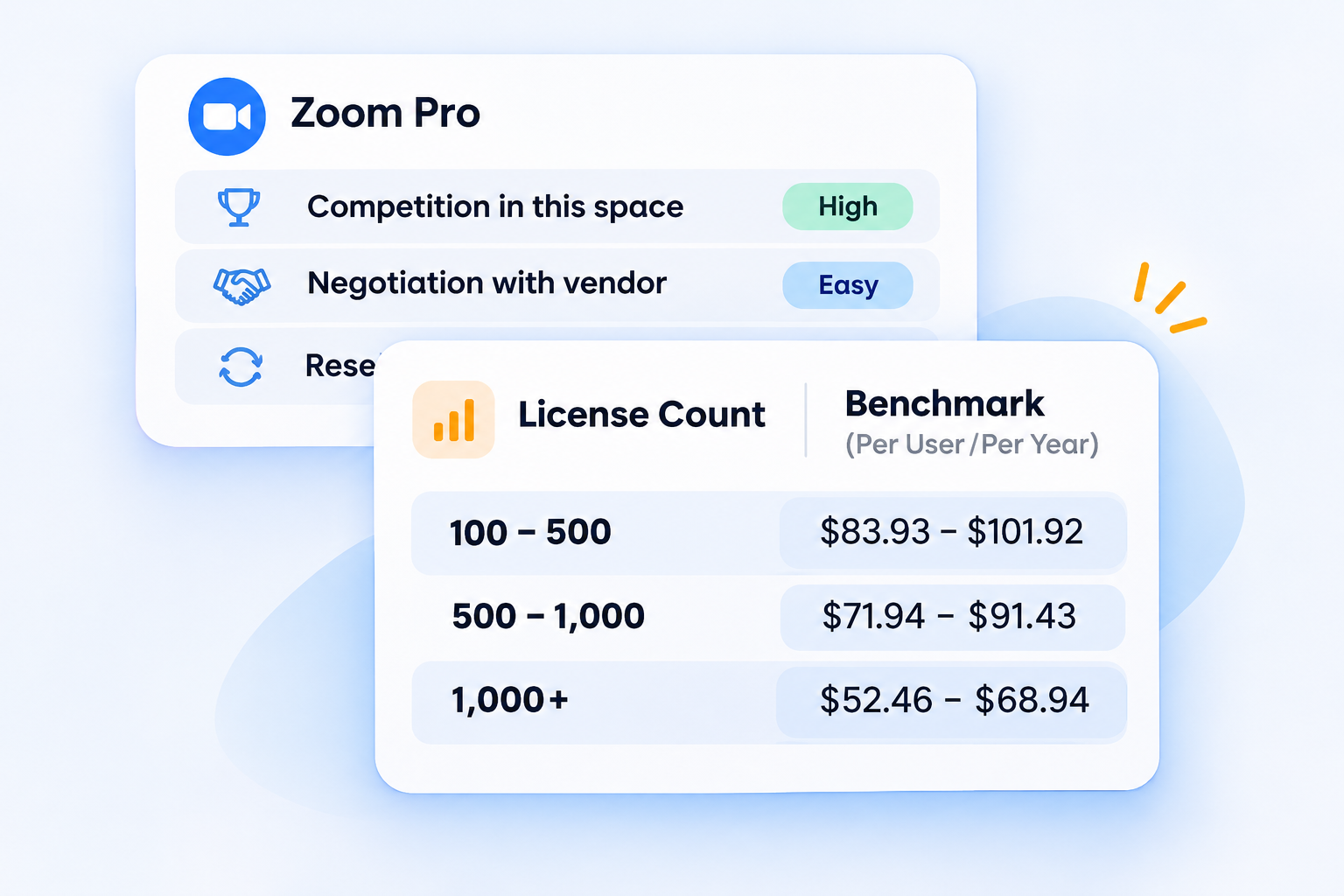
Bundles hide which modules you actually use. Ask for line-item pricing so you can drop a module at renewal without renegotiating the whole deal.

Use price benchmarking to check whether each line is in line with the market. CloudEagle.ai compares vendor quotes against pricing benchmarks and purchasing data, so you know whether a price is fair before you sign.
‍

‍

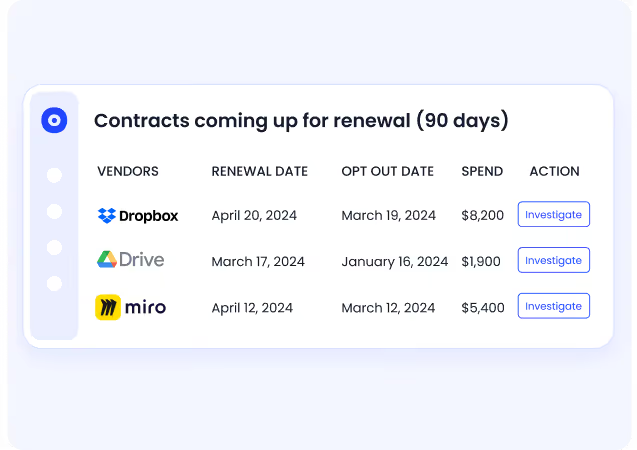
Start Renewal Planning 90 to 120 Days Early

Start early enough to review usage, get alternative quotes, and give notice if you need to. Usage data is your strongest argument.
‍

‍

Say you pay for 250 seats, and only 40 people log in over 180 days. That's a case for cutting seats before the renewal, not after.

An automated renewal calendar keeps every date and owner in view:

  • Alerts 30, 60, and 90 days out, in Slack, Teams, or email.
  • A named renewal owner for every contract.
  • Usage data beside each renewal.

Read this case study to see how one team eliminated auto-renewals.

Keep a Documented Exit Plan for Critical Vendors

For every high-risk vendor, document:

  • Who owns the relationship and the decision to leave.
  • How to export the data and how long it takes.
  • Which integrations would need rebuilding.
  • The realistic alternatives and their rough cost.

Review the plan before each renewal. A plan you've never tested isn't leverage.

‍

‍

5. When Is Some Lock-In a Fair Trade?

Some lock-in is a fair trade when you choose it on purpose, in exchange for a better price, deeper integration, or a capability you can't get elsewhere.

The problem is lock-in you didn't choose and can't see.

Controlled vs. Accidental Lock-InControlled Lock-In

‍

Controlled Lock-In Accidental Lock-In
How it happens A deliberate trade for price or capability Drift: auto-renewals, sprawl, missed notices
What you get A discount, a price lock, or a strategic fit Nothing extra
Exit plan Documented and reviewed None
Example A 3-year core platform deal with a price cap and export rights A tool that auto-renewed because nobody saw the notice date

‍

Common Mistakes That Deepen Dependency

  • Signing multi-year for a discount without a cap: The discount disappears at renewal, and the lock-in stays.
  • Letting integrations grow without a review: Each new connection raises switching cost quietly.
  • Tracking contracts in spreadsheets: Notice dates get missed when nobody owns them.
  • Negotiating without usage data: The vendor knows your usage. You should too.

‍

Avoid SaaS Vendor Lock-In With CloudEagle.ai

SaaS vendor lock-in rarely starts with a bad decision. It starts with a missed notice date, a quote you can't benchmark, and usage nobody tracked. The way to avoid SaaS vendor lock-in is to fix those three things before the next renewal.

CloudEagle.ai is one app to manage, govern, and renew all your SaaS and AI apps. It extracts renewal dates, pricing, and terms with AI, alerts owners 30, 60, and 90 days out, and pairs each renewal with usage data and price benchmarks. With 500+ direct integrations and $20B+ in SaaS spend managed, teams save 10-30% on SaaS.

Don't let your next renewal decide for you. Book a demo.

‍

Frequently Asked Questions

  1. How Do I Know If I Am Locked In to a SaaS Vendor?

You're locked in if you'd renew a worse deal rather than switch. Common signs include no clean data export, uncapped renewal increases, many integrations built on the vendor's API, and no realistic alternative. These are the core signs of SaaS vendor lock-in.

  1. What Contract Clauses Cause SaaS Vendor Lock-In?

The main ones are auto-renewal with short notice windows, uncapped price increases, multi-year terms without exit rights, limited data export, and bundled pricing that hides module costs. See our guide to contract negotiation for how to push back.

  1. How Long Should a SaaS Contract Be to Avoid Lock-In?

One year is safest for most tools. Go multi-year only for critical platforms, and only in exchange for a price cap or lock, export rights, and a clear exit clause.

  1. Is Vendor Lock-In Always Bad?

No. Lock-in you choose on purpose, for a better price or a capability you need, can be a fair trade. Accidental lock-in, from auto-renewals and missed notices, is the kind to avoid.

  1. Can a SaaS Management Platform Reduce Lock-In Risk?

Yes. A SaaS management platform shows every contract's renewal dates, terms, and owners, tracks real usage, and benchmarks pricing. That gives you time and data to avoid SaaS vendor lock-in before a renewal locks you in again.

‍

Advertisement for a SaaS Subscription Tracking Template with a call-to-action button to download and a partial graphic of a tablet showing charts.Banner promoting a SaaS Agreement Checklist to streamline SaaS management and avoid budget waste with a call-to-action button labeled Download checklist.Blue banner with text 'The Ultimate Employee Offboarding Checklist!' and a black button labeled 'Download checklist' alongside partial views of checklist documents from cloudeagle.ai.Digital ad for download checklist titled 'The Ultimate Checklist for IT Leaders to Optimize SaaS Operations' by cloudeagle.ai, showing checklist pages.Slack Buyer's Guide offer with text 'Unlock insider insights to get the best deal on Slack!' and a button labeled 'Get Your Copy', accompanied by a preview of the guide featuring Slack's logo.Monday Pricing Guide by cloudeagle.ai offering exclusive pricing secrets to maximize investment with a call-to-action button labeled Get Your Copy and an image of the guide's cover.Blue banner for Canva Pricing Guide by cloudeagle.ai offering a guide to Canva costs, features, and alternatives with a call-to-action button saying Get Your Copy.Blue banner with white text reading 'Little-Known Negotiation Hacks to Get the Best Deal on Slack' and a white button labeled 'Get Your Copy'.Blue banner with text 'Little-Known Negotiation Hacks to Get the Best Deal on Monday.com' and a white button labeled 'Get Your Copy'.Blue banner with text 'Little-Known Negotiation Hacks to Get the Best Deal on Canva' and a white button labeled 'Get Your Copy'.Banner with text 'Slack Buyer's Guide' and a 'Download Now' button next to images of a guide titled 'Slack Buyer’s Guide: Features, Pricing & Best Practices'.Digital cover of Monday Pricing Guide with a button labeled Get Your Copy on a blue background.Canva Pricing Guide cover with a button labeled Get Your Copy on a blue gradient background.

Enter your email to
unlock the report

Oops! Something went wrong while submitting the form.
License Count
Benchmark
Per User/Per Year

Enter your email to
unlock the report

Oops! Something went wrong while submitting the form.
License Count
Benchmark
Per User/Per Year

Enter your email to
unlock the report

Oops! Something went wrong while submitting the form.
Notion Plus
License Count
Benchmark
Per User/Per Year
100-500
$67.20 - $78.72
500-1000
$59.52 - $72.00
1000+
$51.84 - $57.60
Canva Pro
License Count
Benchmark
Per User/Per Year
100-500
$74.33-$88.71
500-1000
$64.74-$80.32
1000+
$55.14-$62.34

Enter your email to
unlock the report

Oops! Something went wrong while submitting the form.

Enter your email to
unlock the report

Oops! Something went wrong while submitting the form.
Zoom Business
License Count
Benchmark
Per User/Per Year
100-500
$216.00 - $264.00
500-1000
$180.00 - $216.00
1000+
$156.00 - $180.00

Enter your email to
unlock the report

Oops! Something went wrong while submitting the form.

Get the Right Security Platform To Secure Your Cloud Infrastructure

Please enter a business email
Thank you!
The 2023 SaaS report has been sent to your email. Check your promotional or spam folder.
Oops! Something went wrong while submitting the form.

Access full report

Please enter a business email
Thank you!
The 2023 SaaS report has been sent to your email. Check your promotional or spam folder.
Oops! Something went wrong while submitting the form.

TL;DR

  • SaaS vendor lock-in happens when the cost of leaving a vendor outweighs the value of switching. Your data, contracts, integrations, and habits all add to that cost.
  • The fastest fix is to secure your exit rights before you sign: data export, renewal caps, notice periods, and termination terms.
  • Lock-in shows up as warning signs during evaluation, during the term, and at renewal. Most teams only notice it at renewal, when leverage is lowest.
  • EU customers now have legal switching rights under the EU Data Act, and switching charges are banned from January 12, 2027.
  • CloudEagle.ai tracks every contract's renewal dates, terms, and usage, and benchmarks pricing, so you negotiate before lock-in hardens.

‍

Microsoft raised list prices on most commercial Microsoft 365 suites on July 1, 2026. Microsoft 365 E3 went from $36 to $39 per user per month, and F3 rose 25%.

Existing customers pay the new price at their next renewal. Most will pay it, because leaving costs more. That's a SaaS vendor lock-in.

This guide shows you how to spot it in your stack and how to avoid it before your next renewal.

‍

1. What Is SaaS Vendor Lock-In, and How Do You Avoid It?

SaaS vendor lock-in is when switching away from a SaaS vendor costs more than the value of switching.

The fastest way to avoid it is to negotiate exit rights before you sign, while you still have leverage.

The Definition: Switching Costs That Outweigh the Value of Switching

Every SaaS tool builds some switching cost over time. Lock-in starts when that cost is high enough that you'd renew a worse deal rather than leave.

For the general definition, see our glossary entry on vendor lock-in.

The Short Answer: Secure Your Exit Rights Before You Sign

Before you sign, get these in writing:

  • Data export: full export in a standard format, at no extra cost.
  • Renewal caps: a fixed limit on price increases at renewal.
  • Notice periods: short enough that you can actually act on them.
  • Termination terms: what you can leave, when, and at what cost.

Once the contract is signed, every one of these gets harder to win.

‍

2. What Are the Four Types of SaaS Vendor Lock-In?

The four types of SaaS vendor lock-in are data, contract, integration, and process lock-in.

Most critical vendors carry more than one, and they compound each other.

‍

Type What Traps You What It Costs to Leave
Data Proprietary formats, limited or paid exports Moving years of history
Contract Auto-renewals, uncapped uplifts, multi-year terms Penalties and lost leverage
Integration Workflows built on one vendor's API Rebuilding every connection
Process Daily habits built around one tool Retraining and lost productivity

‍

Data Lock-In: Proprietary Formats and Export Limits

Your data sits in a format only the vendor reads well. The longer you stay, the more history you'd have to move.

Watch for:

  • Exports that are partial, slow, or paid.
  • Custom fields or history that don't come out in a standard format.
  • No retrieval period after you terminate.

Contract Lock-In: Auto-Renewals, Price Uplifts, and Multi-Year Terms

The contract renews itself unless you give notice in a narrow window. Uncapped increases and multi-year commitments make leaving expensive even when you want to.

Picture this. Your security tool auto-renews for a full year unless you cancel 30 days before term end. You email the vendor on day 35. The window has closed, and you're paying for another year.

Integration Lock-In: Workflows Built Around One Vendor's API

Your other tools, scripts, and automations are wired into one vendor's API. Switching means rebuilding every connection, not just moving data.

Process Lock-In: User Habits and Retraining Costs

People build their daily work around a tool. Retraining, lost productivity, and change fatigue become real switching costs, even when a better option exists.

‍

Worth A Read: A Smarter SaaS Renewal Checklist for Finance, IT, and Procurement

‍

3. How Do You Spot SaaS Vendor Lock-In Before It Hardens?

You spot SaaS vendor lock-in by checking for warning signs at three points: when you evaluate a vendor, during the contract term, and at renewal.

The earlier you catch them, the more leverage you keep.

Warning Signs During Vendor Evaluation

  • The vendor won't commit to data export terms in the contract.
  • Pricing is bundled, so you can't see what each module costs.
  • The only discount on offer requires a multi-year term.
  • The API is limited, undocumented, or priced separately.

Warning Signs During the Contract Term

  • More of your tools now connect to this vendor's API.
  • Usage is dropping, but your seat count can't go down until renewal.
  • Nobody knows where the signed contract lives or who owns the vendor relationship.

Incomplete contract records make all three worse. When records are missing, teams miss:

  • Notice deadlines.
  • Price caps they already negotiated.
  • The owner who should decide to renew or leave.

CloudEagle.ai puts every contract in one repository and uses AI to extract renewal dates, pricing, and terms, so none of this depends on a spreadsheet.

‍

Know What You're Signing Before You Commit

Use this checklist to review renewal clauses, price increases, data portability, and termination terms before signing a SaaS agreement.
Get the Checklist

‍

Warning Signs at Renewal

  • The renewal quote arrives days before the notice deadline.
  • The price increase is larger than the cap you thought you had.
  • You can't compare the new price to last year's because the packaging changed.
  • You have no usage data to argue for fewer seats.

How to Score Lock-In Risk Across Your Stack

Score each critical vendor on five factors, from low to high risk:

‍

Factor Low Risk High Risk
Data export Full, standard format, free Partial, proprietary, or paid
Renewal terms Capped increase, 90+ day notice Uncapped, short or auto-renew notice
Contract length 1 year or less 3+ years with no exit
Integrations Few, using open standards Many, built on vendor-specific APIs
Replaceability Clear alternatives exist No realistic alternative

‍

Vendors that score high on three or more factors need an exit plan now, not at renewal.

‍

4. How Do You Avoid SaaS Vendor Lock-In?

You avoid SaaS vendor lock-in by writing exit rights into the contract, keeping terms short, favoring open standards, and planning renewals early.

These six practices cover all four types of lock-in.

Negotiate Data Export and Portability Rights Upfront

Write export into the contract: what data, in which format, how fast, and at what cost. Include a retrieval period after termination so you're not racing a deadline.

EU customers have a legal floor. Under the EU Data Act, which has applied since September 12, 2025:

  • Providers must let customers start a switch on no more than two months' notice.
  • A 30-day transition period follows.
  • Switching charges are banned from January 12, 2027.
  • Providers can still charge proportionate early-termination penalties, so read the termination clause closely.

Keep Terms Short and Cap Renewal Increases

Prefer one-year terms for anything that isn't critical. When you do sign multi-year, trade the commitment for a written cap on increases or a price lock.

Our negotiation checklist covers the clauses to ask for.

With CloudEagle.ai, every contract's cap, notice period, and renewal owner sits in one place, so the terms you negotiated don't get lost.

Reject Proprietary Formats and Favor Open APIs

Choose vendors that store data in standard formats and offer documented, open APIs. Every integration you build on an open standard is one you can move later.

Ask each vendor:

  • Is the API documented and included in the price?
  • Can I export everything in a standard format?
  • What happens to my data after I terminate?

Unbundle Modules and Price Each One Separately

Bundles hide which modules you actually use. Ask for line-item pricing so you can drop a module at renewal without renegotiating the whole deal.

Use price benchmarking to check whether each line is in line with the market. CloudEagle.ai compares vendor quotes against pricing benchmarks and purchasing data, so you know whether a price is fair before you sign.

‍

‍

Start Renewal Planning 90 to 120 Days Early

Start early enough to review usage, get alternative quotes, and give notice if you need to. Usage data is your strongest argument.

‍

‍

Say you pay for 250 seats, and only 40 people log in over 180 days. That's a case for cutting seats before the renewal, not after.

An automated renewal calendar keeps every date and owner in view:

  • Alerts 30, 60, and 90 days out, in Slack, Teams, or email.
  • A named renewal owner for every contract.
  • Usage data beside each renewal.

Read this case study to see how one team eliminated auto-renewals.

Keep a Documented Exit Plan for Critical Vendors

For every high-risk vendor, document:

  • Who owns the relationship and the decision to leave.
  • How to export the data and how long it takes.
  • Which integrations would need rebuilding.
  • The realistic alternatives and their rough cost.

Review the plan before each renewal. A plan you've never tested isn't leverage.

‍

‍

5. When Is Some Lock-In a Fair Trade?

Some lock-in is a fair trade when you choose it on purpose, in exchange for a better price, deeper integration, or a capability you can't get elsewhere.

The problem is lock-in you didn't choose and can't see.

Controlled vs. Accidental Lock-InControlled Lock-In

‍

Controlled Lock-In Accidental Lock-In
How it happens A deliberate trade for price or capability Drift: auto-renewals, sprawl, missed notices
What you get A discount, a price lock, or a strategic fit Nothing extra
Exit plan Documented and reviewed None
Example A 3-year core platform deal with a price cap and export rights A tool that auto-renewed because nobody saw the notice date

‍

Common Mistakes That Deepen Dependency

  • Signing multi-year for a discount without a cap: The discount disappears at renewal, and the lock-in stays.
  • Letting integrations grow without a review: Each new connection raises switching cost quietly.
  • Tracking contracts in spreadsheets: Notice dates get missed when nobody owns them.
  • Negotiating without usage data: The vendor knows your usage. You should too.

‍

Avoid SaaS Vendor Lock-In With CloudEagle.ai

SaaS vendor lock-in rarely starts with a bad decision. It starts with a missed notice date, a quote you can't benchmark, and usage nobody tracked. The way to avoid SaaS vendor lock-in is to fix those three things before the next renewal.

CloudEagle.ai is one app to manage, govern, and renew all your SaaS and AI apps. It extracts renewal dates, pricing, and terms with AI, alerts owners 30, 60, and 90 days out, and pairs each renewal with usage data and price benchmarks. With 500+ direct integrations and $20B+ in SaaS spend managed, teams save 10-30% on SaaS.

Don't let your next renewal decide for you. Book a demo.

‍

Frequently Asked Questions

  1. How Do I Know If I Am Locked In to a SaaS Vendor?

You're locked in if you'd renew a worse deal rather than switch. Common signs include no clean data export, uncapped renewal increases, many integrations built on the vendor's API, and no realistic alternative. These are the core signs of SaaS vendor lock-in.

  1. What Contract Clauses Cause SaaS Vendor Lock-In?

The main ones are auto-renewal with short notice windows, uncapped price increases, multi-year terms without exit rights, limited data export, and bundled pricing that hides module costs. See our guide to contract negotiation for how to push back.

  1. How Long Should a SaaS Contract Be to Avoid Lock-In?

One year is safest for most tools. Go multi-year only for critical platforms, and only in exchange for a price cap or lock, export rights, and a clear exit clause.

  1. Is Vendor Lock-In Always Bad?

No. Lock-in you choose on purpose, for a better price or a capability you need, can be a fair trade. Accidental lock-in, from auto-renewals and missed notices, is the kind to avoid.

  1. Can a SaaS Management Platform Reduce Lock-In Risk?

Yes. A SaaS management platform shows every contract's renewal dates, terms, and owners, tracks real usage, and benchmarks pricing. That gives you time and data to avoid SaaS vendor lock-in before a renewal locks you in again.

‍

CloudEagle.ai recognized in the 2025 Gartner® Magic Quadrant™ for SaaS Management Platforms
Download now
gartner chart
5x
Faster employee
onboarding
80%
Reduction in time for
user access reviews
30k
Workflows
automated
$15Bn
Analyzed in
contract spend
$2Bn
Saved in
SaaS spend

Streamline SaaS governance and save 10-30%

Book a Demo with Expert
CTA image