You need to enable JavaScript in order to use the AI chatbot tool powered by ChatBot

How to Walk Into Every Renewal Negotiation With the Usage Data You Actually Need

Share via:
blog-cms-banner-bg
Little-Known Negotiation Hacks to Get the Best Deal on Slack
cta-bg-blogDownload Your Copy

HIPAA Compliance Checklist for 2025

Download PDF

Your renewal prep gives you a vendor quote, a login report, and a calendar reminder. That's it.

It won't tell you that 120 of your 500 licensed users haven't touched the product in 90 days. It won't tell you what a company your size actually pays for the same tier, only what this vendor wants you to think the market rate is.

Nor would it tell you that the seat count you're about to renew already includes a few dozen logins nobody's used since onboarding.

That's the renewal data problem, and it has a direct consequence: you walk into the call with no upper hand, and you end up agreeing to whatever the vendor quotes. The vendor isn't going to hand you the data to change that.

The answer is utilization data and price benchmarking, pulled together before the renewal call instead of during it. CloudEagle.ai builds both into one renewal workflow. Here is exactly what that takes.

TL;DR

  • Procurement teams negotiate on login counts and stale spreadsheets, which is why most renewals close at last year's price
  • Walking in prepared means three things: real utilization data, a benchmark to anchor your number, and a rightsized seat count
  • CloudEagle builds all three automatically: feature-level usage tracking, full-stack price benchmarking, and a 90-day renewal calendar
  • That data becomes leverage: a clean seat count, a benchmark-anchored counteroffer, and a walk-away that isn't a bluff
  • The result: the weeks before renewal go to negotiating, not to figuring out what you're even paying for

1. Why Procurement Walks Into Renewals Without the Data They Need

Most teams are short on data because the systems they use were never built to track the right things.

The Gap What It Actually Means
Usage gets measured by login, not by feature A login shows the app was opened, not whether the priced-around capability was used, or whether the user has gone inactive since onboarding.
Renewal dates live in a spreadsheet nobody owns No automated trigger, escalation, or opt-out alert. The AE's email becomes the first signal after the negotiation window has started closing.
Benchmark data thins out fast past the top-tier vendors Easy to find for AWS or Salesforce. Nearly impossible for Gong, Calendly, and the mid-tier tools that make up most real stacks. Procurement negotiates with nothing to compare against.

Across all three gaps, one thing is missing: a single source of truth that updates continuously, instead of getting rebuilt by hand every renewal cycle.

A meaningful share of provisioned licenses simply goes unused across most stacks. The gap stays invisible until someone finally checks the numbers, usually right before a renewal forces the question.

A vendor selling into that gap sees a clean number on their end. Procurement doesn't see the gap at all.

Vendors negotiate with your data. You should, too.

Your Vendor Knows What You'll Pay. Do You?

Get the checklist that flips the negotiation in your favor.
Download Checklist

2. What Walking In Prepared Actually Requires

Set the vendor aside for a moment. Regardless of what tool gets you there, here's what each requirement actually looks like in practice.

What You Need What it Looks Like in Practice The Manual Workaround
Provisioned count vs. actual usage 451 licenses purchased, 649 users provisioned: surfaced as a true-up, not a negotiating point, because nobody tracked the gap in real time. Reconcile the IdP provisioning list against the vendor invoice yourself, before renewal.
Per-instance usage $1M Jira core license plus $300K/year in per-instance plugins, negotiated blind every year with no visibility into which instances were even active. Ask the vendor for an instance-by-instance breakdown ahead of renewal.
Continuous tracking Adoption and spend trends are tracked over months. Critical for consumption-based tools, where a spend threshold needs catching before the overspend, not after. Pull and compare usage reports on a set monthly cadence.
Who to rightsize, not just how many "How many can we downgrade, and who are they?" A name-and-tier list drives action; a vague percentage doesn't. Cross-reference usage data against your org chart to build the downgrade list by name.

Without a tool, all four rows get built the same way: export to Excel, run the VLOOKUPs, build the pivot table, decide who to contact, repeat by hand every cycle.

It works. It's also slow enough to go stale by call time, and a strong candidate for automation.

Get these four sorted with runway, and the renewal stops being a reaction. It becomes something procurement controls.

3. How CloudEagle.ai Builds the Renewal Brief Before the Vendor Calls

This is where the three requirements above turn into something that runs on its own instead of getting rebuilt by hand every cycle.
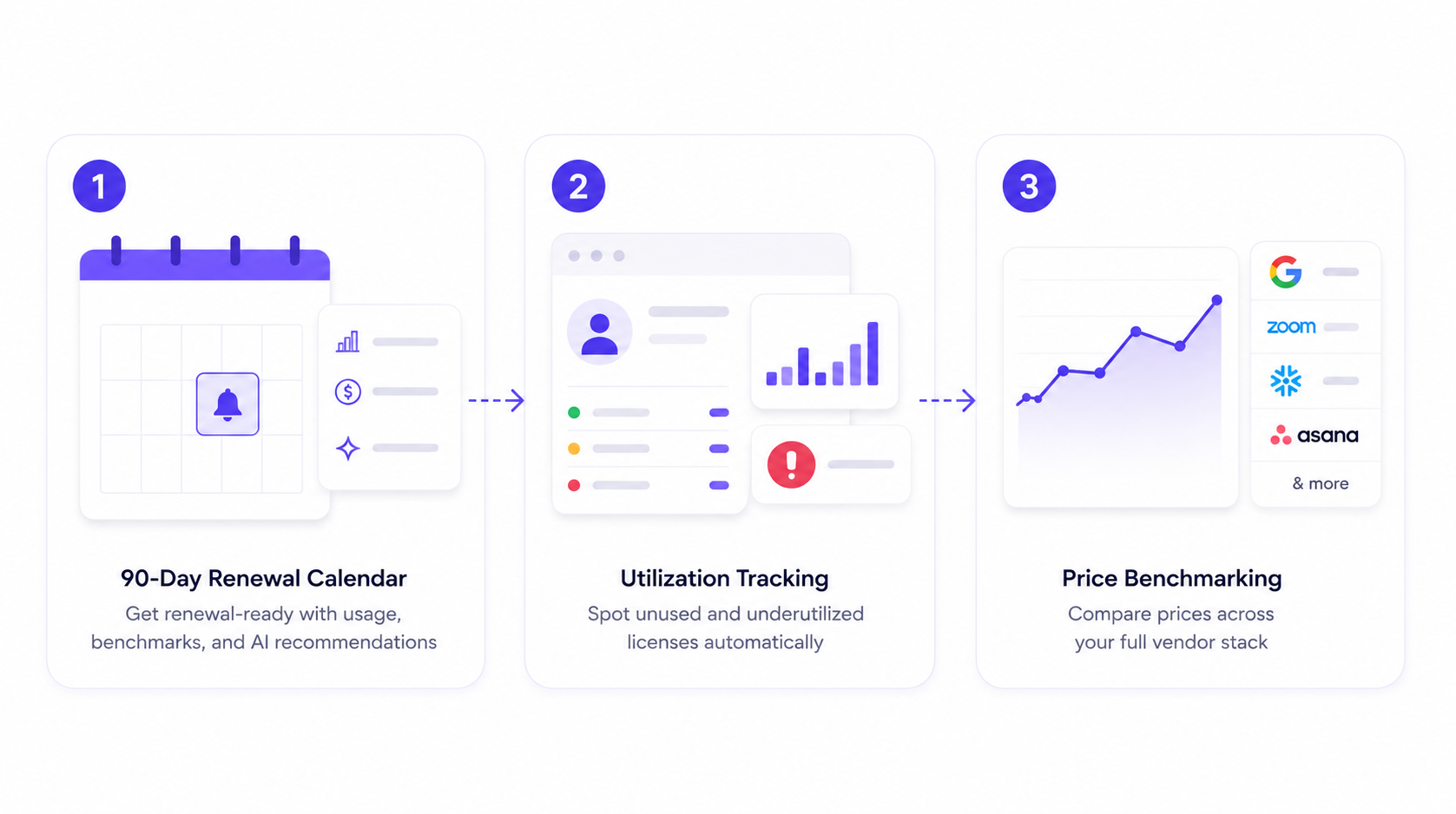
Three-step AI-powered renewal workflow showing how CloudEagle.ai combines a 90-day renewal calendar, license utilization tracking, and real-time price benchmarking to help procurement teams negotiate better SaaS renewals.

a) The 90-Day Renewal Calendar

What a calendar reminder misses: everything except the date. It tells you a renewal is coming. It doesn't tell you what to do about it.

How CloudEagle.ai helps:

  • Triggers the first renewal workflow 90 days before the contract date
  • Delivers that first message with current usage, benchmark pricing, alternative vendors, and an AI-generated recommendation already attached
  • Replaces the blank spreadsheet with a briefing packet, built before anyone has to ask for one

b) Utilization Tracking Beyond Logins

What login-based tracking misses: whether a user touched the feature your contract is priced around, whether their role still justifies their tier, and whether they've been inactive since the day they were provisioned. 

Most teams don't catch this drift until a true-up forces the conversation, because nobody was tracking provisioned seats against actual usage in real time.

How CloudEagle.ai helps:

  • Tracks usage at the feature and role level, not just the session level, so "active" actually means active

Application inventory dashboard displaying SaaS usage, license allocation, utilization percentage, renewal dates, vendor spend, duplicate applications, and confidence scores, giving IT teams a centralized view to identify underutilized software, manage renewals, and optimize SaaS spend.

  • Flags provisioned, but unused seats are automatically provisioned instead of waiting for an annual audit to surface them
  • Surfaces the gap between licenses purchased and licenses actually needed, continuously.

c) Price Benchmarking Across the Full Vendor Stack

What no benchmark means: you're walking into the negotiation blind. With nothing to compare the vendor's number against, you have no way to know if you're being quoted a fair price or simply accepting whatever figure they hand you, and you end up overpaying for it. Analyst benchmarking is strong for the AWS-and-Salesforce tier of vendor and thin for everything else most companies actually run day to day, which leaves that blind spot wide open for most of a real stack.

How CloudEagle.ai helps:

  • Pulls price benchmarking and historical pricing trends from its own SaaS buying team, plus market intelligence gathered across vendor releases and procurement networks
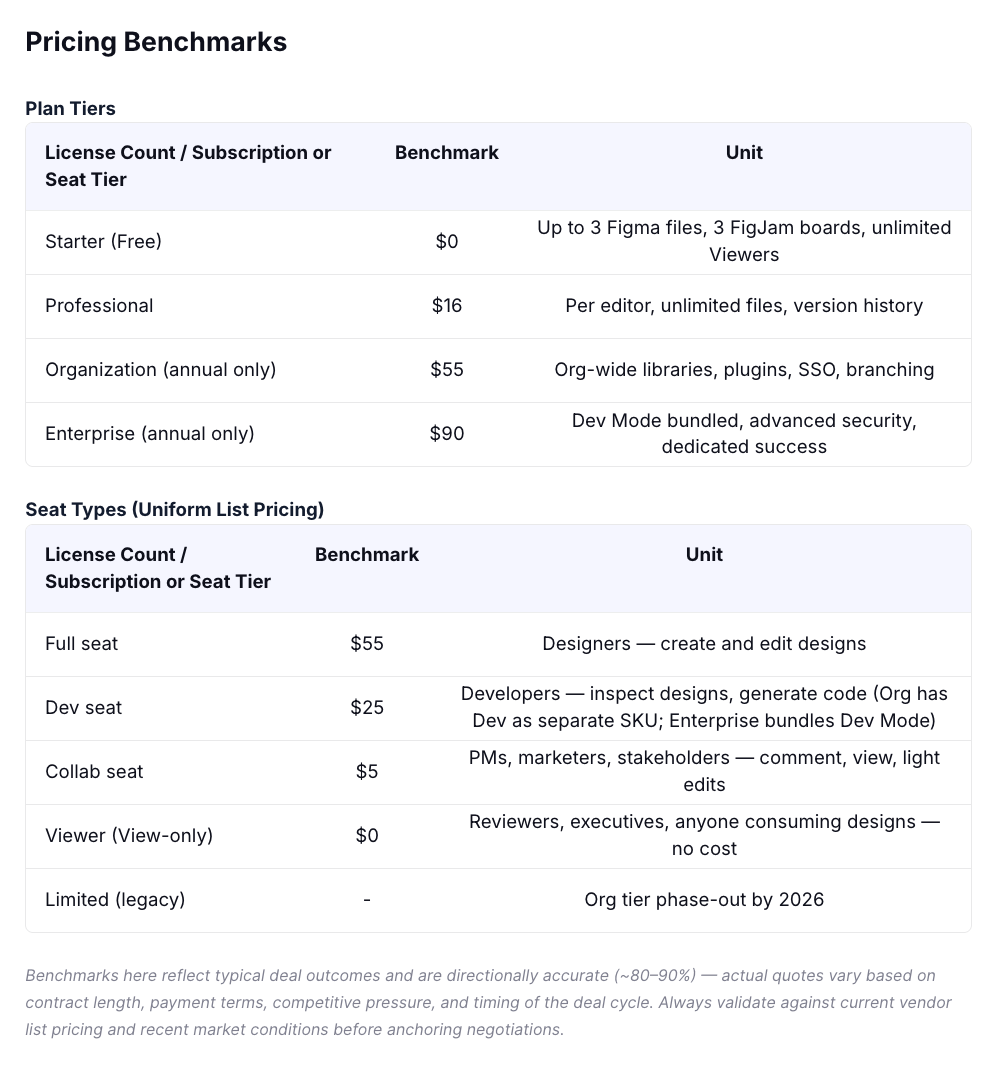
Pricing benchmark dashboard comparing SaaS plan tiers and seat types with market benchmark pricing, licensing models, and included features to support data-driven vendor negotiations and renewal planning.

  • Covers the mid and long tail of vendors, not just the handful that show up in a standard analyst report
  • Makes the benchmark available on demand, 24/7, instead of requiring a scheduled call to confirm whether last year's price still holds

4. The Negotiation Levers That Brief Actually Unlocks

Data sitting in a dashboard doesn't win a negotiation. What it unlocks does:

  • Rightsize before the call: With unused and underutilized seats already flagged, the deprovisioning workflow runs on its own: emails go out to license holders, responses get tracked, and access gets removed for anyone who doesn't respond. The renewal opens with a seat count that's already clean, and the vendor can't charge you for licenses that no longer exist.
  • Anchor the counteroffer on a real number: A benchmark that covers the vendor you're actually negotiating, turns the opening offer from a guess into a position.
  • Use the alternative as a real walk-away: The same renewal brief includes vendors the org could realistically switch to, evaluated against the same usage and pricing data already in hand. Knowing the alternative exists, and that someone's actually looked at it, is what makes the walk-away credible.

None of this depends on someone remembering to chase it:

  • Tasks are routed to specific owners with deadlines attached, and escalate automatically if a deadline slips
  • Approvals move through Slack and Teams instead of a portal nobody opens
  • Tickets sync directly into Jira and Ironclad, so nothing gets copy-pasted between systems and lost in the handoff

The cost of skipping this shows up in teams still running renewal prep as a recurring manual cycle: the same export-and-reconcile process repeated every two weeks or every renewal, with a person dedicating real, ongoing hours to a task that only gets harder as the decision window stays narrow.

The underlying data goes stale between cycles.

Your Renewal Brief Should Win the Negotiation Before the Call Starts.

Get the checklist that builds your leverage in advance.
Download Checklist

5. FAQs

How do you negotiate a contract renewal? 

Start with data, not the vendor's quote. Know your actual usage, not just logins. Get a benchmark for what comparable companies pay. Rightsize your seat count before the call. Anchor your counteroffer on that, and back it with a credible alternative.

What are the 5 stages of the negotiation process? 

Preparation, information exchange, bargaining, closing, and implementation. Most renewal negotiations get lost in the first stage. Without usage and benchmark data going in, there's nothing real to bargain with later.

At which stage of negotiation do you assemble the information you have gathered to support your position? 

Preparation, before any bargaining starts. This is where the renewal brief gets built: utilization data, benchmark pricing, a rightsized seat count, and a viable alternative, all pulled together before the AE's call.

What should be done before renewing a contract? 

Pull current utilization by user and feature, check it against a market benchmark for your tier, identify and remove unused or duplicate licenses, and confirm the renewal date and opt-out window with enough runway to actually negotiate.

Vendors have had your usage data this whole time. CloudEagle.ai makes sure you do too, 90 days before they call.

See CloudEagle's Renewal Intelligence in Action Book a Demo

Advertisement for a SaaS Subscription Tracking Template with a call-to-action button to download and a partial graphic of a tablet showing charts.Banner promoting a SaaS Agreement Checklist to streamline SaaS management and avoid budget waste with a call-to-action button labeled Download checklist.Blue banner with text 'The Ultimate Employee Offboarding Checklist!' and a black button labeled 'Download checklist' alongside partial views of checklist documents from cloudeagle.ai.Digital ad for download checklist titled 'The Ultimate Checklist for IT Leaders to Optimize SaaS Operations' by cloudeagle.ai, showing checklist pages.Slack Buyer's Guide offer with text 'Unlock insider insights to get the best deal on Slack!' and a button labeled 'Get Your Copy', accompanied by a preview of the guide featuring Slack's logo.Monday Pricing Guide by cloudeagle.ai offering exclusive pricing secrets to maximize investment with a call-to-action button labeled Get Your Copy and an image of the guide's cover.Blue banner for Canva Pricing Guide by cloudeagle.ai offering a guide to Canva costs, features, and alternatives with a call-to-action button saying Get Your Copy.Blue banner with white text reading 'Little-Known Negotiation Hacks to Get the Best Deal on Slack' and a white button labeled 'Get Your Copy'.Blue banner with text 'Little-Known Negotiation Hacks to Get the Best Deal on Monday.com' and a white button labeled 'Get Your Copy'.Blue banner with text 'Little-Known Negotiation Hacks to Get the Best Deal on Canva' and a white button labeled 'Get Your Copy'.Banner with text 'Slack Buyer's Guide' and a 'Download Now' button next to images of a guide titled 'Slack Buyer’s Guide: Features, Pricing & Best Practices'.Digital cover of Monday Pricing Guide with a button labeled Get Your Copy on a blue background.Canva Pricing Guide cover with a button labeled Get Your Copy on a blue gradient background.

Enter your email to
unlock the report

Oops! Something went wrong while submitting the form.
License Count
Benchmark
Per User/Per Year

Enter your email to
unlock the report

Oops! Something went wrong while submitting the form.
License Count
Benchmark
Per User/Per Year

Enter your email to
unlock the report

Oops! Something went wrong while submitting the form.
Notion Plus
License Count
Benchmark
Per User/Per Year
100-500
$67.20 - $78.72
500-1000
$59.52 - $72.00
1000+
$51.84 - $57.60
Canva Pro
License Count
Benchmark
Per User/Per Year
100-500
$74.33-$88.71
500-1000
$64.74-$80.32
1000+
$55.14-$62.34

Enter your email to
unlock the report

Oops! Something went wrong while submitting the form.

Enter your email to
unlock the report

Oops! Something went wrong while submitting the form.
Zoom Business
License Count
Benchmark
Per User/Per Year
100-500
$216.00 - $264.00
500-1000
$180.00 - $216.00
1000+
$156.00 - $180.00

Enter your email to
unlock the report

Oops! Something went wrong while submitting the form.

Get the Right Security Platform To Secure Your Cloud Infrastructure

Please enter a business email
Thank you!
The 2023 SaaS report has been sent to your email. Check your promotional or spam folder.
Oops! Something went wrong while submitting the form.

Access full report

Please enter a business email
Thank you!
The 2023 SaaS report has been sent to your email. Check your promotional or spam folder.
Oops! Something went wrong while submitting the form.

Your renewal prep gives you a vendor quote, a login report, and a calendar reminder. That's it.

It won't tell you that 120 of your 500 licensed users haven't touched the product in 90 days. It won't tell you what a company your size actually pays for the same tier, only what this vendor wants you to think the market rate is.

Nor would it tell you that the seat count you're about to renew already includes a few dozen logins nobody's used since onboarding.

That's the renewal data problem, and it has a direct consequence: you walk into the call with no upper hand, and you end up agreeing to whatever the vendor quotes. The vendor isn't going to hand you the data to change that.

The answer is utilization data and price benchmarking, pulled together before the renewal call instead of during it. CloudEagle.ai builds both into one renewal workflow. Here is exactly what that takes.

TL;DR

  • Procurement teams negotiate on login counts and stale spreadsheets, which is why most renewals close at last year's price
  • Walking in prepared means three things: real utilization data, a benchmark to anchor your number, and a rightsized seat count
  • CloudEagle builds all three automatically: feature-level usage tracking, full-stack price benchmarking, and a 90-day renewal calendar
  • That data becomes leverage: a clean seat count, a benchmark-anchored counteroffer, and a walk-away that isn't a bluff
  • The result: the weeks before renewal go to negotiating, not to figuring out what you're even paying for

1. Why Procurement Walks Into Renewals Without the Data They Need

Most teams are short on data because the systems they use were never built to track the right things.

The Gap What It Actually Means
Usage gets measured by login, not by feature A login shows the app was opened, not whether the priced-around capability was used, or whether the user has gone inactive since onboarding.
Renewal dates live in a spreadsheet nobody owns No automated trigger, escalation, or opt-out alert. The AE's email becomes the first signal after the negotiation window has started closing.
Benchmark data thins out fast past the top-tier vendors Easy to find for AWS or Salesforce. Nearly impossible for Gong, Calendly, and the mid-tier tools that make up most real stacks. Procurement negotiates with nothing to compare against.

Across all three gaps, one thing is missing: a single source of truth that updates continuously, instead of getting rebuilt by hand every renewal cycle.

A meaningful share of provisioned licenses simply goes unused across most stacks. The gap stays invisible until someone finally checks the numbers, usually right before a renewal forces the question.

A vendor selling into that gap sees a clean number on their end. Procurement doesn't see the gap at all.

Vendors negotiate with your data. You should, too.

Your Vendor Knows What You'll Pay. Do You?

Get the checklist that flips the negotiation in your favor.
Download Checklist

2. What Walking In Prepared Actually Requires

Set the vendor aside for a moment. Regardless of what tool gets you there, here's what each requirement actually looks like in practice.

What You Need What it Looks Like in Practice The Manual Workaround
Provisioned count vs. actual usage 451 licenses purchased, 649 users provisioned: surfaced as a true-up, not a negotiating point, because nobody tracked the gap in real time. Reconcile the IdP provisioning list against the vendor invoice yourself, before renewal.
Per-instance usage $1M Jira core license plus $300K/year in per-instance plugins, negotiated blind every year with no visibility into which instances were even active. Ask the vendor for an instance-by-instance breakdown ahead of renewal.
Continuous tracking Adoption and spend trends are tracked over months. Critical for consumption-based tools, where a spend threshold needs catching before the overspend, not after. Pull and compare usage reports on a set monthly cadence.
Who to rightsize, not just how many "How many can we downgrade, and who are they?" A name-and-tier list drives action; a vague percentage doesn't. Cross-reference usage data against your org chart to build the downgrade list by name.

Without a tool, all four rows get built the same way: export to Excel, run the VLOOKUPs, build the pivot table, decide who to contact, repeat by hand every cycle.

It works. It's also slow enough to go stale by call time, and a strong candidate for automation.

Get these four sorted with runway, and the renewal stops being a reaction. It becomes something procurement controls.

3. How CloudEagle.ai Builds the Renewal Brief Before the Vendor Calls

This is where the three requirements above turn into something that runs on its own instead of getting rebuilt by hand every cycle.

Three-step AI-powered renewal workflow showing how CloudEagle.ai combines a 90-day renewal calendar, license utilization tracking, and real-time price benchmarking to help procurement teams negotiate better SaaS renewals.

a) The 90-Day Renewal Calendar

What a calendar reminder misses: everything except the date. It tells you a renewal is coming. It doesn't tell you what to do about it.

How CloudEagle.ai helps:

  • Triggers the first renewal workflow 90 days before the contract date
  • Delivers that first message with current usage, benchmark pricing, alternative vendors, and an AI-generated recommendation already attached
  • Replaces the blank spreadsheet with a briefing packet, built before anyone has to ask for one

b) Utilization Tracking Beyond Logins

What login-based tracking misses: whether a user touched the feature your contract is priced around, whether their role still justifies their tier, and whether they've been inactive since the day they were provisioned. 

Most teams don't catch this drift until a true-up forces the conversation, because nobody was tracking provisioned seats against actual usage in real time.

How CloudEagle.ai helps:

  • Tracks usage at the feature and role level, not just the session level, so "active" actually means active

Application inventory dashboard displaying SaaS usage, license allocation, utilization percentage, renewal dates, vendor spend, duplicate applications, and confidence scores, giving IT teams a centralized view to identify underutilized software, manage renewals, and optimize SaaS spend.

  • Flags provisioned, but unused seats are automatically provisioned instead of waiting for an annual audit to surface them
  • Surfaces the gap between licenses purchased and licenses actually needed, continuously.

c) Price Benchmarking Across the Full Vendor Stack

What no benchmark means: you're walking into the negotiation blind. With nothing to compare the vendor's number against, you have no way to know if you're being quoted a fair price or simply accepting whatever figure they hand you, and you end up overpaying for it. Analyst benchmarking is strong for the AWS-and-Salesforce tier of vendor and thin for everything else most companies actually run day to day, which leaves that blind spot wide open for most of a real stack.

How CloudEagle.ai helps:

  • Pulls price benchmarking and historical pricing trends from its own SaaS buying team, plus market intelligence gathered across vendor releases and procurement networks

Pricing benchmark dashboard comparing SaaS plan tiers and seat types with market benchmark pricing, licensing models, and included features to support data-driven vendor negotiations and renewal planning.

  • Covers the mid and long tail of vendors, not just the handful that show up in a standard analyst report
  • Makes the benchmark available on demand, 24/7, instead of requiring a scheduled call to confirm whether last year's price still holds

4. The Negotiation Levers That Brief Actually Unlocks

Data sitting in a dashboard doesn't win a negotiation. What it unlocks does:

  • Rightsize before the call: With unused and underutilized seats already flagged, the deprovisioning workflow runs on its own: emails go out to license holders, responses get tracked, and access gets removed for anyone who doesn't respond. The renewal opens with a seat count that's already clean, and the vendor can't charge you for licenses that no longer exist.
  • Anchor the counteroffer on a real number: A benchmark that covers the vendor you're actually negotiating, turns the opening offer from a guess into a position.
  • Use the alternative as a real walk-away: The same renewal brief includes vendors the org could realistically switch to, evaluated against the same usage and pricing data already in hand. Knowing the alternative exists, and that someone's actually looked at it, is what makes the walk-away credible.

None of this depends on someone remembering to chase it:

  • Tasks are routed to specific owners with deadlines attached, and escalate automatically if a deadline slips
  • Approvals move through Slack and Teams instead of a portal nobody opens
  • Tickets sync directly into Jira and Ironclad, so nothing gets copy-pasted between systems and lost in the handoff

The cost of skipping this shows up in teams still running renewal prep as a recurring manual cycle: the same export-and-reconcile process repeated every two weeks or every renewal, with a person dedicating real, ongoing hours to a task that only gets harder as the decision window stays narrow.

The underlying data goes stale between cycles.

Your Renewal Brief Should Win the Negotiation Before the Call Starts.

Get the checklist that builds your leverage in advance.
Download Checklist

5. FAQs

How do you negotiate a contract renewal? 

Start with data, not the vendor's quote. Know your actual usage, not just logins. Get a benchmark for what comparable companies pay. Rightsize your seat count before the call. Anchor your counteroffer on that, and back it with a credible alternative.

What are the 5 stages of the negotiation process? 

Preparation, information exchange, bargaining, closing, and implementation. Most renewal negotiations get lost in the first stage. Without usage and benchmark data going in, there's nothing real to bargain with later.

At which stage of negotiation do you assemble the information you have gathered to support your position? 

Preparation, before any bargaining starts. This is where the renewal brief gets built: utilization data, benchmark pricing, a rightsized seat count, and a viable alternative, all pulled together before the AE's call.

What should be done before renewing a contract? 

Pull current utilization by user and feature, check it against a market benchmark for your tier, identify and remove unused or duplicate licenses, and confirm the renewal date and opt-out window with enough runway to actually negotiate.

Vendors have had your usage data this whole time. CloudEagle.ai makes sure you do too, 90 days before they call.

See CloudEagle's Renewal Intelligence in Action Book a Demo

CloudEagle.ai recognized in the 2025 Gartner® Magic Quadrant™ for SaaS Management Platforms
Download now
gartner chart
5x
Faster employee
onboarding
80%
Reduction in time for
user access reviews
30k
Workflows
automated
$15Bn
Analyzed in
contract spend
$2Bn
Saved in
SaaS spend

Streamline SaaS governance and save 10-30%

Book a Demo with Expert
CTA image