
%201.svg)


HIPAA Compliance Checklist for 2025

TL;DR
- Eventbrite pricing in 2026 is 3.7% plus $1.79 per paid ticket, plus 2.9% payment processing per order. Free events cost nothing.
- Eventbrite Pro starts at $15 a month and buys email marketing volume. It does not lower your per-ticket fees, which is the most common and most expensive misconception about this platform.
- The flat $1.79 is what hurts. On a $10 ticket the total fee is roughly 25% of face value. On a $100 ticket it is closer to 8%.
- Because fees come out of the transaction rather than arriving as a bill, Eventbrite rarely appears in SaaS spend data at all. Neither does the account holding your attendees' personal information.
- CloudEagle.ai finds every event account in your company, shows who controls it, and makes sure it does not walk out the door with the person who created it.
Eventbrite publishes its fees plainly, and you can read the whole schedule in about thirty seconds. That is not the hard part.
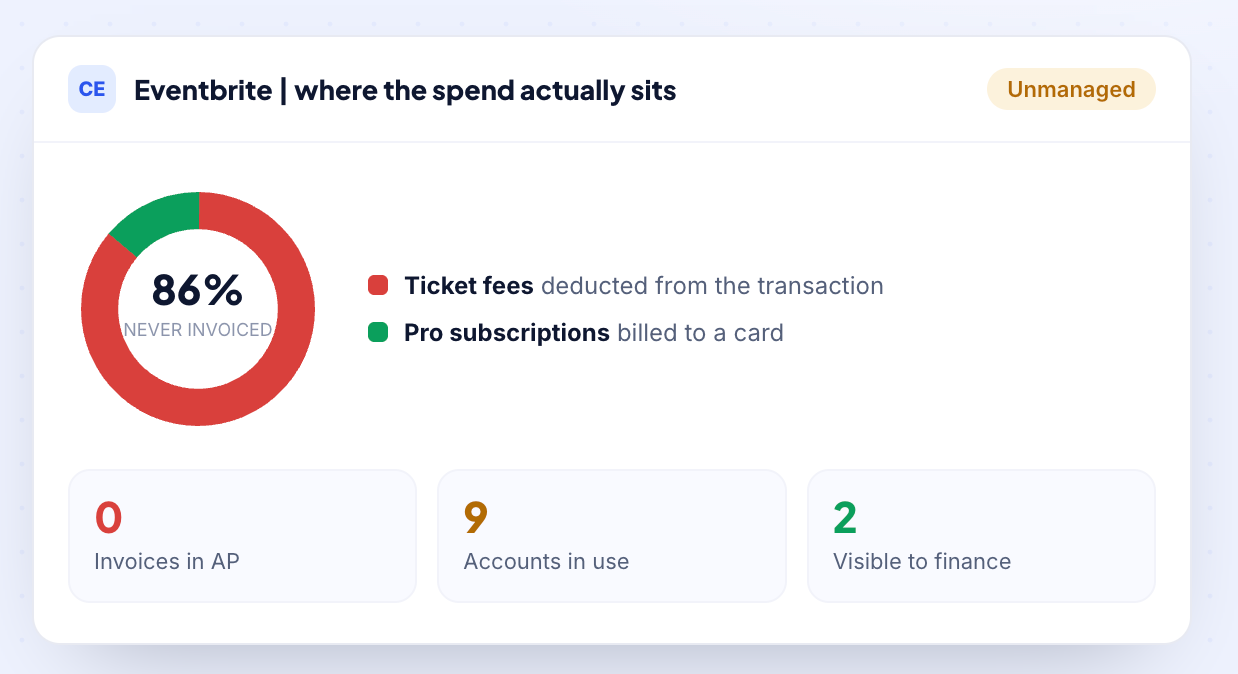
The hard part is that Eventbrite takes its cut out of the ticket transaction instead of sending you a bill, so the spend never reaches accounts payable, never lands on a card statement, and never turns up in a SaaS spend report.
Meanwhile anyone with a work email can create an organizer account in a few minutes. The question worth asking is not what Eventbrite pricing looks like on the page. It is how many Eventbrite accounts your company already has, and whether anyone has ever seen the total.
1. What Eventbrite pricing actually costs in 2026
The fees on a paid ticket
Eventbrite charges nothing to publish events and nothing at all on free events. Paid tickets carry two separate fees.
Fees from Eventbrite's organizer pricing page, July 2026. Eventbrite has restructured its plans more than once in two years, so confirm the live figures before you commit.
By default the ticket buyer pays these fees at checkout. You can choose to absorb them into the ticket price instead, in which case they come out of your revenue.
The number that matters is not the percentage, it is the flat $1.79. Because it does not scale, it punishes cheap tickets hardest:
Service fee plus payment processing, calculated on face value. Rounded.
A $10 community meetup ticket loses roughly a quarter of its value to fees. A $100 conference seat loses about a twelfth. If you run high-volume, low-priced events, that gap is the single biggest lever in your Eventbrite cost, and it is a pricing decision rather than a negotiation.
What Eventbrite Pro does and does not do
This is worth stating clearly because much of the published advice gets it wrong. Eventbrite Pro starts at $15/month and lets you send up to 10,000 marketing emails per day. That is its primary benefit.
What Pro does not do:
- It does not reduce your service fees.
- It does not reduce your payment processing fees.
- It does not lower your per-ticket cost.
If you upgrade expecting cheaper ticketing, your costs will stay the same, you will simply be paying an extra $15/month. Pro only makes sense if your constraint is email marketing volume, not ticketing costs.
What changed under new ownership
In March 2026, Bending Spoons acquired Eventbrite for approximately $505 million, took the company private, and delisted it from the NYSE. Co-founder Julia Hartz also stepped down as CEO, and the older Flex plan was retired.
These changes do not affect today's pricing. However, ownership changes are often an early signal that packaging and pricing may be revised. Since Bending Spoons has stated its intention to reshape the product, it is worth reviewing Eventbrite's fee schedule before each event cycle rather than assuming last year's pricing still applies.
SaaS and AI Spend Calculator
CloudEagle.ai customers typically recover 10–30% of annual SaaS and AI spend. Answer 12 questions to benchmark your maturity, see your recoverable spend estimate, and get a personalized 3-page savings report.
No signup required to start · Instant results
Enter your work email to reveal your personalized estimate, maturity scores, and a downloadable 3-page report.
—
Based on your responses, you are likely overspending approximately $XXXX. There may be unused licenses, overlapping tools, or suboptimal pricing across your SaaS and AI ecosystem.
Download your report for the specific gaps, the consequences if left unaddressed, and the first action to recover spend on each one.

The areas below scored 1 or 2 in your assessment. Each represents a specific gap where spend is leaking or optimization is being left on the table, with a clear first action to address it.
CloudEagle.ai is the AI-powered command center for SaaS, AI, and identity governance. Trusted by RingCentral, Automation Anywhere, Shiji, and Rec Room, the platform has processed $20B+ in spend and delivered $2B+ in savings — typically 10–30% of annual SaaS and AI spend. The gaps surfaced in this report are exactly what CloudEagle was built to close.
Most organizations are governing a fraction of their actual SaaS and AI footprint. CloudEagle.ai builds a real-time inventory through 500+ direct integrations across SSO, finance, HRIS, browser, firewall, and contract data — surfacing every sanctioned tool, every shadow purchase, and every AI tool employees adopted without IT approval. Onboarding takes 30 minutes, with usable visibility from day one.
Unused licenses, duplicate tools, and over-tiered subscriptions accumulate silently between renewal cycles. CloudEagle.ai runs continuous license harvesting, flags overlapping tools across departments, and arms renewals with peer pricing benchmarks and usage data — turning insights into action through no-code Slack-enabled workflows. Customers typically recover 10–30% of annual SaaS spend within the first 90 days.
AI tool costs are usage-based, token-driven, and largely invisible until invoices arrive. CloudEagle.ai tracks AI tool adoption across the organization, monitors usage against budget thresholds, enforces approval workflows for new AI tools, and detects sensitive content shared with public AI services — giving finance, IT, and security a shared real-time view before overruns hit the P&L.
In a focused session with a CloudEagle.ai specialist, we map your specific spend profile against our optimization framework and show you exactly where your savings are — across unused licenses, duplicate tools, renewal negotiation leverage, and AI spend governance.
2. How CloudEagle.ai gets Eventbrite spend and access under control
CloudEagle.ai works this problem in the order it actually occurs. It finds every place Eventbrite is being used, separates the spend that bills from the spend that does not, then governs who holds those accounts and what happens when they leave.
Each lever is useful alone. Together they turn a tool nobody inventoried into one you can actually see.
Find the Eventbrite Accounts That Never Touched Procurement
Eventbrite often spreads outside IT. Marketing, HR, and regional teams create separate accounts using work emails and company cards, without involving procurement.
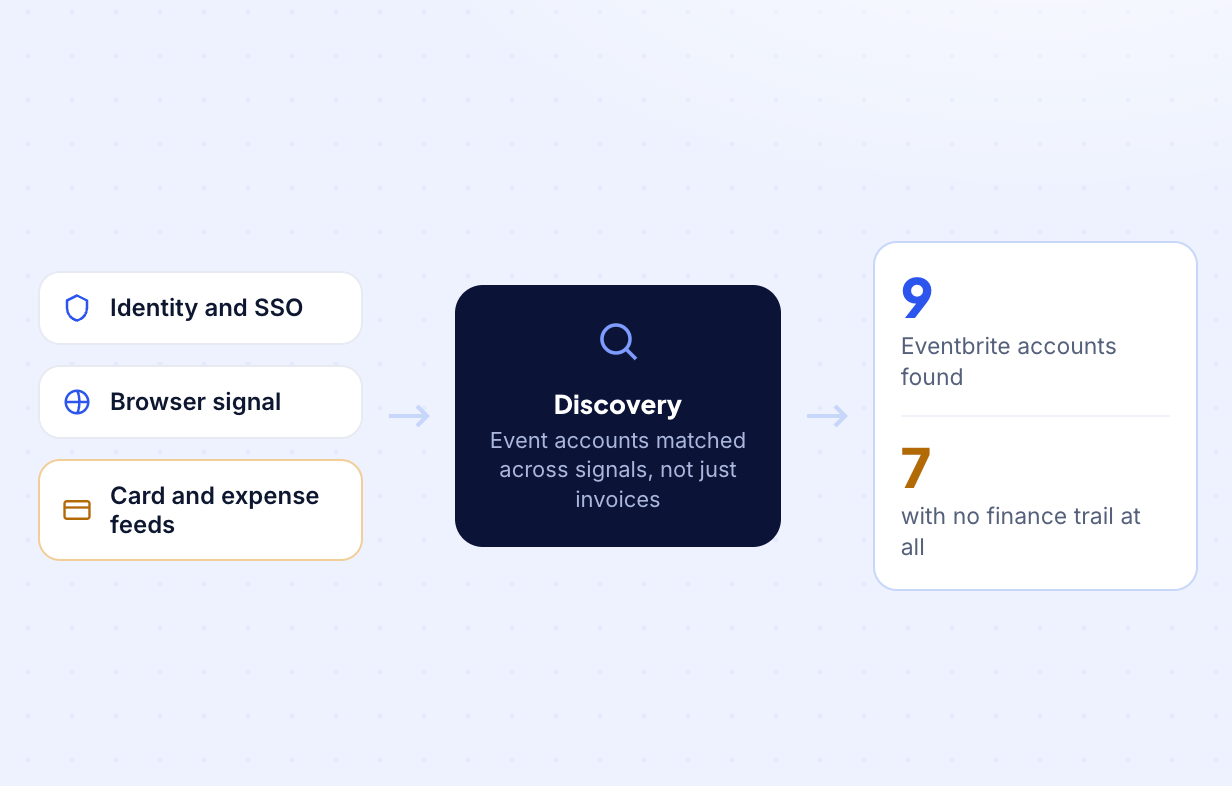
CloudEagle.ai combines browser, identity, SSO, and finance signals to discover every Eventbrite account, including those that never appeared in procurement records or generated a subscription invoice.
How it helps
- Discovers Eventbrite accounts created outside IT and procurement
- Combines browser, identity, SSO, and finance signals into one inventory
- Identifies shadow Eventbrite accounts across the organization
- Gives IT and procurement a complete view of Eventbrite usage
Separate Subscription Spend From Ticket Fees
Once every account is visible, CloudEagle.ai separates recurring subscriptions from transaction-based ticket fees. Each affects costs differently and should be managed separately.
This gives finance teams a clearer view of Eventbrite spending and highlights where optimization opportunities actually exist.
How it helps
- Separates recurring Pro subscriptions from ticketing fees
- Identifies every active Eventbrite subscription
- Consolidates Eventbrite-related spend in one place
- Highlights opportunities to reduce recurring costs
Match Account Access to Business Need With Access Reviews
Eventbrite organizer accounts can export attendee data, issue refunds, modify ticket pricing, and update payout settings. These permissions often remain long after an event has ended.
CloudEagle.ai helps managers regularly review organizer access so only users who still need administrative permissions retain them.
How it helps
- Reviews organizer access for employees and external collaborators
- Identifies users with unnecessary administrative permissions
- Removes excess access without disrupting event operations
- Improves governance through recurring access reviews
If you want to learn more about the process, read our guide to User Access Reviews, which explains how to run access certifications on a recurring schedule instead of treating them as a last-minute audit exercise.
Extend Offboarding to Eventbrite Accounts
Eventbrite accounts created outside IT are easy to miss during employee offboarding. Former employees can retain access to attendee data, event history, and payout settings if those accounts remain undiscovered.
CloudEagle.ai brings discovered Eventbrite accounts into your offboarding workflow, ensuring access is revoked alongside the employee's other business applications.
How it helps
- Identifies Eventbrite accounts owned by departing employees
- Flags accounts created outside standard IT processes
- Revokes access through automated offboarding workflows
- Protects attendee data and payout configurations from lingering access
Know Every Eventbrite Account in Your Organization.


3. What companies actually pay for Eventbrite?
There is no per-seat benchmark for Eventbrite, because there are no seats. What CloudEagle.ai benchmark data measures instead is the effective rate, and what volume unlocks.
Start with what lands in your account when you absorb the service fee rather than passing it on:
Service fee only. Payment processing of 2.9% comes on top. CloudEagle.ai benchmark data, last refreshed 20 July 2026.
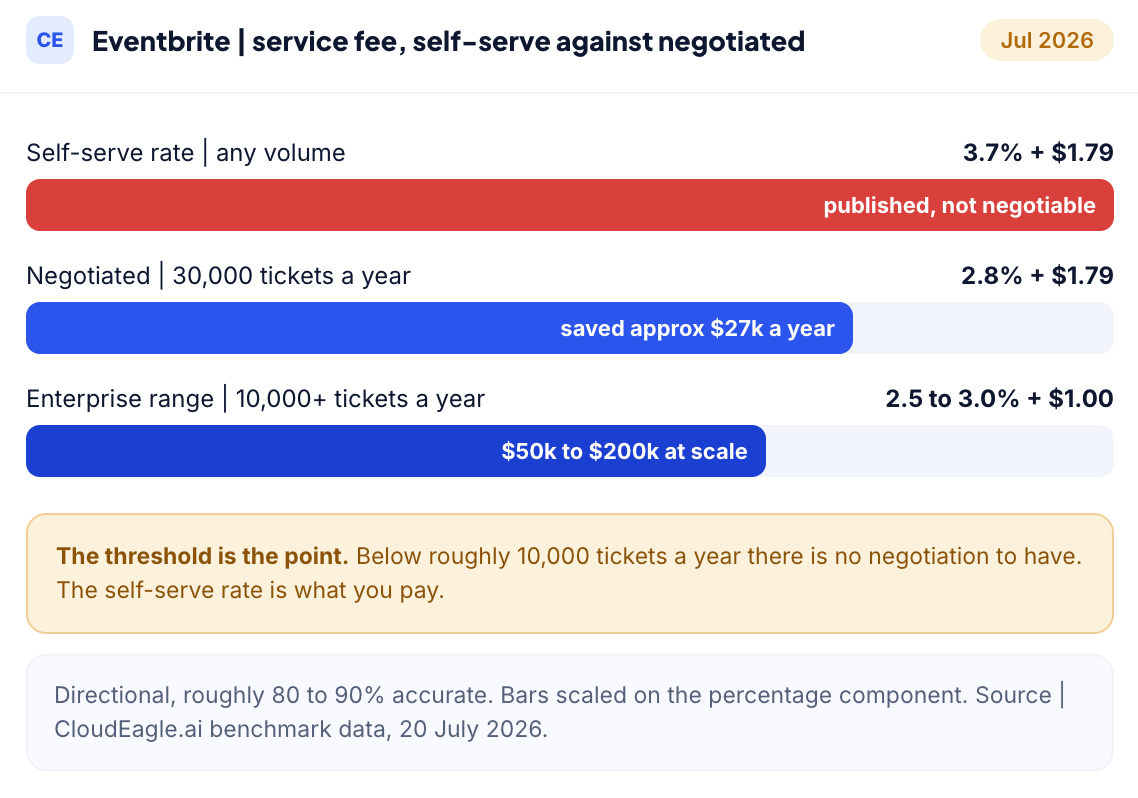
The published rate is not always the rate you pay, but discounts usually start at around 10,000 tickets a year.
Below that threshold, most organizers pay the self-serve fee. Above it, Eventbrite's enterprise team can often reduce the service fee from 3.7% + $1.79 to around 2.5% to 3.0% + $1.00.
That small change adds up. One organizer selling 30,000 tickets a year negotiated the fee from 3.7% to 2.8% and saved about $27,000 annually.
Negotiations are strongest when you have:
- The right timing, usually 2 to 3 months before peak event season, and a documented alternative like Universe, which helped one 50,000-attendee organizer save around $42,000 a year by switching.
Benchmark note: These figures are directional, roughly 80% to 90% accurate. Actual outcomes move on contract length, payment terms, competitive pressure, and where you land in the event season. Validate against current published pricing before you anchor a negotiation. Source: CloudEagle.ai benchmark data, 20 July 2026, and price benchmarking and buying guides.
4. Best practices for reducing Eventbrite costs
None of these need a negotiation. They are all decisions you control.
- Price tickets with the flat fee in mind: The $1.79 is fixed regardless of ticket price, so it hits cheap tickets hardest. Consolidating four $15 sessions into one $60 pass cuts the flat-fee drag by three quarters.
- Decide deliberately whether to absorb or pass fees: Passing fees protects your budget and raises the price your attendee sees. Absorbing them protects conversion and comes out of your revenue. Both are defensible. Drifting into one by default is not.
- Do not buy Pro expecting cheaper tickets: It is an email allowance. Buy it for promotion volume or do not buy it.
- Consolidate organizer accounts under the business, not the person: One account owned by a shared identity beats six owned by individuals who may not be here next year.
- Check nonprofit eligibility: Eventbrite offers discounted pricing for qualifying nonprofits, and it is worth a support conversation if you are eligible.
- Re-check the fee schedule each event cycle: Under new ownership this is no longer a set-and-forget number.

5. What is actually inside an Eventbrite account
The pricing discussion misses the bigger risk. It is not just what the account costs. It is what the account contains.
A typical Eventbrite account stores:
- Attendee names, email addresses, job titles, dietary requirements, accessibility needs, customer and prospect lists, plus payout and banking details.
That is a significant amount of personal and commercial data. If the account was created by a department with no SSO, no inventory, and no access reviews, it is a governance gap, not just another software subscription. The spend is usually the smaller issue.
6. When consolidation beats another ticketing tool
Before you switch platforms, check whether the real problem is the fee or the fragmentation.
If four teams run four different ticketing tools, the fee is not what is costing you. The duplication is, along with four copies of attendee data spread across four systems under four different owners.
Application rationalization is the process of identifying that overlap. For event tooling, it often delivers a faster return than a full migration.
If you do compare platforms, the landscape looks like this:
- Ticket Tailor charges a flat monthly rate instead of per-ticket fees, making it a better fit for high-volume, low-price events. Eventzilla serves a similar mid-market segment with per-registration pricing. Cvent is the enterprise option, offering broader capabilities at a significantly higher price.
One more thing to keep in mind is that migration costs rarely appear in comparison tables. They include attendee data, historical reporting, and any integrations you have already built.
Also check that a platform is still operating before you commit. Brown Paper Tickets, which is still recommended in many older comparison posts, is being retired and its business has moved to Events.com.
7. Get your event accounts under control
Eventbrite pricing is easy to look up and easy to underestimate. The published rate is only the visible part. The rest is the accounts nobody knows about, the attendee data inside them, and the fact that none of it generates the invoice that would normally make a tool visible to finance or IT.
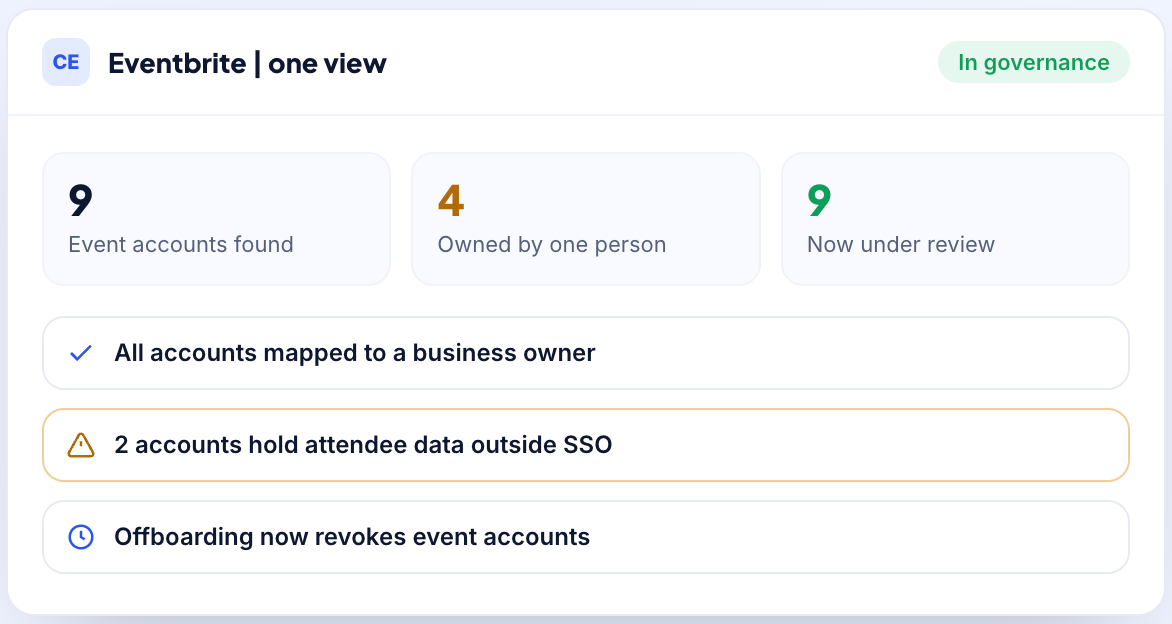
CloudEagle.ai gives you that missing view: every event account in the company, who controls each one, and what happens to it when they leave.
Book a demo and see what is already running in your name.
Frequently asked questions
- What does Eventbrite actually charge per ticket?
On paid tickets, 3.7% plus $1.79 as a service fee, plus 2.9% payment processing on the order. Free events carry no fees. By default the attendee pays these at checkout unless you choose to absorb them.
- Does Eventbrite Pro lower my ticket fees?
No. Pro starts at $15 a month and increases your email marketing allowance to as many as 10,000 sends a day. Per-ticket service and processing fees are unchanged. This is the most common misunderstanding about Eventbrite pricing and it costs people real money.
- Is Eventbrite really free for free events?
Yes. Publishing is unlimited and free, and free tickets carry no service or payment processing fee. This is also why Eventbrite so often sits outside any spend tracking: for many companies it genuinely costs nothing, right up until someone sells a ticket.
- Who pays the Eventbrite fees, me or my attendees?
Your attendees, by default. You can switch to absorbing the fees when you set up ticket types, which lowers the price shown at checkout and reduces your net per ticket by the same amount.
- Are Eventbrite fees negotiable?
Not on the self-serve rate, which is published and applies to everyone. Eventbrite runs a sales partnership track for high-volume and complex event programmes where terms are custom, so volume is the thing that opens a conversation, not asking.
Know Every Eventbrite Account in Your Organization.


.avif)


.avif)
.avif)




.png)







.avif)
.avif)
.avif)


