You need to enable JavaScript in order to use the AI chatbot tool powered by ChatBot

Calendly Pricing Guide: Control Scheduling Access and Enterprise Costs

Share via:
blog-cms-banner-bg
Little-Known Negotiation Hacks to Get the Best Deal on Slack
cta-bg-blogDownload Your Copy

HIPAA Compliance Checklist for 2025

Download PDF

Calendly pricing decisions often start with a simple goal: eliminating the back-and-forth of scheduling meetings.

But as adoption grows across sales, recruiting, customer success, and leadership teams, Calendly becomes more than a scheduling tool. It becomes an external gateway into employee calendars, availability patterns, and meeting workflows.

For CIOs and CISOs, this introduces a different layer of considerations. Who can generate public booking links? How are meeting integrations connected to internal systems like CRMs and video platforms?

In this Calendly pricing guide, we break down plans, features, and costs while also examining how enterprises can maintain control over scheduling access, integrations, and user governance as adoption scales.

TL;DR

  • Calendly offers plans ranging from a free tier for individuals to enterprise packages starting around $15,000 per year, supporting different scheduling needs and team sizes.
  • Paid plans unlock advanced scheduling features, CRM integrations (Salesforce, HubSpot, Zapier), team routing, branding customization, and payment collection through Stripe or PayPal.
  • As scheduling expands across teams, pricing decisions also influence who can create booking links, manage calendar integrations, and access meeting workflows.
  • Without clear governance, public scheduling pages, automated meeting distribution, and external integrations can expose availability data and reduce visibility into how meetings are scheduled.
  • Competitors like HubSpot Meetings, Acuity Scheduling, and Doodle offer similar scheduling functionality depending on workflow requirements.
  • CloudEagle.ai helps organizations benchmark Calendly pricing, negotiate contracts strategically, and optimize licenses based on real usage patterns.

1. What is Calendly?

Calendly is an online scheduling tool that helps you automate appointment booking. Instead of the usual back-and-forth emails to find a meeting time, you simply share your personalized Calendly link, and others can pick an available time that works for them.

Despite your industry, Calendly will cater to all your communication needs. Here are some key features you should know about:

  • Sync Your Calendar: Connect Calendly with Google, Outlook, or other calendars to avoid double bookings.
  • Set Your Availability: Define your preferred meeting times, buffer periods, and daily limits.
  • Automate Scheduling: Let Calendly handle time zone adjustments and eliminate conflicts.
  • Integrate with Your Tools: Use Calendly with Zoom, Microsoft Teams, Salesforce, HubSpot, and more.
  • Send Automatic Reminders: Reduce no-shows with email and SMS reminders.
  • Schedule as a Team: Use round-robin or collective scheduling for team meetings.

With the right Calendly buying guide, you also get advanced features like payment collection through Stripe or PayPal, custom branding to match your business, and workflow automation to streamline follow-ups. Whether you need to schedule one-on-one meetings, group sessions, or round-robin assignments, Calendly adapts to your workflow.

Prevent SaaS access risks before they grow

10 practical steps to control SaaS access and governance as tools scale
Download SaaS Security Must-Dos

2. Is It Worth Paying for Calendly?

Calendly pricing comes with a free version for all users. However, it’s not right for medium-sized companies and large enterprises. Without the paid plans, you cannot leverage the best benefits of this tool. Here are some reasons why you should upgrade to Calendly paid plans:

  • More Customization & Branding: With a premium plan, you can remove Calendly’s branding and customize your scheduling page to match your business identity. 
  • Multiple Event Types: If you need to offer different kinds of meetings (e.g., consultations, demos, and follow-ups), a premium plan lets you create multiple event types with customized settings.
  • Automated Workflows & Reminders: Paid plans allow you to set up automated email and SMS reminders, follow-ups, and notifications. 
  • Team Scheduling & Round-Robin Booking: If you're working with a team, Calendly's advanced scheduling options let you assign meetings based on availability, set up round-robin scheduling, and coordinate group events seamlessly.
  • Integrations with Business Tools: A paid plan gives you access to CRM and productivity integrations, including Salesforce, HubSpot, Zapier, and Stripe.
  • Payment Collection: With a premium plan, you can integrate Calendly with Stripe or PayPal to collect payments when people book a Google Meet.
  • Advanced Analytics & Reporting: Premium users can track meeting trends, analyze scheduling data, and optimize availability based on insights.

If you only schedule a few meetings per month, the free version might be enough. But if you want more efficiency, automation, and control, a premium Calendly pricing plan is definitely worth considering. With our Calendly pricing guide, you will know some excellent negotiation insights. 

3. Calendly Pricing and Governance: What Each Plan Means for Calendar Access and Meeting Control

Calendly pricing varies by team size and scheduling complexity. While the plans primarily differ in automation, integrations, and administrative features, they also influence how meeting links are created and how scheduling workflows are governed across teams.

Here’s how each Calendly plan compares from both a feature and governance perspective.

A. Free

  • Cost: $0
  • Best For: Individuals starting out with basic scheduling needs
  • Features: One event type with unlimited scheduled meetings, connect one calendar and basic integrations, send confirmation emails
  • Drawbacks: Cannot connect multiple calendars

Enterprise Risk Breakdown:

  • Public booking links may expose employee availability without centralized oversight
  • Meetings can be scheduled through personal accounts outside company governance
  • Limited control over how scheduling data interacts with connected tools

B. Standard

  • Cost: $10/seat/month (billed annually) or $12/seat/month (billed monthly)
  • Best For: Professionals and small teams with more sophisticated scheduling needs
  • Features: Unlimited event types, connect up to six calendars per person, customize your booking page and emails
  • Drawbacks: Does not include Single Sign-On

Enterprise Risk Breakdown:

  • Multiple calendar connections increase the complexity of managing scheduling visibility
  • Lack of SSO makes identity management dependent on individual accounts
  • Custom booking pages may expose meeting workflows externally without consistent governance

C. Teams

  • Cost: $16/seat/month (billed annually) or $20/seat/month (billed monthly)
  • Best For: Growing companies requiring advanced features like reporting, meeting distribution, and automation
  • Features: Connect to Salesforce to flow meeting data into the CRM, access to round-robin events, advanced admin features
  • Drawbacks: SSO is available only as an add-on

Enterprise Risk Breakdown:

  • Automated meeting routing can distribute external access across multiple team members
  • CRM integrations expand the flow of meeting data across systems
  • Admin features require consistent oversight to ensure scheduling policies are applied uniformly

D. Enterprise

  • Cost: Starts at $15,000/year
  • Best For: Large enterprises needing enhanced security, administrative control, support, and enterprise-grade procurement.
  • Features: Enable Single Sign-On, domain control for unified account management, audit log compliance, and data deletion API
  • Drawbacks: Cost is way too high

Enterprise Risk Breakdown:

  • Large-scale scheduling across teams increases exposure of availability and meeting patterns
  • Domain-level control requires continuous monitoring of user provisioning and access changes
  • Audit logs must be actively reviewed to maintain scheduling governance

Remember that each Calendly pricing plan comes with unique features and drawbacks. So, make sure you determine your company’s needs first before choosing a plan. 

4. The Hidden Cost of Calendly for CIOs and CISOs: When Scheduling Links Expand Access

Calendly often starts as a simple productivity tool. Teams use it to remove the back-and-forth of scheduling meetings and streamline coordination with customers and partners.

However, as adoption spreads across sales, recruiting, customer success, and leadership teams, Calendly becomes an external interface to internal calendars and availability data.

The real cost doesn’t come from the subscription price but from how scheduling access and integrations evolve without centralized oversight.

  • Public scheduling links exposing employee availability: Booking pages can reveal working hours and calendar patterns to external users
  • Decentralized meeting workflows across teams: Different departments create their own event types and routing rules without consistent governance
  • Unmonitored integrations with CRM and video platforms: Scheduling data flows into tools like Salesforce, Zoom, or HubSpot without unified oversight
  • External participants accessing internal scheduling systems: Guests interact directly with booking pages tied to employee calendars
  • Automation distributing meetings across teams: Round-robin scheduling can assign external meetings without visibility into workload or risk exposure
  • License growth without active usage tracking: Seats may remain assigned to users who rarely schedule meetings
  • Inconsistent identity control across accounts: Without strong identity management, scheduling access may persist after role changes or employee exits

For CIOs and CISOs, the challenge isn’t just managing scheduling efficiency. It’s ensuring that booking links, integrations, and calendar visibility remain controlled as scheduling workflows scale across the organization.

Stop Shadow IT before new tools spread

Learn how to detect unsanctioned apps and control SaaS adoption
Download Calendly Pricing Data

5. Calendly Pricing Guide: How CloudEagle.ai Helps Control Scheduling Access, AI Usage, and License Spend?

As Calendly adoption spreads across sales, recruiting, support, and leadership teams, scheduling links, integrations, and user seats can expand quickly.

Over time, organizations may lose visibility into who owns booking pages, how meeting data flows across tools, and whether licenses reflect real usage.

CloudEagle.ai helps bring structure to this environment by providing visibility, governance, and optimization across your scheduling ecosystem.

A. Discover Shadow AI and Unapproved Scheduling Tools

Teams often experiment with AI assistants or alternative scheduling tools alongside Calendly. These tools can interact with calendars, meeting links, and customer data without formal review.

CloudEagle.ai’s SaaSMap creates a centralized inventory of AI and SaaS tools, helping you understand how scheduling workflows extend beyond Calendly.

  • Identify AI-powered assistants and scheduling tools used across teams
  • Map adoption across departments and individual users
  • Distinguish approved tools from unreviewed or high-risk applications

Instead of fragmented visibility, organizations gain a complete picture of scheduling and AI activity.

B. Enforce AI Usage Policies in Real Time

AI tools connected to scheduling workflows can automate meeting summaries, scheduling suggestions, or booking automation. Without controls, these tools may process sensitive meeting data.

CloudEagle real-time AI usage control flash page redirecting an employee from an unapproved AI tool to the company-approved alternative

CloudEagle.ai enforces AI usage policies directly at the point of behavior, ensuring AI-enabled scheduling tools remain compliant.

  • Maintain a centralized list of approved AI tools aligned with your company policies
  • Redirect users to approved solutions when they attempt to access unapproved tools
  • Apply governance at the moment AI tools are used

Governance becomes proactive rather than reactive.

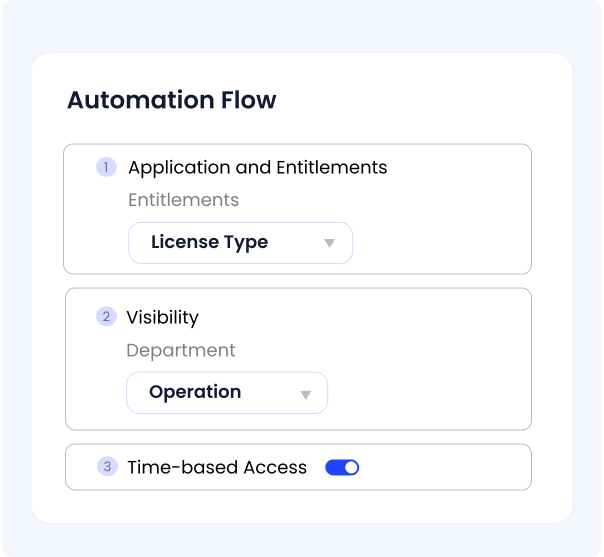
C. Automate Access Requests and Scheduling Permissions

As teams grow, new employees often request access to Calendly while existing users retain permissions even after changing roles.

CloudEagle configurable access workflow builder showing approval paths by app sensitivity, role, entitlement type, and time-based access controls

CloudEagle.ai streamlines access management, ensuring scheduling tools remain aligned with identity and access governance policies.

  • Automate access approvals based on department or role
  • Ensure employees receive appropriate scheduling permissions
  • Remove access automatically when users leave or change responsibilities

Access remains structured rather than manually managed.

D. Reclaim Unused Calendly Licenses and Optimize Spend

Calendly licenses are often assigned broadly across teams, even when scheduling activity varies significantly. This can lead to unused seats and unnecessary subscription costs.

CloudEagle.ai automates license harvesting, managing tracking, notifications, and deprovisioning without manual effort.

  • Identify inactive users based on defined inactivity thresholds
  • Automatically notify users and reclaim unused licenses
  • Schedule recurring checks to ensure licenses match actual usage

Spend optimization becomes continuous and tied directly to real scheduling activity.

E. Price Benchmarking Data

CloudEagle.ai connects you with a vast network of seasoned SaaS buyers and provides real-time benchmarking data from over a billion transactions. These insights let you compare your Calendly pricing against what other companies pay for different plans.  

If you're evaluating your options, this data can be a valuable resource for your Calendly buying guide, ensuring you secure the best deal.

F. Top Negotiation Strategies to Secure the Best Calendly Deal

Getting the best Calendly deal might not be a simple task. The process is easier said than done, given that there are multiple Calendly pricing plans available on the website. Here are some excellent negotiation strategies you need to consider:

  • Determine Your Needs and Requirements: Pay close attention to your company priorities, key SaaS features, budget, and risks to ensure the contract meets your needs and maximizes value.
  • Research the Vendor Thoroughly: Thorough vendor research, including reputation, reliability, and pricing benchmarks, helps you negotiate better terms and secure a cost-effective SaaS solution.
  • Choose Long-Term Agreement: Opting for a long-term SaaS contract can secure better pricing and benefits, while shorter terms offer flexibility.
  • Consider Alternative Bids: Keep alternative bids ready to strengthen your negotiation leverage, compare options, and secure the best SaaS contract terms.

G. Breaking Down the Data

Wondering what other companies are paying for Calendly pricing plans? Gain exclusive insights with our comprehensive Calendly buying guide!  

Download now to access detailed pricing data, industry benchmarks, and expert tips to help you secure the best deal.

H. Benefits of Calendly Pricing Guide

Using Calendly benchmarking data can change how you manage costs and negotiate with vendors. Here’s how it benefits you:

  • Real-World Pricing Insights: Go beyond listed prices with actual Calendly cost data. CloudEagle.ai’s benchmarks reveal true pricing and usage trends.
  • Stronger Negotiation Power: Leverage industry insights to secure better deals and avoid overpaying.
  • Smarter Budgeting: Get precise cost estimates to plan your SaaS expenses effectively and optimize your budget.

I. Premium Negotiation Insights 

Why spend more when CloudEagle.ai helps you negotiate better? With the right data, you can cut unnecessary costs, unlock exclusive perks, and get the most from your Calendly investment.  

Don’t overpay! Download our Calendly buying guide today and discover expert negotiation strategies that have saved businesses thousands.

6. Calendly Pricing Based on Companies

Choosing the perfect Calendly plan will depend on multiple factors, including your collaboration needs, team size, and budget. Here’s a detailed breakdown to help you know more:

  • Free Plan: Ideal for individuals starting out with basic scheduling needs, such as small business owners, entrepreneurs, service providers, or anyone looking to simplify their day-to-day scheduling.
  • Standard Plan: Designed for professionals and small teams requiring more advanced scheduling capabilities. This plan includes unlimited event types, integration with multiple calendars, and access to integrations with tools like HubSpot and Mailchimp.
  • Teams Plan: Tailored for growing companies, this plan offers advanced features such as reporting, meeting distribution, and automation.
  • Enterprise Plan: This plan is perfect for enterprises with complex scheduling needs, enhanced security, administrative controls, and dedicated support.

7. Top Calendly Alternatives

If you're looking for alternatives to Calendly, here are five great options that offer similar scheduling features:

HubSpot Meetings

If you’re already using HubSpot’s CRM, HubSpot Meetings is a natural choice. It syncs seamlessly with your contacts, allowing leads to book meetings directly into your calendar. You can set up round-robin scheduling for your sales team, customize booking pages, and embed scheduling links into emails or your website.

Acuity Scheduling

Acuity Scheduling is a great option for service-based businesses, consultants, and healthcare providers who need appointment booking with built-in payments. You can accept payments through Stripe, PayPal, and Square, set up customized intake forms, and automate appointment confirmations and reminders.

SimplyBook.me

For small businesses and solo entrepreneurs, SimplyBook.me offers an intuitive online booking platform with website and social media integration. It allows you to embed booking widgets on your site, send automated SMS reminders, and accept payments for appointments.

YouCanBook.me

If you manage a global team or frequently schedule across time zones, YouCanBook.me is a strong alternative. It syncs with Google and Microsoft calendars and provides a simple, professional booking experience.

Doodle

Doodle is perfect if you need a simple and effective way to schedule group meetings. Instead of back-and-forth emails, you can create a poll where participants vote on their preferred time slots. It’s widely used for team meetings, interviews, and client consultations, especially in remote teams.

8. Conclusion

Choosing the right Calendly plan is not just about scheduling convenience or feature availability. As booking links and automated meeting workflows expand across teams, those decisions influence how employee calendars are exposed.

For CIOs and CISOs, the focus extends beyond cost optimization. It’s about maintaining visibility over who can create scheduling pages, how integrations interact with internal systems, and whether meeting workflows remain governed as adoption scales.

CloudEagle.ai helps bring structure to this process. It provides real-time visibility into SaaS usage, automated license management, AI tool discovery, and data-driven pricing benchmarks.

Download the Calendly pricing guide to optimize your licenses, negotiate smarter contracts, and ensure scheduling workflows remain governed as your organization grows.

9. Frequently Asked Questions

1. What are the payment options for Calendly?

Calendly supports Stripe, PayPal, and Square for payment processing. These options allow you to collect payments when users book appointments, making it easy to charge for consultations, coaching sessions, or other services.

2. Is Calendly API free?

The basic API access is free, but advanced API capabilities, such as webhooks and deeper integrations, are available on paid plans.

3. Can Calendly send invoices?

No, Calendly does not generate or send invoices directly. If you need invoicing, you can integrate Calendly with third-party tools like QuickBooks, FreshBooks, or Zapier to automate invoice generation.

4. Can Calendly send emails?

Yes, Calendly can send emails, including booking confirmations, reminders, and follow-ups. These automated emails help reduce no-shows and keep attendees informed.

5. Can Calendly links expire?

Yes, Calendly links can expire based on your settings. You can set expiration dates, create one-time use links, or limit scheduling availability.

Advertisement for a SaaS Subscription Tracking Template with a call-to-action button to download and a partial graphic of a tablet showing charts.Banner promoting a SaaS Agreement Checklist to streamline SaaS management and avoid budget waste with a call-to-action button labeled Download checklist.Blue banner with text 'The Ultimate Employee Offboarding Checklist!' and a black button labeled 'Download checklist' alongside partial views of checklist documents from cloudeagle.ai.Digital ad for download checklist titled 'The Ultimate Checklist for IT Leaders to Optimize SaaS Operations' by cloudeagle.ai, showing checklist pages.Slack Buyer's Guide offer with text 'Unlock insider insights to get the best deal on Slack!' and a button labeled 'Get Your Copy', accompanied by a preview of the guide featuring Slack's logo.Monday Pricing Guide by cloudeagle.ai offering exclusive pricing secrets to maximize investment with a call-to-action button labeled Get Your Copy and an image of the guide's cover.Blue banner for Canva Pricing Guide by cloudeagle.ai offering a guide to Canva costs, features, and alternatives with a call-to-action button saying Get Your Copy.Blue banner with white text reading 'Little-Known Negotiation Hacks to Get the Best Deal on Slack' and a white button labeled 'Get Your Copy'.Blue banner with text 'Little-Known Negotiation Hacks to Get the Best Deal on Monday.com' and a white button labeled 'Get Your Copy'.Blue banner with text 'Little-Known Negotiation Hacks to Get the Best Deal on Canva' and a white button labeled 'Get Your Copy'.Banner with text 'Slack Buyer's Guide' and a 'Download Now' button next to images of a guide titled 'Slack Buyer’s Guide: Features, Pricing & Best Practices'.Digital cover of Monday Pricing Guide with a button labeled Get Your Copy on a blue background.Canva Pricing Guide cover with a button labeled Get Your Copy on a blue gradient background.
What to consider when buying Calendly
Based on the latest community trends and observations
Admin
Those with Admin access can upgrade/downgrade your plan and add/remove user seats at any time directly in your Calendly Billing Portal.
Billing
Standard billing is Annual Net 30. Monthly billing is available for a 20% premium. Invoicing and Purchase Orders are only available for purchases over $2,500, anything less requires a Credit Card or Debit Card payment.
Free Product / Trials Considerations
Calendly offers a free 14-d ay trial for the Essentials, Professional, and Team Plans. You can invite multiple team members to join the trial account at no cost and all members will automatically be downgraded to the Free Plan when the trial expires.
Plans
Calendly standard plans with feature comparisons can be found here: Calendly Plans.
Pricing
Customers have shared receiving a 5% discount for multi-year agreements. Calendly incorporates Consumer Price Index (CPI) into renewal uplifts, so customers have cited increases by as much as 10% due to significant increases to CPI/inflation. Customers have shared the removal of CPI is highly negotiable.
Special Pricing
Calendly offers special pricing to qualified non-profit organizations and a 5% discount for marketing partnerships.

Enter your email to
unlock the report

Oops! Something went wrong while submitting the form.
License Count
Benchmark
Per User/Per Year

Enter your email to
unlock the report

Oops! Something went wrong while submitting the form.
License Count
Benchmark
Per User/Per Year

Enter your email to
unlock the report

Oops! Something went wrong while submitting the form.
Notion Plus
License Count
Benchmark
Per User/Per Year
100-500
$67.20 - $78.72
500-1000
$59.52 - $72.00
1000+
$51.84 - $57.60
Canva Pro
License Count
Benchmark
Per User/Per Year
100-500
$74.33-$88.71
500-1000
$64.74-$80.32
1000+
$55.14-$62.34

Enter your email to
unlock the report

Oops! Something went wrong while submitting the form.

Enter your email to
unlock the report

Oops! Something went wrong while submitting the form.
Zoom Business
License Count
Benchmark
Per User/Per Year
100-500
$216.00 - $264.00
500-1000
$180.00 - $216.00
1000+
$156.00 - $180.00

Enter your email to
unlock the report

Oops! Something went wrong while submitting the form.

Get the Right Security Platform To Secure Your Cloud Infrastructure

Please enter a business email
Thank you!
The 2023 SaaS report has been sent to your email. Check your promotional or spam folder.
Oops! Something went wrong while submitting the form.

Access full report

Please enter a business email
Thank you!
The 2023 SaaS report has been sent to your email. Check your promotional or spam folder.
Oops! Something went wrong while submitting the form.

Calendly pricing decisions often start with a simple goal: eliminating the back-and-forth of scheduling meetings.

But as adoption grows across sales, recruiting, customer success, and leadership teams, Calendly becomes more than a scheduling tool. It becomes an external gateway into employee calendars, availability patterns, and meeting workflows.

For CIOs and CISOs, this introduces a different layer of considerations. Who can generate public booking links? How are meeting integrations connected to internal systems like CRMs and video platforms?

In this Calendly pricing guide, we break down plans, features, and costs while also examining how enterprises can maintain control over scheduling access, integrations, and user governance as adoption scales.

TL;DR

  • Calendly offers plans ranging from a free tier for individuals to enterprise packages starting around $15,000 per year, supporting different scheduling needs and team sizes.
  • Paid plans unlock advanced scheduling features, CRM integrations (Salesforce, HubSpot, Zapier), team routing, branding customization, and payment collection through Stripe or PayPal.
  • As scheduling expands across teams, pricing decisions also influence who can create booking links, manage calendar integrations, and access meeting workflows.
  • Without clear governance, public scheduling pages, automated meeting distribution, and external integrations can expose availability data and reduce visibility into how meetings are scheduled.
  • Competitors like HubSpot Meetings, Acuity Scheduling, and Doodle offer similar scheduling functionality depending on workflow requirements.
  • CloudEagle.ai helps organizations benchmark Calendly pricing, negotiate contracts strategically, and optimize licenses based on real usage patterns.

1. What is Calendly?

Calendly is an online scheduling tool that helps you automate appointment booking. Instead of the usual back-and-forth emails to find a meeting time, you simply share your personalized Calendly link, and others can pick an available time that works for them.

Despite your industry, Calendly will cater to all your communication needs. Here are some key features you should know about:

  • Sync Your Calendar: Connect Calendly with Google, Outlook, or other calendars to avoid double bookings.
  • Set Your Availability: Define your preferred meeting times, buffer periods, and daily limits.
  • Automate Scheduling: Let Calendly handle time zone adjustments and eliminate conflicts.
  • Integrate with Your Tools: Use Calendly with Zoom, Microsoft Teams, Salesforce, HubSpot, and more.
  • Send Automatic Reminders: Reduce no-shows with email and SMS reminders.
  • Schedule as a Team: Use round-robin or collective scheduling for team meetings.

With the right Calendly buying guide, you also get advanced features like payment collection through Stripe or PayPal, custom branding to match your business, and workflow automation to streamline follow-ups. Whether you need to schedule one-on-one meetings, group sessions, or round-robin assignments, Calendly adapts to your workflow.

Prevent SaaS access risks before they grow

10 practical steps to control SaaS access and governance as tools scale
Download SaaS Security Must-Dos

2. Is It Worth Paying for Calendly?

Calendly pricing comes with a free version for all users. However, it’s not right for medium-sized companies and large enterprises. Without the paid plans, you cannot leverage the best benefits of this tool. Here are some reasons why you should upgrade to Calendly paid plans:

  • More Customization & Branding: With a premium plan, you can remove Calendly’s branding and customize your scheduling page to match your business identity. 
  • Multiple Event Types: If you need to offer different kinds of meetings (e.g., consultations, demos, and follow-ups), a premium plan lets you create multiple event types with customized settings.
  • Automated Workflows & Reminders: Paid plans allow you to set up automated email and SMS reminders, follow-ups, and notifications. 
  • Team Scheduling & Round-Robin Booking: If you're working with a team, Calendly's advanced scheduling options let you assign meetings based on availability, set up round-robin scheduling, and coordinate group events seamlessly.
  • Integrations with Business Tools: A paid plan gives you access to CRM and productivity integrations, including Salesforce, HubSpot, Zapier, and Stripe.
  • Payment Collection: With a premium plan, you can integrate Calendly with Stripe or PayPal to collect payments when people book a Google Meet.
  • Advanced Analytics & Reporting: Premium users can track meeting trends, analyze scheduling data, and optimize availability based on insights.

If you only schedule a few meetings per month, the free version might be enough. But if you want more efficiency, automation, and control, a premium Calendly pricing plan is definitely worth considering. With our Calendly pricing guide, you will know some excellent negotiation insights. 

3. Calendly Pricing and Governance: What Each Plan Means for Calendar Access and Meeting Control

Calendly pricing varies by team size and scheduling complexity. While the plans primarily differ in automation, integrations, and administrative features, they also influence how meeting links are created and how scheduling workflows are governed across teams.

Here’s how each Calendly plan compares from both a feature and governance perspective.

A. Free

  • Cost: $0
  • Best For: Individuals starting out with basic scheduling needs
  • Features: One event type with unlimited scheduled meetings, connect one calendar and basic integrations, send confirmation emails
  • Drawbacks: Cannot connect multiple calendars

Enterprise Risk Breakdown:

  • Public booking links may expose employee availability without centralized oversight
  • Meetings can be scheduled through personal accounts outside company governance
  • Limited control over how scheduling data interacts with connected tools

B. Standard

  • Cost: $10/seat/month (billed annually) or $12/seat/month (billed monthly)
  • Best For: Professionals and small teams with more sophisticated scheduling needs
  • Features: Unlimited event types, connect up to six calendars per person, customize your booking page and emails
  • Drawbacks: Does not include Single Sign-On

Enterprise Risk Breakdown:

  • Multiple calendar connections increase the complexity of managing scheduling visibility
  • Lack of SSO makes identity management dependent on individual accounts
  • Custom booking pages may expose meeting workflows externally without consistent governance

C. Teams

  • Cost: $16/seat/month (billed annually) or $20/seat/month (billed monthly)
  • Best For: Growing companies requiring advanced features like reporting, meeting distribution, and automation
  • Features: Connect to Salesforce to flow meeting data into the CRM, access to round-robin events, advanced admin features
  • Drawbacks: SSO is available only as an add-on

Enterprise Risk Breakdown:

  • Automated meeting routing can distribute external access across multiple team members
  • CRM integrations expand the flow of meeting data across systems
  • Admin features require consistent oversight to ensure scheduling policies are applied uniformly

D. Enterprise

  • Cost: Starts at $15,000/year
  • Best For: Large enterprises needing enhanced security, administrative control, support, and enterprise-grade procurement.
  • Features: Enable Single Sign-On, domain control for unified account management, audit log compliance, and data deletion API
  • Drawbacks: Cost is way too high

Enterprise Risk Breakdown:

  • Large-scale scheduling across teams increases exposure of availability and meeting patterns
  • Domain-level control requires continuous monitoring of user provisioning and access changes
  • Audit logs must be actively reviewed to maintain scheduling governance

Remember that each Calendly pricing plan comes with unique features and drawbacks. So, make sure you determine your company’s needs first before choosing a plan. 

4. The Hidden Cost of Calendly for CIOs and CISOs: When Scheduling Links Expand Access

Calendly often starts as a simple productivity tool. Teams use it to remove the back-and-forth of scheduling meetings and streamline coordination with customers and partners.

However, as adoption spreads across sales, recruiting, customer success, and leadership teams, Calendly becomes an external interface to internal calendars and availability data.

The real cost doesn’t come from the subscription price but from how scheduling access and integrations evolve without centralized oversight.

  • Public scheduling links exposing employee availability: Booking pages can reveal working hours and calendar patterns to external users
  • Decentralized meeting workflows across teams: Different departments create their own event types and routing rules without consistent governance
  • Unmonitored integrations with CRM and video platforms: Scheduling data flows into tools like Salesforce, Zoom, or HubSpot without unified oversight
  • External participants accessing internal scheduling systems: Guests interact directly with booking pages tied to employee calendars
  • Automation distributing meetings across teams: Round-robin scheduling can assign external meetings without visibility into workload or risk exposure
  • License growth without active usage tracking: Seats may remain assigned to users who rarely schedule meetings
  • Inconsistent identity control across accounts: Without strong identity management, scheduling access may persist after role changes or employee exits

For CIOs and CISOs, the challenge isn’t just managing scheduling efficiency. It’s ensuring that booking links, integrations, and calendar visibility remain controlled as scheduling workflows scale across the organization.

Stop Shadow IT before new tools spread

Learn how to detect unsanctioned apps and control SaaS adoption
Download Calendly Pricing Data

5. Calendly Pricing Guide: How CloudEagle.ai Helps Control Scheduling Access, AI Usage, and License Spend?

As Calendly adoption spreads across sales, recruiting, support, and leadership teams, scheduling links, integrations, and user seats can expand quickly.

Over time, organizations may lose visibility into who owns booking pages, how meeting data flows across tools, and whether licenses reflect real usage.

CloudEagle.ai helps bring structure to this environment by providing visibility, governance, and optimization across your scheduling ecosystem.

A. Discover Shadow AI and Unapproved Scheduling Tools

Teams often experiment with AI assistants or alternative scheduling tools alongside Calendly. These tools can interact with calendars, meeting links, and customer data without formal review.

CloudEagle.ai’s SaaSMap creates a centralized inventory of AI and SaaS tools, helping you understand how scheduling workflows extend beyond Calendly.

  • Identify AI-powered assistants and scheduling tools used across teams
  • Map adoption across departments and individual users
  • Distinguish approved tools from unreviewed or high-risk applications

Instead of fragmented visibility, organizations gain a complete picture of scheduling and AI activity.

B. Enforce AI Usage Policies in Real Time

AI tools connected to scheduling workflows can automate meeting summaries, scheduling suggestions, or booking automation. Without controls, these tools may process sensitive meeting data.

CloudEagle real-time AI usage control flash page redirecting an employee from an unapproved AI tool to the company-approved alternative

CloudEagle.ai enforces AI usage policies directly at the point of behavior, ensuring AI-enabled scheduling tools remain compliant.

  • Maintain a centralized list of approved AI tools aligned with your company policies
  • Redirect users to approved solutions when they attempt to access unapproved tools
  • Apply governance at the moment AI tools are used

Governance becomes proactive rather than reactive.

C. Automate Access Requests and Scheduling Permissions

As teams grow, new employees often request access to Calendly while existing users retain permissions even after changing roles.

CloudEagle configurable access workflow builder showing approval paths by app sensitivity, role, entitlement type, and time-based access controls

CloudEagle.ai streamlines access management, ensuring scheduling tools remain aligned with identity and access governance policies.

  • Automate access approvals based on department or role
  • Ensure employees receive appropriate scheduling permissions
  • Remove access automatically when users leave or change responsibilities

Access remains structured rather than manually managed.

D. Reclaim Unused Calendly Licenses and Optimize Spend

Calendly licenses are often assigned broadly across teams, even when scheduling activity varies significantly. This can lead to unused seats and unnecessary subscription costs.

CloudEagle.ai automates license harvesting, managing tracking, notifications, and deprovisioning without manual effort.

  • Identify inactive users based on defined inactivity thresholds
  • Automatically notify users and reclaim unused licenses
  • Schedule recurring checks to ensure licenses match actual usage

Spend optimization becomes continuous and tied directly to real scheduling activity.

E. Price Benchmarking Data

CloudEagle.ai connects you with a vast network of seasoned SaaS buyers and provides real-time benchmarking data from over a billion transactions. These insights let you compare your Calendly pricing against what other companies pay for different plans.  

If you're evaluating your options, this data can be a valuable resource for your Calendly buying guide, ensuring you secure the best deal.

F. Top Negotiation Strategies to Secure the Best Calendly Deal

Getting the best Calendly deal might not be a simple task. The process is easier said than done, given that there are multiple Calendly pricing plans available on the website. Here are some excellent negotiation strategies you need to consider:

  • Determine Your Needs and Requirements: Pay close attention to your company priorities, key SaaS features, budget, and risks to ensure the contract meets your needs and maximizes value.
  • Research the Vendor Thoroughly: Thorough vendor research, including reputation, reliability, and pricing benchmarks, helps you negotiate better terms and secure a cost-effective SaaS solution.
  • Choose Long-Term Agreement: Opting for a long-term SaaS contract can secure better pricing and benefits, while shorter terms offer flexibility.
  • Consider Alternative Bids: Keep alternative bids ready to strengthen your negotiation leverage, compare options, and secure the best SaaS contract terms.

G. Breaking Down the Data

Wondering what other companies are paying for Calendly pricing plans? Gain exclusive insights with our comprehensive Calendly buying guide!  

Download now to access detailed pricing data, industry benchmarks, and expert tips to help you secure the best deal.

H. Benefits of Calendly Pricing Guide

Using Calendly benchmarking data can change how you manage costs and negotiate with vendors. Here’s how it benefits you:

  • Real-World Pricing Insights: Go beyond listed prices with actual Calendly cost data. CloudEagle.ai’s benchmarks reveal true pricing and usage trends.
  • Stronger Negotiation Power: Leverage industry insights to secure better deals and avoid overpaying.
  • Smarter Budgeting: Get precise cost estimates to plan your SaaS expenses effectively and optimize your budget.

I. Premium Negotiation Insights 

Why spend more when CloudEagle.ai helps you negotiate better? With the right data, you can cut unnecessary costs, unlock exclusive perks, and get the most from your Calendly investment.  

Don’t overpay! Download our Calendly buying guide today and discover expert negotiation strategies that have saved businesses thousands.

6. Calendly Pricing Based on Companies

Choosing the perfect Calendly plan will depend on multiple factors, including your collaboration needs, team size, and budget. Here’s a detailed breakdown to help you know more:

  • Free Plan: Ideal for individuals starting out with basic scheduling needs, such as small business owners, entrepreneurs, service providers, or anyone looking to simplify their day-to-day scheduling.
  • Standard Plan: Designed for professionals and small teams requiring more advanced scheduling capabilities. This plan includes unlimited event types, integration with multiple calendars, and access to integrations with tools like HubSpot and Mailchimp.
  • Teams Plan: Tailored for growing companies, this plan offers advanced features such as reporting, meeting distribution, and automation.
  • Enterprise Plan: This plan is perfect for enterprises with complex scheduling needs, enhanced security, administrative controls, and dedicated support.

7. Top Calendly Alternatives

If you're looking for alternatives to Calendly, here are five great options that offer similar scheduling features:

HubSpot Meetings

If you’re already using HubSpot’s CRM, HubSpot Meetings is a natural choice. It syncs seamlessly with your contacts, allowing leads to book meetings directly into your calendar. You can set up round-robin scheduling for your sales team, customize booking pages, and embed scheduling links into emails or your website.

Acuity Scheduling

Acuity Scheduling is a great option for service-based businesses, consultants, and healthcare providers who need appointment booking with built-in payments. You can accept payments through Stripe, PayPal, and Square, set up customized intake forms, and automate appointment confirmations and reminders.

SimplyBook.me

For small businesses and solo entrepreneurs, SimplyBook.me offers an intuitive online booking platform with website and social media integration. It allows you to embed booking widgets on your site, send automated SMS reminders, and accept payments for appointments.

YouCanBook.me

If you manage a global team or frequently schedule across time zones, YouCanBook.me is a strong alternative. It syncs with Google and Microsoft calendars and provides a simple, professional booking experience.

Doodle

Doodle is perfect if you need a simple and effective way to schedule group meetings. Instead of back-and-forth emails, you can create a poll where participants vote on their preferred time slots. It’s widely used for team meetings, interviews, and client consultations, especially in remote teams.

8. Conclusion

Choosing the right Calendly plan is not just about scheduling convenience or feature availability. As booking links and automated meeting workflows expand across teams, those decisions influence how employee calendars are exposed.

For CIOs and CISOs, the focus extends beyond cost optimization. It’s about maintaining visibility over who can create scheduling pages, how integrations interact with internal systems, and whether meeting workflows remain governed as adoption scales.

CloudEagle.ai helps bring structure to this process. It provides real-time visibility into SaaS usage, automated license management, AI tool discovery, and data-driven pricing benchmarks.

Download the Calendly pricing guide to optimize your licenses, negotiate smarter contracts, and ensure scheduling workflows remain governed as your organization grows.

9. Frequently Asked Questions

1. What are the payment options for Calendly?

Calendly supports Stripe, PayPal, and Square for payment processing. These options allow you to collect payments when users book appointments, making it easy to charge for consultations, coaching sessions, or other services.

2. Is Calendly API free?

The basic API access is free, but advanced API capabilities, such as webhooks and deeper integrations, are available on paid plans.

3. Can Calendly send invoices?

No, Calendly does not generate or send invoices directly. If you need invoicing, you can integrate Calendly with third-party tools like QuickBooks, FreshBooks, or Zapier to automate invoice generation.

4. Can Calendly send emails?

Yes, Calendly can send emails, including booking confirmations, reminders, and follow-ups. These automated emails help reduce no-shows and keep attendees informed.

5. Can Calendly links expire?

Yes, Calendly links can expire based on your settings. You can set expiration dates, create one-time use links, or limit scheduling availability.

CloudEagle.ai recognized in the 2025 Gartner® Magic Quadrant™ for SaaS Management Platforms
Download now
gartner chart
5x
Faster employee
onboarding
80%
Reduction in time for
user access reviews
30k
Workflows
automated
$15Bn
Analyzed in
contract spend
$2Bn
Saved in
SaaS spend

Streamline SaaS governance and save 10-30%

Book a Demo with Expert
CTA image
One platform to Manage
all SaaS Products
Learn More