SaaS Management

Top SaaS Operations Challenges and How to Overcome Them

Share via:
Written by:
CloudEagle.ai Team
Reviewed by
Nidhi Jain
Last Updated:
September 25, 2025
blog-cms-banner-bg
Little-Known Negotiation Hacks to Get the Best Deal on Slack
cta-bg-blogDownload Your Copy

HIPAA Compliance Checklist for 2025

Download PDF

Over the last decade, SaaS has revolutionized how organizations operate. What began as a few tools for email, collaboration, or CRM has evolved into an ecosystem of hundreds of applications powering everything from HR to finance. According to industry reports, the average enterprise uses more than 250 SaaS apps.

While this SaaS-driven workplace fuels innovation and agility, it also introduces serious operational challenges. These SaaS challenges, from redundant tools to rising costs can drain budgets and slow down productivity if left unmanaged. Redundant tools, rising subscription costs, shadow IT, inefficient onboarding, and risky offboarding practices can derail productivity and eat into budgets.

This is where SaaS operations management, or SaaS Ops, comes in. By taking a structured approach to managing SaaS applications, organizations can unlock efficiency, protect sensitive data, and maximize ROI.

In this blog, we’ll explore the top SaaS operations challenges companies face today and practical ways to overcome them. We’ll also show how platforms like CloudEagle.ai simplify SaaS management with automation, visibility, and actionable insights.

‍

‍

TL;DR

  1. SaaS operations (SaaS Ops) are the backbone of modern digital workplaces. 
  2. Yet, organizations often face recurring SaaS challenges—redundant tools, rising costs, lack of visibility, onboarding inefficiencies, and risky offboarding.
  3. These hurdles lead to wasted spend, compliance gaps, and lower productivity. 
  4. By leveraging SaaS operations management best practices and platforms like CloudEagle.ai for automation, visibility, and cost optimization. 
  5. Companies can streamline their SaaS ecosystem, reduce risks, and maximize ROI.

‍

What Are the Biggest SaaS Operations Challenges and How to Overcome Them?

 These five challenges come up most often for teams managing SaaS at scale, and each one has a practical fix.

Challenge 1: Redundant SaaS Tools Are Wasting Budget and Creating Chaos

When departments buy software on their own, the same job ends up covered by several tools. One team runs Zoom while another standardizes on Teams, and three departments pay for separate AI copilots that do the same work. 

Each duplicate adds cost, splits collaboration across platforms, and widens the security surface, and IT usually can't see who is using what or why.

How to Overcome It:

  • Build one inventory of every app, with its owner, department, and cost.
  • Group apps by function, such as video conferencing or AI writing assistants, to find overlap.
  • Compare usage at the user level and keep the tool most people already use.
  • Move the remaining users over and consolidate contracts at the next renewal.

Challenge 2: SaaS Spend Keeps Rising Without Control

SaaS spend tends to climb quietly. Auto-renewals go through without anyone checking usage, licenses sit idle after role changes or in monthly subscriptions, and teams buy software outside procurement, including through cloud marketplaces. 

With high-volume SaaS subscriptions spread across cards, invoices, and marketplace bills, finance has no single view of what the company is paying for.

How to Overcome It:

  • Pull spend from finance, expense, and marketplace data into one record tied to each app.
  • Compare spend with actual usage to find unused and underused licenses.
  • Track every renewal date and review usage 60 to 90 days before it renews.
  • Benchmark pricing before each negotiation so you know what a fair rate looks like.

Challenge 3: Shadow IT and SaaS Blind Spots Create Risk

Employees sign up for apps with personal cards or free tiers when the approved route feels slow. Many of these tools never touch SSO, so IT has no record of the account, the login, or the data shared, which is where most of the security and compliance risks of shadow IT come from. 

AI tools have made this worse, since an employee can paste company data into an unapproved chatbot in seconds.

How to Overcome It:

  • Combine SSO, browser, and spend data to find apps outside IdP control.
  • Risk-score each discovered app, then approve, replace, or block it.
  • Give employees a fast, approved way to request new tools, so they stop working around IT.
  • Rerun discovery continuously, because new apps show up every week.

Challenge 4: Onboarding Is Slow and Inconsistent

Manual provisioning means new hires wait days for the apps they need to start work. 

Access depends on who handled the ticket, because there's no standard bundle by role, department, or location. IT spends its week on repetitive access requests instead of planned work.

How to Overcome It:

  • Define a standard app bundle for each role, department, and location.
  • Trigger provisioning from HRIS, so zero-touch onboarding has access ready on day one.
  • Cover apps outside your IdP, which manual processes usually miss.
  • Route anything outside the bundle through a self-service catalog with manager approval.

Challenge 5: Offboarding Leaves Security Gaps and Wasted Licenses

When someone leaves, their access has to be removed from every app they used, and doing that by hand is slow and error-prone. 

Departing employees keep access to business-critical apps, the service accounts and API keys they created keep running, and their licenses sit unused until someone notices.

How to Overcome It:

  • Trigger deprovisioning across your SaaS apps from HRIS or SSO the moment an exit is logged.
  • Revoke access in every app, including the ones outside your IdP.
  • Reassign or revoke the service accounts, API keys, and AI agents the person owned.
  • Reclaim their licenses and log every action for audit.

‍

Shadow IT Grows Every Time Procurement Is Slow

Close the gaps before ungoverned tools become a compliance finding.
Download Checklist

‍

How to Overcome SaaS Operations Challenges with CloudEagle.ai

CloudEagle.ai is an AI-powered SaaS Management, AI Governance, and SaaS Security platform that gives IT, security, finance, and procurement teams one command center for their entire SaaS and AI stack.

It works through the five challenges above in sequence. First it builds a complete inventory of SaaS and AI apps. Then it uses that inventory to cut duplicate tools and idle licenses, run renewals on real data, and manage access from an employee's first day to their last.

A. Connect Your Systems and Discover Every SaaS and AI App

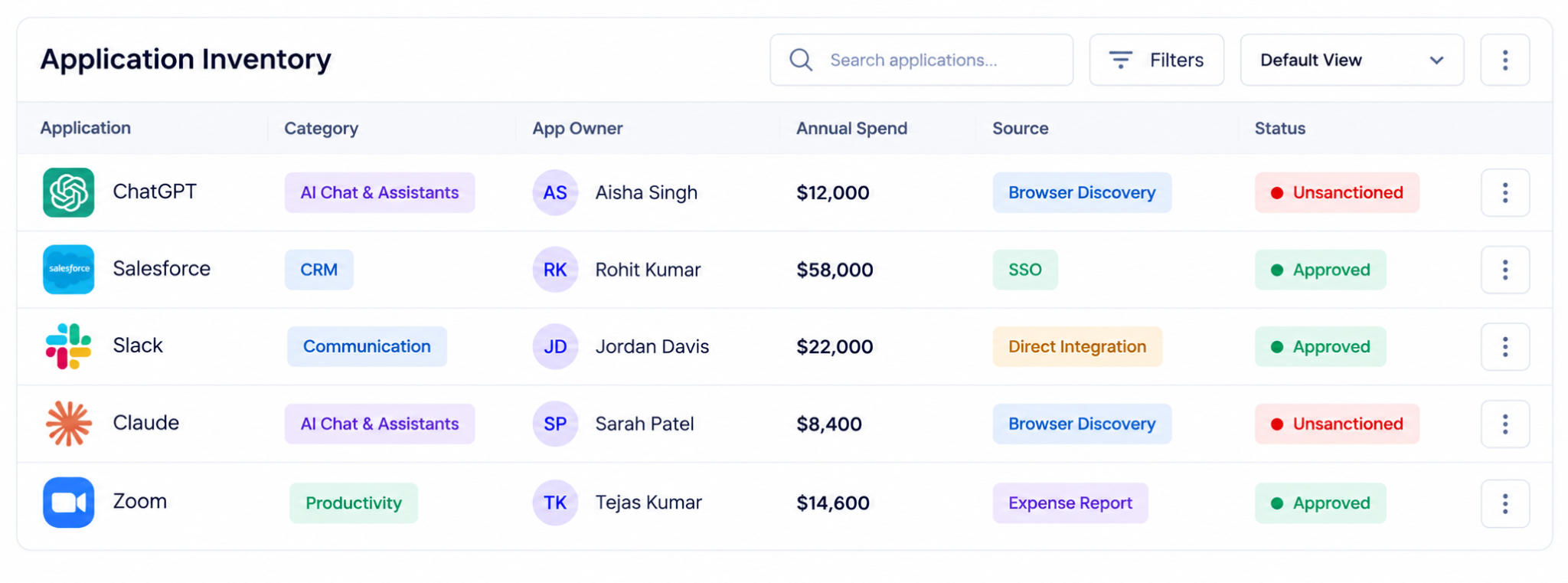
Every other fix depends on a complete inventory, so CloudEagle.ai starts there. It connects to your SSO, HRIS, finance, browser, firewall, and MDM data through 500+ direct integrations. It then correlates those sources into one list of every app in use, sanctioned or not.

  • Apps bought on personal cards or free tiers surface through expense and browser signals.
  • AI apps, agents, and MCP servers are discovered alongside traditional SaaS.
  • Each app is mapped to an owner, a department, and a cost.
‍

SaaS application inventory showing ChatGPT, Salesforce, Slack, Claude, and Zoom, with application categories, owners, annual spend, discovery sources, and approved or unsanctioned status.

‍

This is how CloudEagle.ai closes the shadow IT and shadow AI gap from Challenge 3. Onboarding takes about 30 minutes.

B. Map Real Usage and Flag Redundant Tools

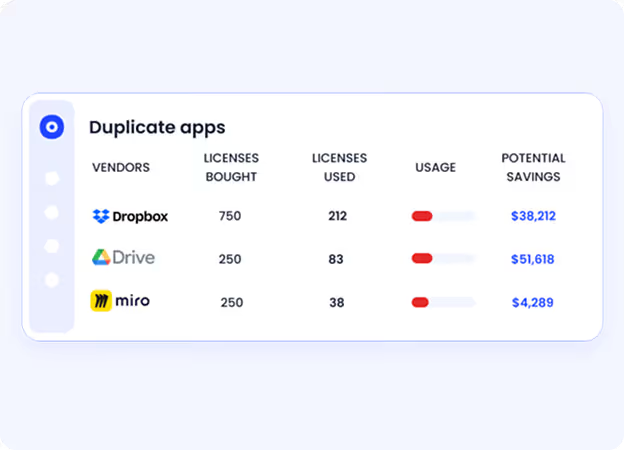
Once every app sits in one inventory, CloudEagle.ai layers usage on top. It tracks activity beyond logins, down to features, roles, and departments, so you can see who actually uses each tool.
‍

Duplicate SaaS application report identifying overlapping licenses across Dropbox, Google Drive, and Miro, with licenses purchased, licenses used, utilization levels, and potential cost savings.

‍

That usage data is what exposes overlap. When two teams pay for Zoom and Teams, or three departments each buy their own AI copilot, application rationalization groups the apps by function and shows which one people use most. You consolidate onto that one.

C. Reclaim Unused Licenses Through Approval Workflows

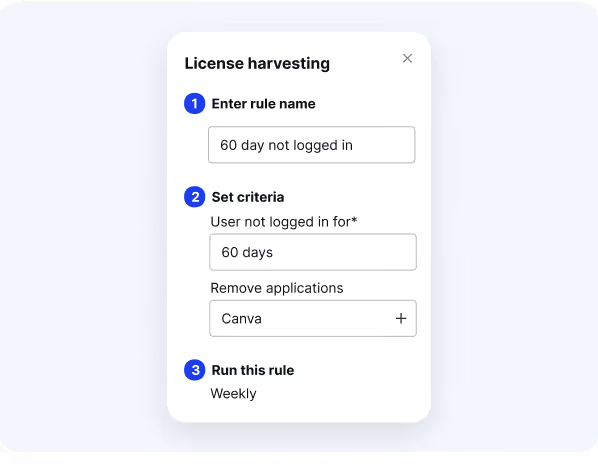
With redundant tools and idle seats identified, CloudEagle.ai moves to reclamation. It flags licenses that haven't been used, checks in with the user or app owner, and routes every downgrade or removal through an approval workflow, so nothing is cut without sign-off.
‍

License harvesting configuration showing a rule to identify users who haven't logged in for 60 days and automatically remove unused Canva licenses on a weekly schedule.

‍

Reclaimed seats go back into the pool for the next new hire, so you don't buy them again. This is how the license waste in Challenge 2 stops compounding month after month.

D. Run Every Renewal on Usage and Benchmark Data

Usage and license data then feed straight into renewals. CloudEagle.ai extracts contract terms with AI, puts every renewal date on a renewal calendar, and alerts the owner well before an auto-renewal triggers.

  • Price benchmarking shows what similar companies pay for the same tool, with no contract upload needed.
  • New purchase requests, including marketplace buys, go through procurement workflows, so less spend happens outside procurement.
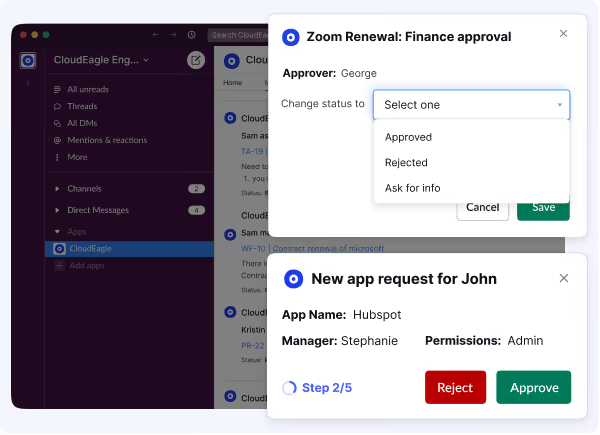
  • Approvals run in Slack.

‍

Slack-based SaaS approval workflow showing a Zoom renewal finance approval request and a new HubSpot application request, with options to approve, reject, or request additional information.

‍

You go into every negotiation knowing how many seats are used and what the market rate is.

E. Give New Hires the Right Apps on Day One

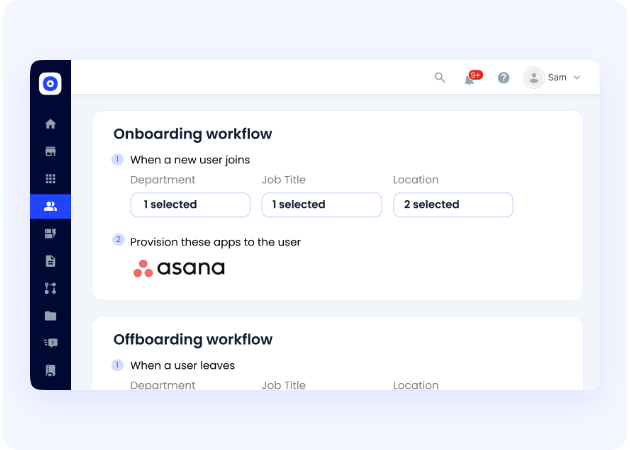
The same inventory also drives access. When a new hire appears in HRIS, CloudEagle.ai provisions a role-based app bundle by job, department, and location, including apps outside Okta.
‍

SaaS management workflow showing automated application provisioning when employees join and access removal when employees leave, based on department, job title, and location.

‍

Anything outside the bundle goes through a self-service app catalog, with access requests approved in Slack. IT stops working through repetitive access tickets, and access request MTTR drops by up to 80%.

F. Revoke Access and Reclaim Licenses When Someone Leaves

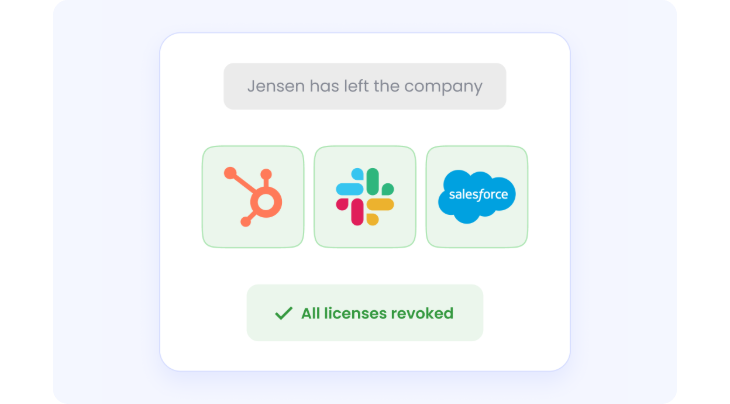
When HRIS or SSO flags an exit, CloudEagle.ai runs the same flow in reverse. It revokes access across every app the employee used, including apps not connected to an IdP. It logs each action for audit and returns the employee's licenses to the pool.
‍

Employee offboarding workflow confirming that HubSpot, Slack, and Salesforce licenses have been revoked after an employee leaves the company.

‍

It also surfaces the service accounts, API keys, and AI agents tied to that employee. CloudEagle.ai governs these non-human identities with the same lifecycle controls as human ones, so each one gets a new owner or gets revoked.

G. Review Access Continuously and Keep Audit Evidence Ready

Annual access reviews leave months of drift between checks, and collecting evidence for auditors becomes a manual scramble. 

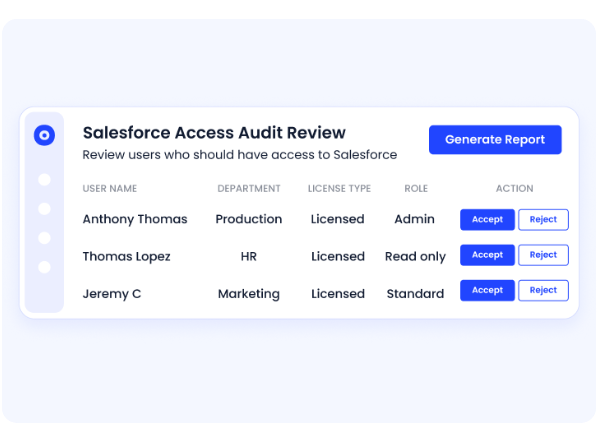
CloudEagle.ai runs user access reviews continuously, using the same usage and role data from the earlier steps to flag excessive privileges, dormant accounts, and anomalies. 
‍

Salesforce access review dashboard displaying users, departments, license types, assigned roles, and options to accept or reject access permissions, with an option to generate an audit report.

Managers approve or revoke access in a few clicks, and every review decision, access change, and approval is logged automatically.

‍

‍

Why SaaS Operations Matter Today

SaaS operations matter today because they drive essential benefits like cost reduction, scalability, enhanced productivity, improved accessibility, and increased agility for modern businesses.

By outsourcing the management of cloud-based software to providers, companies can avoid infrastructure costs, gain access to continuous updates, and allow their IT teams to focus on strategic initiatives rather than routine maintenance.

Here's why strong SaaS operations are mission-critical:

  • Cost efficiency: Eliminate redundant apps, optimize license usage, and prevent wasted spend.
  • Scalability: Easily add or remove tools as the business grows without heavy infrastructure costs.
  • Productivity boost: Streamlined onboarding, single sign-on, and standardized workflows accelerate employee efficiency.
  • Accessibility: Cloud-based apps enable employees to work securely from anywhere, on any device.
  • Agility: Rapidly adopt new SaaS tools to support evolving business needs and innovation.
  • Security & compliance: Mitigate risks from shadow IT and stay audit-ready with visibility and governance.

SaaS is mission-critical. From communication tools like Slack to CRM systems like Salesforce, SaaS apps power every function of a modern organization.

AI is raising the stakes. In a Gartner survey of 302 cybersecurity leaders, 69% of organizations suspected or had evidence that employees use prohibited public GenAI. Gartner also predicts that by 2030, more than 40% of enterprises will have security or compliance incidents linked to shadow AI.

But without proper SaaS operations management, companies struggle with wasted budget due to underutilized apps, increased security risks from shadow IT, employee frustration from poor onboarding, and audit failures due to compliance blind spots.

Strong SaaS Ops ensures that every tool serves a purpose, aligns with business goals, and operates securely.

‍

Conclusion

All five challenges in this blog trace back to the same cause: the data needed to manage SaaS is split across SSO, finance, HRIS, and each app's admin console, so every team works from a partial view. As AI tools spread department by department, bringing their own service accounts, API keys, and agents with them, that gap gets wider.

That's why the order of the fixes matters. 

  • Start with one inventory of every SaaS and AI app, layer usage on top, and use that data to cut duplicate tools, reclaim idle licenses, and go into each renewal with real numbers. 
  • Then run access from the same record, so new hires get the right apps on day one, leavers lose access everywhere, and access reviews happen continuously.

CloudEagle.ai runs that sequence as one workflow across SaaS, AI, and identity, covering human and non-human identities alike. IT, security, finance, and procurement teams work from the same data, without stitching together separate tools for spend, access, and compliance. 

Book a demo to see the workflow mapped to your own SaaS and AI stack.

‍

FAQs

1. What is the challenge of SaaS?

The biggest SaaS challenges include redundant tools, rising costs, shadow IT, poor onboarding, and risky offboarding practices. These create inefficiencies, security gaps, and wasted spend.

2. What is the SaaS problem?

The SaaS problem refers to lack of control and visibility in managing SaaS apps, leading to overspending, compliance issues, and productivity loss.

3. What challenges do IT teams face managing SaaS performance?

IT teams struggle to see which apps are used and how much, because usage data sits across SSO, finance, and each app's admin console. That gap leads to idle licenses, duplicate tools, and a growing pile of access tickets. Pulling usage beyond logins into one view is the first fix.

4. Why do companies lose track of their SaaS apps?

Teams buy apps on cards, through free tiers, or on cloud marketplaces, and many of those apps never connect to SSO. Without discovery that combines SSO, finance, browser, and HR data, they never reach IT's list. AI tools now spread the same way, one department at a time.

5. Why do companies struggle with SaaS management platforms?

Most struggle because the platform only sees part of the stack. Tools that rely on SSO data alone miss apps bought on cards, usage that stops at logins can't show which seats are idle, and dashboards without workflows leave every fix manual. Look for multi-source discovery, usage beyond logins, and built-in approval workflows.

6. How do you enforce deprovisioning across SaaS apps?

Trigger deprovisioning from HRIS so every exit starts the same workflow. Revoke access in every app the person used, including apps outside your IdP, and reclaim their licenses. Reassign or revoke the service accounts and API keys they owned, and log each step so the offboarding holds up in an audit.

7. How can finance teams control SaaS marketplace purchases?

Route marketplace and card purchases through the same intake as every other software request. Connect expense and finance data to your SaaS inventory so purchases made outside procurement still show up. Give each one an owner and a renewal date so it gets reviewed before it renews.

‍

Advertisement for a SaaS Subscription Tracking Template with a call-to-action button to download and a partial graphic of a tablet showing charts.Banner promoting a SaaS Agreement Checklist to streamline SaaS management and avoid budget waste with a call-to-action button labeled Download checklist.Blue banner with text 'The Ultimate Employee Offboarding Checklist!' and a black button labeled 'Download checklist' alongside partial views of checklist documents from cloudeagle.ai.Digital ad for download checklist titled 'The Ultimate Checklist for IT Leaders to Optimize SaaS Operations' by cloudeagle.ai, showing checklist pages.Slack Buyer's Guide offer with text 'Unlock insider insights to get the best deal on Slack!' and a button labeled 'Get Your Copy', accompanied by a preview of the guide featuring Slack's logo.Monday Pricing Guide by cloudeagle.ai offering exclusive pricing secrets to maximize investment with a call-to-action button labeled Get Your Copy and an image of the guide's cover.Blue banner for Canva Pricing Guide by cloudeagle.ai offering a guide to Canva costs, features, and alternatives with a call-to-action button saying Get Your Copy.Blue banner with white text reading 'Little-Known Negotiation Hacks to Get the Best Deal on Slack' and a white button labeled 'Get Your Copy'.Blue banner with text 'Little-Known Negotiation Hacks to Get the Best Deal on Monday.com' and a white button labeled 'Get Your Copy'.Blue banner with text 'Little-Known Negotiation Hacks to Get the Best Deal on Canva' and a white button labeled 'Get Your Copy'.Banner with text 'Slack Buyer's Guide' and a 'Download Now' button next to images of a guide titled 'Slack Buyer’s Guide: Features, Pricing & Best Practices'.Digital cover of Monday Pricing Guide with a button labeled Get Your Copy on a blue background.Canva Pricing Guide cover with a button labeled Get Your Copy on a blue gradient background.

Enter your email to
unlock the report

Oops! Something went wrong while submitting the form.
License Count
Benchmark
Per User/Per Year

Enter your email to
unlock the report

Oops! Something went wrong while submitting the form.
License Count
Benchmark
Per User/Per Year

Enter your email to
unlock the report

Oops! Something went wrong while submitting the form.
Notion Plus
License Count
Benchmark
Per User/Per Year
100-500
$67.20 - $78.72
500-1000
$59.52 - $72.00
1000+
$51.84 - $57.60
Canva Pro
License Count
Benchmark
Per User/Per Year
100-500
$74.33-$88.71
500-1000
$64.74-$80.32
1000+
$55.14-$62.34

Enter your email to
unlock the report

Oops! Something went wrong while submitting the form.

Enter your email to
unlock the report

Oops! Something went wrong while submitting the form.
Zoom Business
License Count
Benchmark
Per User/Per Year
100-500
$216.00 - $264.00
500-1000
$180.00 - $216.00
1000+
$156.00 - $180.00

Enter your email to
unlock the report

Oops! Something went wrong while submitting the form.

Get the Right Security Platform To Secure Your Cloud Infrastructure

Please enter a business email
Thank you!
The 2023 SaaS report has been sent to your email. Check your promotional or spam folder.
Oops! Something went wrong while submitting the form.

Access full report

Please enter a business email
Thank you!
The 2023 SaaS report has been sent to your email. Check your promotional or spam folder.
Oops! Something went wrong while submitting the form.

TL;DR

  • SaaS operations (SaaS Ops) are the backbone of modern digital workplaces.
  • Yet organizations face recurring SaaS challenges: redundant tools, rising costs, shadow IT and shadow AI, slow onboarding, and risky offboarding.
  • These hurdles lead to wasted spend, compliance gaps, and lower productivity.
  • SaaS operations management best practices, backed by a platform like CloudEagle.ai, help companies streamline their SaaS ecosystem, reduce risk, and maximize ROI.

‍

Over the last decade, SaaS has revolutionized how organizations operate. What began as a few tools for email, collaboration, or CRM has evolved into an ecosystem of hundreds of applications powering everything from HR to finance. According to industry reports, the average enterprise uses more than 250 SaaS apps.

While this SaaS-driven workplace fuels innovation and agility, it also introduces serious operational challenges. These SaaS challenges, from redundant tools to rising costs can drain budgets and slow down productivity if left unmanaged. Redundant tools, rising subscription costs, shadow IT, inefficient onboarding, and risky offboarding practices can derail productivity and eat into budgets.

This is where SaaS operations management, or SaaS Ops, comes in. By taking a structured approach to managing SaaS applications, organizations can unlock efficiency, protect sensitive data, and maximize ROI.

In this blog, we’ll explore the top SaaS operations challenges companies face today and practical ways to overcome them. We’ll also show how platforms like CloudEagle.ai simplify SaaS management with automation, visibility, and actionable insights.

‍

‍

TL;DR

  1. SaaS operations (SaaS Ops) are the backbone of modern digital workplaces. 
  2. Yet, organizations often face recurring SaaS challenges—redundant tools, rising costs, lack of visibility, onboarding inefficiencies, and risky offboarding.
  3. These hurdles lead to wasted spend, compliance gaps, and lower productivity. 
  4. By leveraging SaaS operations management best practices and platforms like CloudEagle.ai for automation, visibility, and cost optimization. 
  5. Companies can streamline their SaaS ecosystem, reduce risks, and maximize ROI.

‍

What Are the Biggest SaaS Operations Challenges and How to Overcome Them?

 These five challenges come up most often for teams managing SaaS at scale, and each one has a practical fix.

Challenge 1: Redundant SaaS Tools Are Wasting Budget and Creating Chaos

When departments buy software on their own, the same job ends up covered by several tools. One team runs Zoom while another standardizes on Teams, and three departments pay for separate AI copilots that do the same work. 

Each duplicate adds cost, splits collaboration across platforms, and widens the security surface, and IT usually can't see who is using what or why.

How to Overcome It:

  • Build one inventory of every app, with its owner, department, and cost.
  • Group apps by function, such as video conferencing or AI writing assistants, to find overlap.
  • Compare usage at the user level and keep the tool most people already use.
  • Move the remaining users over and consolidate contracts at the next renewal.

Challenge 2: SaaS Spend Keeps Rising Without Control

SaaS spend tends to climb quietly. Auto-renewals go through without anyone checking usage, licenses sit idle after role changes or in monthly subscriptions, and teams buy software outside procurement, including through cloud marketplaces. 

With high-volume SaaS subscriptions spread across cards, invoices, and marketplace bills, finance has no single view of what the company is paying for.

How to Overcome It:

  • Pull spend from finance, expense, and marketplace data into one record tied to each app.
  • Compare spend with actual usage to find unused and underused licenses.
  • Track every renewal date and review usage 60 to 90 days before it renews.
  • Benchmark pricing before each negotiation so you know what a fair rate looks like.

Challenge 3: Shadow IT and SaaS Blind Spots Create Risk

Employees sign up for apps with personal cards or free tiers when the approved route feels slow. Many of these tools never touch SSO, so IT has no record of the account, the login, or the data shared, which is where most of the security and compliance risks of shadow IT come from. 

AI tools have made this worse, since an employee can paste company data into an unapproved chatbot in seconds.

How to Overcome It:

  • Combine SSO, browser, and spend data to find apps outside IdP control.
  • Risk-score each discovered app, then approve, replace, or block it.
  • Give employees a fast, approved way to request new tools, so they stop working around IT.
  • Rerun discovery continuously, because new apps show up every week.

Challenge 4: Onboarding Is Slow and Inconsistent

Manual provisioning means new hires wait days for the apps they need to start work. 

Access depends on who handled the ticket, because there's no standard bundle by role, department, or location. IT spends its week on repetitive access requests instead of planned work.

How to Overcome It:

  • Define a standard app bundle for each role, department, and location.
  • Trigger provisioning from HRIS, so zero-touch onboarding has access ready on day one.
  • Cover apps outside your IdP, which manual processes usually miss.
  • Route anything outside the bundle through a self-service catalog with manager approval.

Challenge 5: Offboarding Leaves Security Gaps and Wasted Licenses

When someone leaves, their access has to be removed from every app they used, and doing that by hand is slow and error-prone. 

Departing employees keep access to business-critical apps, the service accounts and API keys they created keep running, and their licenses sit unused until someone notices.

How to Overcome It:

  • Trigger deprovisioning across your SaaS apps from HRIS or SSO the moment an exit is logged.
  • Revoke access in every app, including the ones outside your IdP.
  • Reassign or revoke the service accounts, API keys, and AI agents the person owned.
  • Reclaim their licenses and log every action for audit.

‍

Shadow IT Grows Every Time Procurement Is Slow

Close the gaps before ungoverned tools become a compliance finding.
Download Checklist

‍

How to Overcome SaaS Operations Challenges with CloudEagle.ai

CloudEagle.ai is an AI-powered SaaS Management, AI Governance, and SaaS Security platform that gives IT, security, finance, and procurement teams one command center for their entire SaaS and AI stack.

It works through the five challenges above in sequence. First it builds a complete inventory of SaaS and AI apps. Then it uses that inventory to cut duplicate tools and idle licenses, run renewals on real data, and manage access from an employee's first day to their last.

A. Connect Your Systems and Discover Every SaaS and AI App

Every other fix depends on a complete inventory, so CloudEagle.ai starts there. It connects to your SSO, HRIS, finance, browser, firewall, and MDM data through 500+ direct integrations. It then correlates those sources into one list of every app in use, sanctioned or not.

  • Apps bought on personal cards or free tiers surface through expense and browser signals.
  • AI apps, agents, and MCP servers are discovered alongside traditional SaaS.
  • Each app is mapped to an owner, a department, and a cost.

‍

SaaS application inventory showing ChatGPT, Salesforce, Slack, Claude, and Zoom, with application categories, owners, annual spend, discovery sources, and approved or unsanctioned status.

‍

This is how CloudEagle.ai closes the shadow IT and shadow AI gap from Challenge 3. Onboarding takes about 30 minutes.

B. Map Real Usage and Flag Redundant Tools

Once every app sits in one inventory, CloudEagle.ai layers usage on top. It tracks activity beyond logins, down to features, roles, and departments, so you can see who actually uses each tool.

‍

Duplicate SaaS application report identifying overlapping licenses across Dropbox, Google Drive, and Miro, with licenses purchased, licenses used, utilization levels, and potential cost savings.

‍

That usage data is what exposes overlap. When two teams pay for Zoom and Teams, or three departments each buy their own AI copilot, application rationalization groups the apps by function and shows which one people use most. You consolidate onto that one.

C. Reclaim Unused Licenses Through Approval Workflows

With redundant tools and idle seats identified, CloudEagle.ai moves to reclamation. It flags licenses that haven't been used, checks in with the user or app owner, and routes every downgrade or removal through an approval workflow, so nothing is cut without sign-off.

‍

License harvesting configuration showing a rule to identify users who haven't logged in for 60 days and automatically remove unused Canva licenses on a weekly schedule.

‍

Reclaimed seats go back into the pool for the next new hire, so you don't buy them again. This is how the license waste in Challenge 2 stops compounding month after month.

D. Run Every Renewal on Usage and Benchmark Data

Usage and license data then feed straight into renewals. CloudEagle.ai extracts contract terms with AI, puts every renewal date on a renewal calendar, and alerts the owner well before an auto-renewal triggers.

  • Price benchmarking shows what similar companies pay for the same tool, with no contract upload needed.
  • New purchase requests, including marketplace buys, go through procurement workflows, so less spend happens outside procurement.
  • Approvals run in Slack.

‍

Slack-based SaaS approval workflow showing a Zoom renewal finance approval request and a new HubSpot application request, with options to approve, reject, or request additional information.

‍

You go into every negotiation knowing how many seats are used and what the market rate is.

E. Give New Hires the Right Apps on Day One

The same inventory also drives access. When a new hire appears in HRIS, CloudEagle.ai provisions a role-based app bundle by job, department, and location, including apps outside Okta.

‍

SaaS management workflow showing automated application provisioning when employees join and access removal when employees leave, based on department, job title, and location.

‍

Anything outside the bundle goes through a self-service app catalog, with access requests approved in Slack. IT stops working through repetitive access tickets, and access request MTTR drops by up to 80%.

F. Revoke Access and Reclaim Licenses When Someone Leaves

When HRIS or SSO flags an exit, CloudEagle.ai runs the same flow in reverse. It revokes access across every app the employee used, including apps not connected to an IdP. It logs each action for audit and returns the employee's licenses to the pool.

‍

Employee offboarding workflow confirming that HubSpot, Slack, and Salesforce licenses have been revoked after an employee leaves the company.

‍

It also surfaces the service accounts, API keys, and AI agents tied to that employee. CloudEagle.ai governs these non-human identities with the same lifecycle controls as human ones, so each one gets a new owner or gets revoked.

G. Review Access Continuously and Keep Audit Evidence Ready

Annual access reviews leave months of drift between checks, and collecting evidence for auditors becomes a manual scramble. 

CloudEagle.ai runs user access reviews continuously, using the same usage and role data from the earlier steps to flag excessive privileges, dormant accounts, and anomalies. 

‍

Salesforce access review dashboard displaying users, departments, license types, assigned roles, and options to accept or reject access permissions, with an option to generate an audit report.

Managers approve or revoke access in a few clicks, and every review decision, access change, and approval is logged automatically.

‍

‍

Why SaaS Operations Matter Today

SaaS operations matter today because they drive essential benefits like cost reduction, scalability, enhanced productivity, improved accessibility, and increased agility for modern businesses.

By outsourcing the management of cloud-based software to providers, companies can avoid infrastructure costs, gain access to continuous updates, and allow their IT teams to focus on strategic initiatives rather than routine maintenance.

Here's why strong SaaS operations are mission-critical:

  • Cost efficiency: Eliminate redundant apps, optimize license usage, and prevent wasted spend.
  • Scalability: Easily add or remove tools as the business grows without heavy infrastructure costs.
  • Productivity boost: Streamlined onboarding, single sign-on, and standardized workflows accelerate employee efficiency.
  • Accessibility: Cloud-based apps enable employees to work securely from anywhere, on any device.
  • Agility: Rapidly adopt new SaaS tools to support evolving business needs and innovation.
  • Security & compliance: Mitigate risks from shadow IT and stay audit-ready with visibility and governance.

SaaS is mission-critical. From communication tools like Slack to CRM systems like Salesforce, SaaS apps power every function of a modern organization.

AI is raising the stakes. In a Gartner survey of 302 cybersecurity leaders, 69% of organizations suspected or had evidence that employees use prohibited public GenAI. Gartner also predicts that by 2030, more than 40% of enterprises will have security or compliance incidents linked to shadow AI.

But without proper SaaS operations management, companies struggle with wasted budget due to underutilized apps, increased security risks from shadow IT, employee frustration from poor onboarding, and audit failures due to compliance blind spots.

Strong SaaS Ops ensures that every tool serves a purpose, aligns with business goals, and operates securely.

‍

Conclusion

All five challenges in this blog trace back to the same cause: the data needed to manage SaaS is split across SSO, finance, HRIS, and each app's admin console, so every team works from a partial view. As AI tools spread department by department, bringing their own service accounts, API keys, and agents with them, that gap gets wider.

That's why the order of the fixes matters. 

  • Start with one inventory of every SaaS and AI app, layer usage on top, and use that data to cut duplicate tools, reclaim idle licenses, and go into each renewal with real numbers. 
  • Then run access from the same record, so new hires get the right apps on day one, leavers lose access everywhere, and access reviews happen continuously.

CloudEagle.ai runs that sequence as one workflow across SaaS, AI, and identity, covering human and non-human identities alike. IT, security, finance, and procurement teams work from the same data, without stitching together separate tools for spend, access, and compliance. 

Book a demo to see the workflow mapped to your own SaaS and AI stack.

‍

FAQs

1. What is the challenge of SaaS?

The biggest SaaS challenges include redundant tools, rising costs, shadow IT, poor onboarding, and risky offboarding practices. These create inefficiencies, security gaps, and wasted spend.

2. What is the SaaS problem?

The SaaS problem refers to lack of control and visibility in managing SaaS apps, leading to overspending, compliance issues, and productivity loss.

3. What challenges do IT teams face managing SaaS performance?

IT teams struggle to see which apps are used and how much, because usage data sits across SSO, finance, and each app's admin console. That gap leads to idle licenses, duplicate tools, and a growing pile of access tickets. Pulling usage beyond logins into one view is the first fix.

4. Why do companies lose track of their SaaS apps?

Teams buy apps on cards, through free tiers, or on cloud marketplaces, and many of those apps never connect to SSO. Without discovery that combines SSO, finance, browser, and HR data, they never reach IT's list. AI tools now spread the same way, one department at a time.

5. Why do companies struggle with SaaS management platforms?

Most struggle because the platform only sees part of the stack. Tools that rely on SSO data alone miss apps bought on cards, usage that stops at logins can't show which seats are idle, and dashboards without workflows leave every fix manual. Look for multi-source discovery, usage beyond logins, and built-in approval workflows.

6. How do you enforce deprovisioning across SaaS apps?

Trigger deprovisioning from HRIS so every exit starts the same workflow. Revoke access in every app the person used, including apps outside your IdP, and reclaim their licenses. Reassign or revoke the service accounts and API keys they owned, and log each step so the offboarding holds up in an audit.

7. How can finance teams control SaaS marketplace purchases?

Route marketplace and card purchases through the same intake as every other software request. Connect expense and finance data to your SaaS inventory so purchases made outside procurement still show up. Give each one an owner and a renewal date so it gets reviewed before it renews.

‍

CloudEagle.ai recognized in the 2025 Gartner® Magic Quadrant™ for SaaS Management Platforms
Download now
gartner chart
5x
Faster employee
onboarding
80%
Reduction in time for
user access reviews
30k
Workflows
automated
$15Bn
Analyzed in
contract spend
$2Bn
Saved in
SaaS spend

Streamline SaaS governance and save 10-30%

Book a Demo with Expert
CTA image