You need to enable JavaScript in order to use the AI chatbot tool powered by ChatBot

DocuSign Pricing Guide Explained: Costs, Features & Enterprise Plans

Share via:
blog-cms-banner-bg
Little-Known Negotiation Hacks to Get the Best Deal on Slack
cta-bg-blogDownload Your Copy

HIPAA Compliance Checklist for 2025

Download PDF

[[cta18]]

DocuSign is an electronic signature and digital transaction management platform that allows you to sign, send, and manage documents securely online. It eliminates the need for physical paperwork by creating legally binding electronic signatures.

That said, it will prove highly beneficial for your company if you rely on digital signatures. However, the main catch is its pricing plans. DocuSign pricing structure is not only expensive but also overwhelming to understand. Without a solid idea, you might fail to know which one to go for. 

This DocuSign pricing guide will help you know which pricing plan is best for which companies. You will also get to know about some crucial negotiation insights, along with the capabilities of CloudEagle.ai at helping you save money when buying DocuSign paid plans. 

TL;DR

  • DocuSign offers four pricing tiers: Personal ($10–$15/month), Standard ($25–$45/month), Business Pro ($40–$65/month), and Enterprise (custom pricing). Plans
  • Paid plans provide unlimited document signing, workflow automation, enhanced security (2FA, audit trails), and branding customization.
  • Freelancers and solo users can opt for the Personal plan, while small to medium businesses benefit from Standard. Business Pro suits growing teams, and enterprises requiring custom workflows should go for an advanced solution.
  • CloudEagle.ai offers pricing benchmarks and negotiation insights to help companies secure better deals on the cost of DocuSign plans, avoid overpaying, and optimize their SaaS budget.
  • If DocuSign pricing doesn’t fit your needs, alternatives like Adobe Acrobat Sign, HelloSign, PandaDoc, SignNow, and Zoho Sign offer similar features with varying pricing models.

[[cta19]]

What is DocuSign?

DocuSign is a digital signature platform that lets you sign, send, and manage documents online. Thanks to this platform, you don’t need to worry about signing or storing physical documents. As you’ll be saving all your documents in cloud storage, you can search and access them easily. 

  • Electronic Signatures: Sign documents digitally from anywhere, on any device, with legally binding electronic signatures.
  • Templates & Automation: Create reusable templates to streamline document workflows and automate repetitive signing processes.
  • Integration with Business Tools: Works with popular apps like Salesforce, Microsoft 365, Google Drive, and more for seamless document management.
  • Security & Compliance: Ensures document security with encryption, audit trails, and compliance with global e-signature laws like the ESIGN Act and GDPR.
  • Mobile Accessibility: Sign and manage documents on the go using the DocuSign mobile app for iOS and Android.

The right DocuSign buying guide will make sure you choose the most appropriate plan based on your needs. Thus, you will have more flexibility in using the features that can have a long-lasting impact on your company. 

Is DocuSign Worth the Money?

If you’re wondering whether DocuSign pricing plans are worth the investment, the answer depends on your needs. While the free version offers basic signing capabilities, the paid plans come with more powerful features that can significantly enhance efficiency, security, and compliance. Here’s why upgrading to a paid plan is worth considering:

  • Unlimited Document Signing: No restrictions on the number of signature requests, making it ideal for businesses with high document volumes.
  • Advanced Workflow Automation: Set signing orders, automate approvals, and streamline document routing to save time.
  • Enhanced Security & Compliance: Get features like two-factor authentication (2FA), encrypted storage, and audit trails to meet compliance standards (HIPAA, GDPR, SOC 2).
  • Custom Branding: Add your company logo, custom email templates, and branding for a more professional look.
  • Seamless Integrations: Connect with Salesforce, Microsoft 365, Google Drive, Dropbox, and other business tools for efficient document management.

If you regularly process contracts and approvals, a DocuSign paid plan is worth the investment. Thanks to the best DocuSign pricing guide, you can easily choose the right plans. 

DocuSign Free plan

DocuSign’s Free plan lets you create an account, upload documents, and complete basic fields (signature, initials, date) to sign forms sent to you. It’s intentionally limited: restricted or no ability to initiate sends/envelopes beyond a trial, no advanced fields or conditional logic, no templates, integrations, bulk send, payments, or custom branding. It’s best for very low‑volume individuals, occasional signatures, or short evaluations where docusign cost isn’t yet a factor.

Upgrade to a paid tier when you need to send agreements regularly, route to multiple recipients, reuse templates, automate workflows, collect payments, or connect CRM/IDP tools, common triggers that make the Free plan inefficient. Use CloudEagle to benchmark docusign pricing cost, compare “how much is docusign a month” across docusign pricing plans and docusign pricing plans 2025, and identify the break‑even point to switch cost‑effectively.

How Much Does DocuSign’s Personal Plan Cost?

DocuSign’s Personal plan costs $10 per month when billed annually or $15 on a month‑to‑month basis. If you’re asking “how much is DocuSign a month,” this entry tier keeps docusign cost low while giving individuals access to core e‑signature tools under the current DocuSign pricing plans 2025.

What you get: one user, basic fields, mobile/web signing, and the ability to send up to 5 documents (envelopes) per month. Notable limits versus Standard include no unlimited sends, fewer recipient/field options, and no advanced automation, shared templates, or team features. Value verdict: a lean, affordable option for freelancers and solo proprietors with light volume; if your workflow needs templates, collaboration, or higher send volumes, Standard under DocuSign API pricing is the better fit.

What is the Price for DocuSign?

DocuSign comes with different pricing plans for different use cases. One DocuSign pricing that has proved effective for one company might not be suitable for you. That said, you must choose a plan based on your needs and the features you want to use. 

A. Personal

  • Cost: $10/month/user (billed annually) or $15/month/user (billed monthly)
  • Best For: Individuals and sole proprietors requiring basic e-signature capabilities
  • Features: Send up to 5 documents per month, basic fields, mobile app access
  • Drawbacks: No advanced features like templates or integrations.

B. Standard

  • Cost: $25/month/user (billed annually) or $45/month/user (billed monthly)
  • Best For: This DocuSign pricing is for medium-sized companies needing enhanced e-signature functionality
  • Features: Unlimited document sending, customizable templates, team collaboration tools
  • Drawbacks: Limited branding customization

C. Business Pro

  • Cost: $40/month/user (billed annually) or $65/month/user (billed monthly)
  • Best For: Teams requiring advanced agreement workflows
  • Features: Advanced fields, payment collection capabilities, advanced integrations integration
  • Drawbacks: Higher cost

D. Enhanced Plans

  • Cost: Custom pricing based on specific business requirements
  • Best For: Large enterprises with complex agreement workflows
  • Features: Advanced branding and customization, API access for custom integrations, dedicated account management
  • Drawbacks: Requires a custom quote, making budgeting less predictable

These are the four primary DocuSign pricing plans you need to know about. Again, remember that each plan comes with different features and drawbacks. The pricing will also vary depending on the DocuSign price or add-on you choose. So, you need a solid DocuSign pricing guide to get the best deal from your investment. 

4. DocuSign Buying Guide: Using CloudEagle.ai Streamline the Purchasing Process

A. Price Benchmarking Data

CloudEagle.ai gives you access to a large network of experienced SaaS buyers and real-time benchmarking data from over a billion transactions. With these insights, you can compare your DocuSign pricing to what other companies pay for various plans.

If you're exploring your options, this data can be a valuable asset for your DocuSign pricing guide, helping you get the best deal. 

B. Proven Negotiatiom Tips to Secure the Best DocuSign Deal

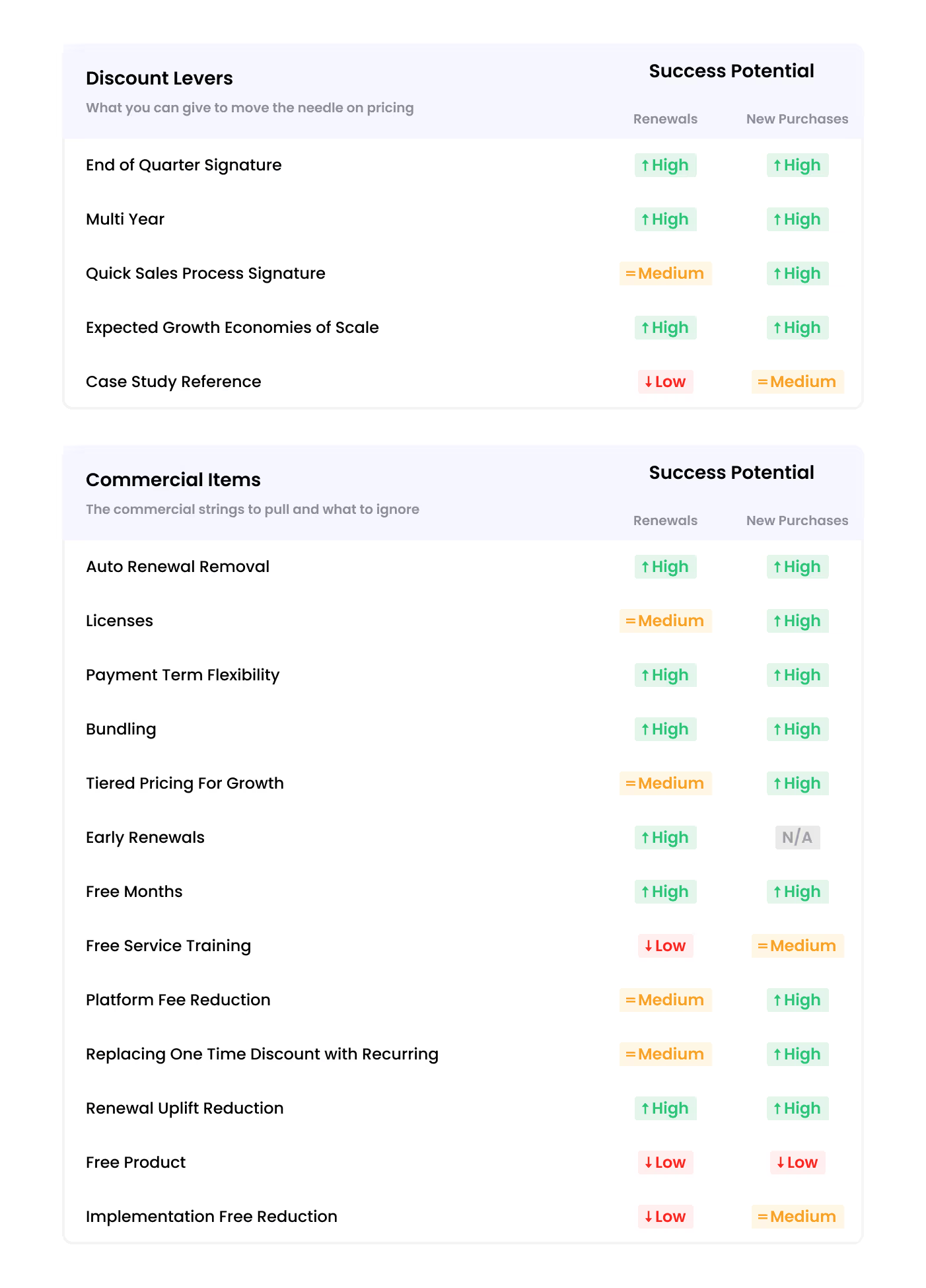
Securing the best DocuSign deal isn't always straightforward. With multiple pricing plans available, the process can be more complex than it seems. To improve your negotiation strategy, consider these key approaches:

  • Define Your Needs and Priorities: Evaluate your company's priorities, essential SaaS features, budget, and potential risks to ensure the contract aligns with your requirements and delivers maximum value.
  • Research the Vendor: Consider DocuSign’s reputation, reliability, and pricing benchmarks to strengthen your position and negotiate better terms.
  • Opt for a Long-Term Agreement: Committing to a long-term SaaS contract can provide cost savings and added benefits, while shorter terms offer greater flexibility.
  • Compare Alternative Offers: Having competing bids on hand enhances your negotiation power, helping you assess different options and secure the best deal.
C. Breaking Down the Data

Curious about what other companies pay for DocuSign pricing plans? Get exclusive insights with our in-depth DocuSign buying guide!  

Download now for detailed pricing data, industry benchmarks, and expert strategies to help you lock in the best deal.

[[cta19]]

D. Why Do You Need the DocuSign Pricing Guide?

Leveraging DocuSign benchmarking data can transform how you manage costs and negotiate with vendors. Here’s how it helps:

  • Real-World Pricing Insights: Move beyond standard pricing with actual cost data. CloudEagle.ai’s benchmarks provide transparency into true pricing and usage trends.
  • Stronger Negotiation Power: Use industry insights to negotiate better terms and prevent overpaying.
  • Smarter Budgeting: Gain accurate cost estimates to plan your SaaS expenses efficiently and maximize your budget.

[[cta5]]

E. Premium Negotiation Insights

Why pay more when CloudEagle.ai can help you negotiate smarter? With the right data, you can reduce unnecessary expenses, access exclusive perks, and maximize your DocuSign investment.  

Don't overpay! Download our DocuSign buying guide today and know the expert negotiation strategies that have saved businesses thousands.

Which Companies Should Use Which DocuSign Plan?

Not every DocuSign pricing plan will prove beneficial for your company’s needs. The last thing you want is choosing an irrelevant plan that’s either draining your budget or failing to cater to your needs. You need to choose a plan depending on the features, your company size, team members, and other factors.

  • Personal Plan: Ideal for freelancers, independent contractors, and solo entrepreneurs who occasionally need electronic signatures. This plan is best for individuals who handle a small volume of agreements.
  • Standard Plan: Best suited for small to medium-sized businesses that require more frequent document signing and collaboration.
  • Business Pro Plan: A great fit for growing businesses and enterprises that need advanced document workflows, bulk sending, and payment collection.
  • Advanced Solution: Designed for large corporations and enterprises with complex agreement workflows. This plan is suitable for legal firms, multinational organizations, and heavily regulated industries.

Are There Better Alternatives to DocuSign?

While DocuSign is a top-tier e-signature solution, several alternatives offer competitive pricing, features, and integrations that might better suit your business needs. Here are five strong alternatives if you don’t like DocuSign pricing:

Adobe Acrobat Sign

Adobe Acrobat Sign is a powerful e-signature solution, especially for businesses already using Adobe’s suite of tools or Microsoft 365. It offers legally binding e-signatures, seamless PDF integration, and strong compliance measures.

HelloSign (by Dropbox)

HelloSign is a user-friendly e-signature tool designed for small businesses and startups. It offers an intuitive drag-and-drop interface, easy document signing, and direct integration with Dropbox, Google Drive, and Slack.

PandaDoc

PandaDoc is a robust document automation platform tailored for sales teams and contract-heavy businesses. It provides customizable templates, built-in document editing, and real-time analytics to track document engagement.

SignNow

SignNow is a cost-effective e-signature solution that offers unlimited document signing, even on lower-tier plans. It provides customizable signing workflows, automated reminders, and API access for developers who need to integrate e-signature functionality into their applications.

Zoho Sign

Zoho Sign is the ideal e-signature solution for businesses already using Zoho’s ecosystem, such as Zoho CRM and Zoho Books. It features blockchain timestamping for added security, multi-factor authentication for signers, and custom branding options.

[[cta20]]

Adobe Acrobat Sign vs DocuSign Pricing

Adobe Acrobat Sign typically sells per user (often bundled with Acrobat) with optional transaction packs, making it attractive when you already license Acrobat. DocuSign pricing is per user with volume/envelope tiers and add‑ons; actual DocuSign cost varies widely by usage and automation needs.

Both offer SSO/SAML, robust APIs, and global compliance, but DocuSign leads in advanced agreement automation, conditional routing, and CLM ecosystem depth, while Adobe excels in PDF‑native workflows and tight Microsoft/Adobe ecosystem fit. When comparing DocuSign pricing plans 2025, evaluate total cost of ownership, not just “how much is DocuSign a month.”

Conclusion

Choosing the right DocuSign plan is key to boosting productivity while managing costs effectively. Whether you're a startup, a growing company, or a large enterprise, knowing the features and limitations of each plan helps you make the best decision.  

CloudEagle.ai provides real-world pricing insights, expert negotiation tips, and cost-saving strategies to help you maximize the value of your DocuSign subscription.  

Download our DocuSign pricing guide today and learn proven tactics that have helped businesses save thousands!

Frequently Asked Questions

1. Is DocuSign free with Office 365?

No, DocuSign is not free with Office 365. However, you can integrate DocuSign with Microsoft 365 apps, but you will need a separate DocuSign subscription. Thanks to CloudEagle.ai, you can save money in different DocuSign pricing plans. 

2. How many users can use one DocuSign account?

A single DocuSign account is typically meant for one user. However, you can purchase multi-user plans that allow multiple team members to access and manage documents under a shared subscription. The number of users depends on the specific plan you choose.

3. Can I use my own signature in Docusign?

Yes, you can use your own signature in DocuSign. You can draw, upload, or customize your signature to use for signing documents.

4. Is DocuSign legally valid?

Yes, DocuSign is legally valid. It complies with major electronic signature laws, including the U.S. ESIGN Act, UETA, and eIDAS in the EU, making its eSignatures legally binding in most countries.

5. Does Docusign have an API?

Yes, DocuSign offers an API that allows developers to integrate electronic signature functionality into their applications. The DocuSign eSignature API enables users to send, sign, and manage documents programmatically. It also provides SDKs for various programming languages, including Python, Java, and Node.js.

Advertisement for a SaaS Subscription Tracking Template with a call-to-action button to download and a partial graphic of a tablet showing charts.Banner promoting a SaaS Agreement Checklist to streamline SaaS management and avoid budget waste with a call-to-action button labeled Download checklist.Blue banner with text 'The Ultimate Employee Offboarding Checklist!' and a black button labeled 'Download checklist' alongside partial views of checklist documents from cloudeagle.ai.Digital ad for download checklist titled 'The Ultimate Checklist for IT Leaders to Optimize SaaS Operations' by cloudeagle.ai, showing checklist pages.Slack Buyer's Guide offer with text 'Unlock insider insights to get the best deal on Slack!' and a button labeled 'Get Your Copy', accompanied by a preview of the guide featuring Slack's logo.Monday Pricing Guide by cloudeagle.ai offering exclusive pricing secrets to maximize investment with a call-to-action button labeled Get Your Copy and an image of the guide's cover.Blue banner for Canva Pricing Guide by cloudeagle.ai offering a guide to Canva costs, features, and alternatives with a call-to-action button saying Get Your Copy.Blue banner with white text reading 'Little-Known Negotiation Hacks to Get the Best Deal on Slack' and a white button labeled 'Get Your Copy'.Blue banner with text 'Little-Known Negotiation Hacks to Get the Best Deal on Monday.com' and a white button labeled 'Get Your Copy'.Blue banner with text 'Little-Known Negotiation Hacks to Get the Best Deal on Canva' and a white button labeled 'Get Your Copy'.Banner with text 'Slack Buyer's Guide' and a 'Download Now' button next to images of a guide titled 'Slack Buyer’s Guide: Features, Pricing & Best Practices'.Digital cover of Monday Pricing Guide with a button labeled Get Your Copy on a blue background.Canva Pricing Guide cover with a button labeled Get Your Copy on a blue gradient background.
What to consider when buying DocuSign
Based on the latest community trends and observations
Admin
Admins can track envelopes being sent to ensure the business does not go into over age premiums.
Billing
Default billing is Annual Net 30 and customers have cited limited flexibility.
Free Credits / Months
Many customers are unaware that sending an envelope counts toward their allotment even if it is voided or goes incomplete. If the volume of voided or incomplete envelopes becomes significant, customers have cited being offered free envelopes to offset the wasted spend.
Free Product / Trials Considerations
30-day free trials are available for the Standard and Business Pro plans, but there will be limited functionality. Free trial users are able to create a free sandbox and test a workflow, including testing API's and other integration points.
Integrations
Customers have mentioned they do not have to commit to a 1:1 user to integration ratio.
Plans
Customers share being able to purchase a User Plan or Envelope Plan. With the User Plan, each user is allotted 100 envelopes and the envelopes are pooled at the account level meaning, 1 user could send 50 envelopes and another could send 150. An envelope is a package of one or more documents that have been uploaded to DocuSign to be signed. With the Envelope Plan, the business purchases an annual allotment of env elopes that can be used by an unlimited number of users. The Envelope Plan is cited to typically be less expensive.
Pricing
Renewal uplifts can be 10% or more if not negotiated or if a renewal price cap is not inserted into the sales order. DocuSign frequently offers end-of-month pricing promotions that are easily accessible on their website for public viewing.
Sales
Customers have voiced that sales reps are able to provide higher discounts on the Enterprise Plan than Business Pro.
Upgrades / Downgrades
Upgrades can be made at any time. Rather than closing an account, it is recommended to downgrade (potentially to the free version) which will enable you to retain access to documents vs. losing access in 30 days if the account is closed.

Enter your email to
unlock the report

Oops! Something went wrong while submitting the form.
License Count
Benchmark
Per User/Per Year

Enter your email to
unlock the report

Oops! Something went wrong while submitting the form.
License Count
Benchmark
Per User/Per Year

Enter your email to
unlock the report

Oops! Something went wrong while submitting the form.
Notion Plus
License Count
Benchmark
Per User/Per Year
100-500
$67.20 - $78.72
500-1000
$59.52 - $72.00
1000+
$51.84 - $57.60
Canva Pro
License Count
Benchmark
Per User/Per Year
100-500
$74.33-$88.71
500-1000
$64.74-$80.32
1000+
$55.14-$62.34

Enter your email to
unlock the report

Oops! Something went wrong while submitting the form.

Enter your email to
unlock the report

Oops! Something went wrong while submitting the form.
Zoom Business
License Count
Benchmark
Per User/Per Year
100-500
$216.00 - $264.00
500-1000
$180.00 - $216.00
1000+
$156.00 - $180.00

Enter your email to
unlock the report

Oops! Something went wrong while submitting the form.

Get the Right Security Platform To Secure Your Cloud Infrastructure

Please enter a business email
Thank you!
The 2023 SaaS report has been sent to your email. Check your promotional or spam folder.
Oops! Something went wrong while submitting the form.

Access full report

Please enter a business email
Thank you!
The 2023 SaaS report has been sent to your email. Check your promotional or spam folder.
Oops! Something went wrong while submitting the form.

[[cta18]]

DocuSign is an electronic signature and digital transaction management platform that allows you to sign, send, and manage documents securely online. It eliminates the need for physical paperwork by creating legally binding electronic signatures.

That said, it will prove highly beneficial for your company if you rely on digital signatures. However, the main catch is its pricing plans. DocuSign pricing structure is not only expensive but also overwhelming to understand. Without a solid idea, you might fail to know which one to go for. 

This DocuSign pricing guide will help you know which pricing plan is best for which companies. You will also get to know about some crucial negotiation insights, along with the capabilities of CloudEagle.ai at helping you save money when buying DocuSign paid plans. 

TL;DR

  • DocuSign offers four pricing tiers: Personal ($10–$15/month), Standard ($25–$45/month), Business Pro ($40–$65/month), and Enterprise (custom pricing). Plans
  • Paid plans provide unlimited document signing, workflow automation, enhanced security (2FA, audit trails), and branding customization.
  • Freelancers and solo users can opt for the Personal plan, while small to medium businesses benefit from Standard. Business Pro suits growing teams, and enterprises requiring custom workflows should go for an advanced solution.
  • CloudEagle.ai offers pricing benchmarks and negotiation insights to help companies secure better deals on the cost of DocuSign plans, avoid overpaying, and optimize their SaaS budget.
  • If DocuSign pricing doesn’t fit your needs, alternatives like Adobe Acrobat Sign, HelloSign, PandaDoc, SignNow, and Zoho Sign offer similar features with varying pricing models.

[[cta19]]

What is DocuSign?

DocuSign is a digital signature platform that lets you sign, send, and manage documents online. Thanks to this platform, you don’t need to worry about signing or storing physical documents. As you’ll be saving all your documents in cloud storage, you can search and access them easily. 

  • Electronic Signatures: Sign documents digitally from anywhere, on any device, with legally binding electronic signatures.
  • Templates & Automation: Create reusable templates to streamline document workflows and automate repetitive signing processes.
  • Integration with Business Tools: Works with popular apps like Salesforce, Microsoft 365, Google Drive, and more for seamless document management.
  • Security & Compliance: Ensures document security with encryption, audit trails, and compliance with global e-signature laws like the ESIGN Act and GDPR.
  • Mobile Accessibility: Sign and manage documents on the go using the DocuSign mobile app for iOS and Android.

The right DocuSign buying guide will make sure you choose the most appropriate plan based on your needs. Thus, you will have more flexibility in using the features that can have a long-lasting impact on your company. 

Is DocuSign Worth the Money?

If you’re wondering whether DocuSign pricing plans are worth the investment, the answer depends on your needs. While the free version offers basic signing capabilities, the paid plans come with more powerful features that can significantly enhance efficiency, security, and compliance. Here’s why upgrading to a paid plan is worth considering:

  • Unlimited Document Signing: No restrictions on the number of signature requests, making it ideal for businesses with high document volumes.
  • Advanced Workflow Automation: Set signing orders, automate approvals, and streamline document routing to save time.
  • Enhanced Security & Compliance: Get features like two-factor authentication (2FA), encrypted storage, and audit trails to meet compliance standards (HIPAA, GDPR, SOC 2).
  • Custom Branding: Add your company logo, custom email templates, and branding for a more professional look.
  • Seamless Integrations: Connect with Salesforce, Microsoft 365, Google Drive, Dropbox, and other business tools for efficient document management.

If you regularly process contracts and approvals, a DocuSign paid plan is worth the investment. Thanks to the best DocuSign pricing guide, you can easily choose the right plans. 

DocuSign Free plan

DocuSign’s Free plan lets you create an account, upload documents, and complete basic fields (signature, initials, date) to sign forms sent to you. It’s intentionally limited: restricted or no ability to initiate sends/envelopes beyond a trial, no advanced fields or conditional logic, no templates, integrations, bulk send, payments, or custom branding. It’s best for very low‑volume individuals, occasional signatures, or short evaluations where docusign cost isn’t yet a factor.

Upgrade to a paid tier when you need to send agreements regularly, route to multiple recipients, reuse templates, automate workflows, collect payments, or connect CRM/IDP tools, common triggers that make the Free plan inefficient. Use CloudEagle to benchmark docusign pricing cost, compare “how much is docusign a month” across docusign pricing plans and docusign pricing plans 2025, and identify the break‑even point to switch cost‑effectively.

How Much Does DocuSign’s Personal Plan Cost?

DocuSign’s Personal plan costs $10 per month when billed annually or $15 on a month‑to‑month basis. If you’re asking “how much is DocuSign a month,” this entry tier keeps docusign cost low while giving individuals access to core e‑signature tools under the current DocuSign pricing plans 2025.

What you get: one user, basic fields, mobile/web signing, and the ability to send up to 5 documents (envelopes) per month. Notable limits versus Standard include no unlimited sends, fewer recipient/field options, and no advanced automation, shared templates, or team features. Value verdict: a lean, affordable option for freelancers and solo proprietors with light volume; if your workflow needs templates, collaboration, or higher send volumes, Standard under DocuSign API pricing is the better fit.

What is the Price for DocuSign?

DocuSign comes with different pricing plans for different use cases. One DocuSign pricing that has proved effective for one company might not be suitable for you. That said, you must choose a plan based on your needs and the features you want to use. 

A. Personal

  • Cost: $10/month/user (billed annually) or $15/month/user (billed monthly)
  • Best For: Individuals and sole proprietors requiring basic e-signature capabilities
  • Features: Send up to 5 documents per month, basic fields, mobile app access
  • Drawbacks: No advanced features like templates or integrations.

B. Standard

  • Cost: $25/month/user (billed annually) or $45/month/user (billed monthly)
  • Best For: This DocuSign pricing is for medium-sized companies needing enhanced e-signature functionality
  • Features: Unlimited document sending, customizable templates, team collaboration tools
  • Drawbacks: Limited branding customization

C. Business Pro

  • Cost: $40/month/user (billed annually) or $65/month/user (billed monthly)
  • Best For: Teams requiring advanced agreement workflows
  • Features: Advanced fields, payment collection capabilities, advanced integrations integration
  • Drawbacks: Higher cost

D. Enhanced Plans

  • Cost: Custom pricing based on specific business requirements
  • Best For: Large enterprises with complex agreement workflows
  • Features: Advanced branding and customization, API access for custom integrations, dedicated account management
  • Drawbacks: Requires a custom quote, making budgeting less predictable

These are the four primary DocuSign pricing plans you need to know about. Again, remember that each plan comes with different features and drawbacks. The pricing will also vary depending on the DocuSign price or add-on you choose. So, you need a solid DocuSign pricing guide to get the best deal from your investment. 

4. DocuSign Buying Guide: Using CloudEagle.ai Streamline the Purchasing Process

A. Price Benchmarking Data

CloudEagle.ai gives you access to a large network of experienced SaaS buyers and real-time benchmarking data from over a billion transactions. With these insights, you can compare your DocuSign pricing to what other companies pay for various plans.

If you're exploring your options, this data can be a valuable asset for your DocuSign pricing guide, helping you get the best deal. 

B. Proven Negotiatiom Tips to Secure the Best DocuSign Deal

Securing the best DocuSign deal isn't always straightforward. With multiple pricing plans available, the process can be more complex than it seems. To improve your negotiation strategy, consider these key approaches:

  • Define Your Needs and Priorities: Evaluate your company's priorities, essential SaaS features, budget, and potential risks to ensure the contract aligns with your requirements and delivers maximum value.
  • Research the Vendor: Consider DocuSign’s reputation, reliability, and pricing benchmarks to strengthen your position and negotiate better terms.
  • Opt for a Long-Term Agreement: Committing to a long-term SaaS contract can provide cost savings and added benefits, while shorter terms offer greater flexibility.
  • Compare Alternative Offers: Having competing bids on hand enhances your negotiation power, helping you assess different options and secure the best deal.

C. Breaking Down the Data

Curious about what other companies pay for DocuSign pricing plans? Get exclusive insights with our in-depth DocuSign buying guide!  

Download now for detailed pricing data, industry benchmarks, and expert strategies to help you lock in the best deal.

[[cta19]]

D. Why Do You Need the DocuSign Pricing Guide?

Leveraging DocuSign benchmarking data can transform how you manage costs and negotiate with vendors. Here’s how it helps:

  • Real-World Pricing Insights: Move beyond standard pricing with actual cost data. CloudEagle.ai’s benchmarks provide transparency into true pricing and usage trends.
  • Stronger Negotiation Power: Use industry insights to negotiate better terms and prevent overpaying.
  • Smarter Budgeting: Gain accurate cost estimates to plan your SaaS expenses efficiently and maximize your budget.

[[cta5]]

E. Premium Negotiation Insights

Why pay more when CloudEagle.ai can help you negotiate smarter? With the right data, you can reduce unnecessary expenses, access exclusive perks, and maximize your DocuSign investment.  

Don't overpay! Download our DocuSign buying guide today and know the expert negotiation strategies that have saved businesses thousands.

Which Companies Should Use Which DocuSign Plan?

Not every DocuSign pricing plan will prove beneficial for your company’s needs. The last thing you want is choosing an irrelevant plan that’s either draining your budget or failing to cater to your needs. You need to choose a plan depending on the features, your company size, team members, and other factors.

  • Personal Plan: Ideal for freelancers, independent contractors, and solo entrepreneurs who occasionally need electronic signatures. This plan is best for individuals who handle a small volume of agreements.
  • Standard Plan: Best suited for small to medium-sized businesses that require more frequent document signing and collaboration.
  • Business Pro Plan: A great fit for growing businesses and enterprises that need advanced document workflows, bulk sending, and payment collection.
  • Advanced Solution: Designed for large corporations and enterprises with complex agreement workflows. This plan is suitable for legal firms, multinational organizations, and heavily regulated industries.

Are There Better Alternatives to DocuSign?

While DocuSign is a top-tier e-signature solution, several alternatives offer competitive pricing, features, and integrations that might better suit your business needs. Here are five strong alternatives if you don’t like DocuSign pricing:

Adobe Acrobat Sign

Adobe Acrobat Sign is a powerful e-signature solution, especially for businesses already using Adobe’s suite of tools or Microsoft 365. It offers legally binding e-signatures, seamless PDF integration, and strong compliance measures.

HelloSign (by Dropbox)

HelloSign is a user-friendly e-signature tool designed for small businesses and startups. It offers an intuitive drag-and-drop interface, easy document signing, and direct integration with Dropbox, Google Drive, and Slack.

PandaDoc

PandaDoc is a robust document automation platform tailored for sales teams and contract-heavy businesses. It provides customizable templates, built-in document editing, and real-time analytics to track document engagement.

SignNow

SignNow is a cost-effective e-signature solution that offers unlimited document signing, even on lower-tier plans. It provides customizable signing workflows, automated reminders, and API access for developers who need to integrate e-signature functionality into their applications.

Zoho Sign

Zoho Sign is the ideal e-signature solution for businesses already using Zoho’s ecosystem, such as Zoho CRM and Zoho Books. It features blockchain timestamping for added security, multi-factor authentication for signers, and custom branding options.

[[cta20]]

Adobe Acrobat Sign vs DocuSign Pricing

Adobe Acrobat Sign typically sells per user (often bundled with Acrobat) with optional transaction packs, making it attractive when you already license Acrobat. DocuSign pricing is per user with volume/envelope tiers and add‑ons; actual DocuSign cost varies widely by usage and automation needs.

Both offer SSO/SAML, robust APIs, and global compliance, but DocuSign leads in advanced agreement automation, conditional routing, and CLM ecosystem depth, while Adobe excels in PDF‑native workflows and tight Microsoft/Adobe ecosystem fit. When comparing DocuSign pricing plans 2025, evaluate total cost of ownership, not just “how much is DocuSign a month.”

Conclusion

Choosing the right DocuSign plan is key to boosting productivity while managing costs effectively. Whether you're a startup, a growing company, or a large enterprise, knowing the features and limitations of each plan helps you make the best decision.  

CloudEagle.ai provides real-world pricing insights, expert negotiation tips, and cost-saving strategies to help you maximize the value of your DocuSign subscription.  

Download our DocuSign pricing guide today and learn proven tactics that have helped businesses save thousands!

Frequently Asked Questions

1. Is DocuSign free with Office 365?

No, DocuSign is not free with Office 365. However, you can integrate DocuSign with Microsoft 365 apps, but you will need a separate DocuSign subscription. Thanks to CloudEagle.ai, you can save money in different DocuSign pricing plans. 

2. How many users can use one DocuSign account?

A single DocuSign account is typically meant for one user. However, you can purchase multi-user plans that allow multiple team members to access and manage documents under a shared subscription. The number of users depends on the specific plan you choose.

3. Can I use my own signature in Docusign?

Yes, you can use your own signature in DocuSign. You can draw, upload, or customize your signature to use for signing documents.

4. Is DocuSign legally valid?

Yes, DocuSign is legally valid. It complies with major electronic signature laws, including the U.S. ESIGN Act, UETA, and eIDAS in the EU, making its eSignatures legally binding in most countries.

5. Does Docusign have an API?

Yes, DocuSign offers an API that allows developers to integrate electronic signature functionality into their applications. The DocuSign eSignature API enables users to send, sign, and manage documents programmatically. It also provides SDKs for various programming languages, including Python, Java, and Node.js.

CloudEagle.ai recognized in the 2025 Gartner® Magic Quadrant™ for SaaS Management Platforms
Download now
gartner chart
5x
Faster employee
onboarding
80%
Reduction in time for
user access reviews
30k
Workflows
automated
$15Bn
Analyzed in
contract spend
$2Bn
Saved in
SaaS spend

Recognized as an Industry leader for our AI

CloudEagle.ai is Recognized in the 2024 Gartner® Magic Quadrant™ for SaaS Management Platforms

Recognition highlights CloudEagle’s innovation and leadership in the rapidly evolving SaaS management and procurement space.
Read More
Gartner Magic Quadrant for SaaS Management Platforms showing a chart divided into Challengers and Leaders quadrants with various companies plotted as dots.

CloudEagle.ai Recognized in the GigaOm Radar for SaaS Management Platforms

CloudEagle named a Leader and Outperformer in GigaOm Radar Report, validating its impact in the SaaS management platform landscape.
Read More
gigaom

Everest Group Positions CloudEagle.ai as a Trailblazer in SaaS Management Platforms

CloudEagle recognized as a Trailblazer by Everest Group, showcasing its rapid growth and innovation in SaaS spend and operations management.
Read More
qks

CloudEagle.ai is Recognized in the 2024 Gartner® Magic Quadrant™ for SaaS Management Platforms

Recognition highlights CloudEagle’s innovation and leadership in the rapidly evolving SaaS management and procurement space.
Read More
gartner

Streamline SaaS governance and save 10-30%

Book a Demo with Expert
CTA image
One platform to Manage
all SaaS Products
Learn More