HIPAA Compliance Checklist for 2025

Gartner expects worldwide software spending to reach about $1.43 trillion in 2026, up 14.7% from 2025. A growing share of it now arrives as AI add-ons and token bills that finance only sees when the invoice lands.
While SaaS tools offer speed and flexibility, finance leaders are now facing the hidden costs: duplicate apps, unused licenses, and unmanaged renewals that quietly drain budgets. These costs often go unnoticed until quarterly reviews.
That's where SaaS spend management comes in. This guide shows finance and procurement teams how to find that waste and cut 20–30% of it without dropping the tools people actually use.
SaaS Spend Management: Why CFOs Can't Ignore It Anymore?
SaaS spend management is the process of tracking and optimizing how an organization invests in cloud-based software, including AI tools. It covers subscription discovery, usage monitoring, contract oversight, and renewal control, so every dollar of SaaS expense management ties back to value.
SaaS spend optimization is the action side of that process: reclaiming idle seats, downgrading tiers, and consolidating tools. Spend management decides what you own and who owns it, and optimization cuts what you don't need. Done together, companies typically save 10–30% and get a software budget finance can forecast.
SaaS Spend Discovery: What's Hiding in Your Stack?
Effective SaaS spend visibility starts with one inventory. Connect SSO to list apps and users, sync finance systems to surface paid subscriptions, and monitor usage to detect active and shadow tools, including AI apps signed up for with a work email.
A spend management platform consolidates these signals, de-duplicates vendors, and attributes costs to departments. With that baseline, teams can:
- Right-size licenses before renewals
- Consolidate overlapping tools across departments
- Track AI seats and token usage alongside SaaS licenses

How to Cut SaaS Spend Waste with CloudEagle.ai
Cutting 20–30% of SaaS waste depends on the order you work in. Seats can't be reclaimed safely until you know who uses them, and renewals can't be renegotiated until the usage data exists.
CloudEagle.ai, an AI-powered SaaS Management, AI Governance, and SaaS Security platform, runs that order in one place. Here is how it manages SaaS spend from the first scan to the next renewal.
A. Find every SaaS app and AI tool you pay for
Most companies undercount their stack because apps bought on corporate cards or signed up for in a browser never pass through SSO. CloudEagle.ai correlates IdP, finance, firewall, MDM, and browser data to build one inventory of every SaaS app, AI tool, and agent, with cost and owner attached. It connects through 500+ integrations, and onboarding takes about 30 minutes.
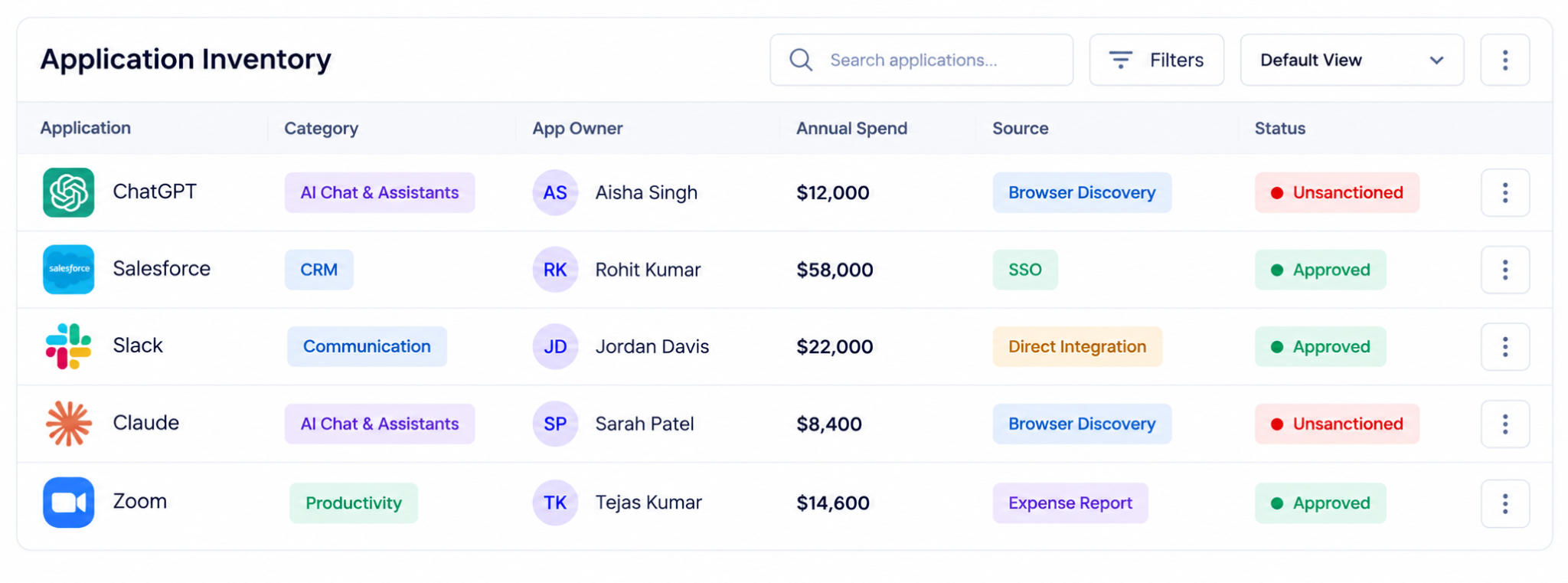
You get a complete baseline in days. With every app on one list, the next question is which of those seats are actually used.
B. See who actually uses each license
Seat counts alone don't show whether a license earns its cost. CloudEagle.ai tracks usage beyond logins, down to the features and roles each person uses, and maps every app to an accountable owner and department.
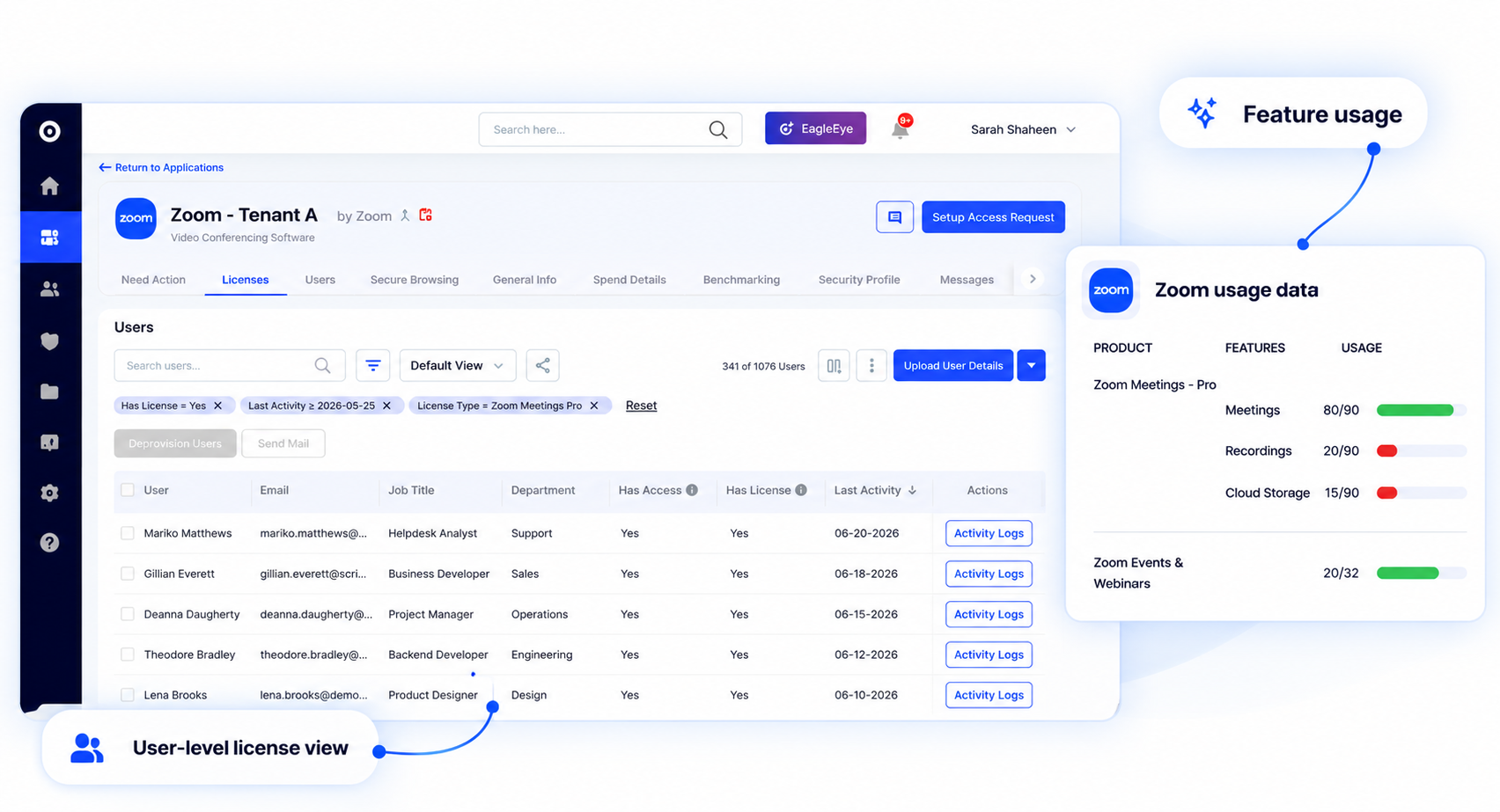
Every license now has a usage record and a named owner. That data is what makes the first round of savings safe to take.
C. Reclaim and downgrade idle licenses
Idle seats renew at full price unless someone catches them before the contract does. CloudEagle.ai flags inactive and underused seats continuously and routes each reclamation or downgrade through an approval workflow in Slack, so nothing changes without the app owner's sign-off. This is how license harvesting runs without breaking anyone's work.
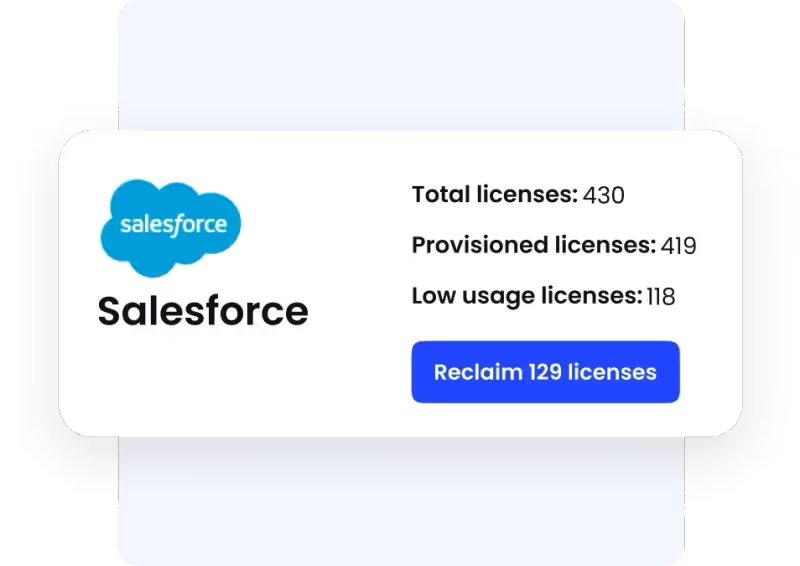
RingCentral used this workflow to save $2.5M and reassign 932 unused Salesforce licenses. Reclaiming seats fixes waste inside each app, and the next layer is apps doing the same job.
D. Retire apps that do the same job
Different teams often buy different tools for the same task, which splits volume discounts across vendors. CloudEagle.ai groups apps by category and shows overlapping tools side by side with their cost and usage, so you can consolidate overlapping apps at each one's renewal date.
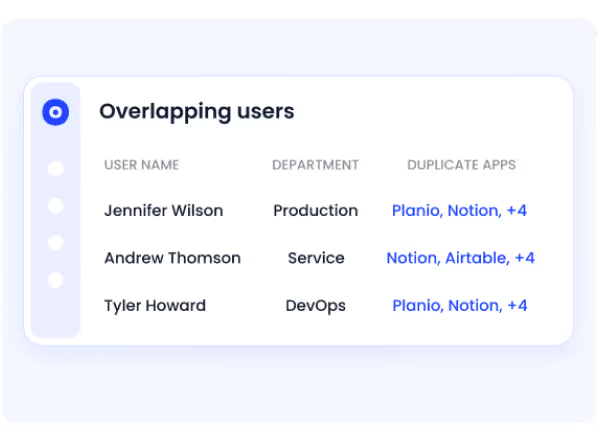
You end up with one tool per job. SaaS seats are now right-sized, but AI tools bill differently and need their own view.
E. Bring AI spend into the same view
AI tools bill by tokens and credits, so seat-based tracking misses most of the cost. CloudEagle.ai shows every AI app in AI usage control and pulls token and credit usage from each vendor, tied to the user, team, model, cost center and API key. Fixed licenses and pay-as-you-go usage sit side by side, and AI licenses unused for 90 or 180 days get flagged.
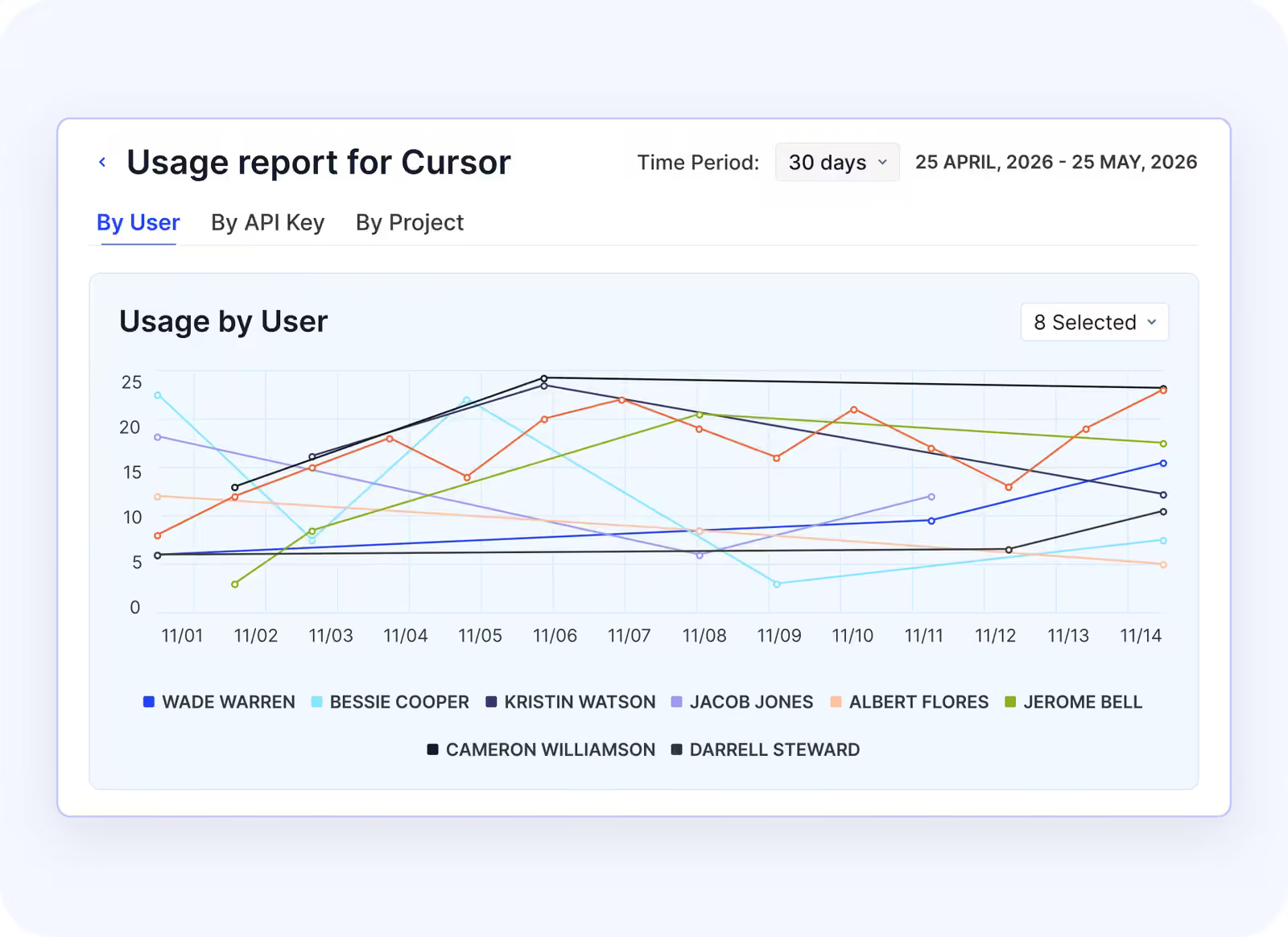
AI spend becomes as visible as any SaaS license. Visibility alone doesn't stop a runaway account, though.
F. Set spend limits and budgets
A single heavy user or leaked API key can blow a monthly AI budget in days. CloudEagle.ai lets you set limits per user or team, sends alerts before a limit is crossed, and projects credit totals for the billing cycle.
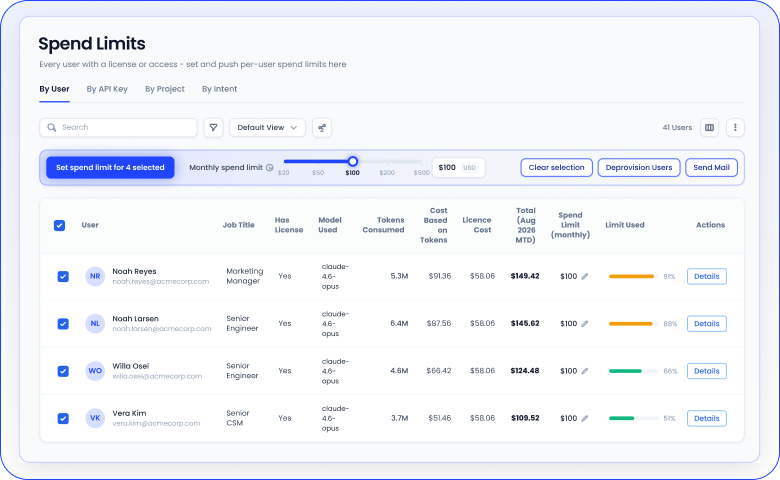
Overruns surface while you can still correct them. With limits in place, finance needs the bill split by who spent it.
G. Charge costs back to departments
One AI invoice is hard for finance to allocate when ten teams share it. CloudEagle.ai produces chargeback reports that map SaaS and AI spend to the department that used it.
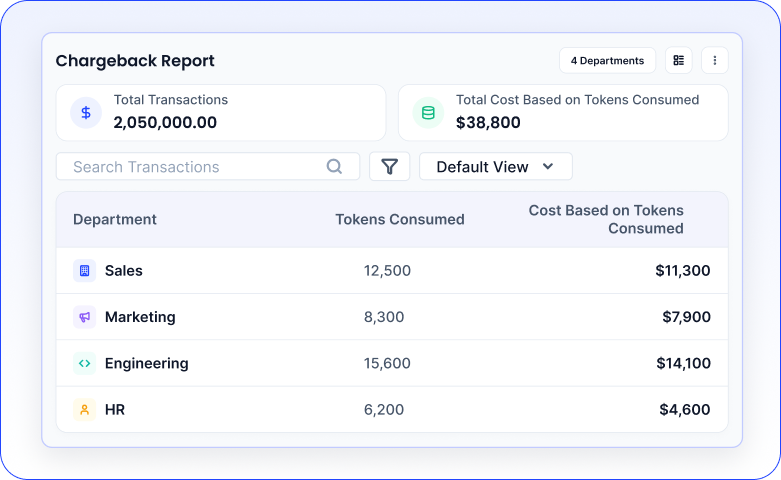
Each team owns its line item in the budget. Allocated costs and usage history then become the leverage for the next renewal.
H. Walk into every renewal with usage data and benchmarks
Renewals negotiated in the final week end on vendor terms. CloudEagle.ai tracks notice periods and auto-renewal clauses on a renewal calendar with alerts, extracts contract terms with AI, and benchmarks your quote against market pricing without a contract upload. Its negotiation experts can also run the renewal on your behalf.
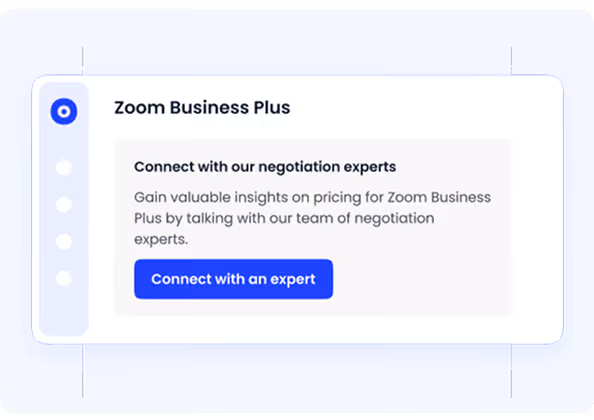
You renew with real seat counts and a target price months before the deadline. Last, the savings need protecting from new purchases.
I. Stop new waste at the request
Savings leak back when teams buy tools outside the process that found them. CloudEagle.ai routes every new request through an intake workflow that checks for duplicate apps and fair pricing before approval.
For AI tools, its Secure Browser shows a flash page that redirects users from unapproved apps to the approved ones you already pay for.
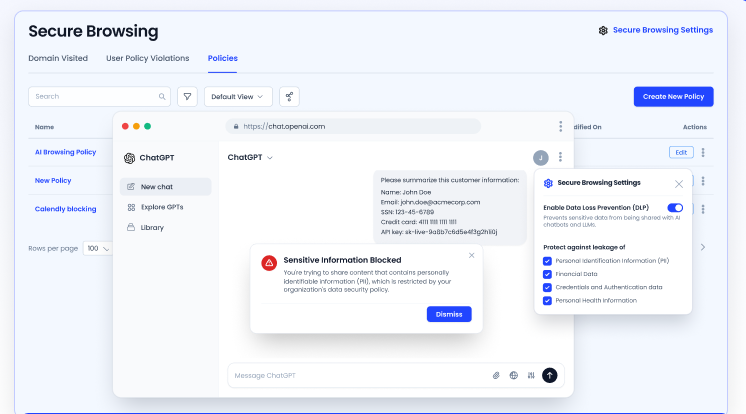
New spend starts governed, which keeps the 10–30% savings from eroding. CloudEagle.ai has processed $50B+ in spend and delivered $3B+ in savings for customers running this workflow.
Find Your SaaS Waste Before the Next Renewal


The SaaS Spend Mistakes Costing You Thousands
Most SaaS wastage comes from a handful of repeat mistakes, and AI pricing in 2026 has added new ones:
- Duplicate tools: overlapping apps drive redundant costs and dilute volume discounts.
- Idle licenses: unused seats lock in recurring fees and erode margins over time.
- Orphaned subscriptions: licenses stay assigned to people who left or changed roles.
- Missed renewals: auto-renewals forfeit leverage and lock in price increases.
- Complex pricing: tiers, add-ons and usage fees hide the true cost.
- Unbudgeted AI usage: Gartner forecasts AI spending of $2.52 trillion in 2026, up 44%, and much of it enters through token billing that scales with use.
- Premium models for routine work: Gartner notes that nearly all corporate AI usage runs on the most expensive models.
- Lack of ownership: with no accountable owner, rightsizing and approvals stall.
- Siloed data: disconnected finance and SSO records hide usage trends.
How to Calculate Your True SaaS Spend (and Your Savings Opportunity)
Most teams underestimate SaaS spend because the real number is scattered across corporate cards, AP invoices, and departmental budgets that never roll up into one view. Before you can cut 20 to 30%, you need an honest baseline. Here is how to audit SaaS spend in four steps:
- Total annual SaaS cost: add every subscription invoice, card charge and reimbursed software expense from the last 12 months, plus AI API and token bills.
- Cost per employee: divide by headcount and benchmark it. CloudEagle.ai's SaaS spend report found companies spend $1,000 to $3,500 per employee a year on software.
- Waste rate: flag licenses inactive for 30 days, tools that duplicate another, and tiers where people pay for features they never touch.
- Savings target: the annual cost of those three buckets is how much is wasted on SaaS spend, and the most you can recover.
Here is a worked example for a 500-person company spending $2,000 per employee:
This is hard to keep current in a spreadsheet, because invoices, usage and contracts live in different systems and change every month.
To run your own numbers, use the SaaS and AI spend calculator.
SaaS Spend Optimization: Visibility Is Nice, Savings Are Better
SaaS spend optimization goes beyond tracking costs. The fastest way to reduce SaaS spend is to work in order, because each step produces the data the next one needs:
- Discover from every source: combine SSO, ERP, AP, HRIS and endpoint data so every later decision rests on a complete inventory.
- Assign an owner to every app: a named owner keeps rightsizing and renewal decisions moving.
- Right-size licenses on feature usage: login timestamps only prove access, while feature data shows whether someone uses what they pay for.
- Rationalize tiers and tools: downgrade light users and consolidate overlapping apps to regain vendor leverage.
- Budget AI usage: set token limits per team and send routine work to cheaper models.
- Renegotiate with usage and benchmarks: start 90 days out with real seat counts and market pricing, using a renewal playbook that surfaces opt-out windows early.
- Govern new purchases: route every request through intake so duplicates get caught before budget is committed.
Optimization works best when this runs continuously, which is where FinOps fits: real-time usage data feeds showback and chargeback, so each department owns its share of the bill.
Are Your SaaS Savings Real? How to Measure Optimization Success?
Savings are real when they show up as a lower run rate in the budget, so track realized savings separately from cost avoidance. Set a month-zero baseline, then review:
Keep metric definitions fixed between periods so quarter-over-quarter comparisons stay meaningful.
How to Choose the Right Spend Management Software?
SaaS spend management software is the system of record for what a company pays for software, who uses it, and when each contract renews. Choose a platform by what each stakeholder needs from it:
What to look for in a SaaS spend management platform demo:
- Discovery sources beyond SSO, such as finance and browser data
- Usage data that goes beyond logins to features and roles
- License harvesting that flags unused licenses automatically and routes them for approval
- AI token spend tracked alongside SaaS licenses
- Renewal alerts with contract visibility at least 90 days out
- A full baseline in days, without a long implementation
For a side-by-side of vendors, see this list of SaaS spend management tools compared.
Conclusion
The best SaaS spend management software in 2026 does three things well: it finds every SaaS and AI app, it shows real license and token usage, and it turns that data into reclamation and renewal decisions. Tools that only read invoices miss the fastest-growing part of the bill.
Use the comparison above to shortlist two or three tools, then test each on your own data before committing. CloudEagle.ai has processed $50B+ in SaaS spend and delivered $3B+ in savings for enterprises like RingCentral and Automation Anywhere.
To see where your own stack stands, run the SaaS and AI spend calculator, or book a demo with CloudEagle.ai.
Frequently Asked Questions
1. Are SaaS spend management tools worth the cost?
Yes, when recoverable waste is larger than the tool's price. Run the four-step calculation first; the worked example above finds $250,000 a year at a 500-person company.
2. What's a reasonable budget for a SaaS spend optimization tool at a 200-person company?
Price it against your waste. At $2,000 per employee, a 200-person company spends $400,000 a year, and 20% waste is $80,000 the tool should recover.
3. Why not just track SaaS spend in spreadsheets?
Spreadsheets go stale because invoices, usage, and contracts live in separate systems. A platform syncs them daily and acts on the data, such as reclaiming seats.
4. Will cutting licenses disrupt teams that need their tools?
It shouldn't. Reclaim only seats with no feature usage, route each one through the app owner for approval, and downgrade light users instead of removing them.
5. When should a company implement SaaS spend management?
Start once nobody can name every app the company pays for, or when AI tools begin appearing on expense reports that never went through procurement.
6. Does SaaS spend management cover AI tools like ChatGPT and Claude?
It should. Look for tracking of AI seats and token usage by user, team, and model, with budgets and alerts, so AI spend sits in the same view as SaaS.
7. How is SaaS spend management different from FinOps?
SaaS spend management governs your software subscriptions. FinOps is the wider practice that makes teams accountable for cloud and software costs.
$50B in Spend Processed. $3B in Savings Delivered.